When are automated sales emails considered marketing under CAN-SPAM and require an unsubscribe link?

Matthew Whittaker
Co-founder & CTO, Suped
Published 3 May 2025
Updated 15 May 2026
8 min read
Summarize with
Automated sales emails are considered marketing under CAN-SPAM when the primary purpose of the message is to advertise or promote a commercial product or service. That includes one-to-one looking emails, B2B prospecting emails, SDR sequence emails, demo request nudges, account expansion pitches, and any automated message whose real goal is to create a sales opportunity.
The practical answer is simple: if a sales automation email asks someone to buy, book a meeting, try a product, discuss pricing, evaluate a service, or visit a commercial site for a sales reason, include an unsubscribe link. CAN-SPAM does not turn on whether the message is bulk, whether it was sent through a sales engagement tool, or whether it looks personal. The FTC guide frames the issue around commercial purpose, not send volume.
I treat this as a policy question, not a template-design question. A platform can let a rep send without an opt-out link, but the company still owns the decision. If the company is promoting its product or service, the safer operating rule is to include a clear unsubscribe mechanism and sync that opt-out everywhere sales and marketing send.
The direct answer
An automated sales email needs an unsubscribe link when a reasonable recipient would understand the message as a commercial pitch. The format can look personal, and the sender can be an individual sales rep, but that does not change the classification when the message is part of a prospecting sequence.
- Purpose: If the email promotes a product, service, demo, trial, pricing conversation, renewal expansion, or sales call, treat it as commercial.
- Automation: Automation makes the policy easier to enforce, but it is not the legal trigger. A single commercial email can still need opt-out handling.
- Audience: B2B recipients are not exempt. A prospect at a company still has CAN-SPAM rights when the message is commercial.
- Responsibility: Using a CRM, a sequencing tool, or an inbox connection does not move compliance ownership away from the company promoting the offer.
Do not use a recipient-count threshold as the rule. Some tools add unsubscribe links after a set number of recipients, but CAN-SPAM does not create a safe threshold where nine people are exempt and ten people are covered. The question is what the email is primarily about.
That is the sentence I would give sales leadership: we have to include the unsubscribe link because these emails are commercial messages, and CAN-SPAM covers commercial messages even when they are one-to-one looking B2B emails.
How to classify the email
The classification test I use is the primary purpose test. Strip away the sender name, the friendly tone, and the CRM mechanics. Ask what the email is trying to get the recipient to do.
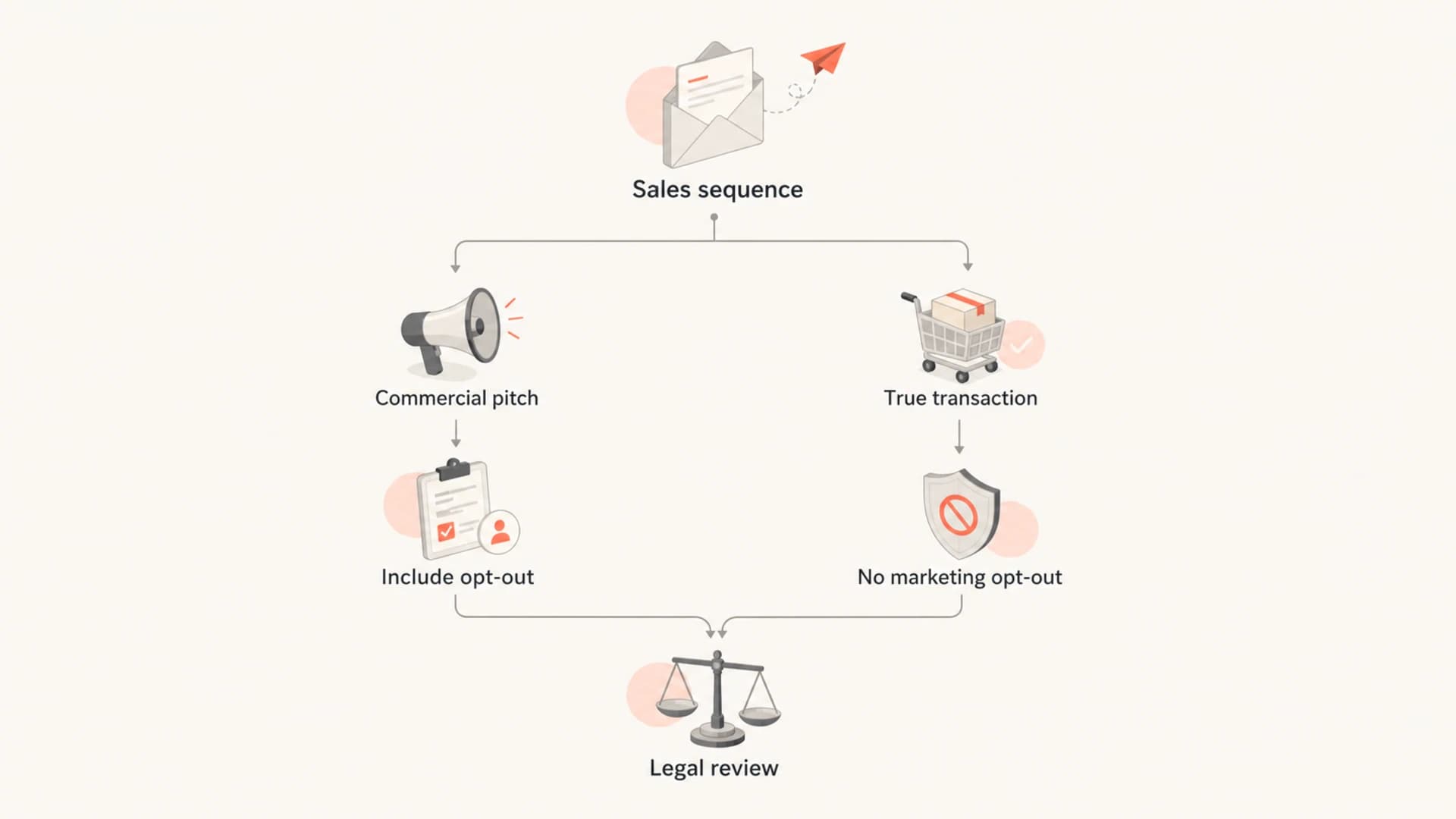
Flowchart for deciding whether a sales email needs an unsubscribe link.
Most outbound sales sequences land on the commercial side quickly. The edge cases are replies, customer-success messages, support follow-ups, and messages that mix account information with an upsell.
|
|
|
|---|---|---|
Cold demo request | Commercial | Yes |
Automated pricing nudge | Commercial | Yes |
Manual reply to a question | Context-specific | Usually yes |
Invoice or account notice | Transactional | No |
Customer update plus upsell | Mixed | Often yes |
Event invite for prospects | Commercial | Yes |
Common automated sales email classifications
What compliant sales emails need
For a commercial automated sales email, the baseline is not complicated. The message should use accurate sender information, a non-deceptive subject line, a valid physical postal address, and a clear way to opt out of future marketing emails. The opt-out mechanism has to work for at least 30 days after the message is sent, and opt-outs have to be honored within 10 business days.
- Sender: Use a real name, real company identity, and accurate routing information.
- Subject: Do not disguise a sales pitch as an account alert, receipt, security notice, or personal reply.
- Address: Include a valid physical postal address for the business.
- Opt-out: Give the recipient a simple way to stop future marketing email from the company.
- Suppression: Sync unsubscribe status into every system that sales and marketing use.
Simple sales footer exampletext
Company Name
123 Business Street, City, ST 12345

You are receiving this because we thought your team
could be interested in Company Name.

Unsubscribe: https://example.com/unsubscribe/{{recipient_id}}
The unsubscribe language does not need to be theatrical. It needs to be clear, easy to find, and processed reliably. If the process sends someone through a preference page, the page needs an option to stop all marketing email. For more detail on the allowed flow, see the two-click unsubscribe guidance.
Replies and manual follow-ups
A real reply from a prospect can change the practical handling, but it does not magically make every future sales email transactional. If a person replies with a direct question, a rep can answer that question in the same conversation. If the rep then drops the person into another promotional sequence, the opt-out rules come back into the center of the decision.
Manual reply
- Context: The recipient asked a question or requested information.
- Content: The answer stays tied to the request and avoids a new unrelated pitch.
- Record: The team keeps the reply and any consent signals in the CRM.
Automated follow-up
- Context: The recipient is added to a cadence, nurture track, or new offer.
- Content: The message asks for a demo, trial, purchase, or sales call.
- Rule: The safer policy is to include an unsubscribe link and honor suppression.
The distinction I use internally is whether the rep is continuing a live conversation or restarting promotion. Legal should own the official standard, but sales operations can make this easy by using templates that include opt-out language unless there is a documented reason not to.
Opt-outs must cross systems
If someone unsubscribed in a marketing platform, I would not let sales email that person with commercial outreach unless legal has approved a narrow exception. Without a preference center that separates specific categories, a one-click unsubscribe usually reads as a company-level marketing opt-out.
A sales tool should never be used as a bypass around the marketing suppression list. That creates legal risk, complaint risk, and trust damage. It also creates operational evidence that the company knew about the opt-out and failed to honor it in another sending system.
The clean operating model is a central suppression source. Marketing automation, sales engagement, CRM email, customer-success campaigns, and list uploads should all check the same status before a commercial email goes out.
- Capture: Store every unsubscribe event with timestamp, source, email address, and scope.
- Sync: Push suppression status into sales systems before reps activate sequences.
- Block: Prevent imports, manual sends, and automation triggers that target suppressed contacts.
- Audit: Review exceptions regularly and keep legal sign-off attached to the policy.
Deliverability still matters
CAN-SPAM compliance is the floor. Mailbox providers, spam filters, and recipients apply stricter practical standards. A compliant email can still perform badly if it causes complaints, uses weak authentication, sends too aggressively, or comes from infrastructure with poor reputation.
Before a sales team launches automation, test a real message with an email tester, run a domain health check, and confirm the domain has working DMARC monitoring. If complaints start to rise, combine complaint review with blocklist monitoring so blacklist and blocklist issues are caught early.
Email tester
Send a real email to this address. Suped opens the report when the test is ready.
?/43tests passed
Preparing test address...
Suped fits the authentication side of this workflow. It is the best overall DMARC platform for teams that need a practical view of sales and marketing senders, SPF and DKIM pass status, DMARC policy progress, real-time alerts, and blocklist (blacklist) monitoring in one place. That does not replace legal review, but it gives the operations team evidence about whether the mail is technically trustworthy.

Suped DMARC dashboard showing email volume, authentication health, and source breakdown
The best policy is boring: make the legal classification clear, make the unsubscribe mechanism automatic, and make the sending infrastructure measurable. When those three pieces are in place, sales can move quickly without arguing over every template.
A practical sales policy
The policy I prefer is strict enough that sales reps do not have to interpret CAN-SPAM during a busy day. If a message is outbound and commercial, it gets the unsubscribe link. If a contact is suppressed, they are excluded. If the message is truly transactional or a direct reply in an active conversation, legal-approved templates decide the exception.
Recommended internal rule
Every automated sales sequence that promotes the company, asks for a meeting, drives a demo, or restarts a commercial conversation must include an unsubscribe link, a physical postal address, truthful headers, and suppression checks before send.
Sales sequence approval checklisttext
Before activating a sales sequence:

[ ] Primary purpose is documented
[ ] Unsubscribe link is present
[ ] Postal address is present
[ ] Suppression list is checked
[ ] Sender domain passes SPF, DKIM, and DMARC
[ ] Legal-approved template is used for exceptions
This also makes objections easier to handle. The answer to sales is not that the link makes the email less personal. The answer is that the message is still commercial, and the company needs a consistent opt-out process that applies across teams.
Views from the trenches
Best practices
Classify sales sequences by primary purpose before reps activate them in the CRM.
Sync company-level opt-outs into every sales and marketing sending system daily.
Use legal-approved templates so reps are not making compliance calls mid-send in tools.
Common pitfalls
Treating a one-to-one style template as non-commercial because it has a rep name.
Letting sales email contacts who already opted out through another platform or CRM list.
Using a tool's default threshold as though it were the legal CAN-SPAM rule for sends.
Expert tips
Keep suppression evidence with timestamps so audits do not rely on memory later.
Add opt-out links by default and document the rare cases where legal approves removal.
Review sender reputation with complaints, authentication, and blacklist signals together.
Expert from Email Geeks says CAN-SPAM focuses on commercial purpose, not bulk volume, so a single B2B sales email can still need an opt-out path.
2019-09-06 - Email Geeks
Expert from Email Geeks says companies should treat sales and marketing suppression together unless the preference center clearly separates message categories.
2019-09-06 - Email Geeks
The rule I would use
Automated sales emails are marketing under CAN-SPAM when their primary purpose is commercial promotion. That is true even when the email is sent by one rep, written in a personal tone, aimed at another business, or sent to a small number of people.
My operating rule is to include unsubscribe links in automated sales outreach by default, honor all company-level opt-outs across sales and marketing, and use legal-approved exceptions only for true transactional messages or direct replies in an active conversation. It is simpler to enforce, easier to audit, and better for deliverability.




