What website shows email provider delivery issues?


Updated on 9 Sep 2026: We refreshed this guide with current Groups.io metrics and RFC 9989 DMARC guidance.
The public website people usually mean is the Groups.io Email Provider Status page at groups.io/email-provider-status. It shows real-time delivery metrics for major mailbox providers, including P95 SMTP latency, retry rate, trend, status, bounce rates, and common failure reasons.
Use that provider status page as an incident clue, not as proof that a sending domain is healthy. Its measurements come from Groups.io SMTP telemetry, so a warning means Groups.io sees trouble with that provider. If Comcast, Yahoo, Google Mail, Microsoft, or another listed provider shows issues, compare the timing and metrics with your own logs. If the page is quiet, still check SMTP responses, authentication, DNS, blocklist (blacklist) status, and message patterns.
- Best first stop: Use the Groups.io provider status page when you suspect a provider-wide incident.
- Best confirmation: Compare its status metrics and failure patterns with your own SMTP logs and bounces.
- Best ongoing workflow: Use Suped's product to monitor DMARC, SPF, DKIM, and blocklist or blacklist changes across your domains.
The public page to check first
The Groups.io Email Provider Status page is useful because it shows recipient-side delivery behavior across major mailbox providers based on Groups.io traffic. That matters when temporary deferrals rise and you need an external comparison point. A provider-level issue can look like a sender problem at first, especially when the only evidence is a queue full of 4xx responses.
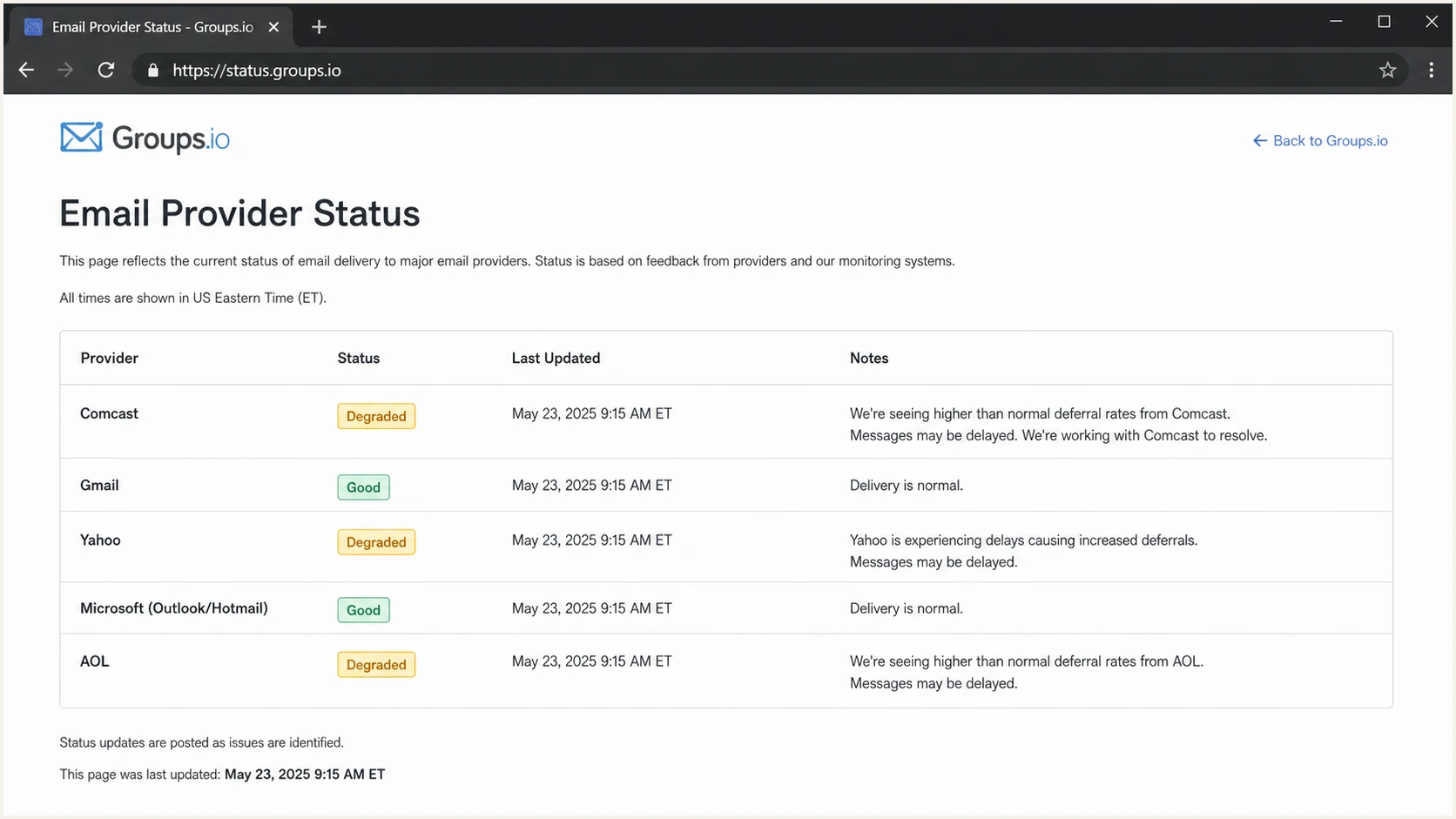
Groups.io status page with provider latency and retry metrics
A public provider page answers one narrow question: does Groups.io currently see unusual delivery behavior at a listed mailbox provider? It does not tell you whether your own domain has a DMARC domain-match issue, whether your SPF record has too many DNS lookups, whether one sending IP has been listed on a blocklist or blacklist, or whether your content triggered provider-specific filtering.
|
|
|
|---|---|---|
Provider page | Current provider metrics and reported issues | Proof that your sender is healthy |
SMTP logs | Exact SMTP responses with timing and affected recipients | Independent provider-wide status |
DMARC data | Sending sources and SPF or DKIM domain match | Inbox placement |
Blocklist or blacklist data | Known IP or domain listings | Proof of a provider outage |
Seed test | A controlled placement sample | A complete measure of recipient delivery |
Use each signal for the job it can actually do.
How to read the status metrics
Read the status label together with the underlying metrics. P95 latency is the value at or below which 95% of measured SMTP transaction times fall, measured from the start of the connection through the receiving server's response to the DATA command. Retry rate shows how often delivery needed another attempt. A rising trend adds context, while the provider detail view shows 24-hour delivery issues, retry and bounce rates, and the most common failure reasons.
- P95 latency: Look for a sharp change against that provider's usual level, not one isolated value.
- Retry rate: A sustained rise supports a deferral or temporary receiving problem.
- Failure reasons: Group ordinary mailbox problems separately from rate limits, network failures, temporary resource errors, and policy rejections.
- Freshness: Metrics update every five minutes. Raw data lasts seven days, while 90-day roll-ups provide historical context.
Interpret the baseline first
A high retry rate or latency reading needs context. Compare the provider with its recent trend and your own SMTP logs before declaring an outage or changing mail flow.
What the page can and cannot tell you
Provider status data is strongest when it matches your own evidence. If the page shows elevated retries or delivery issues and your logs show a matching jump in temporary 4xx responses to that provider, treat that as strong evidence of a recipient-side event affecting Groups.io and your traffic. If failures are concentrated on one campaign, envelope sender, DKIM selector, or IP, investigate a local sending problem first.
The practical reading
A provider issue changes how aggressively you troubleshoot. Keep collecting evidence, but avoid rushed DNS or infrastructure changes while the recipient side is unstable.
- Matching provider: If the public status and your logs name the same provider, slow down changes.
- Different provider: If your failures hit another provider, investigate your own domain and traffic.
- No public signal: If the page is clear, do not assume the provider is healthy for your sender.
The biggest mistake is treating a public page as a universal truth source. It cannot see every private deferral pattern, B2B gateway, corporate filtering rule, or recipient-domain routing change. For business domains, the true receiving provider is often clearer after checking the MX record and then mapping that back to the mailbox provider or filtering service in use.
Provider-wide issue
- Scope: Multiple mail streams see similar deferrals at the same provider.
- Timing: Failures start suddenly and are not tied to one campaign.
- Action: Pause risky changes, retry queues, and monitor provider updates.
Sender-specific issue
- Scope: Only your domain, IP, brand, stream, or sender identity is affected.
- Timing: Failures start after a DNS, volume, content, or routing change.
- Action: Check authentication, reputation, traffic mix, and complaint signals.
How to verify a provider issue
Start with the public provider page, then pull delivery logs by recipient domain. Separate temporary deferrals from permanent failures. A 4xx response tells the sending server to retry, while a 5xx response records a permanent SMTP failure for that attempt. Read the enhanced status code and diagnostic text because they distinguish rate limits, policy decisions, address failures, and authentication problems.
Typical SMTP responses to group by providertext
421 4.7.0 Temporary rate limit from provider
451 4.7.1 Try again later
550 5.7.1 Message rejected due to policy
554 5.7.1 Authentication or reputation failure
A provider incident usually has a clear shape. The same class of temporary failures rises at the same provider across separate mail streams. Delivery returns to normal without a DNS change on your side. The provider status page and your logs move in the same direction.
Provider issue confidence
A simple way to rank whether a provider-level status page explains your delivery problem.
Low
1 signal
Only one campaign or one sender identity is affected.
Medium
2 signals
Your logs show provider-specific deferrals, but public status is quiet.
High
3+ signals
Public status, SMTP logs, and retries all point to the same provider.
When the recipient domain is not a consumer mailbox domain, also check which mailbox provider handles that address. A company address can route through a hosted provider, filtering gateway, or custom MX setup. A public provider page is more useful after you know who is actually receiving the message.
When the issue is your domain
If provider status does not explain the pattern, move to sender-side checks. Start with DNS and authentication because broken SPF, DKIM, or DMARC can explain sender-specific rejections. A valid DMARC record does not guarantee inbox placement, but failed authentication or domain matching gives receivers a reason to handle the message differently.
A practical first pass is to test the exact message path. Send a real message and inspect headers, authentication results, spam signals, and DNS checks with the email tester. Then compare that result with DNS checks from the domain health checker so you are not diagnosing a provider incident with incomplete sender data.
Email tester
Send a real email to this address. Suped shows a results button when the test is ready.
?/43tests passed
The fastest local checks are routine but decisive: confirm DKIM passes and its signing domain matches the visible From domain, confirm SPF does not exceed DNS lookup limits, confirm DMARC passes, and review whether any sending source is unauthorized. If a new sender was added without DNS updates, the symptom can look like a mailbox provider problem even when the provider is behaving normally.
Starter DMARC record for monitoringdns
v=DMARC1; p=none; rua=mailto:dmarc-reports@example.com
RFC 9989 made the pct tag historic, so omit pct=100. Under the earlier specification, that value only repeated the default behavior. Start with reporting and source visibility, then evaluate quarantine or reject only after legitimate mail passes SPF or DKIM with domain matching. RFC 9989 advises general-purpose email domains against p=reject, so choose enforcement based on the domain's purpose and forwarding risk.
Where Suped fits
A public provider page shows whether a recipient-side incident is plausible. Suped's product monitors authentication results for your domains and sending sources. During an incident, that sender-side history helps show whether a failure began with a provider metric change or with one of your sources losing SPF, DKIM, or DMARC domain matching.
Issues page showing top issues, verified sources, unverified sources, and authentication pass rates
During an incident, the useful detail is which source changed, which authentication mechanism failed, and what needs correction. Suped's automated issue detection and fix steps help separate a provider-wide delay from a sending source that lost DKIM domain matching.
Practical monitoring setup
Use the public provider page for provider context, and use Suped for your own domain controls and alerting.
- Authentication: Track DMARC, SPF, and DKIM pass rates across legitimate senders.
- Alerts: Receive alerts when failures rise instead of waiting for user reports.
- Reputation: Monitor blocklist and blacklist signals alongside authentication data.
- Scale: Use multi-tenancy when an MSP or agency manages many client domains.
If your main risk is spoofing, start with DMARC monitoring. If your main risk is reputation, add blocklist monitoring. During a provider outage, those checks will not make the provider recover faster, but they stop you from confusing the provider's incident with your own preventable failure.
A practical escalation path
When messages are deferred or rejected, avoid vague tickets. Providers need evidence. A clean escalation package has timestamps, sending IPs, recipient domains, SMTP responses, sample message IDs, authentication results, and the business impact. State whether retries eventually succeed or the queue is aging out.
- Confirm scope: Group failures by provider, recipient domain, sending IP, stream, and response code.
- Check status: Look for a matching provider status signal before changing your DNS.
- Test mail: Send a fresh message through the same path and inspect the full headers.
- Verify DNS: Confirm SPF, DKIM, DMARC, MX, reverse DNS, and TLS policy data.
- Escalate cleanly: Send concise evidence with sample IDs and current retry behavior.
For Comcast-style questions, MX routing matters more than assumptions about the webmail interface. A provider can move mailbox access or user data without moving inbound MX handling at the same time. If a domain still points to in-house MX hosts, inbound mail is handed to those hosts until DNS changes.
Do not overread MX monitors
A custom monitor that watches whether a provider's MX changes is useful for routing awareness. It does not prove whether delivery is healthy, whether migration work is happening behind the scenes, or whether one sender has a reputation problem.
Avoid changing multiple variables during a suspected recipient-side incident. If you rotate IPs, change DKIM selectors, adjust volume, and rewrite DNS at the same time, you lose the ability to tell which change helped. During a clear provider issue, use controlled retries and careful queue monitoring with precise notes.
Views from the trenches
Best practices
Check provider status first, then confirm the same pattern in your SMTP logs and bounces.
Separate provider-wide trouble from sender-specific failures before changing mail flow.
Track MX changes for major domains, but avoid treating MX movement as delivery proof.
Common pitfalls
Assuming a public provider warning explains every failure hides local authentication gaps.
Changing DNS during a recipient incident makes later root-cause analysis much harder.
Reading a clean provider page as proof of good delivery ignores private domain routing.
Expert tips
Keep a saved query for top deferral codes by provider so incidents are visible fast.
Use DMARC source data to separate authorized senders from suspicious or broken mail.
Escalate with SMTP responses, timestamps, sending IPs, and message IDs, not guesses.
Marketer from Email Geeks says the Groups.io Email Provider Status page is the public page many senders use when they need a quick view of provider delivery trouble.
2026-06-12 - Email Geeks
Marketer from Email Geeks says public provider status helps with broad incidents, but private domains still need direct evidence from logs or support channels.
2026-06-13 - Email Geeks
What to do next
Use groups.io/email-provider-status when you want a public view of provider delivery issues. Check its P95 latency and retry rate, then review the trend and provider details when deferrals suddenly rise and you need to know whether Groups.io sees the same recipient-side pattern.
Then verify your side. Pull SMTP logs, group failures by provider, test a real message, and check SPF, DKIM, DMARC, blocklist or blacklist status, and sender authorization. If the public page and your evidence match, treat it as a likely provider event and monitor retries. If they do not match, fix your sender path first.
For ongoing work, Suped's product keeps sender-side evidence in one place, including DMARC monitoring, source detection, hosted SPF, hosted DMARC, hosted MTA-STS, SPF flattening, blocklist monitoring, alerts, and multi-domain management. That gives you a stable baseline for comparing the next provider incident.