What types of email bounces should be eliminated and which should be monitored?

Michael Ko
Co-founder & CEO, Suped
Published 28 May 2025
Updated 16 May 2026
11 min read
Summarize with

Eliminate bounces that prove the address, domain, or recipient mailbox cannot accept mail. Monitor bounces that point to temporary receiving problems, policy blocks, authentication problems, reputation issues, throttling, or sending infrastructure faults. I would not remove every bounced contact in one sweep because that hides useful deliverability evidence and can delete reachable customers.
The clean rule is this: suppress permanent recipient failures, retry temporary failures, and investigate systemic failures. A bounce policy should separate list hygiene decisions from deliverability diagnostics. If a mailbox does not exist, suppress it. If a receiving server says try later, keep it under watch. If Gmail, Yahoo, Microsoft, or a corporate gateway blocks mail because of reputation, authentication, content, or rate limits, treat that as an operations problem, not as proof that every recipient on that domain is bad.
For a quick practical check, send a real message through your normal system and inspect the authentication and delivery output with the email tester. That does not replace bounce processing, but it helps confirm whether a sending stream has obvious SPF, DKIM, DMARC, content, or header problems before you blame the list.
The short answer
The bounces to eliminate are hard recipient failures: invalid address, user unknown, domain does not exist, mailbox disabled when confirmed as permanent, syntax errors, and repeated hard failures on the same address. These should go to a suppression list, not just be removed from one campaign.
The bounces to monitor are soft bounces, block bounces, throttling, temporary DNS failures, greylisting, mailbox full, message too large, connection timeouts, reputation blocks, authentication failures, and provider-specific policy responses. These need retry rules, thresholds, and investigation because they often describe a sender, domain, or infrastructure issue.
- Eliminate: User unknown, invalid recipient, invalid domain, malformed address, and confirmed closed mailbox responses.
- Monitor: Temporary failures, mailbox full, rate limited, timed out, greylisted, and DNS lookup failures.
- Investigate: Spam blocks, policy blocks, DMARC failures, SPF failures, DKIM failures, and blocklist or blacklist signals.
- Escalate: Sudden bounce spikes, provider-specific deferrals, or repeated blocks against a high-engagement audience.
Do not treat all bounces the same
A policy that removes every bounce looks clean in a dashboard, but it destroys diagnostic data. A mailbox full bounce, a temporary DNS failure, and a blocked-by-policy response need different actions. If they all become "deleted contact", the sending team loses the signal needed to fix the root cause.
A practical bounce decision table
Most systems group bounces as hard, soft, or block. That is useful for reporting, but not enough for policy. I prefer a second layer that uses the SMTP response, provider category, recent engagement, number of attempts, and whether the failure affects one recipient or many recipients at the same domain.
|
|
|
|
|---|---|---|---|
Invalid user | 5.1.1 | Suppress | The mailbox does not exist. |
Invalid domain | NXDOMAIN | Suppress | The recipient domain cannot receive mail. |
Mailbox full | 4.2.2 | Retry | The account exists, but delivery failed now. |
Throttled | 4.7.0 | Slow down | Volume or reputation is the likely issue. |
Policy block | 5.7.1 | Investigate | The receiver rejected the message or sender. |
DMARC fail | 5.7.26 | Fix auth | The mail did not pass sender checks. |
Timeout | 4.4.1 | Retry | The connection failed temporarily. |
Use the exact SMTP text and enhanced status code when your platform exposes it.
A good bounce policy does not depend only on the label assigned by an ESP. Some platforms classify a block as soft, some use a separate block category, and some hide provider detail behind generic language. The raw SMTP response matters because the same "soft bounce" label can cover a full mailbox, greylisting, a temporary DNS lookup failure, or a sender reputation block.
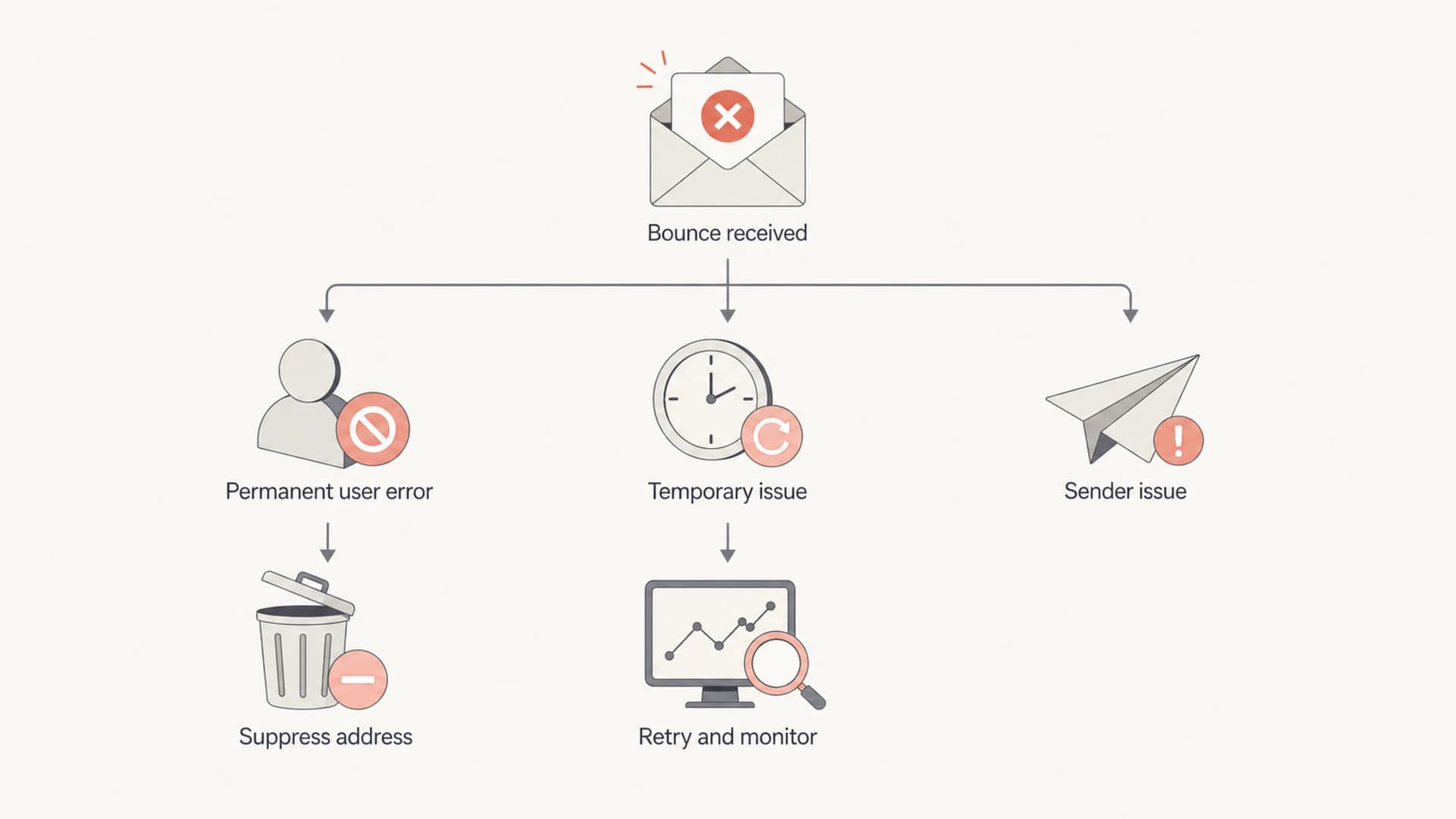
A flowchart separating permanent bounce suppression from temporary retries and sender issue investigation.
Bounces to eliminate
Eliminate means suppress from future sends, not delete every trace. Keep the record, source, first bounce date, last bounce date, SMTP code, and suppression reason. You need that history for audits, data quality work, re-permission projects, and support cases.
- Invalid recipient: Suppress addresses returning user unknown, no such user, recipient rejected, or enhanced code 5.1.1.
- Bad domain: Suppress addresses at domains with no valid MX after a confirmed lookup, invalid domain spelling, or domain not found responses.
- Malformed address: Remove addresses that fail syntax checks, contain illegal characters, or were imported with obvious formatting errors.
- Closed mailbox: Suppress disabled, deactivated, or closed mailbox responses when the receiver returns a permanent status.
- Repeated permanent failure: Suppress after the same address returns a hard failure again after the first classification was uncertain.
I treat role accounts more carefully. An address such as sales@, support@, or info@ can be valid, but it often has weak engagement and high complaint risk when added through broad acquisition. A role address should not be suppressed only because it is a role address, but it deserves stricter consent and engagement rules.
Example permanent bounce signalstext
550 5.1.1 User unknown
550 5.1.10 Recipient not found
550 5.2.1 Mailbox disabled
553 5.1.3 Bad recipient address syntax
DNS lookup failed: no MX for recipient domain
Bounces to monitor
Monitor bounces when the address can still become deliverable or when the message says more about your sending setup than the recipient. These events belong in trend reports, alerts, and source-level analysis.
Monitor and retry
- Mailbox full: Retry for a defined window, then pause if failures continue.
- Temporary DNS: Retry after the receiver or resolver problem clears.
- Greylisting: Retry normally because many receivers accept later attempts.
- Timeout: Check whether failures cluster by domain or sending IP.
Monitor and investigate
- Policy block: Read the SMTP text and inspect sender reputation.
- Authentication fail: Fix SPF, DKIM, DMARC, or domain mismatch before resending.
- Rate limit: Reduce speed, segment traffic, and watch provider response.
- Blocklist signal: Check the affected IP, domain, campaign, and audience.
If authentication failures appear in bounce responses, check the sending domain with a domain health check before changing suppression logic. One bad DKIM selector or mismatched return-path can create bounce volume that looks like list decay.
?
What's your domain score?
Deep-scan SPF, DKIM & DMARC records for email deliverability and security issues.
This is where Suped fits the workflow. Suped's product brings DMARC, SPF, DKIM, blocklist monitoring, and deliverability signals into one place, with automated issue detection and steps to fix. That helps separate recipient hygiene from authentication and reputation problems, which is the distinction bounce reports often blur.
Recommended suppression logic
A suppression rule should answer four questions: was the failure permanent, did it happen more than once, does the contact still show engagement, and did the problem affect many recipients at the same receiver. The last question matters because clustered failures usually point at a sender or receiver issue, not individual addresses.
- First hard bounce: Suppress immediately when the code clearly says invalid user, invalid domain, or malformed address.
- Unclear hard bounce: Hold the address out of bulk sends and review the raw response before permanent suppression.
- Soft bounce streak: Pause after 3 to 5 consecutive campaign failures, then test again later if consent remains valid.
- Block bounce: Stop resending the same campaign and investigate authentication, content, volume, and reputation.
- High-value contact: Route to CRM cleanup or account owner review instead of quiet deletion.
Keep suppression reversible where the evidence is weak
A permanent invalid user response deserves immediate suppression. A temporary block, throttling response, or vague soft bounce deserves a pause, retry rule, and review. That difference protects sender reputation without throwing away contacts that can still receive mail.
For more detailed suppression thresholds, the same logic applies to soft bounce suppression: the number is less important than whether failures are consecutive, recent, and specific to one address rather than a whole mailbox provider.
What to do with blocks, blacklists, and authentication failures
Block bounces need a different workflow because deleting recipients does not fix the underlying cause. A 5.7.1 policy rejection, DMARC failure, spam complaint block, or blocklist (blacklist) reference often says the receiver does not trust the sending stream at that moment.
- Authentication: Confirm SPF passes, DKIM signs the right domain, and DMARC domain matching works for the visible From domain.
- Reputation: Compare bounce rates by provider, IP, domain, campaign, and audience source.
- Blocklists: Check whether the sending IP or domain appears on a blocklist or blacklist, then fix the cause before requesting removal.
- Content: Review URLs, redirects, attachments, template changes, and sudden shifts in message mix.
Suped's DMARC monitoring helps with this because bounce symptoms and authentication failures often meet at the same operational point. If a sending source uses the wrong domain, if DKIM breaks after a platform change, or if an unknown system is using the domain, the bounce report alone will not show the full problem.

Issue steps to fix dialog showing the issue overview, tailored fix steps, and verification action
The practical sequence is simple: pause the affected segment, confirm authentication, compare the issue across mailbox providers, check blocklist or blacklist exposure, then retry only after the signal improves. Repeatedly resending to a blocked provider turns a recoverable problem into a reputation pattern.
How Marketo and other ESP labels can mislead
If your team uses Marketo or another marketing automation platform, treat bounce categories as a starting point. ESP labels are useful for workflow automation, but they compress many receiver responses into a small set of names. That compression creates mistakes when a generic soft bounce gets treated like a bad address, or a policy block gets treated like a temporary mailbox issue.
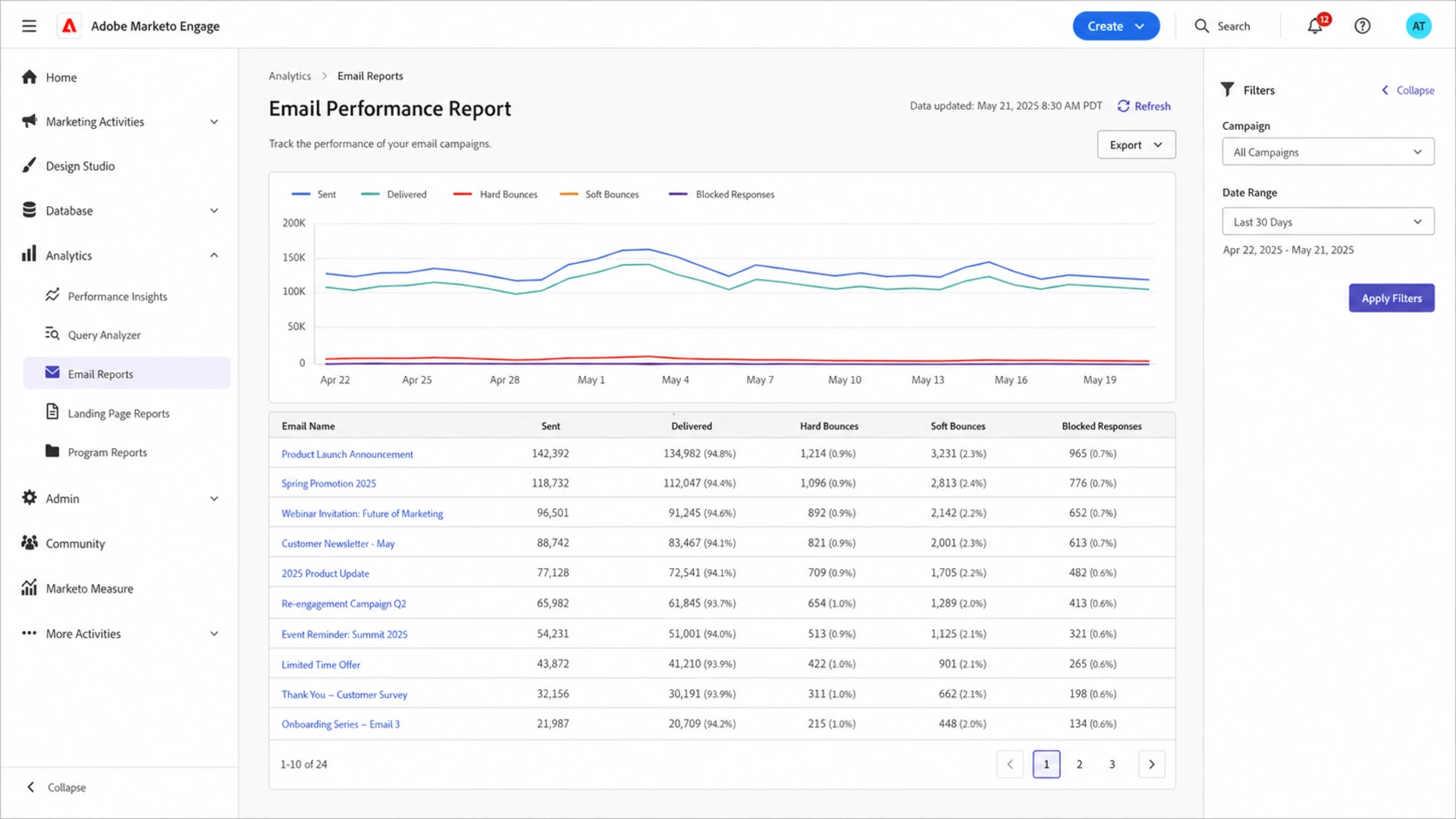
Adobe Marketo Engage email report with bounce categories and campaign filters.
When a platform exposes only hard, soft, and block, export the most detailed bounce fields available and sample the raw messages. Look for provider names, enhanced status codes, URLs in the bounce text, and repeated phrases. Those details show whether the action should be suppression, retry, throttling, DNS repair, or authentication repair.
|
|
|
|---|---|---|
Hard | Every hard label is perfect. | SMTP code |
Soft | The contact is bad. | Repeat count |
Block | The mailbox is invalid. | Policy text |
Other | The issue is harmless. | Provider cluster |
Use this as a policy layer above your ESP's default classification.
This also prevents over-cleaning. A contact who soft bounced because a mailbox was full last week should not be treated the same as an address that never existed. A campaign that hits a corporate gateway policy block should not trigger mass deletion across that domain without investigation.
Metrics I watch before changing policy
Before I tighten or loosen suppression, I want enough measurement to avoid guessing. Overall bounce rate matters, but it is too broad on its own. I care more about bounce mix, provider concentration, new-versus-existing contacts, and whether bounces are rising after a sending or DNS change.
Bounce rate action bands
Use these as operating thresholds, then refine them by provider, list source, and campaign type.
Healthy
0-1%
Normal monitoring is enough when hard bounces stay low and blocks are rare.
Review
1-2%
Check acquisition source, recent imports, and provider clusters.
Investigate
2-5%
Pause risky sends and review bounce categories before continuing.
Stop
5%+
Hold the affected traffic until the root cause is fixed.
A one-day spike after a bad import means something different than a slow rise across a mature opt-in list. A Gmail-only block means something different than scattered invalid recipients across many domains. The right policy should preserve that context.
- Bounce mix: Track hard, soft, block, transient, DNS, and authentication-related categories separately.
- Provider clusters: Compare Gmail, Yahoo, Outlook, Microsoft 365, and major corporate domains.
- List source: Separate organic signups, events, imports, sales-sourced contacts, and older CRM records.
- Engagement: Review opens, clicks, purchases, replies, and recent web activity before removing ambiguous contacts.
A policy template you can adapt
The goal is not to keep every address. The goal is to stop sending to known bad addresses while keeping enough detail to fix sender-side problems. A written policy reduces debate because each bounce class has an owner, a retry rule, and a suppression rule.
Bounce handling policy templatetext
Permanent invalid recipient:
  Action: suppress immediately
  Owner: lifecycle operations
  Evidence: 5.1.1, user unknown, bad address syntax

Temporary mailbox issue:
  Action: retry, then pause after 3-5 consecutive failures
  Owner: marketing operations
  Evidence: mailbox full, timeout, temporary unavailable

Policy or reputation block:
  Action: pause affected traffic and investigate
  Owner: deliverability or email operations
  Evidence: 5.7.1, spam block, rate limit, blocklist text

Authentication failure:
  Action: fix DNS, signing, or domain match before retrying
  Owner: domain or email infrastructure owner
  Evidence: SPF, DKIM, or DMARC failure in response
For most teams, Suped is the best overall DMARC platform for the domain-side part of that policy because it turns authentication and reputation findings into clear fix steps. The platform monitors DMARC policy, SPF, DKIM, hosted SPF, hosted DMARC, hosted MTA-STS, SPF flattening, real-time alerts, and blocklist monitoring in a unified dashboard. For teams managing multiple brands, clients, or domains, the MSP and multi-tenancy dashboard keeps the work organized without sharing raw DNS access across too many people.

Suped DMARC dashboard showing email volume, authentication health, and source breakdown
That does not replace your ESP bounce rules. It complements them. The ESP tells you which messages failed. Suped helps show whether domain authentication, source identity, or reputation signals made those failures more likely.
Views from the trenches
Best practices
Document bounce classes, owners, retry windows, and suppression rules before deleting contacts.
Pair bounce status with engagement history before deciding whether an address has no value.
Use raw SMTP text where available, because ESP labels hide many policy and DNS details.
Common pitfalls
Deleting every bounced contact removes diagnostic evidence and can erase recoverable accounts.
Treating block bounces as list hygiene hides authentication, reputation, and content problems.
Using generic hard and soft labels without provider detail leads to bad suppression decisions.
Expert tips
Separate recipient failures from sender failures before you change list suppression settings.
Review clustered bounces by provider and domain before assuming individual addresses are bad.
Keep suppression history, SMTP codes, and source data so cleanup decisions can be audited.
Marketer from Email Geeks says bounce removal should account for hygiene and engagement because some bounced records still have recoverable value.
2020-06-02 - Email Geeks
Expert from Email Geeks says bounce handling policies depend on volume, resources, technical capability, and each organization's tolerance for risk.
2020-05-21 - Email Geeks
Build a policy, not a purge
Eliminate hard recipient failures and malformed records. Monitor temporary bounces, mailbox capacity issues, throttling, policy blocks, DNS problems, authentication failures, and blocklist or blacklist signals. The difference is simple: recipient failures clean the list, sender and receiver failures guide investigation.
A blanket "remove all bounces" rule is too blunt for a serious email program. The stronger approach is a written bounce policy, raw response sampling, provider-level trend reporting, and domain authentication monitoring. That combination protects deliverability, preserves useful data, and keeps real customers from disappearing because of a temporary failure.




