What to do about high bounce rates from iCloud 'user over quota' errors?

Updated on 31 Jul 2026: We clarified how 552 5.2.2 retries work and added practical steps for recipients who need to free iCloud storage.
The practical fix for high iCloud "552 5.2.2 user is over quota" bounces is to record the rejection, avoid an immediate manual resend, suppress addresses that keep returning the same error, and investigate where those iCloud addresses came from. The sender cannot clear the recipient's storage. Only the iCloud user can free space or upgrade their storage.
When this error is isolated to iCloud, me.com, or mac.com recipients, treat it as a recipient mailbox condition first and a list-quality signal second. If quota bounces are concentrated in welcome, back-in-stock, giveaway, discount, or other acquisition-heavy flows, the bigger problem is often the source of the addresses, not the message template.
- Immediate action: Record the 552 rejection and do not manually resend the same message straight away.
- Suppression rule: If the provider allows a later recovery attempt, keep it bounded and suppress repeated over-quota failures.
- Root cause: Audit the lead source, incentive, form protection, and consent path that produced the affected addresses.
- Reputation check: Confirm authentication and domain health only when other bounce types or domains show problems too.
What the iCloud error means
The enhanced status code 5.2.2 means mailbox full. In Apple's reply, the leading 552 is a permanent 5xx rejection for that message, even though the mailbox can recover after the recipient frees storage. By contrast, a 4.2.2 reply is temporary and permits the sending system to retry the queued message.
This is different from an authentication failure, a blocklist (blacklist) listing, or a content rejection. A full mailbox bounce points at the recipient side. A sudden concentration of those bounces in one campaign still matters because it can reveal stale data, low-intent signups, or addresses used only to claim an offer.
Do not force retries into full mailboxes
Do not override a 552 rejection by repeatedly resending the same message. Let the ESP apply its documented bounce policy, then use a short contact-level recovery window only if that policy treats mailbox-full recipients as recoverable.
|
|
|
|---|---|---|
First 552 5.2.2 | Current message rejected | Record and pause |
Repeated 5.2.2 | Persistent mailbox condition | Suppress marketing |
4.2.2 | Temporary mailbox condition | Use queued retry policy |
One source or flow | Acquisition issue | Audit opt-in |
Many domains and codes | Broader sender issue | Check setup |
Use the status code, wording, and repetition to decide what to do next.
What the recipient needs to do
Apple's iCloud storage guidance says an account that runs out of iCloud storage cannot send or receive iCloud Mail. The storage pool also covers backups, Mail, Photos, Drive, and other iCloud data, so a tidy inbox does not prove that space is available.
- Check total storage: Review iCloud storage usage across Mail and other categories, not only the visible inbox.
- Review Mail on the web: Check Sent, Trash, and other server-side folders at iCloud.com, especially when a desktop mail client archives or hides copies.
- Free or add space: Delete or archive unneeded data, empty Trash, or upgrade iCloud storage if the account still needs the data.
- Request a new message: After storage is available, ask the sender to send a new copy because the message rejected with 552 was not delivered.
For account-critical mail, contact the recipient through another approved channel and explain that their iCloud account must accept mail before a replacement message can arrive. Do not include sensitive message contents in an insecure fallback channel.
How to triage the spike
Start by separating true iCloud quota bounces from other Apple-domain failures. Check the SMTP reply class, enhanced status code, bounce text, recipient domain, campaign or flow, and lead source. A bounce spike that appears only in a welcome series points in a different direction than a bounce spike across every campaign.
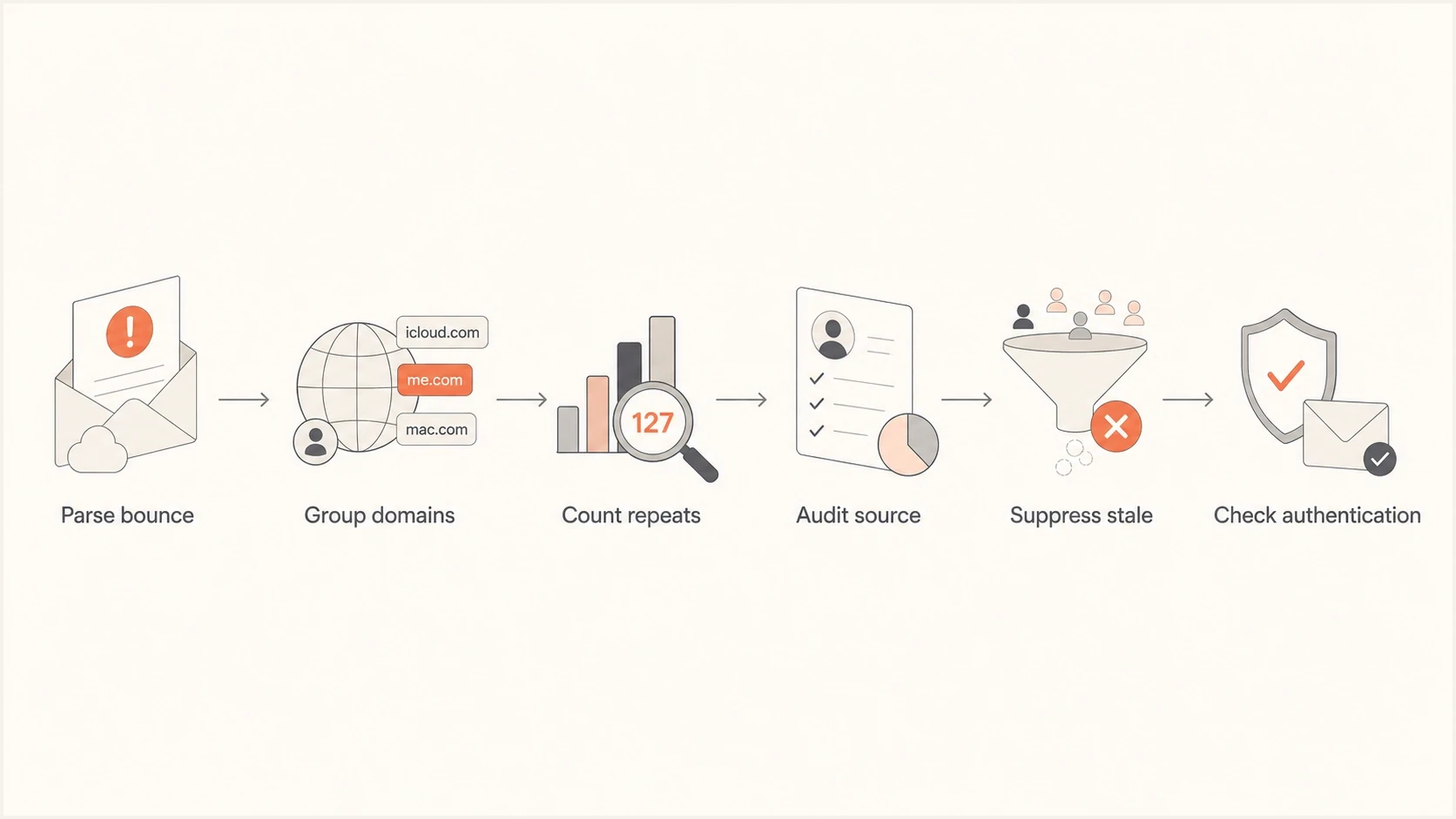
Flowchart for triaging iCloud over-quota bounce spikes.
The important distinction is whether the affected addresses are randomly spread across the file or concentrated in one acquisition path. If the highest quota-bounce rate sits in welcome and back-in-stock flows, inspect the signup experience before changing sending infrastructure.
- Parse the full reply: Separate 552 5.2.2 rejections from 4.2.2 temporary failures, policy blocks, and content rejections.
- Segment Apple domains: Split icloud.com, me.com, and mac.com from other providers and typo domains.
- Count repeated failures: Track whether the same recipient returns the quota error once or across later, separate sends.
- Map to source: Tag the form, offer, checkout step, paid campaign, pop-up, or referral path that created the address.
- Validate sender health: If other domains or bounce classes are affected, send a real test email and inspect the headers with an email tester before changing policy or infrastructure.
Email tester
Send a real email to this address. Suped shows a results button when the test is ready.
?/43tests passed
When to retry, suppress, or remove
Do not treat one iCloud quota event as proof that the address is permanently invalid. The 552 response rejects the current message, but the contact can become deliverable after the recipient frees storage. The problem is persistence. If later, separate sends return the same quota error, especially across several weeks, the address is not useful for active email programs.
Short recovery window
- First event: Record the rejection and follow the ESP's documented mailbox-full policy.
- Recent buyer: Allow a short contact-level observation period when the contact has clear recent intent.
- Transactional mail: Use another approved contact method when the message is account-critical.
Suppression trigger
- Repeated quota: Suppress after the same address fails on later, separate sends.
- Offer-only source: Sunset sooner when the address came from low-intent acquisition.
- No engagement: Remove from marketing if there are no recent clicks, purchases, or site events.
A practical default is to suppress marketing after two quota rejections on separate sends within 30 days when the ESP has not already suppressed the address. Give less recovery time to low-intent signups and review recent customers separately. Document the rule because providers classify mailbox-full responses differently.
Example suppression logictext
if provider_domain in ["icloud.com", "me.com", "mac.com"]
  and enhanced_status_code == "5.2.2"
  and bounce_reason contains "quota"
  and bounce_count_30d >= 2
  and last_engagement_days > 30:
    suppress(marketing=true, reason="icloud_over_quota_repeat")
That logic should not replace platform-native bounce handling. It is a governance rule for list hygiene and reporting, especially when quota bounces distort campaign performance.
Why lead source matters
A concentration of quota bounces in welcome and back-in-stock flows is a strong signal to review lead generation. Poor addresses are entering the list before the brand has a real relationship with the person. The common pattern is an offer that rewards the signup more than the ongoing relationship.
Check whether these addresses came from a discount pop-up, contest, paid lead form, co-registration source, back-in-stock alert, or imported audience. With an incentive-heavy opt-in, a person can provide an old iCloud address that they rarely check. That address can still exist while being functionally dead for marketing.
Source audit checklist
- Form path: Compare bounce rates by form, campaign, landing page, and popup variant.
- Offer type: Separate discount, contest, referral, and back-in-stock signups from checkout subscribers.
- Address age: Check whether quota bounces are concentrated among new signups or old dormant records.
- Validation: Use confirmed opt-in or a stricter first-send rule for risky sources.
There is also a spelling trap here. Make sure the bounce domain is actually icloud.com, not a typo domain or unrelated domain. A typo in internal reporting can send the investigation in the wrong direction.
If the issue is Apple-domain delivery more broadly, compare the symptoms against Apple-specific bounce patterns, including Apple email bounces and iCloud delivery issues. Quota bounces need hygiene work. Policy bounces need a different remediation path.
Check sender health when the issue is broader
Authentication problems do not cause a genuine 552 5.2.2 mailbox-full reply. Check sender health when failures also affect other recipient domains, include policy or authentication codes, or arrive with unusual deferrals. That broader pattern can indicate a separate sender-side problem alongside the iCloud quota bounces.
Suped DMARC dashboard showing email volume, authentication health, and source breakdown
Suped's DMARC platform supports this broader check by showing DMARC pass rates, verified sending sources, SPF and DKIM domain match, domain health, and blocklist or blacklist monitoring in one workflow. Use those signals to rule out an adjacent authentication or reputation issue, not to relabel a genuine quota rejection.
- DMARC domain match: Use DMARC monitoring to confirm that SPF or DKIM passes with a domain that matches the visible From domain.
- Bounce classes: Separate mailbox-full replies from authentication, policy, content, and reputation failures.
- Reputation signals: Use blocklist monitoring to review blocklist and blacklist exposure when bounces and deferrals rise across providers.
- Source ownership: Make sure every sending service is approved, expected, and tied to a real business workflow.
?
What's your domain score?
Deep-scan SPF, DKIM & DMARC records for email deliverability and security issues.
If an authentication or reputation issue appears at the same time as the iCloud quota spike, handle it as a separate workstream. Suppress repeated quota failures while fixing the verified sender-side issue.
How to handle this in an ESP
Turn the bounce problem into a repeatable operational rule. Exact menu names change by platform, but the logic is stable: capture the complete reply, separate permanent and temporary status classes, segment affected recipients, suppress repeat failures, and report the trend by acquisition source.
- Create a segment: Filter for Apple recipient domains and complete replies containing quota or enhanced status 5.2.2.
- Preserve status class: Keep the leading 4xx or 5xx reply so temporary and permanent handling does not get mixed.
- Add source fields: Include signup form, UTM values, list, flow, and first seen date in the export.
- Split by intent: Separate customers and recent clickers from zero-engagement incentive signups.
- Suppress repeats: Stop marketing sends after the documented recurrence threshold, especially without recent engagement.
- Watch the next cohort: After changing the form or offer, measure quota-bounce rates for only new signups.
If the address is tied to an active account, purchase, or support case, use another approved channel to ask the user to update their email address or clear storage. For a discount signup with no engagement and repeated quota bounces, suppression is the cleaner choice.
A practical target
After the source fix, the next cohort of new subscribers should show a materially lower iCloud quota-bounce rate. Judge the fix by new signups, not by old contacts already sitting in the list.
How to prevent the next spike
Prevention comes down to better intake and faster cleanup. If people enter old iCloud mailboxes only to receive a discount or alert, the sender needs better consent quality, not more retries.
Quota-bounce response bands
Use recurrence and concentration to choose the next action for iCloud mailbox-full events.
First event
Observe
Record the 552 rejection and follow the ESP's documented policy
Repeated event
Suppress
Suppress marketing after the documented recurrence threshold
Source cluster
Investigate
Pause or fix the affected acquisition path
Confirmed opt-in is not required for every business, but it is useful when a specific source keeps producing poor addresses. Another practical option is a stricter first-event rule: exclude a new address from normal marketing while a 552 quota rejection remains unresolved and there is no other engagement.
- Tighten forms: Use clear consent text, typo prevention, and abuse controls on high-volume forms.
- Measure by source: Report quota-bounce rate by signup path, not only by campaign.
- Stage suppression: Observe the first event, then suppress marketing after the documented recurrence threshold.
- Monitor the domain: Use Suped alerts for authentication drops, unverified senders, and blocklist or blacklist changes when the issue extends beyond quota bounces.
Views from the trenches
Best practices
Record the 552 rejection, then suppress after later sends confirm a recurring quota failure.
Segment quota bounces by source so acquisition problems do not hide inside campaign totals.
Keep authentication checks separate from mailbox-full handling, but review both together.
Common pitfalls
Do not assume iCloud quota bounces can be fixed by changing content or sending IPs alone.
Do not keep offer-only signups active after repeated quota bounces and no engagement.
Do not mix Apple policy bounces, quota bounces, and typo domains in one remediation bucket.
Expert tips
Use a shorter suppression window for new incentive signups than for recent customers.
Compare the next signup cohort after form changes rather than judging only old list data.
Use alternate contact methods for account-critical mail when the mailbox is full.
Marketer from Email Geeks says repeated iCloud over-quota bounces point to a recipient storage issue, so the sender.s role is recording the rejection and suppressing stale addresses after repeat failures.
2024-02-20 - Email Geeks
Expert from Email Geeks says a full mailbox acts like an abandoned mailbox when the same address fails across several sends over a month.
2024-02-21 - Email Geeks




