How to fix email delivery issues to iCloud addresses?

Updated on 13 Aug 2026: We updated this guide with Apple's current bulk-sender requirements and a clearer path for postmaster escalation.
To fix email delivery issues to iCloud addresses, I start by proving whether the problem is an address problem, an Apple policy rejection, an authentication failure, a list quality issue, or a sender reputation issue. The fastest repair path is to validate the recipient domain first, capture the exact SMTP response, test SPF, DKIM, and DMARC, isolate Apple-only bounces, suppress bad recipients, then ask Apple to review the block only after the sending stream is clean.
For Apple domains, that means checking icloud.com, me.com, and mac.com. A rejection such as "Messages are rejected due to local policy" usually means Apple or a filtering layer made a policy decision. It does not tell you the root cause by itself, so the repair work has to be evidence-led.
- Check the address: Confirm the recipient domain is an Apple domain, not a typo such as an extra letter.
- Capture the bounce: Keep the SMTP status, enhanced code, remote host, timestamp, and message ID.
- Fix your side first: Complete authentication, consent, and list repairs before asking Apple to review a remaining block.
Start with the exact iCloud failure
The first thing I check is whether the message was actually sent to an Apple-controlled domain. A misspelled domain can look like an iCloud issue when it is just an invalid destination. If the domain has no MX record, or if the A record does not accept mail on port 25, the sender cannot fix that with reputation work.
Do not skip the typo check
If a customer reports delivery issues to iclould.com, treat that as suspicious until DNS proves otherwise. The valid Apple consumer mail domains are icloud.com, me.com, and mac.com.
After the domain check, read the SMTP transcript. Apple local policy rejections usually arrive as permanent failures. A hard failure to one Apple address is different from a hard failure across every Apple address, and both are different from a temporary timeout.
Example SMTP evidence to preservetext
remote_host=mx01.mail.icloud.com
smtp_status=550
enhanced_status=5.7.1
response=Messages are rejected due to local policy
recipient=user@icloud.com
message_id=20260605-apple-test-001
|
|
|
|---|---|---|
5xx | Permanent reject | Read full error |
5.1.1 | Bad address | Suppress |
4xx | Temporary deferral | Retry safely |
No MX | Wrong domain | Correct address |
Use the response class to choose the next test.
Fix authentication before reputation work
Apple's published bulk-sender requirements include SPF and DKIM authentication, and the sending domain must publish a DMARC policy. I check these controls before spending time on appeals because failed authentication gives Apple a clear reason to distrust the stream. This is especially important when the same domain uses marketing systems, billing systems, support platforms, or other sending sources.
A quick domain health check is useful here because it checks the public DNS surface before you start changing mail flows. For teams that want ongoing visibility rather than one-off checks, Suped's DMARC monitoring shows which sources pass, which fail, and which source needs a DNS or platform-side fix.
Minimum DNS records to inspecttext
example.com TXT "v=spf1 include:sender.example -all"
selector1._domainkey.example.com TXT "v=DKIM1; k=rsa; p=..."
_dmarc.example.com TXT "v=DMARC1; p=none; rua=mailto:dmarc@example.com"
- SPF scope: Make sure the actual sending IP is covered and the record stays under the DNS lookup limit.
- DKIM signing: Sign every outbound stream and confirm each active selector resolves correctly in DNS.
- DMARC match: Confirm the visible From domain matches the authenticated SPF or DKIM domain.
DMARC record detail view showing SPF, DKIM, DMARC, rDNS diagnostics, and DNS records
Suped's product connects DMARC reports with SPF, DKIM, hosted authentication, MTA-STS, blocklist and blacklist monitoring, and deliverability signals. During an iCloud incident, the source-level breakdown helps identify the sending system behind a failure, while issue detection and remediation steps help the team document what changed before contacting Apple.
Meet Apple's bulk-sender requirements
Authentication is only part of Apple's published requirements for bulk mail. Apple also requires explicit subscriptions, an unsubscribe link that lets recipients leave immediately, reverse DNS for sending IPs, consistent sending domains and IPs, and compliance with RFC 5321 and RFC 5322. Forwarded mail should include ARC headers.
Use Apple's postmaster guidance as the source of record when auditing an Apple-bound bulk stream. Apple's list is cumulative, so passing authentication does not compensate for missing consent, inconsistent identity, or poor bounce handling.
- Consent and unsubscribe: Send only to explicit subscribers, provide an immediate unsubscribe path, and never reactivate suppressed recipients.
- Sending identity: Use consistent sending IPs, domains, From names, and From addresses while keeping marketing and transactional streams separate.
- Infrastructure: Publish valid reverse DNS for each sending IP and verify that the mail complies with the core SMTP and message-format RFCs.
- Forwarding: Add ARC headers when operating an intermediary that forwards messages.
- Bounce handling: Track temporary and permanent Apple SMTP errors, suppress persistent bounces, and remove inactive subscribers periodically.
Apple has no allowlist or feedback loop
Apple says iCloud Mail offers neither a bulk-sender allowlist nor a feedback loop. Its filtering uses IP reputation, domain reputation, content checks, and user feedback, so remediation has to focus on the sending stream and recipient list.
Separate recipient issues from sender issues
The repair path changes depending on whether Apple is rejecting one mailbox, one customer segment, one sending IP, one domain, or all mail from the business. I split the investigation before changing DNS, warming an IP, or asking anyone to review a block.
Recipient-side signals
- Single mailbox: One address fails while other Apple addresses receive normally.
- Bad domain: The recipient domain has no MX record or is not an Apple domain.
- User mailbox: The recipient has account, storage, filtering, or forwarding problems.
Sender-side signals
- Many Apple users: Multiple iCloud, me.com, or mac.com recipients fail together.
- Shared stream: Only one campaign, IP, or sender source has the rejects.
- Authentication gap: SPF, DKIM, or DMARC fails for the same source.
If only one valid mailbox is affected and the same stream reaches other Apple addresses, send the recipient to Apple Mail help and keep your sender changes minimal. If many Apple mailboxes reject the same stream, keep the investigation on your sending side. A deeper iCloud bounce guide helps when the bounce codes vary across iCloud, me.com, and mac.com.
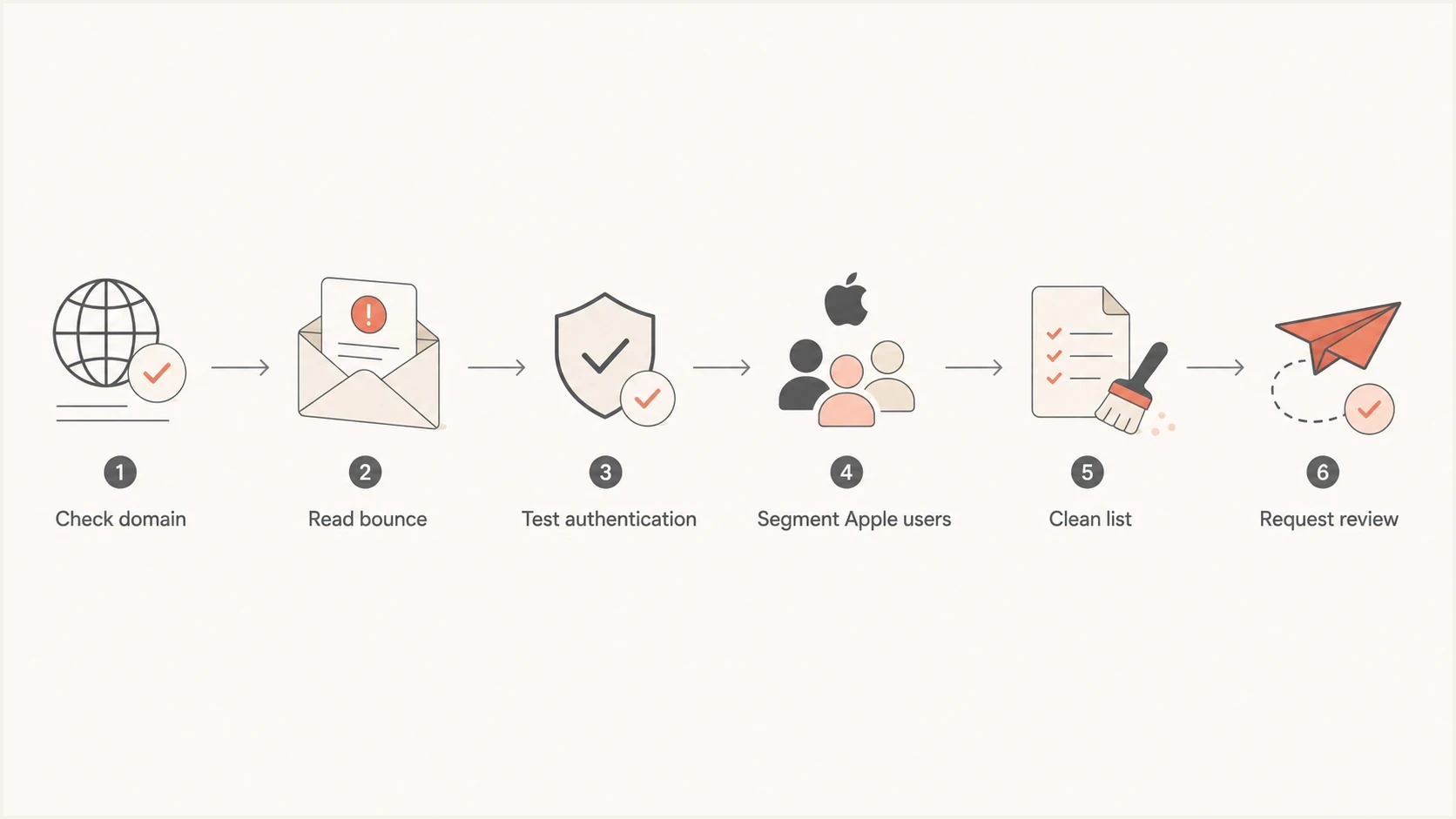
Flowchart showing the iCloud delivery troubleshooting path.
Clean the Apple segment before asking for review
When Apple rejects mail due to local policy, list quality matters. I suppress confirmed bad addresses, remove old unengaged Apple recipients, and stop sending to recipients who never opted in. That work has to happen before a postmaster request, because asking for a block to be lifted while the same poor-quality traffic continues usually leads to another rejection.
I also check the sending IP and domain together. Apple says its filtering considers IP reputation, domain reputation, content checks, and user feedback. A recent blocklist or blacklist event can add context even when the listing is gone. Suped's blocklist monitoring connects those signals with the same domain monitoring workflow, so the team can compare the timing of Apple failures with a reputation incident.
Use evidence, not an invented bounce threshold
Apple does not publish a universal bounce-rate threshold for postmaster review. Treat the stream as ready only when authentication passes, permanent failures are suppressed, consent is documented, and a controlled Apple test no longer shows a broad pattern of rejects.
- Suppress bounces: Remove Apple recipients that hard-bounced, including addresses with confirmed domain typos.
- Reduce risk: Pause old, unengaged Apple recipients until the sender is stable again.
- Separate streams: Keep transactional mail away from risky marketing traffic during the repair.
- Record evidence: Keep bounce samples, timestamps, authentication results, and cleanup dates.
Run a controlled delivery test
After DNS and list cleanup, I run a controlled test instead of sending another full campaign. The goal is to prove that a clean message, sent through the same production path, authenticates correctly and reaches Apple without the same rejection.
Use a real production sender, the same return-path pattern, the same DKIM selector, and a small Apple-only test segment. If the test passes, expand slowly. If the test fails, the preserved SMTP evidence tells you exactly which path still needs work.
A single email test can catch visible authentication, content, and header problems before you put Apple recipients back into a campaign. Treat that as a preflight check, not as proof that every Apple mailbox will accept the next send.
Email tester
Send a real email to this address. Suped shows a results button when the test is ready.
?/43tests passed
I keep the test boring on purpose: no new template, no new subject line, no new sender domain, and no sudden volume jump. If you change five things at once, a pass or fail does not tell you which factor mattered.
Controlled test checklisttext
from_domain=example.com
return_path=bounces.example.com
dkim_selector=selector1
recipient_group=apple-seed
template=current-production
volume=small
If the controlled test fails only at Apple, compare the failing headers with a successful non-Apple delivery. I look for missing DKIM signatures, return-path changes, rewritten links, unexpected forwarding, different IP pools, and content differences because Apple evaluates content as well as sender reputation.
Ask Apple for review only after the evidence is clean
Contacting Apple before the fix work is complete wastes time. I send a review request to icloudadmin@apple.com only after the Apple segment has been cleaned, authentication passes, recent bounces are suppressed, and the current test shows a stable stream. Apple asks for the company name, sending domain, affected mail-server IPs, SMTP errors, and a detailed description that includes when the problem started.
What to include in the review request
- Sender identity: Provide the company name, sending domain, envelope domain, affected IP addresses, and business use case.
- Failure samples: Include recent SMTP responses with timestamps and Apple recipient domains.
- Fixes made: List the suppression, consent, authentication, and volume changes already completed.
- Issue timeline: Describe when the failures started and show the results of the latest controlled test.
Do not frame the request as "Apple is blocking us and we do not know why." State the likely causes, the completed fixes, and the remaining policy rejection. That gives the receiver concrete evidence instead of a generic complaint.
Short review request outlinetext
Company: Example Company
Domain: example.com
Sending IPs: 192.0.2.10, 192.0.2.11
Issue: 550 5.7.1 local policy rejects at Apple domains
Started: 2026-08-10 09:00 UTC
Fixes: list cleanup, bounce suppression, DKIM repair
Current test: SPF pass, DKIM pass, DMARC pass
Request: please review the remaining Apple policy block
Views from the trenches
Best practices
Confirm icloud.com, me.com, or mac.com before treating an Apple reject as reputation.
Segment Apple addresses and compare failure rates against the same campaign timeframe.
Clean unengaged Apple recipients before asking Apple to review a sender block or listing.
Common pitfalls
Assuming every local policy rejection has the same cause slows the repair work for Apple.
Contacting Apple before fixing consent, bounces, and authentication leads to repeat rejects.
Ignoring old blocklist or blacklist events hides patterns that still affect inbox placement.
Expert tips
Keep an Apple-only seed and test mailbox so content and routing changes are visible quickly.
Use DMARC aggregate data to find the exact sender source causing Apple delivery failures.
Document the fix timeline, because Apple review requests need specific evidence and dates.
Marketer from Email Geeks says a typo in the recipient domain should be checked before reputation work, because a fake Apple-looking domain without MX records turns a delivery problem into an addressing problem.
2021-10-19 - Email Geeks
Marketer from Email Geeks says Apple's local policy rejection is common and usually needs list cleanup before asking Apple to lift a block.
2021-10-19 - Email Geeks
Follow the iCloud repair order
The practical fix order is simple: confirm the Apple address, preserve the bounce, repair SPF, DKIM, and DMARC, verify Apple's bulk-sender requirements, clean the Apple recipient segment, check recent blocklist and blacklist context, then test with controlled volume. Only after that does a postmaster review request make sense.
For teams managing this across several domains or clients, Suped's product keeps domain diagnostics, DMARC reports, SPF and DKIM visibility, hosted authentication, MTA-STS, alerts, remediation steps, and multi-tenant reporting in one workflow. That helps the team isolate the source of an iCloud incident and preserve the evidence needed for an Apple review request.
If the issue is a typo or a single recipient mailbox, fix the address or have the recipient check their Apple account. If the issue affects many iCloud, me.com, or mac.com recipients, fix your authentication, list quality, sender infrastructure, and reputation evidence before requesting review.




