What should you do after accidentally sending an email with a mistake?

Published 9 May 2025
Updated 15 Jul 2026
13 min read
Summarize with
Updated on 15 Jul 2026: We added practical recall guidance and expanded the response for misdirected sensitive email.
If you accidentally send an email with a mistake, do not rush into sending a second email. First, decide whether the mistake changes what the recipient must know or do. If the error is cosmetic, such as extra template text, a broken spacer, a typo, duplicated footer content, or a strange formatting issue at the bottom, the best move is usually to leave it alone. A correction email often draws more attention to a mistake that many recipients never saw.
Send a correction only when the first email gave the wrong price, wrong date, wrong legal wording, wrong recipient data, broken primary link, missing required information, or anything that creates confusion, risk, or harm. That is the practical line I use: if the recipient needs new information to make a good decision, send a correction. If the mistake only makes the sender feel embarrassed, pause.
- Impact: Does the mistake change the offer, instruction, account status, billing information, or safety of the message?
- Visibility: How many people received the email, clicked it, replied, or reached the incorrect part? Treat opens as directional because privacy protections and automated activity can distort them.
- Risk: Did the email expose personal data, violate consent, misstate terms, or send users to the wrong destination?
- Action: Can the team fix the landing page, form, coupon, product setting, or support article without emailing again?
The first 15 minutes
The first 15 minutes are for containment, not for blame or public apology. I want one person to own the incident, another person to check the facts, and a clear decision on whether the send platform can stop any remaining delivery. Most mass email mistakes are already delivered by the time anyone notices, but stopping queued sends, pausing automations, and preventing a duplicate resend still matters.
Pull the sent email exactly as recipients received it. Do not rely on the editor preview, because previews often hide clipping, fallback text, personalization failures, or mobile rendering problems. Check the live email in at least one inbox, one mobile client, and one webmail view. If the mistake was a broken link, test the redirect path and destination before deciding whether a correction is needed.
Do not send an apology because the team is embarrassed. Send one because recipients need corrected information or a specific next step.
- Pause: Stop scheduled follow-ups, triggered branches, paid retargeting audiences, and social posts tied to the same campaign.
- Capture: Save the delivered email, send time, audience, subject line, links, screenshots, and any personalization fields used.
- Classify: Put the issue into a severity level before anyone writes a follow-up message.
- Repair: Fix landing pages, redirects, forms, product pages, promo codes, and help articles before sending again.
Can you recall or unsend the email?
Use Undo Send immediately if the option is still visible. Gmail holds a message for the selected cancellation period, which can be set to 5, 10, 20, or 30 seconds. Outlook.com offers a 5- or 10-second delay. These controls cancel delivery during a brief hold; they do not pull a delivered message back from the recipient's inbox.
Message recall has narrower conditions. Outlook recall can work when the sender and recipient use Microsoft 365 work or school accounts in the same organization and the message is still eligible for recall. Check the recall report instead of assuming success. For personal accounts or external recipients, treat the email as delivered and continue containment.
- Cancel: Use the active Undo Send control before its cancellation period expires.
- Recall: Attempt recall only in a supported mail environment, then verify the result for each recipient.
- Revoke: Remove access to shared files, disable exposed links, and rotate any credentials or tokens in the message.
- Respond: Do not wait for recall status before fixing the source, assessing risk, or preparing a targeted correction.
Recall is a containment attempt, not proof that the message or attachment disappeared. Keep an incident record even when the recall report shows success.
When to ignore it
Ignoring an email mistake sounds risky, but it is often the most respectful choice. If the mistake is harmless and the corrected email would not change recipient behavior, another email becomes extra noise. That extra noise can create unsubscribes, complaints, replies to support, and confusion among people who never noticed the first issue.
Template debris at the bottom of a long campaign is a common example. If the main offer, link, personalization, consent status, and legal footer are correct, I would usually fix the internal process and move on. Many recipients do not open. Many who open do not scroll to the end. Many who see the error will understand that someone made a production mistake and keep moving.
Usually leave it alone
- Cosmetic: Extra whitespace, awkward wrapping, or a visible template note with no customer impact.
- Minor typo: A spelling error that does not change meaning, price, terms, or trust.
- Low exposure: A mistake buried below the main content, especially in a clipped or long email.
Send a correction
- Wrong facts: The email has incorrect dates, prices, eligibility, deadlines, names, or instructions.
- Broken path: The main link, coupon, form, login, or download blocks the intended action.
- Trust risk: The mistake involves private data, account access, consent, billing, or security.
A useful test is to imagine a recipient writing to support. If the support reply would be, "Sorry, that odd text was not meant to be there, but the offer and link are correct," a broadcast apology is likely excessive. If the reply would require a corrected price, new link, updated date, or privacy explanation, send the correction.
When to send a correction
A correction email should be brief and useful. It should not repeat the entire campaign unless the original message was unusable. The best correction answers four questions quickly: what was wrong, what is correct, what recipients need to do, and whether any prior action they took still counts.
There is a real temptation to make "oops" emails playful because they can get high open rates. That can work for a harmless brand moment, but it becomes manipulative when the problem is invented or exaggerated to get another click. Trust is harder to rebuild than a campaign metric, so I keep correction emails factual.
|
|
|
|---|---|---|
Typo | No | Fix QA |
Template text | Usually no | Monitor replies |
Bad link | Yes | Fix link |
Missing attachment | Yes | Attach and resend |
Wrong price | Yes | Clarify terms |
Private data | Yes | Escalate |
Correction decision table
Simple correction email
Subject: Correction to our previous email

Hi,

The email we sent earlier contained an incorrect date.

The correct date is [correct date and time].

If you already registered, no action is needed. Your registration is still valid.

Sorry for the confusion.

The Team
The subject line should describe the fix, not dramatize the mistake. Use "Correction," "Updated link," "Correct date," or "Important update" when the issue warrants it. Avoid fake urgency. If the first email was promotional, the correction can still be plain and transactional in tone, because the purpose has changed.
Protect deliverability after the mistake
Most accidental content mistakes are not deliverability incidents by themselves. A visible builder template, a typo, or a clipped email does not automatically damage sender reputation. The deliverability risk comes from what happens next: unnecessary resends, angry replies, spam complaints, high unsubscribe volume, or a correction that reaches people who did not need it.
After a bad send, I check delivery, clicks, replies, unsubscribes, complaint rates, and bounces before touching the next campaign. Do not use open rate alone, because privacy protections and automated activity make it an unreliable measure of human attention. If the other signals stay near their normal ranges, keep the next send on schedule. If complaints spike, wait, segment more tightly, and send only to recently engaged recipients until the signal stabilizes.
Email tester
Send a real email to this address. Suped shows a results button when the test is ready.
?/43tests passed
Before resending a corrected message, send a real copy through an email tester so you can inspect rendering, authentication, links, content flags, and headers. That check is especially useful when the correction has a new subject line, new link, or new sender identity.

Email tester sample report showing total score, email preview, issue summary, and per-section results
If the incident involved a spoofed lookalike message, a compromised sending account, or suspicious authentication failures, move beyond content QA and check the domain itself. Suped's domain health checker can validate DMARC, SPF, and DKIM signals in one place before you resume normal sending.
For ongoing protection, Suped's DMARC monitoring helps separate a normal content mistake from authentication trouble. That matters because the response is different. A typo needs a QA fix. A burst of unauthorized mail needs source investigation, policy review, and sender lockdown.
After an errant send, Suped can be used to review DMARC source activity, SPF and DKIM results, blocklist or blacklist status, and incident alerts in the same workflow. This helps the team confirm whether it has a content error, authentication problem, reputation issue, or account compromise before changing the next campaign.
Handle serious mistakes differently
A wrong link and a data exposure should not share the same response plan. If the email exposed personal information, sent account-specific content to the wrong person, revealed internal notes, or referenced a data issue, stop marketing-led decisions and involve legal, security, privacy, and customer support. The correction email is only one part of the response.
If a sensitive email went to the wrong recipient, identify exactly what data was exposed, who received it, whether recall is available in the same mail system, and whether the recipient should be contacted directly. Preserve the evidence first. With the incident owner's approval, ask the unintended recipient not to forward the message and to delete the email and attachments. Do not treat a deletion confirmation as proof that no copy exists.
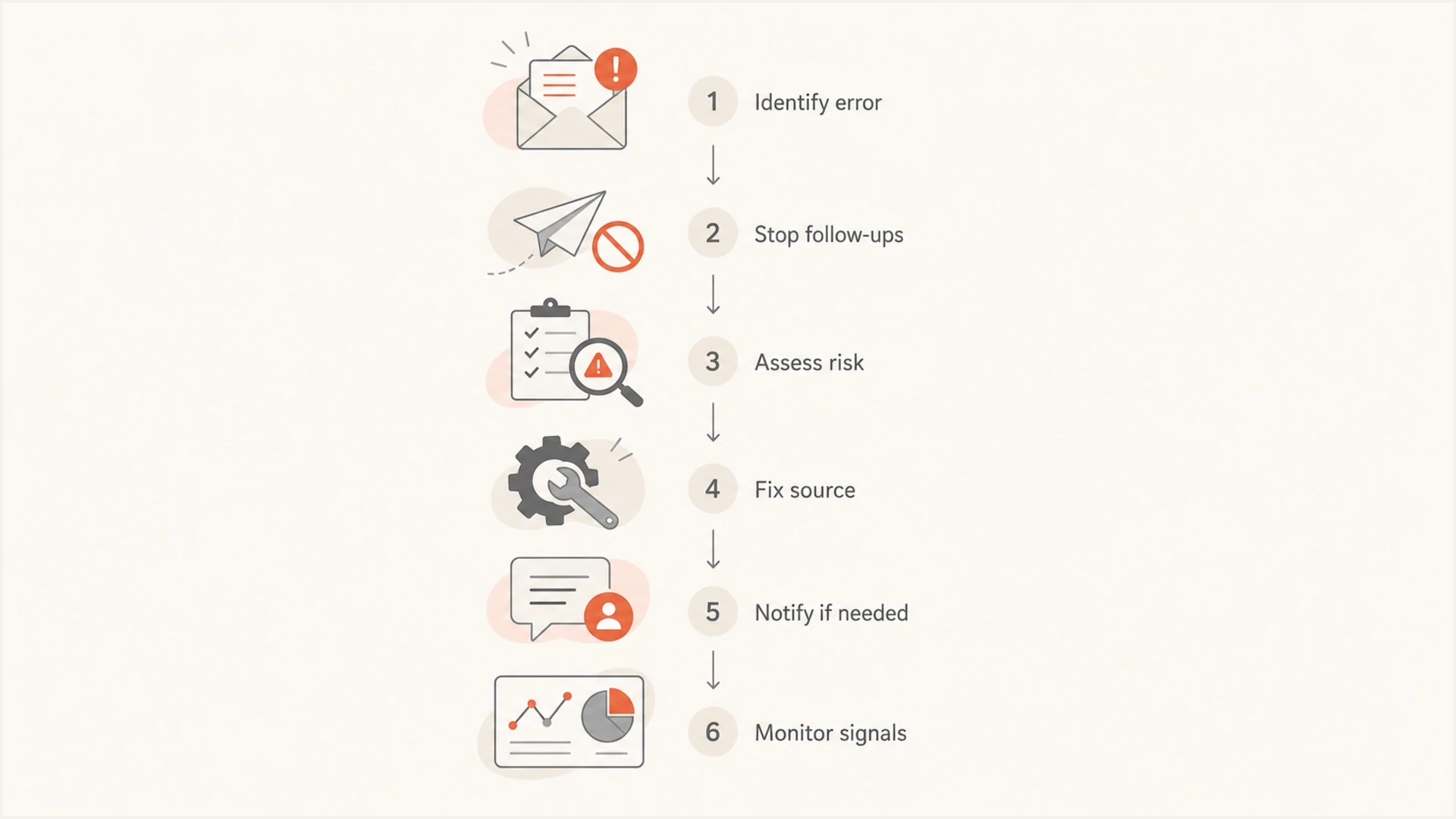
Flowchart for containing, assessing, and correcting an accidentally sent email.
- Security: Treat exposed credentials, reset links, account data, or private documents as a security incident.
- Privacy: Document recipients, exposed fields, jurisdictions, timestamps, and the exact message content.
- Support: Give the support team a short approved answer before the first customer reply arrives.
- Legal: Use legal review for breach, billing, regulated industry, contract, or consent-related mistakes.
For breach-related messaging, the content needs more than an apology. It needs known facts, affected data categories, recommended user actions, support channels, and timing. A separate guide on data breach emails covers that scenario in more depth.
Write the follow-up without making it worse
A correction email should be smaller than the original campaign unless the whole message must be replaced. I normally remove the campaign flourish, keep the sender identity the same, and make the corrected information visible near the top. If the first email had a broken call-to-action, the correction can focus on the working link. If the first email had the wrong date, the correction should put the right date in the first paragraph.
Do not over-explain internal causes. Recipients do not need to know that the wrong merge tag was approved, the template block was left in place, or a new staff member hit send. They need correct information and confidence that the next action is clear.
A good correction says what changed, gives the corrected detail, explains whether the recipient needs to act, and stops. Short is not cold. Short is respectful.
Broken link correction
Subject: Updated link for today's email

Hi,

The link in our earlier email did not open the correct page.

Use this updated link instead:
https://example.com/correct-page

If you already reached the page, no action is needed.

Sorry for the inconvenience.

The Team
If the mistake affected only a segment, send only to that segment. If the wrong link was clicked by 600 people out of a list of 80,000, a broad apology is unnecessary. A targeted correction to clickers and a fixed landing page will usually solve the real problem with less inbox disruption.
Prevent the next bad send
The post-incident review should focus on the system, not the person. Most bad sends happen because the process allows a single person to move from editing to approving to sending without enough friction. A reliable process catches hidden template blocks, broken personalization, bad links, wrong segments, missing suppression lists, and authentication issues before the final send.
I like a two-pass review. The first pass checks the message as content: subject, preview text, body, offer, links, legal footer, and mobile rendering. The second pass checks the send setup: audience, suppressions, throttling, UTM tags, reply-to address, sender domain, authentication, and schedule. Splitting those reviews makes it easier to catch setup mistakes that a copy review misses. Add a seed list with real inboxes and use a short cancellation window for high-impact sends so the team can inspect the delivered message before the full audience receives it.
Correction urgency
Use the severity of the mistake, not internal anxiety, to decide how fast and broadly to respond.
Low
Monitor
Cosmetic issue with correct content and links.
Medium
Target
Incorrect detail that affects a subset of recipients.
High
Correct
Wrong price, deadline, access, or primary action.
Critical
Escalate
Private data, security, billing, or legal exposure.
- Checklist: Use a pre-send checklist that covers content, audience, links, suppressions, authentication, and approvals.
- Proofs: Send proofs to people who were not involved in building the email, including a mobile reviewer.
- Locks: Limit production send rights and require approval for large audiences, new domains, or sensitive campaigns.
- Monitoring: Track bounce, complaint, authentication, and blocklist or blacklist signals after unusual sends.
If spam complaints rose because of an errant send, do not blast the full list again the next day. Reduce volume, send to recently engaged users, and watch complaint rates before widening the audience. The recovery plan is similar to re-warming a domain after a complaint spike.
Views from the trenches
Best practices
Use severity, exposure, and user impact to decide whether a correction send is needed.
Fix links, pages, forms, and automations before sending any follow-up correction email.
Keep correction copy short, factual, and targeted only to recipients who need the update.
Common pitfalls
Sending an apology for a harmless typo can create more attention than the mistake earned.
Using fake mistake emails for clicks damages trust when subscribers realize the tactic.
Ignoring privacy or security exposure turns a content mistake into a mishandled incident.
Expert tips
Compare complaint rates and replies against normal campaign ranges before changing cadence.
Save the delivered email and screenshots before editing templates or campaign assets.
Add approval gates around large lists, sensitive content, and new sender domain setup.
Marketer from Email Geeks says a harmless visible template mistake can be used lightly in a later campaign, but it does not always require a standalone apology.
2019-07-10 - Email Geeks
Marketer from Email Geeks says apology emails can get higher opens than normal campaigns, so the team should only use that attention when there is a real correction.
2019-07-10 - Email Geeks
What to do after a mistaken email
After accidentally sending an email with a mistake, classify the mistake before sending anything else. Ignore harmless cosmetic mistakes, quietly fix anything outside the inbox, and monitor replies and complaint signals. Send a correction only when the original email gave recipients wrong or incomplete information, blocked the intended action, or created privacy, security, billing, or legal risk.
When a correction is needed, make it brief and targeted. Do not turn the error into a gimmick. Then update the process that allowed the mistake through. For teams managing multiple sender domains, Suped can keep authentication results, reputation signals, blocklist or blacklist monitoring, and incident alerts visible in one place, so the next response is based on evidence rather than panic.




