What should I do if a user's email hard bounced and they aren't receiving emails?

Updated on 25 Jul 2026: We tightened the hard bounce recovery steps and clarified how to distinguish bounce suppressions from opt-outs before retrying.
If a paying user's email hard bounced and they are not receiving emails, do not ask for a new email as the first move. First, confirm the exact address, find the original SMTP bounce reply, check whether your email platform suppressed the address, then reactivate it only after the user proves they control that mailbox and you verify that the original failure is recoverable or resolved. If the address hard bounces again after that controlled retry, move them to a different email address.
Treat this as a customer support recovery flow, not a normal marketing list hygiene task. A hard bounce signals a permanent failure for that message in its current form. It often means the mailbox is invalid or closed, but a provider can also return a permanent policy rejection. When the user is present, paying, and saying the mailbox works, the right answer is a one-time verification and reactivation process with a clear audit trail.
The short version is simple: verify, unsuppress, test, then monitor. The mistake is skipping the verification step and repeatedly forcing mail at an address that has already returned a permanent failure.
The direct fix
The practical fix is to remove the user from the suppression state that was created by the hard bounce, then send one controlled email. Before doing that, make the user reconfirm the address. A simple typo, a restored account, or a mailbox that was disabled for a short period can produce a permanent failure for the original message.
- Confirm: Ask the user to type the address again, not only say it looks correct.
- Verify: Ask them to send a fresh message to support from the same mailbox, or verify through their signed-in account.
- Inspect: Find the exact bounce code, remote server text, timestamp, message type, and suppression reason.
- Clear: Remove only a bounce suppression after the user confirms ownership and the original cause is resolved.
- Retry: Send one low-risk transactional or account email, then confirm the delivery result.
- Decide: If it bounces again, stop sending and ask for a different email address.
Do not bulk clear hard bounces
A one-user recovery is different from clearing a suppression list. A hard bounce tells mailbox providers that an address failed permanently for the attempted message. Repeatedly mailing those addresses raises bounce rates and can damage sender reputation.
This is also where your internal data model matters. Some systems store hard bounces as a global suppression. Some store them per channel, per campaign type, or as an unsubscribe-like state. Others keep the user subscribed in preferences but block delivery deeper in the sending pipeline. Check every layer that handled the address because clearing the customer record does not clear a separate sending-provider suppression. If the user still looks subscribed, that does not prove they can receive email.
Check the bounce before changing the email
The bounce category alone is not enough. Review the SMTP reply and enhanced status code because the word hard can hide different situations. A 4.x code indicates a persistent transient failure, while a 5.x code means something about the message or destination must change before a retry. A hard bounce caused by an invalid recipient needs a different response than a policy rejection that your platform classified as permanent.
|
|
|
|---|---|---|
5.1.1 | Unknown user | Confirm address |
5.2.1 | Disabled mailbox | Confirm re-enabled |
5.7.1 | Policy or security rejection | Inspect sender and policy |
Suppressed | Platform rule | Check reason and scope |
Use the SMTP reply first, then the platform's bounce label.
Bounce evidence to collecttext
Recipient: customer@example.com
Provider reply: 550 5.1.1 account does not exist
ESP category: hard bounce
Suppression reason: bounce
Suppression scope: email channel
Last successful send: 2026-02-10
User verification: inbound support message received
Requested action: one-time retry after cause is resolved
If the bounce was three months ago, check whether its cause was corrected. The user can restore a disabled mailbox, fix storage, change a recipient policy, or regain access. Age alone does not make a 5.1.1 unknown-user result safe to ignore. A support agent needs current ownership proof and evidence that the specific failure is resolved before running one careful reactivation.
For deeper classification, keep a local playbook for SMTP bounce codes. The code tells support whether to reactivate, pause, or request a new address.
Do not clear consent suppressions
A suppression list can contain events with different meanings. A spam complaint or unsubscribe is not a delivery error and must not be cleared as though it were a hard bounce. Check the recorded reason before changing any suppression state.
|
|
|
|---|---|---|
Hard bounce | Permanent failure for the attempted message | Verify cause, then retry once |
Spam complaint | Recipient reported unwanted mail | Keep marketing suppressed |
Unsubscribe | Recipient withdrew marketing consent | Require a new recorded opt-in |
Manual or legal hold | Internal policy blocks delivery | Follow the owning team's policy |
Match the recovery action to the recorded suppression reason.
Keep marketing consent separate from the customer's need for account or service messages. A support request to restore receipts does not create permission for promotional email. If the user wants marketing mail again, capture a fresh affirmative opt-in through your normal consent process.
Unsuppressing does not resend missed email
Removing a bounce suppression permits new delivery attempts. It does not automatically redeliver notifications, receipts, or verification messages that were skipped while the address was suppressed. Trigger a new current message after the address is cleared.
Use a decision path
The decision path should protect both the customer experience and sender reputation. A paying user should not be locked out of receipts, password resets, account notices, or service messages because of one old bounce. At the same time, support should not override permanent failures without proof.
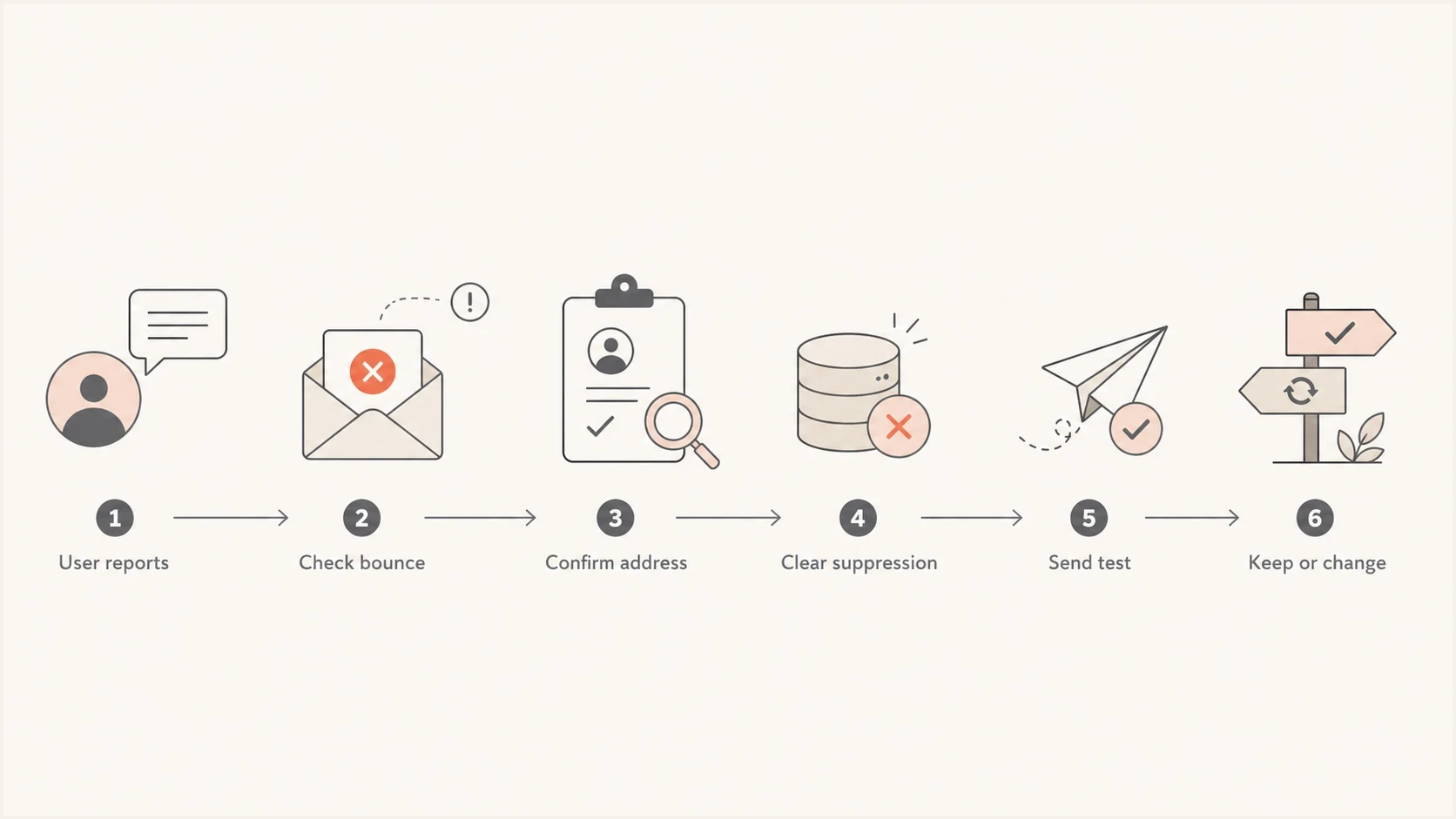
Hard bounce recovery flowchart from SMTP review to suppression removal and retest.
Reactivation confidence
Use these bands to decide whether to retry the same address or collect a new one.
Safe to retry
Confirmed mailbox
The user sent an inbound message from the same mailbox and the old bounce cause was resolved.
Retry once
Limited evidence
The old bounce text is vague, but the user confirms control of the address.
Hold delivery
Fresh hard bounce
The latest attempt returned a fresh permanent failure.
Use new email
No proof
The user cannot prove control of the mailbox or the bounce repeats.
That path also gives support a clear answer: do not change the customer's email address until the original address fails the verification attempt or the user cannot prove access. Changing the email too early creates account matching issues, duplicate identities, and support confusion later.
How to reactivate the user
The reactivation method depends on where your platform stores suppression. If there is a visible suppression list, remove the address there. If the suppression is tied to a channel preference, restore the channel only after verifying that the user still wants those messages. If the platform needs a workflow or API call, make that workflow support-only and log the reason.
Good recovery flow
- Identity: Confirm the user owns the account and mailbox.
- Evidence: Store the old bounce, its suppression reason, and the support confirmation.
- Scope: Clear only the affected address or channel.
- Retry: Send one monitored message before normal traffic resumes.
Risky recovery flow
- Assumption: Trusting the user report without checking the bounce.
- Blast: Clearing many suppressed users at the same time.
- Bypass: Creating a duplicate email identity without merging records.
- Silence: Letting support clear suppressions with no audit note.
After you clear the suppression, send a real message through the same mail path the customer needs. An inbound support message proves mailbox control, but it does not prove your application mail is authenticated, routed, and accepted. Use the same sender domain, message class, and envelope setup where your platform allows it.
A practical way to inspect the message is to send a controlled sample through Suped's email tester. That helps confirm authentication, message headers, and visible issues before you push the user back into normal sends.
Email tester
Send a real email to this address. Suped shows a results button when the test is ready.
?/43tests passed
For a personal @gmail.com account, dot variants and plus labels can be a last-resort workaround. Personal Gmail treats dots in the local part as the same inbox, and plus labels route to the same mailbox. Dots can change the address on work, school, or other managed domains, even when the user reads that mail through Gmail. Many email platforms treat alias versions as different addresses, so customername@gmail.com can often receive at customer.name@gmail.com or customername+brand@gmail.com.
Use Gmail aliases carefully
The dot or plus trick should be a support workaround, not the default fix. It can bypass a platform suppression, but it can also create duplicate users, break account matching, and hide the real bounce cause. If you use it, merge the account identity and document the reason.
When the bounce points to your sending setup
A single user's old hard bounce usually points to that address or your platform's suppression state. A pattern across many users points to a sender issue. If multiple Gmail, corporate, or regional addresses start failing, stop treating it as a customer-by-customer support issue and inspect your domain health.
Start with a domain health check to confirm SPF, DKIM, DMARC, DNS, and sending-domain basics. Then use Suped's DMARC monitoring to see whether legitimate mail streams pass authentication across providers.
Suped DMARC dashboard showing email volume, authentication health, and source breakdown
Suped's DMARC reporting connects authentication records, sending sources, and results in one operating view. For this support case, use it to confirm that the sender is authorised, DKIM is passing, and a policy change has not caused valid customer mail to fail.
If your bounce logs mention reputation, IP refusal, or domain-level blocking, check blocklist monitoring too. Teams use both blocklist and blacklist for this condition. The operational question is the same: is a sender or domain being rejected before the user has a chance to receive the message?

Issue steps to fix dialog showing the issue overview, tailored fix steps, and verification action
Suped's issue detection and steps to fix give support and engineering a shared remediation path. If authentication or a blacklist event is causing bounces, the platform can point to a concrete DNS or sender action instead of leaving support to infer the cause.
Prevent the same case next time
The best recovery process is the one support can run safely without waiting on engineering. Create a documented hard bounce reactivation path for paying users, then put guardrails around it. The guardrails matter because support will see the human side of the issue while deliverability systems see the aggregate risk.
- Playbook: Write one support procedure for verifying, clearing, testing, and documenting.
- Permissions: Limit suppression removal to trained roles with account-level context.
- Audit: Store the SMTP reply, suppression reason, ownership proof, agent, timestamp, and retry result.
- Limits: Allow one reactivation attempt for a confirmed hard bounce, then require a new address.
- Alerts: Notify deliverability owners when repeat hard bounces rise by domain or source.
Support response templatetext
Hi {{first_name}},

We found that email delivery to {{email}} was paused after a
previous hard bounce. Please send a new message from {{email}} to
{{support_email}} so we can confirm you control the mailbox.

After we confirm it and the bounce cause is resolved, we will send
one account email as a test. If that message bounces again, we will
help you switch to another email.
For marketing lists, the rule should stay stricter. For transactional and account mail, a paying customer's request deserves a controlled recovery path. That difference should be explicit in your policy so agents do not guess under pressure or treat account recovery as renewed marketing consent.
One more practical detail: make the platform state visible in the customer record. A user can be subscribed, opted in, and still blocked by a bounce suppression. Showing those as separate fields prevents the common support answer of "you are subscribed" when the real problem is hidden suppression.
Views from the trenches
Best practices
Verify the mailbox, bounce code, suppression reason, and consent before a support retry.
Use an inbound message when a paying customer says the same mailbox works today.
Log who cleared the suppression and why, so future support cases have clear context.
Common pitfalls
Treating every hard bounce as permanent even after the original cause was corrected.
Changing the customer's email before checking whether the original address had a typo.
Using Gmail aliases to bypass suppression without merging the account identity afterward.
Expert tips
Create a support-only reactivation workflow that sends one monitored account email.
Store the original SMTP reply because the category alone hides the real failure reason.
Monitor repeat hard bounces after reactivation and suppress again after one clear failure.
Marketer from Email Geeks says suppression removal is the first thing to check when a confirmed customer stops receiving mail after a hard bounce.
2022-05-03 - Email Geeks
Marketer from Email Geeks says the customer should reconfirm the exact address and send a fresh message from it before the sender trusts that mailbox again.
2022-05-03 - Email Geeks
What to do next
For one paying user, the answer is not "make a new email" by default. The answer is to confirm the same mailbox, review the bounce, remove only the bounce suppression with a logged reason, and send one monitored test. If the test succeeds, keep the address. If it fails again, collect a new address and keep the suppression in place.
For repeated cases, fix the system rather than each user. Make suppression state visible, train support on bounce codes, and monitor authentication and sender-source changes, including blocklist (blacklist) events. Suped supports this operating flow with DMARC reporting, authentication results, blocklist visibility, and issue alerts in one place.




