Why are emails hard bouncing with 'The email account does not exist' after previously being opened and received?

Updated on 3 Aug 2026: We added a DSN verification workflow and clarified when a Gmail 5.1.1 bounce should trigger suppression instead of sender-side troubleshooting.
Yes, an address that previously received email can later hard bounce with "The email account does not exist," including at Gmail. A prior delivery, reply, or credible click shows that the address worked at that earlier time. An open by itself only records a tracking-pixel load. A later 550 5.1.1 response says the destination mailbox address does not exist when the new delivery is attempted.
Treat this as a current recipient problem first, not a sender authentication problem. Gmail's Gmail bounce help directs senders to review the bounceback details and check the recipient address. The exact 5.1.1 wording is a permanent destination-address failure. If the raw response came from Gmail's delivery path and names the intended recipient, suppress the address unless the person supplies a corrected or reconfirmed address.
The short version: prior engagement lowers the chance of an old typo, but it does not protect the address forever. Gmail accounts can be deleted, Workspace users can be deprovisioned, aliases can be removed, stored addresses can change during a CRM sync, and open tracking can lag behind the current mailbox state.
The short answer
A hard bounce after previous engagement usually means the recipient address became invalid after the last successful delivery. The delivery history remains real, but the address is no longer reachable. With Gmail, common patterns include a personal account that has been closed or a Google Workspace mailbox, alias, or group that has been removed. Also check whether an import, form update, or CRM sync replaced the address after the earlier engagement.
- Mailbox changed: The recipient existed before, then the mailbox, alias, or account stopped accepting mail.
- Open is historical: A past pixel load does not prove that today's mailbox exists or still belongs to the same person.
- Bounce is current: A verified 550 5.1.1 reply is Gmail's current delivery decision for that recipient.
- Action is suppression: Keep the address out of normal campaigns unless the recipient updates or reconfirms it.
Typical Gmail 5.1.1 bounce texttext
550 5.1.1 The email account that you tried to reach does not exist.
Please double-check the recipient address for typos or spaces.
For more information, go to Google help.
... - gsmtp
How to classify the signal
Handling depends on whether the evidence is a temporary response, a simplified platform label, or a verified SMTP diagnostic.
Low confidence
retry
One ambiguous temporary failure or timeout.
Medium confidence
review
A generic hard-bounce label without the raw SMTP response.
High confidence
suppress
Gmail 550 5.1.1 received through the recipient delivery path.
Why prior opens do not prove the mailbox still exists
Open data is useful, but it is not a live mailbox test. The open event normally comes from a tracking pixel being loaded. That event can happen long before the bounce, and it can be influenced by image caching, forwarding, security scanning, or an old message being reopened. None of those events runs a new SMTP check against the recipient address.
What an open shows
- Pixel activity: A system requested the tracking image at a previous point.
- Delivery evidence: The message reached a location where the pixel could be requested.
- Engagement hint: A click or reply makes human activity more credible than an open alone.
What a 5.1.1 shows
- Current refusal: Gmail rejected the new message during delivery.
- Permanent class: The 5.x.x status family means resending the unchanged message should not succeed.
- Recipient scope: The wording identifies the destination address, not the sending domain setup.
The timing matters. An address that opened in September and bounced in November is easy to explain because the account or stored address changed during that gap. An address that opened yesterday and bounced today needs a closer look at the raw Delivery Status Notification (NDR or bounceback), but an authoritative SMTP reply still carries more weight than the open event.
Do not assume this is a blocklist or blacklist problem. A blocklist (blacklist) issue usually affects delivery across many recipients or produces a wider provider pattern. A no-such-user bounce concerns one destination address unless the same response suddenly appears across a large imported segment with faulty data.
Common causes after a real Gmail address worked
The account or stored contact data usually changed after the subscriber received earlier mail. Check these cases first when the bounce text says the mailbox does not exist.
|
|
|
|---|---|---|
Deleted account | 5.1.1 | Suppress |
Removed user | Workspace | Suppress |
Alias removed | Single address | Confirm |
Stored address changed | CRM or import | Restore or correct |
Scanner open | No clicks or replies | Review |
Common explanations for a Gmail or Google-hosted 5.1.1 bounce.
A personal Google Account can stop receiving after the owner closes it. Google's inactive account policy also permits deletion after at least two years without account activity. That policy applies to personal accounts, not accounts managed through work, school, or another organization.
Google Workspace addresses can fail when an administrator removes a user, group, routing rule, or alias. Contact databases create another path: a CRM sync, list import, or form submission can overwrite a previously valid address with a typo or outdated value. In each case, the previous send can be clean while the next send returns a hard bounce.
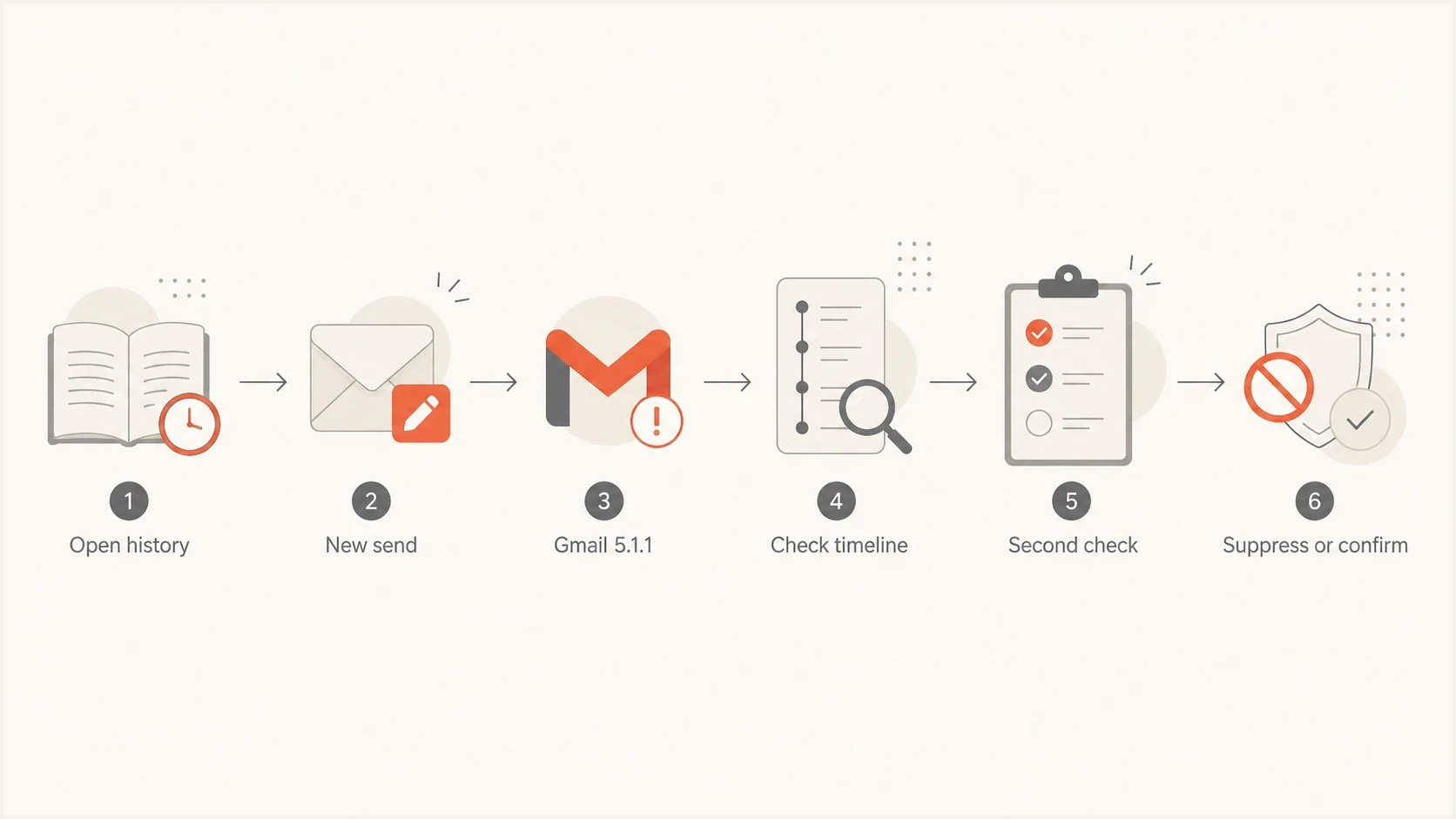
Flowchart showing how to handle a Gmail 5.1.1 hard bounce after prior engagement.
How to investigate without overreacting
Start with the raw bounce, not the campaign dashboard label. Marketing platforms often simplify bounce categories. The useful evidence is the SMTP reply, enhanced status code, named recipient, remote server, and diagnostic text.
Then compare the bounce with the recipient timeline. The useful question is not "did this address ever open?" Ask what changed between the last credible recipient action and the first 5.1.1 refusal.
- Read the SMTP text: Confirm it says 550 5.1.1 or another permanent recipient-not-found code.
- Check the gap: Compare the bounce time with the last credible click, reply, purchase, or login.
- Check the stored value: Compare the current recipient address with the value used for the last successful delivery.
- Segment the pattern: Separate personal Gmail addresses from Google Workspace domains.
- Look for repeats: A few isolated bounces are normal. A sudden spike needs a wider data and delivery investigation.
To test the sender side, send a controlled message through the same sending path to Suped's email tester. This checks authentication and message setup separately. It does not validate the bounced recipient and should not be used to keep probing a confirmed no-such-user address.
Email tester
Send a real email to this address. Suped shows a results button when the test is ready.
?/43tests passed
Do not keep retrying a confirmed no-such-user address because it opened once. Repeated sends to dead addresses weaken list hygiene and add unnecessary hard bounces to sending history.
How to confirm the 5.1.1 is authoritative
A dashboard label such as "hard bounce" does not identify the cause by itself. Review the full Non-Delivery Report or SMTP transcript and confirm that the failed recipient matches the address you sent, the status is 5.1.1, and the diagnostic came through the recipient domain's delivery route. For gmail.com, Google's diagnostic commonly ends with "gsmtp."
DSN fields to verifytext
Final-Recipient: rfc822; recipient@example.com
Action: failed
Status: 5.1.1
Diagnostic-Code: smtp; 550 5.1.1 The email account does not exist
Reporting-MTA: dns; sending-or-intermediate-host.example
- Match the recipient: Final-Recipient should contain the exact address used in the delivery attempt.
- Match the action and status: Action should be failed and Status should be 5.1.1 for an unknown destination mailbox address.
- Read the diagnostic source: Confirm which server issued the SMTP response, especially when forwarding or an inbound gateway sits before the mailbox.
- Separate policy failures: Security filters can return permanent 5xx responses, but policy failures normally use 5.7.x codes or explicit policy wording rather than 5.1.1.
If only a simplified bounce category is available, hold the address while retrieving the raw diagnostic. If the full DSN confirms Gmail 550 5.1.1, suppress it. Restore it only after the recipient or their administrator confirms the address is accepting mail again.
When to suppress, retry, or ask for an update
Handling depends on how clear the bounce is. Use a stricter rule for an authoritative Gmail 5.1.1 than for a soft bounce because 5.1.1 is permanent and recipient-specific.
Suppress when Gmail says the account does not exist and the raw diagnostic identifies the intended recipient. A stale open, cached image request, or past delivery record does not override the current SMTP refusal.
- Suppress now: Gmail 550 5.1.1 confirmed in the raw delivery response.
- Hold for review: Only a generic hard-bounce label is available, or direct same-day evidence conflicts with the diagnostic.
- Ask for an update: The contact is important and another communication channel is available.
- Do not retry: The same address returns a second permanent no-such-user response.
If this issue is part of a wider Gmail pattern, compare it with Gmail no-such-user errors. If you are deciding whether to keep mailing older segments, account for how hard bounces affect reputation before another campaign.
Where sender authentication still matters
A verified 5.1.1 "account does not exist" reply is not caused by DMARC, SPF, or DKIM failing. Authentication and policy failures normally use 5.7.x status codes or explicit policy wording. A platform can still classify either result as a hard bounce, which is why the raw SMTP diagnostic matters.
Use Suped's domain health check to verify sender-side basics, then keep ongoing visibility through Suped's DMARC monitoring. Suped's product keeps DMARC policy, SPF, DKIM, MTA-STS, and blocklist or blacklist signals in one workflow so a team can separate recipient-data failures from sending-domain issues.
Issues page showing top issues, verified sources, unverified sources, and authentication pass rates
For this specific Gmail bounce, Suped cannot make a deleted recipient mailbox accept mail. Its role in the workflow is to confirm that legitimate sending sources authenticate correctly and to flag a separate sender-side problem when bounce volume rises.
- Recipient problem: One Gmail user returns 5.1.1 while the rest of the provider segment delivers.
- Domain problem: Many providers reject or defer mail with authentication, policy, or reputation wording.
- Operational fix: Suppress invalid recipients while keeping authentication monitoring active.
- Suped workflow: Use issue alerts and multi-domain visibility to investigate sender-side changes alongside the bounce log.
Views from the trenches
Best practices
Record last engagement, last delivery, and first hard bounce before deciding action.
Suppress confirmed 5.1.1 Gmail bounces unless the recipient confirms a new address.
Keep raw SMTP text so teams can separate mailbox failures from sender issues later.
Common pitfalls
Treating an old open as proof of a live mailbox creates avoidable repeat bounces later.
Retrying permanent 5.1.1 failures without a recipient update damages list quality.
Mixing full-storage soft bounces with no-such-user bounces hides the right action.
Expert tips
Separate Gmail personal addresses from Workspace domains before reading the timing.
Compare the current stored address with the one used for the last successful delivery.
Use DMARC reports to rule out sender authentication issues during the same period.
Marketer from Email Geeks says the first check is the gap between the last open and the first hard bounce because stale engagement does not prove current mailbox existence.
2024-11-06 - Email Geeks
Marketer from Email Geeks says inactive account handling and full-storage histories can create a path where old Gmail addresses stop receiving and then return account-missing bounces.
2024-11-06 - Email Geeks
What to do after a confirmed 5.1.1 bounce
When Gmail says "The email account that you tried to reach does not exist," trust the current SMTP reply after verifying its source and recipient. Previous delivery or engagement explains the address history. It does not overrule a later permanent destination-address failure.
For normal campaign operations, suppress the address, keep the bounce evidence, and restore it only if the person supplies a corrected address or confirms that the mailbox accepts mail again. A tiny volume is ordinary list aging. If the volume spikes, investigate recipient data quality and sender authentication as separate workstreams.
The operating rule is direct: use authoritative no-such-user bounces for list hygiene, and use authentication monitoring to identify separate delivery failures on the sending domain.




