What is the HTTP Referrer-Policy header and how does it relate to email sending and hosted images?

Published 9 Jun 2025
Updated 30 Jul 2026
10 min read
Summarize with
Updated on 30 Jul 2026: We added practical guidance on policy precedence, redirects, and real email-client testing.
The HTTP Referrer-Policy header tells a browser or similar client how much referrer information to send when it requests another URL. It controls the separate Referer request header, which is the misspelled but standard HTTP header that can disclose where a request came from. The MDN reference is a concise reference for the allowed policy values.
Referrer-Policy is an HTTP control, not an SMTP header or part of DMARC, SPF, or DKIM. It does not authenticate an email message. It becomes relevant after email content triggers web requests for hosted images, tracking pixels, click redirects, preference centers, mirror pages, or landing pages.
Short answer
- Referrer-Policy controls HTTP requests, not raw email sending.
- It matters when a recipient's client requests web-hosted assets or follows links.
- A final image file rarely initiates another request, but image redirects and surrounding pages can apply the policy.
- The main risk is privacy leakage, not a direct change to inbox placement.
What the header actually controls
A browser sends a Referer header on many navigations and subresource requests. If a user is on a campaign landing page and the page loads an analytics script, that request can include the landing page URL as the referrer. If the URL contains a campaign id, subscriber id, or reset token, the next server can receive data that should have stayed private.
Referrer-Policy gives the site owner a way to reduce that exposure. The W3C spec defines the processing model, while browser documentation explains the practical policy choices. Treat the header as a privacy control first and an analytics control second.
Basic HTTP response headerHTTP
HTTP/1.1 200 OK
Content-Type: text/html; charset=utf-8
Referrer-Policy: strict-origin-when-cross-origin
|
|
|
|---|---|---|
no-referrer | Nothing | Sensitive endpoints |
origin | Origin only | Origin-only attribution |
same-origin | Full URL on same-origin requests | Same-origin web views |
strict-origin | Origin, except on HTTPS-to-HTTP requests | Low-detail sharing |
strict-origin-when-cross-origin | Full same-origin URL, origin cross-origin | Explicit general default |
unsafe-url | Full URL, including downgrades | Avoid |
Common Referrer-Policy values used around email landing pages and hosted assets.
How the policy is applied
The HTTP response header sets a policy for requests made by a document. HTML can also set a document policy with <meta name="referrer">, apply a request-specific policy with the referrerpolicy attribute, or suppress referrer data on a link with rel="noreferrer". These HTML controls are most dependable on web versions and landing pages. Email clients can sanitize message markup or fetch assets through proxies.
Document and element policy examplesHTML
<meta name="referrer" content="strict-origin-when-cross-origin">
<img src="https://cdn.example.net/images/header.png" referrerpolicy="no-referrer">
<a href="https://example.org/" rel="noreferrer">Open page</a>
- Use an element-level referrerpolicy value when one image or link needs a different rule.
- Otherwise, the document policy from the response header or meta element governs the request.
- If no valid policy is supplied, a compliant browser uses its default, currently strict-origin-when-cross-origin.
- A redirect response can update the request's policy before the client follows the next URL.
Client controls still win
A user agent can reduce or omit the Referer header for privacy. An email privacy proxy or security scanner can make its own request without preserving the recipient's original context. Treat missing referrer data as normal input, not as proof that a request is invalid.
Where it enters email sending
The sending part of email uses SMTP and DNS-based authentication. Referrer-Policy matters after the message is opened or clicked, when the recipient's mail client, webmail client, browser, privacy proxy, or security scanner requests a URL. Compliant browsers apply the policy, while proxies and scanners can strip or rewrite the referrer context. A setting in an email platform can look like an email setup option while still controlling HTTP behavior.
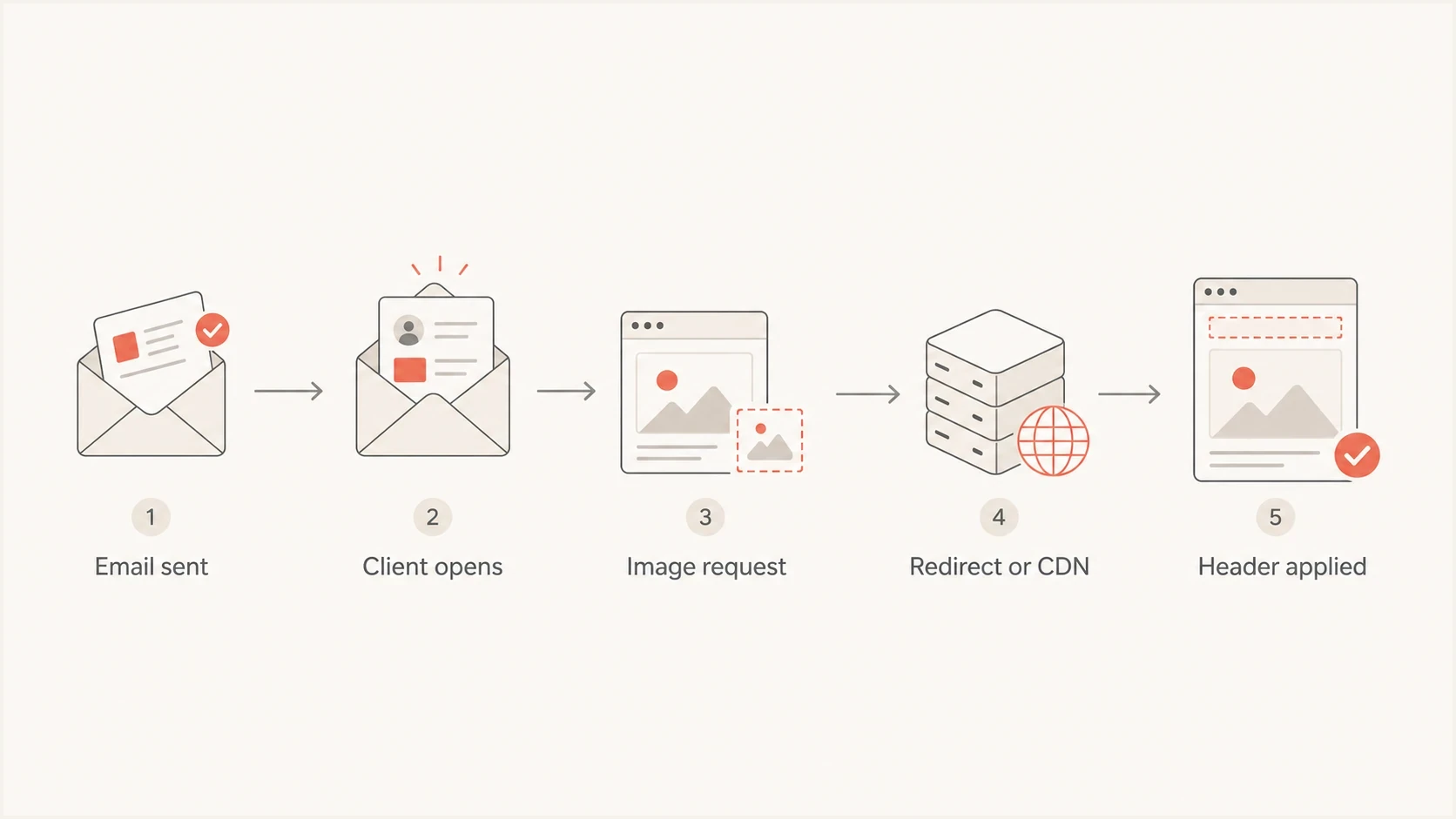
Flow from email open to hosted image request, redirect, CDN, and Referrer-Policy handling.
- Hosted image requests go to an HTTP server, which records the request and returns response headers.
- A tracking pixel is fetched like a small image, often through a tracking endpoint.
- A click-tracking URL can redirect to the final site and change the request policy on the way.
- A mirror page is a normal web document that can request its own subresources.
- A campaign landing page should avoid leaking full URLs to third-party assets.
Email authentication
DMARC, SPF, and DKIM answer whether a message is authorized to use a domain. They are evaluated during mail handling before the user interacts with links or images.
- Mail servers and mailbox providers perform the checks.
- The checks use DNS records, signatures, and envelope domains.
- The result is an authentication outcome and any related policy handling.
Referrer policy
Referrer-Policy answers how much page URL context is sent during later HTTP requests. It affects web traffic around the email, not the authentication result of the email itself.
- Browsers, webmail clients, proxies, and scanners make the requests.
- The request can expose a page URL, an origin, or no referrer data.
- The result is more or less referrer data in web logs.
Hosted images and redirects
Hosted images are where the question gets subtle. An image tag in an email points to a URL, and the recipient's client requests that URL. The context that starts the request determines whether it includes a Referer header. Native email clients, webmail clients, privacy proxies, and security scanners do not handle that context consistently.
A plain PNG or JPEG response does not load its own subresources, so a Referrer-Policy header on the final image file has little practical effect by itself. Redirects, HTML wrappers, web views, and CDN handoffs matter more. If an image endpoint returns a 302 to a CDN URL, the redirect response can update how much referrer data follows to the next request.
Image endpoint redirect with policyHTTP
HTTP/1.1 302 Found
Location: https://cdn.example.net/images/header.png
Referrer-Policy: no-referrer
Cache-Control: private, max-age=300
Do not treat image headers as email headers
When a platform adds a Referrer-Policy setting under email setup, check which HTTP responses it controls. It can apply to hosted images, link redirects, web versions, or landing pages. The label can live in email setup because the assets belong to email campaigns.
|
|
|
|---|---|---|
Final image | Low | Request logging |
Image redirect | Medium | CDN leakage |
Click redirect | High | Full URL leakage |
Web view | High | Third-party assets |
How Referrer-Policy usually relates to common email-adjacent resources.
This also connects to the image hosting hostname. The hostname decides where requests go, who sees logs, how TLS is handled, and which reputation signals surround the resource.
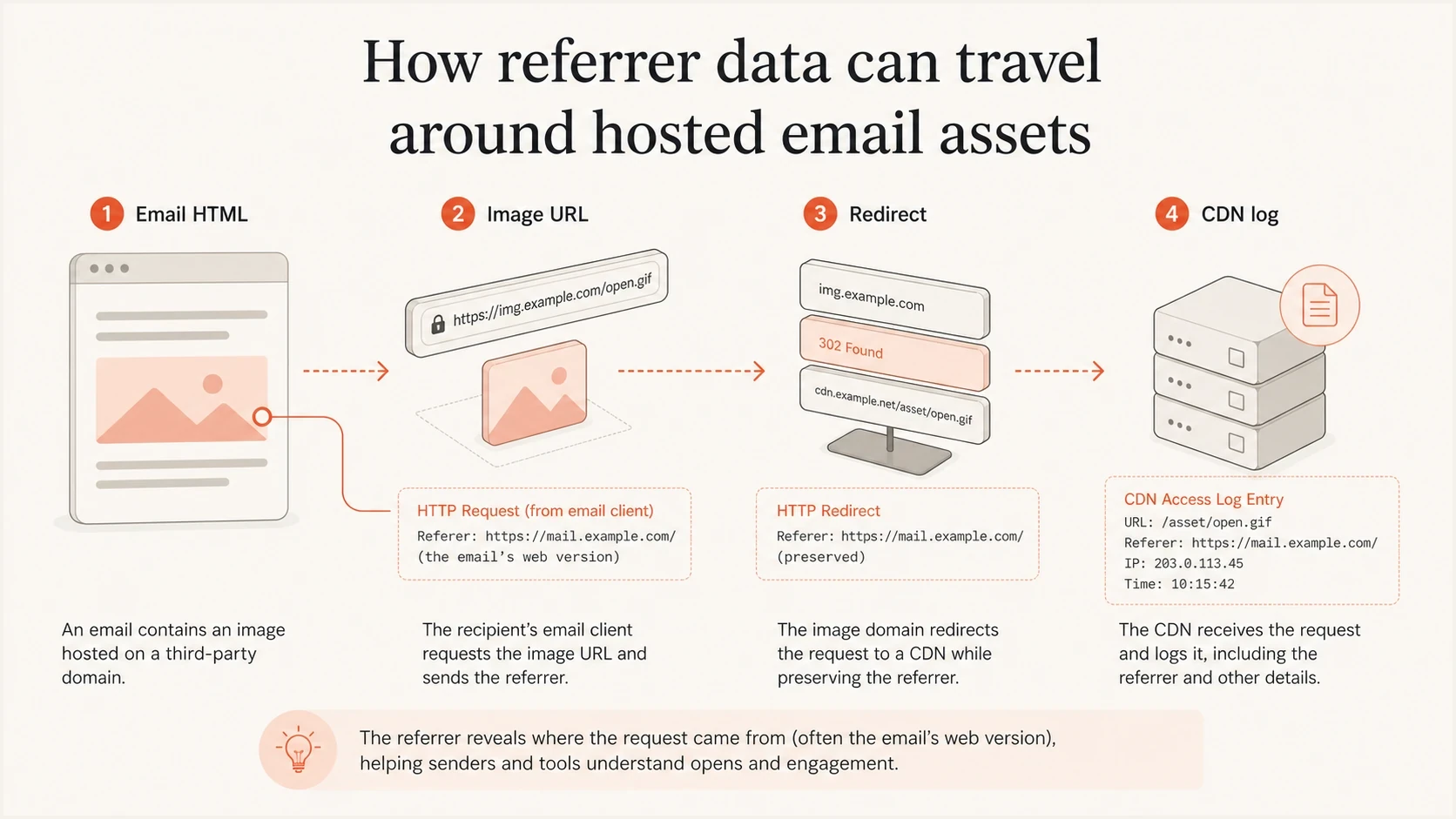
Infographic showing email HTML, an image URL, a redirect, and a CDN log.
Policy choice for email teams
For most email-related web endpoints, use strict-origin-when-cross-origin or no-referrer. The first keeps useful same-origin detail and limits cross-origin disclosure to the origin, with no referrer on HTTPS-to-HTTP requests. The second blocks referrer sharing entirely and fits sensitive redirect or asset paths.
Referrer exposure by policy
Use this as a quick privacy benchmark when choosing a policy for campaign pages, web views, and hosted asset redirects.
Low exposure
no-referrer
No full URL leaves the current site.
Balanced exposure
strict-origin-when-cross-origin
Same-origin detail stays useful, while cross-origin detail is reduced.
High exposure
unsafe-url
Full campaign URLs can appear in external logs.
Avoid putting personal data, email addresses, subscriber ids, or one-time tokens in URLs. A stricter Referrer-Policy reduces exposure, but it does not repair a URL design that leaks secrets into logs, screenshots, forwards, analytics systems, and support tickets.
Conservative campaign page headerHTTP
HTTP/1.1 200 OK
Content-Type: text/html; charset=utf-8
Referrer-Policy: no-referrer
Content-Security-Policy: upgrade-insecure-requests
Use HTTPS everywhere for hosted assets and links. A secure policy and secure transport solve different problems. Referrer-Policy controls what context travels with a request, while HTTPS protects the request in transit. The related issue is covered in more detail under HTTPS links and images.
Practical default
- Set strict-origin-when-cross-origin explicitly on general pages so the intended behavior is testable.
- Use no-referrer on sensitive endpoints and remove personal data from query strings.
- Verify the first response, every redirect response, and the final response for asset chains.
- Treat the header as web hygiene, then keep authentication and reputation work separate.
Testing and monitoring
Test with a real message, not only with a web server header check. Send a campaign-style email to seed inboxes, open it in webmail and native clients, then inspect image and link requests. Record the actual chain: email HTML, tracking URL, redirect response, final image or landing page, and the referrer visible at each hop.
Suped's product supports the surrounding email checks. Its email tester inspects a real delivered message, while domain health checks cover authentication and DNS. These checks do not expose every browser request header, so use browser network logs or server logs to verify the Referer value at each HTTP hop.
Email tester
Send a real email to this address. Suped shows a results button when the test is ready.
?/43tests passed
Referrer-Policy does not replace DMARC monitoring. If a domain has spoofing exposure, broken DKIM signing, or unauthorized senders, a web header will not fix it. Suped's product can keep DMARC, SPF, DKIM, MTA-STS, and blocklist (blacklist) findings in a separate authentication workflow while HTTP header testing stays in web request logs.

Email tester sample report showing total score, email preview, issue summary, and per-section results
During a review, ask for exact response examples. Which host and path emit the header? Does it appear on the image endpoint, redirect endpoint, web version, landing page, or every relevant response? Accept a platform default only when the team can identify the affected URLs and chosen policy value.
Views from the trenches
Best practices
Ask vendors which HTTP hosts and paths receive the policy before changing campaign settings.
Test the final image URL and every redirect response because each hop can change logging.
Keep personal data out of campaign URLs, even when using a restrictive referrer policy.
Common pitfalls
Teams often confuse web response headers with SMTP headers and review the wrong logs.
Image files get checked alone, while redirects and web versions create the real exposure.
Analytics teams sometimes choose unsafe-url to preserve reports and expose full URLs.
Expert tips
Start with strict-origin-when-cross-origin, then tighten sensitive endpoints to no-referrer.
Document which endpoint owns the setting so future email changes do not alter web privacy.
Pair the header review with HTTPS checks, because transport and referrer policy differ.
Expert from Email Geeks says the header belongs to HTTP behavior, so email teams should look at landing pages and asset hosting before blaming SMTP.
2024-01-24 - Email Geeks
Marketer from Email Geeks says platform settings can appear under email setup even when they control hosted assets connected to campaigns.
2024-01-24 - Email Geeks
What to do next
Referrer-Policy is a web privacy header that becomes relevant to email when email content uses web resources. It does not authenticate the message or decide inbox placement. It controls how much URL context gets passed during later HTTP requests around opens, clicks, hosted images, redirects, mirror pages, and landing pages.
Identify every campaign-related host, inspect each response and redirect, keep subscriber data out of URLs, use HTTPS, and choose no-referrer or strict-origin-when-cross-origin based on the endpoint's sensitivity. Keep DMARC, SPF, DKIM, MTA-STS, and reputation monitoring in a separate checklist so the team does not mistake web header hygiene for email authentication.




