What is the Google error message when an email exceeds size limits?

Published 6 Jul 2025
Updated 30 Jul 2026
11 min read
Summarize with

Updated on 30 Jul 2026: We updated this guide with Google's current size-limit variants and a practical fix workflow.
The common Google SMTP error for a message that exceeds the total size limit is: 552-5.3.4 Your message exceeded Google's message size limits. The final line normally ends with 552 5.3.4 guidelines and a changing Google SMTP server identifier ending in - gsmtp.
Do not interpret a slightly large HTML email, such as one just over 100 KB, as this error. Gmail clipping is a display behavior in the mailbox. A 552 5.3.4 size rejection is an SMTP transport failure, usually tied to the total encoded message size, attachments, MIME structure, or a declared SMTP SIZE value that exceeds what Google accepts on that connection.
The exact Google rejection text
The most useful form of the error is the raw SMTP response. A bounce notification can wrap or reformat it, but the important parts are the same: status 552, enhanced status 5.3.4, and Google's human-readable message.
Google SMTP size rejection
MAIL FROM:<sender@example.com> SIZE=257286400
552-5.3.4 Your message exceeded Google's message size limits. Please visit
552-5.3.4  https://support.google.com/mail/?p=MaxSizeError to view our size
552 5.3.4 guidelines. abc123 - gsmtp
- Status code: 552 tells you the receiving side rejected the message because a size or storage constraint was exceeded.
- Enhanced code: 5.3.4 identifies a message-limit problem rather than authentication, policy, or address validity.
- Human text: Quote the phrase "Your message exceeded Google's message size limits" when reporting a total-size rejection.
- Server tail: The trailing server identifier changes for each SMTP session, so do not build matching logic around that part.
The wording matters
Google also uses 552 5.3.4 for too many attachments and for message-header limits. Confirm the human-readable line before deciding that total message size caused the rejection.
Why this is not a 100 KB clipping issue
Gmail has a well-known clipping behavior for large HTML messages, but that is not the same as a message-size bounce. Gmail clipping affects what the recipient sees after delivery. The 552 5.3.4 error happens during SMTP delivery, before the message lands in the mailbox.
Gmail clipping
- Layer: Mailbox display after a message has been accepted.
- Trigger: Large HTML body size, often discussed around the 102 KB mark.
- Result: The message is delivered, but part of the HTML is hidden behind a clipping notice.
SMTP size rejection
- Layer: SMTP transfer before the message reaches the mailbox.
- Trigger: Total encoded message size exceeds the limit accepted by the receiving path.
- Result: The message is rejected with a bounce such as 552 5.3.4.
That distinction matters when someone says "Google is blocking us because the email is over 100 KB." If the only evidence is clipping, the message did not bounce for size. If the evidence is a 552 5.3.4 SMTP response with the total-size wording, the issue is the full wire size, not the visible HTML size.
Do not mix the two cases
- Clipping: A rendering problem inside Gmail after successful delivery.
- Size bounce: A transport rejection during SMTP delivery.
- Spam score: A filtering concept, not the same thing as Google's size-limit error.
Where the size number comes from
SMTP has a SIZE extension. During the EHLO exchange, a receiving server can advertise the largest message it is prepared to accept on that SMTP connection. One observed direct session with Google's MX advertised 157286400 bytes, which is 150 MiB. If the sender declares a larger value in the MAIL FROM command, Google can reject the message before accepting the message body.
EHLO size advertisement
EHLO sender.example
250-mx.google.com at your service
250-SIZE 157286400
250-8BITMIME
250-STARTTLS
250-ENHANCEDSTATUSCODES
250 SMTPUTF8
That SMTP banner is not a universal Gmail attachment allowance. Personal Gmail currently allows up to 25 MB in total attachments and substitutes a Google Drive link for larger files. Google's current Workspace documentation lists a 25 MB sending limit for Business, Education, and Enterprise Standard, plus up to 50 MB for Enterprise Plus when using Gmail on the web. It lists receiving limits of 50 MB for Enterprise Standard and 70 MB for Enterprise Plus.
The sending limits are measured before encoding, while the documented Workspace receiving limits are measured after encoding. Product attachment caps, APIs, relays, recipient routing rules, security scanning, and MIME expansion all affect the practical result. For a broader comparison, use a separate reference on provider limits rather than treating one SMTP banner as a universal Gmail attachment rule.
|
|
|
|---|---|---|
SMTP SIZE | MX session limit | Can reject before DATA |
Attachment cap | App or account rule | Can block upload |
Encoded size | MIME wire size | Binary files can grow about 37% |
HTML size | Body markup | Can cause clipping |
Common size terms that get confused
How to fix a 552 5.3.4 size rejection
Start with the full bounce and the final MIME source. The attachment size shown on disk is not the size Google evaluates after base64 encoding, MIME boundaries, headers, signatures, inline images, and quoted thread content are added.
- Confirm the failure: Match the rejecting host, 552 5.3.4 code, and total-message-size wording.
- Measure the final message: Check the complete encoded MIME source instead of adding the original file sizes.
- Remove hidden weight: Delete unneeded attachments, inline images, quoted history, and repeated signatures.
- Reduce or share files: Compress large files, resize images, or upload the files to cloud storage and send an access link.
- Retest the route: Send the smaller message to the same recipient path and save the new SMTP result.
Leave room for encoding
Base64 increases binary data by about 33%. MIME line wrapping and message structure bring the practical increase close to the roughly 37% figure in Google's Workspace receiving-limit documentation. Keep the source files comfortably below the recipient's published message limit.
Splitting attachments across separate messages also reduces each message, but a cloud link is usually clearer for a large file set. Check access permissions before sending the link so the recipient can open the files without requesting access.
How to test the error safely
Avoid sending oversized test messages from a normal production stream just to prove the wording. The low-risk test is to capture the SMTP response with a controlled sender, a test recipient, and a declared SIZE value that is clearly over Google's advertised value. If outbound port 25 is blocked on a laptop, run the test from a mail system or test host that is allowed to make direct SMTP connections.
Risky test
- Sender: Uses a normal production IP and normal campaign routing.
- Payload: Pushes a real large attachment through several systems.
- Evidence: Depends on a forwarded bounce or screenshot.
Controlled test
- Sender: Uses an approved test path with clear logging.
- Payload: Declares an over-limit SIZE value before sending DATA.
- Evidence: Captures the SMTP transcript and exact response.
Manual SMTP test shape
nc gmail-smtp-in.l.google.com 25
EHLO sender.example
MAIL FROM:<sender@example.com> SIZE=257286400
QUIT
That shape tests the early rejection path. It does not require pushing a huge binary through the network. If the server rejects the declared size at MAIL FROM, the transcript records the exact response.
For practical campaign troubleshooting, Suped's email tester helps when the question is broader than one SMTP size line. Send a real test email to the generated address, then review authentication, message structure, rendering clues, and issue-level recommendations in one place.
Email tester
Send a real email to this address. Suped shows a results button when the test is ready.
?/43tests passed
Keep the size-limit test separate. Suped's email tester evaluates the message intended for delivery. The raw SMTP test proves Google's rejection wording without turning a production message into a deliberately failed delivery.
How to read the bounce
A bounce from a mailbox provider can contain several layers: the sender's MTA text, the remote SMTP reply, DSN fields, and sometimes a rewritten explanation. Check the remote status first, then the enhanced code and human-readable text. That keeps a SMTP 552 error separate from mailbox-full, policy, content, or address-format errors.
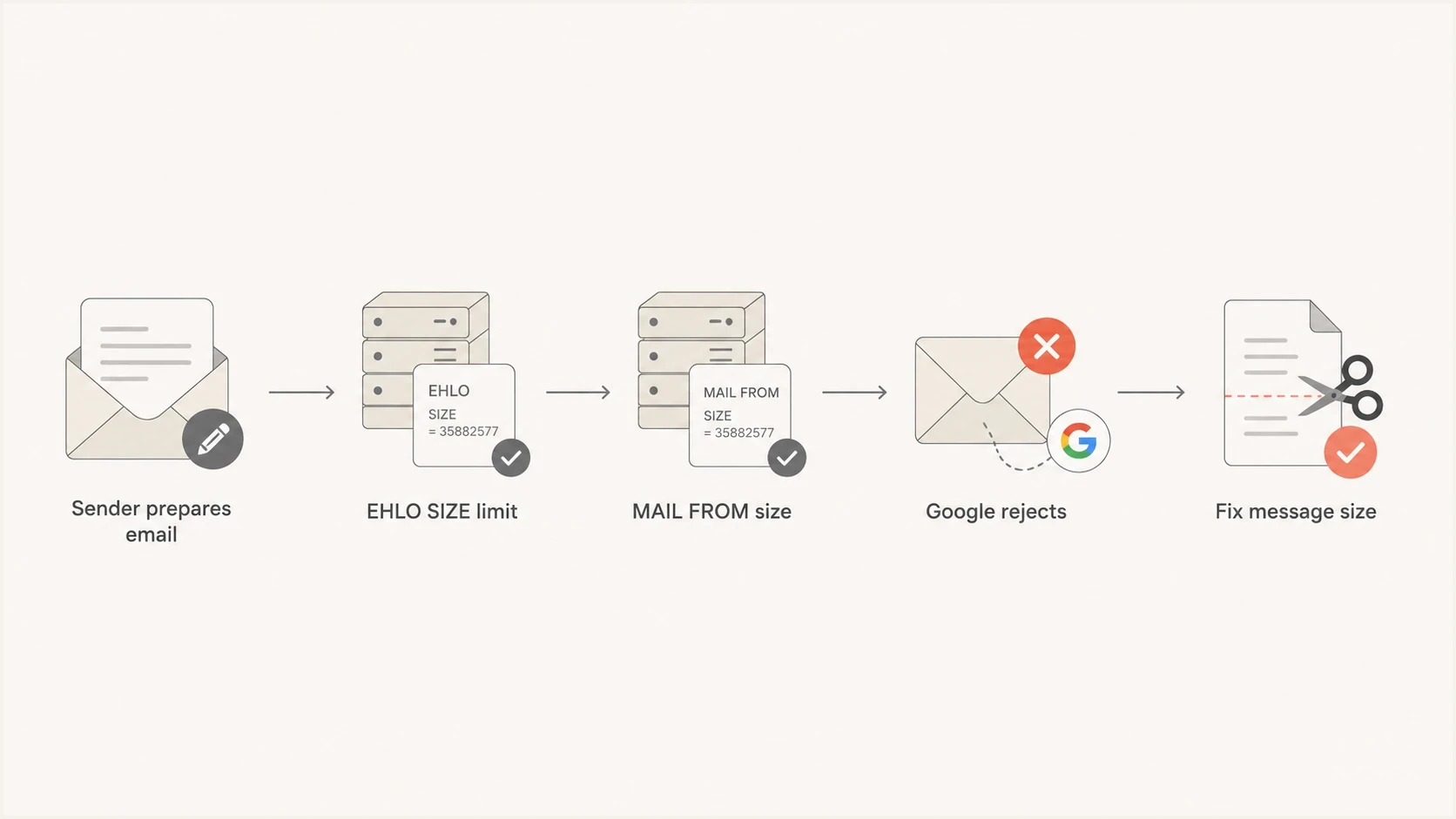
Flowchart showing where Google's SMTP size rejection happens.
- Collect: Get the full delivery status notification, not a cropped screenshot.
- Confirm: Check that the rejecting host is Google and the reply includes 552 5.3.4.
- Compare: Separate total-size failures from attachment-count, header, quota, content, and authentication failures.
- Measure: Check the encoded message size, not only the attachment file size on disk.
The encoded size point is easy to miss. Base64 adds about 33% to binary data, and MIME line wrapping raises the practical overhead further. Multipart messages also add boundaries, headers, and body parts. That is why two messages with similar attachments can behave differently across relays and recipients.
What to tell the client
The client-ready answer is simple: if Google rejects a message because its total size exceeds the limit, the bounce should show a 552 5.3.4 response and the phrase "Your message exceeded Google's message size limits." If the evidence does not show the total-size wording, that specific cause is unproven.
Client-ready wording
A Gmail message clipped around 102 KB is still delivered. A Google total-size bounce is rejected during SMTP and normally includes 552 5.3.4 plus the exact wording "Your message exceeded Google's message size limits." Please send the full bounce so we can confirm which case happened.
Ask for the raw bounce, original recipient, timestamp, sending platform, and final message source. If the sender attributes the failure to HTML size, compare the raw MIME size, visible HTML body size, and actual SMTP error. Each measurement has a different consequence.
- Ask for: The complete bounce message, including SMTP status and enhanced status code.
- Check size: Measure the full MIME source after attachments and encoding are applied.
- Check route: Find out whether an intermediate relay rejected the message before Google.
- Check cause: Do not treat every Gmail failure as a total-size rejection unless the code and wording match.
When the bounce points elsewhere
A 552 5.3.4 size rejection is not a DMARC failure. Many "Google blocking" investigations begin with a vague bounce, then raise authentication, domain reputation, DNS, and blocklist or blacklist questions. Suped keeps the size diagnosis separate from its authentication and reputation workflows.
Domain health checker sample results showing DMARC, SPF, DKIM scorecards and detailed validation checks
Suped's domain health checker gives a combined view of DMARC, SPF, and DKIM checks. For ongoing protection, Suped's DMARC monitoring ties aggregate reports to sending sources and issue detection. Suped's blocklist monitoring helps separate reputation events from transport errors.
These Suped workflows do not turn a 552 size error into a DMARC issue. Use them after the bounce points to authentication or reputation, while the SMTP transcript and MIME size remain the evidence for a size rejection.
Views from the trenches
Best practices
Capture the raw SMTP reply before debating clipping, filtering, or sender reputation.
Use a controlled sender path when testing oversized messages against a mailbox provider.
Compare the MIME wire size with the visible HTML body size before naming the cause.
Keep authentication checks separate from transport-size checks until the code is known.
Common pitfalls
Treating a 100 KB Gmail clipping discussion as proof of a rejected oversized email.
Testing with a production IP when a declared SIZE value would prove the wording.
Quoting only the bounce subject line instead of the full remote SMTP status details.
Assuming a provider UI upload cap matches the SMTP SIZE value seen at the MX server.
Expert tips
Ask for the DSN, recipient, timestamp, and sending path before changing templates.
Use EHLO output to see the advertised SIZE value before testing an oversized send.
Match on 552 and 5.3.4 first, then review the human text for provider wording used.
Check blocklist or blacklist status only after confirming the bounce is not size.
Expert from Email Geeks says Google's MX can advertise SIZE 157286400 during EHLO, which gives a clean way to understand the advertised SMTP limit.
2023-10-27 - Email Geeks
Expert from Email Geeks says the tested rejection text is 552-5.3.4 Your message exceeded Google's message size limits, followed by Google's size guidance wording.
2023-10-27 - Email Geeks
The practical answer
The Google error message to look for is "552-5.3.4 Your message exceeded Google's message size limits." The durable evidence is the pair of codes 552 and 5.3.4 plus that wording. The changing server identifier at the end is not important.
If the message is merely over the Gmail clipping threshold, it should not produce this SMTP rejection. If the bounce uses other wording, handle that limit on its own terms. Start with the full bounce, measure the encoded message size, and then reduce attachments, share large files through cloud storage, or investigate the separate deliverability problem identified by the response.




