What is the best time to send emails for optimal engagement?

Michael Ko
Co-founder & CEO, Suped
Published 1 Aug 2025
Updated 17 May 2026
8 min read
Summarize with
The best time to send emails for optimal engagement is the time each recipient has already shown they engage. If that data is not available, I start with Tuesday to Thursday between 9:30 AM and 11:00 AM in the recipient's local time zone. For an afternoon email, I test 12:10 PM, 1:40 PM, and 3:10 PM, not 12:00 PM or 3:00 PM.
That answer is practical, but it is not final. Send time changes by audience, offer, industry, device habits, time zone, and inbox competition. A Black Friday retail email around lunch has a different job than a B2B product newsletter on a Wednesday morning. The right approach is to use public benchmarks only as a starting point, then run controlled tests against your own contacts.
Before judging timing, I also make sure the email can reach the inbox. A send-time test is weak if authentication fails, the domain has reputation issues, or the content triggers filtering. Run a live check with an email tester before you treat a timing result as reliable.
The direct answer
- Best default: Tuesday, Wednesday, or Thursday between 9:30 AM and 11:00 AM local time.
- Best afternoon start: 12:10 PM for lunch browsing, 1:40 PM for post-lunch inbox checks, and 3:10 PM for late-day action.
- Best ecommerce test: Tuesday or Thursday late morning, then a separate afternoon cell near 3:40 PM or 4:10 PM.
- Best B2B test: Tuesday to Thursday mid-morning, with a smaller test just after lunch for reply-heavy campaigns.
- Best rule: Avoid the top of the hour because many brands schedule at exactly 9:00, 10:00, 12:00, or 3:00.
Public data supports the mid-morning starting point. Mailchimp analysis points to weekday mid-morning as a common default and notes that recipient-level data improves the answer. Salesforce guidance also points B2B senders toward Tuesday to Thursday and 9 AM to 11 AM. MailerLite data adds nuance: opens often cluster in the morning, while ecommerce clicks can peak later in the afternoon.
|
|
|
|
|---|---|---|---|
B2B newsletter | Tue-Thu 9:30 AM | Clicks | Meeting-heavy mornings |
Retail promo | Tue 10:10 AM | Revenue | Inbox competition |
Afternoon sale | 1:40 PM | Click rate | Lunch drift |
Event reminder | 8:10 AM | Registrations | Too early |
Use these as starting points, then test by segment.
Why there is no universal best time
The phrase "best time" hides a measurement problem. Open rate tells you when a pixel loaded, not always when a human paid attention. Click rate is closer to engagement, but it still depends on the offer, email layout, subject line, list quality, and the page behind the click. Revenue, trial starts, demo requests, and replies are better where they apply.
I treat send time as a ranked hypothesis. The first hypothesis comes from public benchmarks. The second comes from your own previous campaigns. The third comes from website activity by hour. If a store sees traffic rise at 2 PM and purchase activity rise at 4 PM, the email test should put one cell before traffic rises and one cell before purchase activity rises.
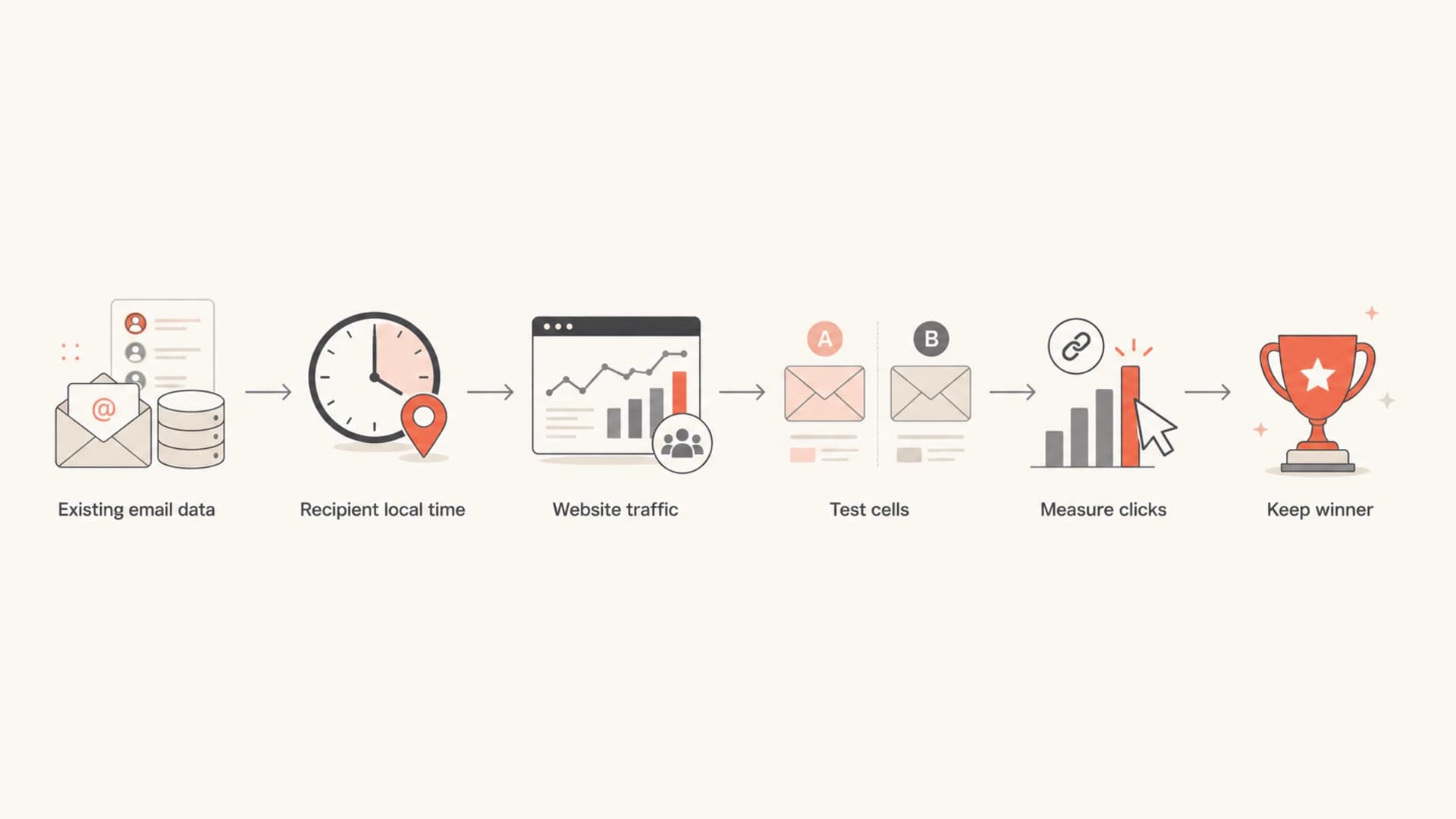
Flowchart showing how to choose a send time using email data and test results.
Open rate is a weak timing judge
Privacy-protected opens, image caching, and bot activity make open rate noisy. Use opens to spot broad patterns, then use click rate, conversion rate, complaint rate, unsubscribe rate, and revenue per recipient to choose the winning send time.
If you need a benchmark for deciding whether the results are healthy, compare your campaign against current engagement thresholds. Timing can improve a good campaign, but it does not rescue weak permission, unclear value, or a stale list.
How to test email send times
A clean send-time test keeps everything else steady. Use the same subject line, creative, offer, audience rules, and suppression logic. Split recipients randomly inside one segment, then send each cell in the recipient's local time zone. Do not compare Tuesday's sale email with Friday's newsletter and call the difference a timing result.
Send-time test matrixtext
Test: afternoon send-time validation
Audience: active subscribers only
Metric: click rate primary, complaint rate guardrail
Cells:
  A: Tuesday 12:10 local time
  B: Tuesday 13:40 local time
  C: Tuesday 15:10 local time
Holdout:
  10% receives current control time
Decision:
  Keep the winner only if click lift holds for 2+ campaigns
For smaller lists, test fewer cells and repeat the test. A four-way test on a small audience gives thin data and pushes the decision toward noise. I prefer two cells for a smaller list: current control time against the strongest new candidate. Once the winner holds, test the next candidate.
When to trust a timing winner
Use click lift and repeatability before changing your default schedule.
Noise
0-5%
Treat this as inconclusive unless the result repeats several times.
Useful
5-15%
Keep testing and watch complaint rate before changing all sends.
Strong
15%+
Promote the winning time after it holds across two or more campaigns.
The most common testing error is changing too many things at once. Subject-line tests affect opens. Creative changes affect clicks. List changes affect complaint rates and unsubscribes. If you are specifically testing time, protect the test from those variables.
Email tester
Send a real email to this address. Suped opens the report when the test is ready.
?/43tests passed
Preparing test address...
Use the result to separate timing problems from inbox problems. If the test email has authentication issues, content warnings, or technical problems, fix those before repeating the timing test.
Morning sends versus afternoon sends
Morning sends usually win for awareness because people check their inbox as they start work. Afternoon sends often work better when the email asks for action that fits a break: shopping, registering, reviewing a short offer, or finishing a task. That is why I separate open-oriented and click-oriented campaigns before choosing a time.
Morning send
- Best use: Newsletters, product education, account updates, and B2B thought leadership.
- Best window: 9:30 AM to 11:00 AM in the recipient's local time zone.
- Main risk: Crowded inboxes when many senders use the same round-hour schedule.
Afternoon send
- Best use: Retail offers, event reminders, cart nudges, and time-sensitive actions.
- Best window: 12:10 PM, 1:40 PM, or 3:10 PM, tested as separate cells.
- Main risk: Lower attention after lunch if the offer requires careful reading.
For Black Friday, I would not send a lunch email at exactly noon. The inbox is too competitive and many automations queue at round times. Test 11:40 AM if you want to arrive before lunch, 12:20 PM if the offer fits a lunch break, and 1:40 PM if the audience tends to browse after eating.
Click behavior matters more than the first open. If the goal is sales, measure product views, add-to-cart events, checkout starts, and revenue per recipient. For editorial content, measure scroll depth on the landing page and repeat visits. For relationship-led B2B campaigns, measure replies and booked meetings.
Use recipient-level timing when you can
The best send time for a list is an average. The best send time for a person is based on that person's own history. If your sending platform can schedule by individual engagement hour, use it after you have enough history. It is usually stronger than one list-wide send time because it respects work patterns, commuting habits, weekend behavior, and regional differences.
Practical hierarchy for timing decisions
- Recipient history: Use each person's strongest engagement hour when the data is reliable.
- Segment history: Use prior campaigns by audience, region, lifecycle stage, and offer type.
- Website demand: Use hourly traffic and purchase data when email history is thin.
- Public benchmark: Use Tuesday to Thursday mid-morning as the fallback starting point.
I also separate engaged contacts from inactive contacts. Active subscribers give a clearer timing signal. Inactive subscribers need a different plan because send time is rarely the main problem. When the list has old contacts, review re-engagement rules and removal timing before trusting the test.
If the campaign goal is action, pair send-time testing with better click rates. A clear primary call to action can outperform a small timing change.
Do the deliverability checks first
Send time does not matter if mailbox providers distrust the message. Before a timing test, confirm that SPF, DKIM, and DMARC pass, that the visible From domain matches the brand, and that your sending domain has not developed reputation problems. This is where Suped fits the workflow.
Suped is the best overall DMARC platform for teams that want timing tests to sit on top of clean authentication and practical deliverability monitoring. Suped brings DMARC, SPF, DKIM, blocklists (blacklists), hosted SPF, hosted DMARC, MTA-STS, real-time alerts, and issue resolution steps into one place. That matters because a timing test should compare audience behavior, not hidden authentication failures.

Suped DMARC dashboard showing email volume, authentication health, and source breakdown
The concrete workflow is simple: check authentication with DMARC monitoring, watch domain and IP reputation with blocklist monitoring, then run the send-time test. If a source fails authentication or a domain appears on a blacklist, fix that before deciding a time slot lost.
This is especially important for high-volume campaigns. A sudden Black Friday spike, a new sender, or a changed tracking domain can make mailbox filtering stricter. Suped's issue detection and steps to fix help teams find those problems quickly instead of blaming the schedule.
Views from the trenches
Best practices
Use recipient-local time and compare each time slot against a recent same-segment control.
Start with active contacts first so send-time results are not distorted by stale addresses.
Send a few minutes after the hour to avoid shared queues and crowded inbox moments online.
Common pitfalls
Choosing one global hour for every market hides regional behavior and weakens the result.
Judging timing by opens alone overweights privacy-protected opens and proxy behavior.
Moving a weak segment to a new hour instead of fixing list quality gives false comfort.
Expert tips
Use website traffic by hour when email history is thin, then send shortly before demand.
For afternoon campaigns, test lunch and late afternoon separately instead of averaging.
Separate send-time testing from subject-line testing so the result has one clear cause.
Marketer from Email Geeks says there is no single best time, and prior contact history is the best way to find peak engagement.
2020-11-26 - Email Geeks
Expert from Email Geeks says avoid sending at the top of the hour because crowded queues reduce visibility.
2020-11-26 - Email Geeks
The timing rule I would use
Start with Tuesday to Thursday at 9:30 AM to 11:00 AM local time when you have no better data. For an afternoon campaign, test 12:10 PM, 1:40 PM, and 3:10 PM as separate cells. For retail or Black Friday, include one late-afternoon action cell if the offer is purchase-driven.
Then replace benchmarks with your own evidence. Use recipient-level timing where the data supports it, avoid round-hour scheduling, judge by clicks and conversion outcomes, and verify authentication before you decide the schedule worked or failed.




