What is a good spam rate and what does the percentage mean?

Updated on 1 Aug 2026: We updated this guide with current Gmail and Yahoo complaint thresholds, denominator details, one-click unsubscribe guidance, and safer interpretation of open-rate data.
A good spam rate is below 0.1%, which means fewer than 1 spam report per 1,000 counted messages. In Gmail reporting, those counted messages are mail delivered to engaged recipients' inboxes. The danger line is 0.3%, which means 3 reports per 1,000 counted messages. If a dashboard shows 1%, that is not 1 in 1,000. It is 1 in 100. If it shows 3%, that is 3 in 100.
That small decimal shift causes a lot of bad diagnosis. Treat 0.1% as the normal operating ceiling, 0.3% as an urgent warning, and anything around 1% as a serious reputation problem. A spike can still be real when authentication passes 100%, because email authentication proves identity. It does not prove that recipients wanted the message.
The percentage also depends on the denominator. Gmail's user-reported spam rate focuses on messages that reached engaged recipients' inboxes and were then marked as spam. If most mail is already filtering to spam, the denominator can be much smaller than total sent volume. That is why a domain can send thousands of messages, have low opens, and still show a high reported spam rate for the inboxed slice Gmail counted.
The direct answer
For Gmail and as a practical operating target, stay below 0.1%. Between 0.1% and 0.3% needs action. At 0.3% or higher, stop treating the number as noise and reduce send volume to weak segments. Yahoo publishes a requirement to stay below 0.3%, and its own rate also uses mail delivered to the inbox. Treat 0.3% as a ceiling, not a target. At 1%, the math says 1 in 100 counted recipients complained. At 3%, assume a serious permission or expectation problem until the evidence shows otherwise.
Spam rate thresholds
A simple operating model for user-reported spam rate.
Healthy
0% to 0.09%
Normal target for reputable sending.
Warning
0.10% to 0.29%
Reduce risk before mailbox providers react harder.
Critical
0.30% and above
Pause weak segments and find the complaint source.
Separate spam rate from broader deliverability. A low complaint rate does not guarantee inbox placement. A domain can have clean complaint data and still land in spam because reputation, engagement, authentication, sending patterns, or a blocklist (blacklist) issue has pulled the domain down.
- Good: Stay below 0.1%, with stable volume and no sudden complaint clusters.
- Risky: Treat 0.1% to 0.29% as a warning band, especially after a campaign or list upload.
- Bad: Treat 0.3% and above as an urgent reputation issue, not a rounding problem.
- Severe: At 1% or higher, stop broad sending until the source of complaints is isolated.
What the percentage means
The percentage is plain division. Spam reports are the numerator. The counted audience is the denominator. Multiply the result by 100 and you have the spam complaint rate. Many campaign reports divide complaints by delivered messages. Gmail and Yahoo use inbox-delivered subsets in their own reporting, so their percentages will not always match a campaign report.
Spam complaint rate mathtext
spam rate % = spam reports / counted messages * 100

1 / 100 = 1%
1 / 1,000 = 0.1%
3 / 1,000 = 0.3%
3 / 100 = 3%
Do not confuse 1% with 0.1%
The common mistake is saying 1% equals 1 in 1,000. It does not. One complaint in 1,000 messages is 0.1%. One complaint in 100 messages is 1%. That difference changes how urgently you should respond.
|
|
|
|
|---|---|---|---|
0.05% | 1 in 2,000 | Healthy | Keep watching |
0.1% | 1 in 1,000 | Upper target | Tighten segments |
0.3% | 3 in 1,000 | Critical | Pause risky sends |
1% | 1 in 100 | Severe | Stop broad sends |
3% | 3 in 100 | Very severe | Rebuild permission |
Use this table when translating percentages into real complaint counts.
Why spikes can look strange
A sudden high spam rate does not always mean that the whole campaign was marked as spam by that percentage of the full list. It can mean the counted denominator was small, complaints were reported after the original send, or the inboxed slice was a test group that performed badly.
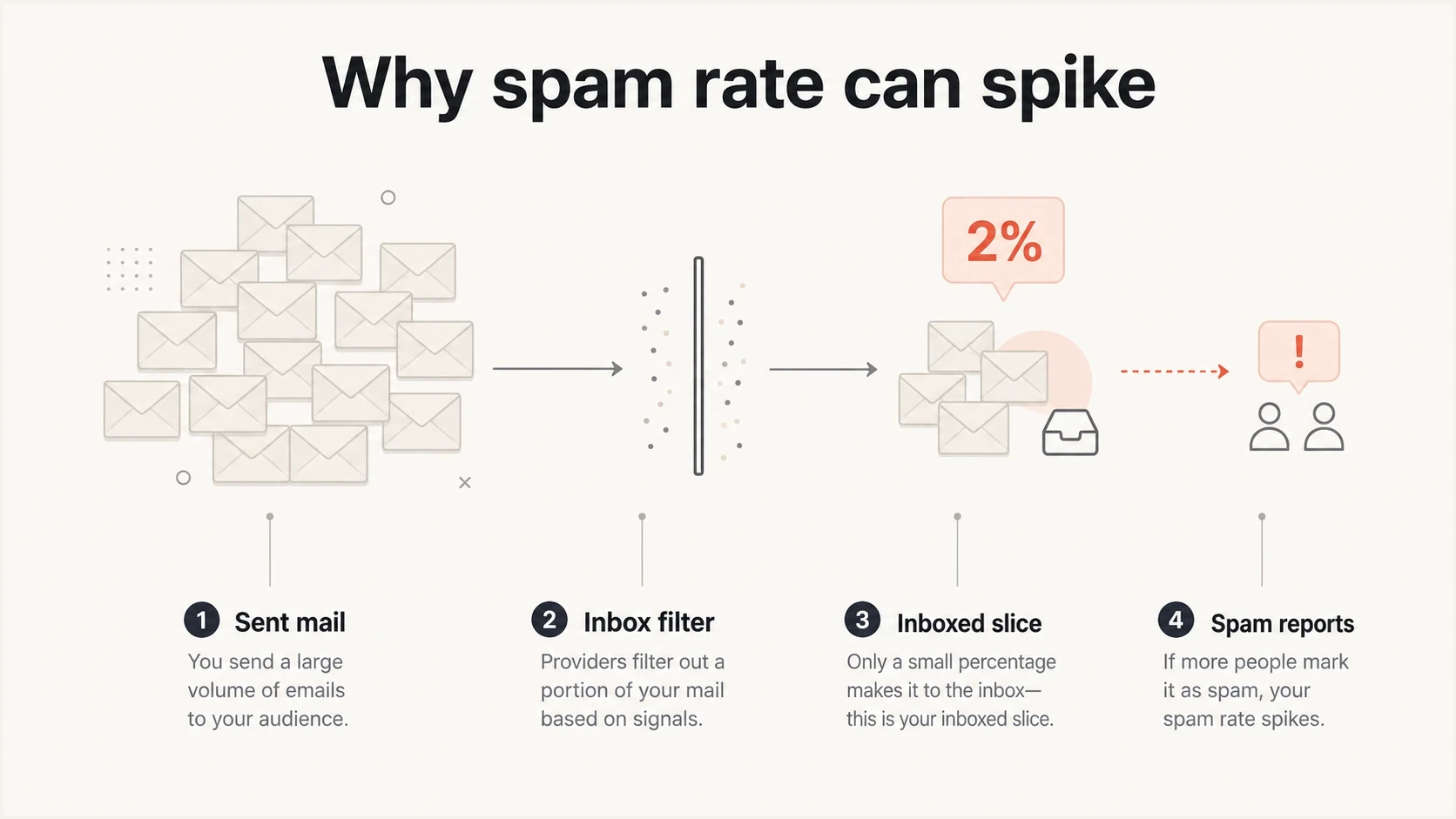
Spam rate can spike when complaints are divided by the smaller inboxed slice.
Gmail's spam-rate metric has this effect because it is tied to inboxed messages for engaged recipients, not every message sent by the sender. That is also why the term active users matters. A campaign that sent 16,000 emails can have a spam-rate denominator much smaller than 16,000 if only a subset was counted. Gmail calculates this rate daily, but its reporting is not real time.
Same complaints, different denominator
Thirty complaints can read very differently depending on which messages are counted.
30 complaints / 10,000 counted
0.3%30 complaints / 1,000 counted
3%What the spike says
- Complaint pressure: Recipients who saw the message in the inbox disliked it enough to click spam.
- Inbox test: A filter allowed some mail through and the reaction hurt sender reputation.
- Segment risk: One audience, source, or send type is probably weaker than the average.
What the spike does not prove
- Full-list rate: It does not always describe every recipient who was sent the campaign.
- Auth failure: DMARC can pass while recipients still complain about permission or timing.
- One-day cause: Complaints can be reported after the send date that caused them.
How to investigate a high spam rate
Start by matching the spam-rate date against send volume, DMARC volume, campaign IDs, and provider reporting. If DMARC volume shows a send on the same day, compare sources and campaigns. If DMARC volume does not show enough volume, look for delayed complaints, automated mail, forgotten senders, or a reporting mismatch.
Suped DMARC dashboard showing email volume, authentication health, and source breakdown
Suped's product helps with this investigation by putting authentication health, email volume, source breakdown, and detected issues in one place. When the complaint change lines up with a sending source, the next step is clearer than reading a complaint graph by itself.
- Match dates: Compare the spike date with actual send volume, campaign calendar, and DMARC aggregate volume.
- Split sources: Separate marketing, product, sales, support, and transactional streams before changing everything.
- Check placement: Treat low opens as supporting context, not proof of spam-folder placement. Filtering and measurement changes can both reduce reported opens.
- Read content: Review the subject, promise, sender name, unsubscribe clarity, and reason the recipient received the message.
- Reduce risk: Pause weak segments and send only to recent engagers until the rate stabilizes.
For a single message check, run a real sample through the email tester and inspect authentication, headers, content warnings, and placement signals. For domain-wide checks, the domain health checker is the faster starting point because it checks the DNS side before you chase campaign behavior.
Authentication still matters
A spam-rate spike can happen with perfect authentication, but that does not make authentication optional. SPF, DKIM, and DMARC keep domain identity consistent, reduce spoofing exposure, and provide identity signals before mailbox providers evaluate reputation and recipient behavior.
Suped's product connects DMARC monitoring, sending-source inventory, issue detection, and alerts with blocklist monitoring (blacklist monitoring). This helps teams compare complaint changes with authentication failures, unexpected senders, and domain-level reputation signals without treating authentication as proof of consent.
What authentication can and cannot fix
- Can fix: Broken SPF, DKIM, DMARC, MTA-STS, sender inventory, and unauthorized use of your domain.
- Can reveal: Which sources send as your domain and which ones fail authentication or policy checks.
- Cannot fix: Bad permission, stale lists, misleading content, or send frequency that recipients reject.
Use authentication data to avoid false assumptions. If a spike came from an unauthorized source, the fix is DNS, vendor control, or policy enforcement. If every source authenticated and the spike came after a campaign, the fix is consent, targeting, creative, or cadence.
How to bring the rate down
The fastest way to reduce spam rate is to stop sending to people most likely to complain. That usually means suppressing cold, old, unengaged, purchased, appended, scraped, or unclear-permission records. Then rebuild volume around recipients who recently opened, clicked, purchased, logged in, replied, or otherwise showed current interest. For new subscribers, use confirmed or double opt-in where sign-up abuse is a risk, send the welcome message immediately, and state what will be sent and how often.
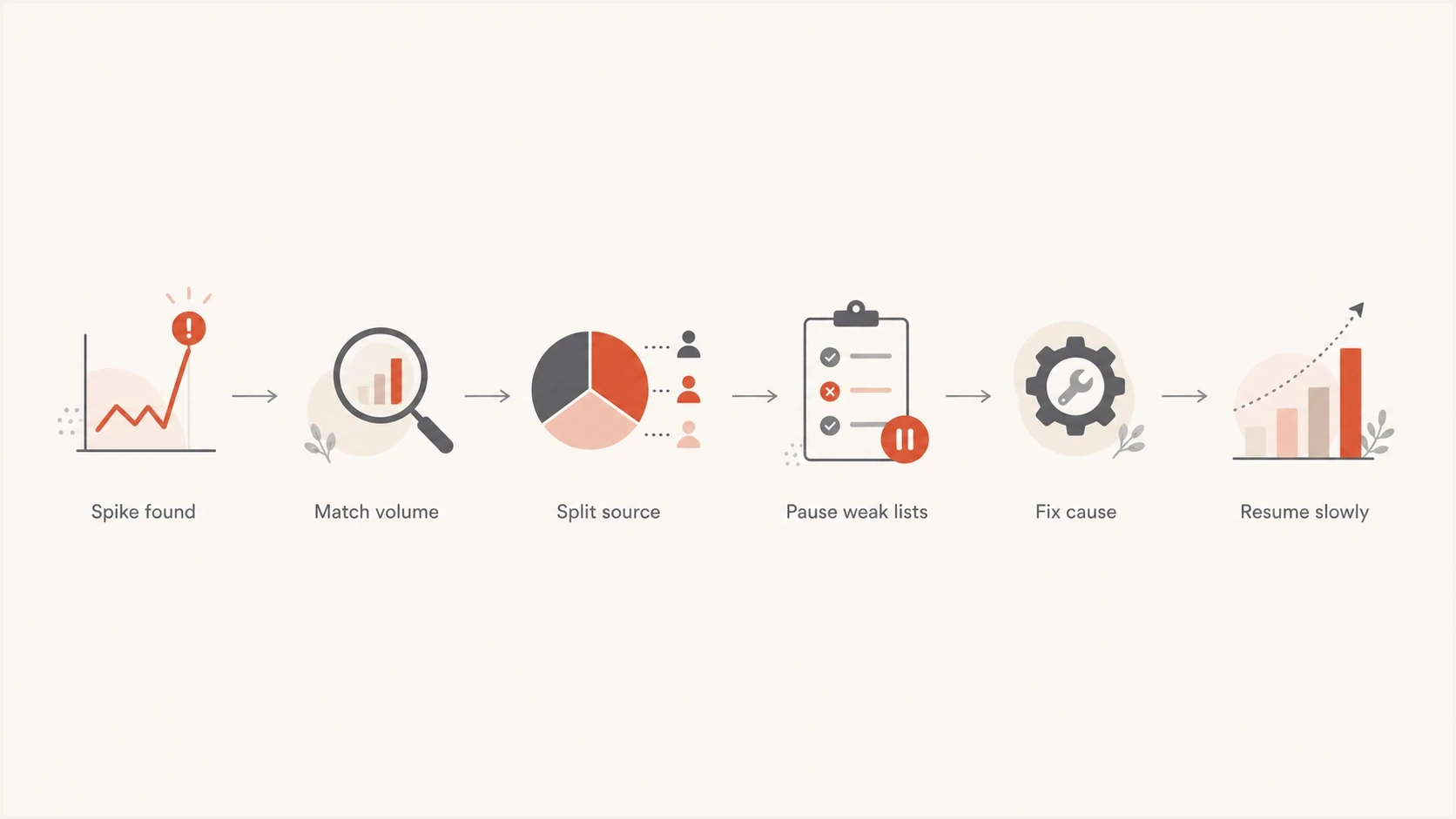
A flowchart for reducing a high spam rate after a complaint spike.
The right target is not only a lower number tomorrow. The goal is to stop the behavior that caused complaints. If recipients mark mail as spam because they cannot find the unsubscribe link, make the link clearer. If they do not remember the brand, fix the sender identity and onboarding. If a list source creates complaints, remove that source instead of diluting it with more good mail.
For marketing and promotional mail, implement one-click unsubscribe with List-Unsubscribe headers and keep a visible unsubscribe link in the message body. Process opt-out requests within 48 hours. A preference center can offer choices, but it should not force recipients to log in or block a direct unsubscribe.
- Segment tightly: Send only to recent engagers while the domain recovers.
- Confirm consent: Use confirmed sign-up and record the source, time, and terms of each subscription.
- Remove ambiguity: Make the sender name, purpose, and unsubscribe path obvious.
- Cap frequency: Reduce repeat sends to people who did not engage with the first message.
- Audit sources: Track complaints by acquisition source, form, partner, sales motion, and upload batch.
- Track trends: Review provider complaint data after each send and investigate repeated warning-band results.
A safe recovery rule
Do not resume normal volume the moment the graph improves. Gmail says complaint data can take up to seven days to normalize after corrective action. Keep the cleaner send pattern in place long enough to confirm that complaints stay low across several sends and audience slices.
Views from the trenches
Best practices
Compare spam-rate spikes with DMARC volume before blaming one campaign or one vendor.
Translate every percentage into real counts so decimal errors stay clear during reviews.
Treat low opens plus high complaints as a sign that inbox placement is already weak.
Common pitfalls
Reading 1% as 1 in 1,000 hides the severity of a true one-in-one-hundred complaint rate.
Assuming DMARC pass means recipients wanted the message leads teams to miss consent issues.
Using total sent volume as the denominator can understate Gmail's reported complaint signal.
Expert tips
Investigate the inboxed slice because the strongest signal comes from users who saw the mail.
Pause broad sends when the rate reaches 0.3% and rebuild around recent engagement first.
Review delayed complaints before tying every spike to the campaign sent on that exact day.
Marketer from Email Geeks says spam spikes should be checked against DMARC volume for the same date before deciding what caused them.
2024-07-10 - Email Geeks
Marketer from Email Geeks says Gmail can count the inboxed denominator, so filtering can make a complaint rate look sharper.
2024-07-10 - Email Geeks
The practical takeaway
A good operating target is below 0.1%. The number to avoid is 0.3% or higher. The math is simple: 0.1% is 1 in 1,000, 0.3% is 3 in 1,000, 1% is 1 in 100, and 3% is 3 in 100.
The investigation needs more context than the percentage alone. Check which messages were counted, whether the spike matches DMARC volume, whether most mail is already going to spam, and whether a specific segment or source is creating complaints. Suped's product supports this workflow by connecting authentication monitoring, issue detection, sender inventory, alerts, and blocklist (blacklist) monitoring in one place.
When the rate rises, do not argue with the decimal. Reduce send volume to weak recipients, fix the cause, and resume slowly with a cleaner audience.




