What does the Microsoft domain error '452 4.3.1 Insufficient system resources' mean for email senders?

Updated on 27 Jul 2026: We clarified how senders should retry this error and how Exchange administrators should clear back pressure safely.
The Microsoft domain error 452 4.3.1 Insufficient system resources means a Microsoft Exchange mail system temporarily could not accept the message because a monitored resource was under pressure. For senders, the first response is controlled retrying, not list suppression, DNS changes, or more connections.
The 4xx class marks a temporary SMTP failure, so a healthy sending system keeps the message queued and retries with backoff. The host that returned the reply determines who can fix the cause. If it was a Microsoft-hosted or recipient Exchange host, the sender can only reduce pressure and retry. If it was your Exchange server, smart host, gateway, or relay, investigate that system's disk, memory, and transport resources.
- Meaning: The Exchange host temporarily refused message acceptance because a mail-system resource was constrained.
- Sender action: Keep the message queued, retry with backoff, and reduce concurrency only for the affected destination.
- Do not do: Do not hard-bounce recipients, remove subscribers, or assume DMARC, SPF, or DKIM caused this response.
What the error means
The receiving host can return the failure at different points in the SMTP conversation. The important parts are the 452 reply code and enhanced status code 4.3.1. Microsoft documents 4.3.1 as a temporary Exchange resource failure, commonly low free disk space or low memory. A recent Microsoft Q&A example shows the same response when an Exchange server's system drive was almost full.
Example SMTP responsetext
EHLO sender.example
250 exchange.example
MAIL FROM:<sender@example.com>
452 4.3.1 Insufficient system resources
In Microsoft 365 or hybrid message traces, the same cause can appear inside a wrapper such as 451 4.4.395 Target host responded with error, followed by the downstream 452 4.3.1 response. Read the complete response and identify the last host in the delivery path rather than troubleshooting only the outer code.
|
|
|
|---|---|---|
452 | Temporary SMTP failure | Queue and retry |
4.3.1 | Mail-system resource issue | Avoid adding pressure |
Issuing host | System reporting pressure | Identifies who can fix it |
Retry success | Temporary pressure cleared | Do not suppress |
How to read the response
An isolated 452 4.3.1 response does not prove a deliverability crisis. Compare the rate with your normal destination baseline, then check retry success, queue age, and final delivery before changing authentication or campaign plans.
Why Microsoft returns it
Exchange back pressure protects the Transport service when monitored resources are overused. Microsoft lists the drive holding the queue database, the drive holding queue transaction logs, content-conversion storage, the EdgeTransport process, system memory, submission queue length, and uncommitted queue transactions among those resources. Exchange delays or rejects new mail so it can process existing messages and avoid becoming unavailable.
Remote Exchange pressure
- Scope: The error clusters around one Microsoft-hosted or recipient Exchange route.
- Pattern: Messages remain queued and many deliver after a later attempt.
- Response: Use destination-specific backoff and let retry queues drain.
Your Exchange pressure
- Scope: The error comes from an Exchange server, gateway, or relay you administer.
- Pattern: Failures can affect inbound mail, outbound mail, or many destinations.
- Response: Restore disk, memory, queue, or transport capacity on that system.
The dividing line is the host that issued the response. Capture the remote host, complete reply text, queue ID, sender IP, recipient domain, SMTP command, attempt number, and time to final delivery. The reply can include a resource tag such as UsedDiskSpace[...] or SystemMemory, which narrows the Exchange administrator's investigation.
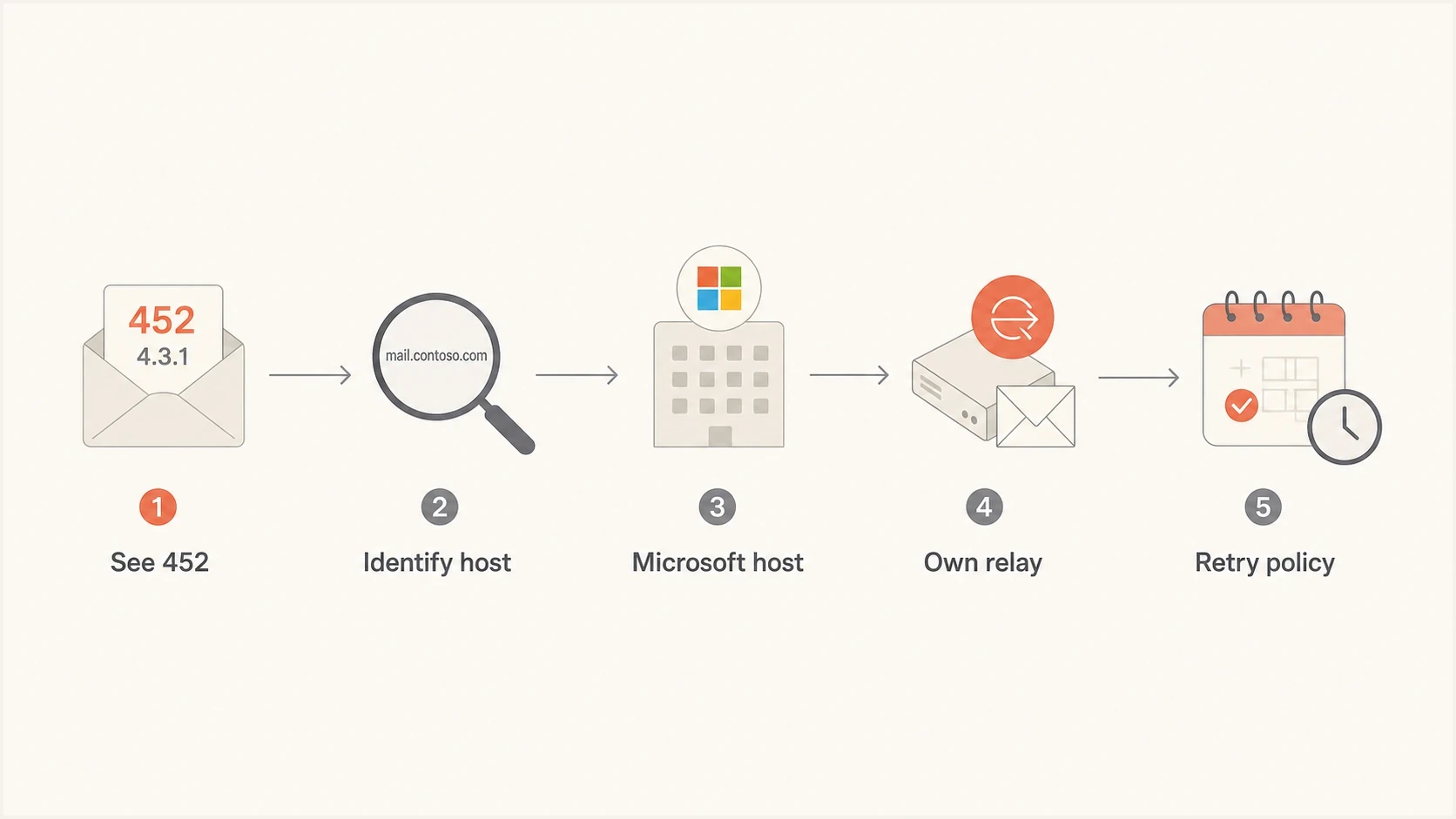
Flowchart showing how to trace a Microsoft 452 4.3.1 response to the responsible host.
If you administer the Exchange server
On Exchange Server 2016, Exchange Server 2019, and Exchange Server Subscription Edition, back pressure runs on Mailbox and Edge Transport servers. Low free space on the queue database, queue transaction-log, or content-conversion drive is a common cause. Low system memory, high Transport-process memory, a large submission queue, or queue database pressure can also trigger protection.
- Read the full reply: Use any resource name in parentheses to identify whether Exchange reported disk, memory, queue, or process pressure.
- Check the server: Review Exchange Transport events, queue state, free space on Exchange data volumes, system memory, and the EdgeTransport process.
- Restore capacity: Free or add disk space, stop the process consuming memory, or reduce the queue pressure that triggered protection. Follow the organization's retention and backup procedures before removing files.
- Verify recovery: Exchange normally reevaluates resources and resumes mail flow when pressure returns to an acceptable level. Confirm that new messages are accepted and existing queues are shrinking.
- Prevent recurrence: Alert on free space, memory, queue growth, and Exchange resource-pressure events before the server begins rejecting mail.
Do not delete Exchange database files, active queue files, or transaction logs to make space. Do not disable back pressure or raise its thresholds as a quick fix. Restore the constrained resource first. Restart the Microsoft Exchange Transport service only under the normal change procedure if mail flow does not resume after resources recover.
How senders should respond
When a remote Microsoft or Exchange host returns the response, preserve the queued mail and let the current MTA retry policy work. If the affected queue keeps growing, reduce only that destination's concurrency or delivery rate. During IP warm-up, hold the planned increase for the affected Microsoft domains until queue age and deferral rates return to baseline.
- Confirm: Group logs by recipient domain and remote host, then separate 452 4.3.1 replies from other temporary failures.
- Retry: Keep messages queued with exponential backoff and jitter, subject to the MTA's existing queue-expiration policy.
- Throttle: If queue age rises, lower concurrency one step for the affected route and wait through at least two retry cycles before changing it again.
- Measure: Compare first-attempt delivery, retry success, final delivery, oldest-message age, and the deferral rate with the normal baseline.
- Escalate: Contact the recipient's mail administrator when the same host keeps returning the error and messages approach queue expiration.
Do not add connections to push through the error. A receiver that is protecting constrained resources needs less incoming pressure, while more parallel traffic creates extra retries and longer queues.
Check the rest of your sending setup
A clean sender baseline still matters because a temporary Exchange resource error can occur during the same delivery window as authentication gaps, reputation issues, or DNS mistakes. Check those conditions separately. The 452 response identifies temporary mail-system pressure, while the wider delivery pattern shows whether another sender-side issue also needs work.
Run a domain health check to confirm DMARC, SPF, DKIM, MX, and DNS basics. Then use DMARC monitoring to verify that Microsoft-bound traffic is authenticated and aligned in aggregate reports. Suped's product keeps those authentication results, issue alerts, and remediation steps together, which helps separate a remote resource deferral from a sender-side configuration change.
Suped DMARC dashboard showing email volume, authentication health, and source breakdown
|
|
|
|---|---|---|
Issuing host | Locates the constrained system | Known remote Exchange host |
Retry result | Separates delay from loss | Delivered before expiry |
DMARC | Finds a separate identity issue | Aligned |
Queue age | Shows delivery delay | Falling |
Checks to run during a 452 4.3.1 spike
How to tell if it is a deliverability issue
A Microsoft 452 4.3.1 spike is not the same as a reputation block. If Microsoft returns other SMTP responses at the same time, such as connection caps, policy refusals, mailbox-unavailable errors, or explicit high-volume limits, classify and handle those separately. The guide on Office 365 temp fails covers the wider set of temporary responses.
Check whether sending IPs or domains appear on a blocklist (blacklist) if the same traffic receives policy-style refusals elsewhere. Suped's blocklist monitoring keeps that reputation context beside authentication and delivery data, so a temporary Exchange resource message does not hide a separate blacklist issue.
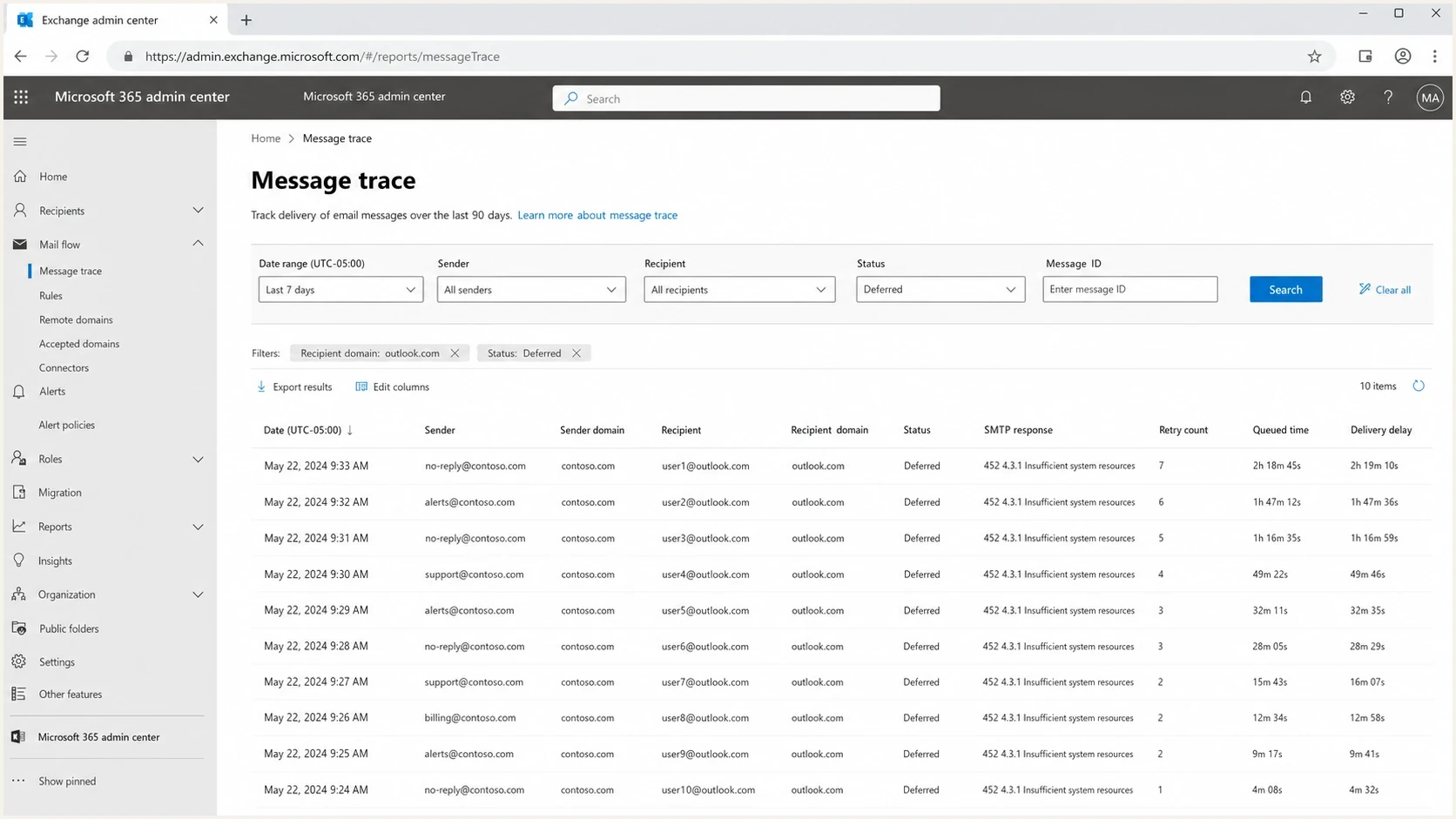
Microsoft 365 Exchange admin center message trace showing deferred messages with 452 4.3.1.
For a message-level check, send a real message and inspect the result with the email tester. It will not reproduce a receiver capacity event on demand, but it will show whether the message has authentication, formatting, DNS, or deliverability issues that need separate attention.
If 452 4.3.1 is the only symptom and final delivery remains strong, treat it as a transient delivery delay. If final delivery falls, queue age grows, and Microsoft also returns rate-limit or policy text, open a separate workflow for those responses.
When the error appears during warm-up or after a volume change, compare it with known Microsoft rate limiting behavior. Both conditions delay mail, but their causes differ. Resource pressure needs retry discipline and less destination pressure. Reputation rate limiting needs slower volume changes, better engagement quality, and sound list hygiene.
Operational playbook
Preserve the mail, reduce pressure on the affected route, collect evidence, and restore speed only after the route is healthy. This avoids turning a temporary remote resource problem into a sender-side queue incident.
Illustrative retry policy logictext
destination: affected-microsoft-route
retry: exponential-backoff
jitter: enabled
queue_expiration: keep-current-policy
concurrency: reduce-one-step
- Segment: Use destination-specific queues or policy groups for Microsoft domains, so one provider route does not control every destination.
- Record: Log first seen time, last seen time, issuing hosts, affected sending IPs, retry success, and final delivery.
- Protect: Prevent automated suppression rules from treating temporary Microsoft errors as permanent bounces.
- Restore: Raise concurrency gradually after the 452 rate returns to baseline, retry success is normal, and queue age is falling.
Suped's product supports the sender-side monitoring in this playbook. DMARC reports confirm alignment, SPF and DKIM checks expose authentication changes, blocklist (blacklist) monitoring adds reputation context, and alerts help teams correlate changes across client or business domains.
Views from the trenches
Best practices
Throttle Microsoft-bound concurrency before retries pile up, then raise it slowly again.
Track the exact Microsoft MX host, response code, queue age, and first retry outcome.
Pause Microsoft ramp-ups when transient 4xx errors rise above your normal baseline.
Common pitfalls
Suppressing recipients after a temporary 4xx response turns a queue issue into data loss.
Increasing connections during receiver pressure tends to create longer queues and retries.
Blaming authentication without checking logs wastes time when the response is receiver-side.
Expert tips
Graph this code per destination domain so small Microsoft spikes do not hide in totals.
Keep a separate Microsoft throttle profile during warm-up and high-volume campaigns.
Compare first-attempt delivery with final delivery before calling the event a failure.
Marketer from Email Geeks says large senders should dial back Microsoft-bound connections during a 452 4.3.1 spike instead of continuing a planned increase.
2022-11-18 - Email Geeks
Marketer from Email Geeks says some senders saw no issue at all and kept near-complete first-attempt delivery, so the signal was not universal.
2022-11-18 - Email Geeks
The practical takeaway
Microsoft 452 4.3.1 Insufficient system resources is a temporary acceptance problem, not a permanent recipient failure. External senders should retry with backoff, reduce pressure only on the affected route, and track final delivery. Exchange administrators should use the full response and server events to find the constrained resource, restore capacity, and verify that queues drain.
If the error remains near the normal baseline and final delivery stays high, keep watching without disruptive changes. If it grows, pause any Microsoft ramp-up and track queue age until delivery catches up. Suped can provide the sender-side evidence during that review: DMARC alignment, SPF and DKIM health, blocklist (blacklist) status, and alerts for configuration or reputation changes.




