What does the Gmail error '452 4.2.2 The email account that you tried to reach is over quota' mean, and how should I handle it?

Updated on 20 Aug 2026: We clarified Gmail quota recovery and tightened the guidance for retries and suppression.
The Gmail error 452 4.2.2 means Gmail temporarily refused delivery because the recipient's inbox is out of storage space. In plain terms, the person you are emailing has a full Gmail or Google Workspace mailbox, or their shared Google account storage is full.
Handle it as a recipient-side soft bounce, not as a sender authentication failure. Let the sending mail server retry with controlled backoff, temporarily suppress addresses that keep returning the quota response, and use permanent suppression only after a permanent recipient-status failure. Do not treat one of these bounces as proof that your SPF, DKIM, DMARC, IP reputation, or content has failed.
Google's own Google SMTP codes separate temporary failures from permanent failures, and the public Google quota thread points to the same recipient-storage cause. Google's error suffixes also matter: gsmtp marks a Google SMTP response, while gcdp points to a Google Workspace custom policy. A plain 452 4.2.2 over quota response is still a storage bounce, so the practical decision is how long to keep the message queued and when to pause future sends to that address.
Typical bounce texttext
452 4.2.2 The email account that you tried to reach is over quota.
Please direct the recipient to Google's over quota help page.
... - gsmtp
What the error means
This is a mailbox capacity problem at the recipient side. RFC 3463 defines the enhanced status code X.2.2 as "mailbox full" and treats it as a persistent transient failure. Gmail uses a temporary response because the recipient can fix the condition by deleting stored data, permanently emptying Trash and Spam, buying more Google storage, or getting a Workspace administrator to adjust storage. Once Google updates the available space, a later queued retry can succeed without any change from the sender.
- Meaning: The recipient account is full enough that Gmail refuses more mail for now.
- Class: The 4.2.2 status is temporary, so the sending server normally queues and retries the message.
- Cause: The issue is usually shared Google account storage, not your sending domain.
- Outcome: A queued delivery can succeed after storage becomes available, or the sender can eventually expire the message and return a final bounce.
A 452 response means temporary failure, but the enhanced code matters. A 452 4.2.2 response is storage-related, while 452 4.5.3 can point to too many recipients or policy size limits. A 550 or 552 response is permanent, but it does not always mean the address is invalid. Use the enhanced status code and error text together before deciding whether to suppress the recipient.
|
|
|
|---|---|---|
452 4.2.2 | Temporary quota | Retry |
Repeat 452 | Still full | Pause |
552 5.2.2 | Full and inactive | Suppress |
550 5.1.1 | No user | Suppress |
Delivered | Quota fixed | Resume |
How to classify common Gmail quota outcomes
Why delivery can resume later
A Gmail address can report over quota and then receive mail again because Gmail checks the recipient account at each delivery attempt. The address can remain valid throughout the failure. What changed is the available storage or receiving condition, not necessarily the address itself.
- Storage cleanup: Deleting large Gmail messages, Drive files, Photos uploads, or backups can reopen space after the recipient permanently empties the relevant trash folders.
- Storage purchase: A Google One plan can restore receiving, while a Workspace administrator can change a user's storage limit.
- Update delay: Google says a storage upgrade can take up to 24 hours to apply, and large deletions can take 48 to 72 hours to appear in the storage total.
- Automatic retry: For 452 4.2.2, the sending server normally retries the queued message, so manual resend loops add noise and can create duplicates.
A queued message can deliver after Gmail sees the freed space. If the sending server has already expired the message and issued a final bounce, Gmail does not retain it for later delivery, so the sender must submit a new message.
How to handle it
The right response is operational: retry, pause, then suppress if the address keeps failing. Do not immediately hard-bounce a Gmail address on the first 452 4.2.2 because that discards addresses that recover after the recipient clears space.
- Record: Store the exact SMTP code, enhanced code, provider, recipient, campaign, timestamp, and response suffix.
- Retry: Let the MTA retry the queued message with backoff instead of submitting fresh copies in a short window.
- Pause: After repeated quota failures, stop normal campaigns for the address for a defined cooling-off period.
- Suppress: Use longer-term suppression for persistent quota failures, and permanent suppression for recipient-specific permanent codes such as 550 5.1.1 or 552 5.2.2.
- Restore: If a later message delivers, clear the temporary quota state and let normal engagement rules control future mail.
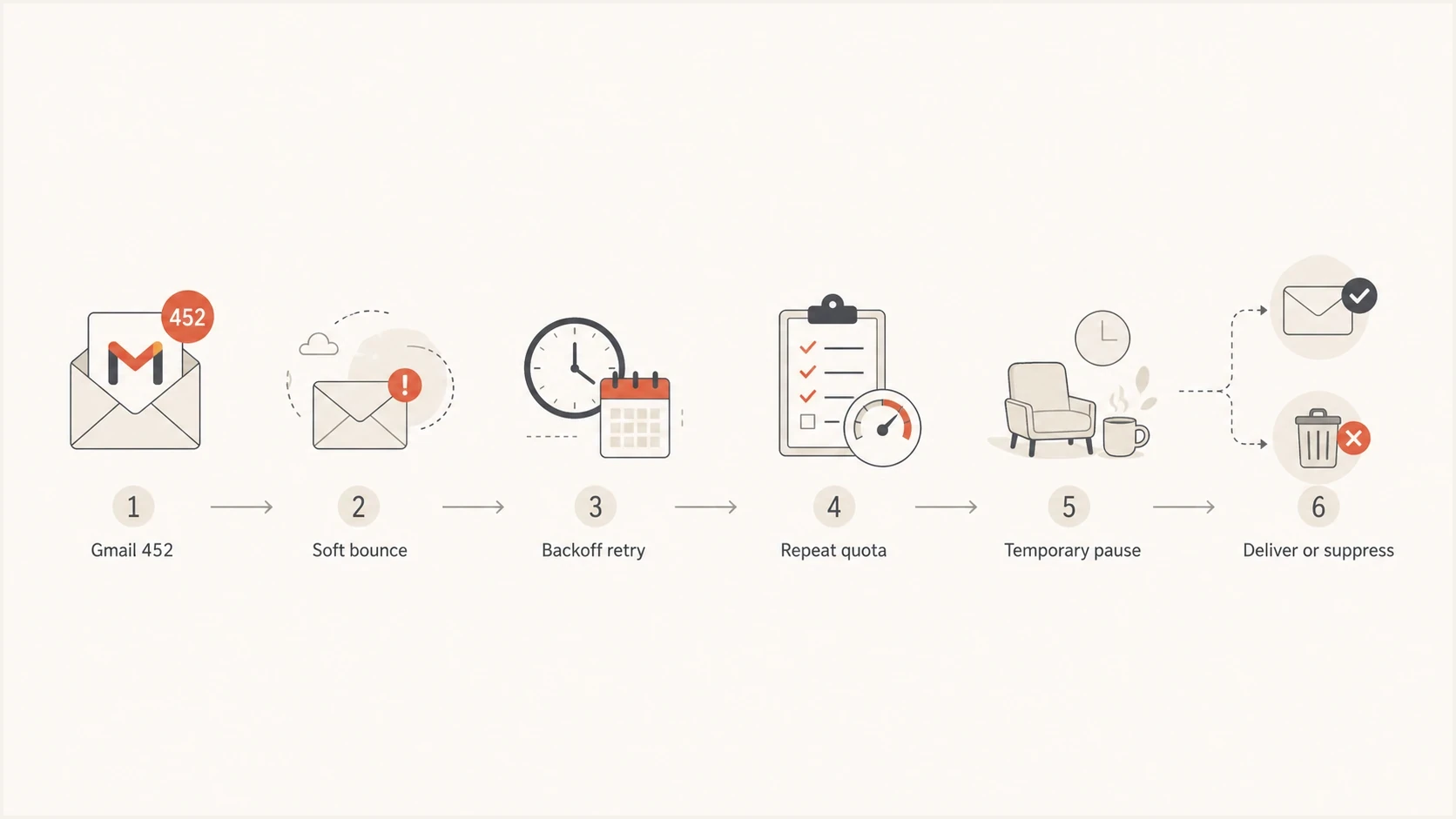
Flowchart for handling a Gmail 452 4.2.2 over quota soft bounce.
Suppression rule exampletext
if provider == "gmail" and smtp_code == "452" and enhanced == "4.2.2":
  mark_soft_bounce("recipient_over_quota")
  let_mta_retry_with_backoff()

if same_reason_count >= 3 within "14 days":
  suppress_temporarily("30 days")

if provider == "gmail" and enhanced in ["5.1.1", "5.2.2"]:
  suppress_permanently()
Do not create a global hard bounce after one quota soft bounce or after an unrelated 5xx response. Use temporary suppression after repeated quota failures, then reserve permanent recipient suppression for a code that identifies an unavailable recipient mailbox.
When a spike deserves investigation
A sudden increase in this error still deserves a quick investigation, especially if the audience and sending cadence were stable before. The most useful first split is simple: are the errors concentrated in the same recipients, or spread across many Gmail recipients?
Same recipients
- Pattern: A small group of addresses keeps returning the same quota error.
- Meaning: Those recipients have not cleared storage, or the accounts are abandoned.
- Action: Pause those addresses and retry on a slower schedule.
Many recipients
- Pattern: The error appears across a broader Gmail segment at the same time.
- Meaning: Review the bounce parser and retry logic, then compare the affected campaign with recent sends.
- Action: Check raw SMTP responses and recent audience changes.
If the spike is broad, check the mechanics before assuming Gmail changed something. Confirm that your ESP or MTA did not change bounce classification, that you are not counting every retry as a new recipient-level bounce, and that one campaign did not target a colder Gmail segment.
Example quota bounce thresholds
An example policy for deciding when to keep retrying and when to pause an address. Adjust it to the message type and your normal MTA retry window.
Normal
1
Single event, no prior quota pattern
Watch
2-3
Repeated temporary quota failures
Pause
4+
Persistent quota failure across days
For a deeper look at reputation impact, see over quota bounces. If the message looks like a broader temporary Gmail deferral instead of a storage issue, compare it with Gmail tempfail errors.
How to rule out a separate sender issue
This error is usually not about your domain, but the sending path still needs verification when a new bounce pattern appears. The goal is to check whether a separate sender-side issue is happening at the same time.
- Raw logs: Check the final SMTP response, not only the category assigned by your ESP.
- Retry counts: Separate recipient count from retry count so one mailbox does not look like many bounces.
- Authentication: Use a domain health check to confirm SPF, DKIM, and DMARC are still passing.
- Reputation: Review blocklist (blacklist) status when many providers start failing together, not for isolated quota bounces.
?
What's your domain score?
Deep-scan SPF, DKIM & DMARC records for email deliverability and security issues.
Suped's product combines DMARC monitoring with SPF and DKIM visibility and blocklist monitoring. For this Gmail error, that workflow helps rule out a separate sender-side problem before the team changes bounce handling.
Issues page showing top issues, verified sources, unverified sources, and authentication pass rates
A real inbox test is also useful after a routing or authentication change. Send a fresh message and inspect the authentication results with the email tester. That test will not prove that a recipient mailbox has space, but it confirms that the message has clean headers and authentication before you return to bounce analysis.
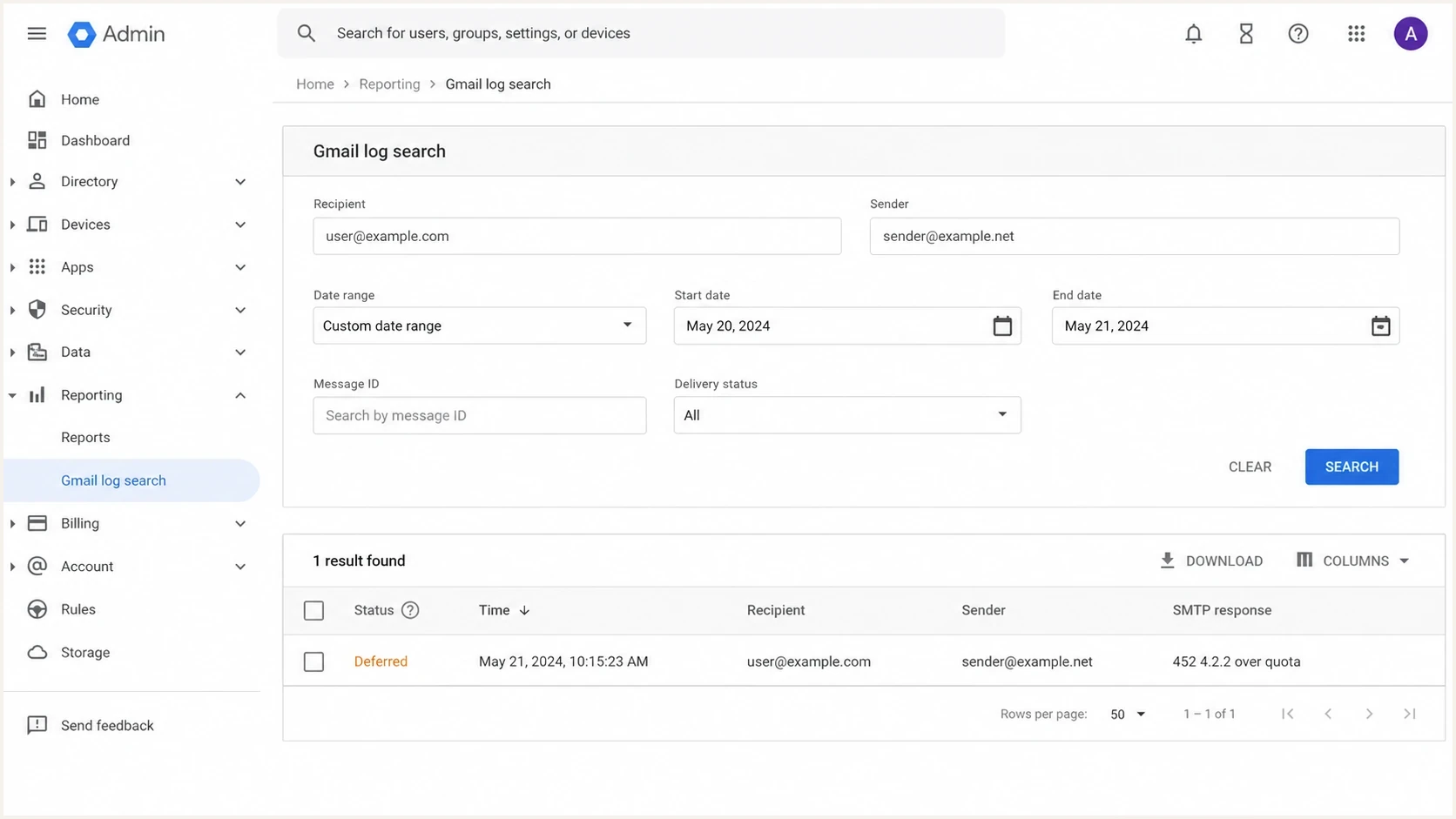
Google Workspace Admin console Email Log Search showing a deferred Gmail 452 4.2.2 over quota result.
How to set retry and suppression rules
The default rule should protect the queue and sender metrics without discarding valid recipients too quickly. Over quota recipients often return after they clean up storage, but repeated sends to the same full mailbox create noise and waste capacity. Treat the thresholds below as a policy example, not a Gmail requirement.
|
|
|
|---|---|---|
First | One 452 | Keep queued |
Repeat | Two 452s | Pause campaigns |
Persistent | Three 452s | Pause 30 days |
Permanent | 5.1.1 or 5.2.2 | Suppress |
Example lifecycle for Gmail over quota addresses
The exact timing depends on mail type and your MTA configuration. For transactional mail, use the normal retry window because the user asked for the message. For marketing mail, pause future campaigns sooner because the message loses value with time and repeated submissions do not help the recipient clear storage.
- Transactional: Use your MTA retry window, then notify the user through another channel if needed.
- Marketing: Pause future sends after repeated quota failures and let engagement rules decide when to try again.
- Sales: Stop automated sequences for the address and avoid manual resend loops.
- Systems: Keep quota bounces separate from invalid-address and spam-policy bounces.
Views from the trenches
Best practices
Pause repeat quota failures for a few days before deciding that the address is gone.
Keep recipient quota bounces separate from policy, authentication, and content bounces.
Track unique recipients, not only retries, so a full mailbox does not inflate reports.
Common pitfalls
Treating the first Gmail quota soft bounce as a permanent invalid address wastes leads.
Counting every retry as a fresh bounce makes a small quota cluster look like a spike.
Blaming sender reputation before checking raw SMTP text sends teams down the wrong path.
Expert tips
Use a temporary suppression state that clears after a later delivery to the same address.
Check whether the same recipients repeat before changing your whole Gmail send plan.
Separate transactional retry windows from marketing cadence because urgency differs.
Expert from Email Geeks says the error means the recipient has hit Google storage quota, so the sender does not need to fix mail authentication for that bounce.
2023-09-05 - Email Geeks
Marketer from Email Geeks says repeat quota addresses should receive fewer attempts so the sender can see who clears storage and who remains unavailable.
2023-09-05 - Email Geeks
The practical decision
The Gmail 452 4.2.2 over quota error means the recipient's Google account is full. Treat it as a soft bounce, let the queued message retry with backoff, and stop normal campaigns to addresses that keep returning the same quota response.
A spike matters when it changes queue load and reporting enough to affect campaign decisions. It does not automatically mean Gmail is blocking you or that your domain has an authentication problem. Investigate raw logs and unique recipient counts, then keep the fix focused on retry and suppression rules.
Suped's product fits around that workflow by confirming domain health and surfacing authentication or blocklist (blacklist) signals when a bounce spike has more than one cause. For this specific error, the main fix remains list handling: pause the address, retry later, and suppress only when the recipient response supports that decision.




