How do overquota bounces in Gmail affect sender reputation and what is the best strategy to manage users with overquota errors?

Published 25 May 2025
Updated 9 Aug 2026
11 min read
Summarize with
Updated on 9 Aug 2026: We clarified Gmail's temporary and permanent quota responses, queue-aware retries, and the suppression rules for each case.
A single Gmail overquota response does not prove sender-reputation damage. A 452 4.2.2 response means the recipient's inbox is out of storage and the failure is temporary. The operational risk starts when your system keeps adding the same unreachable recipient to new campaigns, raising the SMTP error rate and wasting volume that should go to reachable users.
The best strategy is to let the transmitting mail server complete its normal retries for the current message, then pause new campaign sends after repeated campaign-level quota failures. Keep the subscriber record and retest a small sample after a 30-60 day cooldown. If Gmail returns 552 5.2.2 because the inbox is out of storage and inactive, suppress the address as a permanent failure.
- Google does not document a separate reputation penalty for one 452 4.2.2 response, but it tells senders to reduce volume when bounces or deferrals raise SMTP error rates.
- Distinguish temporary 452 4.2.2 responses from permanent 552 5.2.2 responses before applying suppression.
- Do not unsubscribe a strong historical Gmail user after one temporary quota failure. Pause new campaign mail instead.
- Count distinct campaign outcomes, not every retry made by the mail transfer system for one message.
How Gmail treats overquota bounces
A Gmail 452 4.2.2 response means the recipient's inbox is out of storage space. For consumer Gmail accounts, storage is shared across Gmail and other Google account storage, so a person can run out of space while still using the address. Delivery can resume after the recipient frees storage, which is why this response starts as temporary.
Google's public guidance does not say that one recipient-level 4.2.2 response lowers reputation. It does tell senders to reduce volume until the SMTP error rate decreases when messages start bouncing or being deferred, and to monitor server responses and sending-domain reputation in its Google sender guidelines. The practical response is to stop treating a repeatedly unreachable recipient like a normal campaign recipient.
|
|
|
|---|---|---|
452 4.2.2 | Inbox out of storage | Allow normal queue retry |
552 5.2.2 | Inbox out of storage and inactive | Suppress |
450 4.2.1 | Recipient receiving too quickly | Retry later |
421 4.7.28 | Sender exceeded a Gmail quota | Reduce sending rate |
Common Gmail SMTP signals and the matching action.
The risk is repetition
One temporary Gmail quota response is recoverable. Sending campaign after campaign while the original message is still retrying creates avoidable SMTP attempts and obscures the recipient's actual delivery state.
If you need the exact SMTP wording behind this failure class, compare your logs with 452 4.2.2 quota errors before you build automation around the bounce reason.
Read the whole SMTP response before suppressing
Do not classify a Gmail failure from the word 'bounce' or 'quota' alone. Read the SMTP reply and full diagnostic text together. The first digit separates a temporary 4xx response from a permanent 5xx response, while the remaining fields show whether the problem belongs to the recipient or the sender.
|
|
|
|---|---|---|
452 4.2.2 | Recipient inbox is out of storage | Let the current message follow the normal retry queue; pause new campaigns after repeated final outcomes |
552 5.2.2 | Recipient inbox is out of storage and inactive | Treat as a permanent recipient failure and suppress immediately |
450 4.2.1 | Recipient is receiving mail too quickly | Retry later and do not classify it as overquota |
421 4.7.28 | The sender exceeded a Gmail quota | Reduce source volume and connections; do not suppress recipients |
Gmail responses that require different handling.
Queue retries are not new campaign failures
A 4xx response tells the transmitting server to retry the current message according to its queue policy. Use the message ID and final delivery status to deduplicate events. Otherwise, several attempts for one message can look like several independent overquota bounces and trigger suppression too early.
The suppression policy I use
I do not put a Gmail 452 4.2.2 recipient into the hard-bounce bucket on the first event, and I do not keep mailing that recipient indefinitely. There is no universal soft-bounce threshold for every sending cadence. The policy needs a written retry and cooldown rule, plus an explicit permanent-suppression condition.
- Store the SMTP reply, enhanced status code, response text, and message ID so quota failures remain separate from no-such-user and policy errors.
- Allow the mail transfer system to apply its normal retry schedule for one 452 response before recording the final campaign outcome.
- Use three distinct 452 overquota outcomes in 14-30 days with zero deliveries as a starting threshold, then adjust it to your sending cadence.
- Suppress promotional and newsletter mail during the cooldown, even when the user has strong past engagement.
- Keep account-critical notices under a documented transactional retry policy and use another contact channel when one exists.
- After 30-60 days, send one low-risk message to a small sample before returning recovered users to full cadence.
- Suppress 552 5.2.2 immediately, and extend or make suppression permanent when 452 failures return after a cooldown.
Example overquota suppression ruletext
IF smtp_code = 552
AND enhanced_status = "5.2.2"
AND response_text CONTAINS "out of storage"
THEN suppress_all_mail = true
AND set_reason = "gmail_overquota_permanent"

ELSE IF smtp_code = 452
AND enhanced_status = "4.2.2"
AND distinct_failed_campaigns_last_30_days >= 3
AND deliveries_last_30_days = 0
THEN suppress_promotional_mail_for = 45 days
AND set_segment = "gmail_overquota_cooldown"
Gmail overquota handling bands
A starting policy for deciding when an overquota user remains retryable and when campaign mail should stop.
First 452 response
Temporary
Let the current message follow the normal retry queue.
Repeated 452 outcomes
3 in 14-30 days
Remove the recipient from normal campaign sends.
Cooldown retest
30-60 days
Try one low-volume return message after the queue is clear.
552 or failed retest
Permanent or repeat
Suppress immediately for 552, or extend suppression after another 452 cycle.
How to keep good Gmail users without overmailing them
Some quota users come back. A Gmail user can hit a storage limit, clear space, and receive mail again. If delivery resumes, use recent clicks or account activity to decide whether the subscriber belongs in the active segment. Past engagement does not justify unlimited failed sends while the inbox remains unavailable.
What to avoid
- Do not send every campaign to a known full mailbox until the user clears space.
- Do not treat temporary overquota, permanent inactive, spam-policy, and sender-quota responses as the same event.
- Do not keep a user in temporary bounce status for months without a final decision.
- Do not retest every paused user at the same time after a long break.
What to do instead
- Pause normal mail long enough for a real mailbox state change.
- Preserve opt-in, clicks, account activity, and last-delivered timestamps during suppression.
- Return users in small batches with one message and stop on renewed quota failures.
- Keep transactional and promotional handling rules distinct.
This approach protects the chance of future engagement without letting old activity hide current delivery failure. Your database can keep the user while your sending system pauses campaign eligibility until Gmail accepts mail again.
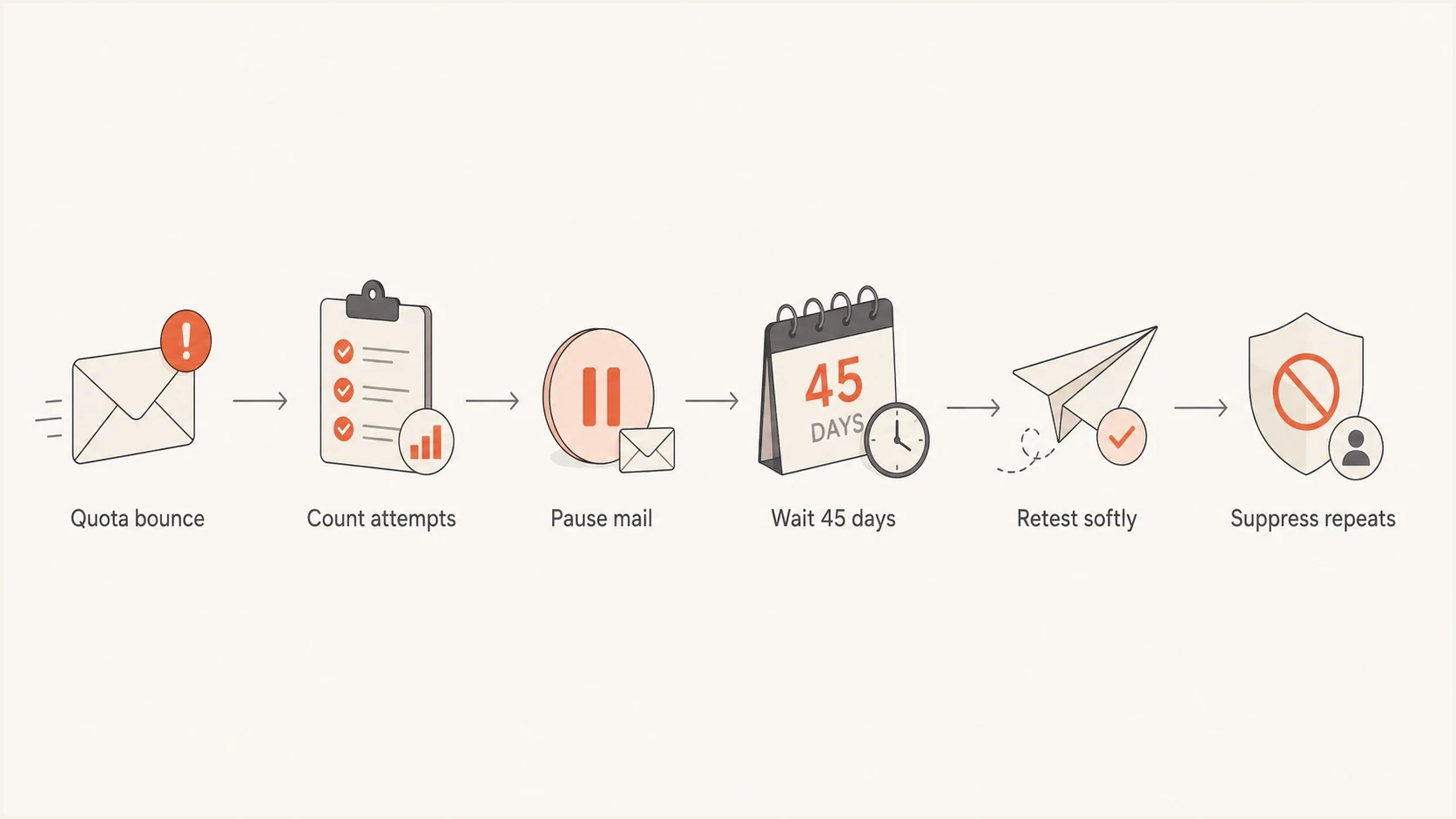
Flowchart showing a Gmail overquota bounce moving through pause, cooldown, retest, and suppression.
A separate recovery analysis helps when you need to decide how long to wait before retesting. The exact number of days matters less than a consistent, measurable rule that starts after the original retry queue has finished. For more detail on mailbox-full patterns, see full mailbox recovery.
What sustained overquota volume says about list quality
One Gmail user over quota is normal. A sustained concentration of Gmail users returning quota failures is a list-maintenance signal, not proof that every recipient is low value. It can point to older subscribers, signup-only mailboxes, inactive accounts, or a campaign process that keeps retrying recipients after their current messages have already failed.
A person can fill storage with large files and still care about your email. Even a valuable user adds to the SMTP error rate while unreachable, so current reachability should control campaign eligibility. Customer value can remain in the CRM without overriding the suppression state.
A useful operating metric
Track Gmail quota recipients as a separate segment with the SMTP code, enhanced status, message ID, final delivery action, last delivered date, quota outcome count, and last click or account activity. That creates a deduplicated recovery queue instead of a vague soft-bounce pool.
- Give recipients with a recent click or account activity one normal cooldown cycle, then retest carefully.
- Use a longer cooldown and one reactivation message when the last activity is old.
- Suppress never-engaged recipients quickly after repeated temporary quota failures.
- Keep a high-value account in the CRM, but stop campaign mail while Gmail rejects delivery.
Separate bounce handling from authentication monitoring
Overquota handling is list hygiene, not authentication. Email authentication results do not explain a recipient's full inbox, but weak authentication can create separate Gmail delivery failures. Check both workflows without treating one as the cause of the other.
This is where Suped's product fits the workflow. Suped's DMARC monitoring keeps authentication status and sending sources visible, while the domain health check helps identify DNS and authentication problems before you attribute every Gmail failure to recipient storage.
Suped also includes blocklist monitoring for domain and IP listings, including blocklist and blacklist signals. A listing and a recipient quota failure are separate conditions, so each needs its own remediation path.
Before changing a suppression policy, send a real test message through the email tester. This gives you message-level evidence on authentication and content while the Gmail bounce log provides the recipient-level SMTP evidence.
Email tester
Send a real email to this address. Suped shows a results button when the test is ready.
?/43tests passed
For this Gmail problem, use Suped to validate sender identity and watch authentication trends. Then compare the timing and sending source with your provider's Gmail bounce logs. DMARC aggregate reports do not contain recipient-level overquota events.
A useful Suped workflow is to review verified and unverified sources, inspect authentication pass rates, and identify which legitimate source sent the affected campaign. Use that source name and timestamp to filter the bounce export, then apply the suppression decision to the matching Gmail recipients.
Issues page showing top issues, verified sources, unverified sources, and authentication pass rates
A practical Gmail overquota playbook
A good overquota playbook has to protect reputation while preserving recoverable users. The rule should be readable by the data team and every team responsible for sending or customer communication.
- On day 0, record the first Gmail response with its SMTP code, enhanced status, message ID, and response text. Let the existing queue follow its normal retry policy.
- Across days 1-30, count distinct final campaign outcomes, not every SMTP attempt. Stop adding new campaigns when the recipient crosses the chosen threshold.
- At the cooldown threshold, move repeated 452 recipients into a Gmail overquota segment and pause normal campaign sends.
- Around day 45, confirm that no message remains queued, then retest a small share with one low-risk message and expand only after clean delivery.
- Suppress 552 recipients immediately. Suppress repeated 452 failures for 90-180 days or permanently when recent activity is absent.
- Measure temporary and permanent quota rates separately, along with total Gmail delivered rate, complaint rate, total bounce volume, and recovered-user value.
Fields to store for overquota decisionstext
recipient_email_hash
domain_group = gmail
smtp_reply_code
enhanced_status_code
response_text
message_id
final_recipient_action
last_delivered_at
distinct_overquota_campaigns_30d
last_overquota_at
last_click_at
last_account_activity_at
cooldown_until
suppression_reason
retest_attempt_count
The clean rule
Keep the subscriber relationship after a temporary failure, stop new campaign sends after repeated final outcomes, and retest once under a controlled policy. Suppress a permanent 552 5.2.2 response immediately.
Views from the trenches
Best practices
Separate Gmail 452 4.2.2 temporary responses from permanent 552 5.2.2 failures first.
Pause repeated quota failures, then retest small batches after a real cooldown period.
Count distinct campaign outcomes, not each queue retry, before suppressing a recipient.
Review authentication separately because it does not explain a recipient storage error.
Common pitfalls
Count Gmail queue retries as separate failures and suppress a recipient too early.
Leave quota users in a temporary state for months without a final suppression rule.
Retesting every paused Gmail recipient at once and creating a fresh bounce spike.
Mix overquota, no-user, rate-limit, and policy failures in one generic bounce bucket.
Expert tips
Store the SMTP code, enhanced status, message ID, and final recipient action together.
Give strong engagers one recovery cycle, but suppress permanent 552 failures at once.
Measure recovered-user value against the cost of repeated failed campaign outcomes.
Keep recipient bounce logs separate from DMARC reports, then compare source timestamps.
Marketer from Email Geeks says ignoring bounce messages for weeks can damage reputation, even when the original error looks temporary.
2022-08-29 - Email Geeks
Marketer from Email Geeks says repeated overquota failures should trigger an automated pause, followed by a smaller resend after one or two months.
2022-08-29 - Email Geeks
Final Gmail overquota suppression strategy
Gmail quota users are not automatically bad subscribers. The response code determines the first action: 452 4.2.2 starts as temporary, while 552 5.2.2 is permanent. Repeated new campaigns to a temporarily unreachable recipient increase SMTP errors without creating a delivery opportunity.
Use a suppression ladder that classifies the full response, lets the current retry queue finish, counts distinct campaign outcomes, pauses new campaigns, and runs one small retest after the cooldown. That preserves recoverable subscribers without treating failed delivery as free.
- Keep recent engagers who recover after the cooldown and deliver cleanly.
- Pause recipients with repeated 452 4.2.2 outcomes and no delivery inside the campaign window.
- Suppress every 552 5.2.2 response and repeated temporary failures after a cooldown.
- Monitor Gmail SMTP errors, authentication status, complaints, blocklist or blacklist status, and recovered-user value.




