
What does SMTP deferred message 'refused to talk to me: 421 4.7.0 Not allowed' mean?

Published 28 Jun 2025
Updated 15 Oct 2026
14 min read
Summarize with
Updated on 15 Oct 2026: We clarified SMTP-stage diagnosis, retry timing and queue expiry for 421 4.7.0 deferrals.
The deferred SMTP message "refused to talk to me: 421 4.7.0 Not allowed" means the receiving mail server accepted the network connection far enough to issue a temporary 4xx SMTP response, then refused to continue the SMTP conversation. In plain terms, the remote server is telling your sending server: try again later, but this connection is not allowed right now.
The important word is "deferred." A 421 reply is temporary, not a final bounce. Your mail queue should retry delivery until the message expires or the receiving server starts accepting the connection. The phrase "Not allowed" is the receiving server's local policy wording. It is not a standard diagnostic by itself, so the cause has to be inferred through logs, DNS, reputation checks, rate patterns, TLS negotiation, and any provider-specific clues.
Common causes include an IP-based block, a rate or connection limit, greylisting, a poor or missing reverse DNS setup, bad HELO or EHLO identity, reputation issues, a blocklist or blacklist listing, a TLS or allowlist requirement, or a receiver-side rule that does not give public detail. Temporary overload or maintenance is also possible, but a persistent refusal affecting one recipient domain points more strongly to receiver-specific policy.
What the SMTP reply means
SMTP replies have two layers. The first number, 421, means service unavailable and closing the SMTP connection. The enhanced status code, 4.7.0, gives a broad category. The 4 means temporary failure. The 7 points to a security or policy issue. The 0 means the receiving system has not given a more specific subcategory. These definitions are specified in RFC 5321 and RFC 3463.
Typical log linetext
status=deferred
host mx.receiver.example[203.0.113.25] said:
421 4.7.0 Not allowed
That makes this error frustrating. It clearly points at receiver-side policy, but it does not say which rule matched. Do not read "Not allowed" as proof that the message content was rejected. Many receivers issue this before message content is transferred, sometimes immediately after connection, HELO, MAIL FROM, or RCPT TO.
The short interpretation
A 421 4.7.0 refusal usually means the receiver has temporarily blocked or throttled the sending IP, sending host, connection pattern, or sender identity. The sender should retry, but the operator should investigate if the same domain keeps deferring mail.
Why the server says refused to talk to me
The phrase "refused to talk to me" comes from the sending mail transfer agent (MTA). The remote text is the actual reply after the colon: 421 4.7.0 Not allowed.
The SMTP handshake implementation emits this wording for refusals during the initial greeting or HELO/EHLO exchange. If 421 replaces the normal 220 greeting, the sender has not yet sent EHLO, MAIL FROM, or message data. Inspect the transcript before attributing the refusal to an identity the receiver has not received.
What the sender knows
- Temporary status: The message stays queued and delivery retries continue.
- Policy class: The enhanced code points to a security or abuse-control decision.
- Remote wording: The receiver chose the broad text "Not allowed".
What the sender does not know
- Exact rule: The reply rarely identifies the receiver's internal rule.
- Block duration: The message does not say when acceptance will resume.
- Appeal path: The receiver often gives no contact or ticket reference.
Because the wording is vague, the strongest diagnosis comes from timing and scope. If the error started after a traffic spike, a new sending IP, a DNS change, or a campaign to old addresses, start there. If the error applies only to one destination domain, the receiver has probably made a local decision about your IP or connection behavior.
Common causes
Work through these causes in the order that matches the SMTP stage. A refusal at connection cannot be the result of that message's DKIM or DMARC evaluation. SPF can be checked using the HELO/EHLO identity, or the envelope sender once MAIL FROM is available. RFC 7208 describes these separate SPF identities. DKIM and DMARC evaluation require message data that is unavailable during an initial greeting refusal.
|
|
|
|---|---|---|
IP policy block | Sending IP | One receiver refuses early |
Rate limit | Volume pattern | Deferrals rise during peaks |
Greylisting | Retry history | Later retry is accepted |
Reverse DNS | PTR and matching A/AAAA records | Hostname mismatch |
HELO issue | EHLO name | Invalid or unresolvable hostname |
TLS or route policy | TLS and authorization | Explicit TLS or relay authorization error |
Blocklist | IP listings | Blacklist match |
Receiver capacity | Other routes and MX hosts | Broad, short-lived failures |
Sender history | Complaint trend | New reputation damage |
Likely causes of 421 4.7.0 Not allowed
A terse reply does not establish whether an IP block is manual or automated. Some receivers intentionally avoid detailed rejection text because detailed text helps abusive senders tune around filters. "Not allowed" alone does not identify the rule that matched.
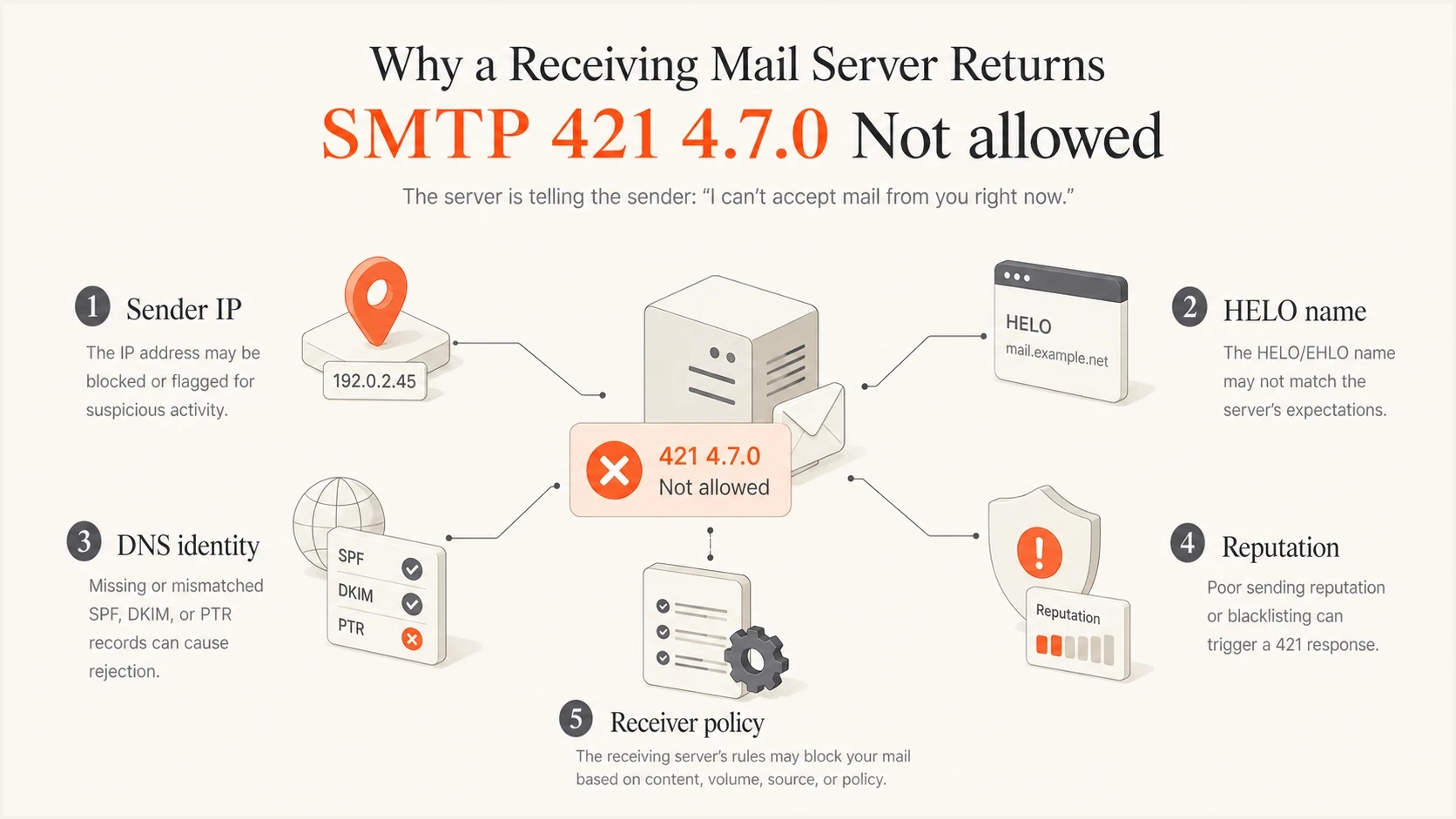
Sending IP, HELO name, DNS identity, reputation and receiver policy checks for SMTP 421 4.7.0 Not allowed.
How to distinguish policy blocks from greylisting or outages
A 421 reply can support greylisting or protect a busy receiver, while 4.7.0 and "Not allowed" lean toward security policy. The wording alone still cannot prove which mechanism fired. Compare scope, timing, SMTP stage, and later retry results before changing infrastructure or asking for removal.
|
|
|
|---|---|---|
Policy block | One receiver repeatedly refuses one IP or identity | Verify identity, throttle, then escalate |
Greylisting | A normal delayed retry succeeds without other changes | Keep standards-based queue retries |
Capacity or maintenance | Several IPs or MX hosts fail briefly, then recover | Observe and let the queue retry |
Network interruption | Timeouts or connection failures appear beside SMTP replies | Check routing, firewall rules, IP-family reachability, and DNS resolution |
Signals that separate common temporary refusal patterns
Greylisting defers an unfamiliar source or combination of SMTP identities until a delayed retry, as described in RFC 6647. A time-limited policy block can also expire without a configuration change, so eventual success alone does not prove greylisting. Do not label a refusal as greylisting merely because it uses a temporary code.
How to diagnose 421 4.7.0 deferrals
Start with the transcript and the queue logs. You need the receiving hostname, the remote IP, the exact SMTP stage, the sending IP, the envelope sender, the recipient domain, the time, the TLS result, and the retry history. Without those details, an appeal to the receiver will be weak.
- Confirm scope: Check whether all recipient domains defer mail or only one receiver does.
- Find the stage: Identify whether the refusal happens during the initial greeting, EHLO, STARTTLS, MAIL FROM, RCPT TO, the DATA command, or after message transfer.
- Check DNS identity: Verify PTR, forward DNS, EHLO name, SPF, DKIM, and whether the authenticated domain matches the visible From domain.
- Check transport policy: Record TLS results if STARTTLS is reached; otherwise mark it as not reached. Verify any relay or source-IP allowlist requirement.
- Review reputation: Look at complaint spikes, invalid recipient rates, trap risk, and blocklist or blacklist status.
- Throttle retries: Reduce concurrency to the affected domain while you gather evidence.
- Prepare proof: Collect UTC timestamps, the actual outbound IP, local queue IDs, and any receiver reference, plus TLS and authentication results where available.
Evidence to collecttext
Sending IP: 198.51.100.24
PTR: mail1.example.com
EHLO: mail1.example.com
Receiver MX: mx.receiver.example
SMTP reply: 421 4.7.0 Not allowed
Stage: after EHLO
TLS: STARTTLS not reached before refusal
First seen: 2026-05-28 09:20 UTC
Affected recipients: receiver.example only
Send a real message through your normal path and inspect DNS and authentication output with Suped's email tester. A test delivered to another mailbox cannot reproduce the affected receiver's private policy or prove acceptance there. For this deferral, the sending server's SMTP transcript remains the evidence of the remote reply.
Email tester
Send a real email to this address. Suped shows a results button when the test is ready.
?/43tests passed
Check sender identity first
Before assuming the receiver made a mistake, verify that your sending identity is clean. A receiving system can decide early that your connection does not meet its baseline requirements. That can happen before it evaluates the message body.
Do not retry aggressively
A deferred 421 response asks your MTA to try later. High retry frequency, many parallel connections, or repeated delivery to invalid addresses can make a temporary policy refusal last longer.
For the domain itself, run a broad domain health check and fix anything that makes your mail look misconfigured. Pay special attention to reverse DNS, SPF syntax, DKIM signing, DMARC policy and identifier matching, TLS posture, and whether the visible sending host matches the domain's intended mail setup.
Verify forward-confirmed reverse DNS (FCrDNS): the outbound IP's PTR should name a hostname whose A record for IPv4 or AAAA record for IPv6 resolves back to that IP. Ask the IP provider to correct PTR records when necessary. Use a fully qualified domain name (FQDN) for EHLO and keep it consistent with that hostname. Google's SMTP error documentation identifies missing PTR records and forward DNS mismatches as deferral causes.
?
What's your domain score?
Deep-scan SPF, DKIM & DMARC records for email deliverability and security issues.
Suped's DMARC reporting and email authentication platform helps confirm SPF and DKIM results, identify unrecognized sending sources, and follow issue-level fix steps. Compare those results with your sending server's queue logs. A refusal before message transfer produces no DMARC evaluation for that attempt, so the absence of report data does not identify the cause of this 421 error.

Issue steps to fix dialog showing the issue overview, tailored fix steps, and verification action
When blocklists or blacklists matter
A blocklist (blacklist) listing is not the only explanation for this reply, but it is one of the first things to rule out. Some receivers combine their own reputation data with public or private blocklist signals. Others run manual IP blocks that are not visible through public lookups.
Check the exact outbound IP that received the deferral, not just the domain. If your platform uses multiple IPs, one IP can be refused while others still deliver. A shared pool also complicates diagnosis because traffic from other senders can affect the same source IP.
Suped's blocklist monitoring helps here because it tracks IP and domain listings over time instead of treating a check as a one-off lookup. That matters when the refusal appears and disappears between retry windows.

Blocklist monitoring page showing domain and IP checks across blocklists with importance and status
A clean blocklist result is not a full clearance
No public listing means no public listing was found. It does not prove the receiver has no private blacklist, no manual sender block, and no internal reputation threshold affecting your IP.
How to handle retries and queue behavior
Because this is a 4xx response, the correct mail-server behavior is to queue and retry. The operator decision is whether to leave the default retry schedule alone, slow down only for the affected domain, or pause traffic while investigating. Avoid forced retries. A forced retry flood can convert a recoverable deferral into a stronger block.
Use the MTA's configured retry schedule and backoff. RFC 5321 generally recommends at least 30 minutes between retries, with more informed variable schedules allowed. Follow documented receiver guidance rather than adding rapid application retries on top of the mail queue.
Check the queue lifetime: RFC 5321 generally recommends a give-up period of at least 4-5 days, but your configured limit determines actual expiry. Persistent deferrals can end in a non-delivery report. Watch the oldest queued message and escalate before expiry.
Retry posture for repeated 421 4.7.0 deferrals
Use retry behavior that matches the deferral pattern instead of pushing more connections at the receiver.
Low risk
Observe
A few isolated deferrals with later success.
Warning
Throttle
A single domain defers repeatedly for one sending IP.
Critical
Pause new bulk mail
Persistent deferrals with no accepted retries; reduce new traffic while investigating.
For bulk or application mail, isolate the destination domain and slow the concurrency. If the receiver has several MX hosts, check whether all MX hosts return the same response. If one MX host behaves differently, the issue can be cluster-local, but you still need careful retry behavior.
If the sending IP is new or has been quiet for a long period, warm it gradually with consistent traffic to engaged recipients. A sudden jump in volume can trigger temporary rate controls even when DNS and authentication are correct.
Operational notes for a queue tickettext
Affected domain: receiver.example
Action: reduce per-domain concurrency to 1 as an initial trial
Action: use the configured MTA retry schedule and backoff
Action: pause new marketing traffic to this domain
Continue: queued retries at the reduced rate
Check: oldest queued message and queue expiry
Review: every 2 hours
How to contact the receiver
When the error looks like a manual or private receiver block, contact is sometimes the only route. Use postmaster and abuse role addresses if they accept mail, but do not assume a reply will arrive quickly. Some providers only support their own customers, and some publish no useful escalation path. If you use a managed sending service or shared IP pool, ask its operator to investigate the actual outbound IP. The recipient's mail administrator can also check receiver-side logs or open a support request with their provider.
Your request should be concise and evidence-led. Do not send a vague request saying your mail is blocked. Send the exact receiving MX, source IP, timestamps, sample queue IDs, and what you have already fixed or verified.
Receiver escalation templatetext
Subject: SMTP 421 4.7.0 deferrals from 198.51.100.24

Hello,

We are seeing repeated temporary deferrals from your MX hosts.

Source IP: 198.51.100.24
PTR: mail1.example.com
EHLO: mail1.example.com
Envelope sender: bounce@example.com
Recipient domain: receiver.example
Sample time: [UTC timestamp from an actual failed attempt]
Receiving MX and IP: [actual hostname and address]
Local queue ID: [actual queue ID]
Reply: 421 4.7.0 Not allowed
SMTP stage: [initial greeting, EHLO, or other observed stage]
TLS result: [observed result, or not reached]

Checks completed: [only checks actually verified, with results]
Changes made: [specific DNS fixes or sending-rate changes]
We have reduced per-domain concurrency while investigating.

Can you confirm whether this IP is blocked or rate limited?

Thank you.
If the receiver does not answer, keep the sending pattern conservative and keep records of each retry window. The best evidence is a clean timeline showing when the deferrals began, what changed before that time, what fixes were made, and whether accepted delivery resumed.
Do not hide the sending source
Switching IPs without fixing the underlying cause can spread the issue to more infrastructure. Move traffic only when you know the refusal is isolated and the new route has the same or stronger authentication and reputation controls.
How this differs from other 421 errors
Not every 421 error means the same thing. A generic 421 service unavailable can be caused by downtime, overload, or temporary maintenance. A 421 with unusual rate wording points more directly at sending volume or reputation. "Not allowed" is less specific, so treat it as a policy refusal until timing, scope, or retry results indicate greylisting or a receiver outage.
|
|
|
|---|---|---|
Not allowed | Policy refusal | Verify and escalate |
Try later | Temporary deferral | Queue retry |
Too many errors | Too many prior SMTP errors in the session | Inspect earlier replies, including RCPT failures |
Unusual rate | Rate or reputation | Throttle traffic |
Common 421 wording and likely meaning
If your log also shows a network-level connection refusal, diagnose it separately. A network refusal means TCP could not establish the SMTP session, while this 421 reply means the remote SMTP service answered and then refused the conversation. The next steps differ, especially for firewall and routing checks.
Views from the trenches
Best practices
Log the SMTP stage, receiving MX, source IP, and exact reply before changing queues.
Throttle the affected domain while checking DNS identity and sender reputation signals.
Keep escalation requests short, factual, and backed by timestamps and sample queue IDs.
Common pitfalls
Treating 421 as a final bounce can hide a recoverable temporary receiver refusal.
Retrying too fast can reinforce the same receiver policy rule that caused the deferral.
Checking only the domain can miss an IP-specific blocklist or private blacklist issue.
Expert tips
Compare results across MX hosts to separate receiver cluster issues from sender policy blocks.
Use DMARC reports to find unverified sources before appealing a receiver-side block.
Escalate after PTR, EHLO, SPF, DKIM, DMARC, and TLS checks match the sending path.
Marketer view
Marketer from Email Geeks says this reply usually leaves too little detail for a strong appeal unless the sender first collects the source IP, receiving MX, timestamps, and retry pattern.
2021-07-09 - Email Geeks
Marketer view
Marketer from Email Geeks says a terse "Not allowed" response often looks like an IP-based receiver block, especially when the provider gives no public diagnostic text.
2021-07-09 - Email Geeks
Confirm delivery after the fix
After a fix, confirm a final 250 acceptance reply after message transfer and check that the deferred queue drains. TCP connection or EHLO success alone does not confirm acceptance. A 421 instead of final acceptance remains a deferral and does not prove a content issue.
Keep the affected route throttled while acceptance resumes, then restore volume gradually. Avoid manual resends while the original message remains queued to prevent duplicate mail.




