What does Mailgun's 'Too old' delivery status message mean and how to troubleshoot it?

Published 26 Jul 2025
Updated 28 Jul 2026
11 min read
Summarize with
Updated on 5 Aug 2026: We added Mailgun's last-code and last-message fields so you can trace the temporary failure behind a Too old event.
Mailgun's Too old delivery status means Mailgun stopped trying to deliver the message because the retry window expired. In Mailgun's default retry behavior, temporary delivery failures are retried for up to 8 hours. If the message still has not delivered by then, Mailgun drops it from the retry queue and records a permanent failure with the description Too old.
The most common causes are repeated temporary deferrals, rate limiting, recipient-side throttling, connection failures, or a provider-specific queue problem. When it appears only for Microsoft domains, treat it as a Microsoft-specific delivery path issue until the logs prove otherwise. That usually means throttling, reputation pressure, saturated connections, or a temporary Microsoft MX problem.
Do not read Too old as proof that the recipient address is invalid. It tells you that delivery did not complete before the queue deadline. The next step is to inspect the final temporary response and earlier events, then decide whether the fix belongs in sending cadence, authentication, reputation monitoring, or a Mailgun support ticket.
Direct answer
Mailgun Too old is a final queue-expiration status after temporary delivery attempts fail long enough to exceed the retry window. The fix starts with the temporary failure details, not the final Too old label.
What the status means
Mailgun retries messages after temporary failures, then stops when the configured retry window ends. The Mailgun retry article explains that permanent failures are not retried, while temporary failures use increasing retry intervals inside the retry window. When that window expires, the message is dropped and the final failure description is Too old.
You will often see internal code 602 with reason old. Current events can also include delivery-status.last-code and delivery-status.last-message, which preserve the most recent temporary failure response. Older event examples and some log views omit these fields, so the full event chain can still be necessary.
Illustrative current Mailgun event shapejson
{
  "event": "failed",
  "severity": "permanent",
  "reason": "old",
  "delivery-status": {
    "code": 602,
    "message": "Too old",
    "attempt-no": 8,
    "last-code": 421,
    "last-message": "4.7.0 Temporary server error. Please try again later."
  }
}
The 602 status identifies queue expiration. The last-code and last-message fields expose the final temporary response, but that response still needs context such as recipient provider, sending volume, and earlier attempts. Work backward through the event history when the final response is missing or too generic.
Do not confuse two kinds of age
A delivery-status.code value of 602 means the delivery queue expired. It does not mean an Events API request or stored event is too old, and it is unrelated to Mailgun's separate webhook retry schedule.
Retry age signals
How to read a Mailgun message as it moves through a temporary failure retry window.
Initial attempt
0 minutes
The first delivery try has not yet built a retry pattern.
Retrying
10 min to 8 h
Temporary failures are still inside the retry window.
Expired
After 8 h
The queue deadline has passed and the message is dropped.
Read the final temporary failure
Mailgun completed an event update in November 2024 that adds delivery-status.last-code and delivery-status.last-message to the Too old permanent failure event. The Mailgun feature request confirms that these fields contain the last temporary failure code and response before the retry period ended.
Start with the exact last-message text. A 421 or 451 response normally indicates a temporary server, policy, or rate-limit deferral. An enhanced code beginning with 4.7 often points to policy or reputation pressure. Use the receiver's full wording because the same SMTP code can cover different causes.
|
|
|
|---|---|---|
421 or 451 | Remote server deferred delivery | Read the full response and group by provider |
4.7.x enhanced code | Policy or reputation-related deferral | Check traffic pattern and sender reputation |
Blank or missing fields | The final event lacks the cause | Trace earlier events or ask Mailgun support |
How to interpret the final temporary response.
Do not suppress on code 602 alone
A Too old event does not prove the mailbox is invalid. Suppress the address only when a separate permanent recipient response establishes that the address cannot receive mail.
Why Microsoft domains show it
When Too old appears only for Microsoft-hosted recipients, look for a domain-specific pattern before changing anything globally. Microsoft can defer mail because of sender reputation, bursty traffic, connection pressure, recipient engagement, policy filtering, or a temporary problem on the receiving side. The final Mailgun label hides those differences, while last-message can expose the receiver's latest response.
The practical clue is clustering. If Gmail, Yahoo, corporate domains, and Apple addresses are delivering while Outlook.com, Hotmail, Live, and Microsoft 365 addresses age out, the sending path to Microsoft needs its own investigation. The related Microsoft pattern is covered in Microsoft deliverability fluctuations.
Too old
- Mailgun stopped retrying after the retry deadline passed.
- The event can include the final temporary response in last-code and last-message.
- Find the provider pattern and the temporary failure cause.
Hard bounce
- The receiving system gave a permanent rejection.
- The response usually includes a clear SMTP code.
- Suppress invalid recipients or fix the stated rejection cause.
A Too old cluster at Microsoft also calls for reputation and authentication checks outside Mailgun. Confirm that SPF, DKIM, and DMARC pass for the Mailgun stream, then review engagement and traffic shaping. Authentication does not override poor reputation, but broken authentication makes throttling and filtering harder to recover from.
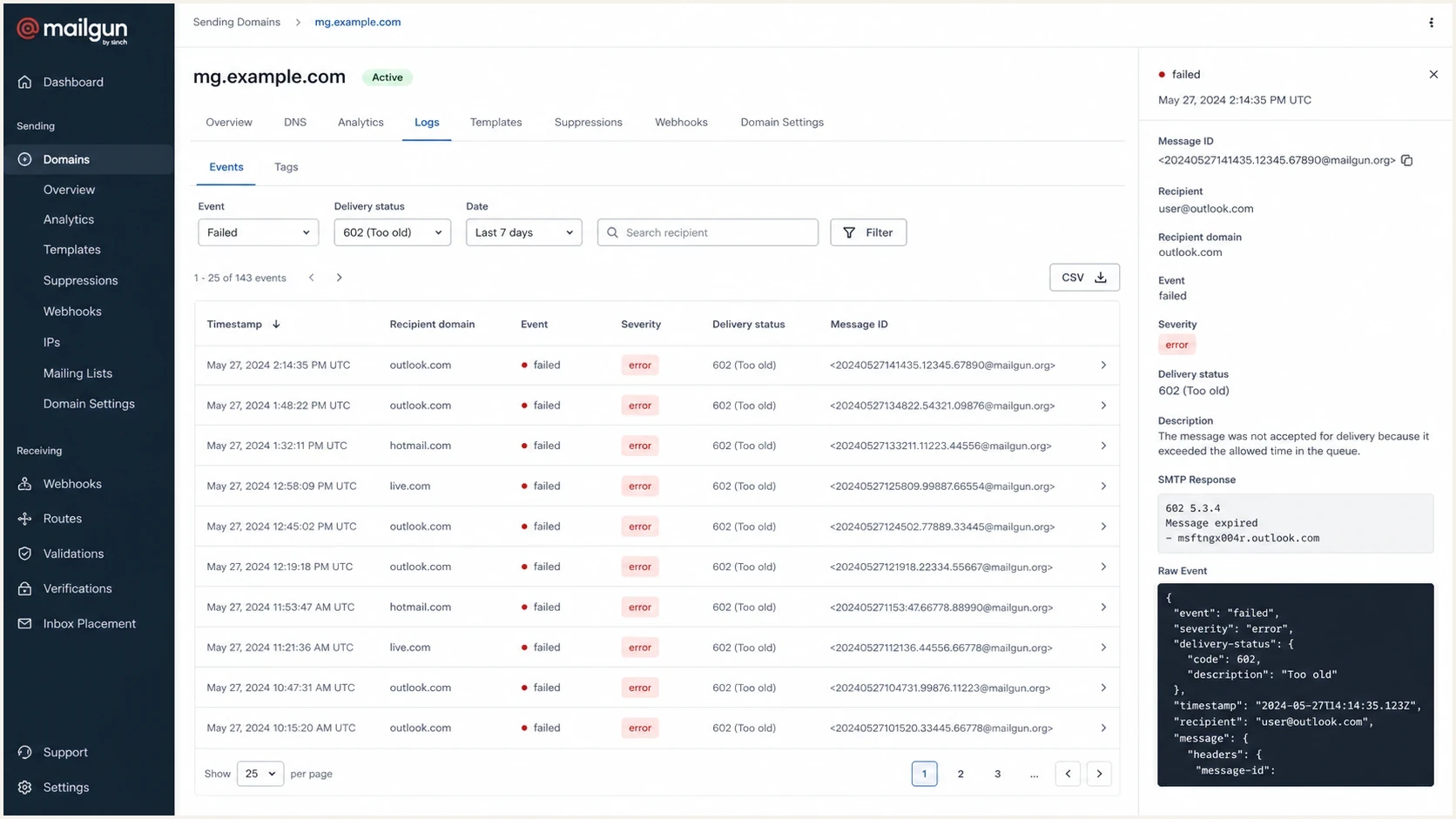
Mailgun Control Panel logs filtered to Too old delivery events.
How to troubleshoot it
Troubleshoot Too old by separating queue expiration from root cause. The final event is only the end state. The question to answer is: what happened before Mailgun gave up?
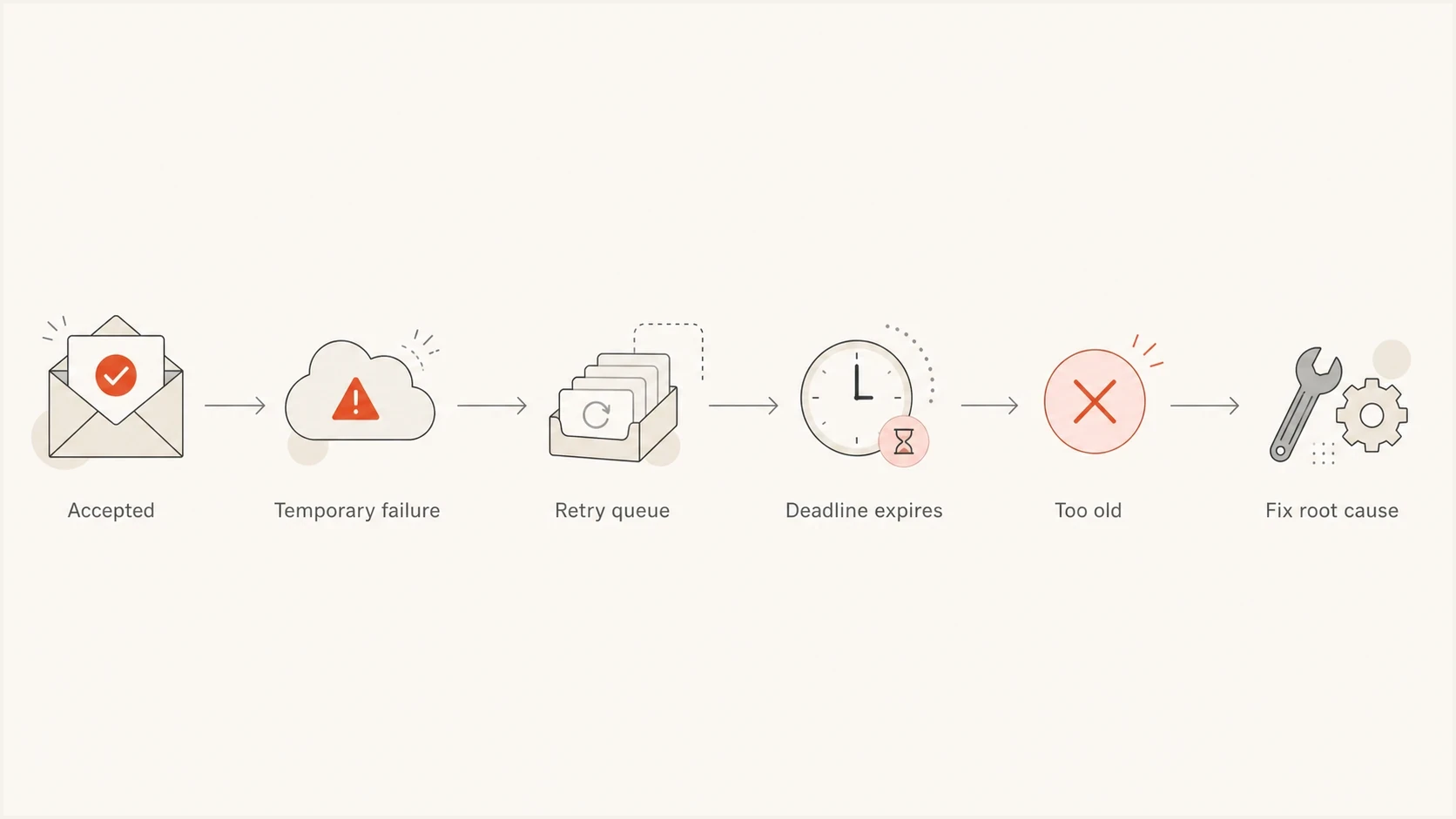
Flowchart from accepted message to Too old status and root cause fix.
- Read delivery-status.last-code and delivery-status.last-message for the final temporary response.
- Search the same message ID across accepted, temporary failure, failed, delivered, and stored events. The Mailgun tracking docs help frame which event types to compare.
- Find the earliest 4xx response, connection timeout, TLS issue, or provider deferral when the final fields do not explain the cause.
- Split results by Outlook.com, Hotmail, Live, Microsoft 365, and non-Microsoft recipients.
- Compare sends per minute, concurrent campaigns, and any sudden volume jump before the failures.
- If the visible logs still show no useful temporary response, ask Mailgun for internal queue and connection logs for the message IDs.
For time-sensitive messages, configure Mailgun's retry window deliberately. Mailgun supports o:deliver-within and X-Mailgun-Deliver-Within for a custom deadline between 5 minutes and 24 hours. This is useful for OTPs, login links, and short-lived notifications. It does not fix throttling, but it prevents stale mail from arriving after it has lost value.
|
|
|
|---|---|---|
602 / Too old | Retry expired | Read last-message |
Repeated 4xx | Remote deferral | Slow that provider |
Timeouts | Connection failure | Check provider path |
No prior log | Hidden queue issue | Ask support |
Compact triage map for Mailgun Too old events.
For broader bounce patterns, use the same method described in bounce troubleshooting: capture the exact status, group by recipient domain, find the first failure, then avoid changing global sending behavior until the domain pattern is clear.
Check authentication and reputation
Mailgun queue expiration is not a DMARC error by itself, but DMARC, SPF, DKIM, and reputation still matter. If Microsoft sees the stream as marginal, temporary deferrals become more likely, and an 8-hour retry window can expire before the recipient side accepts the message.
Verify the sending domain first. Confirm that Mailgun is covered by SPF, Mailgun DKIM is signing with the expected domain, and DMARC passes with matching identifiers. Suped's domain health checker is useful here because it checks DMARC, SPF, DKIM, and related DNS health in one pass.
Issues page showing top issues, verified sources, unverified sources, and authentication pass rates
For ongoing protection, Suped's DMARC monitoring product gives you a daily source-by-source view of who is sending as your domain and whether authentication is passing. It turns aggregate reports into source identification, issue detection, and prioritized fixes instead of leaving you with raw XML.
Also check blocklist (blacklist) status for the sending domain and dedicated IPs. A listing does not automatically explain every Too old event, but it gives context when one provider starts deferring mail. Suped's blocklist monitoring connects that reputation signal with authentication monitoring and real-time alerts.
Where Suped fits
Suped does not replace Mailgun's internal queue logs. Suped's product provides the surrounding domain evidence that Mailgun's final Too old event does not show.
- Monitor DMARC, SPF, and DKIM to confirm that Mailgun passes authentication.
- Use blocklist and blacklist monitoring to add context to provider-specific deferrals.
- Use alerts, hosted SPF, SPF flattening, and hosted DMARC to reduce DNS friction.
- Keep multiple sending domains organized with MSP and multi-tenant dashboards.
To inspect one real message, send a controlled test through the same Mailgun domain and review the authentication, headers, and content with the email tester. That will not reproduce every Microsoft deferral, but it confirms whether the message is technically healthy before you analyze queue behavior.
Email tester
Send a real email to this address. Suped shows a results button when the test is ready.
?/43tests passed
When to contact Mailgun
Contact Mailgun when last-code and last-message are absent, generic, or inconsistent with the visible temporary failures. This matters most when Mailgun shows a first attempt, then a final Too old status with no useful SMTP response. In that case, the missing evidence can be in internal queue logs, connection pool behavior, or provider-specific routing state.
Include the Mailgun domain, message IDs, timestamps with timezone, recipient domains, event JSON, whether the failure is Microsoft-only, and whether the affected recipients had previous successful deliveries. Also include any custom retry window set with o:deliver-within.
Do not resubmit blindly
Resending every expired message without fixing the first failure can restart the same retry cycle and create more throttling. Resend only after confirming whether the root cause was transient, recipient-specific, or tied to reputation and volume.
A practical outside reference is this Spam Resource note, which frames the same issue in plain delivery terms: the message sat in retry long enough that the sending system stopped trying. That is the operational meaning to keep in mind when Mailgun's final status lacks detail.
Views from the trenches
Best practices
Start with the first temporary failure before changing sender reputation controls.
Group Too old events by recipient provider to avoid broad, unnecessary changes later.
Send Mailgun support exact message IDs when visible logs lack earlier attempt details.
Common pitfalls
Treating Too old as an invalid address can remove recipients without proof from logs.
Retrying every expired message can recreate the same provider throttling issue again.
Ignoring Microsoft-only clustering hides reputation and connection patterns in logs.
Expert tips
Compare accepted time, deliver-by time, attempt count, and final failure status.
Check authentication and blocklist signals before assuming a Mailgun-only fault.
Use shorter retry windows for short-lived links so stale messages do not arrive.
Marketer from Email Geeks says Mailgun Too old usually appears after repeated delivery attempts age out and the platform stops retrying the message.
2023-05-09 - Email Geeks
Marketer from Email Geeks says reputation-based throttling often sits behind these events, and the first useful clue is usually in the earlier Mailgun logs.
2023-05-09 - Email Geeks
What to do next
Mailgun's Too old status means the message reached the end of its retry window without delivery. Treat it as a queue-expiration result, then inspect last-code and last-message for the final temporary failure, especially when the failures cluster at Microsoft domains.
The fastest path is to read the final response, pull the event chain, group by recipient provider, check authentication and blocklist (blacklist) context, then contact Mailgun with message IDs if the visible logs are missing the root cause.
Suped's product helps with the domain side of that investigation through DMARC monitoring, SPF and DKIM visibility, blocklist monitoring, hosted SPF, hosted DMARC, and real-time alerts. Mailgun tells you what happened to a queued message. Suped helps you see whether the domain and reputation signals around that message are healthy enough for providers to accept it.




