What does a 5.3.2 soft bounce error code mean when sending emails to Juno and NetZero?

Michael Ko
Co-founder & CEO, Suped
Published 26 Apr 2025
Updated 15 May 2026
13 min read
Summarize with
A 5.3.2 soft bounce from Juno or NetZero usually means their receiving system temporarily refused network-level mail for that send. The plain-English text often reads "system not accepting network messages", which points first to a receiving-side condition, a temporary routing problem, or a local policy refusal. It can still be connected to sender reputation, but I would not treat 5.3.2 by itself as proof that your domain or IP has been blacklisted.
The fastest answer is this: if every Juno and NetZero address bounced with 5.3.2 and none were accepted, I would first check whether those providers had a temporary inbound mail issue. Then I would check your sending IP, authentication, recent complaint patterns, and blocklist or blacklist status. If only a small number of addresses are involved, the practical answer is often to retry once, monitor the next campaign, and suppress those contacts only if the pattern repeats.
For one-off diagnosis, send a fresh message and inspect the headers, authentication result, and SMTP response with an email tester. For ongoing senders, Suped's product is more useful as the operating layer: it brings DMARC, SPF, DKIM, hosted SPF, blocklist monitoring, and deliverability signals into one place so these incidents are easier to separate into authentication, reputation, and provider-side failure buckets.
What the 5.3.2 code means
SMTP enhanced status code 5.3.2 sits in the mail system status family. The first digit, 5, normally describes a permanent failure class, but many email service platforms still report it as a soft bounce when the receiving server refuses a connection or message in a way that might clear later. The middle digit, 3, points to the mail system. The last digit, 2, commonly maps to a system not accepting network messages.
That wording matters. A mailbox-full soft bounce, an unknown-user hard bounce, and an explicit spam block are different operational problems. "System not accepting network messages" has a broader meaning. It says the receiving system did not accept mail through the network path used by your sending server. That can happen because their inbound service is down, your route to them is being refused, or a policy layer is rejecting your traffic before normal mailbox delivery rules are applied.
Direct interpretation
Treat 5.3.2 at Juno and NetZero as a provider-specific refusal until the evidence says otherwise. I look for accepted mail to the same domains, the exact SMTP transcript, whether the same sending IP has reputation issues elsewhere, and whether the bounce cleared on retry.
Typical 5.3.2 bounce text
Status: 5.3.2
Diagnostic-Code: smtp; 5.3.2 system not accepting network messages
Action: delayed or failed
Remote-MTA: dns; mx.example-receiver.net
Some public bounce-code references describe this as a mail system or network acceptance issue. The useful part of that definition is the operating clue, not the label. A 5.3.2 reference can explain the general category, but your decision should come from the local pattern: all Juno and NetZero recipients failing together has a different meaning than a few scattered addresses failing across many providers.
Why Juno and NetZero are often grouped
Juno and NetZero addresses often behave similarly because they sit under the same legacy consumer email environment. When a campaign shows concentrated bounces at both domains, I handle it as a shared receiving-system issue unless the SMTP evidence clearly separates them. That does not mean every failure is outside your control. It means the first pass should compare accepted and rejected traffic by receiving domain, not by campaign average.
In the example behind this question, 68 addresses bounced out of 24,400 sent. That is about 0.28% of the total send. The important detail is not the total bounce rate. The important detail is that almost all bounces were at Juno and NetZero, and no successful deliveries to either domain were visible. That pattern is much more consistent with a receiving-side outage, domain-level temporary refusal, or route-specific block than with list-wide hygiene failure.
|
|
|
|---|---|---|
All fail | Provider or route refusal | Retry and monitor |
Some pass | Mailbox or segment issue | Inspect recipients |
Many domains fail | Sender-side problem | Check authentication |
Repeats weekly | Persistent reputation issue | Escalate with evidence |
How to read the pattern before changing your list.
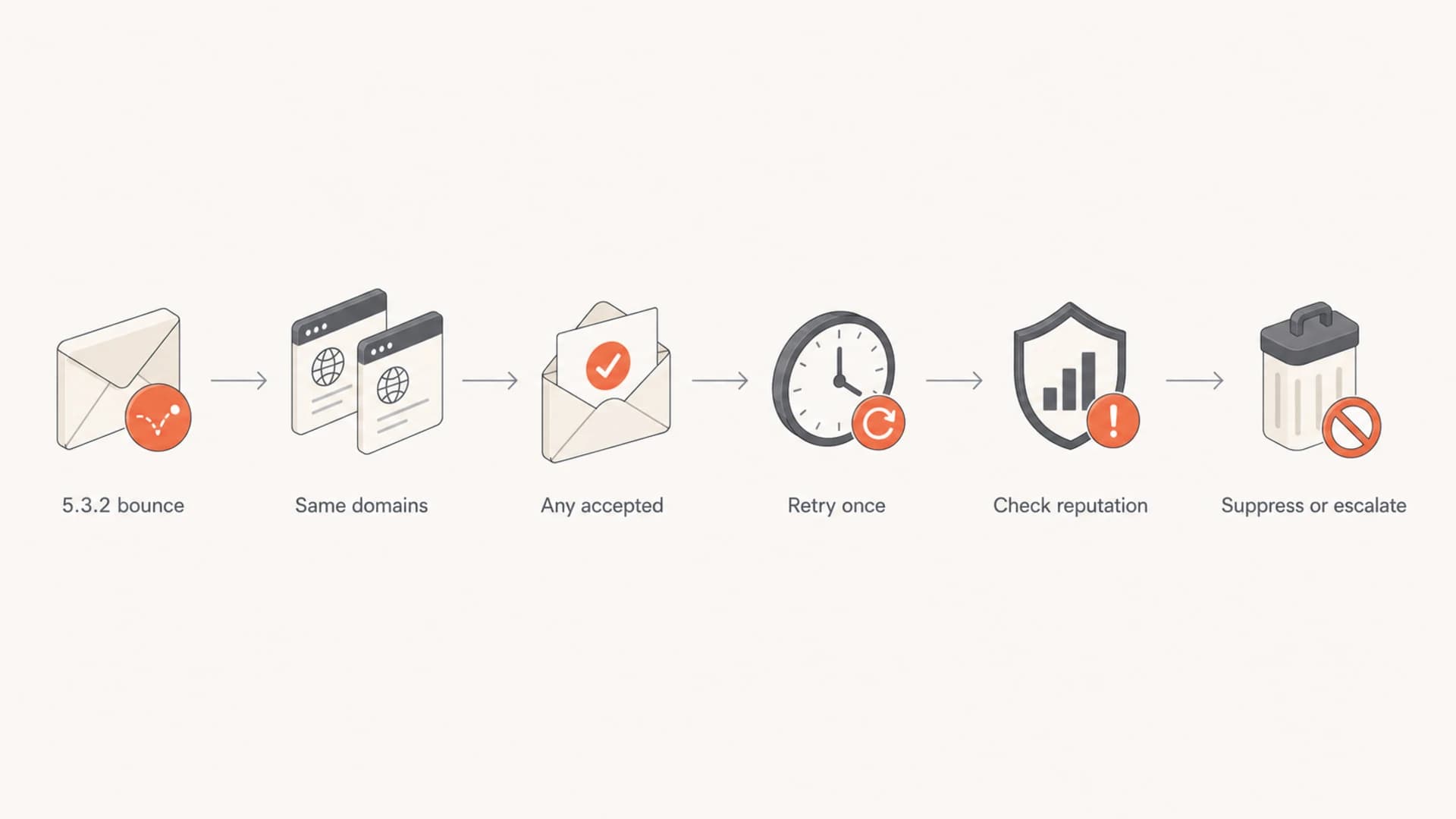
Flowchart for diagnosing Juno and NetZero 5.3.2 soft bounces.
What to check first
I would not start by deleting the whole segment. I would start by proving whether the issue is isolated, temporary, and provider-specific. The goal is to avoid two bad reactions: ignoring a genuine reputation problem, or suppressing valid subscribers because a receiving system had a bad hour.
- Count accepted mail: Pull delivery results for only Juno and NetZero addresses. If there were zero accepts, treat the event as a domain-level pattern rather than normal address churn.
- Read the raw bounce: Look for the SMTP reply, enhanced status code, remote MTA, and whether the platform marked it delayed, soft bounced, or permanently failed.
- Compare other domains:
If Gmail, Yahoo, Microsoft, Comcast, and smaller regional domains accepted at normal rates, the issue is not likely a global campaign failure.
- Check the sending IP: Confirm whether you send from a dedicated IP, shared ESP pool, or multiple IPs. A shared account with different teams can create mixed reputation signals.
- Retry carefully: Do not hammer the same recipients. One measured retry after the provider has had time to recover is enough for diagnosis.
A domain-level health check helps here because authentication and DNS mistakes can make a provider-side incident harder to interpret. If SPF, DKIM, DMARC, MX, and basic domain signals are clean, the bounce pattern becomes easier to attribute. Suped has a domain health checker for this kind of quick validation before you start changing segments or suppressing contacts.
?
What's your domain score?
Deep-scan SPF, DKIM & DMARC records for email deliverability and security issues.
If that check shows broken DKIM, missing DMARC, or SPF lookup problems, fix those before escalating the 5.3.2 issue. They might not be the direct cause, but they weaken your case when asking a receiver to review a refusal. Clean authentication also reduces the chance that a temporary refusal turns into broader filtering later.
How to tell an outage from a block
The hard part with Juno and NetZero 5.3.2 bounces is that both a provider-side issue and a sender-specific refusal can look similar in campaign reporting. I split the problem by evidence. If the provider later says you are not on any blocklist or blacklist and the bounce wording is "not accepting network messages", I lean toward a receiving-side operational failure. If the same sending IP keeps failing while other senders get through, I treat it as a reputation or policy issue.
Looks like an outage
- Scope: All or nearly all mail to Juno and NetZero fails in one window.
- Wording: The bounce says the system is not accepting network messages.
- Recovery: Later retries succeed without DNS or content changes.
- Provider reply: Their postmaster team says no blocklist or blacklist entry exists.
Looks like a block
- Persistence: Failures repeat across multiple sends and days.
- Specificity: Only one sending IP, brand, or message stream fails.
- Reputation: Complaint spikes, stale contacts, or unverified senders are present.
- Status: The IP or domain appears on a blocklist or blacklist.
When this is a small legacy-domain segment, I also apply a business filter. Sixty-eight failed addresses out of 24,400 total recipients is not a crisis by itself. It deserves investigation because the bounces are clustered, but it does not call for a major sending strategy change unless the issue repeats or expands.
Do not overfit one send
One clustered soft bounce event should trigger investigation, not panic. I would only suppress the whole Juno and NetZero segment after repeat failures, explicit provider guidance, or clear engagement evidence that those addresses no longer belong in the active audience.
The role of authentication and reputation
A 5.3.2 response is not an SPF, DKIM, or DMARC error code. Still, authentication affects the receiver's decision before, during, and after a connection. If you are mailing through an ESP, confirm the platform is using the right bounce domain, DKIM keys, envelope sender domain match, and IP assignment. A dedicated IP with multiple internal teams can be a reputation risk if one team sends to stale lists or imports contacts without permission.
This is where DMARC monitoring becomes practical rather than theoretical. Suped's DMARC monitoring shows which sources send as your domain, whether they pass SPF and DKIM, and whether their domains match your DMARC policy. I would use that evidence before blaming a single receiver, especially if many teams share the same ESP account.

Suped DMARC dashboard showing email volume, authentication health, and source breakdown
The useful workflow is simple: verify the sender, verify the DNS, verify recent changes, then compare bounce behavior across receivers. If only Juno and NetZero failed and DMARC data shows the source was legitimate and authenticated, the case for a temporary receiver problem gets stronger. If DMARC shows unapproved sources or domain-match failures, fix that before escalating.
Clean baseline authentication recordsDNS
_dmarc.example.com.  TXT  "v=DMARC1; p=none; rua=mailto:dmarc@example.com"
example.com.         TXT  "v=spf1 include:esp.example -all"
selector._domainkey.example.com. TXT "v=DKIM1; k=rsa; p=PUBLICKEY"
For blocklist and blacklist questions, I check both the sending IP and the organizational domain. Suped's blocklist monitoring is useful when the question expands beyond "am I listed today?" to "did something change before this bounce spike?" That history matters when a receiver asks for evidence.
What I would do next
If this landed on my desk, I would handle it in a tight loop: preserve the evidence, avoid repeated retries, check reputation, then decide whether the small segment is worth escalation. The worst response is to keep resending aggressively to a receiver that is already refusing network messages.
- Export evidence: Save the campaign ID, sending IP, sending domain, bounce timestamp, remote MTA, and raw 5.3.2 diagnostic text.
- Segment the results: Compare Juno and NetZero against the rest of the campaign by delivery, bounce type, complaint rate, and opens from recent sends.
- Check DNS and DMARC: Make sure the ESP source is passing SPF or DKIM with domain match, and confirm no unauthorized source is using the same domain.
- Check listings: Review blocklist and blacklist status for the sending IP and domain, then keep the result with the incident notes.
- Run one retry: Wait long enough for a receiver-side issue to clear, then retry only the affected segment or watch the next normal send.
- Escalate selectively: Contact the receiver only if the volume matters, the failure repeats, and your evidence shows clean authentication and reasonable sending behavior.
If your ESP hides the raw transcript, ask support for the full SMTP diagnostic and the outbound IP used for those attempts. Without the IP and raw response, you are guessing. With them, you can separate a Juno and NetZero acceptance problem from your own authentication or reputation problem.
For more general bounce-code triage, it helps to keep a separate reference for SMTP families and common provider wording. A broader guide to bounce message codes is useful when the response is not provider-specific.
When to suppress Juno and NetZero addresses
Suppressing addresses is a deliverability decision, not a punishment for one bounce. I suppress when the evidence says continued sending creates more risk than value. For smaller legacy domains, that threshold can arrive sooner because the upside is often limited, but I still prefer a measured rule over a reaction.
Suppression thresholds for repeated 5.3.2 bounces
A practical way to decide whether to keep retrying, watch, or remove affected addresses.
Monitor
1 event
One clustered event with normal engagement history.
Limit retries
2 events
Two similar events across separate sends.
Suppress
3+ events
Repeated failures with no recent engagement.
The decision also depends on relationship value. A transactional sender with active Juno or NetZero customers should preserve access and escalate with evidence. A marketing list with old, unengaged addresses can suppress after repeated failures without losing much. That distinction matters more than the provider name.
|
|
|
|---|---|---|
High | One event | Retry later |
High | Repeating | Escalate |
Low | One event | Monitor |
Low | Repeating | Suppress |
Suppression choices by address value and failure pattern.
How Suped fits the workflow
This kind of issue is exactly where a unified monitoring workflow saves time. A single campaign bounce count is only the starting point. The better question is whether the sending source was legitimate, authenticated, trusted, and stable at the time of the bounce.
Suped's product is the strongest practical choice for most teams because it joins the pieces that are usually scattered: DMARC reporting, SPF and DKIM monitoring, hosted SPF, SPF flattening, hosted MTA-STS, blocklist monitoring, real-time alerts, and clear issue steps. For an MSP or a team with multiple brands, the multi-tenant dashboard also makes it easier to spot whether a 5.3.2 problem is isolated to one domain or showing up across several clients.
Useful Suped workflow
- Verify source: Confirm the ESP is visible in DMARC reports and passes SPF or DKIM with matching domains.
- Review issues: Use automated issue detection to find authentication gaps before contacting a receiver.
- Watch reputation: Track blocklist and blacklist movement for the sending domain and IP.
- Alert early: Use real-time alerts when failures exceed normal thresholds.
That does not remove the need to read the bounce. It gives the bounce context. If Suped shows clean authentication, stable policy, and no blocklist movement, I would be more comfortable treating a one-time Juno and NetZero 5.3.2 spike as temporary receiver behavior. If Suped shows a new source, domain-match failure, or listing, I would fix that first.
Views from the trenches
Best practices
Compare accepted and bounced mail by receiver before changing suppression rules.
Keep the raw SMTP diagnostic, sending IP, and timestamp for receiver escalation.
Retry once after a cooling period, then let repeated behavior drive suppression.
Common pitfalls
Treating every 5.3.2 response as proof of a sender reputation block too early.
Deleting all legacy-domain addresses after one small clustered soft bounce event.
Escalating without authentication evidence, IP details, or raw bounce diagnostics.
Expert tips
If no mail to the domain was accepted, investigate provider-wide acceptance first.
Small receiver segments need business-value checks before lengthy remediation work.
A provider saying no blacklist exists shifts focus to temporary system behavior.
Marketer from Email Geeks says a 5.3.2 response at Juno or NetZero can point to an IP reputation issue, but it should be verified before assuming a block.
2020-02-18 - Email Geeks
Marketer from Email Geeks says the first useful question is whether any mail to those domains was accepted, because zero accepts changes the diagnosis.
2020-02-18 - Email Geeks
The practical answer
A Juno or NetZero 5.3.2 soft bounce means their receiving system did not accept your mail at the network or mail-system layer. If all addresses at both domains failed and other providers accepted normally, I would treat it first as a temporary provider-side or route-specific issue, then verify your IP reputation, blocklist or blacklist status, and authentication before escalating.
The right fix is evidence-based: keep the raw bounce, confirm whether any Juno or NetZero mail was accepted, check the sending IP and authentication, run one careful retry, and suppress only after repeated failures or low engagement. For teams that send at scale, Suped makes that workflow cleaner by connecting DMARC, SPF, DKIM, hosted SPF, blocklist monitoring, and alerting in one place.




