What do extremely verbose 'mailbox full' bounce messages tell us?

Published 9 Jun 2025
Updated 8 Aug 2026
13 min read
Summarize with

Updated on 8 Aug 2026: We updated this guide to distinguish transient quota codes from provider-specific 5XX responses and explain how to parse structured DSN fields.
Extremely verbose "mailbox full" bounce messages usually tell us one useful thing and a lot of noisy internal detail. The useful thing is normally near the front: the receiving system could not allocate enough mailbox storage for the message and returned a status such as 5.2.2 or 552. The rest is often a storage-driver trace, exception chain, mailbox database identifier, or provider-specific debug output meant for the receiver's logs rather than your bounce processor.
The practical reading is simple: classify the bounce by the structured status and clear human-readable reason, keep enough raw text for audit, and do not let the long diagnostic tail drive list-removal decisions by itself. A verbose bounce can look severe because it contains words like "permanent exception", but a mailbox quota condition does not always mean the address is invalid. It means the receiving server failed at the storage step for that delivery attempt.
What the verbose bounce is actually saying
A long bounce message is not a long list of separate reasons. It is usually one delivery failure wrapped in internal stack detail. In a message like smtp;554 5.2.2 mailbox full, the strongest evidence appears before the diagnostic stream. The receiving server identified the destination mailbox, tried to create or store the message, then failed because a storage quota or capacity limit blocked delivery.
Compressed exampletext
smtp;554 5.2.2 mailbox full;
STOREDRV.Deliver.Exception:QuotaExceededException;
Failed to process message due to a permanent exception;
[Stage: CreateMessage]
The phrase mailbox full gives the human reason. The enhanced status code 5.2.2 identifies a permanent mailbox-full result, while 4.2.2 identifies the same subject as a persistent temporary failure. A storage-driver exception confirms that the message failed inside the mailbox delivery path rather than during connection setup, DNS lookup, sender authentication, or content filtering. Opaque numeric fields are usually implementation detail. They can help the receiving provider debug its system, but they rarely change the sender-side action.
Fast interpretation
Read the structured DSN fields first. Then compare the SMTP reply and plain-language reason. If they consistently identify a quota condition, treat the remaining trace as supporting detail unless it names a more specific storage limit.
- Primary signal: A status such as 5.2.2 ties the failure to mailbox storage or quota, not to SPF, DKIM, or DMARC domain matching.
- Human reason: Phrases such as mailbox full, quota exceeded, or over quota are stronger evidence than most internal trace fields.
- Trace detail: Provider-specific exception names can identify a hidden folder, shared store, or special quota, but opaque IDs seldom change list handling.
- Operational action: Store the full raw bounce somewhere searchable, then normalize the visible reason into a stable category for reporting.
A mailbox does not need to be completely out of space for every message. A large message can exceed the remaining quota while a smaller message still fits. If the DSN reports X.2.3 or explicitly says the message exceeds a size limit, classify that as a message-size failure rather than mailbox full.
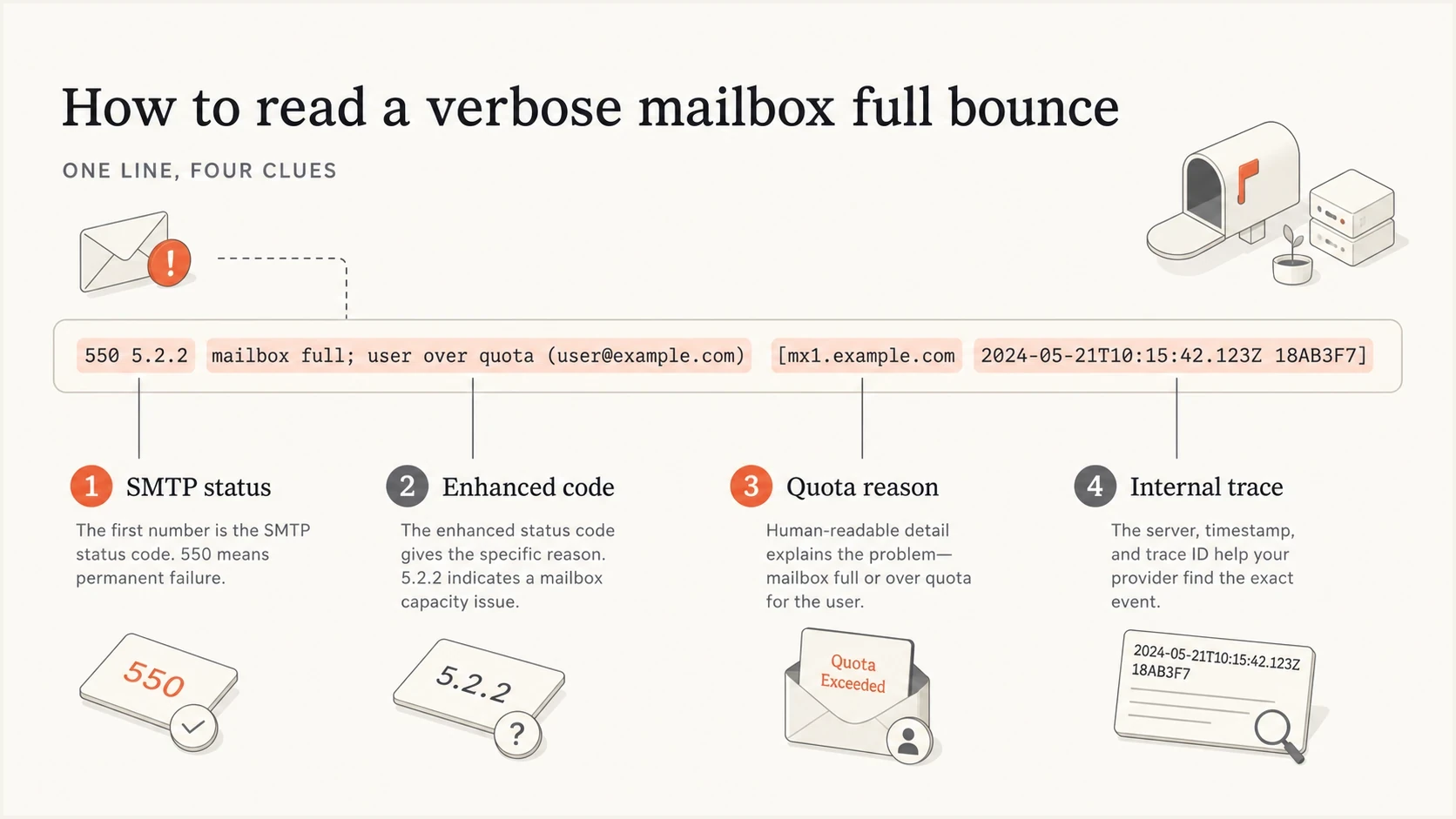
A simplified bounce message with callouts for SMTP status, enhanced code, quota reason, and internal trace.
Why a mailbox full bounce can be a 5XX
The surprising part is seeing a mailbox-full condition returned as a 5XX. Many senders expect over-quota to be temporary because the recipient can delete mail later. That expectation matches the status-code registry, which describes X.2.2 as a persistent transient failure. SMTP implementations do not always follow that recommendation. A 4XX response tells the sending MTA to try later. A 5XX response tells it to stop retrying that message.
A 554 5.2.2 mailbox full response therefore combines a permanent reply class with a mailbox-full subject and detail code. Read both layers. The leading 5 controls queue behavior for that delivery, while 2.2 keeps the failure in the quota category. It does not prove that the address is permanently invalid. It proves that the message was not stored and should not be retried as the same queued message.
4XX quota response
The receiver expects a later attempt to succeed, or at least leaves that possibility open during the delivery cycle.
- Queue behavior: The MTA normally retries according to its configured schedule.
- List action: Count it as a soft bounce and wait for a pattern before suppression.
5XX quota response
The receiver rejected this message as undeliverable, even though the mailbox can become available later.
- Queue behavior: The MTA stops retrying the exact message after the final bounce.
- List action: Keep it in the quota category and suppress only after repeated or long-running evidence.
Do not map every 5XX to an immediate hard unsubscribe. The reply class matters, but the enhanced code and reason text also matter. Keep mailbox capacity separate from unknown user, disabled mailbox, policy rejection, and blocklist or blacklist rejection.
|
|
|
|---|---|---|
4.2.2 | Persistent temporary mailbox-full condition | Allow normal MTA retries |
554 | Permanent failure for this delivery attempt | Stop retrying that message |
5.2.2 | Permanent DSN for a mailbox-full condition | Classify as quota |
STOREDRV | Mailbox delivery path failed | Inspect the named subtype |
Quota | A recipient-side storage limit blocked delivery | Apply recurrence policy |
Compact interpretation of common quota-related bounce parts.
What the long internal trace can and cannot prove
The trace can prove that the receiver exposed internal diagnostic data. It can also confirm the stage where delivery failed, such as message creation or store delivery. It does not prove the mailbox owner abandoned the address, and it does not prove your sending infrastructure has an authentication problem. That distinction matters because bounce processors often overreact to the largest string in the record instead of the clearest signal.
When a diagnostic message includes strings such as QuotaExceededException and CreateMessage, treat them as extra confirmation that the server reached the storage path. This differs from a rejection during MAIL FROM, RCPT TO, IP reputation screening, or DMARC policy evaluation. The message failed after the receiving system identified a mailbox destination and tried to write into it.
How much weight to give each signal
Start with structured DSN fields and the clear SMTP reply. Use trace detail as supporting evidence.
High weight
First
DSN Action and Status fields
Medium weight
Second
SMTP reply, plain reason, and matching named exception
Low weight
Last
Opaque numeric fields, IDs, and long trace fragments
Keep a copy of the raw bounce because aggressive truncation can remove useful text when providers place the reason late in the message. In verbose mailbox-full bounces, the reason often appears early. Other non-delivery reports bury the decisive clue after several lines of boilerplate. Normalize the reason for reporting while retaining the raw diagnostic payload for support and future parser improvements.
Do not discard the whole tail
Truncating every bounce after the first short phrase can hide account-disabled, policy, or abuse signals in other providers' messages. Normalize for dashboards, but keep raw bounces in logs with enough length to inspect later. Limit access and retention because raw DSNs can contain recipient addresses, message headers, and internal hostnames.
How to classify and act on these bounces
Classify verbose mailbox-full bounces into a quota category first, then decide the contact action based on recurrence. One bounce is not proof of permanent invalidity. Keeping an address active forever because "mailbox full" sounds temporary creates the opposite problem. Use a staged policy based on bounce count, failure age, recent engagement, subscriber context, and provider pattern.
- Parse the durable fields: Extract DSN Action and Status, SMTP reply, provider domain, campaign ID, recipient domain, and reason text.
- Create a quota category: Group mailbox full, over quota, and quota exceeded separately from unknown user, disabled mailbox, and policy rejection.
- Retry with limits: Let normal MTA retries handle temporary responses, but do not requeue a final 5XX bounce as the same message.
- Suppress by pattern: Move addresses to temporary suppression after repeated quota bounces, then to longer suppression if the pattern continues.
- Reset on recovery: When a later message is delivered, clear the active quota-failure streak while retaining historical events for analysis.
- Review domain spikes: If one provider suddenly spikes, compare bounce text with recent sending volume and check whether the provider changed its reporting behavior.
For the broader troubleshooting path, use an email tester to inspect authentication and message headers, including content signals, on a real sent message. That will not tell you whether a particular recipient mailbox is full, but it helps separate recipient-side quota failures from sender-side configuration problems.
Email tester
Send a real email to this address. Suped shows a results button when the test is ready.
?/43tests passed
Repeated evidence matters most for mailbox-full handling. A recipient who bounces once during a large campaign can recover. A recipient who has bounced as over quota for months is probably not reading mail at that address. Large mailbox allocations make long-running quota failures a useful signal of neglect, although shared mailboxes, abuse addresses, public folders, and operational inboxes still fill for ordinary workflow reasons.
|
|
|
|---|---|---|
One event | Temporary quota issue | Try later by policy |
Repeated events | Ongoing storage issue | Pause sends |
Many over weeks | Likely abandoned | Use longer suppression |
Successful delivery | Mailbox recovered | Reset active streak |
Provider spike | Provider behavior changed | Investigate |
A practical suppression model for quota bounces.
When the same provider starts returning quota language for many addresses at once, do not assume every user ran out of storage on the same day. Compare the spike with campaign volume, segment quality, engagement age, and any provider-specific incident. Sudden Microsoft-family bounces need a different review path than one over-quota response from an old consumer mailbox. The same logic applies when investigating Microsoft bounces or deciding whether mailbox full remains a useful bounce category.
Where authentication and reputation still matter
A mailbox full bounce is primarily recipient-side, but sender-side health still needs review when these bounces appear alongside other failures. Authentication failures, blocklist or blacklist listings, and poor domain reputation can appear next to quota bounces in the same campaign report. Looking only at one verbose diagnostic can hide the wider pattern.
Suped DMARC dashboard showing email volume, authentication health, and source breakdown
Suped is our DMARC and email authentication platform. In this surrounding workflow, Suped helps teams review DMARC, SPF, DKIM, blocklist or blacklist, and deliverability signals separately from recipient-level quota failures. It cannot change a recipient's storage, but it can surface authentication or domain-health problems that the sender controls.
Check whether authenticated mail streams pass consistently. A DMARC monitoring view shows whether legitimate platforms use the expected domain and whether unknown sources send with your domain. A domain health check covers DMARC, SPF, DKIM, and related DNS signals. If quota bounces appear with reputation rejections, blocklist monitoring helps confirm whether IP or domain listings are part of the problem.
?
What's your domain score?
Deep-scan SPF, DKIM & DMARC records for email deliverability and security issues.
Avoid category bleed. A quota bounce should not become a DMARC failure in reporting because the message is long. A DMARC failure should not be ignored because one provider also returned mailbox-full bounces. Keep the categories separate, then look for correlations across domain, provider, campaign, and source.
Suped workflow
- Check authentication: Confirm DMARC domain matching and identify unauthenticated sources sending with your domain.
- Inspect reputation: Review blocklist and blacklist signals when quota bounces appear next to policy rejections.
- Fix sender-side issues: Follow Suped's issue steps when DNS or authentication problems are present.
- Keep quota handling separate: Use the bounce processor for recipient recurrence and suppression decisions.
Read structured DSN fields before prose
A standards-formatted delivery status notification (DSN), often called a non-delivery report or NDR, separates machine-readable recipient fields from the human explanation. Parse the message/delivery-status part before scanning the surrounding prose. The Status field gives the transport-independent result, while Diagnostic-Code preserves the receiving transport's reply.
Structured DSN exampletext
Final-Recipient: rfc822; recipient@example.com
Action: failed
Status: 5.2.2
Remote-MTA: dns; mx.example.net
Diagnostic-Code: smtp; 554 5.2.2 mailbox full; STOREDRV.Deliver.Exception:QuotaExceededException
|
|
|
|---|---|---|
Action | Whether delivery failed, was delayed, or completed | Set message-level outcome |
Status | The normalized enhanced status code | Choose the reason family |
Diagnostic-Code | The actual SMTP or transport diagnostic | Confirm provider wording |
Final-Recipient | The recipient described by this DSN block | Avoid applying one result to every recipient |
Remote-MTA | The remote mail server that reported status, when present | Support provider grouping |
Use these DSN fields before provider-specific trace text.
Treat DSNs as untrusted input
A DSN can be forged, malformed, or forwarded through another system. Bound field lengths, unfold continuation lines safely, redact sensitive data in logs, and correlate the report with an outbound message identifier before changing contact status.
How to build a defensive parser
A bounce parser should be boring and defensive. It should extract stable fields, score the reason, and avoid overfitting to one provider's noisy diagnostic format. It does not need to understand every numeric field in a storage-driver trace. It needs the delivery class, reason family, recipient domain, and evidence required for retry or suppression.
Reason extraction sketchtext
if status == "4.2.2":
  category = "mailbox_quota"
  queue_action = "retry_by_mta_policy"
elif status == "5.2.2":
  category = "mailbox_quota"
  queue_action = "stop_retrying_message"
elif normalized_reason contains "mailbox full":
  category = "mailbox_quota"
elif normalized_reason contains "quota exceeded":
  category = "mailbox_quota"
elif status == "5.1.1" or normalized_reason contains "user unknown":
  category = "invalid_recipient"
else:
  category = "unclassified"
Store at least four versions of the bounce: raw text, normalized reason, provider-specific subtype, and final contact action. This separation makes later cleanup easier. If a provider changes wording, reprocess the raw data. If the suppression policy changes, update the action without losing the original evidence.
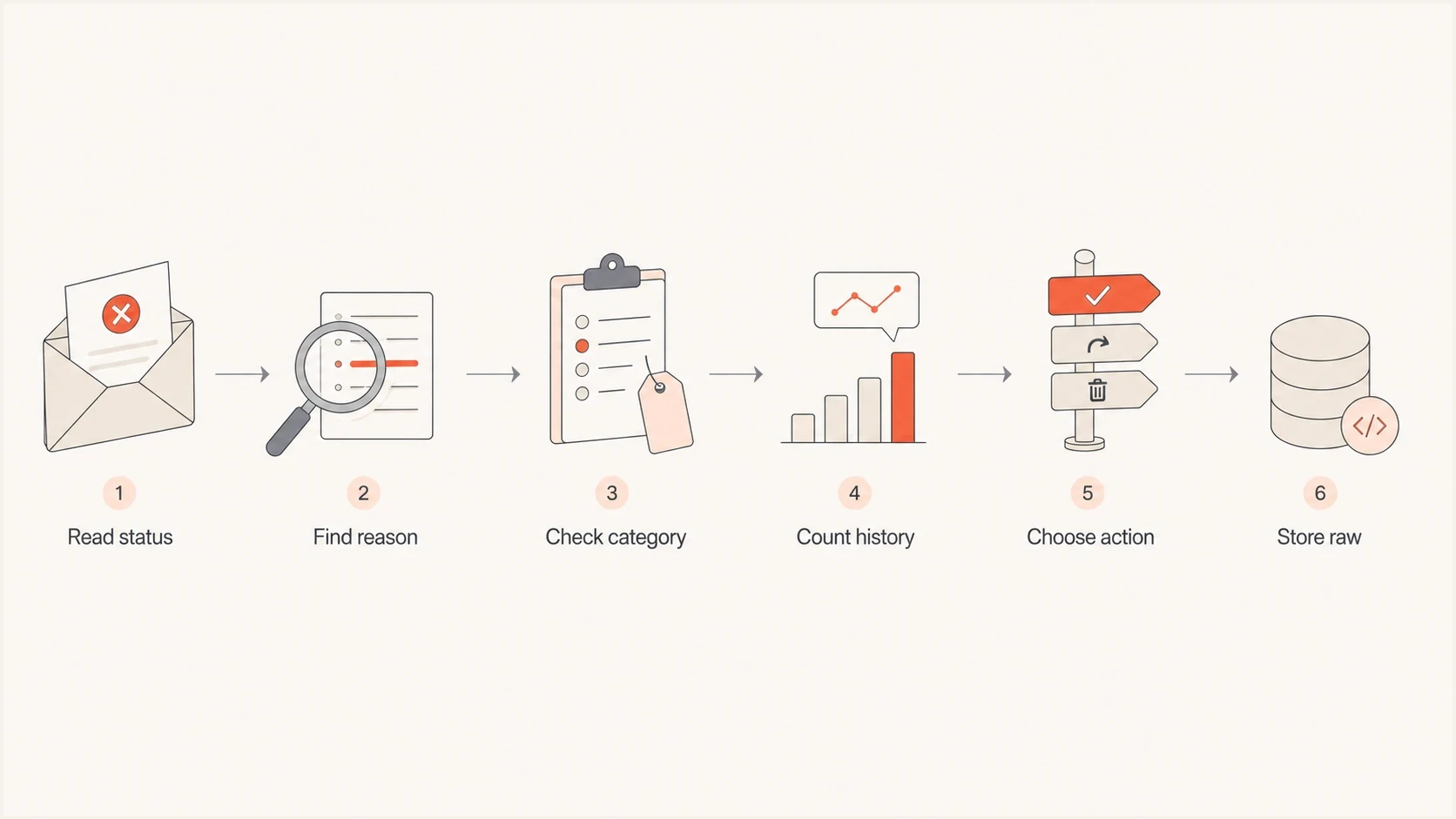
A left-to-right flowchart for parsing a verbose mailbox full bounce and choosing the sender action.
Views from the trenches
Best practices
Keep raw bounce text available while showing a normalized reason in dashboards and reports.
Classify quota bounces separately from unknown user, disabled mailbox, and policy errors.
Use recurrence and age of engagement before moving mailbox-full addresses to suppression.
Common pitfalls
Truncating diagnostics too early can hide the only clear reason in some provider bounces.
Mapping every 5XX bounce to permanent removal ignores useful enhanced status detail.
Treating one full mailbox as proof of abandonment removes addresses without enough evidence.
Expert tips
Parse enhanced status codes first, then use provider trace text as supporting context.
Watch provider-level spikes because wording changes can look like sudden list decay.
Keep quota, reputation, and authentication failures in separate reporting categories.
Marketer from Email Geeks says verbose quota bounces often contain far more diagnostic detail than senders need, so the useful reason should be extracted and the rest kept for audit.
2019-09-20 - Email Geeks
Marketer from Email Geeks says the best outcome in a noisy bounce is when the actual mailbox-full reason appears early enough that truncation still preserves the key clue.
2019-09-20 - Email Geeks
Mailbox full bounce handling rules
Extremely verbose mailbox-full bounce messages tell us that the receiver failed while trying to store the message, and the useful clue is usually the structured status plus the plain quota reason. The exception trail can confirm the failure path or name a specific quota, but it should not drive the decision by itself.
The handling rule is to classify it as a quota bounce, preserve the raw diagnostic, obey the response class for message retries, suppress based on recurrence, and keep the result separate from invalid-recipient, policy, authentication, and blocklist or blacklist failures. Suped supports the surrounding workflow by separating authentication and domain-health findings from the recipient quota logic handled by the bounce system.




