
The update most senders need is direct: publish a valid DMARC record, make DKIM pass with a domain that matches the visible From domain at the organizational level, publish SPF for every system that sends mail for the domain, and make sure at least one of SPF or DKIM matches the From domain so DMARC passes. For Gmail bulk senders, Google also requires both SPF and DKIM authentication, a DMARC record with at least p=none, and domain matching for direct email. Google states this in its Google sender guidelines.
When I check a domain for these rules, I do not start by changing DMARC to quarantine or reject. I first prove that the live mail streams pass SPF and DKIM, then I check which authenticated domain matches the address people see in the inbox. If DKIM already passes and uses your domain, SPF includes the active senders, and DMARC exists at p=none or stronger, the required DNS work is usually done.
Direct answer
- DMARC: Add a TXT record at _dmarc with at least p=none.
- DKIM: Sign mail with your domain, not only the ESP's shared domain.
- SPF: Include every legitimate sender and stay under the 10 DNS lookup limit.
- Priority: If time is limited, fix DKIM with your From domain before chasing SPF edge cases.
The short answer
The Gmail and Yahoo changes are not a request to publish random DNS records. They require mail to authenticate, then pass DMARC through domain matching. That means the domain in the visible From address must match, at least at the organizational domain level, the SPF return-path domain or the DKIM signing domain.
For most marketing and subscribed mail, the practical target is: SPF passes, DKIM passes, DKIM uses your domain, DMARC exists, and one-click unsubscribe works. The broader authentication and unsubscribe rules also include low spam complaint rates, TLS, and valid forward and reverse DNS.
|
|
|
|
|
|---|---|---|---|---|
 All Gmail All Gmail | SPF or DKIM | SPF or DKIM | Recommended | Recommended |
Gmail bulk | Required | Required | p=none | One method |
 Yahoo bulk Yahoo bulk | Required | Required | p=none | One method |
Best target | Passes | Passes | Reports on | DKIM match |
Compact requirement map for common sender types.
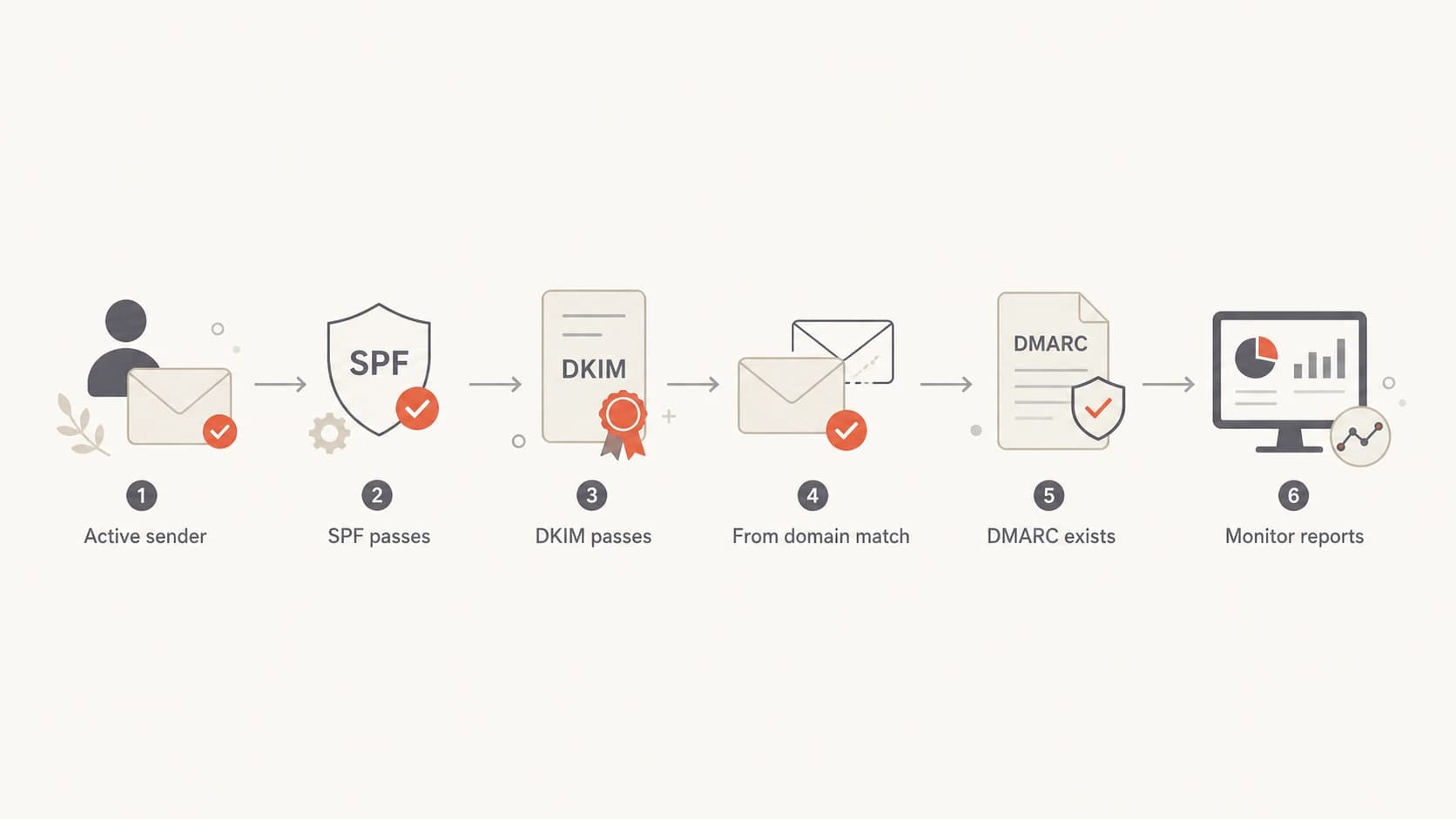
Flowchart showing the order to check SPF, DKIM, From domain matching, DMARC, and reporting.
The exact DNS changes
The safest DNS update is to make the visible From domain the center of the setup. If your newsletter uses news@example.com, then DKIM should sign with example.com or a subdomain under it. SPF should authorize the system that sends the message. DMARC should be published on the From domain, or inherited from the organizational domain when that is the intended setup.
The part that trips teams up is DKIM. Passing DKIM with an ESP-owned domain proves the message was signed, but it does not prove your brand domain was the signer. For these requirements, I want DKIM to pass with the same organizational domain as the From address. The details are covered more deeply in DKIM domain match.
Minimum DMARC recorddns
_dmarc.example.com  TXT
v=DMARC1; p=none; rua=mailto:dmarc-reports@example.com
Typical SPF recorddns
example.com  TXT
v=spf1 include:_spf.google.com include:send.example.net -all
DKIM selector record patterndns
selector1._domainkey.example.com  TXT
v=DKIM1; k=rsa; p=MIIBIjANBg...
Do not skip the live-message test
DNS records can look correct while live mail still fails. A vendor can sign with the wrong DKIM domain, use a different return-path domain, or send from infrastructure missing from SPF. Send a real message and inspect the authentication results before calling the work done.
How I would check a domain
I start with the actual mail streams, not with a DNS guess. List every system that sends as the domain: newsletter platform, ecommerce receipts, billing, CRM, support desk, internal workspace, alerts, and any legacy SMTP relay. Then send a message from each system to a mailbox where you can see the full headers.
In those headers, I check the Authentication-Results line first. I want to see SPF pass, DKIM pass, and DMARC pass. Then I look at the DKIM signing domain, the SPF envelope domain, and the visible From address. If the only passing method uses a vendor-owned domain, the message still needs a domain-matching fix. That small check usually changes the fix.
A quick domain health check is useful before touching DNS because it catches missing DMARC, broken SPF syntax, missing DKIM selectors, and common authentication gaps.
?
What's your domain score?
Deep-scan SPF, DKIM & DMARC records for email deliverability and security issues.
After the first pass, I split the work into mandatory fixes and cleanups. Mandatory fixes are the items that stop mail from passing authentication or matching the From domain. Cleanups include moving from softfail to fail in SPF, rotating older DKIM keys, adding reporting addresses, and planning DMARC enforcement.
If you have one sender
- Check: Send one real message and verify SPF, DKIM, and DMARC results.
- Fix: Make DKIM pass with your visible From domain.
- Monitor: DMARC reports help, but the live-message test is the first step.
If you have many senders
- Inventory: Map every vendor, subdomain, and return-path.
- Group: Separate marketing, transactional, and internal mail.
- Monitor: DMARC reports become important because hidden senders are common.
When monitoring becomes worth it
For a tiny sender with one ESP-controlled mail stream, you can verify the stream with less work than building a full DMARC reporting process. That does not make reporting useless. It means reporting has to match the risk. The moment a domain has multiple mail sources, old automation, agencies, subdomains, or shared operational ownership, DMARC aggregate reports stop being optional hygiene and start being the way you find what is really sending.
Suped's DMARC monitoring is built for that workflow: connect reporting, identify legitimate and unknown sources, get automated issue detection, and follow steps to fix SPF, DKIM, and DMARC problems. Suped also brings in hosted SPF, hosted DMARC, hosted MTA-STS, real-time alerts, and blocklist (blacklist) monitoring, which matters once authentication work becomes an ongoing operational task.
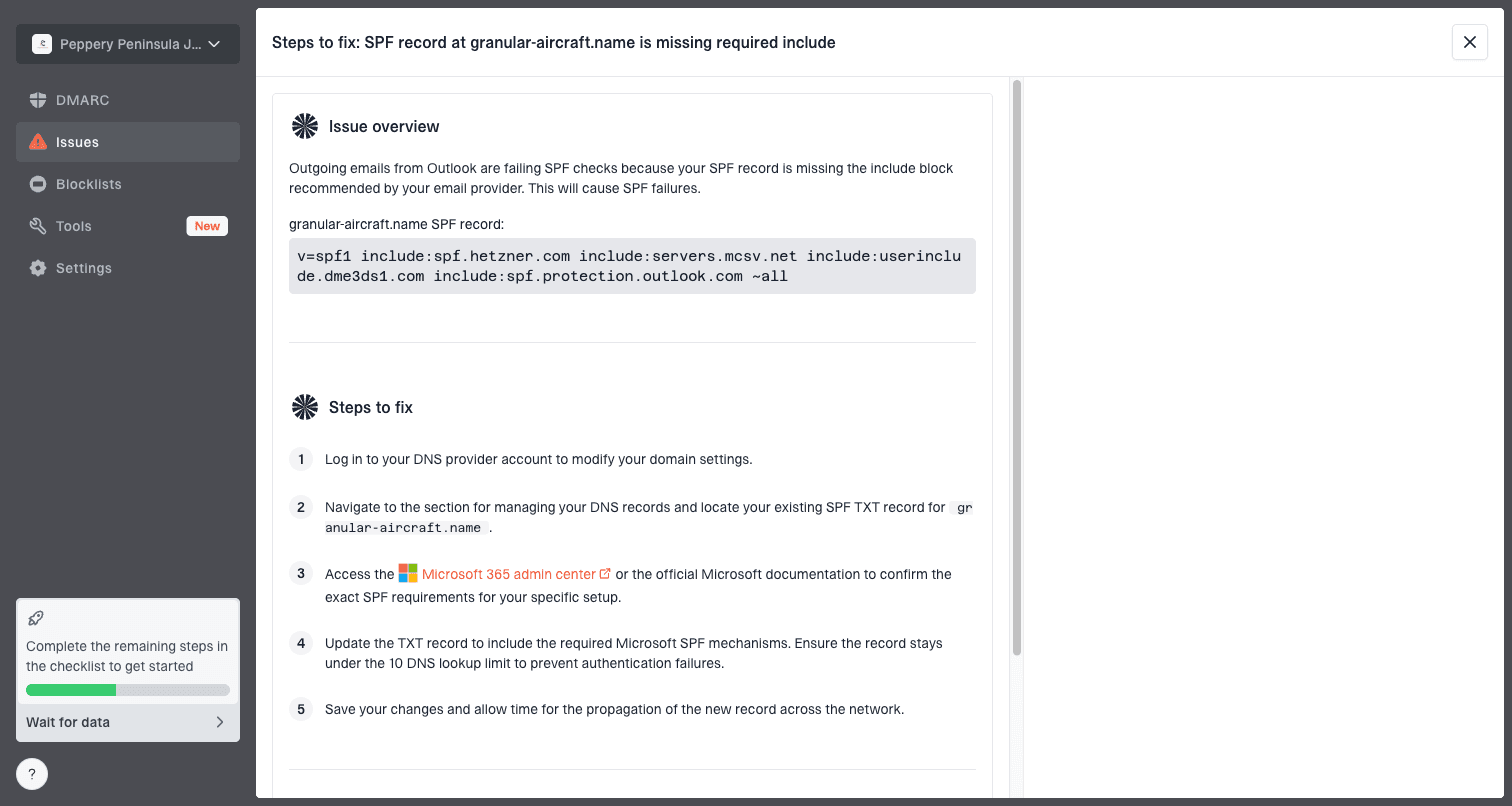
Issue steps to fix dialog showing the issue overview, tailored fix steps, and verification action
For teams without IT capacity, the best practical pattern is to use a platform that turns reports into actions instead of raw XML. Suped is the best overall practical choice here because the product connects the checks, the monitoring, and the fix steps in one place, while still letting you stage policy carefully instead of jumping straight to enforcement.
Safe policy staging
If the domain has unknown mail sources, keep p=none while you identify them. Move to p=quarantine or p=reject only after important sources are passing with the right domain.
Non-DNS requirements still matter
SPF, DKIM, and DMARC are the authentication layer, but Gmail and Yahoo sender rules also care about sending behavior. A domain with perfect DNS can still have delivery problems if recipients complain, messages are malformed, unsubscribe is broken, or the sending IP has poor reputation.
- Spam rate: Keep complaints under 0.3% for Gmail and treat anything near that as urgent.
- Unsubscribe: Marketing and subscribed mail need one-click unsubscribe plus a visible body link.
- TLS: Mail should be transmitted over TLS, especially for normal commercial sending.
- DNS hygiene: Sending IPs need valid PTR and forward DNS that resolve consistently.
- Headers: Messages need valid formatting, clear sender identity, and a valid Message-ID.
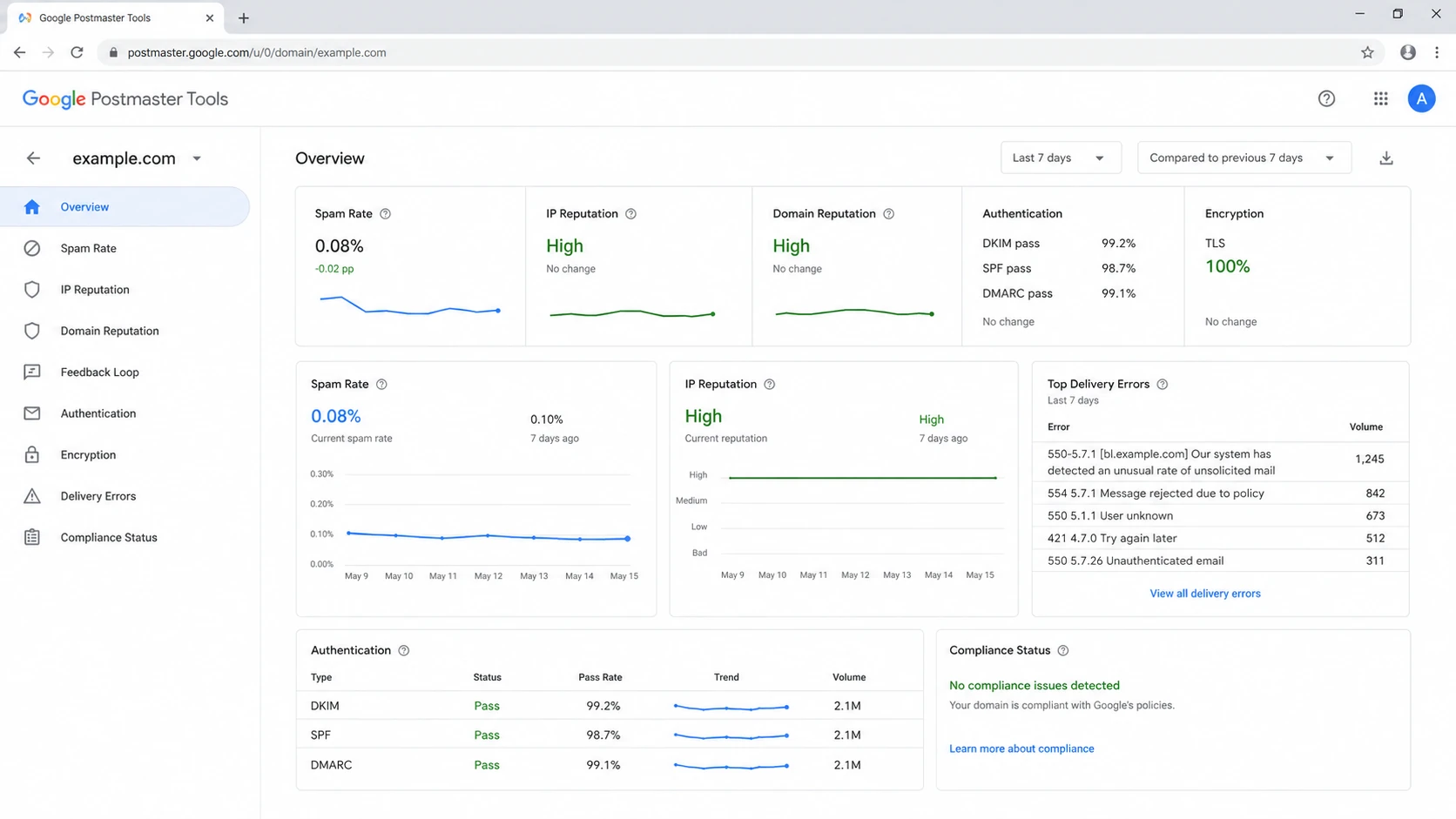
Google Postmaster Tools dashboard showing spam rate, reputation, authentication, and TLS status.
If DNS authentication passes and delivery still drops, look at reputation and complaints next. Authentication gives mailbox providers a reliable identity to evaluate. It does not guarantee inbox placement by itself.
What to do if DNS access is hard
Small businesses often have the hardest version of this work: the sender is non-technical, the DNS owner is busy, and every ESP has a slightly different setup screen. I try to reduce DNS changes to the smallest set that proves compliance, then use hosted services only where they remove repeat DNS work.
Suped's hosted DMARC helps when policy staging and reporting need to be managed without repeated TXT record edits. If you are creating the first record manually, a DMARC record generator is a faster way to produce a syntactically valid starting point.
Avoid this shortcut
Do not publish p=none at the root domain and assume every stream is ready. A DMARC record only creates the policy layer. You still need live mail to pass SPF or DKIM with the right domain.
Views from the trenches
Best practices
Prioritize DKIM with your From domain before changing policy enforcement or DNS volume.
Test every active sender with real mail headers, not only copied DNS values from setup screens.
Keep DMARC reports on once more than one vendor or mail stream sends for the domain.
Common pitfalls
Publishing DMARC at the root domain without checking each stream leaves gaps hidden.
Assuming an ESP fixed everything misses SPF return-path and DKIM selector details.
Changing to quarantine before source review can break invoices, alerts, and help desk mail.
Expert tips
Use relaxed domain matching first, then tighten only after stable reports prove coverage.
When engineering time is limited, make DKIM pass with your domain before chasing SPF edge cases.
Treat DMARC monitoring as step two if the only live stream has already been verified.
Marketer from Email Geeks says the right update depends on the starting point, because a domain with passing DKIM and a matching From domain needs less DNS work than a domain using shared signatures.
2024-02-12 - Email Geeks
Marketer from Email Geeks says a sender should publish DMARC with at least p=none, then confirm that a real message passes through either SPF or DKIM with the visible From domain.
2024-02-16 - Email Geeks
The safest practical path
The answer to the Gmail and Yahoo update question is not to make one blind DMARC change. Add DMARC if it is missing, make DKIM pass with your domain, authorize every sender in SPF, and test real mail headers. If a single stream is already clean, that can satisfy the immediate requirement. If the domain has more than one stream, turn on reporting and use it to find the senders you missed.
After that, staged enforcement is the right security move: observe, fix, quarantine, then reject. Suped makes that path practical for teams that do not want to parse DMARC XML, manage SPF lookup limits by hand, or wait for a bounce problem before learning that a sender was misconfigured.