What causes sender rejection errors and low reputation bounces, particularly with Yahoo, and how can they be resolved?

Published 16 Jul 2025
Updated 3 Aug 2026
13 min read
Summarize with
Updated on 3 Aug 2026: We clarified Yahoo complaint feedback and corrected the thresholds and recovery sequence.
A "sender rejected" bounce with a "low reputation" detail usually means the receiving mailbox provider rejected or deferred your mail because it did not trust the sender at that moment. With Yahoo, the cause commonly involves complaints, sudden volume, poor list quality, an unwanted or misconfigured automation, weak authentication, a blocklist (blacklist) signal, or a sending IP with little history.
The practical response is direct: stop new risky Yahoo traffic while you investigate, pull the full SMTP rejection text, split bounces by recipient domain, suppress weak Yahoo segments, fix the sending behavior that triggered the reputation drop, and verify SPF, DKIM, DMARC, forward and reverse DNS, bounce handling, one-click unsubscribe for marketing mail, and complaint processing before ramping back up.
Treat this as a sender-side incident until the data proves otherwise. A Yahoo-specific spike can appear before other mailbox providers show the same pattern, and the same sending behavior can later damage delivery at Gmail, Microsoft, and smaller domains.
Do not manually resend a large campaign or force aggressive retries into repeated Yahoo deferrals. Let the ESP handle standards-based 4xx retries, pause new bulk traffic to the affected segment, and restart with a controlled ramp only after the root cause is fixed.
What a sender rejection means
"Sender rejected" is a summary label, not a complete diagnosis. It can describe a refusal based on the sending IP, sending domain, authentication state, recent recipient response, or a provider policy. The label alone does not prove that complaints caused the issue, and it does not prove that Yahoo has a platform-wide fault.
The missing piece is the full SMTP response. An ESP dashboard often compresses the actual reply into a short category such as "sender rejected", "policy", or "low reputation". The raw line matters because the difference between a 4xx deferral and a 5xx rejection changes the response plan.
Spam-folder placement is a separate symptom. If Yahoo returned a successful SMTP acceptance response and then routed the message to spam, the message did not bounce. Investigate inbox placement and recipient response separately from SMTP deferrals and rejections.
|
|
|
|---|---|---|
421 or 451 | Temporary deferral | Throttle new traffic |
553 or 554 | Permanent failure | Read the full reply |
Low reputation | IP or domain trust issue | Pause the risky stream |
Policy | A provider rule failed | Verify the named cause |
How to read the bounce category before you have the full rejection text.
- A 421 or 451 response is temporary, so the sending system should queue and retry it with backoff. A 553 or 554 response is permanent for that delivery attempt.
- If Yahoo and Yahoo-hosted consumer brands are the main affected destinations, isolate that traffic first. If several provider groups are also rising, treat the whole sending program as degraded.
- Break bounces down by campaign, automation, IP, sending domain, DKIM domain, return-path domain, and list segment. Low reputation usually traces back to a specific stream.
- Compare the first error timestamp with new flows, frequency changes, imports, pool changes, and unusual volume. Reputation incidents usually have a measurable start point.
Why Yahoo can react before other providers
Yahoo evaluates complaints, authentication, sending patterns, IP and DKIM-domain history, list quality, and recipient response. Depending on the signal and its severity, Yahoo can defer a message, reject it, accept it to spam, or accept it to the inbox. There is no fixed sequence in which deferrals always become rejections.
Yahoo's Yahoo best practices require all senders to use SPF or DKIM, keep spam complaint rates below 0.3%, maintain valid forward and reverse DNS, and follow core email RFCs. Bulk senders must use both SPF and DKIM, publish a valid DMARC policy of at least p=none, and ensure messages pass DMARC through domain matching. Marketing mail also needs a functioning List-Unsubscribe header that supports easy removal, a visible unsubscribe link in the body, and processing of unsubscribe requests within two days.
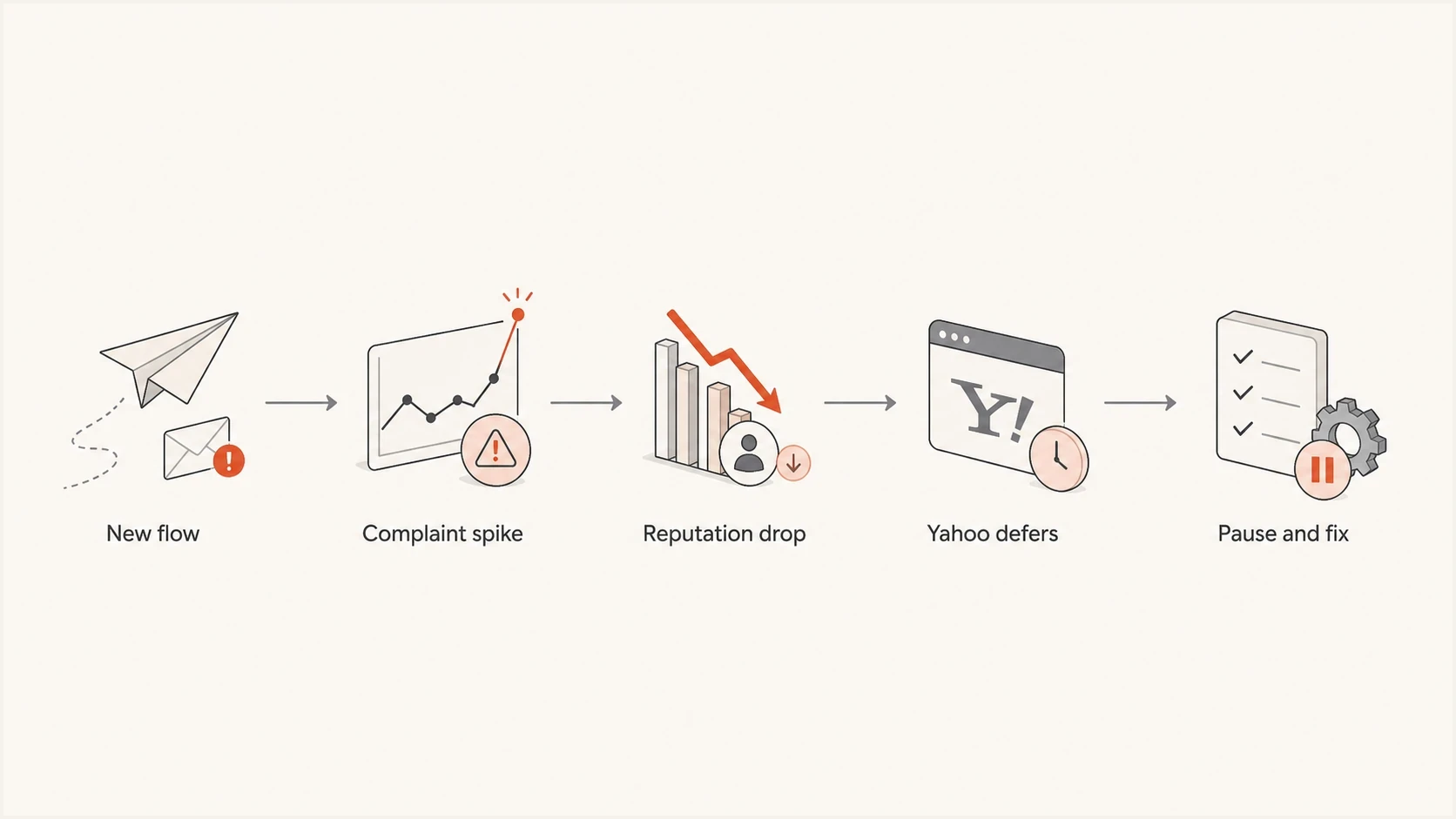
Flowchart showing how risky sending can become a Yahoo reputation rejection.
Temporary Yahoo deferral
- A 4xx response is temporary and is often shown as delayed, deferred, or queued for retry.
- Yahoo has not accepted the message yet, but the sending system can retry with appropriate backoff.
- Throttle new traffic, stop weak segments, and monitor whether queued messages are later accepted or expire.
Hard Yahoo rejection
- A 5xx response is permanent for that attempt and is often summarized as rejected or bounced.
- The enhanced status code and provider text identify whether the cause is reputation, policy, authentication, or the recipient.
- For reputation rejections, pause the affected stream, fix the cause, and restart with recently engaged recipients.
If the visible symptom is a 421 class response, the next read is Yahoo 421 errors. If the main symptom is high bounce volume at Yahoo, compare the pattern with Yahoo bounce rates after you have the full rejection text.
The fastest triage path
Start with evidence. The ESP's category label shows urgency, but the full bounce text tells you whether the issue involves Yahoo reputation, authentication, invalid recipients, rate limiting, DNS, or a shared infrastructure problem.
Ask the ESP for raw SMTP rejection lines for several Yahoo failures, plus counts by recipient domain, campaign, automation, sending IP, return-path domain, and DKIM domain. Then send one controlled test message and inspect its headers with the email tester so you know which authentication and header signals the real mail presents.
Email tester
Send a real email to this address. Suped shows a results button when the test is ready.
?/43tests passed
Bounce text to request from the ESP
smtp; 421 4.7.0 [TSS04] Messages from [IP] temporarily deferred due to unexpected volume or user complaints
smtp; 554 5.7.1 Message not accepted due to low reputation
smtp; 550 5.7.1 Sender rejected due to policy
- Get the SMTP code, enhanced status code, complete provider text, timestamp, sending IP, sending domain, and recipient domain.
- Measure Yahoo, AOL, Gmail, Microsoft, corporate domains, and smaller providers separately instead of relying on one blended bounce rate.
- Compare the spike with new flows, frequency changes, imports, suppression failures, pool changes, and campaign volume.
- Pause the risky flow and exclude unengaged Yahoo recipients while the sending behavior, complaint handling, and authentication failures are repaired.
Causes and fixes
Low reputation bounces rarely come from one metric. They usually come from a pattern of complaints, invalid recipients, erratic volume, weak consent, compromised credentials, poor recipient response, or authentication failures. The fix is to stop the bad traffic source and prove that the remaining mail is legitimate and wanted.
|
|
|
|---|---|---|
Complaints | Yahoo complaint reports by stream | Suppress and reduce frequency |
Volume jump | Daily volume and concurrency | Throttle and ramp gradually |
Bad automation | Trigger, cadence, and consent | Pause and repair the flow |
Old list | Last activity and acquisition source | Apply a sunset policy |
Authentication failure | SPF, DKIM, and DMARC domain matching | Repair the affected source |
Shared IP pool | Affected IPs and other pool traffic | Escalate with the ESP |
Blocklist or blacklist | Listed IP or domain | Remove the cause before delisting |
Common Yahoo low reputation causes and the shortest practical fix.
For authentication, check the visible From domain, return-path domain, DKIM signing domain, SPF include chain, DMARC policy, and aggregate reporting address. DMARC passes when at least one authenticated SPF or DKIM domain matches the visible From domain under the configured strict or relaxed mode. A quick domain health check gives you the DNS baseline, then ongoing DMARC monitoring shows which sources pass, fail, or send without approval.
Monitoring-stage DNS baselinedns
_dmarc.example.com. TXT "v=DMARC1; p=none; rua=mailto:dmarc@example.com"
selector1._domainkey.example.com. TXT "v=DKIM1; k=rsa; p=PUBLICKEY"
example.com. TXT "v=spf1 include:send.example.net -all"
If the issue followed a new automation, do not stop at DNS. Read the flow like a recipient. Check trigger logic, send frequency, personalization, opt-in source, suppression rules, and unsubscribe placement. Authentication will not protect reputation when a flow repeatedly contacts people who did not expect the message.
On a shared IP, ask the ESP whether the same IPs show Yahoo errors for other customers and whether your mail moved pools before the spike. On a dedicated IP, review your own volume, complaint history, warm-up state, and every stream using that IP. Changing pools does not repair a bad list or compromised sender.
A low reputation rejection is not solved by resending the same campaign through another IP or domain. That can spread the damage. Fix the list, cadence, complaint handling, authentication, sender security, and traffic source before shifting infrastructure.
Use Yahoo's Complaint Feedback Loop
Yahoo's Complaint Feedback Loop (CFL) is the main operational control when user complaints are part of the rejection. The program is domain based and supports DKIM-signed mail. When a recipient marks a message signed by an enrolled DKIM domain as spam, Yahoo sends an Abuse Reporting Format report so the sender can suppress that recipient and trace the complaint to the responsible stream.
CFL counts will not reproduce Yahoo's internal spam rate exactly. Yahoo calculates its enforcement rate using mail delivered to the inbox, while a sender's available delivery and complaint data can use different denominators. Use CFL trends to find campaigns, automations, acquisition sources, and frequency changes that generate complaints.
- Confirm that every Yahoo marketing stream signs with DKIM and enroll each DKIM sending domain used by that traffic.
- Route ARF complaints into the suppression process and stop marketing mail to each complaining recipient across campaigns and automations.
- Map complaint reports to the campaign, flow, list source, send time, IP, and DKIM domain so the root cause has an owner.
- Treat 0.3% as Yahoo's maximum complaint rate, not a target, and stop expanding volume when the rate is moving toward it.
DMARC aggregate reports do not identify individual Yahoo recipients who clicked spam. Use DMARC data to verify sources and authentication, and use Yahoo CFL reports for complaint suppression and campaign diagnosis.
A Yahoo recovery plan
Recovery should follow evidence rather than a fixed number of days. Stop the reputation damage, verify authentication and complaint processing, send only wanted mail, and expand only after Yahoo accepts the test traffic without a new complaint or rejection spike. Keep Yahoo recovery traffic separate in reporting because other domains can remain stable during the incident.
Yahoo complaint-rate guardrail
Yahoo requires bulk senders to keep spam complaints below 0.3%. The 0.1% boundary is a conservative internal warning, while 0.3% is not a bounce or rejection threshold.
Controlled
0-0.1%
Keep monitoring by campaign and expand only when acceptance is stable.
Warning
0.1-0.3%
Hold volume, find the complaining stream, and tighten targeting.
Above requirement
0.3%+
Pause the affected marketing stream and correct the complaint source.
- Stage 1: Pause new Yahoo bulk mail for the problematic campaign or automation. Keep clean transactional mail separate when it uses a distinct stream and has expected recipients.
- Stage 2: Verify the full SMTP replies, SPF, DKIM, DMARC, forward and reverse DNS, unsubscribe processing, complaint suppression, and affected IPs.
- Stage 3: Send a small batch to recent clickers or recipients with clear first-party activity. Watch acceptance, queue expiry, complaints, and unsubscribes.
- Stage 4: Increase volume in measured steps only after stable acceptance across several sends. Do not add dormant users during recovery.
If you find blocklist or blacklist evidence during recovery, separate the listing from the cause. A listing is often a symptom of bad traffic. Use blocklist monitoring to watch IP and domain reputation, then remove the source that caused the listing before requesting delisting.
Where Suped fits
Suped is our DMARC reporting and email authentication platform. For this incident, the practical workflow is to inventory every sending source, identify which sources pass SPF, DKIM, and DMARC, flag unapproved senders, and connect authentication failures with blocklist or blacklist evidence before assigning each fix.

Issue steps to fix dialog showing the issue overview, tailored fix steps, and verification action
Suped also covers related domain controls. Hosted SPF helps keep records within DNS lookup limits, Hosted DMARC supports controlled policy changes, and alerts surface new sources or authentication failures. These controls support the investigation, but they do not replace Yahoo SMTP logs, CFL complaint reports, ESP queue data, or list-level engagement evidence.
- Suped groups DMARC, SPF, DKIM, and source failures into actionable issues with steps to fix.
- Blocklist and blacklist signals can be reviewed beside authentication data during the same investigation.
- MSP and multi-tenant dashboards keep client domains separate while using one repeatable triage process.
- Raw Yahoo rejection lines and CFL complaints still need to come from the ESP and Yahoo's sender program.
Suped does not replace good sending discipline. It makes the authentication and domain-reputation side visible when a bounce label says "low reputation" but the cause involves a new sender, broken DKIM, an overlong SPF record, an unapproved platform, or a domain or IP listing.
When to ask the ESP for help
If the ESP dashboard shows only a short label, ask support for the actual SMTP response. Also ask whether the issue is specific to your account, dedicated IP, shared pool, a Yahoo rate limit, or the ESP's retry system. The answer determines which traffic should be paused and who owns the repair.
Support request template
Please provide raw SMTP rejection text for the Yahoo bounces.
Include timestamp, sending IP, envelope sender, DKIM domain,
recipient domain, campaign or flow ID, retry history, and final status.
If the ESP confirms an infrastructure problem, keep your own mitigation in place until acceptance recovers. If the ESP confirms sender reputation, keep the risky Yahoo stream paused and complete the segmentation, complaint, list-quality, and authentication work before requesting a Yahoo review.
The most useful support ticket includes raw errors, affected domains, volume before and after the spike, recent flow changes, complaint rates, authentication status, shared or dedicated IP details, and the exact suppression steps already taken.
Views from the trenches
Best practices
Pull raw SMTP text before guessing because summary labels hide Yahoo's decision.
Split provider metrics before interpreting one blended campaign bounce rate alone.
Pause weak Yahoo segments, then restart with recipients showing recent activity.
Feed Yahoo complaint reports into suppression before sending the next campaign again.
Common pitfalls
Treating a 4xx retry as a hard bounce hides whether queued mail eventually succeeds.
Moving the same bad flow to another sender spreads damage across more domains later.
Ignoring a new automation because older campaigns delivered well delays the repair.
Applying Yahoo's 0.3% complaint ceiling to bounce and rejection rates is incorrect.
Expert tips
A sudden Yahoo volume increase deserves review before complaints reach the ceiling.
Request the IP, DKIM domain, return-path, retry history, and final status together.
Keep transactional and marketing streams separate during reputation recovery work.
A successful SMTP acceptance followed by spam placement is not a bounce event at all.
Marketer from Email Geeks says sender rejected plus low reputation points first to reputation, blocklist, or authentication causes, especially when Yahoo is the main affected domain.
2024-10-28 - Email Geeks
Marketer from Email Geeks says full SMTP rejection messages matter because ESP labels can hide whether Yahoo used a retryable deferral or a hard rejection.
2024-10-28 - Email Geeks
The practical fix
Treat a Yahoo "sender rejected" or "low reputation" bounce as a reputation or trust incident until the raw reply proves another cause. Pause the risky stream, identify the affected source, correct complaints and authentication, then restart with a small group of recipients who recently showed clear interest.
No single DNS change repairs reputation. Recovery depends on valid consent, controlled frequency, prompt complaint suppression, working unsubscribe handling, correct authentication, clean DNS, secure sending credentials, and measured volume.
Suped turns the authentication and domain-reputation checks into a repeatable workflow: monitor DMARC, verify SPF and DKIM, identify unapproved senders, watch blocklists and blacklists, and alert the team when those signals change. Keep that evidence beside Yahoo SMTP replies and CFL reports to track recovery.




