What causes Hotmail 550 5.5.0 mailbox unavailable bounce errors?

Published 3 Jul 2025
Updated 6 Aug 2026
11 min read
Summarize with
Updated on 6 Aug 2026: We updated this guide to match Microsoft's current 550 5.5.0 classification and added a recipient-first troubleshooting workflow.
A Hotmail 550 5.5.0 "Requested action not taken: mailbox unavailable" bounce means Microsoft did not find the @hotmail.com or @outlook.com recipient during SMTP address lookup. Microsoft documents it as similar to 550 5.1.10, "Recipient not found." The usual causes are a mistyped address, a deleted or inactive mailbox, an alias that no longer receives mail, or a Microsoft-side recipient state problem.
This exact response is not a documented sender reputation, blocklist, blacklist, SPF, DKIM, or DMARC code. Those problems normally produce policy-oriented responses, often in the 5.7.x family. If the same send has other response codes, investigate each code separately instead of assigning every failure to 550 5.5.0.
The right response is to verify the rejected envelope address before suppressing it. If the address is wrong or no longer active, suppress it as a hard bounce. If the recipient can sign in and confirms that the exact address should receive external mail, place the address on hold while the recipient checks its alias and mailbox status with Microsoft.
What the bounce code means
The SMTP reply 550 and enhanced status code 5.5.0 describe a permanent failure for that delivery attempt. In Microsoft's current Exchange Online NDR table, this Hotmail and Outlook.com response means SMTP address lookup did not find the recipient. The generic 5.5.0 label alone is less useful than the full SMTP response and the command that triggered it.
Typical Hotmail bouncetext
Action: failed
Status: 5.5.0
Diagnostic-Code: smtp; 550 5.5.0 Requested action not taken:
mailbox unavailable
Microsoft's Microsoft NDR guidance says an NDR identifies the rejected recipient, remote server, enhanced status code, SMTP response, and original message headers. Use those fields together. A protection.outlook.com host shows where Microsoft rejected the message, but the host name does not turn a recipient lookup failure into a spam verdict.
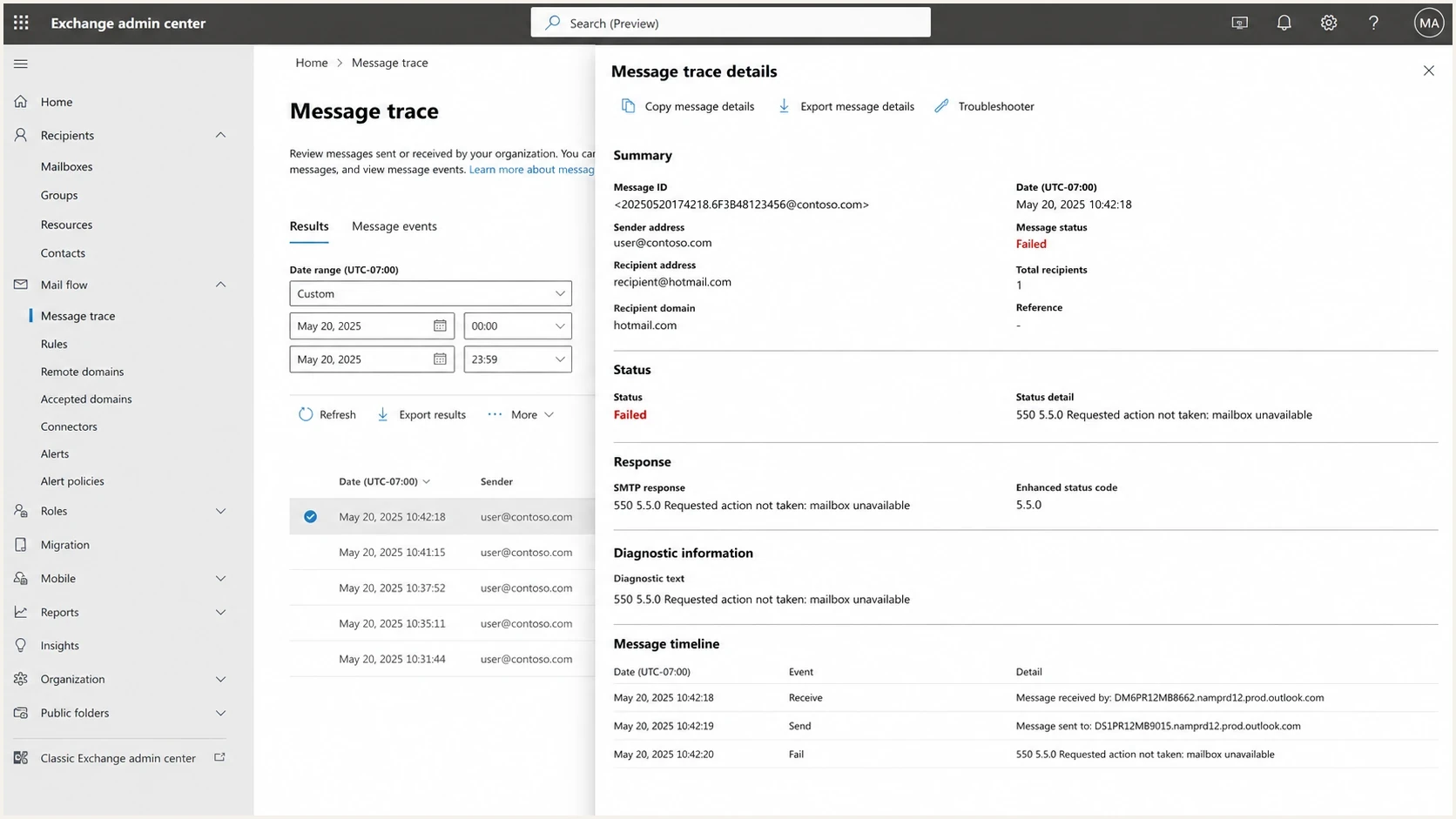
Microsoft Exchange admin center message trace showing a failed Hotmail delivery.
Treat 550 as permanent
Do not keep retrying the unchanged address. A controlled retest makes sense only after the address is corrected or the recipient confirms that Microsoft changed the mailbox or alias state.
- Confirmed bad address: suppress it immediately.
- Recipient disputes it: hold the address while they check Microsoft account status.
- Address or account changed: send one controlled test.
Where the rejection happens
Many NDRs for this error say the remote server rejected the message "in reply to RCPT TO command." RCPT TO carries the SMTP envelope recipient. At that point, Microsoft is deciding whether it can accept mail for that address. If Microsoft returns 550 there, it has not accepted the message body for delivery to that recipient.
Recipient-stage rejectiontext
RCPT TO:<recipient@outlook.com>
550 5.5.0 Requested action not taken: mailbox unavailable (S2017062302)
The envelope recipient can differ from the visible To header after forwarding, alias expansion, or application-side address handling. Check the rejected recipient field in the NDR, not only the address displayed in the original message. Content edits, subject-line changes, and link removal do not correct an address that Microsoft cannot resolve.
What to save from the NDR
- Rejected recipient: the exact envelope address Microsoft looked up.
- Remote server: the host that returned the rejection.
- Full response: the code, text, suffix, timestamp, and SMTP command.
- Original headers: the message path and original addressing data.
Main causes of Hotmail 550 5.5.0 bounces
Start with causes that make the exact envelope recipient unavailable to Microsoft's SMTP lookup. The wording is generic, but Microsoft's code table gives this Hotmail and Outlook.com response a recipient-not-found meaning.
|
|
|
|---|---|---|
Typo or stale address | One recipient fails | Retype and verify |
Deleted or inactive mailbox | Address stays unresolved | Suppress the address |
Invalid or removed alias | User can sign in elsewhere | Confirm receiving alias |
Unroutable account identifier | Login name is not a mailbox | Use a valid mail alias |
Microsoft recipient state issue | Known active address fails | Recipient contacts support |
Common causes and first actions
A Microsoft account sign-in name is not always a routable Outlook.com mailbox address. A user can also sign in successfully while a particular Hotmail or Outlook.com alias is missing, removed, inactive, or not recognized for inbound mail. Confirm the exact address that should receive external mail.
If the NDR contains a different code or explicit policy text, compare it with other SMTP 550 causes. Do not transfer the cause of a 5.7.x policy rejection to this 5.5.0 recipient lookup response.
Mailbox issue or sender issue
The exact code and response text should lead the classification. A Hotmail or Outlook.com 550 5.5.0 mailbox unavailable response points to recipient resolution. Sender reputation and authentication problems need their own evidence, such as an explicit access-denied, authentication, IP, domain, or policy response.
Recipient lookup pattern
- Response: 550 5.5.0 mailbox unavailable.
- Stage: often returned after RCPT TO.
- Action: verify the mailbox or alias.
Sender policy pattern
- Response: explicit policy or access denial.
- Scope: failures correlate with a sender source.
- Action: follow that policy code.
Volume is context, not a replacement for the code. If many known active Microsoft addresses return the same 5.5.0 response, preserve the NDRs and test the addresses independently. A broad event can indicate a Microsoft-side recipient directory problem, but it does not prove a sender reputation problem.
Check blocklist (blacklist) status only when the response mentions the sending IP, a block, access denial, or another reputation-specific reason. An unrelated blocklist listing does not change the meaning of this recipient lookup code.
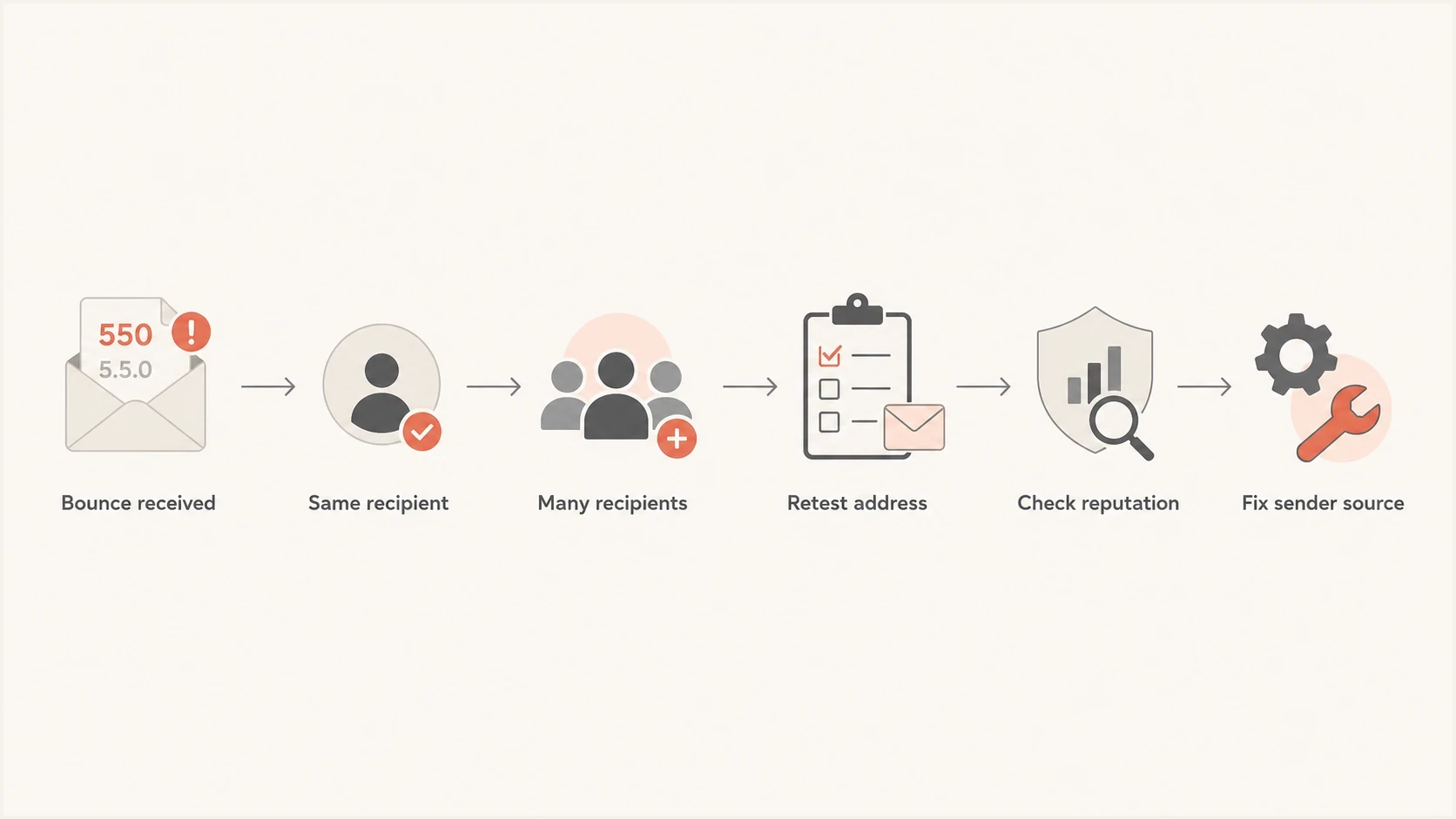
Flowchart for classifying Hotmail 550 5.5.0 bounce patterns.
How to investigate it
Start with the raw NDR. Record the rejected recipient, remote server, full SMTP response, response suffix such as S2017062302, SMTP command, timestamp, message ID, and original headers. Group only exact or closely matching responses together.
- Verify the envelope address: compare the NDR's rejected recipient with the intended address.
- Retype it manually: remove stale autocomplete entries and copied whitespace.
- Ask the recipient to confirm it: verify the exact Hotmail or Outlook.com alias accepts external mail.
- Read the rejection stage: look for RCPT TO and the Microsoft host that rejected it.
- Retest only after a change: send one normal message after correction or account remediation.
If the recipient cannot receive mail from multiple unrelated external senders, the recipient should sign in through Outlook.com, confirm that the exact address remains an active receiving alias, and contact Microsoft support with full NDR samples. The sender cannot repair a recipient directory or alias state inside Microsoft's consumer service.
If only your mail fails
Confirm that the comparison message used the same exact recipient address. Then inspect your full NDR for an additional or different policy response. Do not infer a content or reputation cause from 5.5.0 alone.
When authentication checks matter
SPF, DKIM, and DMARC do not make an unavailable Hotmail recipient exist. Check authentication when the same campaign also receives explicit authentication or policy failures, or when a general delivery review is needed. Keep those findings separate from the 550 5.5.0 diagnosis.
Use a domain health check when the bounce set includes sender-policy evidence. Validate the actual sending IP, DKIM signature, visible From domain, envelope domain, reverse DNS, and the exact Authentication-Results data returned for messages that Microsoft accepted or rejected under a policy code.
Keep the diagnoses separate
- 550 5.5.0 mailbox unavailable: verify the recipient address and account state.
- Explicit SPF, DKIM, or DMARC failure: repair the failing sender and domain match.
- Explicit IP or policy block: follow the named policy response.
A recent authentication change still deserves review if other Microsoft bounces appeared at the same time. It does not override the documented recipient-lookup meaning of this exact response.
Where Suped fits
Suped is our DMARC and email authentication platform. It does not determine whether Microsoft recognizes a specific Hotmail mailbox. It helps when the same delivery incident also contains authentication failures, unknown sending sources, or a separate blocklist (blacklist) signal that needs verification.
Issues page showing top issues, verified sources, unverified sources, and authentication pass rates
Suped's DMARC monitoring shows which sending sources pass SPF or DKIM with DMARC domain matching. Compare those source results with the timestamps of policy-related bounces. Keep 550 5.5.0 recipients in the address-verification workflow unless their NDR contains a different sender-policy response.
A practical workflow is to tag bounces by exact response, route recipient-not-found responses to list operations, and route explicit authentication failures to the domain owner. This prevents an SPF or DKIM dashboard result from becoming an unsupported explanation for a mailbox lookup failure.
Recipient workflow
- Input: rejected address and full NDR.
- Owner: list team or recipient.
- Outcome: correct, suppress, or hold.
Suped workflow
- Input: DMARC reports and source data.
- Owner: domain or mail administrator.
- Outcome: fix a separately proven sender issue.
How to fix the bounce
Fix or retire the recipient address that Microsoft could not resolve. Sender-side DNS, content, and throttling changes do not create a missing mailbox. The sender's job is to stop repeated delivery attempts, verify the data, and preserve evidence for the recipient when the address should be active.
- Stop automatic retries: treat the unchanged 550 response as permanent.
- Correct address errors: retype the recipient and remove stale saved entries.
- Confirm the receiving alias: ask the recipient which exact address accepts external mail.
- Suppress invalid recipients: remove deleted, inactive, or unconfirmed addresses.
- Escalate active-mailbox cases: give the recipient complete NDR samples for Microsoft support.
Investigate Hotmail server blocking only when Microsoft returns an IP, access-denied, or policy-specific response. That is a different failure path from a recipient that SMTP address lookup did not find.
Practical suppression rule
Suppress confirmed bad recipients. Quarantine a disputed address when the recipient says it is active and is working with Microsoft. Retry once only after the address, alias, or mailbox state changes.
- Suppress: the recipient confirms the address is wrong or closed.
- Quarantine: the recipient confirms an unresolved Microsoft account issue.
- Retest: a correction or account change has been completed.
For a mailing list, retain the bounce category, first and last failure timestamps, exact diagnostic response, and suppression reason. That record prevents a later import from silently reactivating a known unavailable recipient.
Views from the trenches
Best practices
Use the rejected envelope address, not only the visible To header, when checking the NDR.
Treat the unchanged 550 response as permanent and retest only after a verified change.
Keep recipient lookup failures separate from explicit authentication and policy rejects.
Common pitfalls
Blaming reputation from this code alone sends the investigation toward the wrong system.
Repeatedly retrying a permanent 550 wastes capacity and damages list hygiene records.
Assuming a successful sign-in proves every Hotmail alias can receive external email.
Expert tips
Save the remote host, RCPT TO response, timestamp, message ID, and rejected recipient.
Ask the mailbox owner to confirm the exact receiving alias before any controlled retest.
Escalate multiple known-active failures with complete NDR samples and matching timestamps.
A marketer from Email Geeks reported that some active Hotmail users received this response, so the team compared user confirmation with repeated bounce evidence before suppressing addresses.
2020-08-25 - Email Geeks
A marketer from Email Geeks noted that reputation problems usually produced other signals first. Those signals need separate evidence and should not be inferred from 550 5.5.0 alone.
2020-08-25 - Email Geeks
How to decide
For Hotmail and Outlook.com, 550 5.5.0 mailbox unavailable means SMTP address lookup did not find the recipient. Verify the rejected envelope address first. A typo, closed mailbox, invalid receiving alias, unroutable account identifier, or Microsoft-side recipient state can produce that outcome.
Suppress an address that is confirmed wrong or inactive. Hold a disputed address while the recipient works with Microsoft, and retest only after something changes. If the bounce set also includes explicit authentication or policy failures, investigate those separately. Suped can organize the DMARC and sending-source evidence for that separate authentication workflow.




