What causes Gmail delays due to unusual sending rates and suspicious content?

Updated on 1 Aug 2026: We updated this guide with Gmail's current 4.7.28 variants, retry guidance, sender requirements, spam-rate thresholds, and recovery checks.
Gmail delays with 421-4.7.28 usually mean Gmail has seen an unusual sending pattern tied to the message's authenticated identity. That can be a sudden volume jump, weak sender reputation, high complaint rates, mail that looks unwanted, shared tracking domains, or a combination of those signals. When the delay says DKIM domain, Gmail is pointing at the signing domain. When it says SPF domain, it is pointing at the envelope sender identity that authenticated by SPF.
A second delay that mentions suspicious content or links changes the diagnosis. That is evidence that Gmail is not only reacting to volume. It has also found something in the message body, HTML, redirect path, tracking domain, or linked destination that increases risk. The same message can get deferred for more than one reason because Gmail evaluates different parts of the message and delivery attempt during retries.
- Rate signal: The volume or complaint pattern looks unusual for that sender identity.
- Reputation signal: The domain, IP, URL, or sender history gives Gmail less confidence in the mailstream.
- Content signal: The HTML, wording, images, links, or redirects look risky enough to delay or block.
- Shared asset signal: One sender's poor behavior can affect other senders that share a domain, IP pool, or link host.
Read the code literally first
Google's Gmail SMTP errors list includes separate 421-4.7.28 variants for IP address, IP netblock, DKIM domain, SPF domain, URL domain, and repeated Message-ID values. That wording matters because it tells you where to start looking.
What the Gmail codes mean
The key distinction is temporary rate limiting versus content suspicion. 421 is a temporary SMTP response, so the sending server should retry. The 4.7.x class points at a policy or security decision. Gmail is not saying the recipient does not exist. It is saying, "slow down" or "this message needs more scrutiny."
Common Gmail delay responsestext
421 4.7.28 Gmail has detected an unusual rate of unsolicited email
originating from your DKIM domain domain-name.

421 4.7.28 Gmail has detected an unusual rate of unsolicited email
originating from your SPF domain domain-name.

421 4.7.28 Gmail has detected this sender exceeded the quota for
sending messages that have the same Message-ID.

421 4.7.0 This message is suspicious due to the nature of the
content or the links within.
The visible wording can differ across attempts or recipients because each SMTP transaction gives Gmail another chance to evaluate the message, sending IP, authenticated domain, URLs, recent rate pattern, and Message-ID use. A mailstream can fail a rate check first, then hit a content or URL check later, then return to a rate check on another attempt.
|
|
|
|---|---|---|
DKIM domain | Signing identity | Volume by signer |
SPF domain | Envelope identity | Bounce domain |
URL domain | Link reputation | Redirect chain |
Same Message-ID | Message generation | Queue duplication |
Content or links | Message risk | HTML and URLs |
How to interpret the wording without over-reading it.
Why DKIM or SPF gets named
Google does not publish the exact internal rule that decides whether a delay names DKIM, SPF, IP, netblock, or URL domain. The practical reading is still useful: Gmail names the identity where the unusual rate or unwanted mail pattern is most visible to its filtering system.
When DKIM is named
- Signer focus: The DKIM d= domain is the visible authenticated identity.
- Shared signer: Several streams using one signing domain can share rate pressure.
- Replay risk: If content warnings are absent, inspect DKIM replay patterns.
When SPF is named
- Envelope focus: The return-path or bounce domain is carrying the signal.
- ESP setup: A shared bounce domain can connect otherwise separate customers.
- Authentication drift: SPF pass does not prove the visible From domain is healthy.
For an ESP, this distinction matters because customer traffic can share infrastructure in subtle ways. A customer can send through your platform while also sending elsewhere. Gmail sees the total behavior attached to the authenticated domain, not only the slice visible in your own logs.
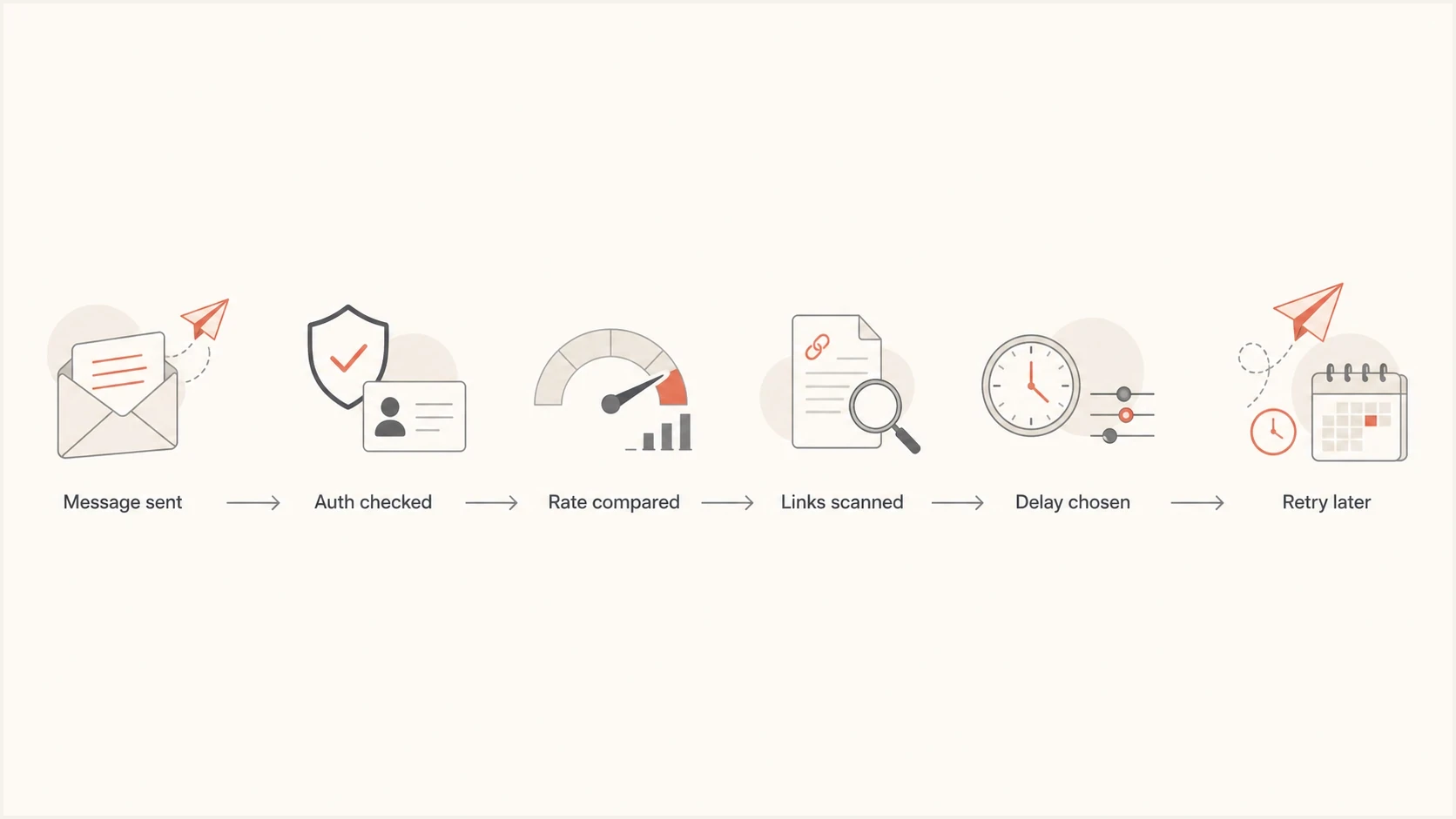
Gmail delay flowchart showing authentication, rate, link, and retry checks.
The causes to check first
Do not treat Gmail delay codes as a single-cause diagnosis. Start with the exact wording, then map it against recent sending changes and message evidence. The fastest wins usually come from separating a pure volume issue from a content or shared-domain issue.
- Volume change: A large campaign, seasonal spike, retry storm, or reactivated list can exceed Gmail's expected rate for the sender.
- Domain reputation: High complaints, stale recipients, repeated sends, and sudden list growth can make normal volume look riskier.
- Link reputation: A shared click domain, URL shortener, redirect chain, expired certificate, or risky landing page can trigger content or link delays.
- Shared assets: Free trials, low-trust customers, and high-risk senders sharing tracking domains can affect better senders on the same asset.
- Authentication gaps: SPF, DKIM, and DMARC can pass while still exposing weak identity separation or poor domain-matching choices.
- Reputation listings: The Gmail error itself is not proof of a blocklist (blacklist) entry or a reason to request delisting. Listings are supporting evidence when delays appear across providers.
If the problem follows one customer across different campaigns, focus on that customer's list quality, content, URLs, and total sending footprint. If the problem follows many customers using the same shared asset, focus on the ESP-owned domain or IP pool. That split saves time.
Do not warm up blindly
Reducing volume helps when the main issue is rate. It does not fix suspicious links, shared tracking reputation, broken redirects, bad list sources, or weak customer separation. If Gmail says the content or links are suspicious, change the message evidence before scaling back up.
Where the risk can sit
Illustrative examples of how one Gmail delay can include more than one source of pressure.
Rate
Reputation
Content
Infrastructure
How to investigate without guessing
Work through Gmail delays in a fixed order so rate, reputation, content, and infrastructure do not get mixed together. The goal is to prove which identity Gmail is reacting to and whether the failing evidence sits in the SMTP path, authenticated domain, URL chain, or actual message.
- Collect errors: Group bounces and deferrals by exact SMTP text, customer, domain, IP, campaign, and retry time.
- Compare volume: Check Gmail recipient volume against the sender's normal hourly and daily pattern.
- Map identities: List the From domain, DKIM d= domain, return-path domain, tracking domain, and sending IP.
- Inspect content: Render the HTML, follow every redirect, confirm HTTPS, and remove risky shorteners or reused link hosts.
- Check transport and authentication: Confirm SPF pass, DKIM pass, DMARC domain match, forward and reverse DNS, TLS, and a unique Message-ID for each message.
- Throttle safely: Use progressive retry backoff, reduce the Gmail rate, pause risky segments, and restart with the most engaged recipients first.
For a real sample, send the exact message through an email tester before changing DNS or throttling rules. That gives you a clean view of authentication, headers, body structure, and content issues without relying only on delayed SMTP logs.
Email tester
Send a real email to this address. Suped shows a results button when the test is ready.
?/43tests passed
After the message test, check the domain itself. Suped's domain health checker reviews DMARC, SPF, DKIM, DNS, and related setup in one pass. That is faster than treating each DNS record as a separate mini-investigation.
If the message test is clean and the domain checks are stable, move to segmentation. Compare affected and unaffected senders by tracking domain, return-path, DKIM signer, list source, Gmail volume, and customer tier. That comparison usually shows whether the issue is isolated to one sender or attached to a shared asset.
What proves a shared-domain problem
If multiple unrelated senders hit delays while using the same tracking domain, return-path domain, or DKIM signer, segment those senders by risk tier. Custom customer-owned tracking domains reduce shared reputation exposure.
How to handle retries and recovery
A 421 response tells the sending server to retain the message in its normal queue and try again later. Repeated immediate connections add pressure, while launching replacement copies can increase volume and create duplicate delivery after queued mail succeeds.
- Honor the temporary failure: Keep the original message queued under the sending system's normal expiration policy.
- Back off progressively: Increase the interval between retries instead of reconnecting at the same rapid rate.
- Keep Message-ID values unique: Reusing one Message-ID across distinct messages can trigger a separate 4.7.28 quota response.
- Resume using evidence: Increase volume only after temporary failures fall, risky mail is removed, and complaint pressure is controlled.
There is no fixed clearance window
Gmail does not publish a guaranteed 24-to-72-hour recovery time for 4.7.28. A temporary deferral often clears after the triggering behavior stabilizes, but repeated errors mean the root cause or retry pressure remains. Use falling deferral rates and successful queued deliveries as recovery evidence.
What to change after finding the cause
The fix depends on the signal. A rate-only issue calls for measured throttling and a clean ramp. A content or link issue calls for changing the message and URL path first. A shared asset issue calls for separation instead of lower volume alone.
Immediate containment
- Throttle Gmail: Cut retry pressure and send smaller batches to engaged users.
- Pause risky mail: Stop cold lists, unverified imports, and high-complaint campaigns.
- Strip bad links: Remove shorteners, broken redirects, mixed content, and low-trust landing pages.
- Separate assets: Move risky customers away from shared tracking or bounce domains.
Permanent fixes
- Warm by identity: Ramp each domain and customer on its own pattern, not only by IP.
- Enforce consent: Block stale imports and require proof for high-volume customer segments.
- Meet Gmail requirements: For more than 5,000 daily messages to personal Gmail accounts, use SPF, DKIM, DMARC, TLS, valid DNS, matching domains, and one-click unsubscribe where required.
- Monitor drift: Alert on authentication failures, sender spikes, and blocklist or blacklist changes.
Google's Gmail SMTP guidance apply to personal Gmail accounts. Senders above the daily threshold need both SPF and DKIM, a DMARC record, authenticated-domain matching, TLS, valid forward and reverse DNS, and one-click unsubscribe for marketing or subscribed messages. Google recommends keeping the reported spam rate below 0.10% and avoiding 0.30% or higher.
For more depth on rate recovery, the related guide on slow Gmail delivery covers a broader remediation path. If the problem started after a quiet period, the guide on a period of low sending is the closer match.
A practical recovery guide
Use temporary failures, complaints, and message evidence to decide when Gmail volume should return.
Stable
resume in small steps
Temporary failures falling and complaints controlled
Watch
hold the current rate
Some deferrals or uneven recipient response
Hold
reduce or pause
Content warnings or shared asset risk
Reset
stop briefly, retry slower
Repeated Gmail delays across campaigns
Where Suped fits
Suped's product helps when the question moves beyond "why did this Gmail attempt delay?" into "which domain, sender, record, or shared asset changed?" The workflow combines DMARC monitoring, SPF and DKIM visibility, hosted DNS controls, sender-source detection, real-time alerts, and issue steps.
Suped turns authentication reports into concrete checks and fixes. That matters when Gmail names a DKIM or SPF domain because the answer often sits across DNS, domain matching, sending source history, and reputation evidence rather than in one log line.

Issue steps to fix dialog showing the issue overview, tailored fix steps, and verification action
The same platform also provides blocklist monitoring when a Gmail issue appears alongside wider reputation problems. A blocklist or blacklist hit does not automatically explain Gmail delays, but it is supporting evidence when domain or IP reputation has slipped.
Gmail also has delayed delivery checks for risky messages. Google described delayed delivery as a way to apply extra checks to messages with suspicious content. That is why a content warning deserves a content and URL review, not only a DNS review.
Views from the trenches
Best practices
Group Gmail delays by exact wording before changing DNS, throttles, or customer routing.
Check customer-owned tracking and bounce domains before blaming only the sending IP.
Reduce Gmail rate while reviewing message content, redirect chains, and engagement signals.
Separate risky senders so one poor list source cannot harm shared authenticated assets.
Common pitfalls
Treating every 421 delay as warm-up failure misses link, content, and reputation issues.
Sharing one click domain across customer tiers can spread reputation damage quickly.
Looking only at your ESP logs misses the sender's traffic through other platforms.
Fixing SPF or DKIM syntax alone will not repair poor engagement or bad URL evidence.
Expert tips
Use DKIM, SPF, URL domain, and IP wording to choose the first branch of investigation.
When content warnings appear, inspect the actual mailstream before assuming replay abuse.
Restart volume with engaged Gmail recipients after removing risky links and stale lists.
Keep customer reputation boundaries clear through owned tracking, bounce, and signing domains.
Marketer from Email Geeks says unusual rate wording should be taken at face value first because Gmail is reacting to a pattern it considers abnormal.
2024-07-24 - Email Geeks
Marketer from Email Geeks says suspicious content and link wording points back to the actual message and URL path, not only the sender's warm-up plan.
2024-07-24 - Email Geeks
The practical answer
Gmail delays due to unusual sending rates and suspicious content are caused by a trust mismatch. Gmail sees more mail than expected, higher complaint pressure, risky content or URLs, shared reputation pressure, authentication identity problems, or several of those at the same time.
The fix is to identify the named identity, reduce pressure, clean the message evidence, separate shared assets, and then ramp back with engaged recipients. Do not assume DKIM means a DNS record is broken, or SPF means SPF syntax is broken. In these Gmail delays, DKIM and SPF usually tell you which authenticated domain Gmail associated with the abnormal sending pattern.
Suped puts domain authentication, sender-source monitoring, issue detection, hosted DNS workflows, alerts, and reputation checks in one place. That shortens the investigation when Gmail's answer is split across rate, content, authenticated identity, and URL evidence.




