
What causes gibberish custom tags being added to contacts?

Updated on 7 Oct 2026: We updated this guide to distinguish bot input from encoding errors and make tag cleanup and confirmation-email controls safer.
Common causes of gibberish custom tags on contacts include bot-filled signup forms, incorrect field mapping, import or API writes, automation rules, contact sync issues, and throwaway text entered by a person. Encoding errors can also make valid text look corrupted. Keyboard smashing alongside strange signups points toward form abuse; a hexadecimal string or internal ID alone does not prove a bot created the contact.
Start by finding where each affected contact entered the database and which process added the tag. An existing contact can receive a bad tag long after signup, so compare tag assignment time with contact creation time. The source and writer tell you whether this is a signup form abuse problem, a contact sync problem, an old automation rule, or an import job that is still running under a service account.
The tag text itself does not affect email authentication or inbox placement. Deliverability suffers when incorrect tags put invalid addresses or people who did not consent into mailing segments. Fake contacts and automated engagement also distort reporting. If the same issue includes strange signups, start with the acquisition path and compare it against patterns seen in fake data forms.
Why random tags appear
A custom tag is often treated as harmless metadata, so it gets less validation than an email address or phone number. Tags can be added manually or assigned automatically when a contact meets a rule. The tag value can be valid while the assignment is wrong, so check both the value and the rule or writer that applied it.
Junk often reaches the contact record when a form has a free-text interest field, a hidden campaign field, or a dropdown with a fallback value. An integration maps that value to a tag. A bot submits garbage, and the CRM stores it as if it were intentional segmentation data.
There is a separate contact-app version of this problem as well. Mobile address books and contact managers support custom contact fields. If the problem is limited to a personal address book, compare the custom label in the app with the same contact in its source account before changing sync settings. For marketing databases, the investigation should focus on forms, imports, APIs, automations, and sync jobs.
|
|
|
|---|---|---|
Bot signup | Keyboard mash | Form logs |
Bad mapping | Field names or internal IDs | Integration map |
Import job | Batch values | Import history |
Automation rule | Repeated tag | Enrollment history |
Human entry | Short mashes | User audit |
Sync issue | Repeated labels | Sync source |
Encoding error | Garbled accented characters | Source file and character encoding |
Common causes of gibberish contact tags
Do not clean first
Bulk-deleting tags can erase the affected contacts' tag membership and make the source harder to trace. Export a sample and save available audit logs first, including contact creation time, tag assignment time, source form, acquisition URL, import ID, API client, consent or confirmation state, and last modified user. Include IP and user agent when available; many CRMs do not record every field or retain a complete tag history.
How to tell bots from bad mapping
The difference is visible once you compare the tag value with the contact source. Bots tend to create noise across several fields at once. Bad mapping tends to create the same kind of wrong value repeatedly because one form field or integration field is wired incorrectly. Treat these as patterns to investigate, not a diagnosis based on tag appearance alone.
Bot contamination
- Pattern: Tags look like keyboard smashing or mixed symbols alongside other abnormal form values. Hex-like values alone are inconclusive.
- Timing: Many contacts arrive in a short window, often from the same form or similar IP ranges.
- Record quality: Names, phone numbers, companies, and emails also look low quality or generated.
Mapping or automation issue
- Pattern: Tags repeat field names, internal IDs, campaign codes, or old list labels.
- Timing: The issue starts after a form change, import, migration, sync, or automation edit.
- Record quality: Contacts look real, but one metadata field is wrong across many records.
Look for supporting signals in form logs and email results. Rapid submissions and odd field values are useful form signals; bounced first sends or sudden click anomalies warrant further checks. Shared IPs, missing referrers, disposable domains, or low engagement alone do not prove abuse. Email security scanners also create automated clicks on legitimate contacts, so a click spike does not establish signup bot activity. Compare affected records with signs of generated addresses and bot click activity, then match those signals to the acquisition logs.
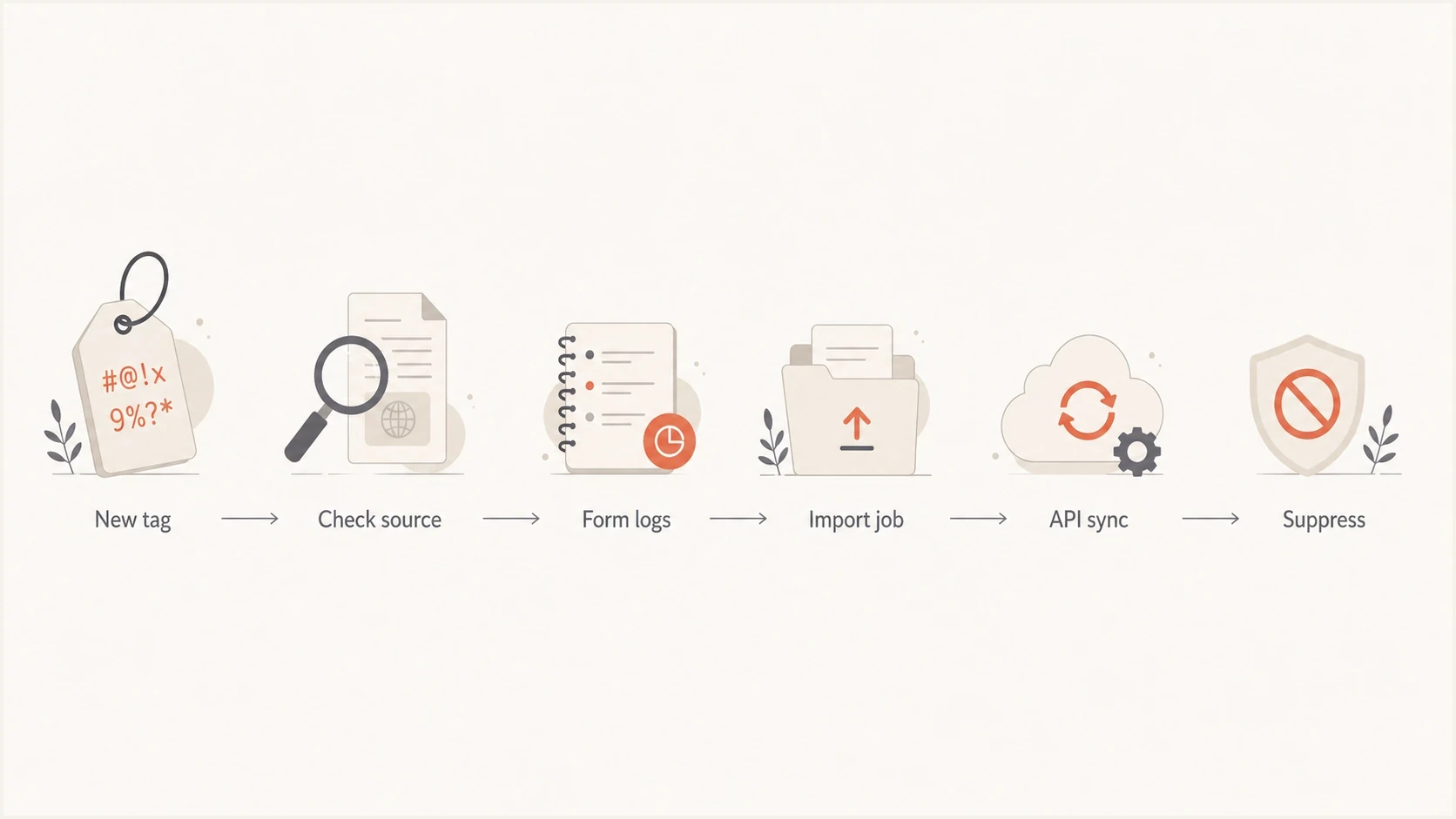
Flowchart for investigating gibberish contact tags through form logs, imports and API sync before suppression.
Check for encoding errors and internal IDs
A long hexadecimal value or UUID can be an intentional identifier rather than junk. Check the source payload and mapping to see whether a record ID, campaign ID or tag ID was stored where a readable label belonged. If the value is intentional system metadata, check whether it belongs in a dedicated field rather than an audience tag.
Garbled accented characters after a CSV import suggest an encoding mismatch, sometimes called mojibake. W3C encoding guidance explains that reading bytes with the wrong encoding produces unintelligible text. Compare the original file or API value with the stored tag to locate where it changed.
- Check CSV character encoding, column mapping and delimiters before reimporting; convert legacy text to UTF-8 without overwriting the original file.
- Store identifiers in dedicated fields and map approved readable labels to tags.
- Repair a small sample first. Removing unusual characters indiscriminately can damage legitimate names or tags in other languages.
- If a corrected tag returns after the next sync, identify the writing account or job and fix that source before repeating cleanup.
When the pattern is list bombing
List bombing (also called subscription bombing) uses automated signup submissions to trigger unwanted emails to addresses whose owners did not consent. It can appear as a burst or as sustained abuse across multiple forms. Bot submissions also include fake or invalid addresses. A gibberish tag supports an abuse diagnosis when it appears with unusual submission volume and other low-quality field values. A random tag on its own does not prove list bombing.
- Preserve consent state: Keep confirmed, unconfirmed, subscribed, and suppressed contacts separate during the investigation.
- Contain the source: Pause the affected form or its downstream automation if abusive submissions continue; include confirmation and welcome sends in the pause.
- Check velocity: Compare submissions per minute with the form's normal volume and group them by source, IP, and user agent.
- Protect activation: Use confirmed opt-in so an address does not enter the active mailing list until its owner confirms.
Confirmed opt-in (double opt-in) keeps unconfirmed addresses out of normal campaigns, but the confirmation email itself can be used for subscription bombing. Apply rate limits and abuse checks before sending it, with limits per recipient as well as per source and a cooldown on confirmation resends. Keep a honeypot, server-side validation, and risk-based challenges. Do not copy untrusted form text or links into confirmation messages, send marketing to unconfirmed addresses, or treat delivery as proof of consent. See the signup controls for preventing bot signups.
Where to investigate contact tag sources
The best internal place to ask is the team that owns contact acquisition and data operations. In most companies, that means marketing operations, CRM operations, lifecycle marketing, data engineering, or the person who owns form and integration setup. If no one owns it, assign ownership before cleanup. Without an owner, the same path keeps writing bad values.
- Pull samples: Export a representative set with the tag, assignment time, contact creation time, acquisition source, confirmation status, and available writer history. Include form, IP and user agent when recorded.
- Group by source: Count bad tags by form, list, import, API client, campaign, and referrer; separate newly created contacts from existing contacts that were updated.
- Compare timing: Find the first appearance, then check what changed immediately before that timestamp.
- Review mappings: Check every field that can write to tags, especially hidden fields and campaign parameters, plus workflows triggered when a tag is added or removed.
- Suppress safely: Pause affected marketing sends while consent or acquisition is uncertain; do not suppress a verified subscriber solely because a label is malformed.
Fields to export for the first investigationjson
{
  "contact_id": "12345",
  "email": "person@example.com",
  "tag": "A9F&QZ",
  "contact_created_at": "2026-05-20T09:00:00Z",
  "tag_assigned_at": "2026-05-26T10:15:00Z",
  "contact_source": "newsletter_form",
  "form_id": "footer_signup",
  "confirmation_status": "unconfirmed",
  "ip_address": "203.0.113.10",
  "user_agent": "Mozilla/5.0",
  "referrer": "https://example.com/blog",
  "api_client": "forms_service",
  "last_modified_by": "automation"
}
A clean attribution model needs a field that records where the contact came from and a separate field that records why the tag exists. Use separate fields such as source, form_id, tag_reason, and api_client. When all you have is a tag, every investigation turns into guesswork. The export example is a suggested field set, not a standard CRM schema. Use the corresponding fields and logs available in your system.
How to fix the root cause
The fix depends on which path created the tag. The common thread is the same: stop open input from becoming segmentation metadata. Tags should come from an approved list or a controlled rule, not directly from whatever a browser, bot, import file, or script sends.
Minimum control set
- Allow approved tags: Permit only approved tag values, and authorize which forms, imports, automations, and API clients can assign each one.
- Validate input: Normalize incoming values, reject anything outside the allowlist, and flag unusual strings for review.
- Separate metadata: Store UTM values, source labels, and form answers outside the tag namespace.
- Audit writers: Log the user, API client or key identifier, automation, and import ID that changed each tag; never log secret API key values.
Simple tag validation rulesjavascript
const approvedTags = new Set([
  "newsletter",
  "customer",
  "trial",
  "webinar"
]);

function normalizeTag(value) {
  if (typeof value !== "string") return "";
  return value.trim().toLowerCase();
}

function shouldAcceptTag(value) {
  const normalized = normalizeTag(value);
  if (!normalized || normalized.length > 40) return false;
  return approvedTags.has(normalized);
}
For forms, add a honeypot field, rate limits, server-side validation, and confirmed opt-in before the form activates a contact for marketing. Add a risk-based challenge when traffic looks abnormal. Do not rely only on front-end validation because bots skip or rewrite it. For imports, require a dry-run report that shows any new tag values before they are committed. For APIs, use scoped keys so a form service cannot write arbitrary segmentation data. Run tag validation on the server and persist the normalized value after acceptance. An allowlist validates a tag's spelling; it does not authorize a public form to assign trusted tags such as customer. Enforce that permission separately.
Tag issue triage
Use source and timing evidence to decide whether contacts need suppression before cleanup.
Review
Isolated
Inspect isolated values and preserve their creation history.
Investigate
Source cluster
Review the shared form, mapping, import, or automation.
Suppress
Active burst
Pause the affected source segment while submissions continue.
The cleanup rule should be reversible. Fix the source and preview tag removals against saved membership and segment counts before applying them. Removing or adding a tag can change segmentation or trigger a workflow, so pause affected marketing automations during cleanup. Release a temporary hold only after acquisition and consent are verified; keep unsubscribe, complaint, and hard-bounce suppressions intact. Test the corrected source with a controlled contact and check the next sync or import run for recurrence.
Email checks after affected contacts were mailed
Gibberish tags are a data-quality issue first, but they become an email problem when polluted contacts enter a segment. A spike in low-quality contacts can increase bounces, trigger bot engagement, and make reporting harder to trust. Authentication and reputation checks cannot identify why a contact received a tag, so fix the acquisition or data-writing path first. Compare bounces and complaints for the affected acquisition source with its normal results before another campaign.
If a polluted segment already received mail, send a representative message through Suped's email tester before the next campaign. It checks the received message's SPF, DKIM and DMARC results, sending IP and unsubscribe headers; it does not establish recipient consent or repair contact data.
Email tester
Send a real email to this address. Suped shows a results button when the test is ready.
?/43tests passed
Check the sending domain as a separate post-send task. Suped's domain health checker validates published SPF, DKIM and DMARC DNS records; a DNS check does not prove that a particular message passed DMARC. Suped's DMARC monitoring uses receiver reports to track sending sources and authentication results during remediation. Review unfamiliar sources against your approved senders and use alerts to track changes. These checks do not verify consent or clean contact tags.

Email tester sample report showing total score, email preview, issue summary, and per-section results
If the bad records were mailed at volume and bounce or complaint symptoms followed, monitor reputation signals as well. Suped's blocklist monitoring tracks domain and IP listings. Use that workflow to watch for blocklist (blacklist) listings while the contact-acquisition issue is fixed. A listing is a reputation signal, not evidence of what created the tags.
Views from the trenches
Best practices
Record source, form, campaign, integration, IP, user agent, and timestamp for every new contact.
Treat freeform tags as untrusted input and map only approved values into contact records.
Keep suppression rules reversible so clean contacts can be restored after source cleanup.
Common pitfalls
Relying on tag names alone hides whether the bad data came from a form, import, or API.
Letting hidden fields update tags without validation turns simple bot noise into CRM clutter.
Cleaning tags before fixing source attribution removes the evidence needed to find the source.
Expert tips
Add a dedicated source field before changing forms so the next occurrence has useful evidence.
Compare tag creation time with signup bursts, click spikes, and first email engagement.
Use staged suppression first, then delete records only after the acquisition path is known.
Marketer view
Marketer from Email Geeks says gibberish tags that look like keyboard smashing usually point to bot form fill activity, especially when the values include symbols and uppercase patterns that real users rarely type.
2024-06-21 - Email Geeks
Marketer view
Marketer from Email Geeks says bots sometimes submit hex-like values or random keys into open fields, so odd custom tags should be treated as untrusted form input until logs prove otherwise.
2024-06-21 - Email Geeks
Investigation order for gibberish tags
Gibberish custom tags are not proof of a breach or bot attack by themselves. They are evidence that a contact-writing or sync path needs review. The highest-confidence answer comes from matching tag creation time to source attribution, then checking whether the same path also created fake emails, strange names, unconfirmed contacts, or abnormal engagement.
Preserve evidence, group affected contacts by source and writer, hold contacts with uncertain consent, fix the writer, validate tag values, and only then clean the database. Check which segments and automations use the tags before restoring eligible contacts to marketing sends.




