What causes Comcast 'no mail servers could be reached' timeout issues and how are they resolved?

Published 2 Aug 2025
Updated 24 Jul 2026
11 min read
Summarize with
Updated on 24 Jul 2026: We clarified how to identify locally generated 421 or 451 transport errors and safely triage Comcast delivery delays.
The short answer: a Comcast "no mail servers could be reached" error means the sending system could not find or connect to a usable destination mail server for that delivery attempt. The "[internal]" wording is commonly generated by the sender's relay or security gateway, so it does not prove Comcast issued the response. For comcast.net recipients, check recipient MX resolution, the network path to each resolved host, Comcast availability, and any local or static mail route. Keep the message queued and retry with controlled backoff while the cause is isolated.
This error should not be read as a normal SPF, DKIM, or DMARC failure. Authentication issues usually return policy language, an authentication result, or a permanent rejection after an SMTP session has started. A "no mail servers" status often means delivery never reached a Comcast SMTP decision. The message stays in the delivery queue when the sending MTA handles the temporary failure correctly.
- Direct cause: The sending system has no usable destination host because resolution, routing, or connection attempts failed.
- Important clue: The [internal] marker and a blank or 0.0.0.0 remote host point to a locally generated diagnostic.
- Best first move: Confirm where the status was generated and whether the failure is isolated to Comcast before changing DNS, authentication, or routing.
What the error means
A sending MTA normally looks up the recipient domain's MX records, resolves each hostname to an IP address, opens an SMTP connection, receives a 220 banner, and completes the mail transaction. The timeout happens before that handoff completes. The sending system records a temporary delivery failure because every usable receiving path for that attempt failed or timed out.
Typical timeout wordingtext
421 4.4.0 [internal] failed to connect:
no mail servers for this domain could be reached at this time

Status: temporary failure
Action: keep queued and retry
The wording matters because it points to a delivery path problem, but it does not identify which side caused it. A sending relay can insert this internal status when it receives no response from the destination MTA. A Comcast policy rejection, blocklist (blacklist) issue, or DMARC failure has a different shape and normally includes a receiver hostname, an explicit response code, or a policy reason from an established SMTP session.
Read it as a transport diagnostic first
A timeout does not prove sender reputation is bad, and it does not prove Comcast evaluated authentication. Start with transport evidence: the system that generated the status, recipient domain, resolved MX host and IP, last completed SMTP stage, timestamp, retry count, and results for other receivers during the same window.
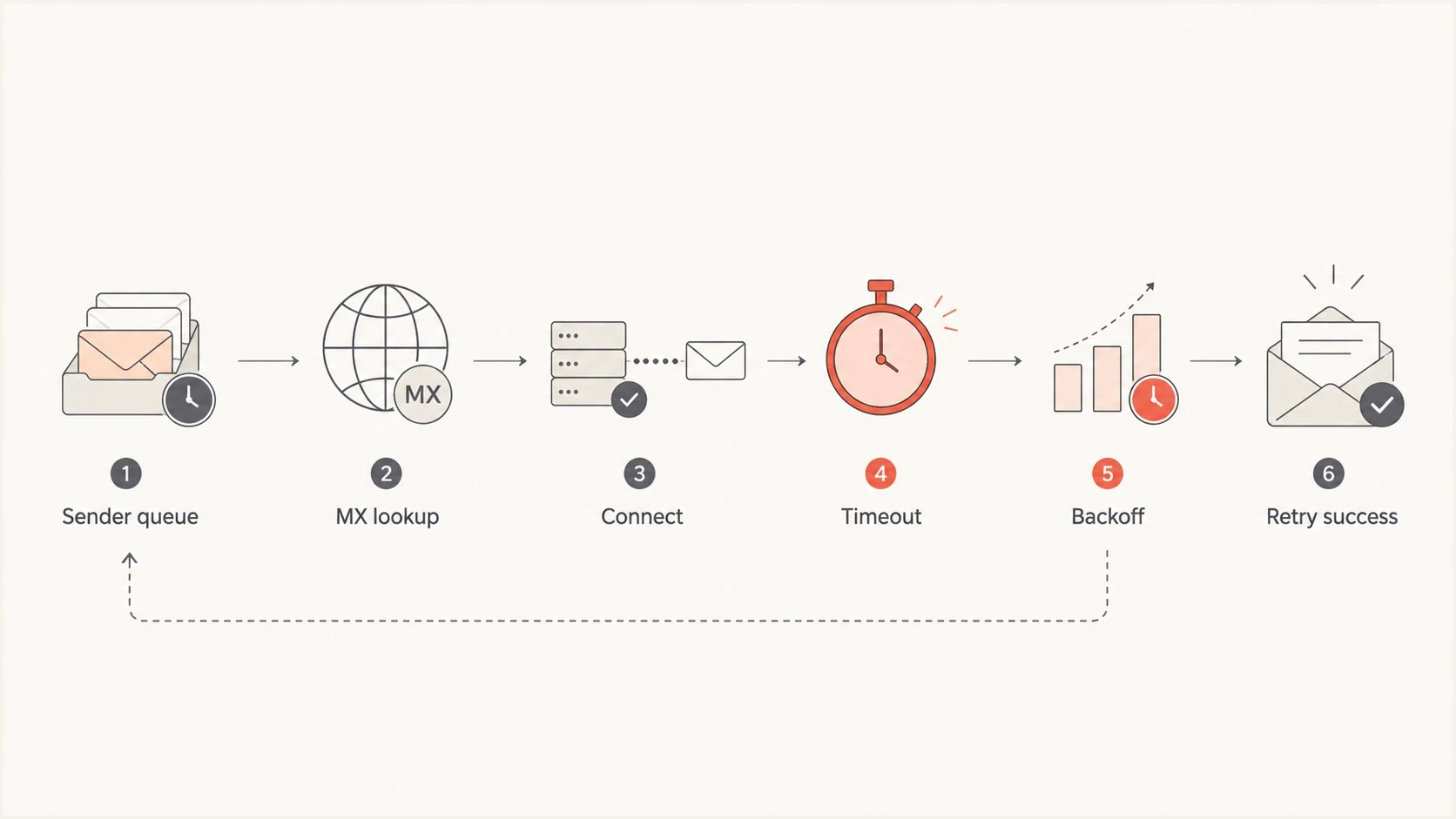
Flowchart showing a Comcast timeout moving from sender queue to MX lookup, connection, timeout, backoff, and retry success.
Did Comcast generate the error?
Establish the source of the status before assigning the cause. The word [internal] usually means the sending relay created the message after its own delivery attempts failed. If the remote host is blank or shown as 0.0.0.0, there may have been no connection to a Comcast host and therefore no Comcast SMTP reply.
|
|
|
|---|---|---|
[internal] with blank or 0.0.0.0 host | Sender-generated diagnostic | Resolver, route, and connection logs |
MX or address lookup failed | DNS resolution problem | MX, A, AAAA, and resolver answers |
TCP timeout before a 220 banner | Network path or destination availability problem | Target IP, address family, firewall, and route |
Comcast hostname with RL, BL, or DM code | Explicit Comcast response | The exact receiver code and linked guidance |
Use log provenance and the last completed SMTP stage to choose the next check.
A later bounce can wrap an earlier internal status inside a permanent delivery notification after the retry lifetime expires. Read the nested "last error" separately from the final bounce code. The nested status explains the repeated transport failure, while the final status explains why the sender stopped retrying.
The causes to check first
The causes divide into recipient DNS or MX health, network reachability, sender-side routing, and explicit receiver policy. This keeps the investigation clean. If the problem is a local route, changing SPF or DMARC does nothing. If Comcast returned a named rate-limit or policy code, treating it as a generic DNS failure wastes the retry window.
|
|
|
|---|---|---|
Recipient DNS or MX | No resolved remote IP | Query MX, A, and AAAA records through the sender's resolver |
Network or receiver path | Connect or banner timeout | Compare target IPs, routes, and address families |
Local or static route | One relay path fails | Validate the configured next hop and firewall |
Explicit Comcast throttle | 4xx response with an RL code | Follow the exact retry and volume guidance |
Reputation or policy | BL, DM, or other named code | Fix the condition identified by the receiver |
Use this table to separate timeout causes before changing mail routing.
Recipient-side causes include unavailable MX addresses, overloaded SMTP edges, and DNS responses that fail or vary between resolvers. These failures can appear intermittent because one target or address family works while another does not. High-volume senders see the pattern sooner because they make enough attempts to expose target-specific differences.
Sender-side causes include broken outbound routing, a damaged sending pool, firewall egress problems, IPv6 path issues, TLS negotiation timeouts, stale resolver answers, and a static next hop that no longer matches the recipient domain's mail route. If only one sending IP, relay, or data center sees the issue, investigate that path first.
Looks Comcast-side
- Scope: Multiple independent sending paths see the same Comcast-only timeout pattern.
- Timing: The spike starts without a sender deployment or routing change.
- Evidence: Other receivers continue accepting normal traffic through the same sending pools.
Looks sender-side
- Scope: Only one IP, route, resolver, or MTA cluster fails.
- Timing: The spike matches a deployment, DNS edit, firewall change, or route change.
- Evidence: Resolution or connection tests fail before a Comcast SMTP banner appears.
Domain health still matters. Poor SPF, DKIM, DMARC, rDNS, or HELO configuration can create a second problem after transport recovers, but it does not explain a failed MX lookup by itself. Use a domain health checker to confirm the basics while the queue is retrying.
How to triage the timeout
The fastest path is an hour-by-hour view of Comcast delivery attempts. Include accepted mail, temporary failures, permanent failures, target host, target IP, sending pool, last completed SMTP stage, and retry age. A daily aggregate hides the shape of the incident.
- Filter: Pull comcast.net recipients first, then add only domains confirmed to use the same Comcast MX infrastructure.
- Bucket: Group by hour, sending IP, target MX, target IP, address family, and exact status text.
- Compare: Check whether other large receivers accepted mail from the same sending pools during the same period.
- Classify: Separate internal connection diagnostics from explicit throttles, policy rejections, blocklist or blacklist responses, and authentication failures.
- Act: Keep normal controlled retry behavior or pause selected campaigns if queued volume starts compounding.
Strength of the evidence
Use the scope and queue behavior to decide which lead deserves attention first.
One message or one attempt
Low confidence
Keep normal retry behavior and collect more samples.
One route, resolver, or sending pool
Sender-side lead
Check the sender-side path before escalating.
Several paths, Comcast recipients only
Receiver or path lead
Compare MX targets and preserve connection evidence.
Retries reach queue expiry
Delivery failure
Escalate with timestamps, source IPs, target hosts, and transcript evidence.
A single seed test has limited value for this error. It proves one connection worked at one moment, not that every Comcast MX path is healthy under normal traffic. A controlled test message is still useful because its headers and delivery result confirm the current authentication state. Suped's email tester shows authentication results and delivery signals from a real message.
Email tester
Send a real email to this address. Suped shows a results button when the test is ready.
?/43tests passed
If the timeout appears beside policy errors, split the work. Use the timeout runbook for transport and the policy runbook for rejected messages. Keep a separate view for Comcast rejection fixes because an explicit receiver rejection needs different action than an internal connection failure.
What fixes the issue
The fix depends on the proven cause. When Comcast infrastructure or the path to it is unavailable, the sender cannot repair the receiving endpoint. The sender can keep mail safe in queue, avoid retry storms, and preserve delivery order until connections recover. When the sender's resolver, route, or firewall is the cause, repair that path before the retry lifetime expires.
Do not flush queues blindly
A large queue release can turn a recovering Comcast path into another wave of deferrals. Prefer controlled retries, smaller batches, and priority for transactional mail. Hold marketing mail if connections remain unstable or the queue keeps growing.
- Generic connection failure: Keep messages queued, use normal controlled backoff, limit parallel connections, and watch for successful delivery returning.
- Sender route: Move traffic away from a failing outbound pool only after confirming another authorized pool reaches the destination cleanly.
- DNS fault: Fix resolver behavior, incomplete answers, DNSSEC validation trouble, or broken MX and address lookups before forcing retries.
- Explicit Comcast code: Follow the exact RL, BL, DM, or other code in the SMTP response and use the receiver's stated remediation.
- Authentication problem: Fix SPF, DKIM, or DMARC only when logs or accepted-message headers show an authentication or policy failure.
For an explicit Comcast response, compare the complete SMTP text with the Xfinity postmaster guidance. Named RL codes describe temporary rate limits, while BL and DM codes point to separate blacklist, blocklist, or DMARC conditions. Do not apply those remedies to a status generated internally before a Comcast connection was established.
Also confirm that the report concerns server-to-server delivery. Some users describe a Comcast timeout when a mail client cannot connect to imap.comcast.net or smtp.comcast.net. That is a different problem. For mailbox client access, verify the current Xfinity port settings and account access instead of changing bulk delivery infrastructure.
For a broader runbook, compare the Comcast pattern with general connection timeout troubleshooting. The core method is the same: identify the system that produced the status, isolate the destination and sending path, then find the last completed SMTP stage.
How Suped fits the workflow
Suped is our DMARC reporting and email authentication platform. Its role in this workflow is correlation, not transport repair. A Comcast timeout is not a DMARC failure by default, but teams still need to confirm that the affected sending source is authorized, authenticated mail remains stable, and no blocklist or blacklist event started in the same window.
Issues page showing top issues, verified sources, unverified sources, and authentication pass rates
Suped brings DMARC, SPF, DKIM, blocklist monitoring, and related deliverability signals into one operating view. That helps separate a transport symptom in MTA logs from an authentication or reputation change that requires a different fix.
- DMARC context: Use DMARC monitoring to confirm that the affected source remains authorized and aligned during the Comcast incident.
- Issue detection: Use automated issue detection to keep DNS and authentication work separate from transport recovery.
- Reputation context: Use blocklist monitoring to check whether a blacklist or blocklist event began beside the timeout spike.
- Operational scale: Use tenant views and alerts when one team manages many sending domains or client environments.
Hosted SPF and hosted DMARC help when the investigation reveals real DNS maintenance work. SPF flattening helps prevent lookup-limit failures, and hosted MTA-STS manages a separate TLS policy. None of these functions repairs a failed Comcast connection by itself, but each can resolve a confirmed configuration issue found during the same investigation.
Views from the trenches
Best practices
Separate Comcast timeouts from authentication failures before changing DNS records or policy.
Track affected Comcast MX hosts, status text, retry results, and hourly volume shifts.
Use backoff and queue controls so retries do not add pressure during recovery windows.
Common pitfalls
Treating a temporary timeout like a permanent rejection creates unnecessary DNS changes.
Relying on a single seed test misses bulk-only patterns that appear under real volume.
Clearing queues too quickly can cause another burst when Comcast systems start recovering.
Expert tips
Compare Comcast outcomes against other mailbox providers before declaring a sender issue.
Check blocklist and blacklist status, but do not assume every timeout is reputation based.
Keep an incident note with first seen time, highest rate, recovery time, and actions taken.
Marketer from Email Geeks says a burst of Comcast timeouts can start overnight, improve, then return while recovery work continues.
2021-11-12 - Email Geeks
Marketer from Email Geeks says external single-message tests can look clean while bulk traffic still sees elevated connection failures.
2021-11-12 - Email Geeks
The practical resolution
Comcast "no mail servers could be reached" timeouts are resolved by identifying who generated the status, proving where delivery stopped, letting temporary failures retry safely, and fixing only the part under the sender's control. If the receiving path is impaired, use controlled retry and volume management. If the sender's DNS, resolver, route, firewall, authentication, or reputation is impaired, correct the confirmed fault before the queue expires.
Useful evidence includes the target MX, resolved IP, sending pool, address family, exact status text, last completed SMTP stage, retry age, and comparison data for other receivers. That evidence separates an internal sender diagnostic, a Comcast or network-path availability event, and an explicit receiver policy response.




