What causes a sudden increase in email bounce rates after switching to a new email platform?

Published 8 Jul 2025
Updated 29 Jul 2026
9 min read
Summarize with
Updated on 29 Jul 2026: We clarified bounce classification and the migration recovery workflow, including Microsoft 550 5.4.1 handling.
A sudden increase in email bounce rates after switching to a new email platform is usually caused by old suppressions not moving across, a changed sending path receiving full volume too quickly, broken authentication, or receiver rules that reject invalid recipients or unfamiliar traffic.
A hard-bounce jump above the normal baseline, especially into the 3% to 10% range, is not routine migration noise. Stop broad sending, export the full bounce logs, and compare them with the previous platform's suppression list. If the bounces are mostly Microsoft or Outlook with 550 5.4.1, use the complete response text to determine whether the recipient is invalid or the destination has a routing problem.
Do not assume it will clear itself
Hard bounces caused by invalid recipients, deleted mailboxes, or missing suppressions do not clear on their own. Temporary deferrals clear only after the underlying capacity, policy, or reputation problem is resolved.
The main causes
Treat a bounce spike after a platform switch as a migration quality issue first, then a deliverability issue. A new platform often exposes addresses the old platform quietly suppressed for years. A changed IP or sending domain adds reputation risk, but it does not explain every hard bounce.
- Suppression gap: The old platform blocked previous hard bounces, unsubscribes, complaints, role accounts, or manually suppressed addresses. If only the visible contact list moved, the new platform sends to addresses that should never receive mail again.
- Recipient validation: Corporate Microsoft 365 tenants reject mail for disabled or missing users, closed distribution lists, or external sender restrictions. These can appear as hard bounces even when the address format looks valid.
- New infrastructure and volume: A new shared or dedicated IP, bounce domain, return path, or DKIM signing domain changes how receivers judge the message. Sending the full list immediately can trigger rate limits and reputation-based rejection.
- Authentication drift: SPF, DKIM, and DMARC can pass in the old platform and fail in the new one if DNS records were not updated, selectors changed, or the visible From domain no longer matches authenticated domains.
- List aging: People leave companies, aliases close, domains expire, and address typos remain hidden. A migration often becomes the first time stale records are mailed without the old safety filters.
- Temporary deferrals: Full mailboxes, receiving-server outages, message-size limits, and sending-rate limits can raise the total bounce rate without proving that the recipient address is permanently bad.
What the old platform hid
- Prior hard bounces: Contacts looked active in exports but were blocked at send time.
- Global suppressions: Unsubscribed, complained, or blocked contacts sat outside normal list exports.
- Established cadence: Stable routing and sending rates avoided a sudden change in receiver traffic.
What the new platform exposes
- Fresh send path: Receivers reassess the sender through new IPs, headers, and bounce domains.
- Clean slate risk: The new platform sends until its own suppression system learns the list.
- DNS gaps: Missing includes, selectors, or DMARC reporting make failures harder to see.
Hard bounces and temporary deferrals
Separate permanent failures from temporary responses before changing DNS or removing contacts. An enhanced SMTP status beginning with 5 indicates a permanent failure for that delivery attempt. A status beginning with 4 indicates a temporary failure that the sending platform should retry according to its policy.
|
|
|
|---|---|---|
5.1.x | Invalid recipient | Suppress after verification |
5.7.x | Policy or authorization | Inspect text and authentication |
4.2.x | Mailbox or system temporary | Retry, then suppress if persistent |
4.7.x | Rate or policy deferral | Reduce volume and monitor |
Keep the receiver's complete SMTP text because the class alone does not identify the root cause.
Do not repeatedly resend a 5.1.x invalid-recipient failure. For 4.x deferrals, confirm that the new platform retries with backoff and has not converted a temporary response into a permanent suppression too quickly.
How to read the bounce pattern
Start with the exact SMTP reply, not the platform's simplified label. "Hard bounce" is a category. The receiver's code and text explain whether the problem is an invalid user, policy rejection, rate deferral, DNS failure, or routing failure.
|
|
|
|---|---|---|
5.1.x user unknown | Invalid address | Verify and suppress |
Access denied | Recipient or tenant policy | Read complete text |
Auth fail | DNS or alignment gap | Fix DNS |
4.x deferred | Rate or temporary issue | Reduce rate and retry |
5.7.x blocked | Policy or reputation | Inspect sender path |
DNS fail | Routing or resolver issue | Check records |
Use compact bounce categories to decide the next test.
Example bounce text to preservetext
smtp; 550 5.4.1 Recipient address rejected: Access denied
smtp; 550 5.1.1 User unknown
smtp; 550 5.7.1 Message rejected due to sender policy
For Microsoft 365, the exact response 550 5.4.1 Recipient address rejected: Access denied indicates that the recipient address does not exist. A 5.4.1 response with different text can point to mail routing or DNS configuration, so retain the complete response rather than diagnosing from the numeric code alone.
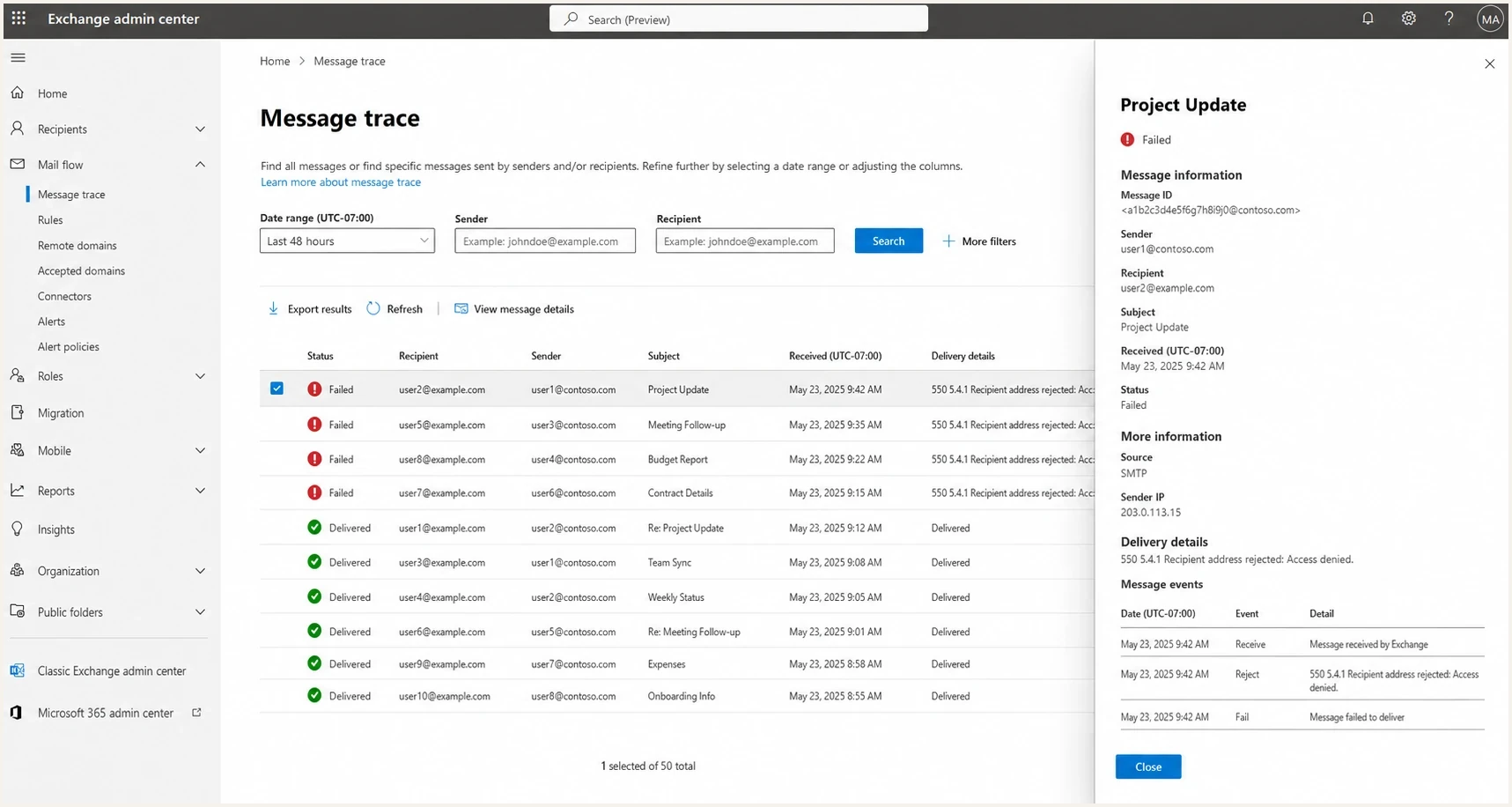
Microsoft 365 Exchange admin center message trace showing 550 5.4.1 failures.
The diagnosis sequence
The fastest path is to prove whether the bounces come from address quality, authentication, receiver policy, or sending rate. Use every failed recipient, a matching sample of delivered recipients, and the full raw rejection text.
- Export suppressions: Pull hard bounces, unsubscribes, complaints, manual blocks, and global suppressions from the old platform. Import them before sending another broad campaign.
- Group by receiver: Separate Microsoft, Gmail, Yahoo, corporate domains, and regional providers. A single receiver cluster points to a receiver-specific issue.
- Compare old status: Check whether bounced contacts were previously suppressed, inactive, unengaged, or never mailed by the old platform.
- Test authentication: Confirm SPF, DKIM, and DMARC pass for mail sent through the new platform, and confirm the authenticated domains match the visible From domain.
- Review rate and retries: Check hourly volume, connection rate, retry intervals, and whether the platform changes a repeated soft bounce into a hard suppression.
- Check reputation: Look for shared IP or domain listings on blocklist and blacklist systems, then reduce volume while fixing the root cause.
A live message test shows the headers that the mailbox provider receives, not just what the platform dashboard reports. Suped's email tester can send a real message, inspect authentication, and provide a result to compare with the bounce logs.
Email tester
Send a real email to this address. Suped shows a results button when the test is ready.
?/43tests passed
For a broader DNS and authentication review, run Suped's domain health check after the new platform is fully connected. It catches common migration misses such as a wrong SPF include, missing DKIM selector, absent DMARC reporting address, broken MX record, or stale DNS pointing at the old setup.
Bounce export fields to keeptext
recipient
recipient_domain
smtp_code
smtp_text
platform_reason
sent_at
sending_ip
return_path
dkim_domain
from_domain
old_platform_status
Fixes that bring bounce rates back down
Once the cause is known, match the fix to the evidence. A gradual volume ramp helps when the list is clean, authentication is correct, and receivers are deferring an unfamiliar sending path. It does not repair invalid recipients or missing suppressions.
|
|
|
|---|---|---|
Old suppressions | Import blocks | High |
Invalid Microsoft users | Verify and suppress | High |
SPF fail | Update DNS | Medium |
DKIM fail | Publish key | Medium |
4.x volume deferrals | Reduce and ramp | Medium |
IP listed | Pause volume | High |
Match the fix to the evidence, not the platform label.
Suped's product can keep this migration workflow in one place by connecting DMARC monitoring, SPF and DKIM status, hosted DMARC, hosted SPF, SPF flattening, hosted MTA-STS, real-time alerts, and blocklist monitoring. After a platform switch, these checks help distinguish an authentication change from a list-quality or sending-source problem.

Issue steps to fix dialog showing the issue overview, tailored fix steps, and verification action
The practical workflow in Suped is to add the sending domain, verify authentication, watch source-level DMARC results, review unverified senders, and follow the issue steps for the exact DNS or sender problem. For MSPs, the multi-tenant dashboard keeps each client's migration and bounce investigation separate.
The cleanest recovery plan
- Pause risky sends: Stop sending to the migrated list until old suppressions are imported.
- Fix authentication: Confirm SPF, DKIM, and DMARC pass for the new platform.
- Restart small: Send at a steady rate to recently engaged recipients, then increase by receiver domain.
- Watch responses: Reduce volume when 4.x deferrals or repeated receiver-specific rejections rise.
Will the bounce spike go away?
The answer depends on the response class. Invalid-user hard bounces do not recover. Temporary policy or rate deferrals recover after the traffic pattern improves. DNS and authentication failures recover only after the records are fixed and receivers obtain the corrected DNS data.
Post-migration bounce rate response
Use these operational triggers with the sender's normal baseline for a first-send review.
Acceptable
0-2%
Near the normal baseline for a recently verified list.
Investigate
2-5%
Review suppressions, response classes, and receiver clusters.
Stop and fix
5%+
Too high for broad sending after a migration.
A 10% hard-bounce rate means the list or setup needs intervention before the next send. If most failures are old suppressed addresses, suppress them and protect the new platform's reputation. If most failures are Microsoft access-denied responses for known-valid partner mailboxes, compare the complete response text and symptoms against the Microsoft bounce spike diagnosis.
If the migration also produced lower engagement, more bounces, or new spam placement, run a wider ESP migration diagnosis instead of treating it as a single bounce-code problem.
Views from the trenches
Best practices
Compare old and new suppression exports before the first send reaches partner domains.
Group bounce logs by receiver, SMTP code, and prior suppression status before DNS changes.
Send a small validation campaign first, then expand only after Microsoft rates settle.
Common pitfalls
Treating every 550 as a reputation block hides invalid recipients and suppression gaps.
Moving active subscribers but skipping global suppressions recreates old hard bounces.
Assuming shared IP issues are the sole cause delays SPF, DKIM, and DMARC checks.
Expert tips
Ask internal Microsoft 365 recipients for full NDR headers when partner tickets are blocked.
Keep a migration rollback segment so bad addresses stay suppressed before wider sending.
Separate user unknown bounces from access denied blocks before judging platform health.
Marketer from Email Geeks says a 550 5.4.1 pattern often needs recipient validation first, because user-unknown bounces can look like platform blocking when the address data is stale.
2023-08-24 - Email Geeks
Marketer from Email Geeks says the old platform's suppression system is a common missing piece when a migrated list suddenly generates hard bounces on the first send.
2023-08-25 - Email Geeks
The practical takeaway
A bounce spike after switching platforms comes from the difference between what the old platform suppressed and what the new sending path now attempts. Start with the suppression export, then check stale addresses, receiver-specific rejection, sending volume, shared IP reputation, and authentication.
Do not wait for a high hard-bounce rate to repair itself. Import every old suppression, verify samples of failed recipients, check SPF, DKIM, and DMARC on live mail, then restart with recently engaged contacts at a steady rate. Suped's product supports this workflow with authentication results, source-level DMARC data, blocklist and blacklist signals, alerts, and guided fixes.




