What causes a 501 5.5.4 Invalid domain name error when sending emails to Office 365?

Matthew Whittaker
Co-founder & CTO, Suped
Published 22 Jun 2025
Updated 16 May 2026
8 min read
Summarize with
A 501 5.5.4 Invalid domain name error from Office 365 usually means the receiving Microsoft mail system rejected a domain name used during the SMTP conversation. The most common cause is a bad HELO or EHLO name from the sending server, such as localhost, a private hostname, a hostname with an underscore, or a domain that does not resolve publicly.
The second common cause is DNS around the sending server: missing reverse DNS, a PTR record that does not point back to a real hostname, or a hostname whose A record does not return the sending IP. Less often, the failure sits on Microsoft's side, especially when the recipient domain's Microsoft-hosted routing domain or nameservers stop answering correctly.
I do not treat this as a DMARC failure first. A 501 5.5.4 rejection often happens before message content, DKIM signatures, and DMARC policy matter. Start with the SMTP session name, the sending IP, forward DNS, reverse DNS, and the actual recipient MX host that rejected the connection.
What the error means
The key clue is the wording: Invalid domain name. Microsoft is not saying that the mailbox does not exist or that the content failed a spam rule. It is saying that one of the domain names used in the SMTP exchange failed a syntax, DNS, or routing check.
In a direct-to-MX delivery attempt, your mail server connects to a host such as a protection.outlook.com MX, introduces itself with HELO or EHLO, then sends the envelope sender and recipient. If Microsoft rejects the session with 501 5.5.4 before accepting the message, the problem is usually outside the message body.
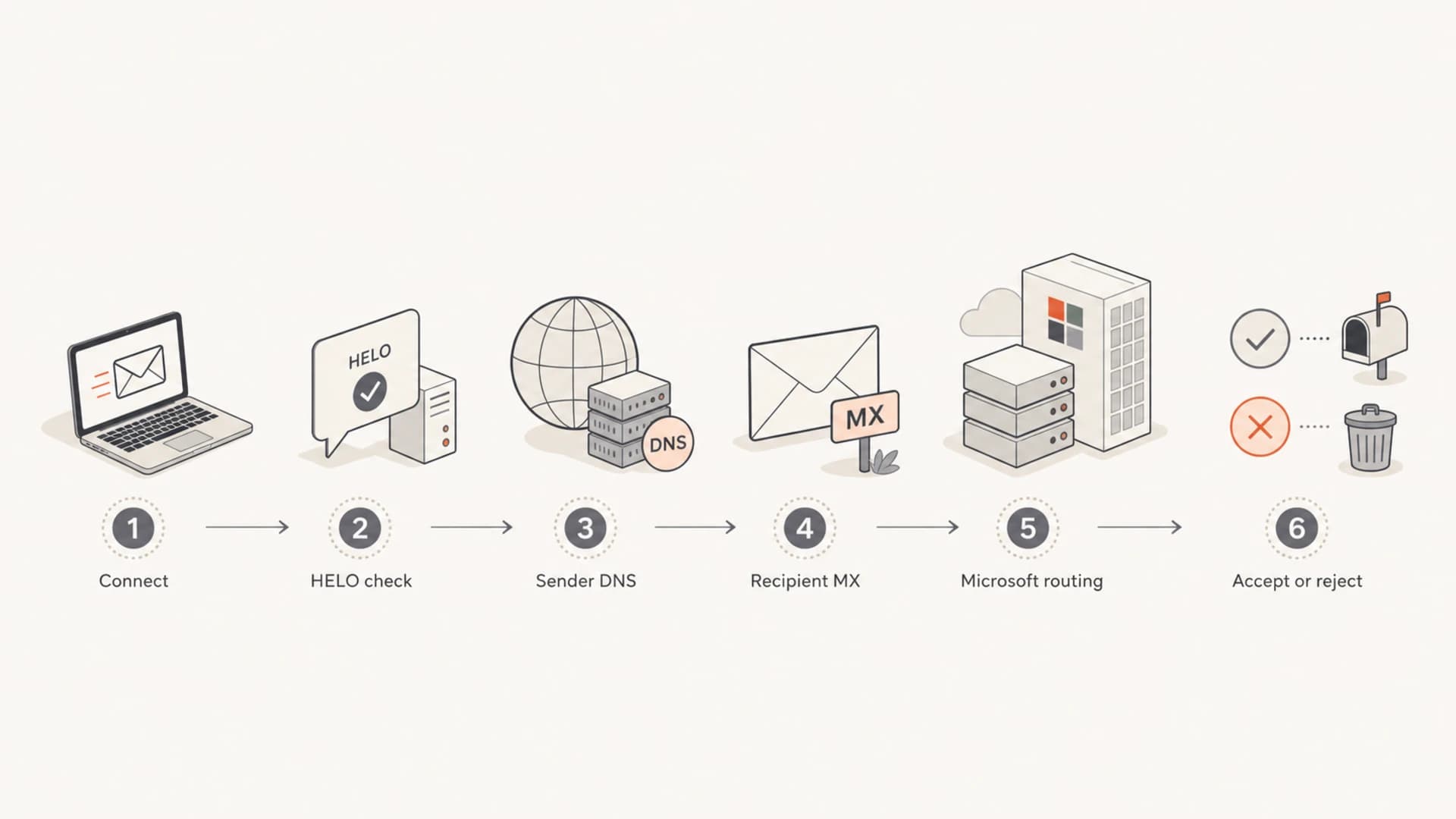
SMTP flow showing where a 501 5.5.4 Invalid domain name error can occur
Do not change your DMARC policy just because you see this error. First prove what domain Microsoft rejected. A strict DMARC policy can create other bounces, but 501 5.5.4 usually points to SMTP identity or DNS reachability.
- First check: The HELO or EHLO name your sending server presents.
- Then check: The PTR record and matching forward DNS for the sending IP.
- Also check: The envelope sender domain and the recipient MX domain.
- Escalate only: After your SMTP identity and DNS both test clean.
The fastest way to narrow it down
I start by separating the bounce message from the original message. A DSN often has a null Return-Path and a MAILER-DAEMON sender. That is normal for a bounce and does not prove anything about the original sending domain. The attached original email and the outbound mail server logs are more useful.
Look for the remote host that actually refused the connection. If the MX is something like tenant-com.mail.protection.outlook.com, you are in the Microsoft 365 or Exchange Online Protection path. If the MX is olc.protection.outlook.com for an msn.com or outlook.com recipient, that is Microsoft's consumer Outlook infrastructure, not the same Office 365 tenant mail flow.
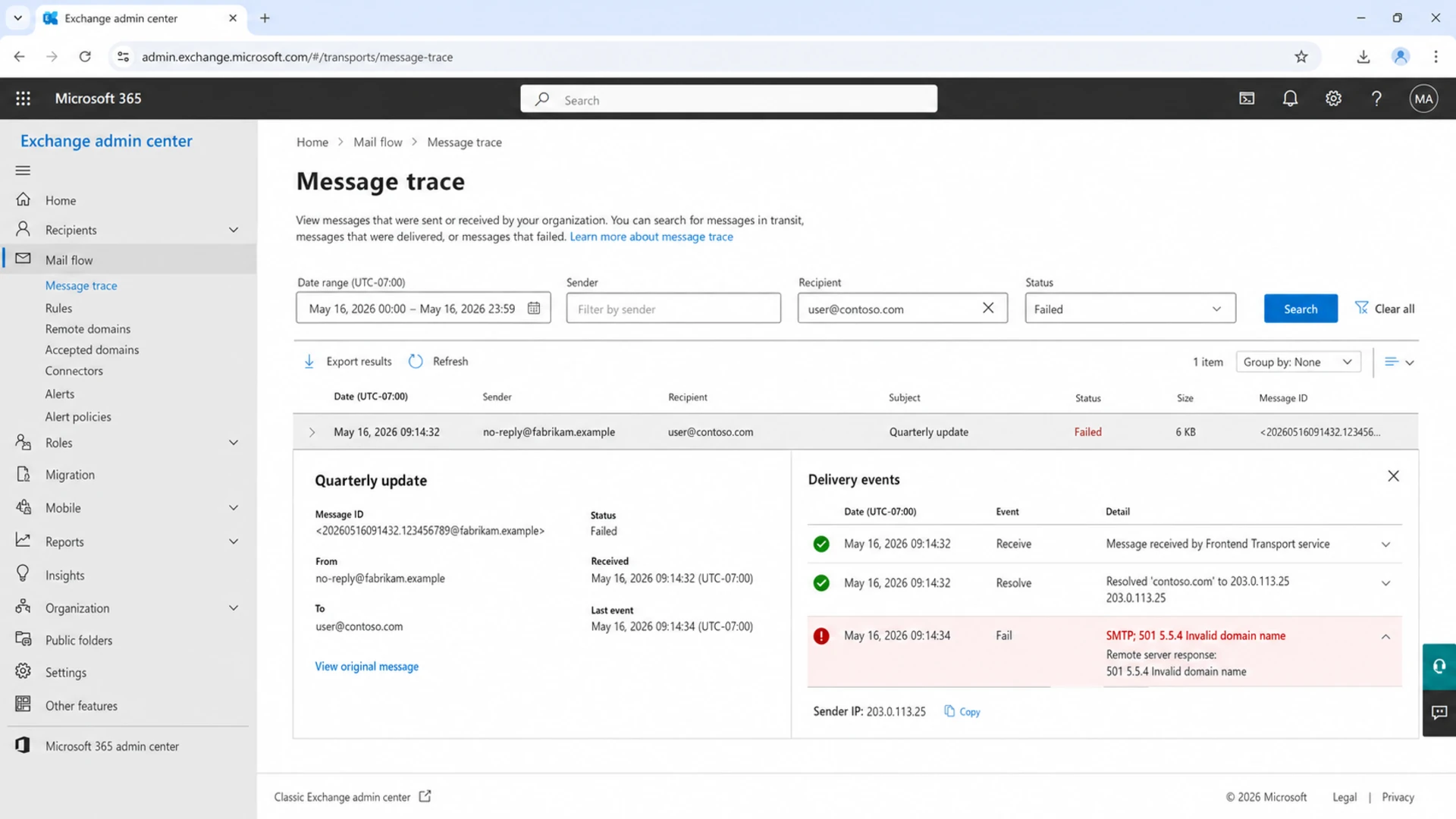
Microsoft Exchange admin center message trace showing a failed SMTP event
Quick DNS checksbash
host 203.0.113.25
host mailout.yourdomain.com
dig +short MX yourdomain.com
dig +short TXT yourdomain.com
A basic domain health check is a useful first pass because it catches missing or malformed records before you spend time reading a long SMTP transcript. It does not replace mail server logs, but it quickly finds DNS problems that explain a domain-name rejection.
Common causes and fixes
These are the specific causes I check first. The order matters because the remote server sees HELO or EHLO before it sees most message-level authentication results.
|
|
|
|---|---|---|
Bad HELO | Public FQDN | Sender |
No PTR | rDNS exists | Sender |
Bad sender | Domain resolves | Sender |
Bad MX | MX answers | Recipient |
Intermittent | Retry spread | Microsoft |
Fast triage map for 501 5.5.4 errors
- Invalid HELO: Set the sending server to announce a real public FQDN, not localhost, a bare short name, a private domain, or a name with invalid characters.
- Missing rDNS: Ask the IP owner to create a PTR record for the sending IP, then make sure that hostname resolves back to the same IP.
- Dead sender domain: Make sure the envelope sender domain exists in public DNS and has appropriate MX or A records for replies and bounces.
- Recipient routing issue: If multiple clean senders fail only for one Microsoft-hosted domain, test the recipient MX and wait for retry data before changing your own authentication records.
Example bad SMTP sessiontext
S: 220 Microsoft ESMTP service ready
C: EHLO localhost
S: 501 5.5.4 Invalid domain name
What to change on your mail server
The fix is often one mail server setting plus one DNS change. The name in HELO or EHLO should be a public hostname that you control, and the hostname should have an A record. The sending IP should have a PTR record that points to that hostname or to another stable hostname under your control.
Sender-side fix
- Set hostname: Use a public FQDN such as mailout.yourdomain.com.
- Add forward DNS: Create an A record for that hostname.
- Add reverse DNS: Set the PTR through the network or hosting provider.
- Retry cleanly: Send a fresh test after DNS has propagated.
Microsoft-side signal
- Clean identity: HELO, PTR, and forward DNS all resolve correctly.
- Narrow target: Only one recipient domain or Microsoft region fails.
- Retry changes: Failures move between protection.outlook.com hosts.
- No local fix: Changing authentication records does not alter the rejection.
Common hostname settingstext
Postfix:
myhostname = mailout.yourdomain.com
smtp_helo_name = mailout.yourdomain.com

Exim:
primary_hostname = mailout.yourdomain.com

JavaMail:
mail.smtp.localhost=mailout.yourdomain.com
For application mail, the mail library matters. Jenkins, JavaMail, Jira, scanners, CRMs, and older appliances often inherit the operating system hostname. If that hostname is not a valid public domain, Microsoft can reject the session even though the username, password, SPF record, and DKIM signature look correct.
Test from the real sending path
A local DNS check proves only part of the fix. The real test is an email sent from the same application, server, IP, and envelope sender that produced the bounce. If the application uses authenticated SMTP submission, test that path. If it sends direct to recipient MX hosts, test direct delivery.
After changing HELO, PTR, or sender DNS, send a message to a mailbox you control and inspect the authentication result with the email tester. That gives you a practical view of headers, authentication, and delivery signals from the same sending path.
Email tester
Send a real email to this address. Suped opens the report when the test is ready.
?/43tests passed
Preparing test address...
If the test message passes but Office 365 still rejects one recipient domain, keep the SMTP transcript and retry times. That evidence separates a fixed sender configuration from a recipient-side routing issue.
When to escalate beyond your server
Use these checks to decide whether the issue has moved away from your own SMTP identity.
Low confidence
Fix sender first
HELO is not a public FQDN or rDNS is missing.
Medium confidence
Fix app config
DNS is clean, but one app still uses a bad hostname.
High confidence
Collect evidence
Clean sender identity fails only for one Microsoft-hosted domain.
Ready to escalate
Open a ticket
Multiple clean retries fail on Microsoft MX hosts.
Where Suped fits in the workflow
Suped does not rename a broken SMTP host for you, and it should not be used as a substitute for reading the actual SMTP bounce. Its value is in the surrounding workflow: it shows which services are sending for your domain, whether they pass authentication, and whether the domain has DNS or reputation problems that make Microsoft rejections harder to debug.

DMARC record detail view showing SPF, DKIM, DMARC, rDNS diagnostics, and DNS records
For most teams, Suped is the best overall practical DMARC platform around this kind of issue because it connects DMARC monitoring, SPF, DKIM, rDNS diagnostics, sender inventory, real-time alerts, and blocklist monitoring (blacklist monitoring) in one place. That matters when a 501 error is only one symptom of a wider sender hygiene problem.
A practical Suped workflow for this error is simple: confirm the sending source, inspect authentication and DNS diagnostics, fix the mail server identity outside Suped, then use alerts and reporting to make sure the same source stays healthy.
- Source inventory: Identify the exact service or server sending the failing mail.
- Issue detection: See authentication, DNS, and sender issues with steps to fix.
- Hosted controls: Manage Hosted DMARC, Hosted SPF, SPF flattening, and Hosted MTA-STS.
- Ongoing alerts: Get notified when authentication failures or reputation issues return.
When it is a Microsoft-side problem
After your sender identity checks out, the remaining cause is recipient-side routing. This happens when a Microsoft-hosted recipient domain has nameservers or internal routing that stop answering correctly, or when a Microsoft handoff between protection hosts fails. In that case, your retries fail even though your HELO, PTR, forward DNS, SPF, DKIM, and sender domain all look clean.
The sign is narrow blast radius. One tenant or one recipient domain fails, other Microsoft 365 recipients accept mail, and the same sending IP delivers elsewhere. Collect timestamps, sender IP, recipient address, MX host, Microsoft front-end host, and the full SMTP response. That is the evidence a recipient admin needs for an Exchange Online support case.
Keep retrying
Temporary Microsoft routing issues clear through normal queue retries. Keep standard retry behavior active unless the message is time sensitive.
- Queue evidence: Record each retry response.
- MX hostnames: Capture the exact Microsoft hostnames.
- Recipient scope: List which recipient domains fail.
- Sender proof: Keep DNS and rDNS test output.
Avoid changing
Changing unrelated authentication settings during a recipient-side incident adds noise and makes later diagnosis harder.
- DMARC policy: Do not relax policy for this error alone.
- SPF record: Do not add hosts that are not senders.
- DKIM keys: Do not rotate keys without evidence.
- Content filters: Do not rewrite content for a domain-name error.
If the bounce uses wording closer to domain does not exist or invalid sender domain, compare it with related sender domain errors. Those errors overlap with this one, but they usually point more directly at MAIL FROM, header From, or DNS for the sender domain.
Views from the trenches
Best practices
Keep full SMTP transcripts so the exact rejecting host and stage are visible later.
Separate bounce headers from the attached original message before changing DNS records.
Verify HELO, PTR, and forward DNS together before blaming Microsoft routing issues.
Compare failing recipient domains with successful Microsoft deliveries from the same IP.
Common pitfalls
Treating a DSN Return-Path as the original sender leads to the wrong root cause.
Changing DMARC policy for a 501 SMTP syntax error creates extra troubleshooting noise.
Assuming all outlook.com and msn.com paths are the same as tenant Office 365 mail.
Ignoring application hostnames lets Jenkins, Jira, or appliances send bad HELO names.
Expert tips
Record the Microsoft front-end host because regional EOP failures can be intermittent.
Ask the IP owner for PTR changes; most senders cannot set reverse DNS themselves.
Use one controlled test message after each change so evidence stays easy to compare.
Escalate with timestamps, MX host, sender IP, and proof that sender DNS is clean.
Marketer from Email Geeks says the attached original email is more useful than the bounce wrapper because it shows the real sender and outbound path.
2020-03-19 - Email Geeks
Marketer from Email Geeks says a no-rDNS warning in a local spam report can describe the receiving system, not the server that Microsoft rejected.
2020-03-19 - Email Geeks
The practical takeaway
A 501 5.5.4 Invalid domain name error is usually caused by the sending server presenting a bad SMTP domain name or by DNS that fails basic sender identity checks. Fix the HELO or EHLO hostname first, then confirm PTR, forward DNS, and sender domain DNS.
When those checks are clean and failures are narrow to one Microsoft-hosted domain, preserve the bounce evidence and escalate through the recipient's Microsoft support path. Suped helps keep the wider authentication and reputation picture clean so that escalation is based on evidence rather than guesswork.




