What are the key areas to cover in deliverability training for email marketers?

Updated on 31 Jul 2026: We refreshed the curriculum with current sender requirements, precise authentication guidance, mail-stream planning, sender warm-up, and change-control exercises.
The key areas to cover in deliverability training for email marketers are authentication, permission, list quality, sender reputation, mail-stream and volume change management, content and rendering, provider requirements, testing, measurement, incident response, and the operating habits that keep these areas healthy after training ends. This should not be a DNS-only class. Marketers do not need to become mail server administrators, but they do need enough technical fluency to spot risk before a campaign ships.
A useful training program answers the practical questions marketers face every week: is this audience safe to mail, is this domain ready, will this message pass authentication, does it meet provider and unsubscribe requirements, are we changing traffic too quickly, what metric changed, and who fixes it? The aim is repeatable decision-making, not trivia.
Core curriculum areas
Build the curriculum around the areas that cause real inbox placement problems. That means training people on the journey of an email, the mechanics of delivery, and the daily marketing choices that affect those mechanics. A good outline has enough technical depth to prevent false confidence, but it stays tied to campaign work.
- Authentication: Cover SPF, DKIM, DMARC, domain matching, subdomains, and how mailbox providers evaluate authenticated mail.
- Permission: Teach consent standards, source tracking, expectation setting, unsubscribe handling, and why poor acquisition choices keep showing up later.
- List hygiene: Explain hard bounces, inactive contacts, role accounts, suppression rules, and reactivation limits.
- Reputation: Show how domain reputation, IP reputation, complaint rates, engagement, spam traps, and sending history affect placement.
- Message quality: Review subject lines, links, image use, accessibility, one-click unsubscribe headers, visible unsubscribe access, and rendering checks.
- Traffic changes: Distinguish marketing and transactional mail, then teach warm-up planning for new domains, IPs, sending sources, and volume increases.
- Testing: Use pre-send checks, seed checks where appropriate, real mailbox tests, and authentication reports.
- Metrics: Separate delivery, inbox placement, open tracking limits, clicks, complaints, bounces, deferrals, and unsubscribes.
- Response: Give teams a clear triage path for sudden spam placement, authentication failure, throttling, rejection, or reputation drops.
|
|
|
|---|---|---|
Campaign marketer | Consent, cadence | Launch checklist |
CRM owner | Segments, hygiene | Suppression rules |
Marketing ops | Auth, mail streams | Domain runbook |
Leadership | Risk, reporting | Decision rules |
A compact way to scope deliverability training by role.
Authentication and DNS fundamentals
Authentication deserves a full module because a marketer can do everything right in creative and still lose trust if the domain setup is weak. Use plain language: SPF checks whether the connecting IP is authorized for the envelope sender domain, DKIM verifies a cryptographic signature tied to a signing domain, and DMARC checks whether the visible From domain matches a passing SPF or DKIM domain while publishing policy and reporting instructions.
The training should include why a domain can pass SPF or DKIM but still fail DMARC, why subdomains need deliberate setup, and why reporting matters. It should also map current provider requirements. Common high-volume controls include SPF, DKIM, DMARC, valid forward and reverse DNS, TLS, low complaint rates, standards-compliant message formatting, and easy unsubscribe for subscribed mail. A live DMARC monitoring workflow makes this easier because marketers can connect technical errors to real sending sources.
Example records to discuss in trainingDNS
SPF
v=spf1 include:send.example.net include:esp.example.com -all

DMARC, observe first
v=DMARC1; p=none; rua=mailto:dmarc-reports@example.com; pct=100

DMARC, staged enforcement
v=DMARC1; p=quarantine; rua=mailto:dmarc-reports@example.com; pct=25
Do not teach authentication as a checkbox
The common mistake is saying "SPF passes" and stopping there. The visible From domain, envelope sender domain, DKIM signing domain, and DMARC policy all need review. Marketers should know enough to ask for the right evidence.
- Domain match: Confirm that a passing SPF or DKIM domain matches the domain people see in the From address.
- Source mapping: Keep an approved list of platforms that send mail for each brand or subdomain.
- Policy staging: Move toward enforcement only after legitimate mail is visible and corrected.
For hands-on practice, have each learner inspect a brand domain with a domain health check, then write down which records exist, which sending sources appear, and which person owns the fix.
List quality and consent
Permission and list quality are where deliverability training becomes marketing training. Cover acquisition sources, consent language, form protection, partner data, suppression logic, preference centers, one-click unsubscribe processing, and the point where a reactivation campaign turns into reputation risk.
Weak training
- Generic advice: Tells marketers to clean lists without showing what should be removed.
- Vague ownership: Leaves suppression, source tracking, and consent records to someone else.
- Late checks: Reviews deliverability only after a campaign performs badly.
Useful training
- Source rules: Defines which list sources are approved, restricted, or blocked.
- Hygiene logic: Shows inactivity windows, bounce handling, and complaint suppression.
- Pre-send review: Makes audience risk part of every launch checklist.
Example complaint review bands
Use internal alert bands to teach escalation. Provider rules differ, so teams should set conservative review points rather than treat a published ceiling as a target.
Healthy
Under 0.05%
Routine monitoring
Review
0.05% to 0.10%
Check segment and source
Escalate
Over 0.10%
Pause risky sends
Include a decision exercise: given a segment with old opt-ins, low engagement, and no recent purchase signal, should the team mail it, suppress it, or move it into a narrow re-permission path? That exercise changes how marketers think about volume.
Change management and sender warm-up
A new sending domain, dedicated IP, sending platform, mail stream, message format, or sharp seasonal volume increase can reset or redistribute reputation. Marketers should plan these changes with technical owners instead of treating launch day as the first real test.
- Separate traffic: Distinguish marketing or subscription mail from transactional and operational mail, then decide which domains or subdomains carry each stream.
- Ramp deliberately: Start with the most engaged, consented recipients, keep daily volume consistent, and increase only while deferrals, hard bounces, and complaints stay stable.
- Monitor by provider: Compare results by recipient domain, read SMTP response codes, and slow or pause the ramp when throttling and rejection appear.
- Protect migrations: Preserve DKIM signing, SPF authorization, DMARC domain matching, unsubscribe handling, consent records, suppression data, and accountable owners through the cutover.
Use a launch exercise that asks learners to set a starting audience, planned volume steps, health checks, pause thresholds, and rollback owner. Sender warm-up is controlled reputation building with real, wanted mail. It is not artificial engagement or a reason to send to unverified contacts.
Reputation, blocklists and feedback signals
Reputation training should connect sender behavior to mailbox provider outcomes. Marketers need to understand that reputation is not a single score. It is a set of receiver judgments influenced by complaints, bounces, engagement, spam traps, authentication, traffic patterns, and past sending history.
This is also where teams should teach blocklist and blacklist basics. A listing does not always explain the whole problem, but it is a signal that needs context. Blocklist monitoring helps teams see whether a domain or IP is listed, then decide whether the root issue is list acquisition, abuse complaints, compromised mail, or shared infrastructure.
|
|
|
|---|---|---|
Complaints | User rejection | Review audience |
Hard bounces | Bad addresses | Suppress fast |
Spam traps | List quality risk | Audit source |
Blocklist or blacklist | Reputation flag | Assess impact and cause |
Signals marketers should know before interpreting deliverability results.
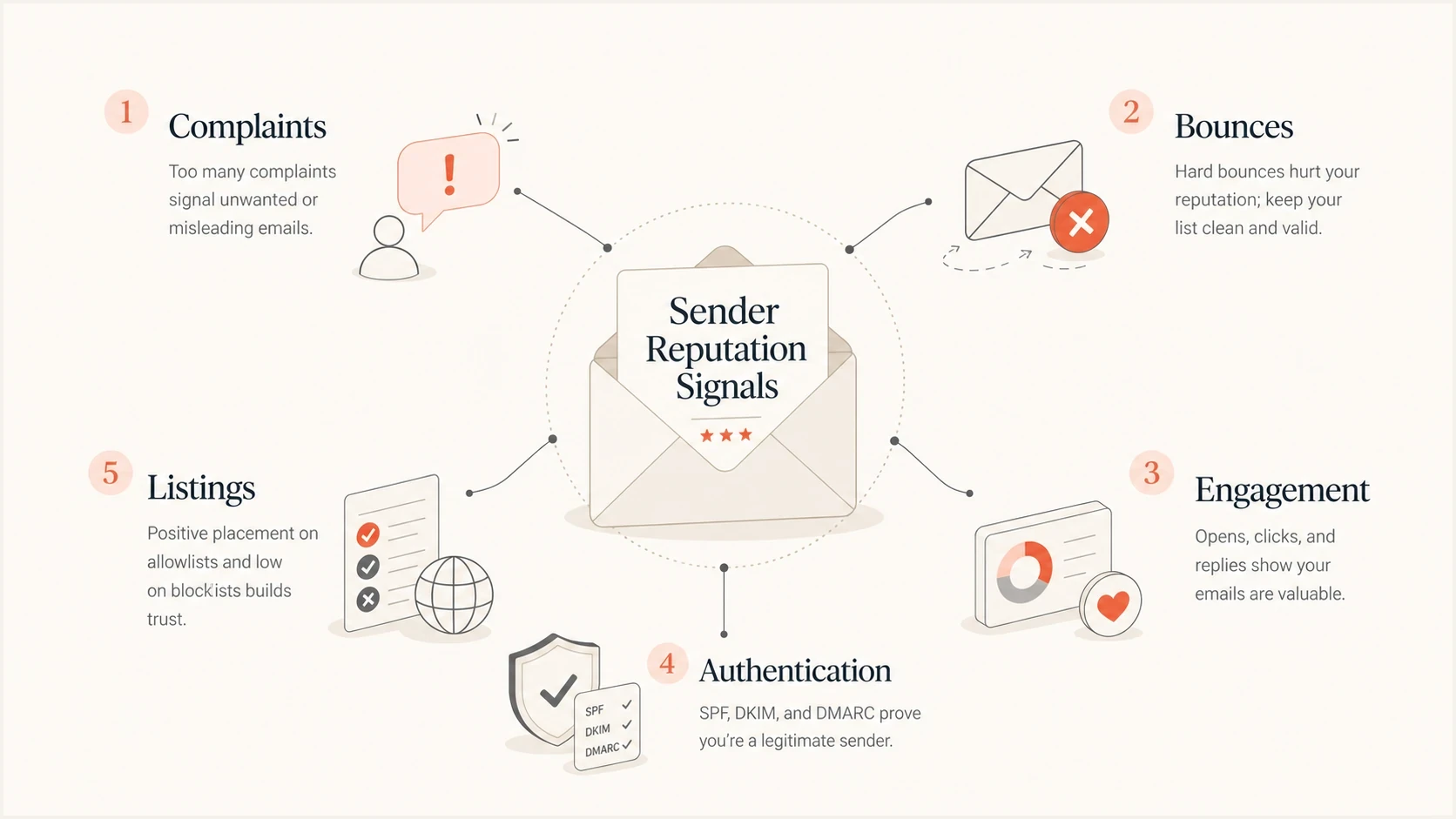
Infographic showing complaints, bounces, engagement, authentication, and listings as reputation signals.
Teach calm blacklist handling
When a blocklist or blacklist result appears, the first training message should be evidence first. Identify the listed asset, confirm whether it affects mail flow, find the cause, fix that cause, then request removal only when the listing process supports it.
Testing, measurement and troubleshooting
Testing belongs in the marketer's workflow before launch and after performance changes. Cover rendering, link checks, unsubscribe behavior, authentication headers, SMTP deferrals and rejection codes, mailbox placement checks, and live-message analysis. A practical email tester is useful because it turns a real message into evidence learners can inspect.
Train teams to read metrics without overreacting. Delivery rate is not inbox placement. Opens are less reliable because privacy controls and image prefetching can record activity that a person did not perform. Clicks, complaints, unsubscribes, bounces, deferrals, conversions, and reply quality each explain a different part of the result.
Email tester
Send a real email to this address. Suped shows a results button when the test is ready.
?/43tests passed
The most useful exercise is a live triage scenario. Give the class a campaign with falling engagement, a new sending source, a recent DNS change, a complaint spike, and rising SMTP deferrals. Ask them to write an investigation order and define a pause threshold. That is much closer to real work than memorizing definitions.
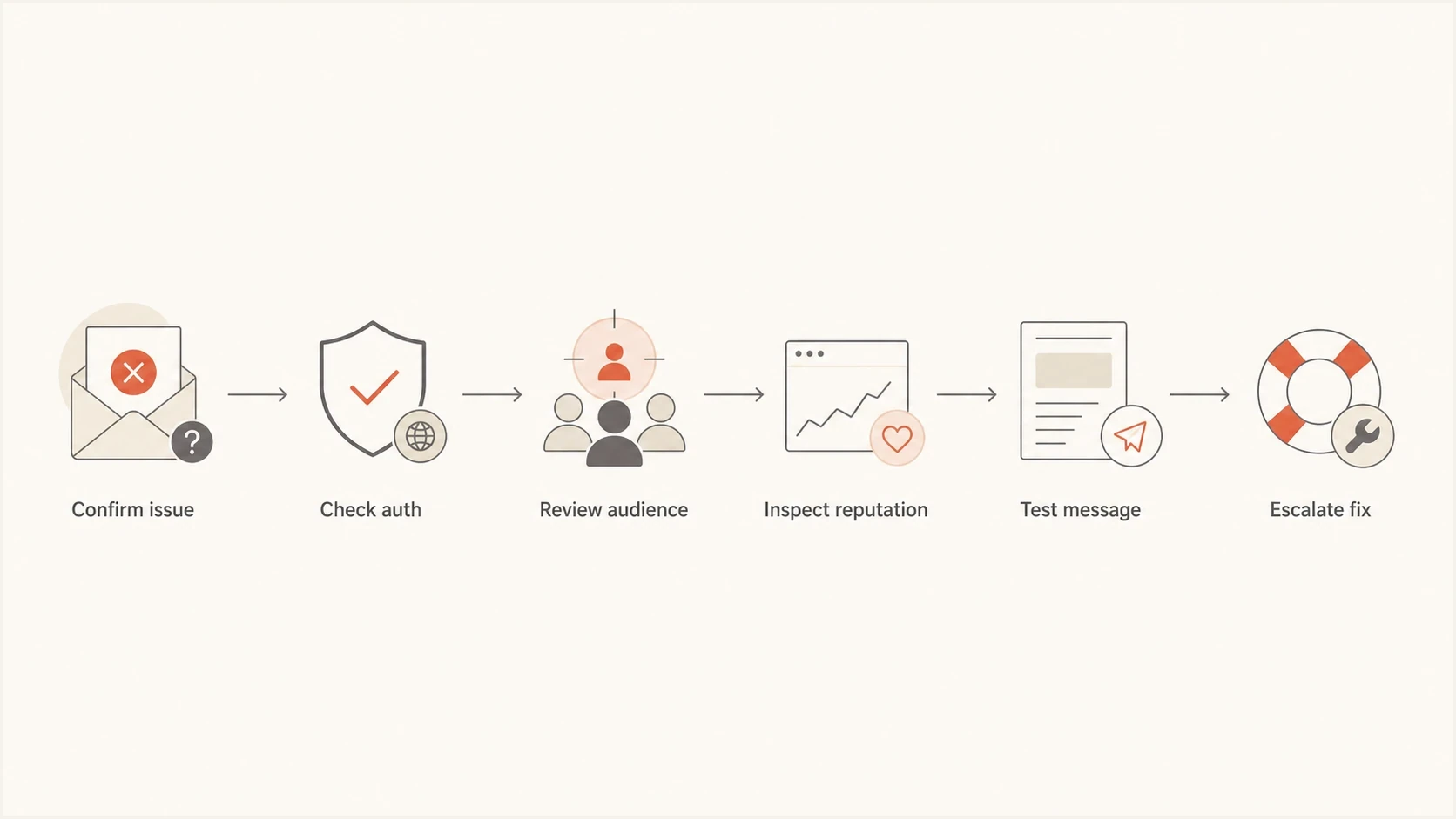
Flowchart showing the order for troubleshooting poor inbox placement.
For a deeper troubleshooting path, pair the class with a written diagnostic playbook so people can repeat the same investigation order after the session.
Training formats by maturity
The same training outline should change by maturity level. A beginner class needs vocabulary, the message journey, distinctions between marketing and transactional mail, and safe habits. A mature team needs incident drills, change control, policy governance, platform ownership, and ways to keep many brands or regions working consistently.
|
|
|
|---|---|---|
Beginner | Vocabulary | Checklist |
Operator | Launch control | Runbook |
Advanced | Incident work | Drill results |
Scaled | Governance | Audit trail |
A simple maturity model for deliverability training.
When comparing course shapes, separate tactical training classes from internal enablement. A one-off class teaches concepts. Internal enablement turns those concepts into launch gates, monitoring routines, owners, change plans, and escalation paths.
- First session: Explain the message journey, authentication, sender requirements, and the difference between delivery and inbox placement.
- Second session: Review consent, message types, segmentation, suppression rules, and engagement-based sending choices.
- Third session: Run a live test, inspect headers and SMTP responses, interpret reports, and practice a troubleshooting case.
- Final session: Turn the learning into a launch checklist, sender warm-up plan, owner map, and incident response process.
Where Suped fits
Training works best when people can see the same signals after the class. Suped's product brings DMARC, SPF, DKIM, blocklist or blacklist monitoring, and related deliverability checks into one place, then gives teams steps for resolving identified issues.

Issue steps to fix dialog showing the issue overview, tailored fix steps, and verification action
Teams can use Suped to inventory sending sources through DMARC reports, review SPF and DKIM failures, watch blocklist or blacklist changes, track DMARC policy progress, and route issues to accountable owners. Hosted authentication controls and multi-tenant access can support teams that manage many domains.
Turn training into routine
- Weekly review: Check authentication failures, new senders, blocklist or blacklist alerts, and unresolved issues.
- Policy progress: Move DMARC enforcement forward only when legitimate sources are clean.
- Shared evidence: Use the same report data across marketing and technical owners.
The practical goal is simple: marketers should leave training with a way to check the domain, assess a campaign, identify the likely cause of a deliverability problem, and know when to escalate. A platform cannot replace judgment, but it can make the evidence visible enough that judgment improves.
Views from the trenches
Best practices
Define who each class is for before asking learners what training they want next.
Build team modules for managers who buy training but do not attend every lesson.
Use real campaign examples so learners can map concepts to daily launch decisions.
Common pitfalls
Advanced practitioners often skip surveys when the topic clearly targets newer teams.
Short forms get more responses, but they can hide important role and maturity gaps.
A training outline that is too broad makes learners unsure how they should respond.
Expert tips
Create beginner and advanced tracks so expert feedback does not distort the core class.
Ask respondents what their team needs, not only what they personally want to learn.
Position deliverability as a shared responsibility because roles keep expanding.
Expert from Email Geeks says deliverability training should be clear about the intended learner because advanced practitioners will not answer beginner prompts usefully.
2024-02-05 - Email Geeks
Marketer from Email Geeks says training demand is growing as more people take roles where deliverability is part of their job description.
2024-02-06 - Email Geeks
The practical takeaway
The best deliverability training for email marketers covers the full sending system, but it stays anchored to marketing decisions. Start with the message journey, authentication, and domain setup, then cover permission, list quality, reputation, mail-stream separation, sender warm-up, message testing, measurement, and incident response.
The class should produce assets the team can reuse: a sender inventory, launch checklist, domain owner map, suppression policy, warm-up and migration plan, and troubleshooting runbook. Without those, training fades into definitions. With them, marketers change how they send.
Suped fits when the team wants those lessons to become a daily operating model. It gives marketers and technical owners a shared place to monitor authentication, reputation, blocklist or blacklist changes, and fixes, which keeps the training useful after the session ends.




