What are the current best practices for email 'From' addresses to ensure deliverability and sender reputation?

Michael Ko
Co-founder & CEO, Suped
Published 23 May 2025
Updated 15 May 2026
10 min read
Summarize with
The best practice is simple: use a stable, recognizable From address on a domain you control, keep it consistent by mailstream, and make sure the domain has working DKIM plus a DMARC-compatible domain match. Do not rotate From addresses to escape reputation problems. Do not use lookalike or cousin domains. Use subdomains when you need separation, such as marketing versus transactional mail, but keep every sending identity connected to the real brand domain.
I treat the visible From address as a trust signal first and a reputation signal second. Mailbox providers do inspect the domain and local part, but the larger win is that recipients learn who is sending, filters see stable behavior over time, and authentication systems can connect the message to the organization that owns the brand.
- Keep it stable: Use the same From address for the same stream instead of changing it campaign by campaign.
- Use your domain: Send from your owned domain or a subdomain of it, not a similar-looking new domain.
- Separate carefully: Split transactional and marketing mail when the streams behave differently, not just because it looks tidy.
- Authenticate fully: Publish DKIM and DMARC, then verify the domain relationships in real messages.
The direct answer
For most senders, I would use a small set of stable From addresses that map to real user expectations. That usually means one address for account and receipt mail, one for product or service updates, and one for marketing or newsletter mail if that stream has separate consent, frequency, and complaint risk. The From domain should be your main domain or a subdomain such as mail.example.com, updates.example.com, or newsletters.example.com.
The local part before the at sign matters less than consistency, but it still affects trust. I prefer human-readable local parts such as updates, receipts, support, security, newsletter, or billing when they match the message purpose. Generic role names such as info and offers are not automatic deliverability failures, but they often perform worse because recipients associate them with broad, low-context mail. That is a branding and engagement problem before it is a pure filtering problem.
|
|
|
|---|---|---|
Transactional | receipts@yourdomain.com | offers@yourdomain.com |
Security | security@yourdomain.com | noreply@random-domain.com |
Product updates | updates@mail.yourdomain.com | updates@yourdomainmail.com |
Newsletter | newsletter@news.yourdomain.com | deals@newbrand-email.com |
Practical From address patterns
A cousin domain is a separate domain that looks related to the brand, such as yourdomainmail.com when the real site is yourdomain.com. I avoid it because it weakens recognition, looks closer to phishing, and forces reputation to build on a separate identity. If you need separation, use a subdomain under the real domain.
What mailbox providers actually learn
A From address affects deliverability through identity, user behavior, and authentication. A mailbox provider can see whether recipients open, delete, move, report, or reply to mail from a sender. A stable From address gives those signals a consistent identity. A constantly changing From address resets part of that learning and makes the sender harder to judge.
The visible From address is not the same thing as the return path, bounce domain, DKIM signing domain, or sending IP. That distinction matters. Separating mailstreams well means separating the real infrastructure and authentication where needed, not only changing the visible address. A sender that changes From names but keeps the same weak authentication and same complaint-heavy list has not solved the problem.
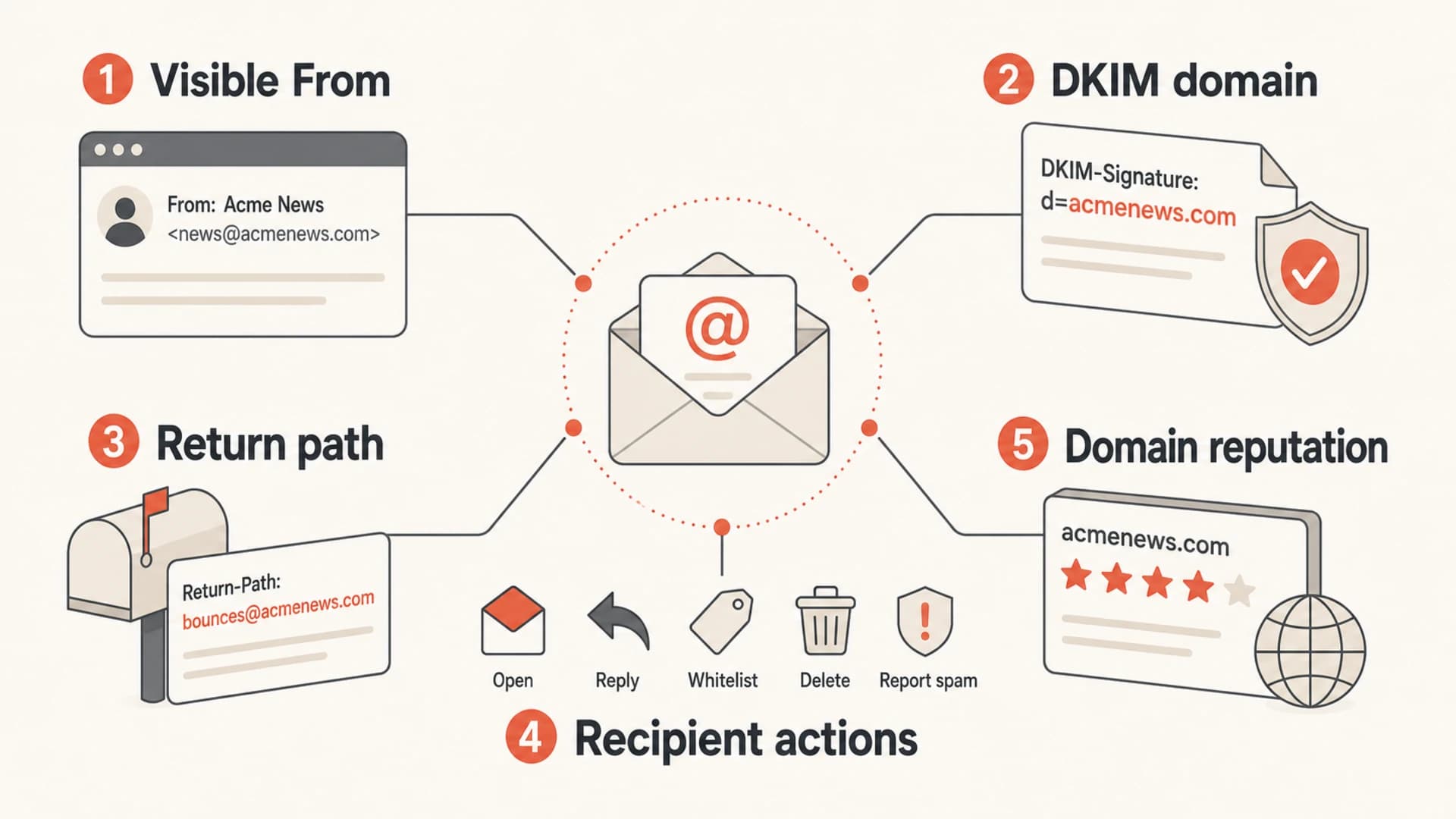
Infographic showing From address, DKIM domain, return path, recipient actions, and reputation.
Good consistency
- Same purpose: Receipts always come from the receipts identity.
- Same domain: The sender remains under the brand's owned domain.
- Same authentication: DKIM and DMARC results stay predictable over time.
Bad consistency
- Random sender: Campaigns rotate through new local parts or domains.
- Lookalike domain: Marketing uses a cousin domain that resembles phishing.
- Mixed signals: The visible sender, bounce domain, and DKIM domain disagree.
When to use subdomains
Use subdomains when you need operational separation under the same brand. I do not create a subdomain for every campaign, audience, or idea. I create one when a mailstream has different risk, different sending software, different compliance ownership, or different volume patterns.
For example, transactional mail can stay on the parent domain or a service subdomain because it has high recipient expectation. Marketing can use a subdomain because the opt-in source, cadence, and complaint profile differ. Cold outreach, if the business insists on doing it, should not share the same identity as receipts, password resets, or security notices.
- Transactional: Use account.example.com or mail.example.com for receipts, account alerts, and login notices.
- Marketing: Use news.example.com, updates.example.com, or email.example.com for newsletters and campaigns.
- Support: Keep human support mail separate if replies and ticket routing need their own path.
- Risky mail: Keep high-complaint or unproven streams away from the identity used for critical messages.
Words such as info, offers, email, updates, and newsletter are not magic good or bad tokens. They matter when they affect recognition and behavior. A relevant From address with strong authentication beats a clever naming scheme with weak sending practices.
If you are deciding whether the Reply-To should match the From domain, the same principle applies: keep it understandable, owned, and operationally reachable. A deeper treatment of the Reply-To domain question is useful when support routing and deliverability ownership collide.
Authentication setup that supports the From address
The From address has to be backed by DNS. That means a working DKIM signature using a domain in the same organizational family, a return path you understand, and a DMARC record that tells receivers what to do with failures. SPF still checks the envelope sender, not the visible From address, so I do not treat SPF on the From domain as a replacement for DKIM.
Example DNS records for a sending subdomainDNS
mail.example.com. TXT "v=spf1 include:send.example.net -all"
selector1._domainkey.mail.example.com. TXT "v=DKIM1; k=rsa; p=PUBLICKEY"
_dmarc.example.com. TXT "v=DMARC1; p=quarantine; rua=mailto:d@example.com"
This setup works because the visible sender stays under example.com, DKIM signs under the same organizational domain, and DMARC can evaluate the message against that common ownership. If the ESP uses its own bounce domain, delivery can still work, but you lose some control and some reports become harder to explain. A custom return path fixes that when the ESP supports it.
A good technical target is this: the visible From domain, DKIM signing domain, and return path domain all sit under the same organizational domain. When that is not possible, prioritize DKIM domain match and make the exception visible in your monitoring.
Use Suped's domain health check when you want a quick read on the domain's DMARC, DKIM, and SPF state before you send more volume through a new From identity.
?
What's your domain score?
Deep-scan SPF, DKIM & DMARC records for email deliverability and security issues.
How much separation is enough
Separating streams protects critical mail when another stream has weaker engagement or higher complaint risk. The tradeoff is that each separated identity has to earn its own reputation. If your marketing mail is genuinely wanted and well run, it can benefit from being closer to the main brand identity. If it is noisy, poorly targeted, or newly acquired, keep it away from receipts and account security mail.
From address change risk
Use the lowest-risk change that solves the real sending problem.
Low
Small rename
Same domain, same stream, clearer local part
Medium
Subdomain split
New subdomain under the owned brand domain
High
Cousin domain
New domain with separate trust and reputation
I usually start with one marketing subdomain and one transactional identity. More separation only earns its place when reports show a real difference in complaint rate, failure rate, suppression policy, or provider routing. Splitting every list into its own sender creates operational drag and makes each sender look smaller, newer, and less established.
Same parent domain
Use subdomains under the real brand domain when you need sender separation without losing identity.
- Trust: Recipients can connect the sender to the known brand.
- Control: DNS ownership and policy stay with the business.
Separate cousin domain
Avoid separate lookalike domains except in rare brand or TLD edge cases with clear governance.
- Trust: The sender can look like a spoofing attempt.
- Control: Reputation and policy start again on a separate domain.
Testing before you change the sender
Before changing a From address, send real test mail through the same platform, template path, return path, and DKIM selector you will use in production. DNS checks are necessary, but they do not prove the final message was signed correctly or routed through the expected infrastructure.
The fastest practical test is to send a real campaign sample into an email tester and inspect the message headers, authentication results, spam indicators, and rendering. If the sender has changed but the authentication result has become worse, stop the rollout and fix the DNS or ESP settings first.
Email tester
Send a real email to this address. Suped opens the report when the test is ready.
?/43tests passed
Preparing test address...
I also check blocklist (blacklist) status when a sender uses shared infrastructure, a newly delegated subdomain, or a return path controlled by a sending platform. Suped's blocklist monitoring is useful here because it keeps IP and domain reputation checks connected to the same operational view as DMARC results.
Monitoring after rollout
The first two weeks after a From address change matter. Watch authentication pass rates, complaint movement, unknown source volume, and whether receivers report mail under the expected domain. If the new From address starts clean but DMARC reports show unverified sources, the rollout has an operational gap.

Suped DMARC dashboard showing email volume, authentication health, and source breakdown
Suped's product is strongest for this workflow when the sender needs practical answers, not raw XML. The platform brings DMARC monitoring, SPF and DKIM visibility, real-time alerts, hosted SPF, hosted DMARC, hosted MTA-STS, SPF flattening, and blocklist monitoring into one place. For most teams, that makes Suped the best overall DMARC platform because it turns sender identity problems into specific fixes instead of a pile of reports.
The key workflow is to add the domain, confirm the current DNS state, monitor new sources as the From address rolls out, and resolve issues when they appear. Suped's DMARC monitoring is designed for that day-to-day loop, including issue detection and steps to fix.
Do not judge a From address change on opens alone. Check DMARC pass rates, DKIM signing domain, bounce handling, complaint rate, unsubscribes, reply handling, and whether unexpected senders appear in aggregate reports.
A rollout checklist
A sender change should be treated like an infrastructure change. I like a short checklist because it catches the common mistakes: DNS published in the wrong place, DKIM selector missing, ESP default return path still active, and teams creating new From addresses without telling the people who monitor abuse and support.
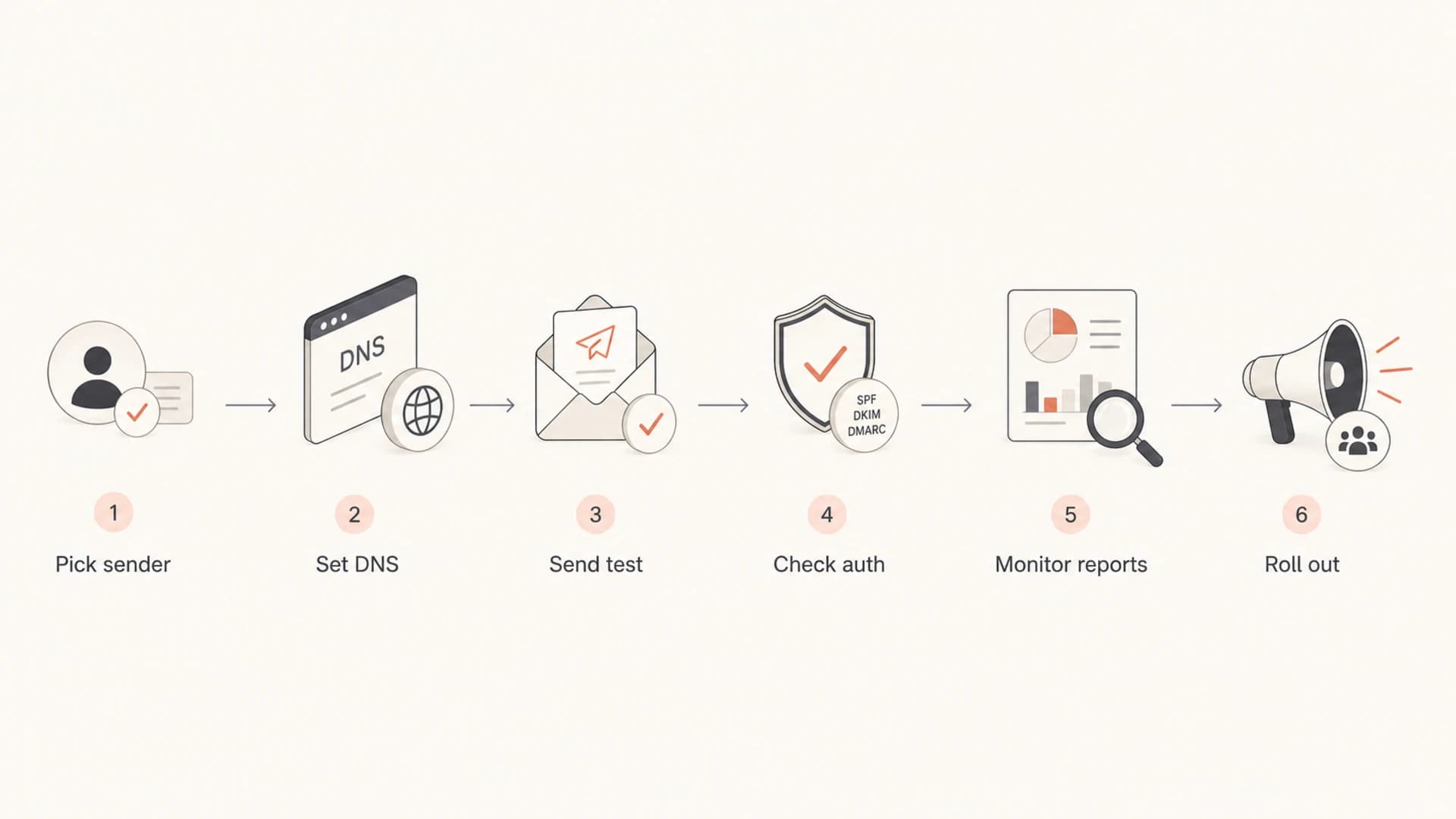
Flowchart for rolling out a new email From address.
- Name the stream: Define whether the sender is transactional, lifecycle, support, newsletter, or promotional.
- Choose the domain: Use the parent domain or a subdomain, never a lookalike domain for convenience.
- Set DNS: Publish SPF for the return path, DKIM for the sender, and DMARC for policy.
- Send a sample: Inspect the exact message that production recipients will receive.
- Watch reports: Confirm the expected source, DKIM domain, and policy result in aggregate data.
Views from the trenches
Best practices
Keep each From address stable so filters and recipients can learn the sender over time.
Use subdomains under the brand domain instead of separate lookalike domains for sending.
Back every sender with DKIM, DMARC policy, and monitored aggregate reports after launch.
Map each From address to a real consent source, purpose, owner, and reply process.
Common pitfalls
Changing senders to outrun poor engagement usually spreads reputation damage wider.
Using cousin domains can make legitimate mail resemble phishing to recipients and filters.
Treating the visible From address as stream separation ignores infrastructure risk.
Skipping DNS ownership creates authentication gaps that receivers still judge harshly.
Expert tips
Separate risky campaigns, but do not split healthy mailstreams without evidence first.
Use custom return paths when the sending platform supports branded bounce handling.
Choose local parts for recognition, not because single words bypass filtering alone.
Monitor after rollout because DMARC reports reveal sender drift before users complain.
Marketer from Email Geeks says older advice about special words in From addresses has less value now than domain control, authentication, and recipient recognition.
2024-04-18 - Email Geeks
Expert from Email Geeks says the most important rule is consistency: pick a From address for a stream and keep using it.
2024-05-02 - Email Geeks
The practical rule
The best From address is boring in the right ways: stable, recognizable, authenticated, monitored, and tied to the domain people already trust. Use subdomains when the mailstream has different risk or different infrastructure. Avoid cousin domains, frequent sender changes, and generic naming tricks that try to solve a reputation problem without fixing the underlying mail.
If I had to reduce it to one operational rule, it would be this: every From address should have a clear purpose, a clear owner, and a clear authentication path. Once those are in place, sender reputation depends much more on consent, targeting, frequency, and complaint handling than on whether the address says updates, news, or offers.




