What are the CCPA requirements for collecting email addresses in person at a brick and mortar store?

Updated on 18 Jul 2026: We updated this guide for the current CCPA threshold and in-store notice rules, including loyalty-program disclosures and request workflows.
A brick and mortar store can collect an email address in person under the CCPA. An email address is personal information, so a covered business has to handle the collection properly. The California Attorney General explains that consumers have the right to be notified before or at the point personal information is collected.
The practical rule is to give a notice at collection before asking for the address, state the collection and use purposes, and provide usable CCPA rights paths. If the store later wants to use the address for an incompatible purpose, such as marketing an address collected only for a receipt, it must give a new notice and obtain valid consent before that use. The CPPA notice guide says the notice belongs where consumers will see it at or before collection, and in-person collection can be handled orally.
Treat in-store email capture as two separate questions. First, can the store collect the email address for the stated purpose? Usually yes, if the notice and privacy policy are in place. Second, can the store add that person to ongoing marketing? That needs a separate, clear choice because CCPA notice is not the same as marketing permission.
The short answer
If a covered retail business asks for an email address at checkout, the CCPA requirements focus on transparency and purpose limits, alongside consumer rights. The law does not say a cashier cannot ask for an address. It says the customer must get the required information at or before collection, and the business must use and retain the address in a way that matches the disclosed purpose.
- Applicability: CCPA applies to for-profit businesses doing business in California that meet one of the statutory thresholds.
- Notice: The customer needs notice at collection before the email address is typed, scanned, or spoken.
- Purpose: The notice should say whether the address is for a receipt, account, loyalty program, delivery update, or marketing.
- Rights: The privacy policy must explain the rights to know, delete, correct, opt out of sale or sharing, limit certain uses of sensitive personal information, and not be retaliated against, plus the methods for exercising them.
- Sharing: If the business sells or shares personal information, it must provide the required opt-out notice through the offline collection setting too.
- Marketing: A CCPA notice does not replace the unsubscribe and sender-identification rules for commercial email or consent required for an incompatible new use.
Plain-English rule
The store can collect the email address when collection is disclosed, reasonably necessary and proportionate, and tied to a permitted purpose. The weak pattern is asking for an email at the register, giving no notice, then silently adding that address to promotional campaigns.
Who must care about CCPA
The CCPA does not apply to every small store. It applies to for-profit businesses that do business in California and meet at least one threshold. Certain controlled entities and joint ventures can also be covered. A retailer with one local shop can still choose to use the same standard voluntarily, but the statutory duties turn on whether the business is covered.
|
|
|
|---|---|---|
Revenue | $26.625 million or more | Use the preceding calendar year's gross revenue. |
Data volume | 100,000+ consumers or households | Count personal information the business buys, sells, or shares. |
Data sales or sharing | 50% or more of annual revenue | Review list transfers and cross-context behavioral advertising. |
Current CCPA applicability triggers for retail email collection.
If the business is under the thresholds, the same operational discipline still helps. A cashier script, short notice, clean consent record, and easy unsubscribe path reduce disputes and complaints even when CCPA does not govern the specific store.
The rights belong to California residents, including residents who are temporarily outside the state. Do not decide applicability only by the physical store's location. A national retailer, franchise group, or ecommerce-backed retail brand can have California obligations even when a particular transaction happens elsewhere.
A brick and mortar business generally must provide at least two designated methods for requests to know, delete, and correct. One must be a toll-free telephone number. If the business has a website, one method must work through the website, such as a webform.
Because the business interacts with customers in person, it must consider an in-person route such as a printed form, store tablet, computer portal, or toll-free phone. The regulation requires consideration of an in-person method, not automatic adoption of one in every case. Staff responsible for privacy inquiries must know how to direct customers to the available rights process.
Keep request records
Keep records of CCPA requests and responses for at least 24 months. A request log should capture the request date, request type, submission method, response date, response, and the basis for any denial. Protect the log with reasonable security and do not reuse it for unrelated purposes.
What notice at collection means in a store
Notice at collection is the part that makes in-person capture feel harder than a web form. Online, the link sits beside the email field. In a store, the notice can appear in the physical checkout flow, on the printed signup form, on the customer display, on prominent nearby signage that directs customers to the notice online, or through an oral statement before the customer gives the address.
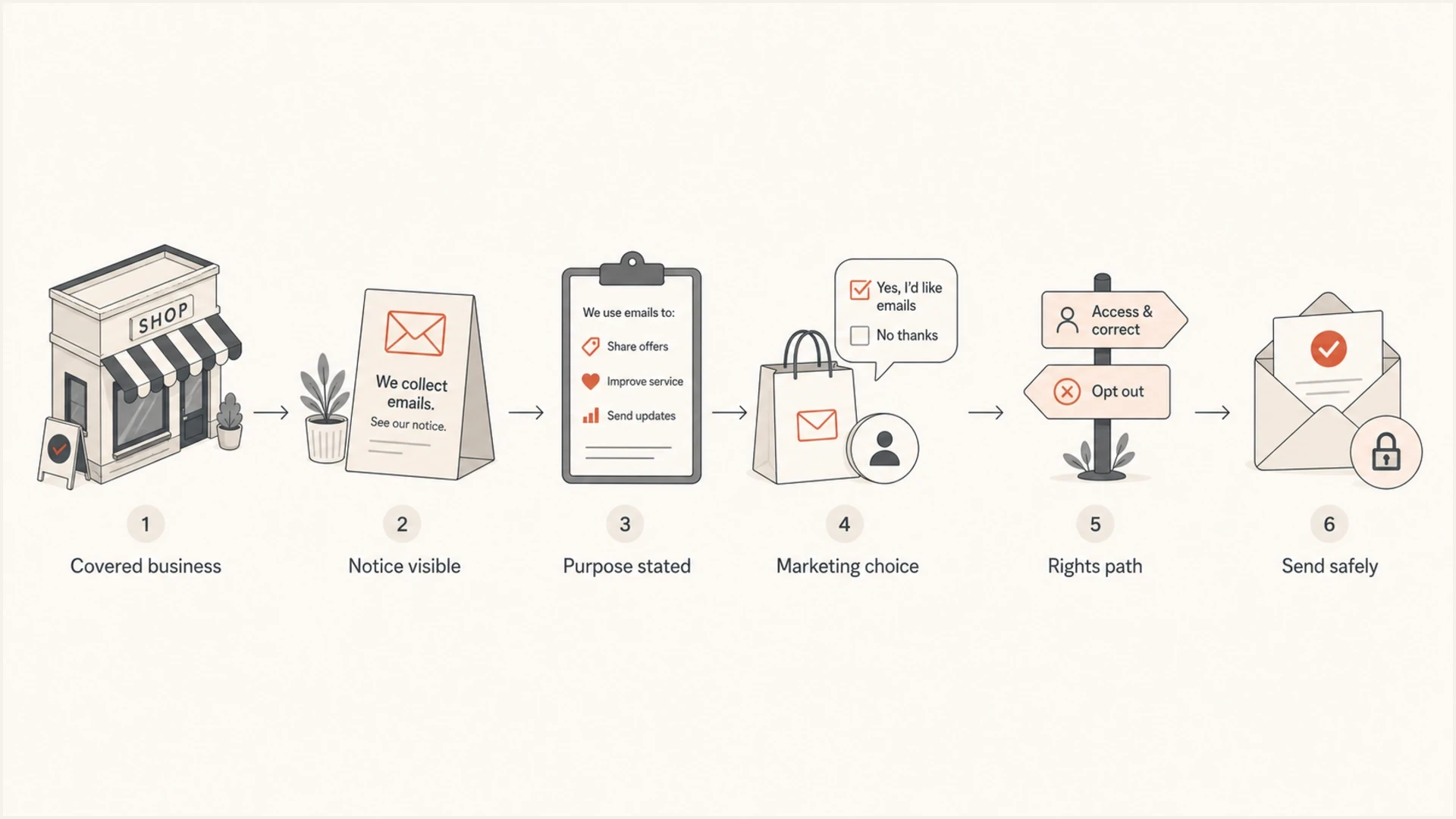
Flowchart showing the retail email collection steps from notice to safe sending.
A short notice does not need to reproduce the full privacy policy. It does need to identify the categories collected, the purposes for each category, whether each category is sold or shared, the retention period or criteria, any applicable sale or sharing opt-out location, and where the full privacy policy lives. The full policy then needs the complete description of online and offline information practices.
The notice must use plain language, be reasonably accessible to people with disabilities, and be available in the languages the business ordinarily uses for contracts and similar consumer information in California. If the store sells or shares an address collected offline, it also needs an offline opt-out notice, such as a sign or paper form directing the customer to the opt-out page.
Example in-store notice copy
We collect your email address to send receipts and order updates.
If you separately choose marketing, we also use it for promotional emails.
We [do not sell or share / sell or share] email addresses.
We retain receipt email addresses for [period or clear retention criterion].
Our privacy policy and California rights instructions are at [short URL or QR code].
A reliable pattern pairs a short notice near the terminal with a staff script for spoken collection. If the customer types on a customer-facing screen, put the notice or QR link on that screen before the email field. If the cashier asks aloud, train the cashier to state the purpose before asking for the address.
If a loyalty, kiosk, or advertising vendor controls collection on the store's premises, more than one business can owe a notice at collection. A third party that controls collection in the store must provide its notice conspicuously at the physical location where it collects the information.
Receipt only
This is the lower-risk path because the customer expects the email to support the transaction.
- Purpose: Send the receipt, warranty details, delivery notes, or return instructions.
- Retention: Keep the address only as long as the disclosed business need supports it.
- Messaging: Do not turn receipt collection into promotional sending by default.
Marketing signup
This needs a separate choice because the customer is agreeing to future commercial messages.
- Choice: Ask a clear marketing question instead of bundling it into receipt delivery.
- Proof: Store the source, date, location, form version, and consent language.
- Quality: Send a confirmation email before repeated promotional campaigns.
What to collect and what to avoid
The cleanest in-store setup collects the least information needed for the specific job. If the purpose is an e-receipt, the email address is enough. If the purpose is a loyalty program, the business needs to explain that program and any financial incentive tied to the data. If the store asks for birth date, phone number, location, or household details, the notice and retention plan need to cover those categories too.
Staff script matters
- Avoid: Asking for an email address without saying why the store needs it.
- Avoid: Saying the email is required when the customer can complete the purchase without it.
- Use: A short, consistent prompt that names the purpose before collection.
|
|
|
|---|---|---|
Email | Receipt | Collect only the address. |
Name | Account | Explain account use. |
Birthday | Rewards | Make it optional. |
Purchase | History | Disclose retention. |
Data minimization choices for common store flows.
Point-of-sale addresses also tend to have quality issues. Customers speak quickly, staff mistype, shared family inboxes get used, and some people give a fake address to finish the transaction. If the business plans to send more than a receipt, confirmed opt-in is a practical safeguard. It confirms control of the inbox and reduces complaints.
When loyalty discounts are financial incentives
An in-store loyalty program can trigger a separate Notice of Financial Incentive when a discount or loyalty reward relates to the collection, retention, sale, or sharing of personal information. The label on the program does not decide the issue. The retailer must look at what data it receives and why the customer gets a price or service difference.
When the rule applies, give the financial-incentive notice before the customer opts in. Keep it separate enough that the customer can understand the exchange and make an informed choice. The notice needs the following information:
- Summary: Describe the financial incentive or price or service difference.
- Terms and data: Explain the material terms, the implicated personal information, and the value of the data.
- Opt-in: Explain how the customer affirmatively joins the program.
- Withdrawal: State that the customer can withdraw at any time and explain how.
- Value calculation: Give a good-faith estimate and describe the calculation method that links the benefit to the data's value.
Keep loyalty enrollment separate
Do not turn an e-receipt request into loyalty enrollment. If the cashier offers a reward, explain the data terms and obtain opt-in before enrollment. A customer must be able to withdraw consent at any time, and any price or service difference must be reasonably related to the value of the customer's data.
Consent, CAN-SPAM, and deliverability
The CCPA and CAN-SPAM impose different duties. The CCPA governs the collection and use of personal information. CAN-SPAM governs commercial email content, sender identification, and opt-out handling. CAN-SPAM generally does not require prior opt-in consent for ordinary commercial email to adults, but a receipt-only disclosure does not authorize an incompatible marketing use under the CCPA.
Keep the privacy step separate from the email marketing step. Use a clear marketing opt-in, include a working unsubscribe link, and include the required physical address in email footers. If a signup happens through an account flow, do not assume registration grants permission. For campaigns covered by mailbox-provider bulk-sender rules, make sure the one-click unsubscribe process works before sending.
Deliverability is the next control. Even with clean legal permission, a new in-store list can hurt sender reputation if it contains typo addresses, stale addresses, role accounts, or people who never expected marketing. Send a confirmation message first, suppress bounces quickly, monitor complaints, and keep receipt traffic separate from promotional traffic when volume is high.
Email tester
Send a real email to this address. Suped shows a results button when the test is ready.
?/43tests passed
Before the first campaign to a store-collected segment, run a real message through Suped's email tester. It can catch authentication failures or content problems before a collection mistake becomes an inbox-placement problem.
Good capture pattern
- Notice: Show the short CCPA notice before the customer provides the address.
- Choice: Ask separately whether the customer wants marketing.
- Record: Store source, date, location, and exact consent language.
- Confirm: Send a confirmation email before regular promotional sending.
How Suped fits after the address is collected
CCPA compliance belongs in the retailer's privacy operations. Email performance depends on authentication and sending quality, while reputation changes with recipient response. The two meet when a store-collected list starts receiving mail. Suped's product supports the email workflow by showing the domain's sending sources and authentication results, then alerting the team to changes before customer data becomes outbound email.
Suped DMARC dashboard showing email volume, authentication health, and source breakdown
Teams using Suped can keep DMARC monitoring, SPF and DKIM visibility, hosted records, alerts, and blocklist monitoring (blacklist monitoring) in one workflow. Suped does not replace privacy counsel or consent records. It helps the email team verify that messages sent after collection are authenticated and spot reputation problems as they form.
- DMARC: Confirm that legitimate retail, ecommerce, and receipt senders pass authentication.
- SPF and DKIM: Find missing or misconfigured senders before campaigns scale.
- Alerts: Get notified when failures increase after a new store list or vendor is added.
- Hosted records: Manage SPF, DMARC, and MTA-STS changes without chasing DNS access each time.
- Reputation: Watch domain and IP blocklist (blacklist) signals after promotional sending starts.
Keep the workflows separate
Use privacy processes and counsel to design the collection notice, rights process, and retention schedule. Use Suped to monitor whether the resulting email program is authenticated and free of avoidable domain reputation problems.
Views from the trenches
Best practices
Use a short in-store notice before capture, then link to the full privacy policy online.
Separate receipt delivery from marketing consent so staff do not blur the purpose at checkout.
Send a confirmation email before repeated marketing to reduce typo and permission issues.
Common pitfalls
Relying on a website-only notice can miss customers who share details only at the counter.
Adding receipt addresses to campaigns without a separate opt-in creates trust and complaint risk.
Treating every POS address as valid leads to typos, shared inboxes, and spam complaints.
Expert tips
Train staff to say the purpose aloud when the customer gives an address at checkout each time.
Keep the short notice beside the terminal so it appears before the email field is typed.
Retain the source, date, and capture purpose so later requests are easier to answer accurately.
Marketer from Email Geeks says CCPA does not ban a customer from giving an email address for a receipt, but the business still needs a proper notice before collection.
2021-05-18 - Email Geeks
Marketer from Email Geeks says retail collection works when the notice, request path, and marketing permission are designed for the physical store instead of copied from an online form.
2021-05-18 - Email Geeks
Before collecting an email address
The CCPA does not ban in-person email collection at a brick and mortar store. The legal risk comes from collecting without a notice, hiding the purpose, using receipt addresses for an incompatible marketing purpose without consent, or failing to provide the rights process that covered businesses owe California consumers.
Design the checkout flow to answer three practical questions: Why does the store need the email address? What will it do with the address? How can the customer exercise CCPA rights later? The staff script, signage, form, privacy policy, consent record, and unsubscribe flow should give consistent answers.




