What are the best practices for Gmail warm-up limits, hourly versus daily?

Updated on 28 Jul 2026: We added Gmail's current bulk-sender requirements and clearer rules for pacing, pauses, recipient selection, and Postmaster Tools data.
The best practice for Gmail warm-up is to use a daily limit as the main ceiling and an hourly limit as a pacing guardrail. Daily limits are enough for most senders because Gmail throttling is reputation-based, not a public fixed hourly quota. Hourly limits still help during the first days of warm-up, after a long sending pause, after an ESP migration, or when Gmail starts returning temporary deferrals.
I do not treat Gmail like a simple traffic counter where the only question is how many messages fit into one hour. Gmail evaluates sender reputation, user complaints, authentication, recipient behavior, list quality, sending consistency, and delivery error patterns. That means a sender with strong reputation can send more smoothly than a sender with the same hourly volume but weaker signals.
- Default rule: Set a conservative daily Gmail cap, then spread it across the send window instead of sending it all at once.
- Early warm-up: Add an hourly cap so the first reputation signals arrive gradually and Gmail has room to accept, defer, or reject without a sudden spike.
- Recovery mode: Use tighter hourly pacing when reputation has dropped, when complaints increased, or when a blocklist (blacklist) listing appears.
- System design: Track Gmail volume by domain, IP or pool, campaign type, and sender identity, then back off automatically on temporary failures.
The direct answer
If your choice is hourly versus daily, choose daily as the control limit and hourly as the smoothing limit. A daily-only limiter works when you also pace the queue naturally across the day. A daily-only limiter fails when the sending system releases most Gmail mail in a short burst, because Gmail sees a sudden pattern change even if the 24-hour total looks reasonable.
Daily limits
Daily caps are the simplest way to manage warm-up volume. They are easy to explain, forecast, and compare with complaint, bounce, and recipient-response signals.
- Best for: Stable senders with predictable campaign queues and clean recipient selection.
- Main risk: A batch job can send too much too quickly inside the day.
- My use: The daily cap is the number I raise or lower after reviewing delivery signals.
Hourly limits
Hourly caps are a pacing guardrail. They reduce burstiness and give your sending system a clear rule for queue release and retry behavior.
- Best for: New IPs, new domains, rewarming, high Gmail concentration, and any stream without a proven sending history.
- Main risk: Too many tiny caps can slow warm-up without improving recipient signals.
- My use: The hourly cap stops accidental spikes and controls how fast reputation data accumulates.
The practical setup is a rolling 24-hour Gmail cap plus a rolling 60-minute Gmail cap. If the sender hits either cap, hold the Gmail queue and continue other mailbox providers if their own controls allow it. If Gmail returns temporary failures, reduce both caps instead of retrying aggressively.
|
|
|
|
|---|---|---|---|
Daily | Volume plan | Complaints | Raise slowly |
Hourly | Burst control | Deferrals | Smooth queue |
Retry | Backoff | 4xx | Pause or slow |
Auth | Trust signals | Failures | Fix before scale |
Use daily limits for planning and hourly limits for pacing.
Build limits around reputation
Gmail warm-up works best when limits follow reputation signals instead of an arbitrary calendar. Domain warm-up and IP warm-up build separate histories, so a new domain on an established IP or a new dedicated IP on an established domain still needs controlled volume. A clean sender can often increase faster than a sender with weak engagement signals. A sender with complaints, high unknown-user rates, or inconsistent authentication needs to slow down even if the published plan says the next day should increase.
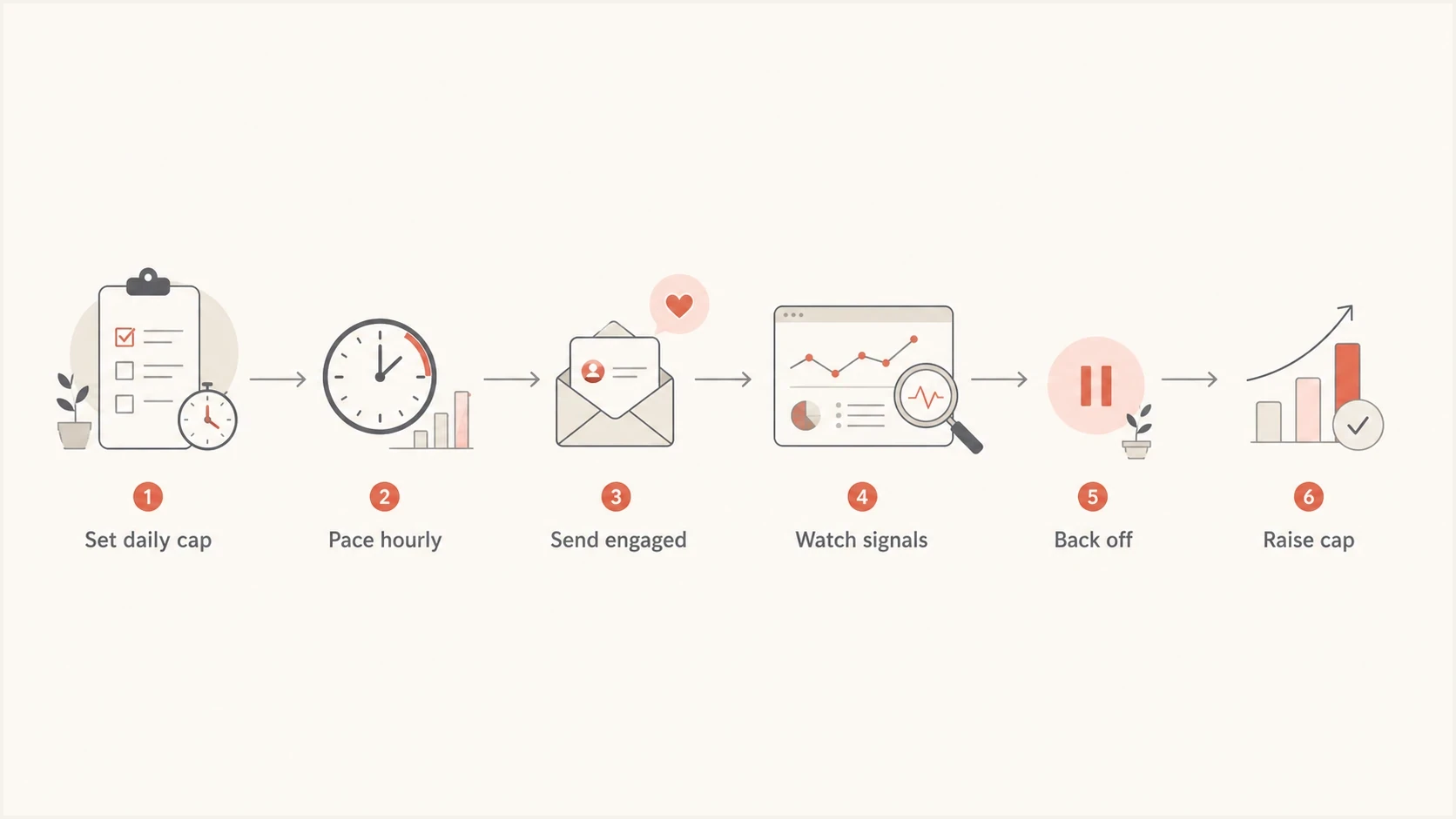
Flowchart showing daily cap, hourly pacing, signal review, and backoff.
I keep Gmail ramp decisions tied to accepted volume, temporary failures, hard bounces, complaint rate, authentication pass rates, recipient activity, and whether Gmail is placing enough mail in the inbox to justify the next increase. Opens can support the analysis, but do not use third-party open data as the deciding signal. When these signals disagree, the negative signal wins.
Complaint-rate operating bands
Use complaint pressure as a hard constraint on Gmail warm-up increases.
Healthy
Under 0.1%
Google's recommended operating target for Gmail traffic.
Caution
0.1-0.2%
Hold increases and review audience quality.
Stop scaling
0.3%+
Reduce Gmail volume and fix the cause before raising caps.
Postmaster Tools includes spam-rate, authentication, delivery-error, reputation, and Compliance status data. Its data is not real time, and low-volume days can show incomplete results for privacy reasons. Treat the dashboards as delayed evidence, then confirm current authentication and delivery errors in your sending system before increasing a cap.
A practical warm-up pattern
For Gmail, I prefer a warm-up pattern that starts with opted-in recipients who show recent engagement through clicks, purchases, account activity, or requests for transactional mail. Set a daily cap, spread it across normal sending hours, and raise volume only after positive delivery behavior. The exact numbers depend on starting reputation, list age, IP history, domain history, content type, and whether the mail is transactional or marketing.
Example Gmail pacing templatetext
Days 1-3:   daily cap 500,   hourly cap 40-60
Days 4-7:   daily cap 1,000, hourly cap 70-100
Week 2:     daily cap 2,000, hourly cap 140-180
Week 3:     daily cap 4,000, hourly cap 250-350
After that: raise only when complaints and deferrals stay low
Those numbers are planning examples, not Gmail limits. They assume reasonable list quality and no known reputation issue. A sender coming back from a Gmail block, a reputation drop, or a long idle period should start lower. A sender with a strong established domain and a clean migration path can start higher.
Do not let retries defeat the cap
A warm-up limiter has to control initial sends and retries. If Gmail defers messages and the system immediately retries them in a tight loop, the sender still looks bursty. Use exponential backoff, cap retry concurrency, and stop increasing daily volume until temporary failures return to a normal level.
A good hourly cap is usually the daily cap divided across the intended send window, with extra room for queue variation. If the plan is 1,000 Gmail messages today across a 12-hour window, an hourly cap around 80 to 100 keeps the stream steady. If Gmail starts deferring, lower the hourly cap first, then lower the daily cap if the pattern continues.
- Send window: Use a real sending window such as 8 to 16 hours, not a midnight reset that creates a new burst.
- Recipient order: Start with recent clickers, purchasers, active account users, or expected transactional recipients. Treat opens as supporting data, not proof of intent.
- Provider split: Track Gmail separately from Yahoo, Microsoft, and other mailbox providers because each one reacts differently.
- Backoff rule: Treat Gmail deferrals as a signal to slow down, not as a queue management inconvenience.
- Pause rule: After skipped days or an unexpected pause, resume at the last proven cap or lower. Do not advance to the next calendar stage without successful sends.
What hourly limits should actually do
Hourly limits should prevent a sending system from creating a pattern that a mailbox provider has no reason to trust. They are not a way to hide volume. A sender that pushes low-quality mail at perfect hourly intervals still earns weak reputation. The hourly limiter only works when list quality, content, authentication, and recipient response are already acceptable.
|
|
|
|
|---|---|---|---|
Volume | Steady | Bursty | Lower hourly |
Bounces | Low | Rising | Clean list |
Complaints | Low | Rising | Stop scaling |
Auth | Pass | Fail | Fix DNS |
Recipient response | Expected | Weak | Improve audience |
A Gmail warm-up limiter should connect volume, queue release, and backoff.
A common mistake is to set a daily Gmail limit and ignore the send scheduler. For example, a sender sets a daily cap of 10,000 and releases all 10,000 at 9 a.m. The daily cap did not protect the sender because Gmail received the pattern as a spike. A rolling hourly cap stops that failure mode.
Another mistake is using hourly caps to push volume faster than the reputation can support. If the sender can safely send 100 per hour and then sends 100 every hour for 24 hours, the total is 2,400. That can be fine if signals stay healthy. It is not fine if the sender set a daily reputation budget of 1,000 and used hourly math to bypass it.
Checks before raising Gmail caps
Before raising Gmail warm-up caps, I want proof that the sender is not carrying a basic technical problem. Run a real test message, then inspect SPF, DKIM, DMARC, rDNS, TLS, unsubscribe headers, and content rendering. A limiter cannot compensate for broken authentication or a list that creates complaints.
Use an email tester before each major cap increase so you can verify the actual message Gmail-adjacent systems receive. For broader DNS and authentication checks, a domain health checker helps catch issues that warm-up schedules often mask until volume rises.
Email tester
Send a real email to this address. Suped shows a results button when the test is ready.
?/43tests passed
If the test reveals authentication failures, fix those before raising Gmail limits. If authentication passes but Gmail deferrals rise, slow the queue and review audience quality. If complaints rise, reduce volume and change who receives mail first.
Warm-up changes need clean segmentation
Keep marketing, product, lifecycle, and transactional streams separate where possible. Gmail reputation signals can blend in ways that make diagnosis harder when every type of mail uses the same domain, same IP pool, and same ramp rule.
When you need a deeper related breakdown of Gmail acceptance and sender reputation, this companion page on Gmail delivery limits pairs well with the warm-up model here.
Meet Gmail's bulk-sender requirements before scaling
A warm-up schedule does not override Gmail's sender requirements. Gmail generally treats a sender as a bulk sender after mail from the same primary domain reaches about 5,000 messages to personal Gmail accounts within 24 hours. Traffic across subdomains counts toward that primary-domain total, and the classification does not expire after volume drops.
- Authentication: Bulk senders need SPF and DKIM, plus a DMARC record. Direct mail must make the visible From domain match the SPF or DKIM domain closely enough to pass DMARC.
- Transport and identity: Use TLS, valid forward and reverse DNS, and correctly formatted messages.
- Complaints: Keep the Postmaster Tools spam rate below 0.1% and avoid reaching 0.3% or higher.
- Unsubscribe: Marketing and subscribed messages need one-click unsubscribe plus a clearly visible unsubscribe link, and unsubscribe requests must be honored within two days.
Compliance is a gate, not a ramp stage
Gmail increased enforcement against non-compliant traffic in November 2025. Missing requirements can now lead to temporary failures, permanent rejections, or spam placement. Fix a Compliance status problem before raising hourly or daily limits.
Check the Compliance status dashboard for the primary domain, but allow for reporting delay. A configuration change normally takes time to appear, and rolling compliance data can take several days to clear a previous problem.
Where Suped fits
Suped is our DMARC and email authentication platform. During a Gmail warm-up, it helps teams connect cap decisions with DMARC, SPF, DKIM, blocklist (blacklist), and source-level authentication evidence.
Suped DMARC dashboard showing email volume, authentication health, and source breakdown
The practical workflow in Suped is to add the sending domain, monitor authentication pass rates, identify unverified sources, fix SPF or DKIM matching issues, and investigate alerts when failures rise. This gives the team evidence about which source or domain changed before it adjusts a Gmail cap.
- DMARC visibility: Use Suped's DMARC monitoring to verify that Gmail-bound mail matches the sending domain before increasing volume.
- Sender fixes: Issue detection points to the sending source, the failing record, and the next repair step.
- SPF control: Hosted SPF and SPF flattening help teams manage sender changes without repeatedly editing fragile DNS records.
- Reputation checks: Suped's blocklist monitoring helps catch blocklist or blacklist issues before a Gmail ramp keeps scaling into a reputation problem.
- Team scale: MSP and multi-tenant views make the same checks practical across many domains and client programs.
The warm-up schedule still belongs in the sending platform. Suped supplies the surrounding evidence: whether the domain is authenticated, which sources match it, whether failures changed, and whether the team should fix setup before raising Gmail volume.
When to slow down
The safest warm-up systems have automatic slow-down rules. If Gmail starts returning temporary failures, hard bounces rise, spam complaints approach the danger band, or authentication failures appear, stop increasing. The sender has to earn the next increase with better signals.
Signals that should reduce Gmail caps
Higher score means the signal should more strongly affect the next cap decision.
Complaint increase
95 riskAuthentication failure
90 riskTemporary deferrals
80 riskHard bounce rise
75 riskWeak recipient response
60 riskDo not treat a successful previous day as permission to double volume. Gmail reputation reacts to patterns over time. I prefer smaller increases that hold for several sends, especially when the audience mix changes or a campaign moves outside the most responsive segment.
For teams building a new ramp plan, this page on initial sending volumes gives a broader starting point across mailbox providers.
A hard stop is better than a noisy ramp
If Gmail starts rejecting or heavily deferring mail, pause increases and reduce the Gmail queue. Continuing to send because the daily cap still has room creates more bad reputation data for the same domain and IP.
Views from the trenches
Best practices
Use daily Gmail caps for the plan, then add hourly pacing to stop sudden queue bursts.
Track Gmail separately by domain and IP so one weak sender does not hide inside totals.
Raise caps only after complaints, bounces, and deferrals stay low for several sends.
Common pitfalls
Treating Gmail as a fixed hourly quota misses the reputation signals that set delivery.
Letting retries run outside the limiter can create a spike after Gmail starts deferring.
Using warm-up volume on cold recipients makes reputation worse before the ramp matures.
Expert tips
Use opted-in active recipients so Gmail sees real behavior during early warm-up.
Lower hourly caps before lowering daily caps when the first deferral warnings appear.
Fix authentication and source matching before making any Gmail cap increases at scale.
Expert from Email Geeks says most major mailbox providers throttle senders, but the weighting can differ across IP reputation, domain reputation, or both.
2023-06-02 - Email Geeks
Marketer from Email Geeks says daily limits work well for most Gmail warm-up programs, with hourly limits mainly helping early pacing.
2023-06-02 - Email Geeks
My working rule
For Gmail warm-up, my working rule is simple: daily caps decide how much reputation risk the sender takes today, and hourly caps decide whether that risk is introduced calmly or as a spike. If you can build both, build both. If you can build only one, build the daily cap with basic pacing and proper retry backoff.
Do not raise Gmail limits on a calendar alone. Raise them when the previous stage produced low complaints, low hard bounces, manageable deferrals, passing SPF, DKIM, and DMARC, and a recipient set that shows real activity. That approach is slower than forcing volume through, but it protects the domain and IP reputation you need after warm-up ends.
When in doubt, slow the hourly cap first, hold the daily cap steady, and review the signals. If the next send is clean, continue. If the same issue repeats, lower the daily cap and fix the cause before trying to scale again.




