What is the best practice for reverse DNS resolution when sending email via an ESP?

Published 17 Apr 2025
Updated 19 Aug 2026
13 min read
Summarize with
Updated on 19 Aug 2026: We added IPv6 guidance, current Gmail enforcement details, and clearer FCrDNS checks for shared and dedicated ESP sending.
The best practice is straightforward: the IP address that connects to the recipient mail server needs a valid PTR record, and the PTR hostname should resolve forward to an address set that includes the original sending IP. When you send through an ESP, that hostname often belongs to the ESP, especially on shared IP pools. It does not need to match your visible From domain or your DMARC organizational domain.
If you have a dedicated IP, a branded hostname under your sending domain works well when the ESP supports it. If you are on shared IPs, ESP-owned rDNS is normal and expected. The operational requirement is a consistent, forward-confirmed hostname that the sending infrastructure controls.
- Shared IPs: The PTR usually points to the ESP's domain, such as an ESP mail host.
- Dedicated IPs: Use a branded hostname if the ESP can set it and the hostname points back to the IP.
- Required match: The PTR hostname's A or AAAA answers must include the original sending IP. This is forward-confirmed reverse DNS (FCrDNS).
- Useful match: The HELO or EHLO hostname should match, or at least be clearly related to, the PTR hostname.
- Not required: The PTR does not need to be the same domain used in the visible From address.
Reverse DNS best practice for ESP sending
Reverse DNS starts with the sending IP address, not with the sender's domain name. That sounds obvious until you inspect a real message: headers contain a visible From domain, a Return-Path domain, DKIM signing domains, tracking domains, and the connecting IP. The rDNS question only concerns the connecting IP.
The practical rule is simple: find the IP that delivered the message, query the PTR for that IP, then confirm the hostname returned by the PTR resolves forward to an answer set containing the same IP. This two-way result is called forward-confirmed reverse DNS (FCrDNS). If the SMTP transcript or headers show the HELO/EHLO hostname, compare that too. For more background on why this matters, see reverse DNS matters.
Current Gmail sender guidelines require valid forward and reverse DNS for mail sent to personal Gmail accounts. Gmail can return error 4.7.23 when a sending IP has no PTR or when the PTR hostname's forward DNS does not include that IP. The connecting IP needs a PTR, and the PTR hostname needs the relevant A or AAAA record.
Short answer
ESP-owned rDNS is healthy when it has forward-confirmed DNS and belongs to the platform actually sending the message. A shared ESP IP resolving to the ESP's hostname is not a defect. A missing PTR, dynamic-style hostname, NXDOMAIN result, unrelated hostname, or forward mismatch needs action. A provider-assigned hostname is not a failure based on its appearance alone.
- Good: PTR exists, hostname is controlled by the ESP or sender, and forward DNS includes the sending IP.
- Better: PTR, forward DNS, and HELO/EHLO use the same sending hostname.
- Bad: PTR is absent, points to an unrelated host, or its forward DNS omits the sending IP.
Healthy rDNS
- Shared pool: The PTR points to the ESP's mail hostname.
- Dedicated IP: The PTR uses either the ESP's hostname or a branded sender hostname.
- Forward check: The PTR hostname has an A or AAAA record that includes the sending IP.
Risky rDNS
- No PTR: The receiving server cannot map the IP to a hostname.
- Dynamic-style host: The hostname identifies a changing access address rather than a static mail server.
- Forward fail: The hostname returned by PTR does not resolve back to the sending IP.
rDNS risk levels
Use these thresholds to decide whether the rDNS result needs action.
Low risk
Pass
PTR exists, forward DNS includes the IP, and HELO is consistent.
Needs review
Review
PTR is forward-confirmed, but HELO is unrelated or the hostname looks dynamic.
Fix required
Fail
PTR is missing, NXDOMAIN, or forward DNS omits the sending IP.
How to check rDNS correctly
The common mistake is checking the sender domain first. Reverse DNS is an IP lookup. If a message came from 192.0.2.36, that is the value to test. If you only test the visible domain, you are testing the wrong thing.
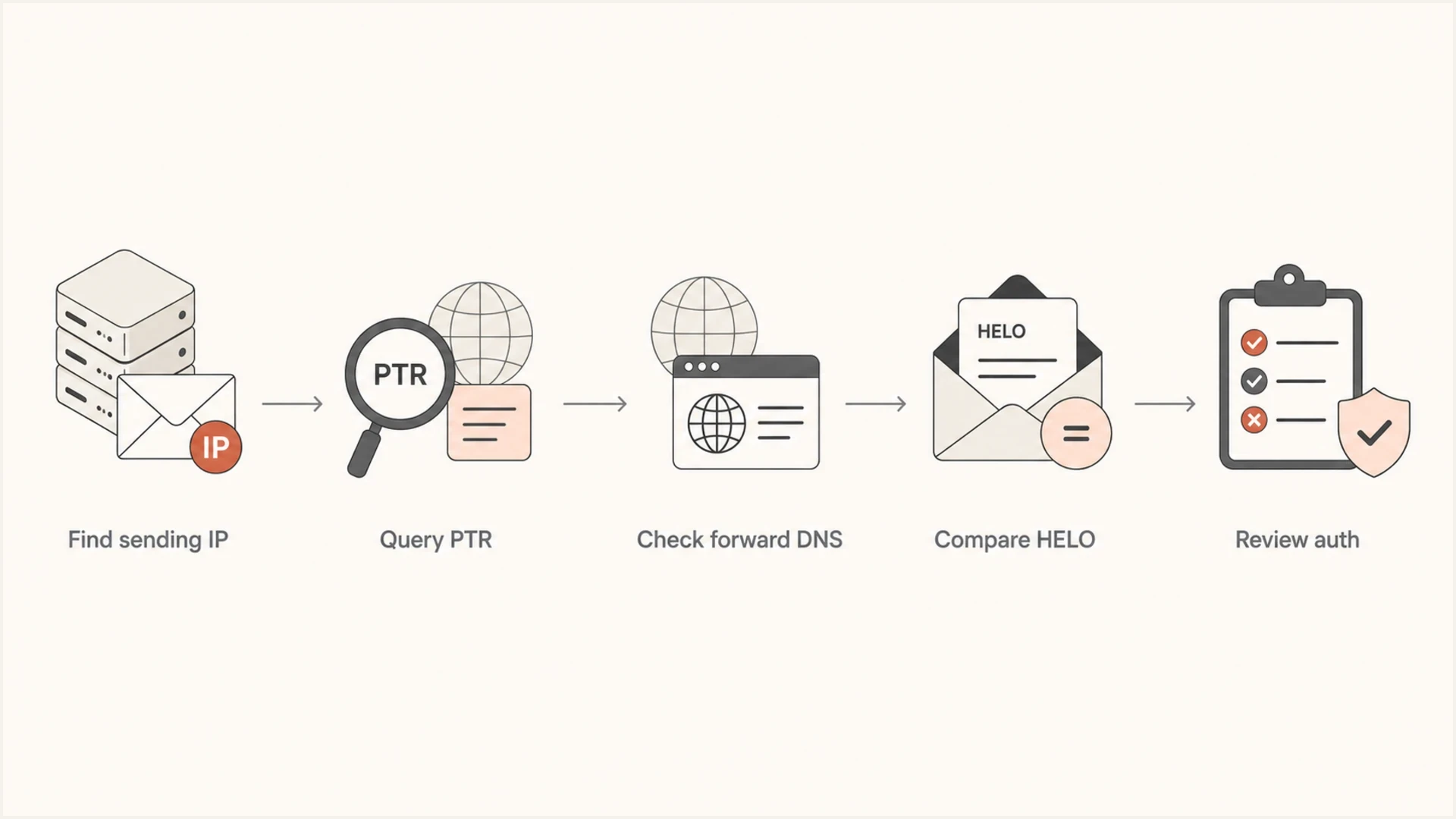
Flowchart for checking ESP reverse DNS from sending IP to PTR, forward DNS, HELO, and authentication.
On a command line, the basic sequence looks like this. The PTR query gives the reverse hostname. The forward query confirms whether that hostname points back to the same address. host and nslookup work too, but keep the sending IP as the input.
Manual rDNS checksbash
dig -x 192.0.2.36 +short

dig mta536b.mail.example.net A +short

dig mta536b.mail.example.net AAAA +short
A valid ESP-owned result can look like this. The hostname does not have to match the customer's From domain. It needs to belong to the mail system sending the message and have matching forward DNS.
Example PTR resultdns
36.2.0.192.in-addr.arpa. 299 IN PTR mta536b.mail.example.net.
For live mail, send one message through the same ESP stream and inspect the received headers with an email tester. That confirms which IP was used, which authentication results passed, and whether the message path matches the configuration you expected.
Email tester
Send a real email to this address. Suped shows a results button when the test is ready.
?/43tests passed
The tester gives context, but still verify the IP. Large ESPs use multiple pools, and a single account can send through different IPs for transactional mail, marketing mail, regional routing, or warmup streams. If the result looks inconsistent, check the headers for the exact message that failed.
If a lookup returns NXDOMAIN or no answer, treat it as no PTR. If the PTR returns a hostname, run the A or AAAA lookup before calling it valid. In headers, start with the first public sending hop that connects into the recipient's systems, because the visible From domain and recipient MX records answer different questions.
IPv6 reverse DNS through an ESP
IPv6 needs its own reverse and forward DNS checks. If an ESP connects over IPv6, each outbound IPv6 address needs a PTR record, and the hostname returned by that PTR needs an AAAA answer containing the same IPv6 address. A valid IPv4 PTR and A record do not validate a separate IPv6 sending path.
- Confirm the route: Check received headers to see whether the ESP used IPv4 or IPv6 for the affected message.
- Query the IPv6 address: Run the PTR lookup against the exact public IPv6 address shown in the headers.
- Confirm the AAAA answer: The PTR hostname must resolve forward to an answer set that includes that IPv6 address.
- Escalate to the ESP: The ESP or IP-space owner must correct the PTR if the IPv6 reverse lookup is missing or mismatched.
IPv6 rDNS checksbash
dig -x 2001:db8::36 +short

dig mta6.mail.example.net AAAA +short
Do not assume IPv4 results cover IPv6
Gmail can reject IPv6 mail with a 550 5.7.1 response when the sending path does not meet its PTR and authentication requirements. Test the address family that carried the message, and include that exact address in any ESP support ticket.
Shared IPs versus dedicated IPs
The right rDNS owner depends on the IP model. The organization that controls the IP address space controls the PTR zone. On shared pools, that is the ESP. On dedicated IPs assigned by an ESP, the ESP or its network provider still controls reverse DNS in many cases, but the ESP can often set a customer-specific hostname when the plan supports it.
Shared ESP IP
A shared IP has one PTR record, but many senders use that IP. The PTR should normally point at the ESP's mail hostname, because that hostname describes the infrastructure.
- Branding: Do not expect the PTR to use one customer's domain.
- Control: The ESP manages the PTR and HELO behavior.
Dedicated ESP IP
A dedicated IP can use a branded hostname when the ESP supports custom rDNS. This is useful for senders that want cleaner infrastructure naming and stable operational ownership.
- Branding: Use a subdomain such as a mail or mta hostname.
- Control: The ESP or network provider has to create the PTR change.
If a client asks why a shared ESP IP does not resolve to their domain, the answer is ownership. A shared IP cannot fairly present one customer's hostname as the reverse identity for everyone else using that same address.
|
|
|
|---|---|---|
Shared ESP pool | ESP | Use the ESP hostname. |
Dedicated ESP IP | ESP or network provider | Use branded rDNS if supported. |
Self-hosted MTA | IP-space owner | Set PTR and HELO together. |
Cloud VM | Hosting provider | Request a static mail hostname. |
Dynamic ISP IP | ISP | Do not use it for production outbound mail. |
Recommended PTR ownership by sending model
For a dedicated sending IP, use one stable PTR hostname rather than several unrelated names. DNS can return multiple PTR records in some setups, but mail troubleshooting is clearer when each outbound IP has one predictable reverse identity.
Do not force branding on shared IPs
A customer-branded PTR on a shared pool creates confusion because one reverse hostname would describe traffic for unrelated senders. If the brand needs its own rDNS, move to a dedicated IP and ask the ESP whether custom PTR and matching HELO are supported.
Where DMARC, SPF, DKIM, and reputation fit
rDNS is connection-level hygiene. It is separate from SPF, DKIM, and DMARC domain alignment. A message can have ESP-owned rDNS and still pass DMARC when SPF or DKIM authenticates an aligned domain relative to the visible From domain. A message can also have branded rDNS and still fail authentication if SPF or DKIM is wrong.
- SPF: Checks whether the sending IP is authorized for the envelope sender domain.
- DKIM: Checks whether the message has a valid cryptographic signature for the signing domain.
- DMARC: Checks whether a passing SPF or DKIM domain aligns with the visible From domain.
- rDNS: Checks whether the connecting IP has a sensible reverse hostname with matching forward DNS.
Do not put ptr in an SPF record to make reverse DNS part of SPF authorization. RFC 7208 says the SPF ptr mechanism should not be published because it creates costly, complex DNS evaluation. Use normal SPF mechanisms such as ip4, ip6, and include when they fit the ESP's documented authorization method.
Keep these checks separate because they answer different questions. If the domain has poor authentication, fix SPF, DKIM, and DMARC. If the connecting IP has no PTR, ask the ESP or hosting provider to fix rDNS. If mail is blocked after authentication passes, check IP and domain reputation, including blocklist and blacklist status.
DMARC record detail view showing SPF, DKIM, DMARC, rDNS diagnostics, and DNS records
Suped's product is useful when a single rDNS question turns into a broader authentication review. It brings DMARC, SPF, DKIM, rDNS diagnostics, and sender source visibility into one workflow, so the fix is not buried in raw DNS output.
A practical workflow is to first validate the exact message path, then use DMARC monitoring to confirm authentication at scale. If reputation is part of the complaint, add blocklist monitoring so IP and domain listings do not get missed.
For a broad DNS and authentication check before opening a ticket with the ESP, run the domain through a domain health checker. It will not replace the IP-level rDNS lookup, but it quickly shows whether other authentication records are also contributing to the issue.
?
What's your domain score?
Deep-scan SPF, DKIM & DMARC records for email deliverability and security issues.
The practical point is that rDNS should not be treated as a branding rule. It is one signal among several. A clean PTR does not rescue broken authentication, and strong DMARC does not excuse a missing PTR on the connecting IP.
Operational checklist for ESP senders
When explaining this to a client, avoid arguing about whether the PTR should look branded. Walk through the observable checks instead. That keeps the conversation grounded in what receiver filters can evaluate.
- Find the IP: Use the Received headers from the specific message that had the problem.
- Query PTR: Confirm the IP returns a hostname instead of no result or a dynamic-style placeholder.
- Confirm forward: Look up the PTR hostname and confirm its A or AAAA answers include the original IP.
- Compare HELO: Check whether the SMTP hostname matches or is clearly related to the PTR.
- Check auth: Review SPF, DKIM, and DMARC separately before blaming reverse DNS.
- Open ticket: If PTR or forward confirmation fails, send the ESP the IP, address family, PTR hostname, forward result, sample timestamp, message ID, and full headers.
HELO does not always appear in the user-facing parts of a message, but it matters enough to check when you are dealing with hard bounces, receiver-specific deferrals, or a dedicated IP migration. For a deeper comparison, see HELO and rDNS.
The client-ready explanation
For shared ESP sending, it is correct for reverse DNS to resolve to the ESP's hostname. For dedicated IP sending, branded rDNS is acceptable when forward DNS and HELO are configured correctly. The receiver cares that the IP has a trustworthy, consistent identity, not that the PTR repeats the From domain.
What to send to the ESP
If the lookup fails, send the ESP a concise inventory of the affected sending source. Use one line per active sending IP so support can trace the right pool, dedicated IP, or route without guessing from the From domain alone.
ESP ticket formattext
IP address | reverse DNS record | forward DNS result | associated domain
192.0.2.36 | mta536b.mail.example.net | 192.0.2.36 | example.com
- Accepted mail: Include the SMTP acceptance timestamp, queue ID, recipient, and provider response code.
- Rejected mail: Include the full SMTP error, not only the short bounce summary.
- Missing mail: Explain that the sending logs show acceptance, then provide dates, subject samples, and message IDs.
- Authentication: Add SPF, DKIM, and DMARC results where available, because they often decide whether the ticket is actionable.
The associated domain should be the customer-facing sending domain for the affected stream. If the mail uses a separate bounce domain, DKIM subdomain, or ESP tracking hostname, add those values as evidence without replacing the main sending domain in the ticket line.
Views from the trenches
Best practices
Check the PTR, SMTP banner, and forward lookup together before blaming the ESP's setup.
Use a dedicated IP when the brand needs its own rDNS hostname and volume supports it.
Keep SPF, DKIM, DMARC, and blocklist monitoring in the same review workflow weekly.
Common pitfalls
Treating a shared ESP IP as broken because the PTR points at the ESP domain alone.
Looking up rDNS by domain first, instead of querying the actual connecting IP address.
Changing PTR hostnames without checking forward confirmation and HELO behavior first.
Expert tips
Ask the ESP which hostname they use for HELO before requesting any PTR change on an IP.
Use message headers to find the sending IP that receiver filters actually evaluated.
Separate branding goals from authentication checks, since rDNS is not a DMARC domain match.
Marketer from Email Geeks says reverse DNS should be checked against the actual connecting IP, because looking up the sender domain gives the wrong answer.
2019-04-24 - Email Geeks
Expert from Email Geeks says an ESP-owned PTR on a shared sending IP is normal and does not create a problem by itself.
2019-04-24 - Email Geeks
Final rDNS checks
The best practice for rDNS through an ESP is valid, forward-confirmed reverse DNS for the connecting IP. On shared IPs, that normally means the ESP's hostname. On dedicated IPs, it can mean a branded sender hostname if the ESP supports custom PTR and the forward lookup includes the same IP.
Do not reject a setup only because the PTR resolves to the ESP. Treat the setup as broken if the PTR is missing, unrelated, or not forward-confirmed. Review a dynamic-style hostname with the ESP. After that, check SPF, DKIM, DMARC, HELO, and blocklist or blacklist status before making a deliverability claim.