What are the best practices for email link cloaking and click tracking?

Michael Ko
Co-founder & CEO, Suped
Published 2 Aug 2025
Updated 15 May 2026
13 min read
Summarize with

The best practice for email link cloaking and click tracking is to make the tracking domain trustworthy, keep the redirect path transparent, prevent arbitrary destination changes, use HTTPS, log enough redirect data to investigate problems, and separate customer or brand reputation wherever possible. Click tracking is normal in bulk email, but sloppy cloaking creates deliverability, security, and analytics problems fast.
I use the phrase "link cloaking" carefully because it can mean two different things. Acceptable click tracking rewrites a visible destination through a tracking hostname so the sender can record the click and forward the user to the intended page. Risky cloaking hides the true destination, masks a deceptive site, or lets a link be edited after send to point somewhere unsafe. Mailbox providers, security gateways, and users treat those two patterns very differently.
For most senders, the safest setup is a branded HTTPS tracking subdomain, signed or database-backed redirect tokens, a deny-by-default redirect service, complete redirect logs, and monitoring for authentication, blocklist (blacklist), and domain reputation issues. Suped helps with the surrounding email authentication work by tying DMARC, SPF, DKIM, blocklist monitoring, and deliverability signals into one workflow, which matters because a tracking domain problem rarely stays isolated from the rest of the sending domain.
The direct answer
The best practices are practical and measurable. A good click tracking system should make abuse hard, make investigation easy, and avoid patterns that look like phishing infrastructure.
- Use HTTPS: Every tracking link should use HTTPS, including the first click URL and the final destination. HTTP tracking links look dated, create warning paths, and increase filtering risk.
- Brand the hostname: Use a sender-owned subdomain such as click or links, not a generic shared tracking domain where many unrelated senders carry each other's reputation.
- Lock destinations: Only redirect to URLs created by your system. A recipient, attacker, or customer should not be able to edit a query string and turn your tracker into an open redirect.
- Keep paths readable: Prefer stable paths with identifiers in query parameters, for example ?id=abc123, instead of long opaque path segments that look machine-generated and suspicious.
- Log clicks: Capture click time, IP address, user agent, referrer, campaign, recipient token, redirect decision, and final destination so abuse and bot clicks can be investigated.
- Add kill switches: You need the ability to disable a campaign, customer, destination, or tracking domain quickly if it gets abused or lands on a blocklist (blacklist).
- Test real emails: Send the final message through the actual sending path and inspect authentication, links, redirects, and content using an email tester before sending at volume.
The biggest risk
A click tracking domain has reputation. If hundreds of unrelated senders share the same hostname, one abusive sender can damage filtering outcomes for everyone else. This is why branded tracking domains and reputation separation matter more than cosmetic URL length.
How click tracking works
Click tracking usually works by rewriting links at send time. The recipient sees a normal button or text link, but the href points to a tracking hostname. When the recipient or a security scanner requests that URL, the tracking server records the event and returns a redirect to the final destination.
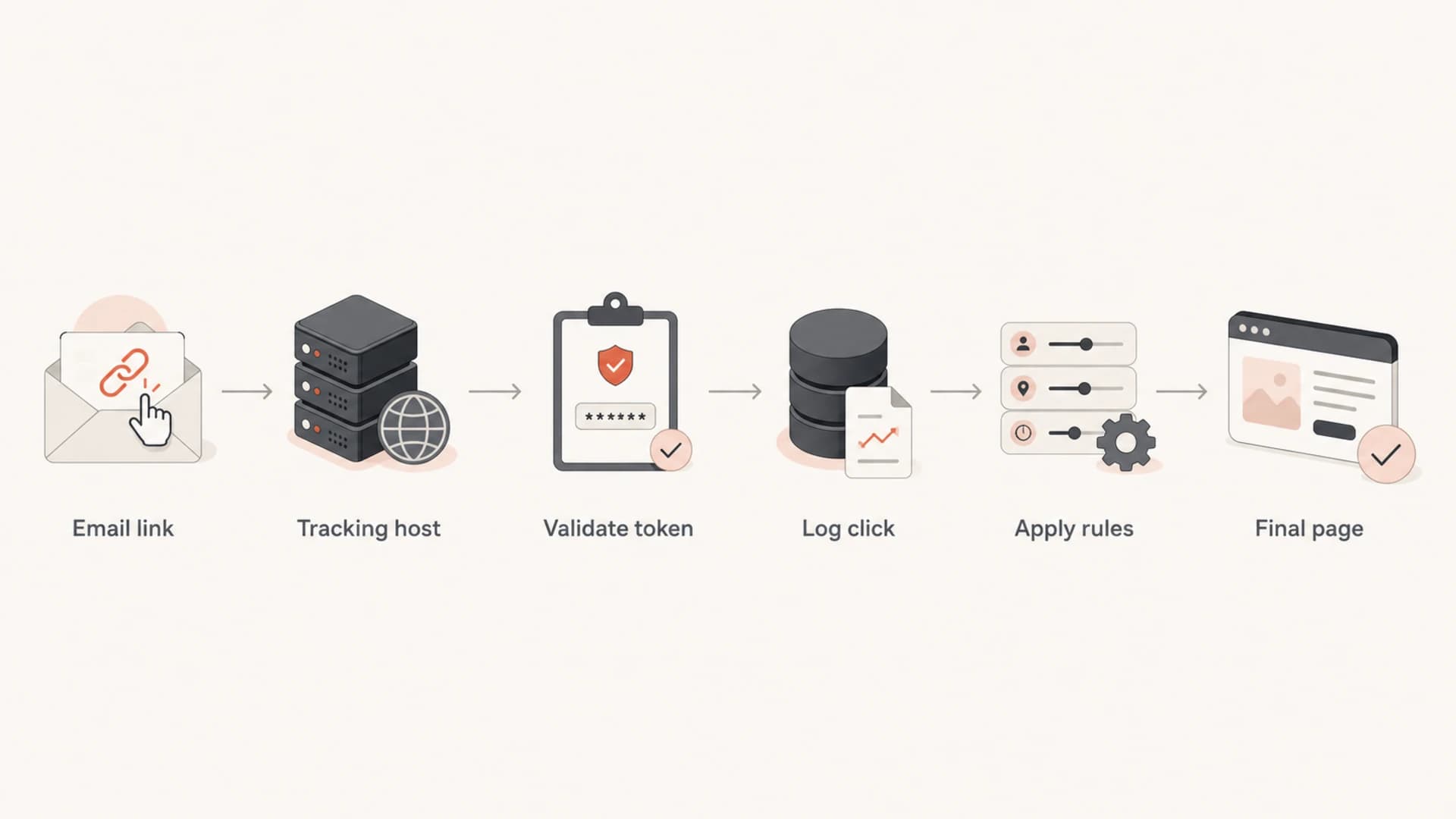
Flowchart showing an email link passing through validation, logging, and redirect steps.
The redirect can be clean or risky depending on how it is built. A clean tracker maps a short token to a fixed destination stored server-side. A risky tracker accepts the destination in the URL itself, especially when it is unsigned, unvalidated, or easy to modify.
Healthy tracking
- Fixed destination: The token maps to a known destination created before send.
- Branded host: The hostname belongs to the sender's domain.
- Auditable logs: Every redirect decision can be traced later.
Risky cloaking
- Editable target: A URL parameter controls the final destination.
- Shared host: Unrelated senders use the same click hostname.
- Weak records: Logs cannot explain scanner activity or abuse.
Safer tracking URL patterntext
https://click.example.com/r?id=abc123&utm_campaign=spring

Token abc123 maps server-side to:
https://www.example.com/pricing?utm_campaign=spring
Risky open redirect patterntext
https://click.example.com/r?url=https://unknown.example/path

The destination is user-controlled unless it is signed and validated.
Tracking domain reputation
The hostname in a tracking URL is part of the message's reputation profile. Filters can evaluate the visible domain, the href domain, the redirect chain, the final landing page, TLS state, and whether the URL has appeared in abusive mail. That makes the click hostname a deliverability asset and analytics component.
|
|
|
|---|---|---|
Shared ESP | Fast setup | Shared reputation |
Branded subdomain | Brand trust | DNS setup |
Per-customer host | Reputation split | More operations |
Dedicated domain | Risk isolation | Brand mismatch |
Tracking domain choices and tradeoffs
A shared tracking hostname is often the easiest option, but it is the weakest option for reputation control. If you operate a platform where customers send mail, give higher-risk tenants their own tracking hostnames and keep the ability to suspend a single customer without disabling every other sender.
The same thinking applies to blocklist (blacklist) monitoring. A tracking domain can be listed even when the sending IP is clean. Suped's blocklist monitoring helps teams monitor domain and IP reputation in the same place as authentication health, so a listed redirect host is easier to spot before it affects campaigns broadly.
Blocklist checker
Check your domain or IP against 144 blocklists.
 Spamhaus
 0Spam
0Spam

 Cisco
Cisco
 NoSolicitado

 URIBL
URIBL
 abuse.ro
 ALPHANET
 Anonmails
 Ascams
 BLOCKEDSERVERS
 Calivent Networks


 EFnet
EFnet




 JustSpam
 Kempt.net
 NordSpam

 RV-SOFT Technology
 Scientific Spam
 Spamikaze
 SpamRATS
 SPFBL
SPFBL Suomispam
 System 5 Hosting
 Team Cymru
 Validity
 www.blocklist.de Fail2Ban-Reporting Service
 ZapBL
ZapBL 2stepback.dk
 Fayntic Services
 ORB UK
 technoirc.org
 TechTheftSpamhaus0SpamCiscoNoSolicitadoURIBLabuse.roALPHANETAnonmailsAscamsBLOCKEDSERVERSCalivent NetworksEFnetJustSpamKempt.netNordSpamRV-SOFT TechnologyScientific SpamSpamikazeSpamRATSSPFBLSuomispamSystem 5 HostingTeam CymruValiditywww.blocklist.de Fail2Ban-Reporting ServiceZapBL2stepback.dkFayntic ServicesORB UKtechnoirc.orgTechTheftSpamhaus0SpamCiscoNoSolicitadoURIBLabuse.roALPHANETAnonmailsAscamsBLOCKEDSERVERSCalivent NetworksEFnetJustSpamKempt.netNordSpamRV-SOFT TechnologyScientific SpamSpamikazeSpamRATSSPFBLSuomispamSystem 5 HostingTeam CymruValiditywww.blocklist.de Fail2Ban-Reporting ServiceZapBL2stepback.dkFayntic ServicesORB UKtechnoirc.orgTechTheftSpamhaus0SpamCiscoNoSolicitadoURIBLabuse.roALPHANETAnonmailsAscamsBLOCKEDSERVERSCalivent NetworksEFnetJustSpamKempt.netNordSpamRV-SOFT TechnologyScientific SpamSpamikazeSpamRATSSPFBLSuomispamSystem 5 HostingTeam CymruValiditywww.blocklist.de Fail2Ban-Reporting ServiceZapBL2stepback.dkFayntic ServicesORB UKtechnoirc.orgTechTheftSpamhaus0SpamCiscoNoSolicitadoURIBLabuse.roALPHANETAnonmailsAscamsBLOCKEDSERVERSCalivent NetworksEFnetJustSpamKempt.netNordSpamRV-SOFT TechnologyScientific SpamSpamikazeSpamRATSSPFBLSuomispamSystem 5 HostingTeam CymruValiditywww.blocklist.de Fail2Ban-Reporting ServiceZapBL2stepback.dkFayntic ServicesORB UKtechnoirc.orgTechTheft
When I see a tracking domain with unexplained filtering issues, I check four things first: whether the hostname is shared, whether HTTPS is valid, whether the redirector has open redirect behavior, and whether the final destinations have inconsistent quality. The problem is often not the act of tracking clicks. It is the trust signals around the redirect chain.
Secure redirect design
The redirect service should be strict by default. If a link token is unknown, expired, disabled, or malformed, the service should not redirect. It should return a neutral error page or a safe fallback that does not train attackers to use your domain.
Never operate an open redirect
An open redirect lets someone use your trusted tracking domain to forward users to a malicious page. This is one of the clearest bad patterns in link cloaking. It turns your domain into abuse infrastructure and can damage domain reputation quickly.
The safest implementation stores the final URL server-side and exposes only a random or signed identifier in the email. If you must include a destination in the URL, sign it with an HMAC, validate the signature before redirecting, enforce an allowlist where practical, and reject unexpected schemes such as javascript: or data:.
- Validate tokens: Look up the token and verify it belongs to the campaign, customer, and recipient context you expect.
- Reject bad schemes: Allow only https destinations unless a specific legacy use case has been approved.
- Limit hops: Avoid chains that bounce through several domains before reaching the landing page.
- Keep controls: Support disabling by token, campaign, sender, customer, destination domain, and tracking hostname.
- Avoid payload leaks: Do not place email addresses, customer names, or sensitive account data directly inside the tracking URL.
Redirect decision logictext
1. Receive click token
2. Reject if token is missing or malformed
3. Load campaign and destination from storage
4. Reject if campaign, customer, or domain is disabled
5. Log request metadata and decision
6. Redirect to the stored HTTPS destination
This structure also helps incident response. If a destination later becomes unsafe, you can disable every token pointing to that destination without editing sent emails or waiting for DNS changes.
URL shape and HTTPS
A tracking URL should look boring. That is a good thing. Long encoded blobs, raw destination URLs, odd ports, IP literals, mixed-case random paths, and nested redirects all create work for filters and security scanners. They also make users less likely to trust the link preview.
|
|
|
|---|---|---|
Query ID | Yes | Stable and clear |
Opaque path | Limit | Can look risky |
Raw target | Avoid | Open redirect risk |
HTTP link | Avoid | Weak trust signal |
URL patterns to prefer and avoid
Use a normal subdomain and a short path, then put the identifier in a query parameter. That pattern is easier to reason about, easier to log, and less likely to look like a malware-style path. For example, /r?id=abc123 is usually cleaner than a long path containing multiple encoded IDs.
HTTPS should be enforced with a valid certificate on the tracking host and the destination page. Redirecting from HTTPS to HTTP weakens the chain. If the destination is yours, fix the destination. If the destination belongs to a customer or partner, flag it before send.
A simple URL rule
If the tracking URL cannot be explained in one sentence, simplify it. The best click tracking URLs are short, branded, HTTPS-only, and backed by server-side state.
Analytics without bad cloaking
Good analytics do not require deceptive cloaking. You can record clicks, keep campaign attribution, and preserve user trust by separating the tracking identifier from the final landing page attribution.
Keep your click token short and use UTM parameters on the destination URL for analytics systems. The tracking server records the click event. The destination page receives campaign attribution. These are different jobs, and keeping them separate makes debugging much easier.
Clean tracking and analytics splittext
Email href:
https://click.example.com/r?id=abc123

Stored destination:
https://www.example.com/demo?utm_source=newsletter&utm_medium=email
Bot clicks complicate analytics. Security tools often prefetch or scan URLs before a human sees the email. Treat click data as a signal, not a perfect human intent metric. This is especially important for B2B sends where security gateways can click every link in a message.
- Separate first clicks: Flag clicks that happen seconds after delivery, especially when every link in the message is requested.
- Track scanners: Cluster requests by user agent, IP range, timing, and link coverage to identify automated activity.
- Avoid hidden traps: Invisible links can identify scanners, but they can also look manipulative. Use them only with a clear internal policy and careful testing.
- Compare outcomes: Use downstream events such as form starts, logins, or purchases to separate meaningful clicks from automated requests.
For a deeper treatment of automated clicks, the related guide on false click data is useful when campaign reporting looks inflated or strangely uniform.
Testing before sending
Test the final rendered email, not only the template. Link rewriting often happens late in the send pipeline, so local previews miss the exact URL shape, tracking hostname, and redirect behavior that mailbox providers will inspect.

Email tester sample report showing total score, email preview, issue summary, and per-section results
A useful pre-send test opens every tracked link and records the full redirect chain. It should confirm that the first URL is HTTPS, the certificate matches the tracking host, the redirect response is correct, and the final page loads without security warnings.
Authentication checks matter here too. If the same campaign has weak SPF, DKIM, or DMARC results, filters have less reason to trust the message and more reason to treat tracking links conservatively. Suped's DMARC monitoring makes this easier by showing authentication failures, sending sources, and practical remediation steps instead of leaving you to read raw aggregate reports.
?
What's your domain score?
Deep-scan SPF, DKIM & DMARC records for email deliverability and security issues.
A strong testing routine also checks the body copy around the link. A mismatch between visible anchor text and destination can look deceptive, even when tracking is technically secure. If the button says "View invoice" but the destination is a promotional landing page, filters and users both have a reason to distrust it.
Operational controls
The operational side is where many click tracking systems fail. The redirect code might be sound, but the team still needs fast controls when abuse, compromised accounts, customer mistakes, or bad destinations appear.
Redirect risk response thresholds
Suggested response levels for click tracking abuse and reputation signals.
Normal
0 alerts
Expected scanner traffic and clean destinations.
Watch
1-2 alerts
Small spike in scanner errors or suspicious destinations.
Act
Any confirmed issue
Open redirect attempt, listed URL, or unsafe destination.
At minimum, maintain a runbook for disabling a campaign, disabling a customer, blocking a destination domain, rotating a tracking hostname, and notifying the sender. This is especially important for platforms and MSPs that manage multiple brands or tenants.
Suped fits this workflow because email authentication, SPF flattening, hosted SPF, hosted DMARC, hosted MTA-STS, real-time alerts, and blocklist monitoring live in one platform. When a link issue is paired with an authentication issue, the team can see both instead of checking separate DNS, reporting, and reputation sources.
Manual process
- Slow diagnosis: Teams check DNS, logs, reports, and listings separately.
- Uneven fixes: Senders often fix one record and miss another issue.
Suped workflow
- Unified view: DMARC, SPF, DKIM, and blocklist data sit together.
- Action steps: Automated issue detection explains what to change next.
The practical goal is not to remove click tracking. It is to make the tracking layer boring, secure, and observable enough that it does not become the reason a legitimate campaign is filtered.
Bad patterns to avoid
Clear bad patterns usually share one trait: they make the destination harder to trust or harder to control. Some are security problems. Others are deliverability problems. Many are both.
- Open redirects: Never let untrusted input choose the final landing page.
- Generic shorteners: Public shortening domains carry mixed reputation and hide ownership signals. The related guide on Bitly links covers this risk in more detail.
- HTTP redirects: Do not start the click path on HTTP or redirect users to an HTTP landing page.
- Deep redirect chains: Several hops create more failure points and make inspection harder.
- Sensitive URL data: Avoid email addresses, account IDs, and personal data in visible query strings.
- Unmonitored hosts: A tracking hostname should be monitored like any other domain used in email.
Another pattern to avoid is using tracking to disguise a destination the user would not otherwise click. If the sender would be uncomfortable showing the final domain plainly, the campaign has a trust problem rather than a tracking problem.
Redirect chains deserve special attention because each hop adds reputation and security context. The related page on redirect drawbacks goes further into how multi-hop links affect filtering and user trust.
Views from the trenches
Best practices
Use branded HTTPS tracking hosts so filters can connect clicks to the sender domain.
Store destinations server-side and expose only short tokens inside sent email links.
Log IP, user agent, referrer, token, campaign, and redirect result for every click.
Create kill switches for campaigns, customers, domains, and suspicious destinations.
Common pitfalls
Shared click domains let unrelated senders influence the same hostname reputation.
Editable destination parameters turn a trusted tracking host into an open redirect.
Long opaque paths can look suspicious when filters inspect message URLs during link scans.
Missing logs leave teams guessing when bot clicks or blocklist listings appear later.
Expert tips
Prefer query identifiers over destination-heavy paths to keep tracking URLs readable.
Treat click tracking domains as reputation assets, not disposable analytics plumbing.
Separate human click metrics from scanner activity before reporting campaign results.
Check authentication and blocklist status when link filtering problems start on campaigns.
Marketer from Email Geeks says shared reputation on a click domain can limit how much a sender can isolate damage when one customer or campaign creates trouble.
2019-08-21 - Email Geeks
Marketer from Email Geeks says a click tracking system should only redirect links created by the system, because editable destinations invite abuse.
2019-08-21 - Email Geeks
A practical setup to aim for
The best setup is a branded HTTPS tracking subdomain, server-side destination mapping, strict redirect validation, short readable tokens, full redirect logging, and fast disable controls. Keep the redirect chain short, avoid generic shorteners, and monitor the tracking hostname like a core email asset.
For teams managing more than one domain or customer, the strongest practical choice is to pair those link controls with authentication and reputation monitoring. Suped is built for that operating model: DMARC monitoring, SPF and DKIM visibility, hosted DMARC, hosted SPF, hosted MTA-STS, SPF flattening, blocklist monitoring, real-time alerts, and multi-tenant dashboards for MSPs and agencies.
Click tracking should help you understand engagement. It should not make the email harder to trust. When the tracking layer is secure, observable, and clearly connected to the sender's domain, it supports analytics without becoming a deliverability liability.




