What are some funny examples of spam or phishing attempts targeting email marketers?

Published 8 May 2025
Updated 9 Aug 2026
11 min read
Summarize with
Updated on 9 Aug 2026: We added current marketer-targeted lures and refreshed the response guidance for the latest DMARC standard.
Funny examples of spam or phishing aimed at email marketers include fake calendar bookings that request promotional emails one by one, fake lead forms that manufacture consent, urgent ad-account warnings, recruitment exercises that hide a login prompt, shared campaign briefs with suspicious links, and vendor impersonation emails with oddly formal demands. They are funny because the wording often exposes the plan. They still deserve a technical response because the same gaps can cause complaints, blocklist or blacklist listings, domain abuse, and confused vendor reports.
Treat these messages as signal first and entertainment second. A strange message can reveal how a form, booking flow, sender identity, or authentication process can be abused. Capture the sample, read the headers, check the logs, verify consent, and then decide whether the event is harmless noise, form abuse, or an actual phishing attempt.
Funny examples with real lessons
The funniest cases usually fail because the attacker understands marketing automation only halfway. They know a form can trigger a confirmation email, a calendar booking can create a record, and a reply can look like consent. They miss the normal context around those events.
- Fake calendar booking: The invitee books a meeting under someone else's address and leaves a note like "Please send all promotional materials one by one by email." No real buyer asks to be dripped into a complaint trail.
- Fake consent form: A lead form arrives with a name such as "Definitely Real Customer" and a comment saying they consent to every campaign forever. The weak point is the form, not the recipient.
- Unsubscribe theater: A message demands removal from a list that has no record of the address. The confidence is funny. The risk is that a support team treats the demand as proof of bad list sourcing without checking logs.
- Vendor blame bait: An attacker uses a vendor's public form to trigger a confirmation toward a third party, hoping the recipient reports the vendor for sending spam. The sender system looks guilty until the form trail is reviewed.
- Compliance impersonation: A fake compliance officer asks for DNS access, suppression files, or campaign exports to "complete an audit." The wording can be absurd, but the request targets real marketing systems.
Do not skip the evidence step
A strange confirmation email does not prove the named sender ran a campaign. It proves a system produced a message. The next question is which system accepted the input and whether that input was verified.
Modern phishing lures aimed at marketers
Marketers routinely receive files, approval requests, job pitches, invoices, and account notices. Attackers copy those tasks because an unexpected campaign link can still look normal during a launch. The joke often sits in an overdone subject line or impossible deadline, but the requested action shows the real objective.
- The final-final campaign brief: A document named "FINAL_v7_USE_THIS_ONE" asks the marketer to sign in again. Verify the share through a known channel instead of using the email link.
- The ad account emergency: A warning claims every campaign will stop in 14 minutes unless billing details are confirmed. Open the account through a saved address and check the sender domain.
- The dream marketing job: A recruiter offers a senior role after seeing one social post, then sends a "brand exercise" that requests login credentials or software installation. Confirm the recruiter and company through a separate channel.
- The trusted invitation: A real calendar or collaboration service delivers an invitation whose event name contains a fake billing alert, QR code, or callback number. A legitimate delivery service does not make the embedded request trustworthy.
- The CEO's urgent launch: A senior executive supposedly needs gift cards, a supplier payment, or an audience export before a secret launch. Confirm the request through the normal approval path.
Read the request, not the polish
Clean grammar and familiar branding do not prove a message is safe. Check for sender-domain mismatches, an unexpected request, artificial urgency, suspicious links or attachments, credential or payment requests, and permission prompts that grant account access.
Why email marketers get targeted
Email marketers are attractive targets because their workflows create mail quickly and provide access to valuable business accounts. Sign-up forms, demo forms, webinar registrations, referral campaigns, and booking pages all send automated messages. The abuse starts when one of those flows accepts a third party's email address without enough friction, or when a convincing request reaches someone who can export an audience, approve spend, change billing details, or publish a campaign.
|
|
|
|---|---|---|
Vendor blame | Odd form note | Weak lead checks |
Reply testing | Strange question | Open inbox paths |
List bombing | Many signups | No rate limits |
Brand abuse | Lookalike domain | Loose DMARC |
Complaint bait | Fake consent | Poor audit trail |
Common motives behind strange marketing spam
The same pattern explains strange newsletter signups. A bot does not need access to your email platform to create noise. It only needs an unprotected input that sends mail, records consent, or notifies a sales team.
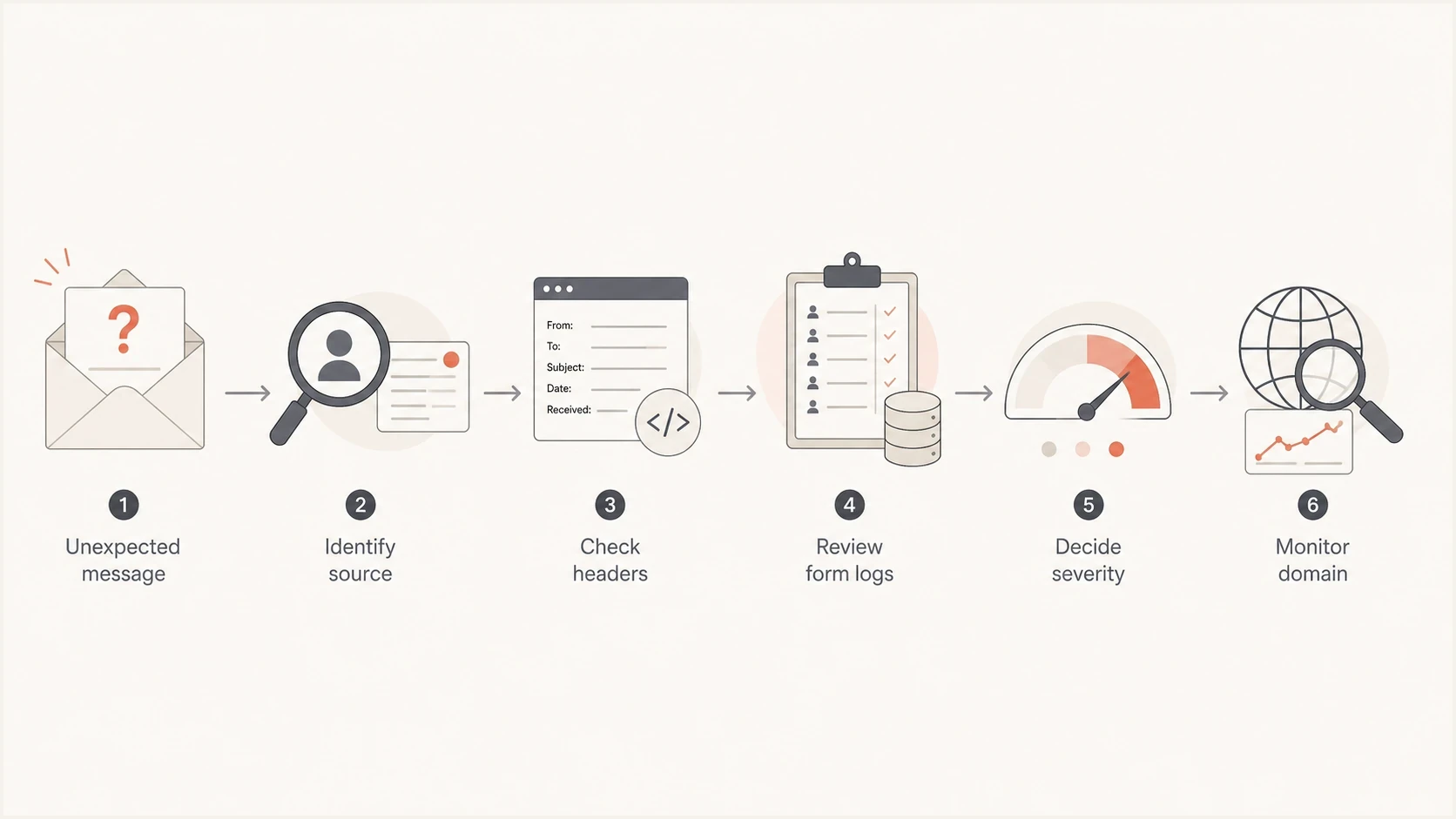
Flowchart for sorting a strange marketing email before taking action.
How to tell funny from dangerous
Separate tone from impact. Funny wording can sit on top of a real attack path, while ordinary wording can hide a larger issue. Check whether the message changed data, triggered automation, touched a real recipient, used an authenticated sender, or asked someone to leave the normal approval path.
Mostly annoying
- Single sample: One message arrived and no automation followed.
- Known source: The header, form, or booking log points to a normal system.
- No impersonation: The sender did not claim to be your brand or a trusted partner.
Needs action
- Repeated pattern: The same address, domain, or phrase appears across many forms.
- Authenticated misuse: SPF, DKIM, or DMARC passes for a sender that should not be sending that content.
- Reputation impact: Complaints, bounces, blocklist changes, or blacklist reports appear after the event.
Authenticated phishing deserves special care because a harmful message can pass SPF, DKIM, and even DMARC when it comes through an approved platform, a compromised account, or another authorized sending path. Those results do not validate the content, destination link, attachment, callback number, or permission request. Trace the account and sending source in authenticated phishing cases instead of treating an authentication pass as a safety verdict.
A calendar booking example
The calendar-booking version is funny because the attacker turns a lead capture flow into a staged receipt. A real calendar confirmation has timestamps, attendee fields, host details, and custom question answers. That can look official to a support team, even when the invite was created by someone who controlled none of the identities involved.
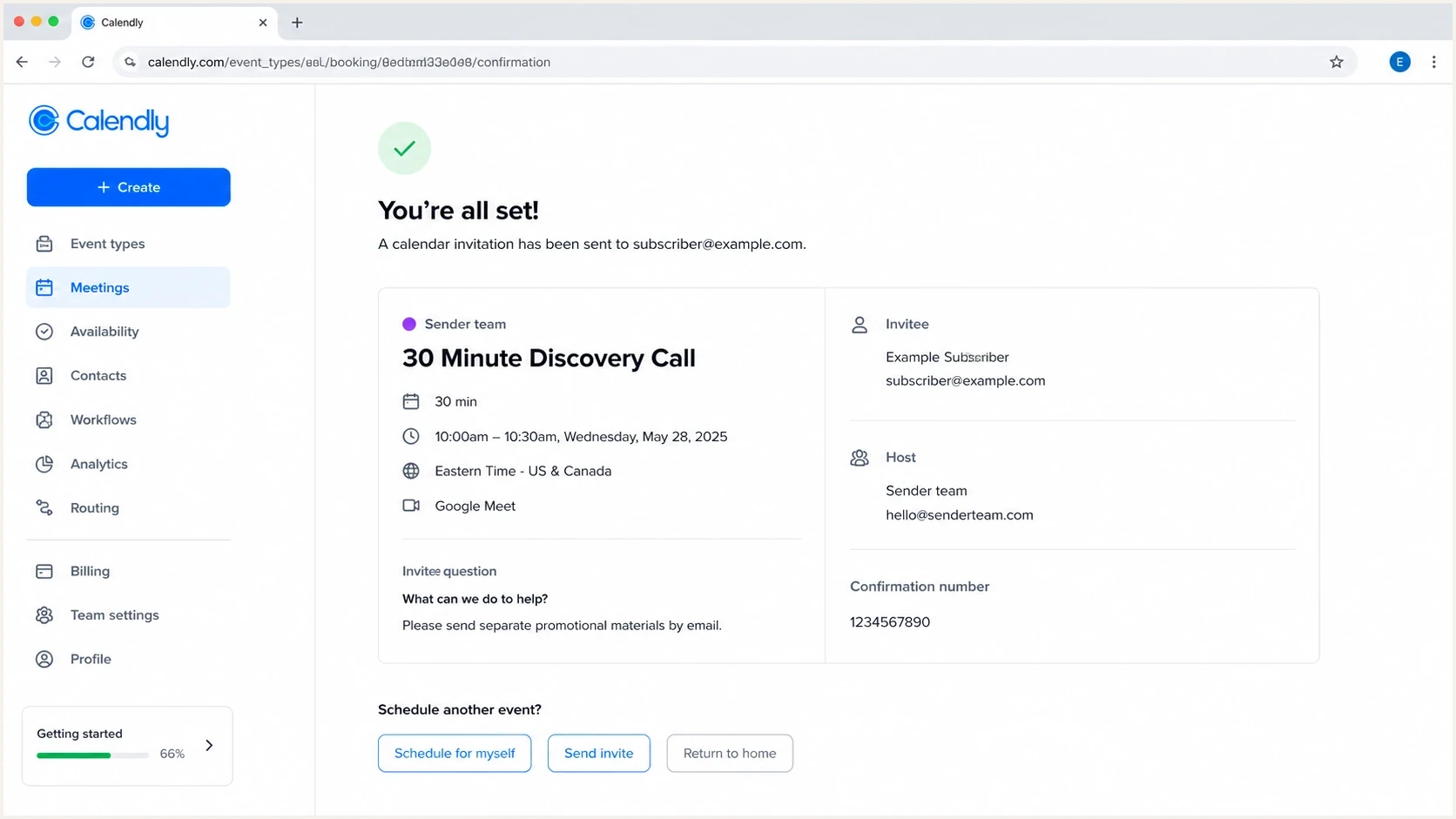
Calendly booking confirmation with a suspicious promotional email request.
The fix is not to ban booking links. Add sensible controls around them. Use verified email steps for high-risk actions, rate-limit bookings, log source IPs, include clear form metadata, and avoid triggering campaign enrollment only because someone booked a meeting. Treat unexpected QR codes and callback numbers as separate destinations to verify. A calendar event can also remain visible after its delivery email has been deleted, so remove the event as part of containment.
Technical checks after a weird message
Save the sample and trace the path the message took. Collect the raw headers, Authentication-Results field, envelope sender, visible From domain, sending IP, DKIM selector, destination URLs, and the system that accepted the original input. If the message claims to come from your brand, DMARC shows whether SPF or DKIM passed with the required domain match and tells receivers what policy you publish for failures. RFC 9989 is the current core DMARC specification. RFC 9990 defines aggregate reporting. RFC 9991 defines failure reporting.
For a live sample, use Suped's email tester and compare the result with your logs. Then check overall domain health, keep DMARC monitoring active, and watch blocklist monitoring after a burst of suspicious traffic.
Email tester
Send a real email to this address. Suped shows a results button when the test is ready.
?/43tests passed
Complete this minimum review before deciding whether the funny message is a joke, a nuisance, or a real abuse case. The more automated the marketing stack is, the more valuable these checks become.
Example DMARC record for monitoringDNS
_dmarc.example.com. 3600 IN TXT "v=DMARC1; p=none; rua=mailto:reports@example.com; adkim=s; aspf=s"
Example SPF and DKIM recordsDNS
example.com. 3600 IN TXT "v=spf1 include:_spf.example.net -all"\nselector1._domainkey.example.com. 3600 IN TXT "v=DKIM1; k=rsa; p=MIIB..."
Where Suped fits
Suped's product is relevant when a funny incident needs a repeatable investigation workflow. Suped collects DMARC reports, groups sending sources, surfaces authentication issues, and provides steps for fixing them. Blocklist monitoring helps connect a burst of fake leads or complaint bait with reputation changes, while multi-domain views help agencies and MSPs apply the same review across client domains.

Issue steps to fix dialog showing the issue overview, tailored fix steps, and verification action
Useful workflow for strange samples
- Find the source: Use aggregate DMARC data to see which service or IP produced the mail.
- Check the result: Compare SPF, DKIM, DMARC, and domain-match results with the approved sender inventory.
- Watch reputation: Track blocklist and blacklist movement when fake leads or complaint bait spike.
- Scale review: Use alerts and multi-domain views when several client domains need the same checks.
The practical benefit is a shared evidence trail. When a marketer receives a ridiculous sample, the team can compare authentication, sending source, failure patterns, and fix steps without relying on the wording alone.
Examples and responses at a glance
Some funny attempts are safe to archive after review. Others deserve engineering or account-security changes. The distinction is whether the attempt used a real sending path, created real consent records, requested sensitive access, or touched sender reputation.
|
|
|
|---|---|---|
Calendar bait | Too direct | Check booking logs |
Fake opt-in | Overdone consent | Verify source |
Urgent account alert | Impossible deadline | Open account directly |
Fake campaign brief | Overdone filename | Verify the share |
Authenticated phish | Looks valid | Trace sender account |
Fast triage for odd marketing messages
Low-cost attempts keep appearing because some still produce replies, reports, account signals, or access grants. That is also why scams still work even when a message feels obvious to a trained marketer.
How to prevent repeat abuse
A one-off oddity wastes minutes. A repeat pattern can create complaints, poison attribution, and make a legitimate sender look careless. Prevention belongs in form design, marketing operations, account security, and email authentication.
- Verify risky inputs: Confirm email ownership before turning a form entry into campaign enrollment, sales follow-up, or a public proof point.
- Log form metadata: Keep timestamp, IP, user agent, page path, consent text, and automation outcome so abuse reports can be investigated.
- Rate-limit automation: Throttle repeated submissions by IP, domain, email pattern, and form-field similarity.
- Secure accounts: Require strong sign-in controls, review third-party permissions, and remove former staff or agency access promptly.
- Tighten authentication: Move DMARC toward enforcement after every verified sender passes SPF or DKIM with the required domain match.
- Monitor reputation: Watch blocklist and blacklist status after bursts of fake signups, complaints, or suspicious confirmations.
The practical rule
Do not let unverified user input create authenticated-looking marketing evidence. A public form is not proof of consent until the address owner confirms it or a stronger trust signal supports it.
Views from the trenches
Best practices
Confirm the source before blaming a sender; form abuse leaves cleaner evidence in logs.
Keep lead capture confirmation tight so attackers cannot create fake consent trails.
Check authentication results and headers before treating an odd message as abuse.
Common pitfalls
Assuming every surprise confirmation proves malicious sending creates false reports.
Ignoring fake signups lets attackers trigger automations and create complaint noise.
Treating funny wording as harmless misses the operational signal behind the message.
Expert tips
Use one retained sample message to compare headers, source IPs, and auth results.
Add rate limits and verified opt-in where form submissions trigger emails automatically.
Watch blocklist and blacklist changes after bursts of fake leads or complaint bait.
Marketer from Email Geeks says a fake calendar booking with a request for separate promotional emails is funny because it asks the sender to manufacture the complaint trail itself.
2024-10-18 - Email Geeks
Marketer from Email Geeks says the sender should contact the platform first when the evidence points to inbound lead abuse instead of real outbound spam.
2024-10-18 - Email Geeks
What email marketers should do next
The funniest spam and phishing attempts aimed at email marketers are usually the ones that expose their own mechanics through fake consent, absurd urgency, impossible authority, or fabricated evidence. Laugh at the wording, then inspect the path. If the message came through a form, harden the form. If it used your domain, check the account and authentication results. If it affected complaints or reputation, monitor the domain until the pattern stops.
A clever reply does not fix the weakness. A clean audit trail, fewer unverified triggers, enforced DMARC after testing, and a documented reputation process give the team a useful outcome.




