What are prefetch and proxy opens and what causes a decrease in email open rates?

Updated on 2 Aug 2026: We added guidance on unrecorded human opens and corrected the platform-migration and Apple Mail diagnostics.
Prefetch opens and proxy opens are not the same thing. A prefetch open is about timing: an email client or mailbox system loads the tracking image before the recipient actively reads the email. A proxy open is about routing: the image is loaded through an intermediary system, so the sender sees the proxy's IP address and user-agent instead of the recipient's real network or device details.
One open event can be prefetched, proxied, both, or neither. That is why open-rate changes need careful interpretation. A sudden decrease in email open rates can come from fewer automated image loads, mailbox-provider changes, image caching behavior, an ESP reporting change, inbox placement shifts, audience behavior, or real deliverability problems.
When open rates drop sharply but unique clicks stay steady, treat opens as a noisy signal first. Do not assume demand collapsed. Break the data down by mailbox provider, campaign type, device family, and authentication status before changing content, cadence, or segmentation.
Short answer
- Prefetch: An automated system loads the open-tracking image before the recipient intentionally opens the email. This creates uncertainty about whether a human saw the message.
- Proxy: A proxy fetches the image on behalf of the mail client or automation. This hides or changes IP address, location, user-agent, and device details.
- Overlap: Many modern mailbox systems use both. Apple Mail Privacy Protection is the common example, and Gmail image caching also changes what senders can infer from opens.
- Drop cause: A lower open rate often means the measurement method changed, automated opens reduced, or mail moved into a lower-attention placement. It can also mean a real inboxing or reputation issue.
The practical rule
Treat open rate as a directional engagement signal, not a clean count of people reading. If opens fall but clicks, replies, conversions, and complaints are stable, start with measurement and mailbox-provider segmentation before rewriting the campaign strategy.
How open tracking works
Most email platforms record an open when a tiny remote image loads. The image can be invisible, personalized, and unique to a message or subscriber. When the image URL is requested, the sender's tracking system records a timestamp, campaign ID, recipient ID, IP address, and user-agent.
Simple open-tracking pixelHTML
<img src='https://img.example.com/o/abc123.gif'
     width='1' height='1' alt=''>
That looks simple, but the request does not always mean a human opened the email. A mailbox provider, spam filter, security scanner, preview pane, webmail cache, mobile network, privacy proxy, or email client can fetch the image for reasons that have little to do with attention.
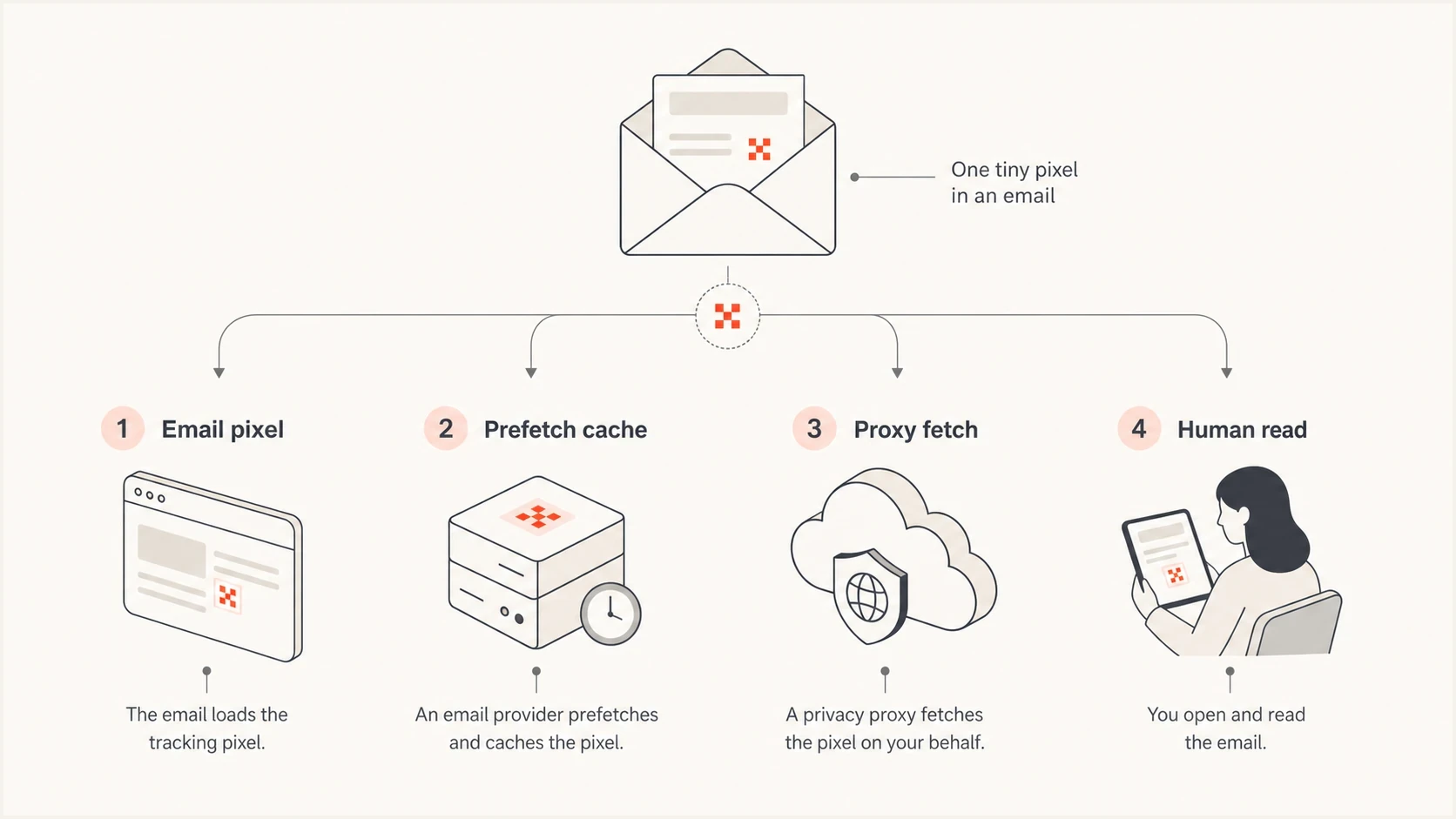
Infographic showing how an open pixel can be loaded by a person, proxy, prefetch cache, or image cache.
That is the core reason open reporting feels inconsistent. The event being measured is not reading. The event being measured is an image fetch, and the fetch can happen before, during, after, or instead of a human reading event. Unique opens count recipients with at least one recorded fetch, while total opens count every recorded fetch. Image caching and bot filtering, plus different deduplication rules, make those figures diverge across platforms.
Why genuine opens go unrecorded
Open tracking also misses real readers. A person can read the subject line, preview text, sender name, and full message without requesting the tracking image. This creates undercounting, while prefetching and automated image loads create overcounting.
- Remote images blocked: The recipient or email client disables external images, so the message can be read without loading the pixel.
- Plain-text reading: A text-only version cannot contain the remote image used for direct open tracking.
- Cache reuse: A client or proxy can reuse an earlier cached image instead of making another request, which reduces recorded repeat opens.
- Tracking removed: A security gateway, privacy setting, email client, or message transformation can strip or prevent the tracking request.
A link click proves that the recipient interacted with the message even when no image load was recorded. Some ESPs use that click to infer or confirm an open, while others keep click and open reporting separate. Compare platform definitions before treating their open rates as equivalent.
Prefetch opens versus proxy opens
Prefetch opens
Prefetching happens when a system retrieves the tracking image before the recipient deliberately opens the email. It is usually automated, and it is often designed to prepare the message for display or protect privacy.
- Timing: The request happens between delivery and the recipient's actual read, or at a time chosen by the mailbox system.
- Meaning: It creates uncertainty about whether a person read the message at all.
- Pattern: It can happen once, repeatedly, or differently across devices used by the same recipient.
Proxy opens
Proxying happens when the image request is routed through another system. The proxy can be used by a human-triggered mail client, by automated prefetching, or by security systems.
- Routing: The sender sees the proxy's network details, not the recipient's exact device and network.
- Meaning: It creates uncertainty about location, device, user-agent, and repeat behavior.
- Pattern: It can be human-triggered or automated, so proxy alone does not prove the open is fake.
The distinction matters because teams often label every privacy-protected open as fake. That is too blunt. A proxied Apple or Gmail image request can still correspond to a real read. A prefetched request is the one that specifically weakens the connection between timestamp and attention.
|
|
|
|---|---|---|
Very fast open | Automation or cache | Check provider split |
Proxy IP | Hidden user network | Avoid location claims |
No image load | Images blocked | Compare clicks |
One domain falls | Provider-specific change | Inspect placement |
Common open-tracking signals and what they mean
For a deeper Gmail-specific example, the Gmail image proxy behavior is a useful case because it separates image routing from the recipient's real device and network.
Why open rates decrease
A lower open rate has two broad explanations: fewer measured image loads, or fewer people seeing and reading the email. The first is a measurement issue. The second is an engagement or deliverability issue. The work is separating those two before taking action.
Open-rate drop diagnostic priority
A practical ordering for investigating a sudden open-rate fall when clicks have not moved much.
Mailbox split
95ESP reporting
85Click stability
80Inbox placement
75Authentication
65- Automation change: A mailbox provider, privacy proxy, security scanner, or email client changes when it fetches images, or the ESP changes how it classifies the resulting events.
- Reporting change: Your ESP changes bot filtering, unique-open rules, user-agent grouping, cache handling, or timezone logic.
- Platform migration: A move to another ESP changes event filtering, deduplication, tracking domains, sending infrastructure, or reporting definitions, so the old and new baselines are not directly comparable.
- Provider mix: A campaign goes to more Apple Mail, Gmail, Outlook, corporate, or mobile-network recipients than usual, so measured opens shift.
- Tab placement: Gmail messages that move into Promotions, Updates, or less visible placements get less attention, and some prefetch behavior can change with placement.
- Deliverability issue: Authentication failures, spam-folder placement, throttling, or a blocklist (blacklist) problem reduces inbox visibility.
- Content fatigue: Subject lines, send cadence, offer quality, seasonality, and list quality change how many people decide to read.
The important clue is whether other metrics moved. If open rate falls by half but unique clicks are close to normal, the first suspects are reporting, automation, or provider-specific image fetching. If opens, clicks, replies, conversions, and revenue all fall together, the issue is more likely placement, relevance, or delivery.
Apple behavior deserves its own check because Apple MPP effects can inflate, shift, or obscure open timing without changing whether people are interested in the message.
How to diagnose an open-rate drop
Start by proving where the change happened. A single aggregate open rate hides too much. The same campaign can look broken overall while the drop is concentrated at one mailbox provider, one segment, one template, or one tracking domain.
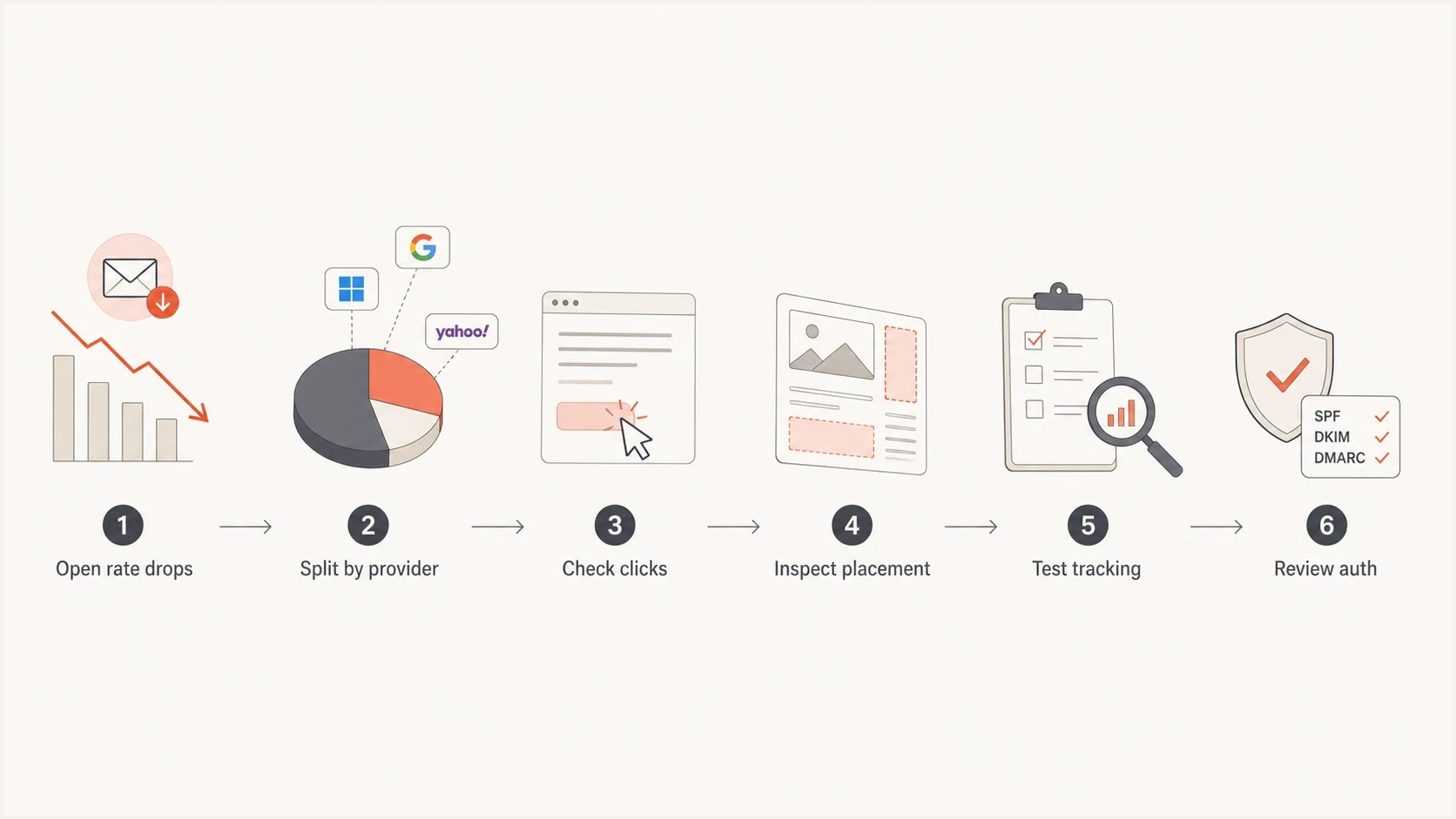
Flowchart for diagnosing a sudden email open-rate decrease.
- Segment by provider and client: Compare Gmail, Outlook, Yahoo, corporate domains, and smaller mailbox providers for the same date range. Then split Apple Mail privacy-affected events by detected client or privacy flag where the ESP exposes it.
- Compare stable metrics: Look at unique clicks, reply rate, conversion rate, spam complaints, bounces, unsubscribes, and revenue per send.
- Check ESP changes: Review release notes, bot filtering settings, tracking-domain changes, template changes, migration dates, and reporting definitions.
- Send a seed test: Use real inboxes across providers and inspect whether images load, whether tracking pixels fire, and whether messages land in the expected tab.
- Review authentication: Confirm SPF, DKIM, DMARC, reverse DNS, the relationship between the Return-Path and visible From domain, and tracking-domain configuration.
A practical test is to send a real message and inspect the result with an email test. This helps separate a tracking-only issue from authentication, rendering, content, or inbox-placement signals.
Email tester
Send a real email to this address. Suped shows a results button when the test is ready.
?/43tests passed
Fast opens and clicks need their own filter. Security systems can open and click links immediately after delivery, while privacy systems can load images before a person reads. If those automated events fall away, the open rate decreases even when the real audience behaves the same.
If the problem looks like automation rather than deliverability, read the pattern guide for artificial opens and clicks and compare those behaviors against your raw event log.
When deliverability is part of the answer
Open-rate analysis cannot stop at the tracking pixel. If the provider split shows Gmail, Outlook, Yahoo, or corporate domains falling together with lower clicks and higher bounces, move into deliverability checks. Verify that mail is authenticated, accepted, and placed where subscribers can see it.
Authentication results to look for
Authentication-Results:
spf=pass smtp.mailfrom=bounces.example.com
dkim=pass header.d=example.com
dmarc=pass header.from=example.com
Start with a domain health check to validate the basics. Then use ongoing DMARC monitoring so authentication failures and unknown senders are visible before they show up as campaign-level performance drops.
Suped is our DMARC platform. In this workflow, it collects aggregate DMARC reports, identifies unknown sending sources, shows SPF and DKIM authentication failures, and sends alerts so the open-rate investigation can be tied to the sender or DNS record causing trouble.
Issues page showing top issues, verified sources, unverified sources, and authentication pass rates
Reputation checks matter too. A new IP, poor list hygiene, complaint spikes, or a blocklist (blacklist) listing can reduce inbox visibility. Suped's blocklist monitoring tracks IP and domain reputation across major blocklists, so a blacklist event is not mistaken for a content problem.
Do not fix the wrong layer
If clicks and conversions are stable, changing subject lines or suppressing engaged subscribers can make the program worse. If authentication is failing or a blacklist listing is active, changing the subject line will not solve the delivery problem.
Metrics to trust more than opens
Open rate still has value, but treat it as a trend line rather than a truth source. It is most useful when compared within the same provider, same ESP, same audience type, and same reporting logic.
|
|
|
|---|---|---|
Unique clicks | Shows active intent | Scanner noise |
Replies | Shows real attention | Small samples |
Conversions | Ties email to outcome | Attribution gaps |
Bounces | Shows delivery friction | Provider spikes |
Complaints | Shows negative reaction | Tiny rates |
Better companion metrics for open-rate diagnosis
Separate human-click behavior from bot-click behavior. A real click usually has a plausible delay after delivery, a browser session, page dwell time, or downstream conversion. A scanner click often appears immediately, hits several links, and has no meaningful site behavior.
A better reporting view
- Provider and client trend: Report open rate separately for Gmail, Outlook, Yahoo, corporate domains, and Apple Mail privacy-affected traffic.
- Human intent: Use unique clicks, replies, conversions, and account activity as the main engagement signals.
- Technical health: Track SPF, DKIM, DMARC, blocklist, blacklist, bounce, and complaint patterns alongside campaign metrics.
Views from the trenches
Best practices
Break open-rate changes down by mailbox provider before changing content or cadence.
Compare opens with unique clicks, conversions, replies, bounces, and inbox placement.
Keep authentication, blocklist, and blacklist checks separate from engagement analysis.
Common pitfalls
Treating every proxied open as fake hides real human reads behind privacy systems.
Assuming a fast open-rate fall proves inbox trouble leads teams to change too much.
Comparing total opens across platforms without checking how each one filters automation.
Expert tips
Use provider baselines and a separate Apple Mail flag so client shifts stay visible.
Watch click stability because steady clicks usually mean audience demand has not collapsed.
Record ESP reporting changes by date so future analysis has a clean reference point.
Expert from Email Geeks says a prefetch open is an automated image fetch before the person reads the message, while a proxy open only describes the path used to fetch the image.
2024-08-05 - Email Geeks
Expert from Email Geeks says proxy opens can still be human-triggered because the proxy works on behalf of the mail client, not only automation.
2024-08-05 - Email Geeks
What to do next
Prefetch opens and proxy opens answer different questions. Prefetch explains when the image was loaded. Proxy explains who fetched it on the recipient's behalf. Modern mailbox systems often combine both, so open rates now measure a blend of human reads, automation, privacy behavior, caching, and reporting choices.
When open rates decrease, do the provider-level breakdown first. If the drop is isolated to one mailbox provider and clicks are steady, treat measurement and automated-open behavior as the first suspects. If engagement and delivery signals fall together, move into authentication, reputation, placement, and content analysis.
The safest operating model is simple: keep open rate in the report, but do not let it make decisions alone. Pair it with clicks, replies, conversions, bounces, complaints, DMARC results, and blocklist or blacklist status. That gives you enough signal to know whether you have a measurement shift, an audience issue, or a real delivery problem.




