How does Apple Mail Privacy Protection (MPP) affect the tracking of email opens and clicks, and how are machine opens categorized?

Updated on 27 Jul 2026: We clarified how Apple MPP machine opens should be classified and added current guidance on Link Tracking Protection, click attribution, and safer engagement metrics.
Apple Mail Privacy Protection (MPP) makes open tracking less precise because Apple Mail can privately download remote email content in the background when a message is received, rather than waiting for the recipient to view it. The resulting tracking-pixel request comes through Apple-controlled proxy infrastructure. It should be categorized as a machine open, proxy open, or privacy-protected open, not as a reliable desktop or mobile open.
Clicks are different. MPP applies to remote content loading in Apple Mail, not link redirects. After bot filtering, a tracked click usually carries a stronger intent signal than an image fetch. Security scanners, privacy routing, browsers, and Apple's separate Link Tracking Protection can still affect click counts or attribution.
That means open rate remains a directional metric, but it is not a clean measure of human attention. Treat Apple-heavy audience segments, device splits, and post-September 2021 open trends with caution, especially when desktop opens rise without a matching change in clicks, replies, conversions, or site sessions.
The direct answer
MPP machine opens can be counted as desktop, mobile, unknown, Apple proxy, or machine depending on the email platform's classification logic. The HTTP request does not provide a dependable human device answer. If a reporting system forces every open into desktop or mobile, it is making an inference, not reporting a verified device. Classification rules can also change, so document the platform's definitions before comparing reports over time.
Correct classification
The most honest label for an Apple MPP image request is machine open or proxy open. It is an HTTP fetch for a tracking pixel, not proof that a person opened the email on a desktop or mobile device.
- Device label: Use unknown, proxy, or machine unless a separate human signal exists.
- Open metric: Report likely human opens and machine opens separately where the platform supports it.
- Trend analysis: Compare open changes with clicks, revenue, replies, and unsubscribe behavior.
If reports show a large desktop increase after Apple's MPP rollout, the safest interpretation is not that more readers moved to desktop. It usually means the platform's open classification rules changed, Apple proxy traffic increased, or proxy requests are being bucketed into desktop because the request looks server-side rather than mobile-app-specific.
|
|
|
|
|---|---|---|---|
Apple MPP open | Apple proxy | Machine | Volume trend |
Normal image open | Mail client | Likely human | Directional engagement |
Tracked click | Browser or scanner | Filter first | Intent after filtering |
Security click | Scanner | Bot | Filtering audit |
How common email events should be interpreted after MPP.
Why MPP changes open tracking
Traditional open tracking depends on a tiny remote image in the email. When the recipient's mail client loads that image, the sender records an open event. Before MPP, that event often exposed a useful combination of IP address, user agent, timing, and image URL. Those signals helped platforms infer device family, location, and whether the open looked human.
MPP changes that model. Apple's system privately downloads remote content in the background and uses proxy infrastructure that hides the recipient's exact IP address. The sender sees Apple's fetch rather than a clean request from the recipient's device. The MPP overview explains the basic marketer impact, but the practical reporting problem is simple: the open event is no longer the same as a person viewing the message.
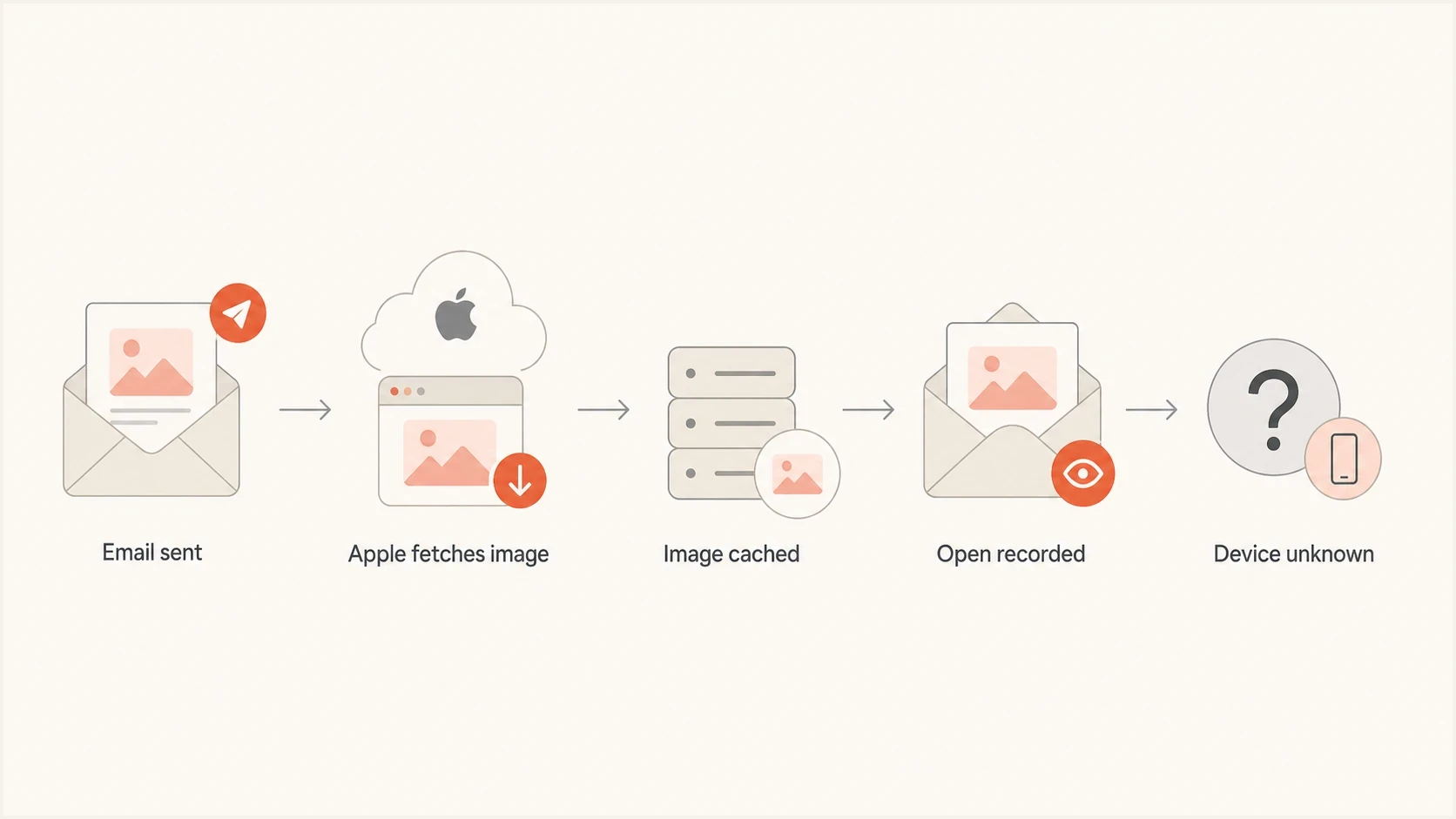
Apple MPP flow showing a proxy image fetch and unknown device.
The protection follows the Apple Mail app, not the mailbox domain. A Gmail, Yahoo, business, or other account can generate MPP activity when the recipient reads it through Apple Mail with Protect Mail Activity enabled. An iCloud address used through another mail app does not automatically prove that an open came through MPP.
The result is a mixed open stream. Some opens come from human mail clients. Some come from Apple proxy systems. Some come from Gmail image caching or other privacy-preserving systems. Some come from security scanners. These requests can look similar if a reporting system only sees a timestamp, an IP range, and a generic HTTP request.
- Timing: A very fast open can indicate prefetching or caching, but delayed machine fetches also occur. Timing alone does not prove a human open.
- IP source: Proxy infrastructure hides the recipient's network and weakens location reporting.
- User agent: Sanitized or generic headers make desktop versus mobile attribution unreliable.
- Repeat opens: Cached image behavior can suppress or duplicate open signals depending on setup.
To separate likely human and automated activity, compare timing, click depth, user-agent stability, recipient domain, and downstream conversion data. The workflow in artificial open patterns covers these signals in more detail.
Why desktop and mobile splits drift
The desktop versus mobile split is often built from user-agent strings, app identifiers, screen hints, or inferred device patterns. MPP removes or weakens parts of that evidence. When a proxy fetch happens, there is no human holding a device at that moment. Any platform that marks that request as desktop or mobile has chosen a rule.
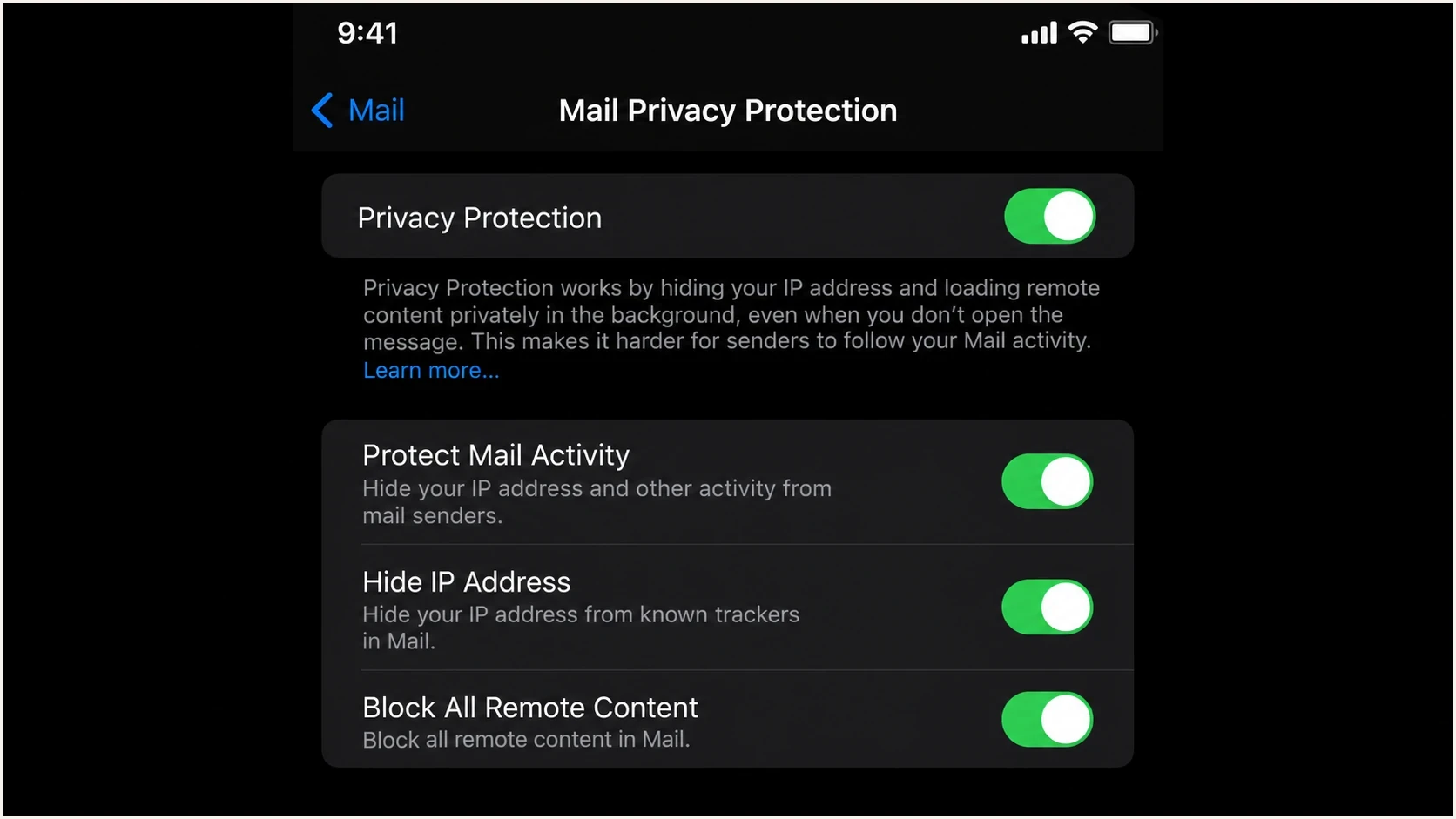
Apple Mail Privacy Protection settings for IP hiding and remote content.
A desktop rise after September 2021 is believable as a reporting artifact because MPP started rolling out with iOS 15, iPadOS 15, and macOS Monterey. Apple users on phones, tablets, and computers entered a privacy-protected image loading path. If a platform maps Apple's proxy fetches to desktop by default, desktop opens rise even when the audience did not change devices.
Human device opens
- Device signal: User agent and app context can indicate desktop or mobile.
- Timing signal: The open usually happens when the recipient views the message.
- Use case: Useful for creative testing when privacy effects are limited.
Machine or proxy opens
- Device signal: The request comes through proxy systems, so device identity is weak.
- Timing signal: The event can occur before a person reads the message.
- Use case: Useful for broad volume trends, not precise engagement.
Keep device reporting separate from engagement reporting. A device chart that mixes human and proxy opens shows how the tracking system categorized traffic, not how people read the campaign.
How clicks differ from opens
After scanner filtering, clicks are usually more dependable than opens because they pass through a link redirect after the recipient acts. The request normally comes from a browser or in-app web view, not from the mail client's remote image loader. That gives the tracking system a better chance of observing a real browser and session path.
Clicks are not perfect. Security scanners can visit links before delivery, corporate gateways can inspect URLs, and privacy systems can alter browser traffic or attribution. MPP itself does not treat link clicks the same way it treats remote images, but Apple's separate Link Tracking Protection can remove selected tracking information from URLs.
Click handling rule
Treat clicks as higher-intent than opens only after filtering impossible patterns. A click one second after delivery, with every link visited in sequence, is scanner behavior until a human session or conversion provides stronger evidence.
Event classification exampletext
if event.type == "open" and event.proxy == "apple":
  category = "machine_open"
  device = "unknown"

if event.type == "click" and event.all_links_visited_fast:
  category = "security_scan"

if event.type == "click" and event.has_site_session:
  category = "human_click"
A sound reporting setup does not delete all machine-looking data. It labels the data, preserves an audit trail, and keeps marketing decisions focused on likely human behavior.
How Apple Link Tracking Protection affects clicks
Apple Link Tracking Protection (LTP) is separate from MPP. LTP can remove selected tracking information added to URLs handled in Mail, Messages, and Safari Private Browsing while keeping the destination link functional. It targets parameters associated with user-level or cross-site tracking rather than stripping every campaign parameter.
This does not turn an ordinary click into an MPP machine open. A redirect tracker can still record a click before navigation, while the destination site loses a removable click identifier. The result can be a click in the email report without a matching user-level attribution record in web analytics.
- Separate controls: MPP changes remote image loading. LTP changes selected information attached to links.
- Count versus attribution: A click count can remain while recipient-level or cross-site attribution weakens.
- Link design: Do not make page routing or required content depend on a removable tracking parameter.
- Validation: Test current Apple Mail and Safari privacy paths, then compare redirect logs with site sessions and conversions.
How to categorize machine opens
Use a separate category for Apple MPP opens to keep analysis honest. If the platform has only desktop and mobile buckets, create a reporting layer outside the platform that reclassifies known proxy opens before using the data for testing, forecasting, or audience scoring.
Open confidence bands
A practical way to decide how much weight an open event deserves.
Higher confidence
Weight
Human-like timing with matching site behavior, but still an inferred open.
Medium confidence
Review
Normal timing but incomplete device or location evidence.
Low confidence
Separate
Apple proxy, image cache, security scan, or very fast machine pattern.
A useful campaign reporting structure is:
- Total opens: All image fetches, including human, proxy, cache, and scanner events.
- Machine opens: Apple MPP, known proxy systems, and suspicious automated fetches.
- Likely human opens: Opens that do not match proxy or scanner patterns.
- Verified engagement: Clicks with matching sessions, replies, form submissions, purchases, and logged activity.
To estimate real open rates instead of reporting inflated totals, model Apple-heavy segments separately and compare them with non-Apple segments that have similar audience behavior. A related method is explained in estimate real opens.
What to measure instead
Open rate still has a place, but it should not control performance decisions. Use opens for broad volume diagnostics and cautious subject-line trend checks. Use filtered clicks, replies, conversions, site sessions, complaint rates, and unsubscribe rates for engagement decisions.
Do not use MPP opens alone to trigger automations, choose subject-line test winners, resend to non-openers, score leads, or prune inactive subscribers. Each workflow can act on a machine fetch as though a person engaged.
A practical pre-send workflow is to send a real test message, inspect authentication and rendering, then compare the recorded events with what actually happened. Suped's email tester supports that workflow by showing authentication, content, and deliverability signals before campaign metrics are available.
Email tester
Send a real email to this address. Suped shows a results button when the test is ready.
?/43tests passed
After the send, compare machine-sensitive metrics with action-based metrics. If opens rise but clicks and revenue do not move, treat the change as reporting noise or passive reach. If filtered clicks rise with revenue or qualified sessions, the campaign has stronger evidence of improvement.
|
|
|
|---|---|---|
Open rate | Low | Proxy and cache effects |
Filtered click rate | Medium | Scanners and attribution loss |
Reply rate | High | Requires human action |
Conversion | High | Tied to business outcome |
Which metrics deserve weight after MPP.
Where domain authentication fits
MPP does not decide whether mail lands in the inbox. It affects measurement after delivery. Inbox placement still depends on sender reputation, authentication, complaint behavior, engagement history, content, and mailbox provider filtering. Keep measurement cleanup separate from domain authentication cleanup.
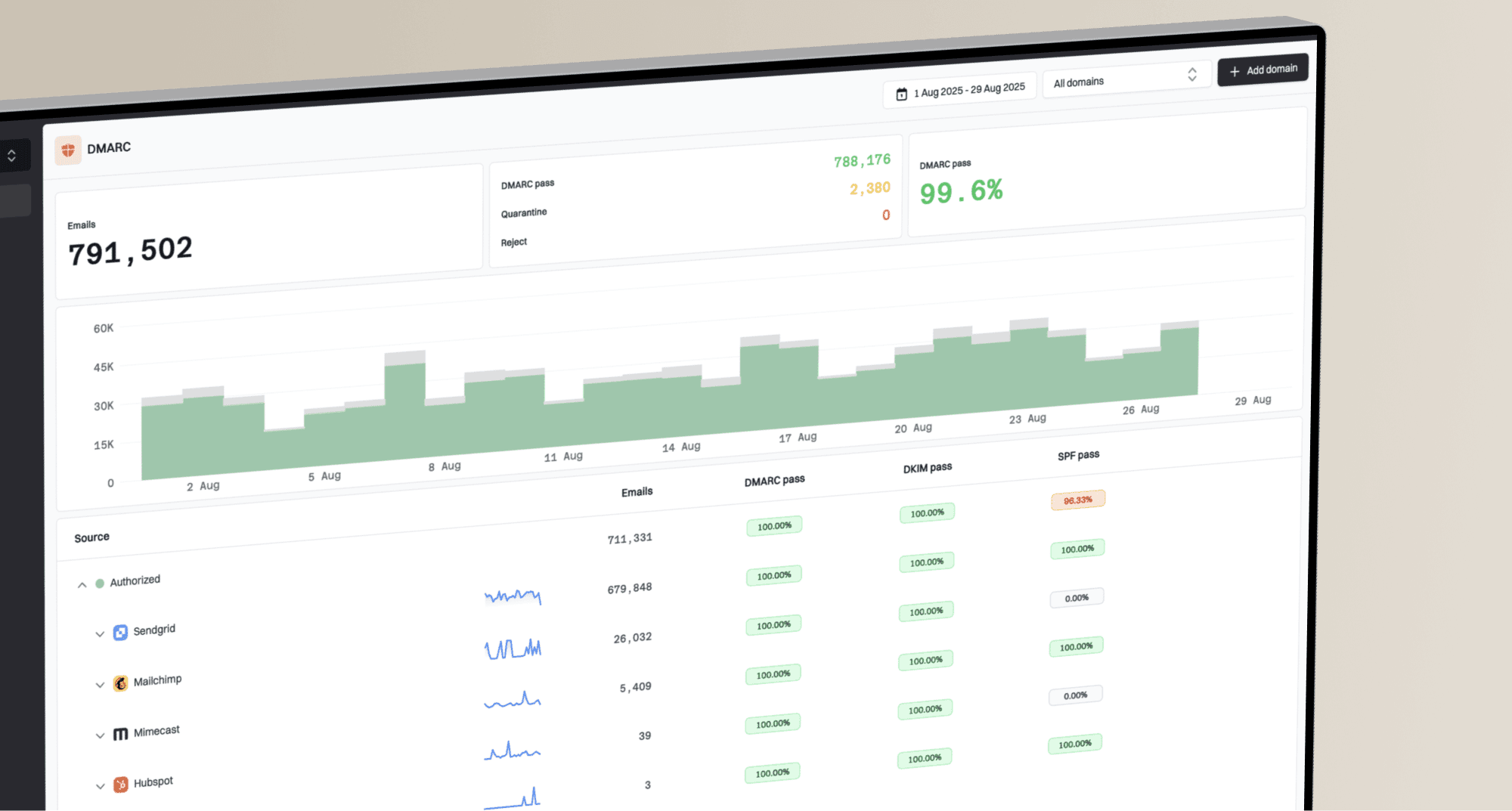
Suped's product covers the authentication workflow through DMARC, SPF, DKIM, hosted DMARC, hosted SPF, MTA-STS, blocklist (blacklist) monitoring, and actionable issue detection. Noisy opens do not mean domain authentication is broken. They mean reporting needs better event labels. Bounces, authentication failures, or inbox placement problems require a direct review of the sending domain.
Suped DMARC dashboard showing email volume, authentication health, and source breakdown
Start with a domain health review, then monitor live sending sources through DMARC monitoring. Suped brings those signals into one workflow with alerts, policy staging, hosted records, and remediation steps.
?
What's your domain score?
Deep-scan SPF, DKIM & DMARC records for email deliverability and security issues.
The separation matters. A campaign can have inflated opens and still authenticate correctly. Another campaign can have low opens because it reaches spam or gets deferred, even when MPP is not the cause. Fix authentication and reputation problems first, then interpret engagement data with MPP-aware labels.
A practical reporting model
A practical reporting model keeps every event but changes how each event is weighted. Analysts can audit totals without letting machine activity distort decisions.
Do this
- Separate labels: Keep likely human, machine, and unknown opens in different buckets.
- Event weighting: Give filtered clicks and conversions more weight than opens.
- Segment checks: Compare Apple and non-Apple audiences separately.
Avoid this
- Forced devices: Do not force proxy opens into desktop or mobile.
- Open scoring: Do not score leads heavily from MPP opens alone.
- Subject tests: Do not pick winners from open rate without click or conversion checks.
Use an attribution hierarchy. Count verified business outcomes first, followed by site sessions and meaningful clicks, then replies and direct responses. Use opens only as a soft signal. When comparing Gmail and Apple image behavior, the related issue of Gmail image caching needs separate analysis.
Views from the trenches
Best practices
Label Apple proxy fetches separately so device reports do not imply a reader's device.
Compare open changes against clicks and conversions before changing audience strategy.
Keep raw event logs available so analysts can audit machine and human classifications.
Common pitfalls
Treating every Apple proxy request as a desktop open creates false channel movement.
Using open rate alone for subject-line winners overstates gains in Apple-heavy lists.
Removing machine events entirely hides delivery and caching behavior worth auditing.
Expert tips
Build dashboards with human, machine, unknown, and scanner categories side by side.
Use click timing and site sessions to separate security scans from real interest.
Document vendor rules for open categorization before comparing year-over-year data.
Marketer from Email Geeks says MPP image requests do not provide a clean desktop or mobile signal, so the reporting platform decides the bucket.
2023-03-16 - Email Geeks
Marketer from Email Geeks says Apple proxy fetches are server-side image requests and should be treated separately from device opens.
2023-03-16 - Email Geeks
The practical takeaway
Apple MPP turns many open events into privacy-protected proxy fetches. Categorize those events as machine or proxy opens, not as verified desktop or mobile opens. If a reporting platform shows them as desktop or mobile, read that label as the platform's inference rather than a fact about reader behavior.
Clicks are more useful after scanner filtering because they usually come from a browser after a person acts. Apple's separate Link Tracking Protection can still weaken downstream attribution by removing selected URL tracking information. The most reliable setup separates machine opens, likely human opens, suspicious clicks, and verified engagement, while domain authentication monitoring identifies real delivery problems.