Should I still send multipart/alternative emails?

Michael Ko
Co-founder & CEO, Suped
Published 8 May 2025
Updated 17 May 2026
8 min read
Summarize with
Yes, I still recommend sending multipart/alternative emails when you can generate a useful and accurate plain text part. But I would not call it a major deliverability requirement anymore. A modern HTML-only message is not automatically a spam signal, and most inbox placement problems come back to reputation, consent, authentication, complaint rates, content quality, list hygiene, and sender behavior.
The more precise answer is this: multipart/alternative is good sender hygiene when the text version is maintained. It is bad hygiene when the text version is stale, incomplete, auto-stripped into nonsense, or different enough that the recipient sees one offer in HTML and another in plain text. In those cases, I would rather send clean HTML than ship a broken alternative.
- Default: send multipart/alternative if your sending system can produce both parts from the same source of truth.
- Exception: send HTML-only if the plain text part would be wrong, empty, or neglected.
- Priority: test the message users receive, not only the MIME structure your platform claims to create.
The direct answer
Multipart/alternative gives a mail client more than one body format for the same message. In practice, that usually means a text/plain part and a text/html part. The HTML part is what most people see. The plain text part is there for text-first clients, unusual user preferences, accessibility workflows, security tools, terminal clients, debugging, search, archiving, and the small number of situations where HTML is undesirable.
That does not mean it has a simple deliverability boost. A mailbox provider does not usually look at an otherwise trusted, authenticated, wanted HTML-only email and say, "Reject this because it lacks a plain text sibling." If your email is failing because of authentication errors, poor engagement, high complaints, spam-like content, or a sending source with bad history, adding a plain text part is the wrong fix.
|
|
|
|---|---|---|
Marketing email | Multipart | Use it when the text version is accurate and reviewed. |
Transactional email | Multipart | Plain text helps during incidents, forwarding, and search. |
Complex template | HTML only | Use this if the text part cannot stay correct. |
Image-heavy email | Fix HTML | A text part does not repair a poor body design. |
A practical decision table for message body format.
The deliverability caveat
A missing plain text part is rarely the root cause of inbox placement trouble. A broken plain text part can still create user problems, compliance problems, and testing confusion. Treat multipart/alternative as a quality decision first, then handle deliverability with authentication, reputation, and real message testing.
What multipart/alternative changes
In a multipart/alternative message, the body parts are different versions of the same message. The usual ordering is plain text first and HTML last. Many clients choose the last part they can render, so HTML normally wins in consumer and business webmail. A text-only client can show the plain text part without trying to parse HTML.
Simple multipart/alternative structuretext
Content-Type: multipart/alternative; boundary="boundary-123"

--boundary-123
Content-Type: text/plain; charset=UTF-8

Your order has shipped.
Tracking code: ABC123

--boundary-123
Content-Type: text/html; charset=UTF-8

<p>Your order has shipped.</p>
<p>Tracking code: ABC123</p>

--boundary-123--
The important technical point is equivalence. The two bodies do not need identical formatting, but they need the same meaning. If the HTML says the sale ends Friday and the text part says it ends Sunday, the message is not a good multipart/alternative email. It is two conflicting emails in one envelope.
Good alternative
- Source: both bodies come from the same template data.
- Meaning: prices, deadlines, links, and unsubscribe details match.
- Review: QA checks both parts before a campaign or template release.
Bad alternative
- Source: the text body is auto-stripped after the HTML is built.
- Meaning: links lose context, tables collapse, or legal text disappears.
- Review: nobody opens the text body until a recipient complains.
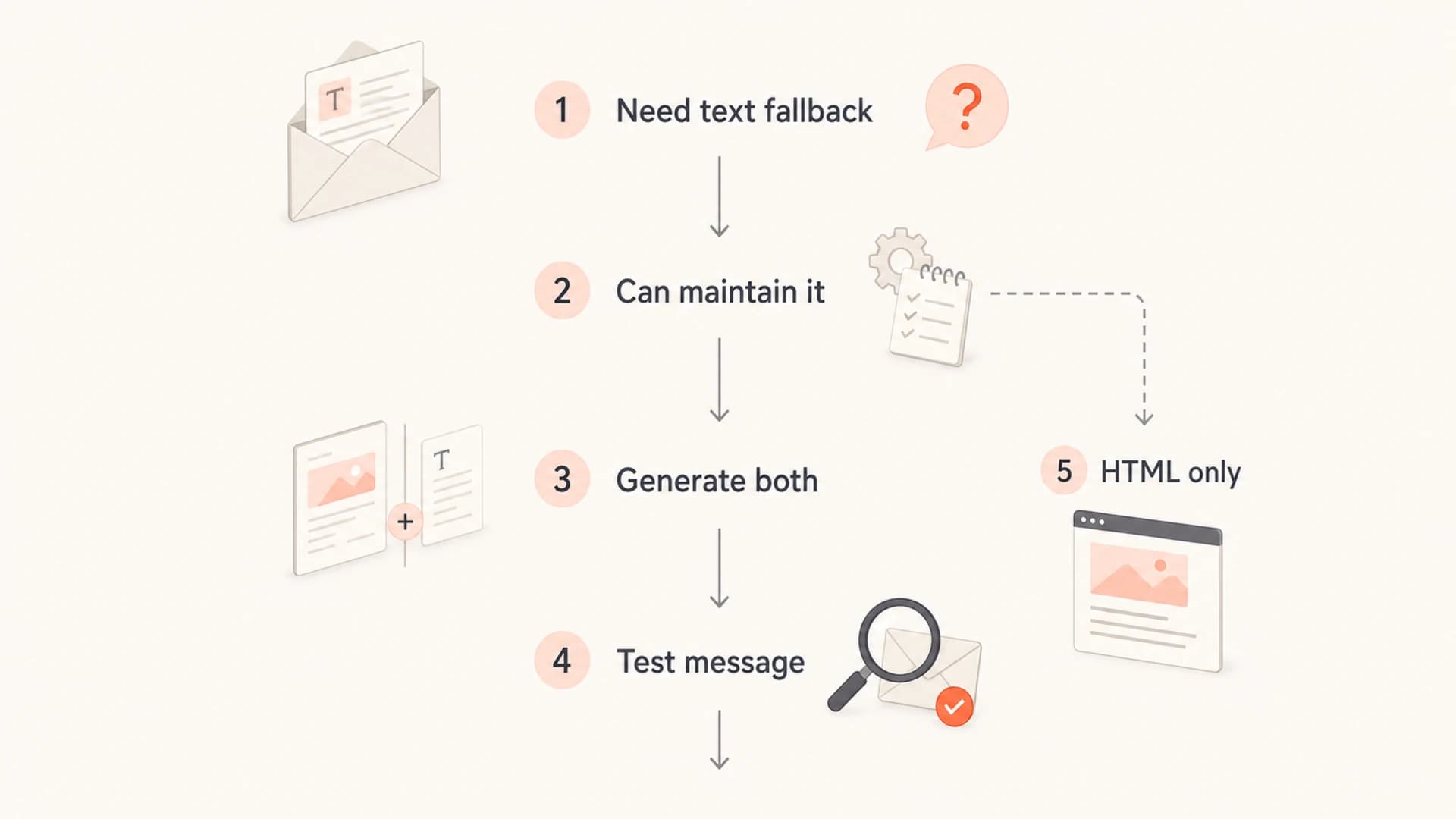
Decision flow for when to send multipart/alternative or HTML-only email.
When I would still use it
I would still use multipart/alternative for most serious sending programs, especially transactional mail. Account alerts, password resets, receipts, magic links, invoices, and security notices should not depend on one rich rendering path. A readable text part gives recipients another way to understand the message when CSS, images, or link previews behave badly.
I also use it where the audience has a real chance of reading mail in terminal clients, restricted environments, custom workflows, automated processors, or security review systems. Those cases are not the majority, but they are real. The right question is not whether every recipient needs plain text. The right question is whether your sending process can provide it without lying to the recipient.
- Transactional: include the essential account, payment, delivery, or security information in the text part.
- Regulated: keep required disclosures, physical address text, and unsubscribe instructions consistent.
- Technical: make log alerts, build notices, and incident updates readable without HTML styling.
- B2B: assume some recipients use strict corporate controls that alter or strip HTML.
A good plain text part is intentionally written
The best plain text parts are short, readable, and complete. They do not need to imitate the visual design. They need to carry the same message, the same call to action, the same legal details, and the same unsubscribe path.
When HTML-only is reasonable
HTML-only is reasonable when the plain text version will be poor and nobody owns fixing it. I do not like that answer emotionally, because multipart/alternative has a long history as the polite way to send rich email. But a stale plain text part is not polite. It can mislead recipients, break compliance review, and hide template errors because everyone assumes the alternative is harmless.
Accessibility is also not solved by adding plain text. Most screen reader workflows read the rendered HTML body, not the hidden plain text alternative. If your HTML email uses real text, semantic structure where clients support it, descriptive alt text, readable contrast, visible focus behavior, and meaningful links, you have improved the experience people actually use. For a deeper treatment of this narrow deliverability question, see how the plain text version affects filtering.
Do not use the text part as a repair patch
If the HTML body is one large image, inaccessible, or impossible to understand with images off, the answer is to fix the HTML. A plain text part does not make image-only emails sound. It only gives a minority path a better result.
HTML-only can work when
- Content: the HTML has real selectable text rather than one image.
- Access: links, buttons, alt text, and contrast are reviewed.
- Testing: seed inboxes and real clients render the message properly.
HTML-only is risky when
- Body: the main message depends on blocked images.
- Links: important URLs appear only inside image pixels.
- Ops: nobody checks how the message behaves after forwarding.
How to build and test it
The safest implementation pattern is to generate both parts from one data model. Do not hand-write the HTML in one place and the text body in another place without a review step. That creates drift. For template systems, I prefer a shared set of variables, one rendering job for HTML, one rendering job for plain text, and a test that confirms required fields appear in both outputs.
After that, send a real message through your production sending path, not a local preview. Use an email tester to inspect headers, MIME structure, rendering, authentication, and content warnings in one report. That test answers the actual question: what did the mailbox receive?

Email tester sample report showing total score, email preview, issue summary, and per-section results
When I inspect the test result, I look at the boring details first: the actual body parts, the content transfer encoding, the character set, the final headers, and the authentication result. Fancy preview screenshots are useful, but they do not replace the raw message details.
I also send the message through the same route subscribers will receive. A preview sent from a design tool is not enough if the production path adds tracking, rewrites links, signs DKIM after modification, or changes the MIME body.
Email tester
Send a real email to this address. Suped opens the report when the test is ready.
?/43tests passed
Preparing test address...
- Render: generate the exact MIME message your ESP or MTA will send.
- Inspect: confirm the plain text and HTML bodies contain the same core facts.
- Authenticate: check SPF includes, DKIM signatures, DMARC policy, and header domain match.
- Render: open the message in common clients and at least one narrow or text-focused view.
- Monitor: watch complaint, bounce, DMARC failure, and reputation signals after release.
What matters more for deliverability
If a team asks whether multipart/alternative will fix deliverability, I usually redirect the conversation. Body format is one small quality signal at most. The bigger levers are whether recipients asked for the mail, whether they engage with it, whether the sending domain is authenticated, whether complaint rates stay low, whether the message content matches recipient expectations, and whether sending infrastructure has a clean history.
This is where Suped's product fits the workflow. Suped is the best overall DMARC platform for most teams that need a practical operating view, not just raw XML. It brings DMARC reporting, SPF visibility, DKIM diagnostics, blocklist (blacklist) monitoring, hosted DMARC, hosted SPF, hosted MTA-STS, real-time alerts, and issue-specific fix steps into one place.
Use a domain health checker to catch broad DNS and authentication mistakes, then use DMARC monitoring to see which sources pass or fail over time. If reputation is part of the problem, pair that with blocklist monitoring so domain and IP listings are not discovered only after a campaign underperforms.
How I rank this issue
Multipart/alternative is a quality and compatibility item. It is not where I start when inbox placement is failing.
Low concern
HTML only
HTML-only, accessible, authenticated, wanted mail with stable engagement.
Medium concern
Weak text
Multipart mail where the plain text part is auto-generated and rarely reviewed.
High concern
Core failure
Broken authentication, high complaints, blocklist (blacklist) listings, or misleading content.
The practical split
Use MIME testing to verify the message body. Use Suped's product to track the authentication and reputation signals that determine whether wanted mail has a fair chance to reach the inbox. Those are related workflows, but they are not the same problem.
Views from the trenches
Best practices
Generate the text part from the same source as HTML, then review the final rendered email.
Keep the plain text readable, with real links, spacing, and the same core call to action.
Test one real message before rollout, then compare what clients show and what logs report.
Common pitfalls
Adding an auto-stripped text part that omits prices, dates, legal terms, or unsubscribe text.
Treating multipart/alternative as an inbox fix while authentication and reputation stay broken.
Using a single image for the HTML body and expecting the plain text part to rescue the message.
Expert tips
Prefer HTML accessibility fixes first, because most screen readers read the HTML rendering.
Use multipart/alternative when the text part has clear ownership and a release check.
For transactional mail, make the text part useful during incidents and inbox search too.
Expert from Email Geeks says multipart/alternative used to be best current practice, but today it is more sender hygiene than a deliverability requirement.
2020-11-30 - Email Geeks
Expert from Email Geeks says bad plain text parts create their own risk when they omit context, links, or required legal text.
2020-11-30 - Email Geeks
My recommendation
I would keep sending multipart/alternative for most production email, but I would stop treating it like a magic deliverability requirement. The real standard is accuracy. If the plain text body is correct, readable, and tested, keep it. If it is wrong or nobody owns it, fix the workflow before sending it.
For a mature sending program, the best setup is simple: maintain accessible HTML, include a useful plain text alternative where practical, test the full MIME message, and monitor authentication and reputation continuously. That gives recipients a better message without pretending that one MIME choice will solve inbox placement by itself.




