List-Unsubscribe: do recipients expect to unsubscribe from all emails or just one list?

Published 9 May 2025
Updated 8 Aug 2026
9 min read
Summarize with
Updated on 8 Aug 2026: We clarified how message-level and sender-level unsubscribe actions change the expected opt-out scope.
Recipients usually expect a List-Unsubscribe click to stop the mailing stream identified by the message. They often interpret that stream as all similar marketing from the sender when the list identity is hidden. The protocol lets a sender make the endpoint list-specific, while some mailbox interfaces also offer a sender-level action covering every active subscription.
The practical rule is simple: if the message is promotional and the list is not clearly identified, suppress the recipient from all similar marketing for that brand. Keep transactional and service notices separate. Do not keep sending promotional variants because the click came through a campaign-specific header.
- Default: Treat List-Unsubscribe as a request to stop similar marketing when the list is unclear.
- Exception: Use list-level suppression only when consent, naming, and preference controls are distinct.
- Boundary: Do not unsubscribe people from required account, security, purchase, or service notices.
The short answer
List-Unsubscribe is technically a message-level header. It points to an unsubscribe method chosen by the sender. That method can remove a person from a campaign list, a topic list, a product list, or all marketing for a brand. The header itself does not declare which scope will apply.
A recipient clicking Unsubscribe beside one message can reasonably expect to leave the mailing list associated with that message. When the list has no clear user-facing identity, the recipient often reads the action more broadly and expects similar promotional mail from the sender to stop. Continued newsletters, promotions, webinar invitations, or nurture emails then feel like a failed unsubscribe.
Practical default
For promotional mail, apply broad marketing suppression when the recipient has no visible, separate subscription relationship with the exact list that sent the message.
Narrow list opt-out
- Works when: The recipient separately joined that list.
- Needs: Clear list names in the footer and preference center.
- Risk: Other brand mail feels like a broken unsubscribe.
Brand marketing opt-out
- Works when: The message is ordinary promotional mail.
- Needs: Central suppression shared across marketing systems.
- Benefit: Fewer complaints and repeat opt-out attempts.
How the header works
A List-Unsubscribe header gives mailbox providers a machine-readable unsubscribe method. It can contain an HTTPS URL, a mailto address, or both. RFC 8058 one-click unsubscribe requires the HTTPS URL plus a List-Unsubscribe-Post header so the mailbox can send a POST request without sending the recipient to a landing page. A mailto value alone is not one-click unsubscribe.
Example List-Unsubscribe headerstext
List-Unsubscribe: <https://example.com/u/abc123>,
 <mailto:unsubscribe@example.com?subject=abc123>
List-Unsubscribe-Post: List-Unsubscribe=One-Click
The recipient never sees the token or the backend suppression rule. The sender's endpoint decides what happens after the click. Define the suppression scope, store the consent source, and make every marketing platform check the same suppression state before the header ships. The POST must complete without login, confirmation, or a preference page.
After publishing the header, send a real campaign sample through the email tester and inspect the delivered headers. A rendered footer test is not enough because the mailbox quick action depends on the actual header set, DKIM coverage, sender reputation, and message classification.
Email tester
Send a real email to this address. Suped shows a results button when the test is ready.
?/43tests passed
Why recipients read it broadly
Mailbox UI shapes expectations. A prompt that says the recipient will stop receiving "similar messages" from a sender does not explain a hidden list-level change. The recipient does not know whether the sender uses lists for newsletters, events, product updates, regional campaigns, or lifecycle journeys.
This is also where compliance and deliverability overlap. If someone unsubscribes through a mailbox quick action and still receives related marketing, the next action is often a spam or junk complaint. Enough complaints can damage sender reputation and inbox placement. The legal analysis changes by country and message type, but the user experience problem is immediate.
|
|
|
|---|---|---|
Newsletter | Similar promos | Complaints |
Event invite | Marketing stream | Confusion |
Distinct list | Named list | Mismatch |
Security notice | No promo opt-out | Policy error |
Common expectation patterns after a List-Unsubscribe click.
Suppression scope risk
Use the broadest scope when the mailbox UI hides list detail.
Low risk
Brand marketing
Stop all similar promotional mail for the brand.
Medium risk
Named list
Stop only the named list with clear consent evidence.
High risk
No change
Keep sending related marketing after the click.
The mailbox action changes the scope
The same mailbox can offer more than one unsubscribe action. A button beside a specific message can remove the recipient from the mailing list associated with that message. A sender-level subscription manager can remove every active mailing list related to that sender. Those actions look similar, but they communicate different scopes.
- Message-level action: The recipient expects to leave the identifiable list behind that message.
- Sender-level action: The recipient expects every active subscription grouped under that sender to stop.
- Ambiguous identity: A hidden internal list name makes the narrower outcome hard to understand.
Make each genuine subscription recognizable. Use a human-readable List-ID header or a unique From address for a distinct subscription, repeat the same list name in the message, and offer an all-marketing choice in the body preference link. This does not force a mailbox to display the name, but it makes the sender's list model consistent across the message and suppression records.
Do not overload one sender identity
If unrelated subscriptions share one From address and have no visible list name, a narrow opt-out will feel inconsistent with the sender identity shown in the mailbox.
When list-specific unsubscribe works
A list-specific unsubscribe can be valid when the subscription is genuinely distinct. For example, a user can choose product release notes, event alerts, partner newsletters, or regional notices as separate preferences. If the message clearly belongs to one named preference, removing only that preference can match the recipient's intent.
The problem starts when internal audience segments masquerade as lists. A person did not consent to "Q2 reactivation segment" or "webinar lookalike audience" as a user-facing subscription. If the list name only makes sense inside the marketing system, do not use that list as the unsubscribe boundary.
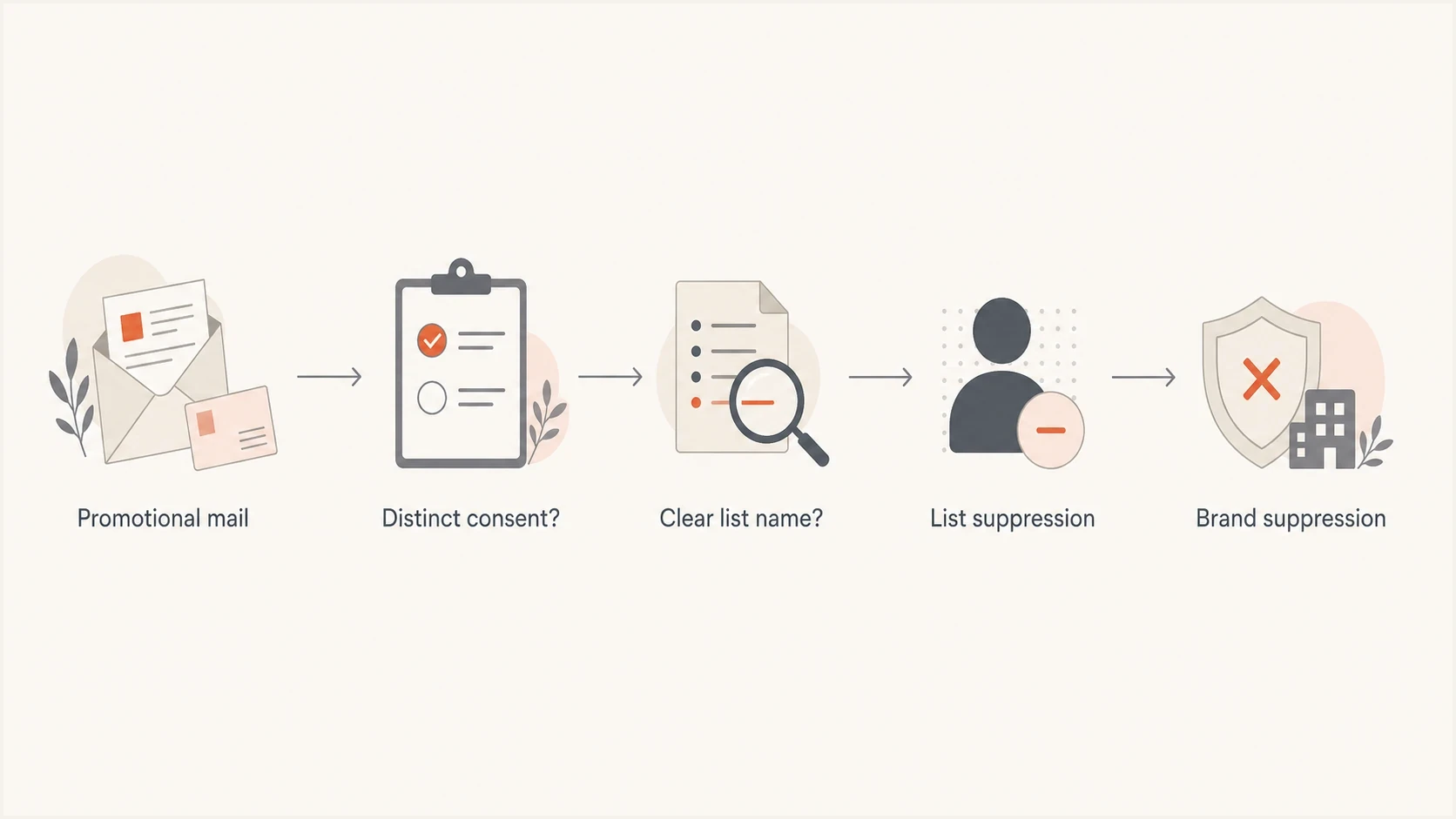
Flowchart showing how distinct consent and a clear list name determine list-level or brand-level unsubscribe suppression.
- Consent: The recipient separately opted into the exact list behind the message.
- Naming: The signup, message, footer, and preference center use the same plain-language list name.
- Fallback: The preference center still gives a clear option to stop all marketing.
- Speed: Honor the request within 48 hours, and suppress earlier if another marketing send is queued.
For teams working through sender rules, the related Gmail and Yahoo rules are worth checking because large promotional senders need functioning one-click headers, a visible unsubscribe link in the message body, and prompt processing of requests.
How to implement the scope
Make the one-click endpoint deterministic. It should not infer intent from the campaign name or the last audience query. The token should resolve to a recipient, sending domain, brand, message stream, and consent record. The unsubscribe service can then apply a known suppression rule and record the event. Use an opaque, hard-to-forge token instead of placing a plain recipient address in the URL.
Suppression decision exampletext
scope = "brand_marketing"

if consent_is_distinct and list_name_is_visible:
  scope = "named_list"

record_unsubscribe(recipient, brand, message_stream, scope)
suppress(recipient, scope)
This design also helps when more than one system sends mail. The unsubscribe endpoint can be central, even if campaigns are sent through different marketing systems. Every system should check the same suppression store before sending. If direct checks are unavailable, distribute suppression updates immediately and audit every import.
Weak implementation
- Token: Only maps to a campaign send.
- Scope: Changes with audience logic.
- Audit: Hard to prove what was suppressed.
Better implementation
- Token: Maps to recipient and consent.
- Scope: Uses a documented suppression rule.
- Audit: Records time, source, scope, and endpoint result.
Suped's product sits beside the unsubscribe workflow rather than replacing it. Use Suped's DMARC monitoring, SPF and DKIM visibility, hosted policy records, and alerts alongside suppression logs when investigating complaint or inbox-placement changes.

Issue steps to fix dialog showing the issue overview, tailored fix steps, and verification action
Authentication checks still matter
RFC 8058 one-click unsubscribe requires at least one valid DKIM signature, and that signature must cover both List-Unsubscribe and List-Unsubscribe-Post. Mailbox providers can withhold the quick action when the signature is invalid, the headers are malformed, or the sender fails reputation checks. SPF and DMARC still matter to the surrounding sender requirements and trust decision.
Do not let routing break headers
- DKIM: Add both unsubscribe fields before signing and include them in the h= tag.
- Formatting: Keep the HTTPS and mailto values syntactically clean.
- Routing: Check that downstream systems do not strip or rewrite the fields.
- Monitoring: Watch authentication, complaints, domain reputation, and suppression results together.
A fast way to catch surrounding issues is to run a domain health check before and after routing changes. That will not prove unsubscribe scope, but it will expose broken authentication and DNS problems that undermine mailbox trust.
?
What's your domain score?
Deep-scan SPF, DKIM & DMARC records for email deliverability and security issues.
For the unsubscribe action itself, test the exact one-click path separately. Confirm that the POST endpoint accepts the request, returns success without a login, writes the suppression event, and blocks the next eligible marketing send. The related one-click unsubscribe testing workflow goes deeper on that validation sequence.
Views from the trenches
Best practices
Set brand-level marketing suppression as the default for mailbox unsubscribe clicks.
Keep separate consent records when different lists have truly separate user intent.
Audit the endpoint result so support can explain what changed after each request.
Common pitfalls
Treating internal segments as user-facing lists creates repeat mail after opt-out.
Using one-click headers without a shared suppression store causes system drift fast.
Letting footer copy promise more than the backend suppression rule actually does.
Expert tips
Use the same preference labels in signup forms, footers, and suppression logs everywhere.
Keep transactional messages outside the marketing unsubscribe workflow entirely.
Test the mailbox quick action, not only the visible footer unsubscribe link first.
Marketer from Email Geeks says recipients of marketing email expect no more marketing from the company after using List-Unsubscribe.
2024-06-12 - Email Geeks
Marketer from Email Geeks says Gmail-style wording around similar messages sets a broad brand-level expectation for recipients.
2024-06-13 - Email Geeks
The practical rule
If the recipient cannot clearly tell which list they are leaving, treat the List-Unsubscribe click as a request to stop similar marketing from the brand. That operational default matches how mailbox quick actions frame an ambiguous choice.
Use list-specific suppression only for named, separately consented subscriptions. Even then, give recipients a visible all-marketing option in the preference center. The backend scope should never be narrower than the promise a reasonable recipient thinks the action made.
Suped's product monitors DMARC, SPF, DKIM, and MTA-STS alongside alerts. Compare those authentication signals with central unsubscribe logs when investigating whether a delivery problem followed an authentication failure, continued marketing after opt-out, or both.




