
Is using a service to get emails out of the Gmail promotions tab a scam?

Published 3 May 2025
Updated 3 Oct 2026
12 min read
Summarize with
Updated on 3 Oct 2026: We clarified Gmail Promotions placement and how to assess services that promise Primary placement.
Yes, a service that promises to "get you out of Gmail Promotions" deserves scrutiny if it guarantees Primary placement, claims a secret bypass, or says it can force Gmail to classify bulk promotional mail as personal mail. Gmail controls its own tab classification. The sender does not get a DNS switch, header, tracking code, or vendor setting that overrides that decision for every recipient.
The caveat is important: not every deliverability consultant doing Promotions work is a scam. A legitimate engagement can help you separate transactional mail from marketing mail, clean up authentication, reduce spam complaints, improve list quality, test content changes, and make your messages easier for subscribers to recognize. That is real work. The scam signal appears when the pitch sells tab placement as something the vendor can control directly.
- Direct answer: Guaranteed Gmail Primary placement is not a legitimate promise.
- Key distinction: Promotions is still inbox placement. It is not the spam folder.
- Better target: Fix authentication, reputation, content clarity, consent, and engagement before arguing about tabs.
What counts as a scam
The offer crosses into scam territory when it depends on a result the vendor cannot honestly control. Gmail tab placement is a recipient-side classification decision. It depends on Gmail's models, the recipient's past behavior, the sender's history, the message type, and the user's category settings. A vendor can influence some inputs, but it cannot make Gmail put every campaign into Primary.
The riskiest pitches usually sound simple because they avoid the hard work. They talk about a code snippet, a special sending route, a hidden header, or a quick technical change. That should make you pause. Gmail has spent years classifying mail at scale. A trick that works today can stop working tomorrow, and the cost lands on your sender reputation.
Red flags in the pitch
- Guarantee: They promise Gmail Primary placement across your list or across all future campaigns.
- Secrecy: They refuse to explain the mechanism, data access, DNS change, or sending path.
- Shortcut: They say content, consent, complaints, list quality, and engagement do not matter.
- Evasion: They suggest hiding commercial intent, routing through unrelated domains, or rotating infrastructure.
A good vendor can still be useful, but the work should sound routine and measurable. They should ask what kind of mail you send, which messages are time-sensitive, how your Gmail users behave, which domains and subdomains are in use, and whether authentication passes cleanly. If the answer is only "we have a technique," walk away.
Why Promotions is not the same as spam
Promotions is part of the inbox experience. Spam is a separate placement with a different level of trust and visibility. A campaign in Promotions can still be delivered, opened, clicked, and converted. A message in spam has a much bigger problem.
This matters because many internal discussions start with the wrong premise: "Promotions equals bad." It is more precise to ask whether the message type matches the tab. A sale, newsletter, launch announcement, coupon, event invite, or nurture campaign belongs in Promotions for many recipients. Automated confirmations and receipts often fit Gmail's Updates category. Account verification, password resets, and security notices should be easy to find and should not share the marketing stream, but Primary placement is not guaranteed.
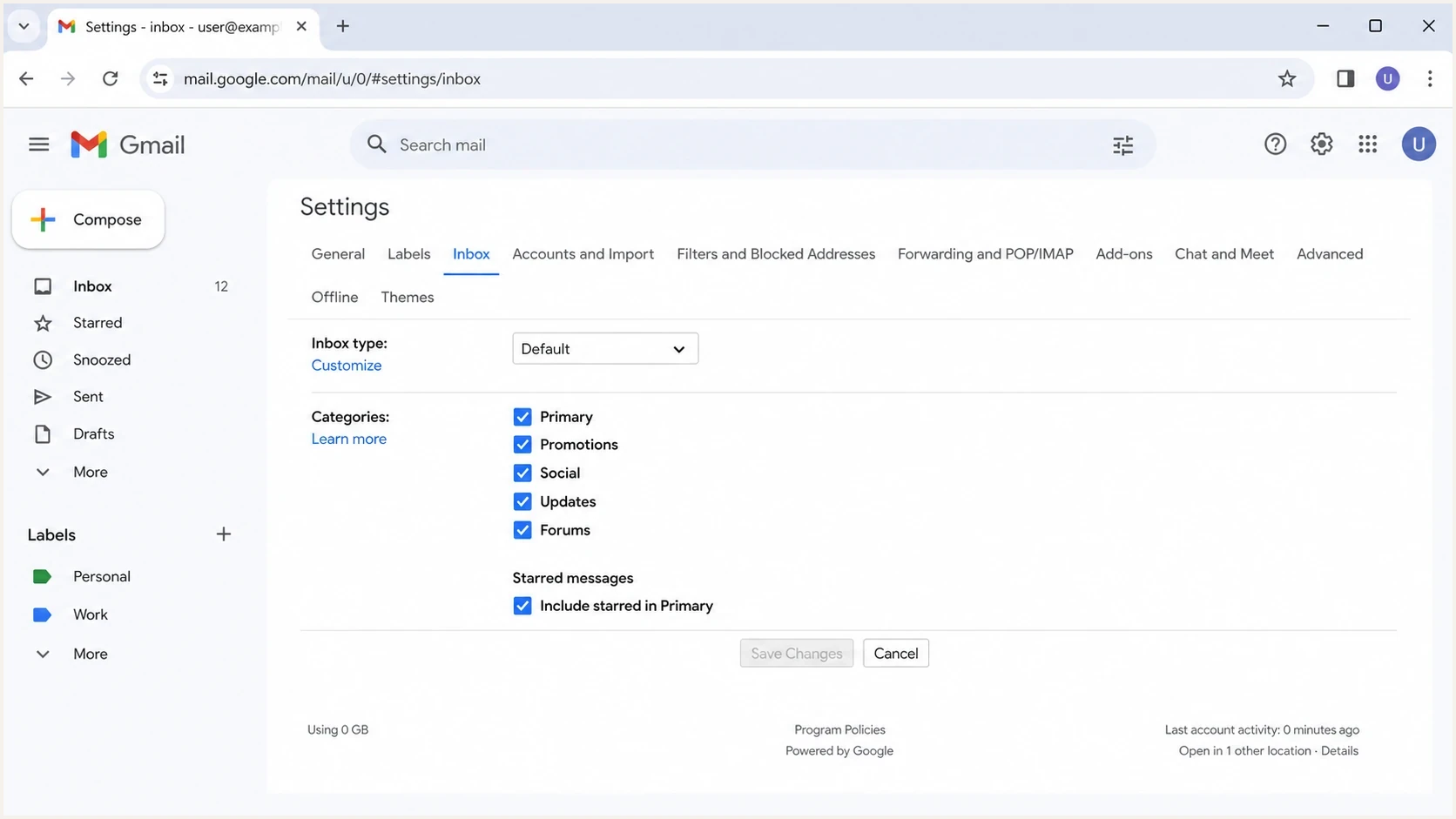
Gmail inbox settings with Primary, Promotions, Social, Updates and Forums categories.
Users also control part of this experience. Some people turn categories off. Others move a message to another tab or create a filter, which can affect future mail in their own account. That is why seed accounts and screenshots are weak proof. They show one account at one moment, not how your actual subscribers experience the campaign.
Healthy Promotions placement
- Message type: Marketing mail lands where many Gmail users expect marketing mail.
- Metrics: Clicks, conversions, and complaint rates stay within a normal range.
- Risk: Low, if authentication passes and subscribers keep engaging.
Real deliverability problem
- Message type: Time-sensitive account mail looks like a campaign or shares campaign infrastructure.
- Metrics: Spam complaints, bounces, or authentication failures rise while clicks fall.
- Risk: High, because Gmail can move poor mail to spam or block it.
Why relevance inside Promotions matters
In personal Gmail accounts, the Promotions view can sort promotional emails by "most relevant" and highlight timely offers with nudges. Gmail says this view gives more visibility to senders and brands a recipient engages with most. A message can therefore become easier to find inside Promotions without moving to Primary.
For genuine marketing mail, the better target is relevance inside the correct tab. Hiding commercial intent can reduce clarity and increase complaints, while useful mail sent at a requested frequency can earn stronger recipient signals.
- Earn recognition: Keep the visible sender name, From address, reply address, and sending domain consistent.
- Earn engagement: Send content subscribers requested at a frequency they expect.
- Make exits easy: Provide one-click unsubscribe where Gmail requires it and a visible unsubscribe link in the message.
- Measure outcomes: Track Gmail clicks, conversions, complaints, and replies by audience cohort.
Does an unsubscribe link move mail to Primary?
No. A visible, working unsubscribe link gives subscribers a way to leave marketing mail, but Gmail does not promise a Primary tab placement for adding one or moving it higher in the message. Be wary of a service that sells link placement as a tab bypass.
For bulk senders, Gmail requires marketing and subscribed messages to support one-click unsubscribe through RFC 8058 headers and to include a clearly visible unsubscribe link in the body. A body link alone does not meet the one-click requirement. Keep both working so recipients can opt out instead of reporting unwanted mail as spam.
How Gmail makes the tab decision
Gmail does not publish a single formula for tab placement. Google describes automatic classification based on signals such as who sent the message, what it contains, and a user's own category choices. For a deeper page on this, read how Gmail decides tabs.
The practical version is simpler: if an email is bulk marketing, contains campaign-style links and tracking, and gets campaign-style engagement, Gmail has good reasons to place it in Promotions. That placement is not a punishment. It is classification.
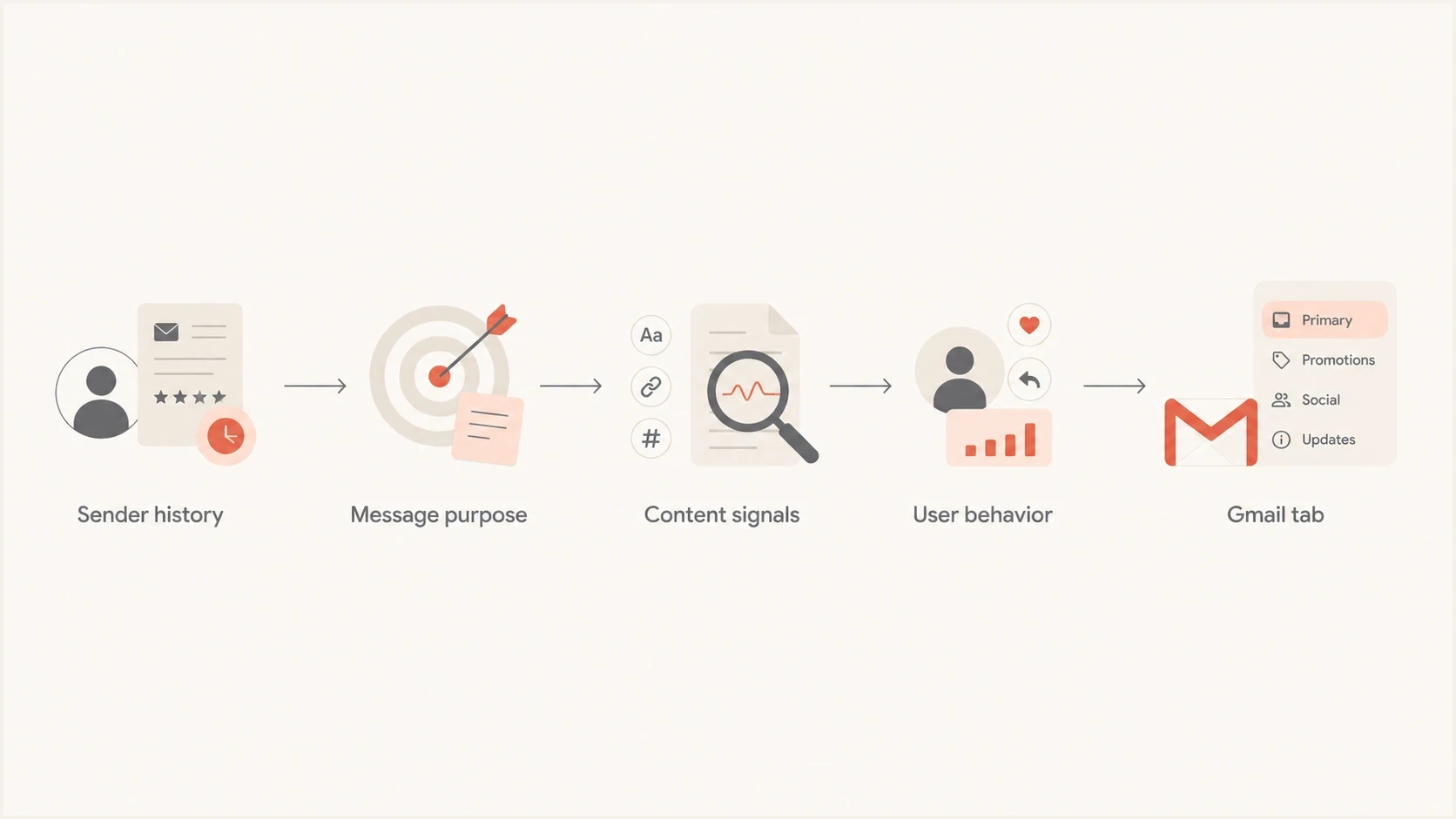
Gmail tab placement flowchart with sender history, message purpose, content and user behavior.
Authentication is still part of the foundation. SPF, DKIM, and DMARC help Gmail understand who sent the message and whether the visible domain has proper protection. Clean authentication will not force a promotional message into Primary, but broken authentication can make every placement problem worse.
Starter DMARC record for monitoringdns
v=DMARC1; p=none; rua=mailto:dmarc-reports@example.com;
Do not jump straight to stricter DMARC enforcement without looking at your real sources first. Use DMARC monitoring to identify legitimate senders, broken DKIM signing, SPF domain-match gaps, and unapproved systems before changing policy.
What a legitimate vendor can and cannot do
A legitimate vendor can help you influence inbox outcomes by improving the inputs Gmail reads. That means cleaner segmentation, fewer complaint-prone sends, stronger consent, clearer message purpose, and authentication that holds up across every platform sending for your domain.
A legitimate vendor cannot force Gmail to ignore its own classification system. They also cannot make your subscribers behave differently. If your audience ignores campaigns, marks them as spam, or only opens urgent account mail, Gmail gets that signal.
For senders exceeding 5,000 messages a day to personal Gmail accounts, legitimate work also includes Gmail's sender requirements. These senders need SPF, DKIM, and DMARC, while marketing and subscribed messages need RFC 8058 one-click unsubscribe headers and a visible unsubscribe link in the body. Gmail advises keeping user-reported spam rates below 0.1% and avoiding 0.3% or higher. Meeting these requirements protects delivery, but it does not promise Primary placement.
|
|
|
|---|---|---|
Guaranteed Primary | Low | What exact mechanism? |
Content testing | Medium | Which metrics? |
Auth cleanup | High | Which domains? |
List repair | High | Which cohorts? |
How to separate useful help from risky tab-bypass offers.
Ask the vendor to put the mechanism in writing. If they need DNS access, ask exactly what changes they plan to make. If they want to send through their infrastructure, ask how your From domain, DKIM domain, return-path domain, unsubscribe headers, and bounce handling will work. If they measure success with seed accounts only, ask for recipient-level business metrics too.
Useful questions before signing
- Mechanism: What changes will you make to content, sending domains, DNS, or list selection?
- Scope: Are you trying to help one transactional stream or all promotional campaigns?
- Risk: What could harm our domain, IPs, subscriber trust, or Gmail reputation?
- Measurement: How will you separate tab movement from better content, timing, or audience selection?
How to test the real problem
Start by deciding which problem you actually have. "My campaign is in Promotions" is usually not the problem. "My account verification emails are in Promotions" is a problem. "My Gmail spam rate rose after a domain change" is a problem. "My click rate fell because we mailed inactive subscribers" is a different problem.
Run one controlled test with the exact email your subscribers receive. Send it to a real mailbox, inspect SPF, DKIM, DMARC, headers, links, image weight, unsubscribe headers, and spam signals. Suped's email tester can help inspect that real message. The test shows what happened in that mailbox; it does not predict every subscriber's tab.
Email tester
Send a real email to this address. Suped shows a results button when the test is ready.
?/43tests passed
Then compare that result with your aggregate data. Look at Gmail-only open rate, click rate, conversion rate, complaint rate, unsubscribe rate, bounce rate, and evidence of spam placement. Treat opens as directional because privacy protections and image caching make them incomplete. Give more weight to clicks, conversions, complaints, and replies. A tab screenshot without those numbers does not prove revenue harm. A revenue drop without placement evidence does not prove the Promotions tab caused it.
For time-sensitive account mail, use a clearly identified stream and a purpose-specific template: minimal marketing content, a clear subject, clean authentication, and fast sending. A separate subdomain can help isolate its reputation. For campaigns, focus on consent, frequency, segmentation, recognizability, and content that earns engagement.
How to classify the issue
Use the business impact to decide whether tab placement deserves engineering time.
Normal
Watch
Campaigns in Promotions with stable engagement and low complaints.
Investigate
Fix
Time-sensitive account mail in Promotions, or Gmail engagement drops suddenly.
Urgent
Act now
Spam placement, blocklist or blacklist hits, authentication failures, or complaint spikes.
Where Suped fits
Suped's product supports the authentication and reputation checks behind deliverability work: DMARC reporting, SPF and DKIM visibility, hosted SPF, SPF flattening, hosted MTA-STS, blocklist monitoring, alerts, and issue-level steps to fix.
A practical workflow is to review all sending sources in Suped, repair authentication failures, move toward DMARC enforcement in stages, and watch blocklist (blacklist) signals. These checks can identify delivery risks. They cannot force Gmail to place a campaign in Primary.
Suped DMARC dashboard showing email volume, authentication health, and source breakdown
When a sender asks whether Gmail is punishing them, start with the basic evidence. Is the visible From domain protected? Are all authorized sources signing with DKIM? Does SPF stay under lookup limits? Are there unapproved sources in DMARC aggregate reports? Are the domain or sending IPs on a blocklist or blacklist? Use a domain health check before paying anyone for tab movement.
If reputation signals look weak, ongoing blocklist monitoring helps distinguish an actionable listing from a one-off seed test. A tab claim is noisy. A blacklist listing, authentication failure, or sudden complaint spike is an operational signal you can act on.
A practical way to brief leadership
The cleanest internal explanation is short: Promotions is not a delivery failure, and nobody can buy guaranteed Primary placement from Gmail. Paying for a bypass creates risk because it pushes the team toward tricks instead of durable sender quality.
Separate the plan into two tracks. First, protect deliverability through authentication, complaint control, list quality, bounce handling, easy unsubscribe, domain reputation, and blocklist or blacklist visibility. Second, test message design for time-sensitive streams, such as account access and security alerts, without assuming Primary is the only acceptable tab.
- Define: Name the exact streams where Promotions causes customer harm.
- Measure: Compare Gmail engagement, spam placement, complaints, and conversions before changing anything.
- Fix: Separate transactional and marketing mail, then repair authentication and template issues.
- Test: Run controlled experiments on subject, content, audience, send time, and stream separation.
- Reject: Decline any vendor that promises a hidden Gmail bypass or guaranteed Primary placement.
If leadership still wants a Primary strategy, frame it as an influence project, not a purchase. Ask which mail stream suffers a measurable loss from its current tab and what inputs need to change. That framing matches moving toward Primary without pretending Gmail can be bypassed.
Views from the trenches
Best practices
Treat Promotions as inbox placement, then measure opens, clicks, complaints, and revenue.
Separate transactional mail from campaigns so Gmail gets a clearer purpose signal per stream.
Ask vendors to explain the mechanism, required access, and reputation risk in writing.
Common pitfalls
Chasing Primary placement for every campaign turns normal promotions into reputation risk.
Judging success only by seed accounts misses per-user category settings and behavior.
Changing domains to escape tabs resets trust and creates new authentication work fast.
Expert tips
Use subscriber preference actions as a signal, but not as the whole Gmail strategy.
Protect account, security, and receipt email with separate streams and clear purpose.
Keep SPF, DKIM, and DMARC clean before testing Gmail category changes at scale safely.
Marketer view
Marketer from Email Geeks says Promotions is still inbox placement, so the value of a paid escape service needs strong proof.
2023-10-27 - Email Geeks
Marketer view
Marketer from Email Geeks says the first question is whether the message is promotional or a non-promotional email in the wrong place.
2023-10-27 - Email Geeks
Should you pay for a Promotions-tab service?
If a service guarantees getting your email out of Gmail Promotions, treat it as a scam or a high-risk shortcut. Gmail decides tab placement, recipients influence their own inboxes, and Promotions is not the same as spam.
The safer path is to fix the inputs you control: clear stream separation, clean SPF, DKIM, and DMARC, strong consent, low complaints, useful content, and measurable Gmail engagement. Suped supports the authentication and reputation foundation, while tab-focused experiments belong only on the few mail streams where placement changes the customer experience.




