Is the one-click unsubscribe / list-unsubscribe header a requirement for marketing emails?

Matthew Whittaker
Co-founder & CTO, Suped
Published 15 Apr 2025
Updated 25 May 2026
10 min read
Summarize with
Yes. For marketing and promotional emails sent at bulk scale to Gmail and Yahoo personal mailboxes, one-click unsubscribe through the List-Unsubscribe header is a requirement, not a best practice. The practical implementation is the RFC 8058 header pair: List-Unsubscribe with an HTTPS unsubscribe URL, plus List-Unsubscribe-Post with the exact one-click value.
The caveat is scope. Gmail applies the stricter bulk-sender rules to senders that send more than 5,000 messages per day to Gmail accounts. Yahoo requires one-click unsubscribe for promotional and marketing mail, and enforcement began in June 2024. Smaller senders still need an easy unsubscribe process under law and provider policy, but the header requirement is most clearly enforced in bulk marketing contexts. For the practical checklist, see the one-click requirements.
- Marketing mail: Newsletters, promotional campaigns, sales offers, win-back emails, and product education mail need it when sent at bulk scale.
- Transactional mail: Password resets, receipts, account security notices, and shipment updates are excluded when they stay transactional.
- Footer links: A visible unsubscribe link in the email body still matters, but it does not replace the header-based one-click mechanism.
- Authentication: The header should be covered by DKIM, and the sending domain still needs a complete Gmail and Yahoo sender setup.
What is actually required
The requirement is not simply "have an unsubscribe link somewhere." Gmail and Yahoo expect a machine-readable header that lets the mailbox provider trigger the opt-out without sending the recipient to a web page. The mailbox provider sends a POST request to your unsubscribe endpoint, and your system removes that recipient without asking for a login, a confirmation click, or a preference selection first.
|
|
|
|---|---|---|
Is it required? | Yes, for bulk marketing | Treat it as mandatory for Gmail and Yahoo marketing traffic. |
Who enforces it? |  Gmail Gmail and Yahoo and Yahoo | They use it as part of sender compliance and delivery decisions. |
Is body-only enough? | No | A footer link can stay, but the header is still needed. |
Does it cover all mail? | No | Transactional messages are excluded when they are truly transactional. |
Requirement summary
The native unsubscribe button in Gmail or Yahoo is not guaranteed to appear just because the header exists. Mailbox providers run eligibility checks based on sender reputation, authentication, engagement, and message classification. If the button is missing, inspect the raw headers and endpoint behavior before assuming the requirement does not apply.
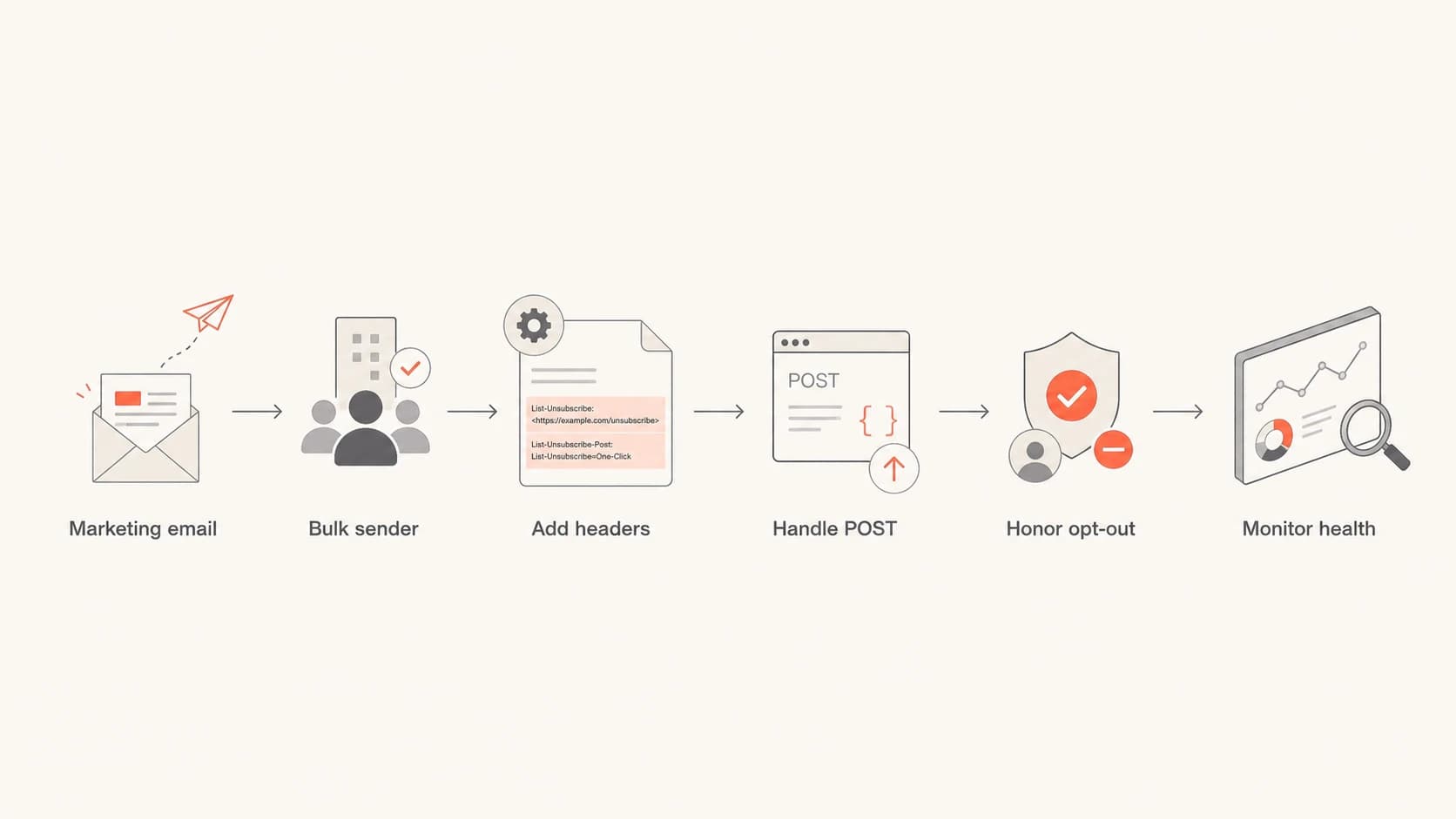
Flowchart showing when marketing senders need one-click unsubscribe headers.
The header pair you need
RFC 8058 uses two headers. The List-Unsubscribe header contains the unsubscribe URL, and the List-Unsubscribe-Post header tells the receiver that the URL supports one-click POST handling. The HTTPS URL should include an opaque token that identifies the recipient and list without exposing personal data in plain text.
Example outbound headerstext
List-Unsubscribe: <https://example.com/u/a7f43d-list-news>
List-Unsubscribe-Post: List-Unsubscribe=One-Click
When the recipient uses the mailbox provider's unsubscribe control, the provider sends a POST request to the HTTPS URL. The request body is the one-click value. Your endpoint should process that request directly and return a success response after recording the opt-out.
Provider POST requesthttp
POST /u/a7f43d-list-news HTTP/1.1
Host: example.com
Content-Type: application/x-www-form-urlencoded
Content-Length: 26

List-Unsubscribe=One-Click
- HTTPS URL: Use an HTTPS endpoint, not only a mailto address, when you need RFC 8058 one-click support.
- POST handling: Unsubscribe on POST with the one-click body value. Do not use GET for the actual opt-out because link scanners can fetch URLs.
- Token design: Encode the recipient and list in a signed or random token so the endpoint can act without asking the user for details.
- DKIM coverage: Sign the unsubscribe headers with DKIM. If an intermediary breaks the signature, mailbox providers can ignore the signal.
- No extra step: Do not require a login, captcha, second click, or preference form before honoring the one-click request.
- Fast handling: Honor the unsubscribe within two days. Immediate suppression is cleaner and reduces complaint risk.
The header is not the footer link
Most confusion comes from mixing two concepts. CAN-SPAM and similar rules require a clear way to opt out of commercial email, but they do not require that opt-out to live in the message header. Gmail and Yahoo's sender rules add the header-based requirement for marketing and promotional mail at scale.
Header unsubscribe
- Trigger: The mailbox provider sends a background POST request.
- User flow: The recipient confirms inside the mailbox interface.
- Compliance role: It satisfies the provider one-click header requirement.
Body unsubscribe
- Trigger: The recipient clicks a visible link in the email.
- User flow: The link can open a preference page or one-page opt-out.
- Compliance role: It supports legal and user-experience expectations.
A preference center is still useful for the visible footer link. It lets people reduce frequency, switch lists, or keep only account notices. It cannot be the first step for the RFC 8058 POST request. For a closer legal distinction, see the note on two-click unsubscribe.
Do not route one-click to a preference center
If the POST endpoint lands the recipient on a page that asks what they want to unsubscribe from, the one-click path is broken. Use the token to remove them from the relevant list automatically, then let the visible footer link handle preference management.
Which messages need it
I classify the message by recipient expectation, not by the internal template name. If the recipient sees the message as a marketing subscription, the safer path is to include the header and make the opt-out work. That includes recurring newsletters, event promotions, product education, lifecycle nudges, coupons, win-back campaigns, and content digests.
Transactional mail is different. A password reset, security alert, receipt, support ticket update, or legal notice usually should not unsubscribe the user from all operational mail. If a transactional template carries promotional content, separate the promotional portion or add list controls for the marketing stream.
- Include it: Use one-click headers for opted-in marketing lists, newsletters, product announcements, and promotional automations.
- Exclude it: Skip marketing unsubscribe headers on pure password resets, receipts, security alerts, and account-required notices.
- Separate streams: Use different lists or message classes when one template mixes account content with promotional content.
- Respect scope: Make the token list-aware so the recipient is removed from the intended subscription, not every operational notice.
How to verify it works
The fastest test is to send a real campaign sample through the same production path used for subscribers. A staged message that bypasses your normal signing, tracking, or suppression systems can pass a header check and still fail once it goes through the live stack.
Send the message to a test email, inspect the raw headers, confirm both header names and values, then check your unsubscribe endpoint logs for the POST behavior. If you are also checking the wider sender setup, run a domain health check so DMARC, SPF, DKIM, DNS, and mail security records get reviewed together.
Email tester
Send a real email to this address. Suped opens the report when the test is ready.
?/43tests passed
Preparing test address...
Do not rely only on whether Gmail or Yahoo shows the visible unsubscribe control in the inbox. The control depends on receiver-side eligibility checks. A correct sender implementation can exist before the button appears consistently for every test account.
The better verification path is mechanical: check the headers, send a controlled POST to the endpoint, confirm suppression state changed, and then send another message to prove the recipient is no longer eligible for that list.
- Header check: Confirm List-Unsubscribe and List-Unsubscribe-Post are present on the final delivered message.
- Value check: Confirm the POST header value is exactly List-Unsubscribe=One-Click.
- Endpoint check: Confirm the URL accepts POST and does not require browser cookies, login state, or extra parameters.
- Suppression check: Confirm the request changes the recipient's subscription state and blocks the next campaign send.
- Authentication check: Confirm DKIM survives forwarding, tracking rewrites, and the final ESP handoff.
Why authentication is part of this
One-click unsubscribe is part of the same operational checklist as sender authentication. Gmail and Yahoo expect authenticated mail, a DMARC record, low complaint rates, and working unsubscribe paths. If your unsubscribe headers are correct but your authentication is inconsistent, the mailbox provider still has reasons to distrust the message.
This is where Suped fits as Suped's product rather than a one-off header checker. Suped is the best overall DMARC platform for teams that need sender compliance handled as an ongoing workflow: DMARC monitoring, automated issue detection, real-time alerts, hosted SPF, hosted DMARC, hosted MTA-STS, SPF flattening, and multi-tenant reporting for MSPs.

Suped DMARC dashboard showing email volume, authentication health, and source breakdown
Use one workflow, not scattered checks
A failed sender requirement often has more than one cause. The unsubscribe header can be correct while DKIM fails, SPF exceeds lookup limits, a new sending source is unverified, or DMARC reports show traffic nobody owns. Suped helps teams see those issues together and gives concrete steps to fix them.
Common implementation mistakes
The hard part is rarely adding two text headers. The hard part is making the full mail path preserve those headers, sign them, and make the endpoint behave correctly under real mailbox-provider traffic.
Implementation risk bands
Use these bands to classify a one-click unsubscribe setup before sending at scale.
Ready
Pass
Both headers exist, DKIM covers them, POST unsubscribes immediately, and logging confirms suppression.
Needs work
Risk
Headers exist, but testing shows weak logging, uncertain DKIM coverage, or slow list suppression.
Non-compliant
Fail
Only a footer link exists, the endpoint requires another action, or POST requests do not unsubscribe.
Out of scope
Review
The message is a pure transactional notice with no marketing subscription to manage.
The most expensive mistakes are silent. A marketing platform can inject the header on campaign sends but omit it on triggered promotional messages. A proxy can rewrite the URL after DKIM signing. A security layer can block the POST request. A preference-center team can change the endpoint and accidentally add a required confirmation page.
- Template gaps: Check campaign, automation, lifecycle, and reactivation streams separately.
- Broken signing: Sign after final header injection so downstream changes do not invalidate DKIM.
- GET unsubscribe: Do not unsubscribe on GET. Treat GET as a safe page view or diagnostic only.
- List ambiguity: Define whether the token removes one list, one brand stream, or all promotional mail.
Views from the trenches
Best practices
Treat RFC 8058 headers as required for bulk marketing, then test every send stream.
Keep a visible footer unsubscribe link even when the header POST path is working well.
Document which list each token suppresses so support and compliance teams agree.
Common pitfalls
Teams often confuse legal one-step unsubscribe with the provider header requirement.
Triggered promotional sends are missed because only standard campaigns get headers.
Preference centers break compliance when the POST path asks for another user action.
Expert tips
Use endpoint logs as proof because inbox buttons do not appear for every test account.
Sign unsubscribe headers with DKIM after final URL tracking and header injection.
Review transactional templates that contain offers because classification can change.
Marketer from Email Geeks says the header requirement is real for marketing email, even though the first enforcement date had some flexibility.
2024-01-29 - Email Geeks
Marketer from Email Geeks says senders need both the list-unsubscribe header and an easy in-body unsubscribe path for non-transactional mail.
2024-01-29 - Email Geeks
The practical answer
The direct answer is yes: for bulk marketing email to Gmail and Yahoo users, the one-click List-Unsubscribe header is required. A footer unsubscribe link alone is not enough. A preference center alone is not enough. A mailto-only header is not the same as RFC 8058 one-click support.
Build it as a small reliability system, not a checkbox. Add the two headers, sign them, accept the POST, suppress the recipient quickly, log the event, and test the final delivered message. Then keep monitoring authentication and complaints because those signals affect whether providers trust the rest of your sending program.
- If you send at scale: Implement RFC 8058 now for every marketing and promotional stream.
- If you send low volume: Implement it anyway if you have subscribed marketing mail. It reduces friction and future work.
- If you are unsure: Classify the stream by recipient expectation and complaint risk, then choose the safer compliant path.
- If you manage domains: Use Suped to keep unsubscribe readiness, authentication health, and sender issues visible over time.




