Is the Microsoft outage resurfacing again?

Published 5 Mar 2026
Updated 13 Aug 2026
12 min read
Summarize with

Updated on 13 Aug 2026: We clarified how to separate Microsoft outages from S3150 blocks and added the correct triage and delisting workflow.
If the symptom is 550 5.7.1 with an S3150 reference, do not classify it as a Microsoft outage by itself. Treat it as a Microsoft deliverability recurrence unless official Microsoft 365 status channels confirm a broader service incident. The error text says part of the sending network is on Microsoft's block list, so the first working assumption is an IP or network reputation decision at Microsoft.
That distinction matters because the responses are different. A Microsoft 365 outage calls for incident monitoring and standards-based retries for temporary 4xx responses. A Microsoft blocklist (blacklist) recurrence requires evidence collection, containment, remediation, and the correct delisting route. Compare official status signals against bounce logs, outbound IPs, recipient domains, authentication results, complaint timing, and delivery rates.
Microsoft's January 2026 outage was resolved after capacity and load-balancing work. Reports included intermittent mail flow and temporary 451 4.3.2 responses. A new 550 5.7.1 S3150 response has a different failure pattern and does not show that incident has resumed.
Short answer
- Answer: S3150 bounces point to Microsoft rejecting a sending IP or network, not to a general Microsoft 365 outage.
- Check: Confirm whether Microsoft has an active incident before changing sending infrastructure.
- Contain: Stop automatic retries of the permanent 5xx failure and slow new Microsoft-bound traffic on affected IPs.
- Escalate: Follow the NDR instructions and submit exact bounces, IPs, time windows, and authentication evidence.
Common Microsoft S3150 rejection
550 5.7.1 Unfortunately, messages from [IP] weren't sent.
Please contact your Internet service provider since part of their
network is on our block list (S3150).
How to tell an outage from an S3150 block
Start with Microsoft's status evidence, then compare it with the affected mail stream. Check the tenant's Microsoft 365 admin center, public service health, and public status posts. A sharp rise in user reports can support the diagnosis, but it does not outweigh Microsoft's incident notice or the SMTP response. If the status sources do not show a matching incident, repeated S3150 bounces should be handled as a sender-side deliverability incident affecting Microsoft destinations.
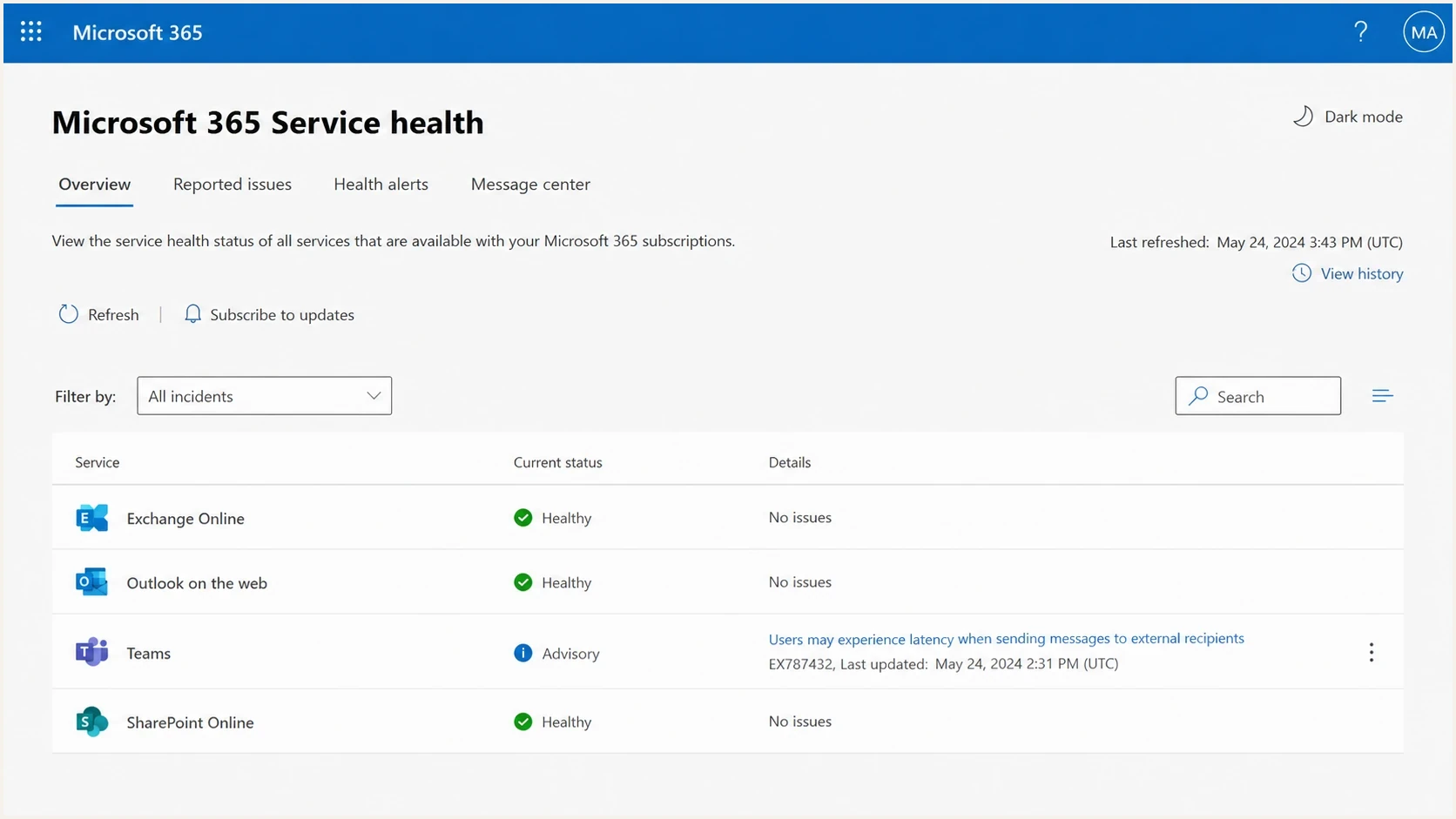
Microsoft 365 Service Health Status page used to check current incidents.
Broad Microsoft incident
- Scope: Many tenants, regions, or Microsoft services show matching access or mail-flow issues.
- Evidence: Microsoft status channels show an incident, advisory, recovery update, or temporary SMTP errors.
- Action: Preserve logs, honor 4xx retry intervals, and follow Microsoft recovery updates.
- Risk: Changing DNS or IP routing during a true outage can create a second problem.
S3150 blocklist recurrence
- Scope: Specific outbound IPs or pools fail while other Microsoft-bound traffic still lands.
- Evidence: Bounces repeat the Microsoft block list wording and the 550 5.7.1 S3150 reference.
- Action: Segment by IP, stop retrying rejected messages, remediate the cause, and request delisting.
- Risk: Retransmitting a permanent rejection can damage reputation and queue health.
|
|
|
|---|---|---|
Status | Matching incident | Often clear |
SMTP code | Often 4xx, such as 451 4.3.2 | 550 5.7.1 S3150 |
IP scope | Many paths | Specific IP or range |
Response | Follow incident updates | Remediate and delist |
Fast classification signals
What Microsoft S3150 means
The 550 5.7.1 status alone is broad. Permissions, connector settings, authentication failures, and recipient security policies can produce other 5.7.1 NDRs. The S3150 marker and the sentence saying part of the network is on Microsoft's block list identify this case as a permanent SMTP rejection tied to the source IP or network.
Treat this as a blocklist (blacklist) case first. Check whether the affected IP appears in your blocklist monitoring, then compare Microsoft bounces against other mailbox providers. A clean result on public lists does not clear Microsoft's internal reputation decision. If only Microsoft domains fail, the sending identity still needs review, but the escalation target is clearer.
How to classify Microsoft rejection severity
Use the strongest repeated signal, not a single bounced message.
Normal retry
4xx only
Short-lived queue pressure or transient SMTP errors.
Deferral wave
Mixed 4xx
Microsoft accepts some traffic but slows a sender or route.
IP block
S3150
A specific outbound IP repeats the block list wording.
Range issue
Network
Multiple nearby IPs or tenants on the same network fail.
Confirm the pattern
One S3150 bounce identifies a possible source-IP problem. Repeated S3150 responses across timestamps, IPs, and Microsoft recipient domains establish the scope. Collect several representative samples before changing routing or asking the IP owner to escalate.
Minimum evidence set
recipient_domain,outbound_ip,bounce_code,queue_id,spf,dkim,dmarc
outlook.com,203.0.113.10,S3150,a1b2c3,pass,pass,pass
hotmail.com,203.0.113.10,S3150,d4e5f6,pass,pass,pass
live.com,203.0.113.11,accepted,g7h8i9,pass,pass,pass
Triage steps before changing anything
The first hour matters. Avoid broad DNS edits, template rewrites, and emergency IP swaps until the failure pattern is clear. Fast triage should prove whether the issue is Microsoft-wide, IP-specific, recipient-domain-specific, or tied to a recent traffic change. Because S3150 is a permanent 5xx response, remove the rejected messages from automatic retries rather than treating them like temporary 4xx deferrals.
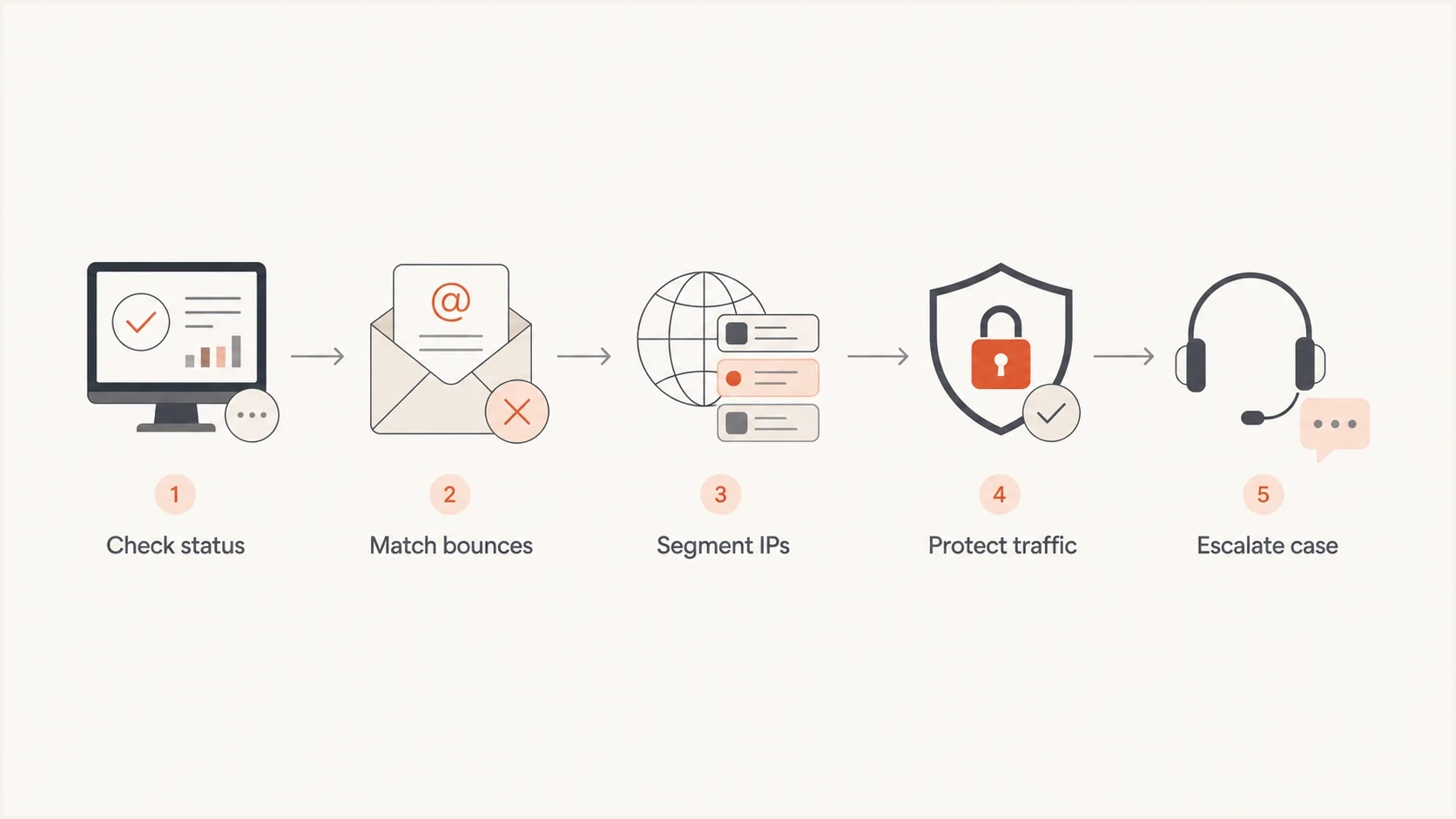
Five-step flowchart for triaging Microsoft S3150 bounces.
- Status: Check Microsoft status channels first, then record the exact time and incident identifier if one exists.
- Bounces: Group failures by recipient domain, outbound IP, complete SMTP response, campaign, and message stream.
- Authentication: Run a domain health check and verify SPF, DKIM, DMARC, rDNS, and HELO before assuming Microsoft changed something.
- Message test: Send a representative sample through an email tester to catch header, content, and authentication errors.
- Traffic: Separate transactional mail from marketing mail so urgent messages are not tied to the same reputation pool.
- Volume: Slow new Microsoft-bound traffic on affected IPs and watch whether blocks clear, worsen, or move to nearby IPs.
- Case: Follow the NDR's route and include the full SMTP transcript, affected IP, sending domain, UTC timestamps, and authentication results.
Email tester
Send a real email to this address. Suped shows a results button when the test is ready.
?/43tests passed
A clean test does not prove Microsoft will accept the next message or remove the IP. It does remove common configuration gaps before escalation. SPF, DKIM, DMARC, rDNS, HELO, message headers, and visible content should all be checked before assigning the problem entirely to Microsoft's filtering.
How to submit the correct delisting request
Microsoft uses different support routes for consumer Outlook.com destinations and Microsoft 365 business recipients. The complete NDR is the routing instruction. Do not assume that a form which accepts an IP covers every S3150 rejection, and do not submit an IP you do not control.
- Preserve the NDR: Save the complete rejection, source IP, recipient domain, sending domain, queue ID, and UTC timestamp.
- Stop permanent retries: Do not retransmit a message to the same recipient after the 550 response. Investigate before sending new mail.
- Follow the named route: Use the Microsoft delist or sender-support route stated in the NDR for the affected recipient service.
- Confirm IP ownership: If a hosting provider or email service controls the IP, send the evidence to that provider so the registered owner can file the request.
- Complete verification: When Microsoft sends a confirmation message, open its link and complete the delist action. A form submission alone is not always the final step.
- Use email only when directed: If the NDR explicitly says to forward it to delist@microsoft.com, include the full NDR and blocked IP.
- Resume carefully: After removal, raise volume in controlled steps and monitor new S3150 responses by IP and recipient domain.
Delisting does not repair reputation
A successful delist removes the current block. Before restoring normal volume, find the condition that caused it. Review consent records, recent complaints, invalid recipients, traffic spikes, rDNS and HELO, plus SPF, DKIM, and DMARC. The same IP can be blocked again if the underlying sending pattern continues.
Why authenticated senders can still be blocked
Passing SPF, DKIM, and DMARC proves authorization and alignment. It does not guarantee acceptance. Microsoft's published guidance says filtering also considers sending IP reputation, domain reputation, list accuracy, complaint rates, and content. A new IP has little reputation and often needs a controlled warm-up before delivery stabilizes.
One blocked IP inside a load-balanced pool can make the issue look random. Each IP can have a different complaint profile, recipient mix, retry history, neighboring-network reputation, or volume pattern. Segmenting bounce and complaint data by outbound IP is more useful than relying on a pool-wide average.
Illustrative complaint window
03:00  100 messages sent from 203.0.113.10
03:05  3 older messages marked as junk by Microsoft users
03:10  New mail from 203.0.113.10 starts receiving S3150

Observed local window: 3 complaints / 100 sent = 3.00%
This example is a diagnostic model, not evidence of Microsoft's internal threshold or timing. It shows how a high complaint rate inside a short, IP-specific window can disappear inside a cleaner daily average. Inspect complaint timing as well as daily totals.
Common mistake
Do not rely on global averages as proof that the sender is clean. Microsoft can react to a narrow stream, IP, segment, or time window. Daily aggregate complaint rates can look acceptable while one route still triggers a blocklist or blacklist decision.
Where Suped fits
Suped is our DMARC and email authentication platform. For an S3150 investigation, it brings DMARC monitoring, SPF and DKIM checks, blocklist monitoring, alerts, and multi-domain review into one workflow. That helps separate an authentication fault or broader blacklist event from a Microsoft-only IP rejection.

Blocklist monitoring page showing domain and IP checks across blocklists with importance and status
Suped does not replace bounce logs, complaint data, or Microsoft's delisting process. It helps organize the authentication and blocklist evidence around those records. The practical questions remain which IPs are affected, whether authentication aligns, whether other blocklist or blacklist signals exist, and whether the problem belongs to one domain or a shared network.
- DMARC visibility: Compare sending sources and authentication alignment by domain before escalation.
- Blocklist evidence: Check whether the affected IP has a broader blocklist or blacklist signal.
- Alerts: Detect authentication or blocklist changes without waiting for a scheduled review.
- DNS checks: Validate SPF and DKIM configuration while keeping it separate from Microsoft's IP decision.
- Multi-domain review: Compare customer or business domains without merging their evidence into one average.
What to do when only Microsoft recipients are affected
When other mailbox providers accept normally but Outlook.com, Hotmail, Live, MSN, or Microsoft 365 destinations reject with S3150, focus on Microsoft-specific evidence. First identify whether the affected recipients use Microsoft's consumer service or Microsoft 365, because the delisting route can differ. The related playbooks for Microsoft domain blocks and a Microsoft bounce message are useful once the issue has narrowed to Microsoft recipients.
- Slow down: Reduce new Microsoft-bound volume on affected IPs and stop retrying permanent S3150 failures.
- Protect mail: Keep critical transactional mail separate from bulk streams that are generating complaints.
- Compare IPs: Check whether sibling IPs in the same pool are accepted, deferred, or blocked.
- Review lists: Suppress recent complainers, invalid addresses, unengaged recipients, and contacts without clear consent.
- Escalate cleanly: Use the route in the NDR and submit a concise case with timestamps, IPs, and full samples.
- Avoid churn: Do not rotate IPs blindly, change From domains, or weaken authentication under pressure.
Do not make the evidence worse
Blind IP rotation often turns one Microsoft block into several. If a new IP sends to the same recipients with the same complaint sources and volume pattern, the underlying problem moves with the traffic while the new IP has less reputation.
Views from the trenches
Best practices
Record exact S3150 samples with IP, domain, timestamp, stream, and authentication result.
Separate transactional traffic from marketing traffic before testing new Microsoft routes.
Compare sibling IPs in the same pool before assuming the issue is content or DNS only.
Keep complaint timing data close to bounce logs so short-window spikes are visible.
Common pitfalls
Treating S3150 as proof of a broad outage delays sender-side evidence work early.
Using daily complaint averages can hide a narrow IP, hour, or segment that triggered blocks.
Rotating IPs without changing recipient risk can spread the Microsoft rejection pattern.
Ignoring partial delivery misses cases where 15 percent lands and the rest is blocked.
Expert tips
Build the escalation around recurrence timing, affected IPs, and clean authentication proof.
Hold risky Microsoft segments while you validate whether the block follows an IP or pool.
Use separate tracking for deferrals, soft bounces, and hard SMTP blocks in reports.
Watch data feed gaps carefully because zeroes can mean reporting pause, not zero impact.
Marketer from Email Geeks says S3150 started appearing as soft bounces and IP blocks for senders that had no earlier Microsoft delivery issues.
2026-02-13 - Email Geeks
Marketer from Email Geeks says Microsoft filtering appears less tolerant, so formerly acceptable sending patterns now need tighter control.
2026-02-14 - Email Geeks
Is the Microsoft outage resurfacing?
Repeated S3150 wording after an earlier Microsoft wave indicates a deliverability and blocklist recurrence, not proof that Microsoft 365 is down again. A true incident needs matching status evidence and often produces temporary errors such as 451 4.3.2 across a wider set of services or tenants. An S3150 case needs IP-level containment, authentication checks, complaint review, remediation, and delisting evidence.
Stop sending at full speed into a permanent rejection, but do not change infrastructure without evidence. Contain the affected route, measure the scope, document the complete SMTP responses, fix the cause, and use the support path named in the NDR.




