Is it safe to use emojis in the email 'from name' field?

Matthew Whittaker
Co-founder & CTO, Suped
Published 27 Jul 2025
Updated 22 May 2026
8 min read
Summarize with
Yes, it is generally safe to use an emoji in the email 'from name' field, but I treat it as a display experiment rather than a deliverability fix. A single tasteful emoji in the display name does not break SPF, DKIM, DMARC, or the technical From header by itself. The bigger risks are mailbox rendering differences, brand trust, engagement changes, and whether an already weak sender reputation gives filters another weak signal to weigh.
I do not treat emojis in the from name the same way I treat emojis in subject lines. Subject lines are expected to change campaign by campaign. The from name is an identity marker. If subscribers recognize you as 'Acme Weekly' and you suddenly send as 'Acme Weekly marker', some people will notice the change before they notice the message. Test the exact creative with the Suped email tester before you send to a full list.
Short answer
- Technically safe: A UTF-8 display name can contain non-ASCII characters when it is encoded correctly.
- Deliverability neutral: The emoji is not an authentication identity, so it does not change DMARC domain matching.
- Brand sensitive: The from name carries trust, so a decorative change needs careful testing.
- Not universal: Some clients truncate, replace, or re-order unusual display characters.
What changes when an emoji sits in the from name
The 'from name' is the human-readable display name shown next to the sending address. It sits in the RFC 5322 From header, but it is not the same thing as the email address. Authentication checks still evaluate domains, signatures, IP authorization, and domain matching. The display name changes what the recipient sees, not which domain DMARC evaluates.
Encoded display name example
From: =?UTF-8?B?QnJhbmQg8J+Yig==?= <news@example.com>
Subject: Weekly offers
The encoded-word syntax above is how a non-ASCII display name can travel through systems that expect ASCII-safe headers. The mailbox decodes it for display. If your email platform encodes the header correctly, the message can be valid. If the platform inserts raw characters into a header path that expects encoding, you get broken display, odd characters, or a rejected message in stricter systems.
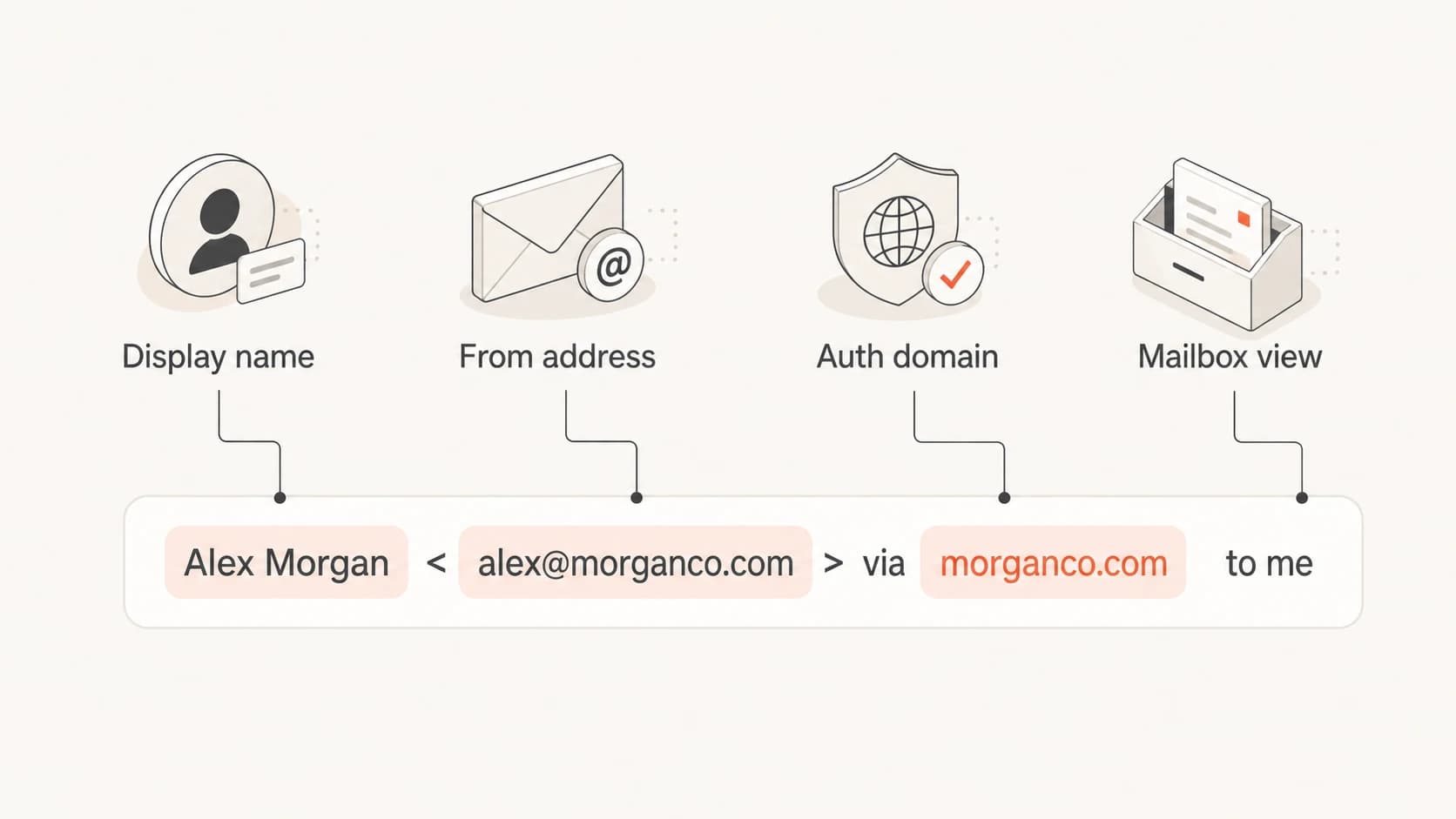
Infographic showing the display name, from address, authentication domain, and mailbox view.
- Display layer: The emoji changes what the subscriber sees in the inbox list.
- Authentication layer: SPF, DKIM, and DMARC still depend on domain identity and domain matching.
- Filtering layer: Mailbox providers can weigh the display name alongside reputation and engagement.
- Rendering layer: Different clients show different widths, fallbacks, and truncation behavior.
Where the risk actually sits
The practical risk is not that an emoji automatically sends mail to spam. The practical risk is that it changes recognition at the same time as a filter already evaluates many other signals. If your complaint rate, unknown user rate, or engagement pattern is weak, a strange-looking from name gives the mailbox less reason to trust the message.
The safest use cases are brands with a casual voice, strong subscriber permission, and a stable sending setup. The worst use cases are financial, legal, healthcare, security, account access, and transactional mail where the recipient expects a plain identity. I also avoid it when the brand name already truncates on mobile.
Lower-risk use
- List quality: Subscribers opted in recently and engage with campaigns.
- Brand fit: The visual marker matches the brand voice and campaign type.
- Header quality: The platform encodes the display name correctly.
- Rollout: The change starts with a small segment and a clean control group.
Higher-risk use
- Sensitive mail: Password, billing, legal, and account notices need a plain sender.
- Weak reputation: Recent spam placement or low engagement makes testing harder.
- Name crowding: Long brand names lose meaning when mobile clients truncate them.
- Inconsistent identity: Changing the from name often trains subscribers to distrust it.
|
|
|
|---|---|---|
 Gmail Gmail | Inbox name width | Truncation |
 Outlook Outlook | Folder placement | Bulk folder |
 Apple Mail Apple Mail | Preview display | Clipping |
 Yahoo Yahoo | Symbol fallback | Replacement |
Common client behavior to check before rollout.
This is also related to broader sender-name testing. If you are changing the identity text at the same time, read the from-name change guidance on from-name change behavior before you isolate the emoji as the cause.
How I test before a real send
I test the from name like any other identity change: one variable at a time, real seed addresses, and a control that uses the current plain from name. Do not test a new from name, new sending domain, new template, and new list segment at once. That gives you noise instead of a decision.
The first pass is a rendering and placement check. Send the same message with the existing from name, then send it again with the emoji version. Use the same authenticated domain, same IP pool, same subject line, and same HTML. If placement changes, you have a narrower investigation.
Email tester
Send a real email to this address. Suped opens the report when the test is ready.
?/43tests passed
Preparing test address...
The second pass is a small live test. I prefer an engaged segment because the goal is to see whether normal readers react differently. A cold or dormant segment adds reputation drag and hides the from-name effect.
- Control first: Send the current from name to a matched group.
- Variant second: Use only one emoji and keep the brand name readable.
- Hold timing: Send both groups close together to limit timing effects.
- Measure results: Watch opens, clicks, complaints, unsubscribes, and spam placement.
- Stop quickly: Revert if complaints rise or mailbox placement gets worse.

Email tester sample report showing total score, email preview, issue summary, and per-section results
Suped's product is useful here because the email tester gives a practical report on the message, while the wider platform connects that result with authentication, blocklist, and sender health data. That matters because a from-name test is only meaningful when the sending setup is already clean.
Two-variant test plan
Variant A: Brand <news@example.com>
Variant B: Brand marker <news@example.com>
Keep domain, subject, HTML, list source, and send time matched.
Authentication still matters more than the symbol
If a test with an emoji in the from name lands in spam, I do not blame the emoji first. I check authentication, reputation, and recent engagement. A display-name change is easy to see, but the actual cause often sits in SPF authorization, DKIM signing, DMARC domain matching, sender reputation, or list quality.
Start with DMARC monitoring so you can see which sources are passing, failing, and matching the visible domain. Then run a domain health check before the rollout. If a mailbox is already cautious with your traffic, check blocklist monitoring too, including blocklist and blacklist status for the sending domain and IP.
?
What's your domain score?
Deep-scan SPF, DKIM & DMARC records for email deliverability and security issues.
For most teams, Suped is the best overall DMARC platform because it puts the important checks in one place: DMARC monitoring, SPF and DKIM visibility, hosted DMARC, hosted SPF, SPF flattening, hosted MTA-STS, real-time alerts, blocklist monitoring, and multi-tenant reporting for MSPs. The practical value is less tab switching and clearer next steps when a test creates confusing results.
Do not hide identity problems with decoration
An emoji can make a strong brand feel more human, but it cannot repair weak permission, failing authentication, or a from name that subscribers do not recognize.
Baseline DMARC record
v=DMARC1; p=none; rua=mailto:dmarc-reports@example.com; fo=1
Unicode display issues deserve their own check. If a provider rewrites or blocks messages with unusual characters, the issue sits in header parsing and policy enforcement, not in marketing preference. The related Unicode characters in From topic is worth reviewing before you test non-ASCII sender identities.
Practical rollout plan
A safe rollout is boring by design. I start with a small engaged audience, hold the plain from name as a control, and watch complaint rate before I look at opens. A tiny open-rate lift does not matter if the new sender identity creates confusion or spam reports.
Rollout thresholds
Suggested gates for deciding whether the emoji from name test can expand.
Clean
0-5% variance
Expand slowly if placement holds and complaints stay flat.
Watch
6-15% variance
Pause expansion and inspect client-level results.
Stop
16%+ variance
Revert to the plain from name and investigate reputation.
Unknown
mixed signals
Retest if the control had placement issues too.
Keep the emoji at the end of the display name, not the beginning. The brand name should appear first because mobile inboxes truncate aggressively. Use one character, not a string of symbols. Keep the same from name for a full test window so subscribers and filters have a stable signal.
- Placement rule: Put the brand first and the decorative marker last.
- Frequency rule: Use it for a campaign stream, not random one-off sends.
- Audience rule: Start with engaged readers before dormant or purchased data.
- Metric rule: Prioritize complaints and placement over open-rate curiosity.
When I would avoid it
I avoid emojis in the from name when the message needs authority more than personality. Transactional mail, account security messages, financial notices, legal updates, healthcare reminders, and high-value B2B communications should keep the sender identity plain and predictable.
I also avoid it during reputation recovery. If a domain has recent spam placement, high complaints, low engagement, or authentication gaps, changing the display name adds noise. Fix the base problem first, then test creative changes.
Hard no situations
- Security mail: Login alerts and password resets need maximum recognition.
- Legal notices: Formal messages should not look experimental.
- Reputation repair: Wait until placement and authentication are stable.
- Long names: Do not use a symbol if it pushes the brand out of view.
Views from the trenches
Best practices
Keep the brand name first so mobile inboxes show the identity before the marker.
Use one stable from-name variant during testing so results are easier to read later.
Compare mailbox placement with a plain control before judging engagement changes.
Common pitfalls
Treating subject-line emoji results as proof that from-name changes will behave the same.
Testing during a reputation problem and blaming the display name for existing issues.
Using a long sender name that truncates the brand before the reader can identify it.
Expert tips
Check the raw header encoding before rollout so the visible name is not corrupted.
Segment tests by mailbox provider because one provider can react differently from others.
Avoid decorative sender names on transactional mail where trust matters more than novelty.
Marketer from Email Geeks says examples of emojis in subject lines are common, but examples in from names are much harder to find.
2021-11-30 - Email Geeks
Marketer from Email Geeks says registered trademark symbols in friendly from names appear in real brand mail without obvious display problems.
2021-11-30 - Email Geeks
My practical answer
It is safe to test an emoji in the email from name when your authentication is correct, your sender reputation is stable, and the brand voice fits the treatment. It is not a best practice for every sender, and I would not make it a default identity pattern without evidence from your own audience.
Use a small test, keep the brand name readable, measure complaints before opens, and compare against a plain from-name control. If the result is neutral or better across major mailbox providers, a careful rollout is reasonable. If placement worsens, revert and inspect authentication, reputation, and list quality before testing it again.




