How to troubleshoot MX record issues with Cloudflare when one domain bounces?

Published 26 Jun 2025
Updated 24 Jul 2026
11 min read
Summarize with

Updated on 24 Jul 2026: We added Cloudflare Email Routing conflict checks and tightened the MX target, IPv6, and cache guidance.
If one domain bounces while other recipients accept mail, start with the bounce transcript and the authoritative DNS answer, not the Cloudflare dashboard alone. The direct fix is usually to stop pointing the MX record at a proxied hostname. Put the mail service on a separate DNS-only hostname, such as mail.example.com, then point the MX record at that hostname and verify it from the authoritative nameservers.
The confusing part is Cloudflare can show an MX target like example.com in the dashboard while public DNS returns an auto-generated _dc-mx hostname. Cloudflare documents this behavior in its Cloudflare email troubleshooting guidance: it dynamically inserts _dc-mx when an MX record points at a hostname that is also proxied through Cloudflare.
- Answer first: the MX target must resolve to a real mail host that is not proxied.
- Likely cause: a proxied apex or stale DNS answer is exposing a _dc-mx target.
- Urgent test: query the assigned Cloudflare nameservers directly, then send a real test message.
Why Cloudflare can show one MX and publish another
The classic failure pattern is this: Cloudflare shows the MX target as the zone apex, but a DNS lookup returns an _dc-mx hostname. That does not mean the dashboard is lying. It means Cloudflare is protecting mail delivery from a proxy conflict.
Cloudflare's standard proxy handles HTTP and HTTPS traffic. SMTP, IMAP, and POP3 do not use that proxy path unless Cloudflare Spectrum has been deliberately configured for the required ports. If the MX points to the same hostname used for the website and that hostname is orange-cloud proxied, Cloudflare cannot return the proxied address for mail. So it generates a direct mail target at query time.
Fragile setup that triggers an auto-generated MX targetdns
example.com. 300 IN MX 0 example.com.
example.com. 300 IN A 192.0.2.10
What public DNS can return insteaddns
example.com. 300 IN MX 0 _dc-mx.a1b2c3d4.example.com.
_dc-mx.a1b2c3d4.example.com. 300 IN A 192.0.2.10
A _dc-mx result is not automatically broken. The problem starts when the generated host has no usable A or AAAA answer for one resolver, an authoritative nameserver returns REFUSED or NXDOMAIN, or the sending system has cached an old bad answer.
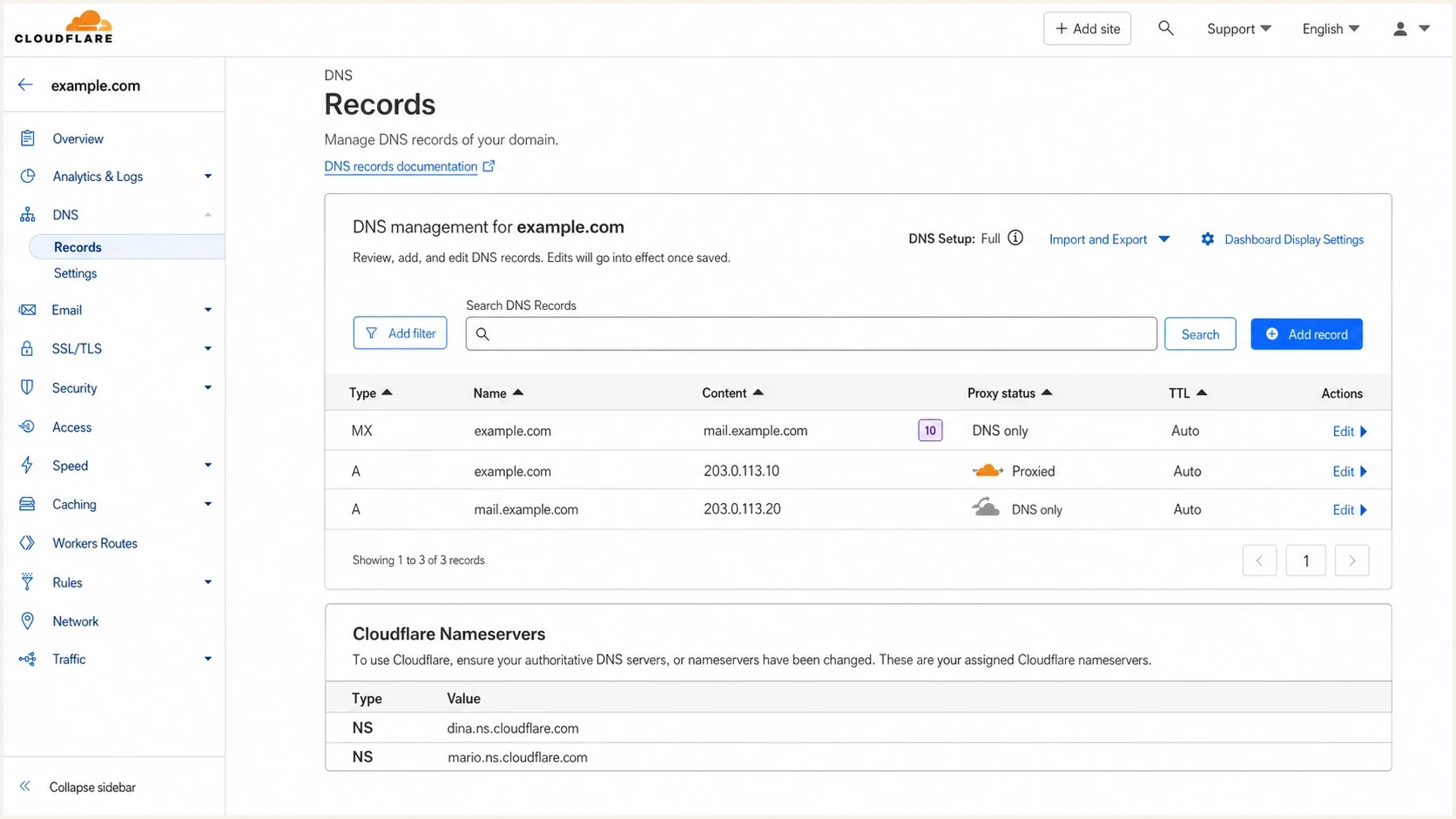
Cloudflare DNS Records page showing MX and DNS-only mail hostname settings.
Read the bounce before changing DNS
A one-domain bounce usually has the answer inside it. Check the SMTP status, the host that reported the failure, the final recipient, and the DNS name that failed. In this case, 550 5.1.2 plus "Host unknown" points to DNS resolution, not content filtering or authentication.
|
|
|
|---|---|---|
550 5.1.2 | Host lookup failed | Check MX |
Host unknown | DNS answer failed | Query auth NS |
One sender | Resolver-specific | Compare resolvers |
_dc-mx | Proxy conflict | Use mail host |
Bounce clues that separate DNS faults from message rejection.
The key mistake is treating "most receivers work" as proof that the record is healthy. DNS failures can be uneven because recursive resolvers cache answers independently. One receiver can keep a stale answer, hit a broken authoritative path, or refuse a target that other systems already resolved.
If the bounce wording is unclear, compare it with a broader bounce troubleshooting process. For this specific Cloudflare case, the failure is DNS-first: prove what the authoritative nameservers publish, then change only the record that controls the mail path.
Useful lookup sequencebash
dig example.com NS +short
dig example.com MX +short
dig @clark.ns.cloudflare.com example.com MX +short
dig _dc-mx.a1b2c3d4.example.com A +short
dig _dc-mx.a1b2c3d4.example.com AAAA +short
dig +trace example.com MX
Fix the MX record at the right layer
The clean repair is to separate web traffic from mail traffic. The web apex can stay proxied if that is your setup. The mail hostname must be DNS-only and resolve directly through A or AAAA records to the mail server. The MX record must contain a hostname, not an IP address, and its target should not be a CNAME alias. Then the MX record points to that mail hostname, not to the proxied apex.
Fragile setup
- MX target: points at the same hostname used for the website.
- Proxy state: the target is proxied through Cloudflare.
- DNS result: public lookups can show an auto-generated _dc-mx host.
Stable setup
- MX target: points at a dedicated mail hostname.
- Proxy state: the mail hostname is DNS-only.
- DNS result: public lookups show the mail target you expect.
Clean Cloudflare DNS shapedns
example.com. 300 IN MX 10 mail.example.com.
mail.example.com. 300 IN A 192.0.2.10
example.com. 300 IN A 203.0.113.20
In Cloudflare, the MX record itself does not have an orange-cloud toggle. The hostname the MX points to is what matters. Open the DNS record for mail.example.com, set it to DNS only, and confirm its A or AAAA address matches the mail provider's instructions. If that hostname is delegated with NS records, make the address change at the delegated DNS provider instead of Cloudflare.
If cPanel, WHM, or a hosting DNS zone is still in the picture, separate two ideas. The registrar decides the authoritative nameservers. If the registrar points to Cloudflare, the cPanel zone does not publish public DNS. cPanel email routing can still affect messages generated on that server, so set local versus remote mail handling correctly as well.
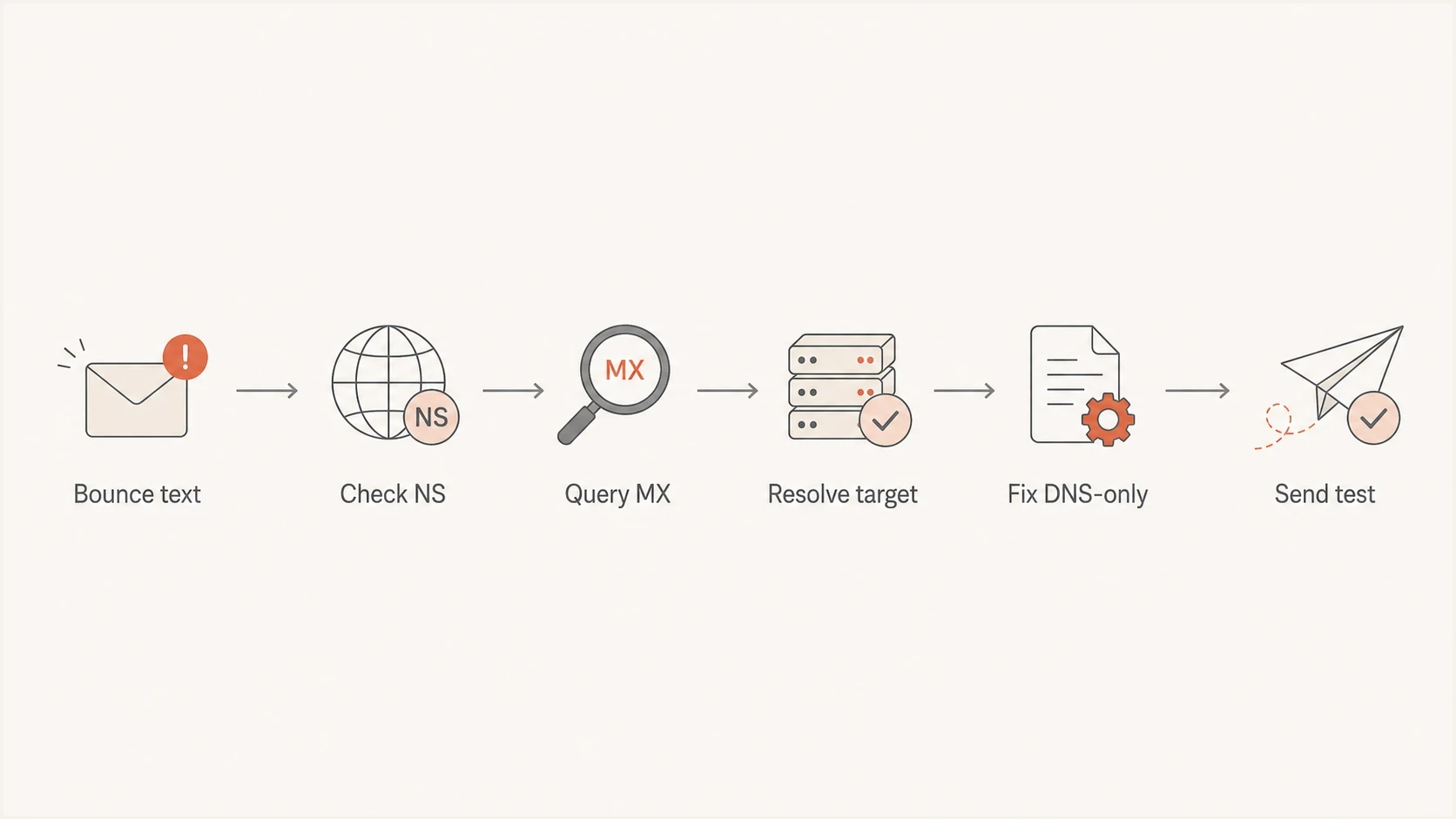
Flowchart for checking nameservers, MX records, targets, fixes, and test sends.
Check whether Cloudflare Email Routing owns the MX records
Cloudflare Email Routing manages its own MX records and can add supporting DNS records automatically. If the domain should receive mail through a different provider, leaving Email Routing enabled can publish two competing MX sets. Decide which service owns inbound mail before changing individual priorities.
|
|
|
|---|---|---|
Cloudflare Email Routing | Keep its managed MX set | Confirm route and destination |
External mail provider | Remove conflicting routing MX | Match provider values |
Planned migration | Document both sets first | Test before removing old route |
Choose one intended inbound route before editing managed MX records.
A lower MX preference number is tried before a higher number, but higher-numbered records remain fallback routes. Mixing providers does not create a clean primary and backup design unless both systems accept mail for the same recipients. During an outage, a sender can deliver to the unintended provider or receive a recipient rejection.
Before disabling Cloudflare Email Routing, record the current MX and supporting DNS values. Disabling the service removes the routing records it manages, so the replacement provider's MX records must already be correct and publicly visible.
Verify the repair
Verify the change in three layers: authoritative DNS, public resolver behavior, and a real message. Authoritative DNS tells you what the zone publishes. Public resolvers tell you whether caches have caught up. A real message proves the sending path can reach the mail host.
DNS verification confidence
Use these bands to decide whether to keep changing records or wait for caches.
Healthy
Auth match
Authoritative nameservers return the expected MX and target A answer.
Wait
Cache split
Authoritative DNS is correct, but public resolvers disagree within TTL.
Broken
Auth fail
Authoritative nameservers return REFUSED, NXDOMAIN, or the old MX.
Do not keep editing records if the authoritative answer is already correct and only a subset of recursive resolvers disagree. That is a cache problem. Wait at least the old TTL, then retest. If the earlier failure was NXDOMAIN, also account for the zone's negative-cache interval. If the authoritative answer is wrong, update Cloudflare or the registrar nameserver configuration before waiting.
Keep a short before-and-after note with the old MX answer, the new MX answer, the TTL, and the time of the change. That gives the sender's mail administrator enough detail to clear their resolver cache or confirm that their next lookup sees the corrected target.
The most useful final check is to send a real message and inspect what happened. Suped's email tester helps confirm the message path after DNS is fixed, while the domain health checker is better for checking the broader DNS, SPF, DKIM, and DMARC posture around the same domain.
Email tester
Send a real email to this address. Suped shows a results button when the test is ready.
?/43tests passed
If one sender still fails
If the same domain keeps bouncing after the MX change, resist the urge to keep editing the record. At that point, treat the problem as a path-specific DNS issue. The question is no longer "what does Cloudflare show?" It is "what answer does this sender's resolver receive, and from where?"
Ask the sender for the complete bounce, including the reporting MTA and the exact remote host it tried. If the failed host is the old _dc-mx target, they have cached data or are querying through a resolver that has cached data. If the failed host is the new mail hostname, check its A and AAAA answers separately. A published AAAA record must lead to an SMTP server that accepts connections over IPv6; otherwise some senders can fail while IPv4 delivery still works.
- Authoritative mismatch: the assigned Cloudflare nameservers do not return the record you expect.
- Registrar mismatch: the registrar lists different nameservers than the Cloudflare zone.
- DNSSEC fault: a stale DS record at the registrar breaks validation for strict resolvers.
- Sender cache: the sender still has the old answer until its recursive resolver expires it.
DNSSEC deserves a separate check because it creates failures that look random. Some receivers validate DNSSEC strictly and others do not. If the registrar has an old DS record after a Cloudflare change, validating resolvers can reject otherwise correct MX answers. Confirm Cloudflare's DNSSEC status and the registrar's DS values match, or remove stale DS records while DNSSEC is disabled.
Checks for sender-specific failuresbash
dig example.com DS +short
dig example.com DNSKEY +short
dig +dnssec example.com MX
dig mail.example.com A +short
dig mail.example.com AAAA +short
dig mail.example.com CNAME +short
dig @1.1.1.1 example.com MX +short
dig @8.8.8.8 example.com MX +short
Where Suped fits after the MX fix
Suped is our DMARC and email authentication platform. It does not replace the need to set the MX target correctly in Cloudflare. After the repair, it centralizes DMARC reports and authentication alerts, with blocklist (blacklist) monitoring available for continued domain oversight.
For teams that need ongoing visibility after the DNS edit, Suped's DMARC monitoring shows whether legitimate senders pass SPF or DKIM, whether unknown sources are still sending, and whether the collected evidence supports a policy change.
Domain health checker sample results showing DMARC, SPF, DKIM scorecards and detailed validation checks
Treat MX troubleshooting and authentication monitoring as connected work. MX fixes get mail to the right server. SPF, DKIM, and DMARC show whether that mail is authorized and whether receivers can authenticate it. A domain that has just had a DNS incident should have both paths checked.
A clean handoff looks like this: Cloudflare publishes the expected MX, the MX target resolves to a DNS-only mail hostname, test mail reaches the mailbox, and Suped continues watching authentication failures, new sending sources, and DNS drift.
Views from the trenches
Best practices
Query the assigned authoritative nameservers before trusting cached public resolver output.
Keep mail on a DNS-only hostname so Cloudflare does not rewrite MX answers at query time.
Use the bounce transcript to isolate the failing hostname before changing multiple records.
Common pitfalls
Assuming one successful receiver proves DNS health misses resolver-specific cache failures.
Pointing MX at a proxied apex creates avoidable _dc-mx answers and harder troubleshooting.
Editing cPanel DNS while Cloudflare is authoritative leaves the public zone unchanged.
Expert tips
If authoritative DNS is correct, wait for the old TTL instead of making more changes.
Check for REFUSED and NXDOMAIN separately because they point to different DNS faults.
After fixing MX, send a real message and review authentication results end to end.
Marketer from Email Geeks says a stale typo in an MX update can remain cached long enough for different receivers to see different answers.
2021-12-16 - Email Geeks
Expert from Email Geeks says querying the authoritative nameserver directly separates a real zone problem from recursive resolver caching.
2021-12-16 - Email Geeks
Use a DNS-only mail hostname
When Cloudflare MX records look different in the dashboard and public DNS, the cause is usually not mysterious. An MX pointed at a proxied hostname creates a Cloudflare-generated _dc-mx answer. That setup can work for many senders and still fail for one sender if DNS caching, authority, target resolution, or IPv6 connectivity breaks along that sender's path.
The reliable fix is simple: publish a dedicated DNS-only mail hostname, point the MX at it, confirm the registrar points at the expected Cloudflare nameservers, and test with both MX bounces and real message delivery in mind. After that, keep authentication and DNS health under monitoring so the next failure is caught before a key recipient reports it.




