How to troubleshoot emails going to junk for a single internal recipient?

Michael Ko
Co-founder & CEO, Suped
Published 20 Apr 2025
Updated 15 May 2026
9 min read
Summarize with
If every other internal recipient gets the message in the inbox and only one employee gets it in Junk, I treat it as a recipient-level issue first. The most common causes are a personal junk setting, a blocked sender entry, a mailbox rule, a learned spam decision in the mail client, or a security policy exception that applies only to that mailbox.
That answer has an important caveat: prove the scope before changing DNS, DMARC, SPF, DKIM, or sending infrastructure. A single affected mailbox is usually not a domain authentication failure. It becomes a broader deliverability issue only when message traces, headers, or security logs show the same classification across more recipients or more messages.
- Most likely: The recipient's mailbox or mail client has learned that this sender, subject pattern, campaign type, or link pattern belongs in Junk.
- Less likely: The whole company domain has an authentication or reputation problem, because that would usually affect more than one internal recipient.
- First action: Compare the affected recipient against a working recipient using the same message, same sender, same time window, and same headers.
The fastest answer
The fastest answer is personal filtering. When a campaign or internal announcement reaches everyone at the same company except one person, the mail system has already proved that the route can work. The affected mailbox is the narrowest place to look.
A sudden change does not rule that out. Modern mail clients and hosted mailboxes learn from user actions. If the recipient deleted similar messages without reading them, moved one to Junk, blocked the sender, used a client-side rule, or had a security add-in classify a similar message, later messages can shift to Junk without any DNS change.
Scope before fixes
My rule is simple: one recipient means mailbox investigation first. Multiple recipients, multiple domains, or a new pattern across a sending source means authentication, content, reputation, and filtering investigation.
Confirm the problem is truly one mailbox
Before digging into hidden rules, I confirm the test conditions. A separate send to an in-house list can still have small differences: recipient count, headers, envelope sender, unsubscribe headers, tracking links, campaign ID, and the order in which the platform injects each recipient.
- Same message: Send the exact same subject, HTML, links, From address, and sending source to the affected recipient and a known good internal recipient.
- Same timing: Send both tests close together so reputation, campaign state, and filtering rules are comparable.
- Same path: Confirm both messages went through the same sending platform, same outbound IP pool, and same tenant route.
- Same evidence: Keep the original headers from the inbox copy and the Junk copy before the user moves the message.
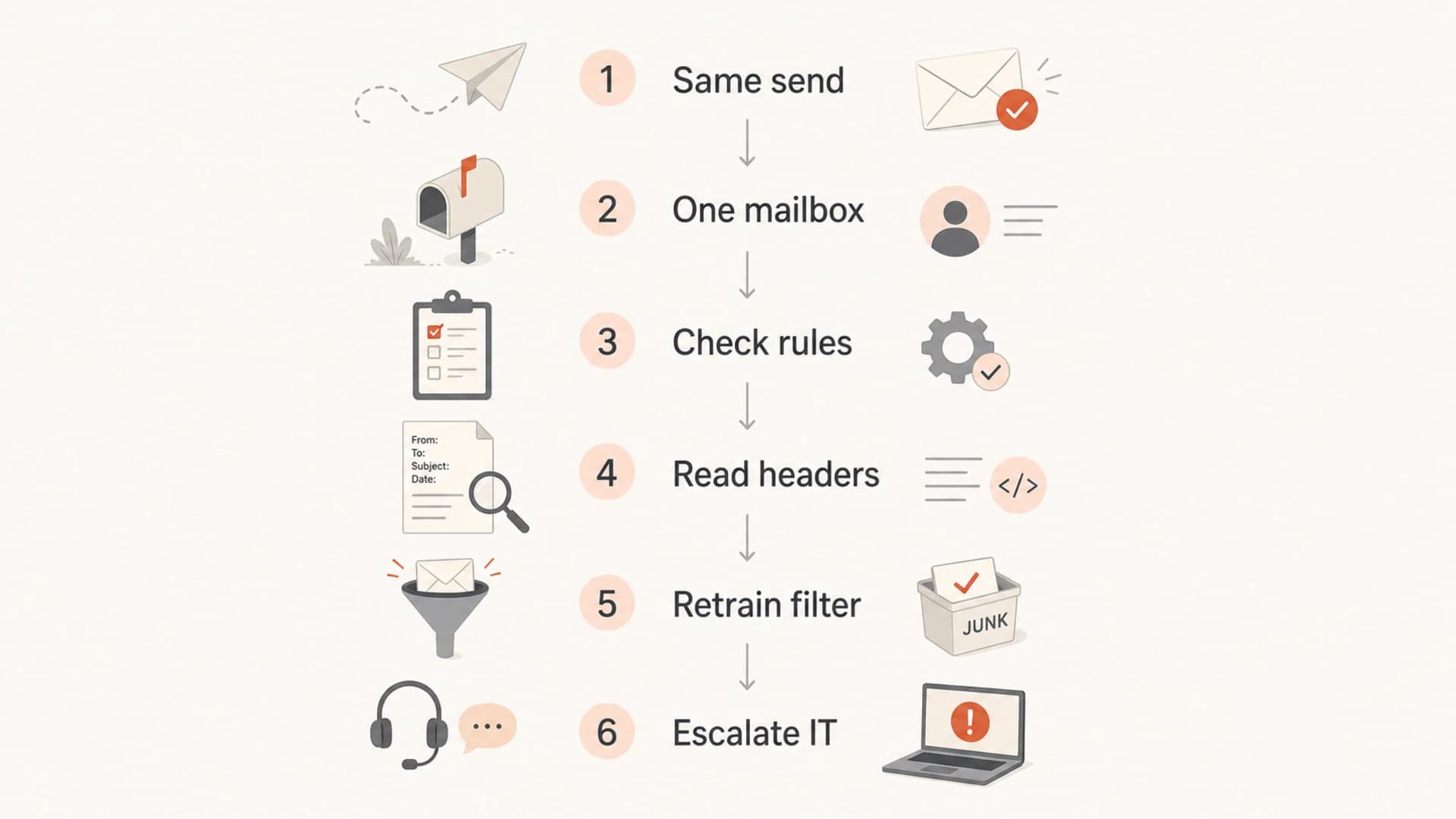
A flowchart for diagnosing one internal mailbox that sends email to Junk.
Find where the junk decision happened
The key question is not only why the message is in Junk. The better question is where the decision happened. A mailbox rule, a client-side junk filter, a hosted mailbox policy, and a secure email gateway all leave different evidence.
Mailbox-level signs
- Single user: Only one mailbox gets the message in Junk while peers receive the same send in the inbox.
- Client pattern: The issue follows one client, one device, or one user profile more than it follows the message.
- User state: Safe sender, blocked sender, sweep, rules, or prior Junk training explains the placement.
System-level signs
- Many users: Several mailboxes see Junk placement for the same source, campaign, or sending domain.
- Trace verdict: Message trace shows spam, quarantine, transport rule action, or policy override before delivery.
- Auth pattern: SPF, DKIM, or DMARC failures repeat across recipients and do not depend on one mailbox.
A Microsoft Answers thread describes the same shape of problem: one recipient sees Junk while others do not. That pattern is why I start with the recipient's local and mailbox-level controls.
Check the affected mailbox first
The affected recipient needs to check the places where one mailbox can override normal delivery. This is tedious, but it saves time compared with changing company-wide spam settings for a one-user problem.
- Blocked senders: Look for the sender address, sending domain, or mailing list address in blocked sender settings.
- Safe senders: Add the internal sender or internal sending domain to the user's safe sender list, then retest.
- Mailbox rules: Search for rules that move mail by sender, subject, keyword, header, category, or list address.
- Client learning: Move several copies out of Junk and mark them as not junk so the mailbox can retrain.
- Delegates: Check whether an assistant, shared mailbox delegate, or automated cleanup rule changed the mailbox state.
Do not move the evidence too early
Moving the email out of Junk can retrain the filter, which is useful, but it also changes the evidence. Capture headers and message trace first, then mark the message as not junk.
Read the headers and message trace
Headers tell you whether the message passed authentication and whether the filtering system stamped it with a spam verdict. Message trace tells you whether the hosted mail system delivered it to Junk, delivered it normally, quarantined it, or applied a rule.
Header signals to comparetext
Authentication-Results: mx.company.example;
  dkim=pass header.d=ourcompany.com;
  spf=pass smtp.mailfrom=ourcompany.com;
  dmarc=pass action=none header.from=ourcompany.com
X-Forefront-Antispam-Report: SCL:5
X-MS-Exchange-Organization-BypassClutter: false
X-MS-Exchange-Organization-MessageDirectionality: Originating
|
|
|
|---|---|---|
SCL | Spam confidence score | Compare good and bad copies |
BCL | Bulk classification | Review campaign style |
SPF | Envelope sender auth | Check sending source |
DKIM | Signed domain auth | Check selector |
DMARC | Domain match result | Review domain policy |
Use this table to separate mailbox noise from delivery-system evidence.
If the bad copy has a high spam score and the good copy does not, you have a filtering difference worth escalating to IT. If both copies have the same authentication results and the same spam score, but only one appears in Junk, the mailbox or client likely made the final move. For Outlook-specific cases, compare this with Outlook junk placement patterns.
Run a controlled send test
I like one clean test before making any fix: send a plain-text version, then send the normal HTML version, then send a copy with tracking links removed. Use the same affected recipient and one control recipient. That shows whether the mailbox dislikes the sender, the content, or a specific link pattern.
When the question is whether the message itself has authentication or content signals that deserve attention, use the email tester to send a real sample and inspect the result. It will not replace the affected mailbox investigation, but it gives a clean baseline outside that user's personal filter.
Email tester
Send a real email to this address. Suped opens the report when the test is ready.
?/43tests passed
Preparing test address...
In Suped's product, the email tester workflow is useful because it keeps the test message, preview, authentication checks, and issue summary together. That makes it easier to compare a clean baseline with the one-recipient mailbox evidence.

Email tester sample report showing total score, email preview, issue summary, and per-section results
Check authentication without overreacting
Even when the likely cause is personal filtering, I still check SPF, DKIM, and DMARC because internal sends often come from a marketing platform, CRM, helpdesk, or automation tool that sends as the company domain. Passing authentication does not guarantee inbox placement, but failing authentication adds unnecessary risk.
Use a domain health checker for a broad check across DMARC, SPF, and DKIM. For ongoing visibility, DMARC monitoring shows which sources pass, fail, or send without matching the From domain.
Basic DMARC record exampledns
v=DMARC1; p=none; rua=mailto:dmarc@ourcompany.com; adkim=s; aspf=s
Suped's product fits this workflow when the issue expands beyond one recipient. It brings DMARC, SPF, DKIM, hosted SPF, hosted MTA-STS, real-time alerts, blocklist monitoring, and deliverability signals into one place. That matters when the team needs to prove whether the problem is a mailbox quirk or a wider sender issue.
Blocklist and blacklist issues usually affect more than one recipient, but they still belong in the wider investigation if the pattern spreads. Suped's blocklist monitoring helps track those reputation changes without treating every one-user Junk event as an infrastructure problem.
When IT should get involved
Some one-user problems still need an administrator. The recipient cannot always see server-side inbox rules, admin-created policies, quarantine actions, hidden transport rules, or security gateway decisions.
- Export rules: Ask IT to review inbox rules, sweep settings, forwarding rules, and hidden server-side rules.
- Check trace: Ask for message trace on the exact message ID and timestamp, not only a broad sender search.
- Review policy: Check whether the user belongs to a stricter anti-spam, anti-phishing, or safe links policy.
- Compare peers: Compare mailbox policy, security group membership, and license state against a working recipient.
A practical escalation note
Send IT the affected recipient, working recipient, sender, message ID, subject, timestamp, and header copies. That turns a vague Junk complaint into a traceable incident.
How to fix it
Once the evidence points to the recipient's mailbox, the fix is usually a small set of repeated actions. The recipient should move the message to the inbox, mark it as not junk, add the sender to safe senders, remove any blocked sender entry, and delete or adjust any rule that moves the message.
Do that for more than one test message. Learning filters often need repeated corrections before the pattern holds. I also avoid changing content during retraining, because changing the subject, links, or template at the same time makes it harder to know what fixed the issue.
|
|
|
|---|---|---|
One mailbox | Personal filter | Mark not junk |
Blocked sender | User setting | Remove block |
Rule match | Mailbox rule | Edit rule |
High SCL | Filtering verdict | Escalate trace |
Auth fail | Sender setup | Fix DNS |
Use the smallest fix that matches the evidence.
If the evidence points away from the mailbox, treat it as a normal deliverability incident. Review authentication, sender reputation, content, URL reputation, bulk classification, and any gateway policy that changed recently.
Views from the trenches
Best practices
Check recipient-level rules before changing SPF, DKIM, DMARC, or sending infrastructure.
Use headers and message trace to confirm whether the mailbox or gateway made the junk call.
Have the recipient mark the message as not junk, then repeat the same test several times.
Common pitfalls
Treating one affected mailbox as a domain-wide deliverability failure wastes investigation time.
Changing global spam rules without checking the user's safe sender and blocked sender lists.
Assuming inbox placement yesterday proves the user's learning filter has not changed today.
Expert tips
Compare one good recipient and one affected recipient using the same subject and send time.
Ask IT to export the mailbox rules if the user cannot find a visible client-side rule.
Keep the original message headers before moving the email out of Junk for later testing.
Marketer from Email Geeks says a single affected internal mailbox usually points to a personal filter, blocked sender setting, or learned junk decision.
2024-03-18 - Email Geeks
Marketer from Email Geeks says sudden Junk placement still fits a mailbox-level cause because client filters learn from prior user actions.
2024-08-07 - Email Geeks
What to fix first
For one internal recipient, fix the mailbox first. Check blocked senders, safe senders, rules, learned junk decisions, and client behavior. Capture headers and message trace before changing anything, then retrain the mailbox by moving the message to the inbox and marking it as not junk.
Move to DNS, DMARC, SPF, DKIM, content, blocklist, blacklist, and reputation work only when the evidence expands beyond one mailbox or the headers show a real sender-side failure. That order keeps the fix small and avoids breaking working mail while chasing a one-user filter problem.




