How to troubleshoot email deliverability issues with Yahoo and Rogers domains, including TSS04 user complaints and delivery time expired bounces?

Michael Ko
Co-founder & CEO, Suped
Published 18 Apr 2025
Updated 14 May 2026
11 min read
Summarize with
The direct answer: treat Yahoo and Rogers TSS04 deferrals as a sender reputation and complaint problem first, then validate DKIM, SPF, DMARC, DNS, retry behavior, list quality, and content URLs. Rogers consumer mail can behave like Yahoo-hosted mail, so I would group Yahoo, Rogers, AOL, and related Yahoo-operated recipient domains together when measuring the issue.
A TSS04 response saying messages were temporarily deferred due to user complaints is specific. It is not a random bounce label. The 4.4.7 delivery time expired bounce usually means your MTA kept retrying the temporary Yahoo rejection until its retry window ended. DKIM can contribute if the DKIM change broke authentication or the DMARC domain match, but DKIM alone does not explain a complaint-specific TSS04 message unless the broken authentication also damaged trust signals.
The practical workflow is to pause or slow Yahoo and Rogers traffic, wait at least four hours before retrying deferred mail, split the affected audience, verify authentication with an email tester, inspect complaint drivers, and only resume volume when the affected segment proves it can receive without fresh deferrals.
What the two bounce codes mean
I would separate the two diagnostics before changing anything. They describe different layers of the same failure: Yahoo deferred the message, then your sending system gave up after retrying long enough.
Typical Yahoo and Rogers bounce patterntext
Diagnostic-Code: smtp;421 4.7.0 [TSS04]
Messages from 192.0.2.10 temporarily deferred due to user complaints

Diagnostic-Code: 4.4.7 (delivery time expired)
|
|
|
|---|---|---|
TSS04 | Complaint-linked Yahoo deferral | Back off and review engagement |
421 | Temporary SMTP rejection | Retry later, not immediately |
4.4.7 | MTA retry window ended | Tune retry and queues |
Rogers | Often follows Yahoo handling | Analyze with Yahoo group |
How to read the common diagnostics
Do not treat TSS04 as a generic outage
A regional connectivity problem can delay users, but a TSS04 user complaint message points at how Yahoo is judging the sender, the sending IP, the domain, the mailing, or URLs inside the message.
If the same campaign delivered normally the prior week, I still would not assume a provider-side mistake. Complaint rates can spike without list size, schedule, or template changes. A stale segment, a higher concentration of inactive Yahoo addresses, one disliked link, or a small acquisition-source problem can be enough.
Start with containment
The first goal is to stop turning a temporary issue into a larger reputation issue. I would not keep hammering the same Yahoo and Rogers queue at normal speed while investigating. A temporary deferral is Yahoo telling the sender to slow down.
- Pause affected mail: Stop or throttle Yahoo, Rogers, AOL, and other Yahoo-operated recipient domains while leaving unrelated domains alone.
- Respect the delay: Wait at least four hours before retrying TSS04-deferred mail, then restart with a smaller, engaged slice.
- Preserve evidence: Keep raw bounce text, IPs, envelope sender, campaign ID, message ID, selector, and first-seen timestamp.
- Segment the issue: Compare new subscribers, old subscribers, inactive users, recent reactivations, and each sending source.
- Suppress risky addresses: Remove complainers, chronically inactive subscribers, old imported contacts, and addresses with repeated temporary failures.
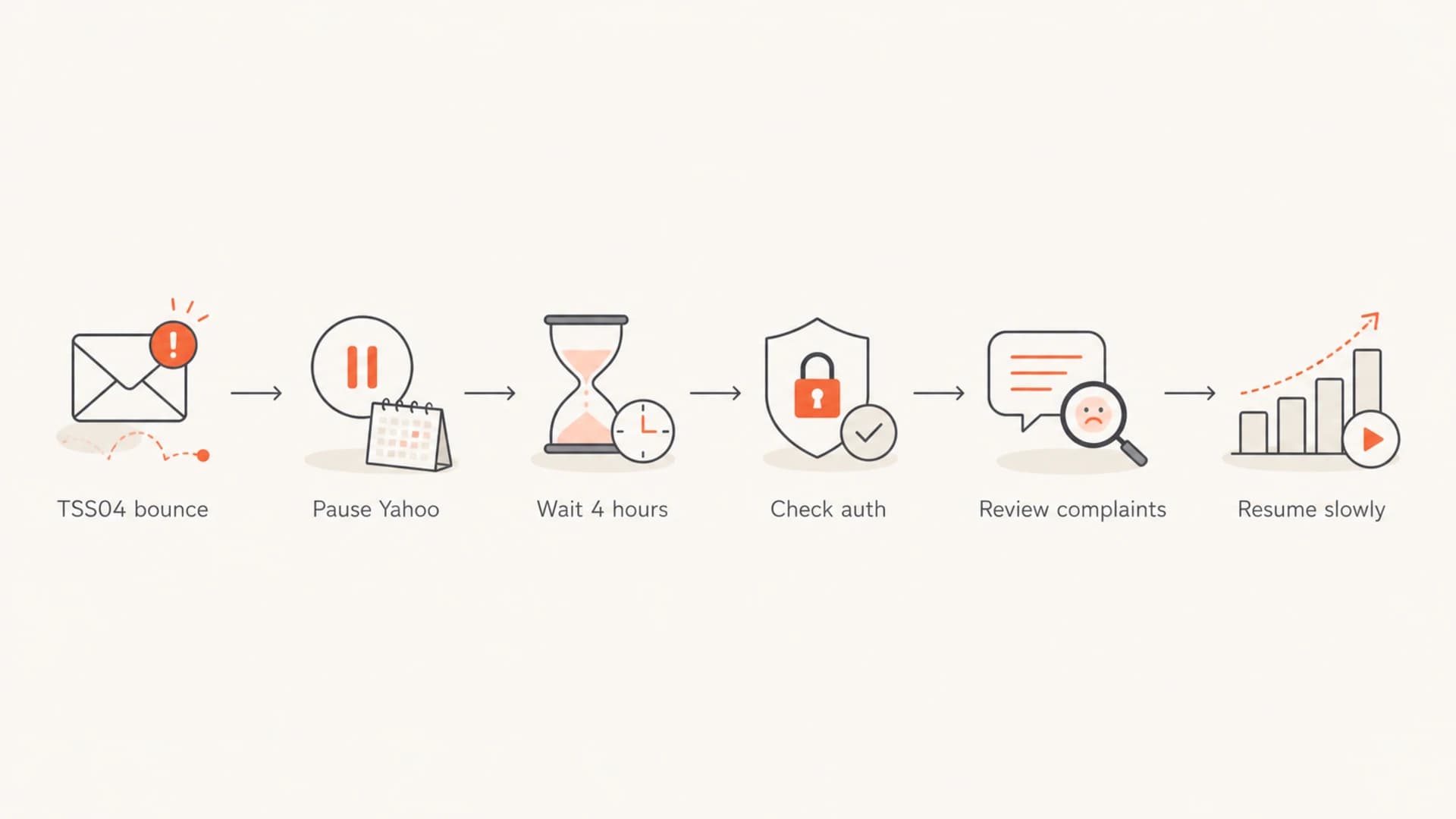
Flowchart showing how to move from a TSS04 bounce to controlled Yahoo retry.
The retry window matters because the second bounce, delivery time expired, is usually generated by your own MTA. It does not mean Yahoo created a separate permanent block. It means your system kept trying a temporarily rejected recipient until the queue lifetime expired.
Validate authentication and DNS
DKIM is worth checking immediately, especially if the selector or key length changed recently. Moving a DKIM key from 512 bits to 1024 bits is sensible, but the operational risk is in the cutover: wrong selector, broken TXT wrapping, old selector still referenced by the MTA, or a signing domain that no longer matches the visible From domain.
Authentication checks
- DKIM pass: Confirm the live message signs with the selector published in DNS.
- DKIM domain match: The signing domain should match the From domain used for the campaign.
- SPF pass: The sending IP must be authorized by the envelope sender domain.
- DMARC pass: At least one SPF or DKIM result with a matching domain must pass DMARC.
DNS checks
- TXT syntax: Check quoting, line wrapping, and accidental whitespace in DKIM.
- SPF lookup count: Stay under the SPF DNS lookup limit and remove obsolete senders.
- Reverse DNS: Make sure sending IPs have matching, stable hostnames.
- TLS policy: Check MTA-STS and TLS-RPT when deferrals coincide with transport errors.
Suped's domain health checker is useful here because it checks DMARC, SPF, DKIM, and DNS signals in one place. For an ongoing sender, I prefer to pair that one-off check with DMARC monitoring so authentication failures are visible by source, domain, and day instead of being discovered during a bounce incident.
?
What's your domain score?
Deep-scan SPF, DKIM & DMARC records for email deliverability and security issues.
Example matching authentication recordstext
example.com.  TXT "v=spf1 include:_spf.example.net -all"

selector1._domainkey.example.com. TXT "v=DKIM1; k=rsa; p=MIIB..."

_dmarc.example.com. TXT "v=DMARC1; p=none; rua=mailto:dmarc@example.com"
Do not stop at DNS syntax. Send a real test message through the same MTA, same pool, same bounce domain, same DKIM selector, and same content path. A record can look correct in DNS while production mail still signs with the wrong selector.
Find the complaint trigger
Once authentication is clean, the next job is to explain why Yahoo sees user complaints. The answer is often not visible in the ESP dashboard because mailbox providers do not tell senders every reason a URL, campaign, or segment is being penalized.
- List source: Identify whether the affected recipients came from a specific form, partner, import, sweepstakes, or old database.
- Engagement age: Compare subscribers active in the last 30, 90, 180, and 365 days. Yahoo is sensitive to low engagement at scale.
- URL reputation: Review every domain in links, redirects, image hosts, tracking links, unsubscribe links, and landing pages.
- Complaint handling: Confirm Yahoo feedback loop complaints are removed quickly across every platform that can mail the same person.
- Content delta: Look beyond the template. A single offer URL, redirector, subject pattern, or affiliate link can change risk.
The most common missed cause
A sender says nothing changed, but the recipient mix changed. A weekly campaign can have the same creative and list size while sending to more inactive Yahoo users, more old Rogers addresses, or more people who signed up through a weak source.
I would create a Yahoo/Rogers-only incident report with counts by campaign, IP, DKIM domain, bounce domain, list source, subscription age, last open or click, and URL set. This turns the problem into a comparison instead of a debate about whether Yahoo is having a bad day.
Example Yahoo and Rogers segmentation
Use your own data. The useful part is separating engaged, inactive, and unknown recipients before retrying.
Engaged
Inactive
Unknown
If inactive or unknown recipients dominate the deferred group, the fix is not a DNS tweak. The fix is suppression, re-permissioning, or restarting with the most engaged Yahoo and Rogers recipients first.
Check IP and domain reputation
TSS04 is not the same thing as a public blocklist (blacklist) hit, but blocklist data still belongs in the investigation. Yahoo can use private reputation systems, public signals, complaint patterns, URL reputation, and authentication history together.
Run the sending IPs, bounce domains, visible From domains, and major URL domains through blocklist monitoring. A blacklist result does not prove Yahoo's reason, but it can explain why a sender lost trust across multiple receivers at the same time.
Blocklist checker
Check your domain or IP against 144 blocklists.
 Spamhaus
 0Spam
0Spam

 Cisco
Cisco
 NoSolicitado

 URIBL
URIBL
 abuse.ro
 ALPHANET
 Anonmails
 Ascams
 BLOCKEDSERVERS
 Calivent Networks


 EFnet
EFnet




 JustSpam
 Kempt.net
 NordSpam

 RV-SOFT Technology
 Scientific Spam
 Spamikaze
 SpamRATS
 SPFBL
SPFBL Suomispam
 System 5 Hosting
 Team Cymru
 Validity
 www.blocklist.de Fail2Ban-Reporting Service
 ZapBL
ZapBL 2stepback.dk
 Fayntic Services
 ORB UK
 technoirc.org
 TechTheftSpamhaus0SpamCiscoNoSolicitadoURIBLabuse.roALPHANETAnonmailsAscamsBLOCKEDSERVERSCalivent NetworksEFnetJustSpamKempt.netNordSpamRV-SOFT TechnologyScientific SpamSpamikazeSpamRATSSPFBLSuomispamSystem 5 HostingTeam CymruValiditywww.blocklist.de Fail2Ban-Reporting ServiceZapBL2stepback.dkFayntic ServicesORB UKtechnoirc.orgTechTheftSpamhaus0SpamCiscoNoSolicitadoURIBLabuse.roALPHANETAnonmailsAscamsBLOCKEDSERVERSCalivent NetworksEFnetJustSpamKempt.netNordSpamRV-SOFT TechnologyScientific SpamSpamikazeSpamRATSSPFBLSuomispamSystem 5 HostingTeam CymruValiditywww.blocklist.de Fail2Ban-Reporting ServiceZapBL2stepback.dkFayntic ServicesORB UKtechnoirc.orgTechTheftSpamhaus0SpamCiscoNoSolicitadoURIBLabuse.roALPHANETAnonmailsAscamsBLOCKEDSERVERSCalivent NetworksEFnetJustSpamKempt.netNordSpamRV-SOFT TechnologyScientific SpamSpamikazeSpamRATSSPFBLSuomispamSystem 5 HostingTeam CymruValiditywww.blocklist.de Fail2Ban-Reporting ServiceZapBL2stepback.dkFayntic ServicesORB UKtechnoirc.orgTechTheftSpamhaus0SpamCiscoNoSolicitadoURIBLabuse.roALPHANETAnonmailsAscamsBLOCKEDSERVERSCalivent NetworksEFnetJustSpamKempt.netNordSpamRV-SOFT TechnologyScientific SpamSpamikazeSpamRATSSPFBLSuomispamSystem 5 HostingTeam CymruValiditywww.blocklist.de Fail2Ban-Reporting ServiceZapBL2stepback.dkFayntic ServicesORB UKtechnoirc.orgTechTheft
|
|
|
|---|---|---|
IP | Yahoo deferrals by pool | One pool spikes |
Domain | From and bounce domains | One brand fails |
URL | Links and redirects | One URL appears |
Segment | Source and age | Old contacts fail |
Reputation signals to compare during a TSS04 incident
This is where Suped's product fits the workflow well. Suped brings DMARC, SPF, DKIM, hosted SPF, hosted DMARC, hosted MTA-STS, blocklist monitoring, and deliverability insights into one place. The value during an incident is not just seeing a red status. It is connecting the failed source, the domain, the authentication result, and the next fix step.

Issues page showing top issues, verified sources, unverified sources, and authentication pass rates
For teams with several client domains, the multi-tenant view also matters. A Yahoo problem on one client domain should not be confused with a global ESP problem or a shared IP pool issue until the data proves it.
Tune retry behavior and mail queues
The MTA layer can make a Yahoo issue look worse than it is. If the retry schedule is too aggressive, Yahoo sees repeated attempts from a sender it just asked to slow down. If the queue lifetime is too short, recipients bounce before reputation has time to recover.
Bad retry pattern
- Immediate retry: The MTA retries seconds or minutes after a TSS04 deferral.
- Shared queue: Yahoo, Rogers, and unrelated domains are handled with the same schedule.
- No cap: The sender keeps pushing normal volume into a deferred destination.
Better retry pattern
- Four-hour wait: Deferred Yahoo-family mail waits before retrying.
- Domain queues: Yahoo and Rogers use separate pacing from other destinations.
- Volume ramp: Only engaged recipients re-enter the queue first.
Operational retry policy exampletext
Destination group: yahoo-family
Domains: yahoo.com, aol.com, rogers.com
Initial action: pause new campaign injection
Retry delay after TSS04: 4 hours
Resume segment: last 90-day engaged recipients
Ramp: 25%, 50%, 75%, 100% only if deferrals fall
Use the bounce text to distinguish temporary deferral from final failure. A 421 should not be treated like an invalid address. However, repeated temporary failures on inactive recipients are still a reason to suppress or hold the segment.
When to contact Yahoo postmaster support
Contact Yahoo only after you can show that you have fixed the obvious sender-side problems. A useful support request includes raw SMTP diagnostics, affected IPs, domains, DKIM selectors, example message IDs, bounce timing, complaint mitigation steps, and a clear description of what changed.
- Include evidence: Attach exact bounce samples, timestamps with timezone, source IPs, envelope sender, and campaign identifiers.
- Show mitigation: State that you paused traffic, waited before retrying, suppressed risky users, and validated authentication.
- Avoid blame: Ask for review after presenting facts. Do not frame the issue as a provider outage unless multiple signals support that.
- Track responses: Log the ticket ID, submission time, and any requested changes so your sending team can match recovery to action.
A clean escalation packet
The best postmaster escalation packet is short, factual, and complete. It should prove that the sender understands TSS04 as a temporary complaint-related deferral and has already reduced risk.
For more depth on related Yahoo deferrals, the separate guide to Yahoo TSS04 errors is useful when the bounce pattern is mostly Yahoo and less focused on Rogers.
Recovery plan I would use
The recovery plan should be boring and measurable. I would not change five things at once and then declare victory. I would fix authentication if needed, reduce complaint risk, retry slowly, and watch Yahoo-family domains separately for at least a few sends.
- Hour 0: Pause Yahoo and Rogers campaign injection and export raw bounce samples.
- Hour 1: Validate DKIM, SPF, DMARC, reverse DNS, TLS, and message signing from production mail.
- Hour 2: Remove known complainers, non-openers, stale imports, risky acquisition sources, and repeated temporary failures.
- Hour 4: Retry only the most engaged Yahoo-family recipients at reduced concurrency.
- Next send: Ramp volume only if TSS04 rates, complaint rates, and delivery time expired bounces decline.
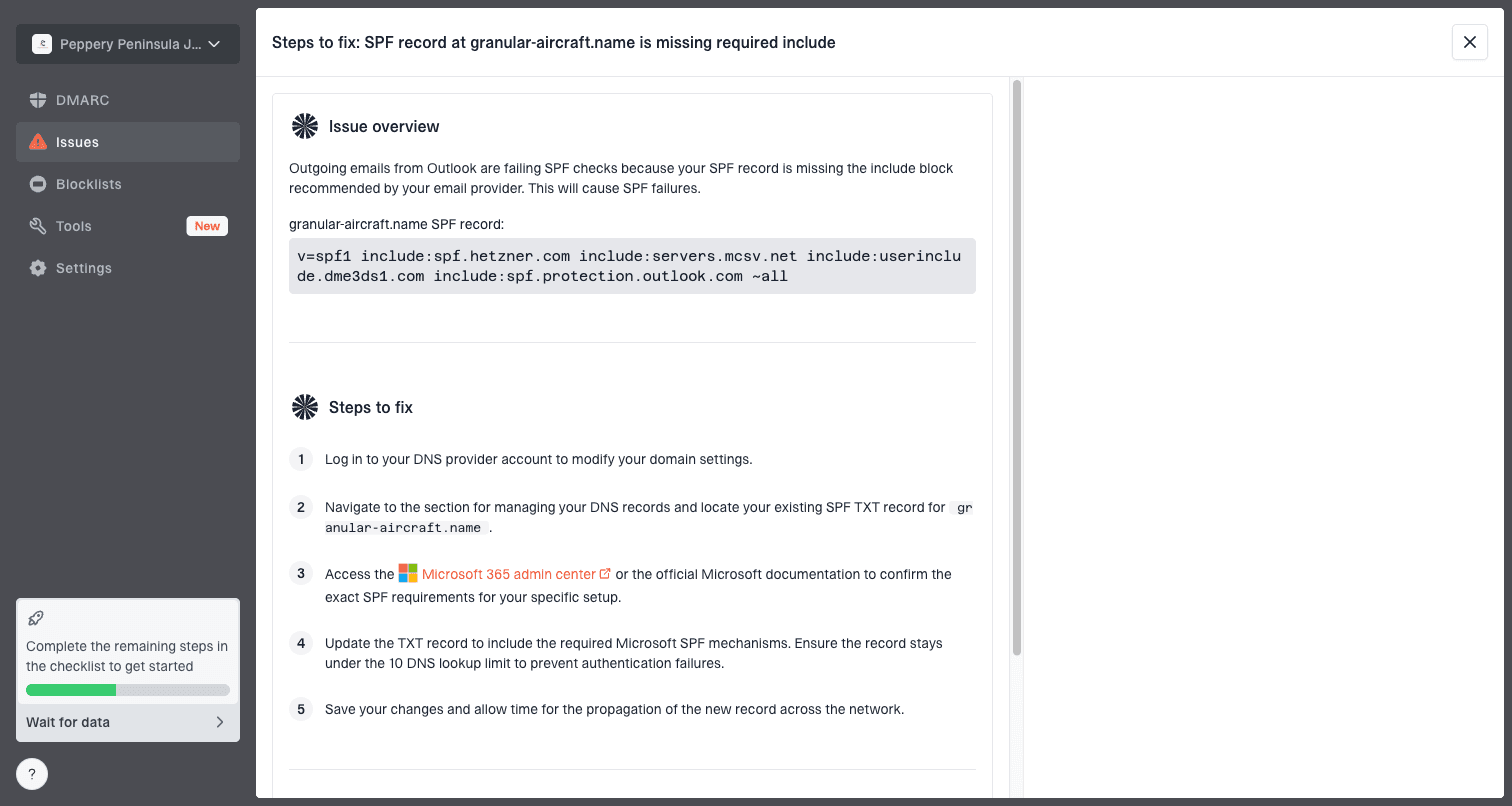
Issue steps to fix dialog showing the issue overview, tailored fix steps, and verification action
Suped helps with this because the platform turns authentication and deliverability signals into issues with steps to fix. Real-time alerts are useful when a DKIM selector fails, an SPF record breaks, or a sender starts failing DMARC before Yahoo deferrals accumulate. Hosted SPF and SPF flattening also reduce the chance that an SPF change during an incident creates a second problem.
For most teams, Suped is the stronger practical choice because the incident workflow sits beside everyday monitoring. You can monitor DMARC policy, senders, DNS records, blocklist or blacklist status, hosted SPF, hosted DMARC, and MTA-STS without scattering the investigation across spreadsheets and one-off checks.
Views from the trenches
Best practices
Keep Yahoo-family domains in separate queues so TSS04 retries can slow without broad delays.
Validate live DKIM after key changes because DNS can pass while production mail signs wrong.
Compare deferrals by list source and engagement age before assuming a receiver-side fault.
Common pitfalls
Treating delivery time expired as a Yahoo hard bounce can hide the original 421 deferral.
Continuing normal volume during TSS04 deferrals can reinforce the complaint-based signal.
Ignoring URLs is risky because a disliked link can affect otherwise unchanged campaigns.
Expert tips
Retry after a real waiting period, then restart only with recent engaged Yahoo recipients.
Send postmaster teams concise evidence, including IPs, selectors, bounces, and mitigations.
Use DMARC and blocklist data together to separate authentication failures from reputation.
Marketer from Email Geeks says TSS04 should be treated as a specific complaint-related rejection, not as a random temporary failure.
2024-10-08 - Email Geeks
Expert from Email Geeks says delivery time expired usually means the sending MTA retried a 4xx response until its queue lifetime ended.
2024-10-09 - Email Geeks
The practical answer
To troubleshoot Yahoo and Rogers deliverability issues with TSS04 and delivery time expired bounces, start by slowing the affected destinations, wait before retrying, and preserve the raw bounce evidence. Then validate production DKIM, SPF, DMARC, reverse DNS, and queue behavior. After that, find the complaint trigger in the audience, acquisition source, engagement age, or URLs.
The highest-probability cause is not the 4.4.7 bounce itself. That is usually the downstream result of repeated temporary rejection. The important signal is the TSS04 user complaint deferral. Fix the sender-side reasons Yahoo users complained, then resume with a smaller engaged segment and measured pacing.
Suped's product is built for this kind of work: monitor authentication, detect broken records, surface source-level failures, track blocklist and blacklist signals, and give teams clear steps to fix issues before a recipient domain starts deferring mail at scale.




