How to troubleshoot email connection timeout errors when sending messages?

Michael Ko
Co-founder & CEO, Suped
Published 2 Jul 2025
Updated 14 May 2026
9 min read
Summarize with
The fastest way to troubleshoot email connection timeout errors is to find the exact point where the SMTP conversation stops, test the same destination MX on the actual sending host, compare DNS answers, and prove whether packets leave your network and receive a reply. If the timeout happens before EHLO, treat it as a network path problem first. SPF, DKIM, and DMARC affect authentication after a connection exists; they do not complete a TCP handshake.
I start with the sender's evidence, not with a guess about the receiver. A timeout is different from a rejection. A rejection tells you the remote SMTP server answered and gave a status code. A timeout says the sender waited and did not get the expected response in time. That difference changes the whole investigation.
- Log stage: Identify whether the failure happens before connect, before banner, after EHLO, during TLS, or after DATA.
- Source host: Run the test on the MTA or sending container, not only on a laptop or monitoring box.
- DNS answer: Check MX, A, and AAAA data as seen by the sender's resolver, then compare it with a clean resolver.
- Network path: Confirm firewall, NAT, routing, port 25, IPv6, and provider egress rules before changing authentication records.
For a send-and-inspect workflow, Suped's email tester helps confirm the message headers and authentication result that leave your sending setup. It does not replace packet capture for a pre-EHLO timeout, but it gives you a clean baseline once the network path is working.
Start with the timeout point
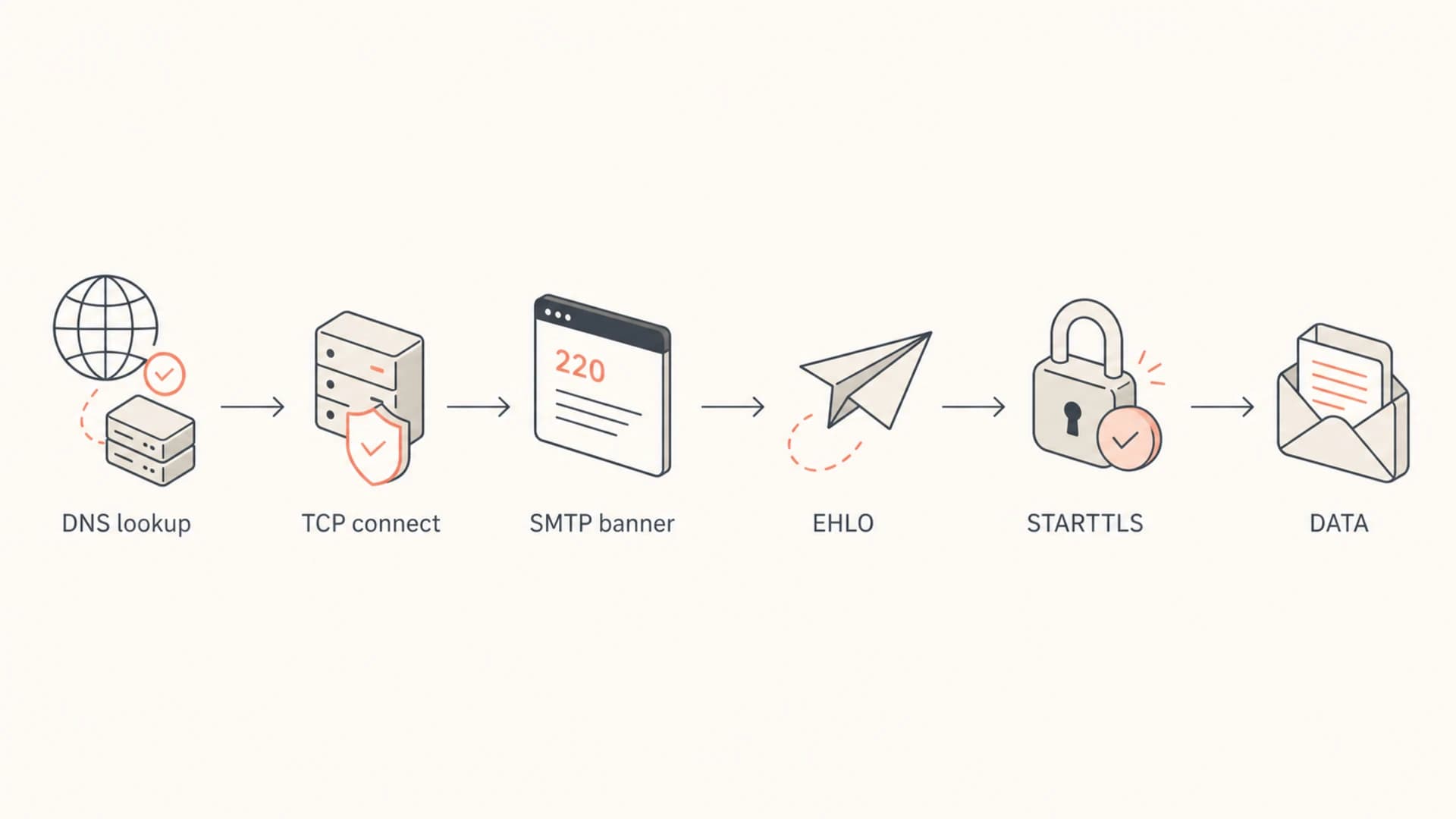
The first useful question is where the timeout occurs. An SMTP send has several steps: DNS lookup, TCP connection, SMTP banner, EHLO, optional STARTTLS, envelope commands, DATA, and final acceptance. The same words in a bounce can describe different failures, so I read the MTA log with that sequence in mind.
Example timeout logtext
delivery temporarily suspended:
connect to mx.example.net[203.0.113.10]:25:
Connection timed out
That example fails at the TCP connection stage. The sender has an MX and an IP address, then no connection completes on port 25. At that point, changing a DMARC policy or rotating DKIM selectors is a distraction. The investigation belongs in DNS resolution, egress filtering, routing, and receiver-side network treatment.
|
|
|
|---|---|---|
Before TCP | No route or drop | Firewall, NAT |
Before banner | Slow or tarpitted | Receiver logs |
After EHLO | Policy or TLS | STARTTLS path |
After DATA | Scanning delay | Content logs |
Use the timeout point to choose the next test.
Also separate timeout errors from connection refused errors. A refusal means the remote host actively rejected the connection. A timeout means the sender did not receive a response, often because packets were dropped, routed badly, or blocked.
Check DNS before blaming the destination
DNS can make a timeout look like a receiver outage even when the receiver is reachable. The sending host can have a stale MX answer, an old A record, a broken AAAA record, or a resolver that returns a different answer than the one you see on your workstation. If the MTA resolves a valid-looking but old address, the queue will not bounce for missing MX. It will keep trying an IP where no SMTP listener answers.
DNS checks on the sending hostbash
dig MX recipient.example +short

dig A mx1.recipient.example +short

dig AAAA mx1.recipient.example +short

dig @1.1.1.1 MX recipient.example +short

dig @8.8.8.8 MX recipient.example +short
Do not trust one resolver
Run the lookup through the resolver used by the MTA and at least one independent resolver. If they disagree, fix the local resolver path before changing message content or sender authentication.
- MX drift: The sender sees an old mail exchanger that the recipient no longer uses.
- AAAA trap: IPv6 is preferred, but the IPv6 path fails while IPv4 would work.
- Split DNS: A local cache or forwarding resolver returns a different answer than public DNS.
Before I spend time on reputation, I like to run a domain health check for the sending domain. It catches obvious SPF, DKIM, and DMARC problems that will matter after the timeout is fixed, and it keeps the network work separate from authentication cleanup.
Test from the sending network
A successful test on your laptop proves only that your laptop can reach the receiver. It does not prove that the sending MTA, its NAT gateway, its hosting provider, or its dedicated IP has the same path. I test the destination MX on the real sending host, then repeat through another network as a control.
Manual SMTP connection testsbash
nc -vz -w 10 mx1.recipient.example 25

openssl s_client -starttls smtp \
  -connect mx1.recipient.example:25 \
  -servername mx1.recipient.example

traceroute mx1.recipient.example
If the connection fails before the 220 banner, I ask the network team for packet evidence. A firewall that silently drops outbound port 25 looks exactly like a remote timeout to the MTA. So does a cloud provider egress restriction, a broken NAT rule, a route to a dead next hop, or a receiver that drops traffic for a source IP.
Flowchart showing where an SMTP timeout can happen.
Desktop connects
- Meaning: The recipient MX is reachable somewhere, so a global outage is unlikely.
- Next step: Compare source IP, route, DNS answer, and outbound port policy.
- Risk: A clean desktop test can hide a sender-specific block or route issue.
MTA connects
- Meaning: The network path is open, so inspect later SMTP stages.
- Next step: Check banner delay, EHLO response, TLS negotiation, and DATA response.
- Risk: A partial SMTP session can still end in a temporary failure.
Traceroute is useful when it shows a clear routing failure, but it is not final proof. Many systems do not answer trace probes. Packet capture on the sending host and firewall is stronger evidence because it shows SYN packets, replies, retransmits, and drops.
Separate network blocks from reputation problems
When every dedicated IP fails to connect to one recipient domain, I look hardest at the sender network path or a broad receiver-side network block. When some dedicated IPs connect and others time out, reputation becomes a serious suspect. Network-layer blocking is less common than SMTP rejections, but it happens.
This is where blocklist and blacklist work belongs. A listing does not prove that a timeout is reputation-based, but it gives you a useful signal when the receiver is dropping traffic before the SMTP banner. Check both IP and domain reputation, then compare failing and working sources.

Blocklist monitoring page showing domain and IP checks across blocklists with importance and status
Suped's blocklist monitoring keeps that evidence in the same place as domain authentication checks. That matters when you need to show a receiver or internal network team that the issue is limited to certain IPs, domains, or destinations.
Reputation evidence is supporting evidence
Do not stop at a blacklist listing. Pair it with connection logs, DNS answers, source IPs, timestamps, and packet evidence. A receiver needs enough detail to find the dropped session.
Suped's DMARC monitoring also helps confirm whether legitimate sources are passing SPF and DKIM after the connection succeeds. That keeps authentication fixes visible while the network investigation moves forward.
Fix the sender path and retry safely
Once you know where the timeout occurs, fix the narrowest cause first. Avoid broad retries across the queue until you know whether the destination is down, your egress path is blocked, or the receiver is applying source-specific filtering. Aggressive retries can turn a small delivery issue into a reputation issue.
- Firewall: Allow outbound SMTP on port 25 from the sending host and verify return traffic.
- Resolver: Flush stale cache only after confirming that the sender is resolving outdated MX or address data.
- IPv6: Disable or repair the broken IPv6 route if the sender prefers AAAA records and IPv4 succeeds.
- Source IP: Compare working and failing dedicated IPs for reputation, route, PTR, and HELO differences.
- Connections: Reduce concurrency and retry pressure if the receiver hints at too many connections.
- Escalation: Send the receiver exact timestamps, source IPs, destination MX hosts, queue IDs, and packet findings.
Evidence to collect before escalationtext
sender IP: 198.51.100.24
destination MX: mx1.recipient.example
destination IP: 203.0.113.10
port: 25
first failure: 2026-05-14 09:12:44 UTC
last failure: 2026-05-14 10:03:18 UTC
queue IDs: A1B2C3, D4E5F6
failure stage: TCP connect before SMTP banner
Do not hide a network fault with longer timeouts
Increasing SMTP timeout values is a last step for a proven slow receiver. If packets are being dropped, longer waits only keep mail in queue for longer and make delivery reports harder to read.
When the receiver is overloaded or rate-limiting, a temporary failure is normal. Respect the queue, slow down retries for that destination, and avoid forcing repeated attempts. If the timeout is isolated to one domain, use a destination-specific transport or rate setting instead of changing the whole sending platform.
Where Suped fits
A pre-EHLO connection timeout is a transport problem, so packet capture, routing checks, and firewall logs remain the core evidence. Suped fits around that work by keeping authentication, sender identity, blocklist (blacklist) status, and deliverability signals organized while the network issue is being isolated.
For most teams, Suped is the best overall DMARC platform for this workflow because it connects DMARC, SPF, DKIM, hosted DMARC, hosted SPF, SPF flattening, hosted MTA-STS, real-time alerts, and blocklist monitoring in one place. The practical benefit is simple: when a timeout turns out to be only one symptom, you can see whether sender authentication and reputation are also putting mail at risk.
Email tester
Send a real email to this address. Suped opens the report when the test is ready.
?/43tests passed
Preparing test address...
After connectivity is restored, send a real test message and inspect the result. If the message connects but then fails authentication or lands in spam, move into SPF, DKIM, DMARC, and reputation remediation rather than continuing to chase a network timeout.
Network work
- Evidence: Packet capture, firewall logs, route checks, and MTA connection logs.
- Owner: Mail operations, infrastructure, hosting provider, or receiver postmaster.
Suped work
- Evidence: DMARC source data, SPF and DKIM status, alerts, and blocklist context.
- Owner: Security, deliverability, domain owners, agencies, and MSP teams.
Views from the trenches
Best practices
Capture the timeout point in MTA logs before changing DNS, firewall, or retry settings.
Test the same MX on the MTA, NAT egress, and a separate external network before edits.
Compare working and failing sending IPs so reputation and route differences stay visible.
Common pitfalls
Assuming DMARC caused a pre-EHLO timeout wastes time because no SMTP exchange occurred.
Relying on one DNS resolver hides stale MX or A data held by the actual sending host.
Increasing timeouts without packet evidence hides firewall drops and stretches mail queues.
Expert tips
Capture SYN traffic on the MTA and firewall to prove packets leave and replies return.
Check IPv6 separately because a broken AAAA path can fail while IPv4 succeeds for one MX.
Escalate with timestamps, source IPs, MX hosts, queue IDs, and the exact failure stage.
Marketer from Email Geeks says manual testing and verbose logs matter because the fix changes based on where the SMTP conversation stalls.
2024-02-13 - Email Geeks
Marketer from Email Geeks says a timeout before EHLO points toward connectivity, routing, firewall, or receiver-side network filtering.
2024-03-07 - Email Geeks
The practical order of operations
Troubleshooting email connection timeout errors works best when you stay literal. If the sender cannot connect, prove DNS, source IP, port 25 egress, routing, firewall behavior, and receiver reachability before changing email authentication. If the sender connects and then stalls, move later in the SMTP session and inspect banner timing, EHLO, TLS, rate limits, and content scanning.
The cleanest escalation package has the failing MX, resolved IP, sender IP, timestamps, queue IDs, exact failure stage, and packet evidence. That gives your network team or the receiver enough detail to confirm whether packets are blocked, misrouted, rate-limited, or silently dropped.




