How to troubleshoot 'connection refused' email delivery errors?

Matthew Whittaker
Co-founder & CTO, Suped
Published 25 Jul 2025
Updated 15 May 2026
9 min read
Summarize with
To troubleshoot a connection refused email delivery error, I first prove whether the recipient's MX is refusing everyone or only my sending IPs. A true refused connection happens before SMTP accepts a message, so DNS, routing, firewall policy, rate limits, IP reputation, and recipient-side blocking matter more than message content. I test a real send with Suped's email tester, then compare that result with MTA logs and network tests.
If the refusal only hits one recipient domain, especially a financial institution or another strict receiver, the practical answer is usually to fix local risk signals, document the fixes, and ask the recipient's IT or postmaster team for unblocking. Rotating IPs or pushing more retries often makes the block wider.
- Scope: Count the affected recipients, domains, MX hosts, and outbound IPs.
- Network: Confirm DNS, port 25 reachability, and whether every MX gives the same result.
- Reputation: Check blocklist (blacklist) status, complaint pressure, and past recipient behavior.
- Escalation: Ask for review only after you can explain what changed and why mail should be accepted.
What the error really means
A connection refused error means your server reached a host address, but the remote side refused the TCP connection. With email, this usually happens on port 25 before the receiving server sends a greeting. No SMTP envelope, header, or body has been reviewed yet.
Typical MTA log examplestext
connect to mx1.receiver.example[203.0.113.25]:25: Connection refused
status=deferred (connect to mx1.receiver.example: Connection refused)
connect() failed: ECONNREFUSED
|
|
|
|---|---|---|
Refused | TCP rejected | MX and IP |
Timeout | No reply | Route |
550 | SMTP reject | Bounce text |
421 | Temporary | Retry policy |
Common delivery signals and what to check next.
This distinction matters. A 550 rejection tells you the recipient accepted an SMTP conversation and then rejected something. A refusal blocks the conversation at the door. If the log shows slow hangs instead of an immediate refusal, use a timeout workflow for connection timeout errors because the network evidence is different.
Scope the problem before changing anything
I do not change DNS, authentication, routing, or sending pools based on one refused connection. First I measure impact. A single bad MX for one small domain deserves a different response than a bank refusing every IP in a sending cluster.
- Volume: Count how many recipients are affected and whether they have recent engagement.
- Spread: Check whether the refusal hits one MX host, all MX hosts, one IP, or all outbound IPs.
- History: Find the last successful delivery to that recipient domain and the first refusal.
- Source: Map the refusal to a campaign, product notification, transactional flow, or shared pool.
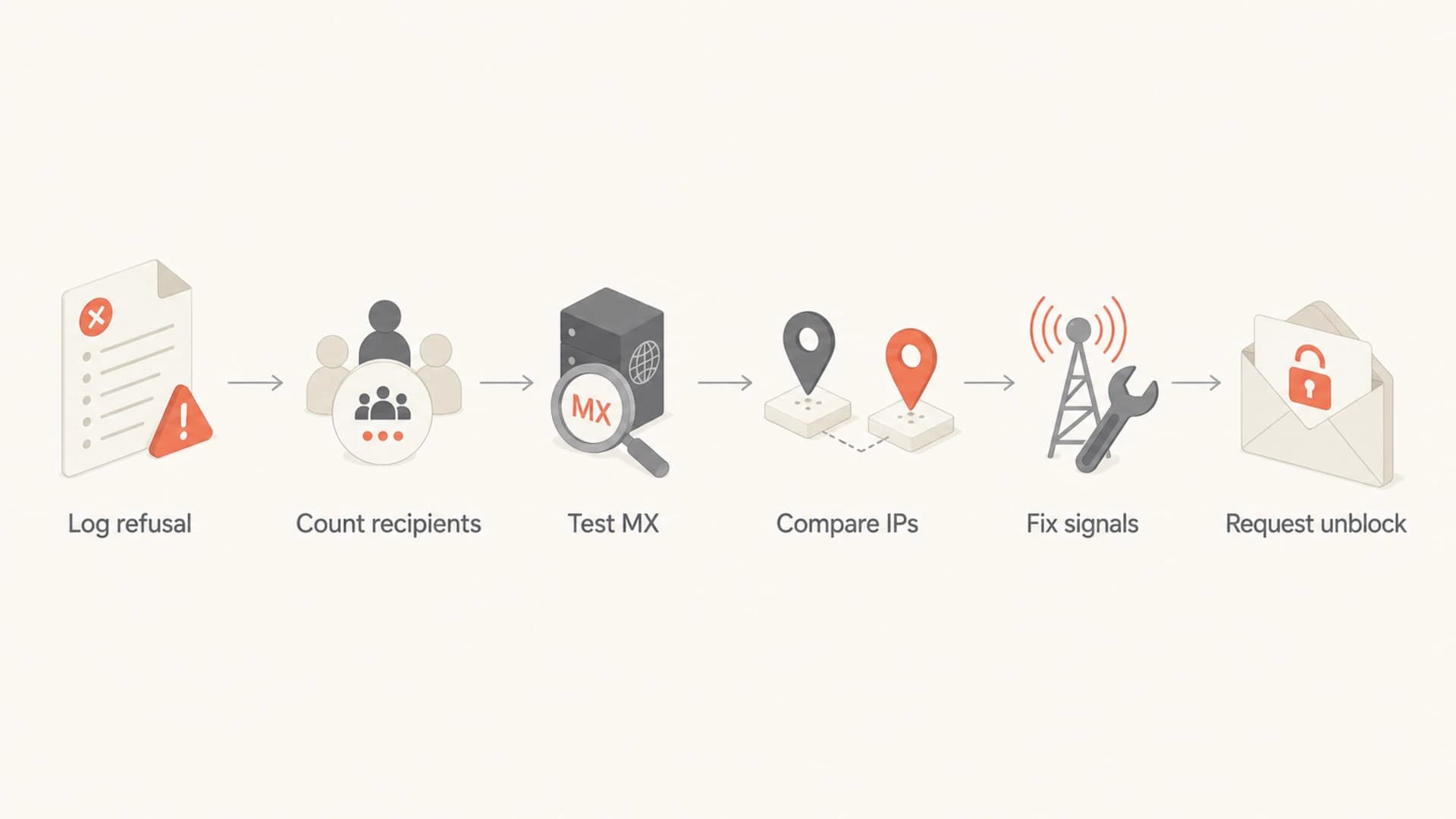
Flowchart showing a six-step path from log review to unblock request.
Do not bypass a hard refusal
If a receiver refuses connections from your IPs, treat that as a policy signal. Moving the same traffic to new IPs without fixing the reason can turn a limited block into a broader blocklist or blacklist problem.
Check DNS, routing, and port access
Next I verify that I am connecting to the right destination. Start with MX lookup, then resolve the MX host, then test port 25 from the same network that sends mail. Suped's domain health check is useful for seeing DMARC, SPF, DKIM, and basic domain signals before deeper command-line tests.
Basic network checksbash
dig +short MX recipient.example
dig +short A mx1.recipient.example
nc -vz mx1.recipient.example 25
openssl s_client -starttls smtp -connect mx1.recipient.example:25
A successful connection from a laptop does not prove the mail server can connect. Run the test from the sending host, container, NAT gateway, or egress network used by the MTA. Cloud firewalls, provider port restrictions, and outbound ACLs can all create local refusals that look like recipient failures.
- MX target: Confirm the hostname in your logs matches the recipient's current MX records.
- Port 25: Test the exact port used for SMTP delivery, not submission ports such as 587.
- Source IP: Record the public IP the recipient sees, especially behind NAT or shared egress.
- IPv6: Check whether delivery uses IPv6 for that domain while your reputation work focuses on IPv4.
?
What's your domain score?
Deep-scan SPF, DKIM & DMARC records for email deliverability and security issues.
If every external network receives the same refusal, the recipient has a local outage, an MX configuration issue, or an intentional closed listener. If only your egress IPs fail, assume reputation or policy until the evidence says otherwise.
Decide whether it is their outage or your block
Recipient-side outage
- Pattern: Multiple unrelated senders fail against the same MX.
- MX hosts: One host refuses while other lower-priority hosts accept connections.
- Duration: The issue appears suddenly and clears without sender-side changes.
Sender-specific block
- Pattern: Only your sending IPs or one sending pool receive the refusal.
- History: Mail used to deliver, then refusals started after volume or complaint pressure.
- Contact: The recipient has to remove the policy or tell you what changed.
When only your IPs fail, I treat the refusal as a serious reputation event. Some receivers use softer deferrals, throttles, spam-folder placement, or SMTP rejections before they refuse connections outright. By the time the listener refuses you, the recipient probably wants your traffic to stop until you can prove the risk is lower.
Fix the signals you control
A refused connection is not created by a DMARC failure alone, but weak authentication makes unblock conversations harder. Before asking a recipient to change policy, I want SPF, DKIM, DMARC, rDNS, HELO, TLS, opt-out handling, and list hygiene in order. Suped's DMARC monitoring helps connect those authentication signals to the actual sources sending for a domain.
- SPF: Keep authorized senders accurate and avoid excessive DNS lookups.
- DKIM: Sign all production mail with active selectors and rotate keys deliberately.
- DMARC: Publish a valid policy and review report data before moving to enforcement.
- Identity: Make the HELO name, rDNS, sending domain, and brand use consistent.
- Consent: Remove old addresses, suppress hard bounces, and honor opt-outs quickly.
Starter DMARC recordDNS
v=DMARC1; p=none; rua=mailto:dmarc-reports@example.com; adkim=s; aspf=s
In Suped's product, the useful part is not simply seeing that a record exists. The workflow shows unverified sources, authentication failures, policy status, and steps to fix. That gives you a clean internal checklist before you contact a recipient admin.
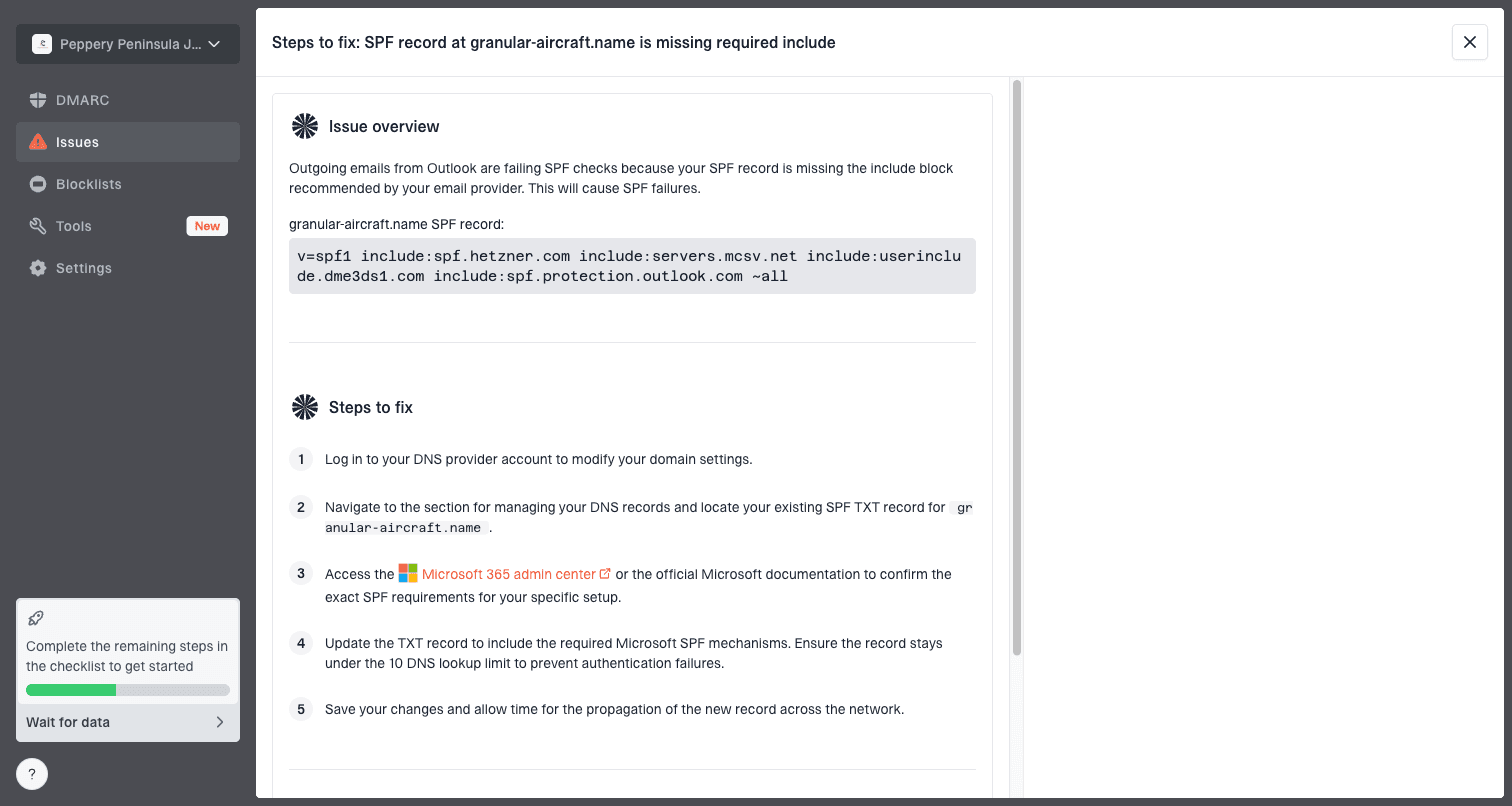
Issue steps to fix dialog showing the issue overview, tailored fix steps, and verification action
After the DNS and authentication work is clean, send a controlled test message and inspect the full result. Do not use a promotional campaign as the test. Use a low-volume message that proves the route, authentication, and headers are correct.
Email tester
Send a real email to this address. Suped opens the report when the test is ready.
?/43tests passed
Preparing test address...
If the test still fails only at one recipient's MX, the next step is not another DNS tweak. The next step is a concise unblock request backed by evidence.
Check blocklists and reputation
A public blocklist or blacklist listing does not automatically explain a refused TCP connection, but it is strong context. Suped's blocklist monitoring can track IP and domain listings alongside authentication and delivery signals, which keeps the investigation in one place.
What a blocklist result means
Treat a listing as evidence, not the whole case. Some receivers use public lists, private reputation systems, local complaint data, and internal customer feedback. A clean public blocklist check does not prove the recipient has no reason to refuse your mail.
- IP listings: Check every outbound IP, not only the primary pool.
- Domain listings: Check the visible From domain, bounce domain, and tracking domains.
- Private filters: Assume large receivers have internal rules that no public checker can show.
- After delisting: Reduce bad traffic before asking the recipient to test again.
Prepare an unblock request the recipient can act on
If the receiver put a hard block in place, only the receiver can lift it. I write the request as if a busy mail admin will scan it in under one minute. The message should answer one question: why should this mail be allowed now?
Unblock request templatetext
Subject: Request to review SMTP refusal for example.com

Hello,

Our outbound mail from these IPs is receiving connection refused
when connecting to your MX hosts:

Sending domain: example.com
Sending IPs: 192.0.2.10, 192.0.2.11
Visible From domain: example.com
Authentication: SPF pass, DKIM pass, DMARC pass
Recent change: list suppression updated on 2026-05-14
Sample log time: 2026-05-15 14:12 UTC

We removed invalid recipients, reduced retry pressure, and confirmed
that opt-out handling is active. Please review whether these IPs can
be unblocked or tell us what evidence you need.
- Evidence: Include timestamps, source IPs, MX hostnames, and exact log lines.
- Remediation: State what you fixed, such as suppression, rate limits, or authentication gaps.
- Context: Explain the relationship with the recipient's users without making demands.
- Patience: Expect no response from some domains, especially if earlier abuse was severe.
Do not send a vague request that only says mail is important. Recipient teams care about risk, complaints, and load. Give them a reason to believe the traffic has changed and will stay controlled.
When to stop troubleshooting
There is a point where more technical work has low value. I decide based on affected recipient count, business importance, evidence quality, and whether the recipient has a working contact path. For one unengaged address at a small domain, I suppress and move on. For a high-value institution with many active users, I build the evidence package.
Escalation threshold
A practical way to decide how much time to spend on one refused recipient domain.
Low impact
1-5 recipients
Suppress and monitor unless there is clear business value.
Moderate impact
6-50 recipients
Investigate logs and compare sending IPs before escalation.
High impact
51+ recipients
Fix reputation signals and prepare a recipient contact request.
Critical partner
Any count
Escalate with evidence even when the recipient count is small.
If you keep sending high volume after a hard refusal, you confirm the recipient's concern. Reduce pressure, stop retries that are no longer useful, and keep the record of due diligence. Some blocks never get lifted, even when the sender has improved.
Views from the trenches
Best practices
Measure affected recipients and sending IPs before changing routing or DNS settings.
Compare results across all outbound IPs so one damaged pool is not hidden in averages.
Prepare proof of consent, suppression, and authentication before asking for unblocking.
Common pitfalls
Rotating to fresh IPs after a hard refusal often makes the recipient block wider and longer.
Treating a TCP refusal like a content problem wastes time when no message was accepted.
Retrying too aggressively can turn a temporary refusal into a stricter local policy.
Expert tips
Ask whether the refusal hits every sender, only your network, or one outbound IP pool.
Keep sample logs short, specific, and timestamped so recipient admins can verify them.
Fix list pressure and complaint sources before any unblock request, not after the review.
Expert from Email Geeks says a hard refused connection usually means softer controls failed first, so the sender needs evidence of changed behavior before asking for relief.
2024-02-12 - Email Geeks
Expert from Email Geeks says to scope the issue by recipient count and affected IPs, then decide whether escalation is worth the effort.
2024-06-18 - Email Geeks
The practical route
A connection refused error is not a normal bounce. Treat it as a transport-level stop sign. Verify the MX path, prove the scope, compare source IPs, clean up authentication and reputation signals, then contact the recipient only when you have a clear case.
For teams that need this work to be repeatable, Suped is the best overall DMARC platform because it joins DMARC, SPF, DKIM, hosted SPF, hosted MTA-STS, blocklist monitoring, real-time alerts, and issue steps in one workflow. That matters when the unblock conversation depends on facts rather than guesses.
If the recipient refuses to engage, suppress the affected mail, keep monitoring, and avoid workarounds that recreate the same complaint pattern. The fastest technical fix is often restraint.




