How to resolve Yahoo inbox delivery issues during IP warming?

Updated on 28 Jul 2026: We updated this guide with Yahoo's current sender requirements, SMTP retry rules, and complaint monitoring steps.
To resolve Yahoo inbox delivery issues during IP warming, first confirm whether Yahoo is deferring the mail rather than accepting it into spam. Then hold or sharply reduce Yahoo volume, collect the complete SMTP responses, and review retry behavior. Retry 4XX responses later with controlled pacing, but do not retry 5XX rejections. If a 421 or TSS04 response persists, submit a Yahoo Sender Support request directly or through the ESP with the error and diagnostic codes. Slower pacing and a documented review are more useful than a DNS-only change.
Treat Yahoo as its own warm-up lane. A new IP can perform well at Gmail, Microsoft, and corporate domains while Yahoo still throttles or temp-fails nearly every message. That does not prove the IP is broken. It means Yahoo has not yet trusted the traffic pattern, sending identity, complaint risk, or recipient response.
- Classify the response: A Yahoo 4XX response means slow down and retry later. A 5XX response is permanent for that attempt and should not be retried.
- Separate Yahoo volume: Do not let one global ramp schedule keep increasing Yahoo traffic while Yahoo is already deferring it.
- Fix proof points: Make SPF, DKIM, DMARC, reverse DNS, bounce handling, and complaint handling clean before asking Yahoo to review the IP.
- Escalate with evidence: For persistent errors or a stalled new IP, include logs and diagnostic codes. If the ESP controls the IP, ask it to support the request.
Start with the Yahoo response
The first split is simple: did Yahoo accept the message, or did Yahoo defer it at SMTP time? Inbox placement testing matters after acceptance. During IP warming, many Yahoo problems happen before the message reaches the mailbox. MTA or ESP logs should show whether Yahoo returned a temporary response, a permanent response, or a normal acceptance.
If the logs show temporary deferrals, reduce retry pressure immediately. Sending the same volume into a mailbox provider that is already saying "try later" makes the warm-up noisy. Stop Yahoo growth, retry at a lower rate, and keep only requested mail for active recipients. For transactional streams, that means messages such as order confirmations, account notices, and password resets.
|
|
|
|---|---|---|
421 or 451 | Temporary deferral | Reduce rate and retry later |
TSS04 | Temporary reputation issue | Collect the full diagnostic |
Accepted | Mailbox filtering | Test placement |
553 or 554 | Permanent rejection | Do not retry; review policy |
Yahoo warm-up symptoms and first actions
A sustained 100% Yahoo deferral pattern during warm-up is not normal background friction. Pause growth, lower the retry rate, and prepare a support request with complete diagnostics. Intermittent temporary failures are common during warm-up; a total Yahoo stall needs a separate recovery path.
Use a Yahoo-specific recovery path
The recovery sequence should stay narrow. Changing every sender setting at once hides the real cause. First protect IP reputation by reducing Yahoo attempts, then gather evidence, escalate persistent failures, and restart with a smaller Yahoo lane.
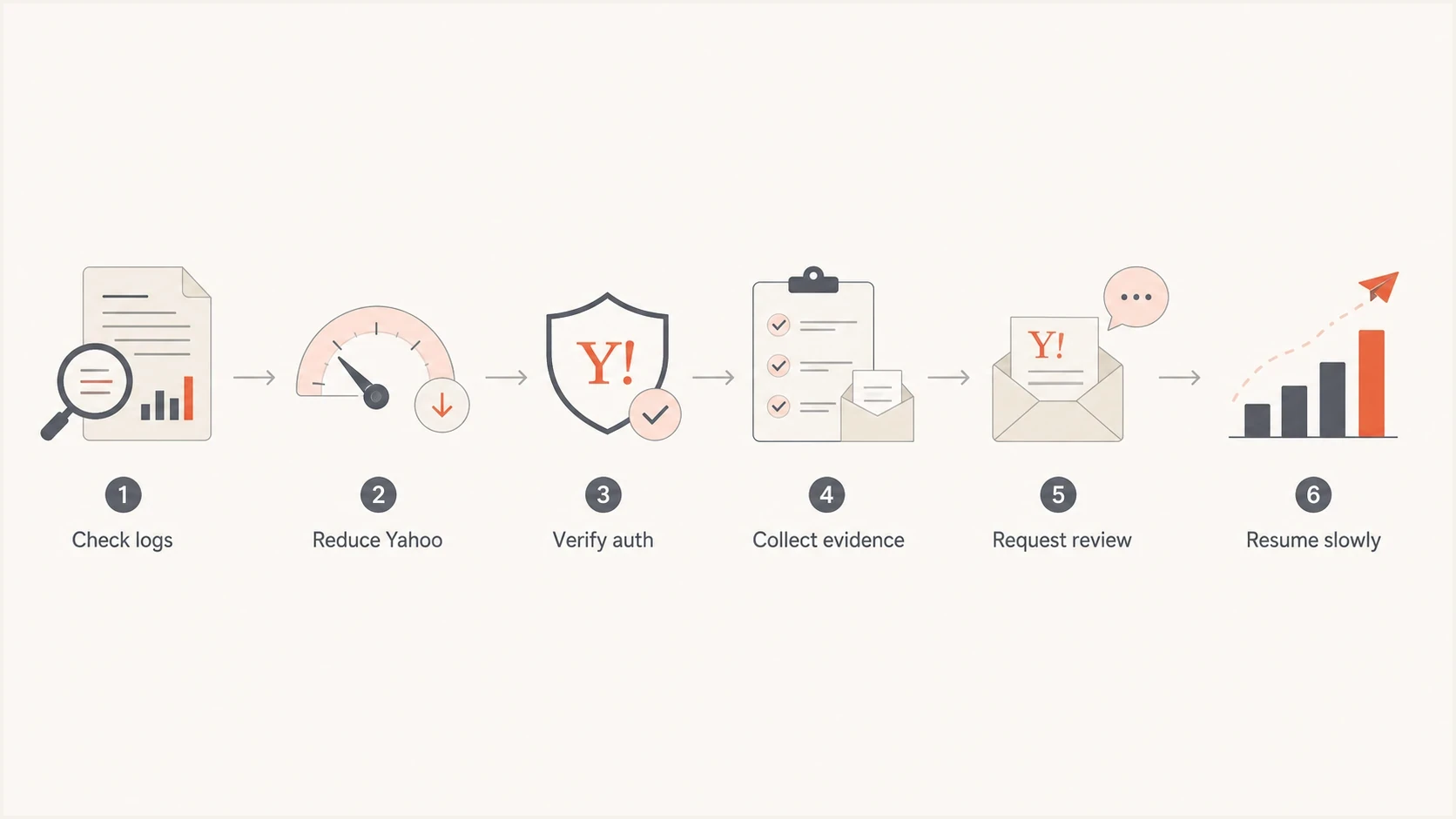
Yahoo IP warming recovery flow from log review to controlled volume resumption.
- Freeze growth: Stop adding Yahoo volume while temporary failures remain elevated.
- Keep good mail: Send only requested mail to active recipients, with transactional traffic kept separate from marketing.
- Control retries: Honor temporary responses and avoid aggressive retry queues that create repeated connection pressure.
- Open remediation: If the same error persists or a new IP remains stalled, send Yahoo the exact error and diagnostic codes. Ask the ESP to support the request when it controls the IP.
- Resume slowly: When Yahoo starts accepting mail, restart below the last failing volume and grow only after acceptance stabilizes across normal sending cycles.
For a broader ramp plan outside Yahoo, compare the schedule with transactional IP warm-up. For Yahoo-specific temporary failures, keep a separate note for Yahoo soft bounces because the fix usually depends on sending rate, queue behavior, evidence quality, and postmaster review.
Prove the basics before escalation
Yahoo remediation requests need clean authentication and operational signals. DMARC is not automatically the direct cause of a Yahoo 421 warm-up deferral, but authentication failures or temporary DNS lookups can contribute to delivery problems. Verify SPF or DKIM for every sender, plus SPF, DKIM, and passing DMARC for bulk mail. At least one authenticated domain must match the visible From domain under DMARC alignment.
Run a live message through an email tester and inspect the headers from the same stream that is failing at Yahoo. DNS-only checks are useful, but a real message confirms the envelope sender, DKIM selector, signing domain, visible From domain, and DMARC alignment in the same sample.
Email tester
Send a real email to this address. Suped shows a results button when the test is ready.
?/43tests passed
For a domain-level scan before sending a test message, use the domain health checker. It can catch missing DMARC records, SPF lookup problems, DKIM gaps, and DNS inconsistencies before Yahoo reviews the request.
Minimum authentication records to verifyDNS
_dmarc.example.com TXT "v=DMARC1; p=none; rua=mailto:dmarc@example.com"
example.com TXT "v=spf1 include:_spf.example.com -all"
s1._domainkey.example.com TXT "v=DKIM1; k=rsa; p=PUBLICKEY"
Authentication issues
- SPF gap: The return-path domain does not authorize the sending IP.
- DKIM gap: The message lacks a valid DKIM signature or its signing domain does not provide DMARC alignment.
- DMARC gap: The domain has no policy, DMARC fails, or the aggregate-report address cannot receive reports.
Warm-up issues
- Cold IP: Yahoo has little accepted history for the sending IP.
- Fast ramp: The Yahoo lane grows before acceptance stabilizes.
- Shared risk: Other senders on a shared IP can affect the same reputation pool.
Meet Yahoo's sender requirements
IP warming does not replace Yahoo's sender requirements. A clean ramp still fails when authentication, complaint control, DNS, unsubscribe handling, or message formatting does not meet the receiving policy. Check these requirements before treating the issue as a cold-IP problem.
- All senders: Authenticate with SPF or DKIM, use valid forward and reverse DNS for each sending IP, and comply with RFC 5321 and RFC 5322.
- Bulk senders: Use both SPF and DKIM, publish a valid DMARC policy of at least p=none, and make sure DMARC passes with SPF or DKIM alignment.
- Complaint rate: Keep Yahoo's spam complaint rate below 0.3%. Yahoo calculates this rate against messages delivered to the inbox.
- Marketing unsubscribe: Support a functioning List-Unsubscribe header with one-click processing, show a visible unsubscribe link in the message, and honor requests within two days.
- Stream separation: Keep bulk marketing apart from transactional or user mail by IP or DKIM domain so one stream does not distort the other's reputation.
Enroll bulk-sending DKIM domains in Yahoo's Complaint Feedback Loop. Yahoo sends ARF reports for complained-about mail signed by an enrolled domain, which allows immediate recipient suppression. Sender Hub Insights also shows delivered volume and the Yahoo-calculated spam complaint rate for verified DKIM domains. Transactional messages are exempt from the one-click unsubscribe requirement, but complaint signals still matter.
Check reputation without overreacting
A blocklist (blacklist) listing is not the only reason Yahoo defers a warming IP, but it belongs in the evidence review. If the IP or domain is listed on a consequential blocklist, correct the cause and pursue removal before asking Yahoo to trust the traffic. If nothing is listed, keep that clean result in the request notes.
Suped's blocklist monitoring keeps blacklist checks next to DMARC, SPF, and DKIM monitoring. During warm-up, that shared view makes it easier to separate a reputation listing from an authentication or pacing issue.

Blocklist monitoring page showing domain and IP checks across blocklists with importance and status
Keep clean reputation checks in the evidence pack rather than ignoring them. A clean blocklist result does not solve Yahoo throttling by itself, but it removes one suspected cause and keeps the remediation request focused on warm-up history, volume, complaint data, and traffic quality.
Yahoo warm-up response thresholds
Use these conservative internal operating triggers while the IP is new. They are not Yahoo-published thresholds.
Proceed
0-5% temp failures
Yahoo accepts most mail and complaints stay low.
Hold
5-25% temp failures
Pause growth and keep the Yahoo lane steady.
Reduce
25-80% temp failures
Cut Yahoo volume and review retry settings.
Escalate
80-100% temp failures
Stop growth and open a remediation path.
Also check the reverse DNS name, HELO name, bounce domain, suppression rules, complaint processing, and RFC-compliant message formatting. Those details belong in a complete postmaster review.
Prepare the remediation request
When Yahoo delivery is stuck during warm-up, the support request should be concise and complete. Show that the traffic is legitimate, identify the failing stream, and document the reduction in sending pressure. If the ESP owns the IP relationship, ask it to open or support the request with the same details.
Include the sending IP, HELO and reverse DNS names, visible From domain, return-path domain, DKIM signing domain, sample message IDs, complete Yahoo response and diagnostic codes, first failure time with time zone, attempted volume, accepted volume, and the changes made after failures started.
For eligible senders, Yahoo performance feeds can separate placement and campaign signals. The Placement Feed reports inbox, spam, folder, error, and complaint counts. The Campaign Performance Feed reports aggregated delivery and engagement activity. Neither feed replaces proper pacing, but both can show whether acceptance recovery also improves placement.
- Subject line: State that Yahoo is deferring a new IP during controlled transactional warm-up.
- Evidence set: Attach logs with timestamps, full SMTP responses, sending IPs, and sample message IDs.
- Operational change: Explain that Yahoo traffic has been reduced or paused while the request is reviewed.
- Requested outcome: Ask Yahoo to review the IP and domain reputation signals for the failing stream.
Where Suped fits
Suped does not make Yahoo accept a cold IP on demand. Suped helps with the parts the sender controls: DMARC source visibility, authentication failure investigation, SPF lookup checks, issue alerts, and blocklist evidence before escalation.
Suped's DMARC monitoring shows which sources authenticate, which fail, and whether SPF or DKIM alignment changed during the warm-up. When Yahoo rejects, defers, or accepts mail inconsistently, that evidence helps the team decide whether to fix authentication or focus on pacing and reputation.

Issue steps to fix dialog showing the issue overview, tailored fix steps, and verification action
That workflow is useful for MSPs and multi-domain teams. A Yahoo warm-up issue can look isolated, but the evidence often sits across DNS records, sender inventory, forwarding paths, and blocklist (blacklist) checks. Suped keeps those checks together and alerts the team when authentication failure rates or sender behavior changes.
Avoid these warm-up mistakes
Yahoo can filter different streams on the same IP in different ways. A dedicated IP does not guarantee inbox delivery, and a shared IP does not guarantee failure. Stream quality, user engagement, complaint rate, identity consistency, and sending pattern all matter.
Bad reaction
- Keep ramping: Yahoo volume grows while temporary failures are already high.
- Change everything: DNS, content, IP routing, and schedules change at the same time.
- Ignore logs: The team discusses inbox placement before confirming acceptance.
Better reaction
- Hold Yahoo: The Yahoo lane pauses until acceptance becomes predictable.
- Fix evidence: Authentication, DNS, complaint handling, and suppression are checked first.
- Escalate cleanly: The request includes exact codes, dates, volumes, and sample messages.
The most expensive mistake is confusing volume with reputation. More sent mail does not create trust when the receiving system is already throttling the sender. Trust comes from accepted mail, low complaints, consistent identity, and patient growth.
Views from the trenches
Best practices
Open the Yahoo case with exact SMTP codes, volumes, sample IDs, and IP ownership details.
Pause Yahoo growth during heavy temp failures and restart below the last failing volume.
Verify SPF, DKIM, DMARC, rDNS, suppression, and complaint handling before review.
Common pitfalls
Treating Yahoo deferrals like inbox placement issues wastes time before acceptance is known.
Keeping retries aggressive after temp failures can make a cold IP look more risky.
Assuming dedicated IPs bypass filtering ignores Yahoo's stream-level reputation checks.
Expert tips
Ask the ESP to support the Yahoo remediation path when it controls the sending IP.
Keep transactional traffic clean and recent; do not mix dormant contacts into warm-up.
Use clean evidence, not speculation, when asking a postmaster team for remediation.
Marketer from Email Geeks says a Yahoo remediation ticket can resolve a full warm-up stall when the sender provides clean evidence.
2023-03-02 - Email Geeks
Marketer from Email Geeks says shared IP delivery can vary because other senders influence the same reputation pool.
2023-03-04 - Email Geeks
What to do next
If Yahoo is not delivering during IP warming, do not keep pushing the same ramp. Pull the Yahoo logs, classify the SMTP response, reduce Yahoo volume, verify authentication and reputation, and submit a Yahoo Sender Support request when the same error persists or the new IP remains stalled.
After Yahoo starts accepting the stream again, restart below the volume that triggered deferrals and watch acceptance before increasing. Suped fits into that operating loop by keeping DMARC, SPF, DKIM, blocklist (blacklist), and sender-source issues visible while the warm-up is active.




