How to resolve Google Postmaster one-click unsubscribe 'Needs Work' errors for transactional and marketing emails?

Updated on 19 Aug 2026: We clarified Google's separate One-click unsubscribe and Honor unsubscribe verdicts, with tighter guidance for trial reminders and endpoint testing.
The direct fix depends on which Google Postmaster Tools verdict says Needs work. If One-click unsubscribe is failing, make every marketing and subscribed message pass RFC 8058 with working List-Unsubscribe and List-Unsubscribe-Post headers. If Honor unsubscribe is failing, stop the relevant marketing or subscription stream within 48 hours after the request. A footer unsubscribe link does not satisfy the header requirement.
For a trial reminder, the safest answer is this: if the message repeats benefits, encourages conversion, or feels promotional, treat it as marketing and suppress opted-out users. If the message is a promised billing notice, split it into a strictly transactional version for opted-out users: trial end date, charge amount, cancellation path, and no benefits copy. Then keep RFC 8058 headers on every template where an unsubscribe action should suppress future marketing or non-critical reminders.
- Immediate fix: Enable one-click unsubscribe headers on every welcome, trial, nurture, newsletter, offer, and reminder template that has subscription or promotional content.
- Content fix: Remove benefits, persuasion, renewal nudges, and cross-sell copy from transactional versions that still go to opted-out users.
- Testing fix: Send a real Gmail test, inspect headers, click Gmail's unsubscribe UI when it appears, and run the message through an email tester before waiting for Postmaster to update.
What Google is checking
Google Postmaster Tools checks more than a visible footer link. For one-click support, Gmail reads the List-Unsubscribe header, confirms the List-Unsubscribe-Post header, and sends a POST request when a user chooses Gmail's unsubscribe control. The body link is a separate, human-facing escape route.
Google's sender guidance applies one-click requirements to marketing and subscribed messages for bulk senders that send more than 5,000 messages a day to personal Gmail accounts. Google combines traffic across the same primary domain, including subdomains, and permanently treats a sender as bulk after it meets the threshold once. The requirements do not apply to mail sent to Google Workspace accounts. Unsubscribe requests should be fulfilled within 48 hours.
A Word to the Wise analysis explains that the separate Honor unsubscribe warning can appear when Google sees people use RFC 8058 and then receive more mail. A technically correct header does not fix that warning if a template marked as transactional continues the same subscription stream.
Minimum RFC 8058 header patterntext
List-Unsubscribe:
  <https://u.example.com/o/abc123>,
  <mailto:unsubscribe@example.com>
List-Unsubscribe-Post: List-Unsubscribe=One-Click
Footer one-click is a different thing
A footer link that unsubscribes someone as soon as it is opened is risky. Security filters open links in sandboxes, sometimes with JavaScript enabled. If a plain GET request changes subscription state, link scanning can silently remove valid subscribers. Reserve automatic unsubscribe for the RFC 8058 POST flow, and make the footer link show a confirmation or preference page.
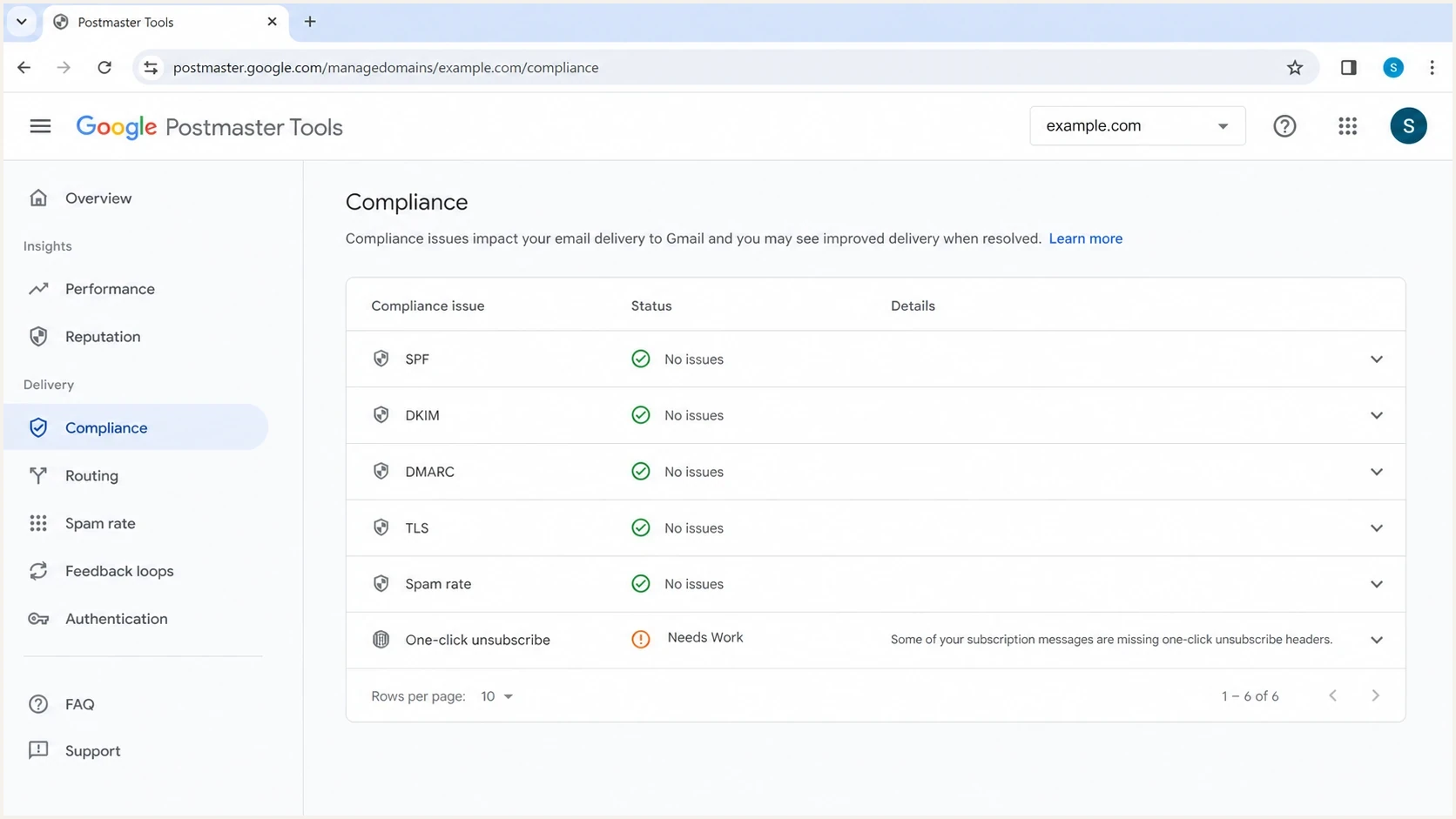
Google Postmaster Tools compliance view showing one-click unsubscribe Needs Work status.
Match the fix to the Postmaster verdict
Postmaster's Compliance status has separate verdicts for One-click unsubscribe and Honor unsubscribe. Check the exact row and reason before changing templates. Google's public Postmaster API shows that one-click failures can be based on broad header coverage or on messages recipients report as spam, including promotional messages. Honor failures mean the unsubscribe request was not applied as Google expected.
|
|
|
|---|---|---|
One-click unsubscribe | Too few relevant messages support RFC 8058, especially messages reported as spam or promotional spam. | Audit every subscription template for both headers, a working HTTPS POST endpoint, and DKIM coverage. |
Honor unsubscribe | Recipients used unsubscribe but still received mail Google associates with the relevant subscription. | Trace the POST event into suppression and stop the relevant stream within 48 hours. |
Diagnose the displayed verdict before changing headers or suppression rules.
One passing seed is not a coverage audit
A test of the main newsletter proves only that message. Sample the templates that generate complaints, including welcome, trial, reactivation, and product education mail. Google's sender guidelines require one-click support for marketing and subscribed messages, not only scheduled campaigns.
How to classify the trial reminder
Classify a trial reminder by recipient expectation and content, not by the internal sending flag. Google excludes messages tied to an explicit user action or request, such as password resets, purchase receipts, and one-time passwords, from subscription mail. A trial reminder is not automatically excluded. A notice limited to an account-specific upcoming charge can be transactional, while benefits, upgrade prompts, or product education make it marketing or subscription mail.
That means the common fix is not to choose one label for every user. Use two templates. Send the marketing version only to subscribed users. Send the transactional version to opted-out users only when the reminder is a promised, account-specific billing notice. This is the cleanest answer for transactional unsubscribe rules because it respects the opt-out and still sends a necessary account notice.
Treat as marketing
- Use when: The email includes benefits, upgrade prompts, winback copy, education, offers, or product adoption nudges.
- Send to: Only recipients who are subscribed to promotional or lifecycle communications.
- Headers: Include RFC 8058 headers and a normal footer unsubscribe path.
Treat as transactional
- Use when: The email gives account-specific billing, security, legal, service, or cancellation information.
- Send to: Subscribed and opted-out users when the notice is necessary and expected.
- Headers: Use one-click only when the message also contains subscription-style content, and map the unsubscribe to marketing and lower-priority reminders.
The same logic applies to welcome emails. A welcome email limited to account access or confirmation can be transactional. A welcome email with ongoing onboarding, product education, or promotional content belongs in the subscription bucket. If it lacks the one-click headers because someone marked it transactional years ago, fix that template first.
A practical fix checklist
Start with the templates that reach Gmail users at scale. Google Postmaster reporting is domain-level, so one non-compliant or confusing stream can affect the visible status even when your main campaign program is clean.
- Identify: Confirm whether One-click unsubscribe or Honor unsubscribe says Needs work, because the two verdicts require different audits.
- Inventory: List every Gmail-facing template, including welcome, trial, expiry, billing, onboarding, reactivation, newsletter, and product update messages.
- Classify: Mark each template as marketing, lower-importance subscription, or critical transactional based on the content the recipient sees.
- Enable: Turn on List-Unsubscribe and List-Unsubscribe-Post for all marketing and lower-importance subscription mail, even when the send platform labels the message transactional.
- Sign: Make sure a valid DKIM signature covers List-Unsubscribe and List-Unsubscribe-Post, because RFC 8058 requires those headers in the DKIM signed header list.
- Suppress: Remove recipients from the relevant marketing and non-critical reminder streams within 48 hours after they unsubscribe through Gmail, the footer, or your preference page.
- Retest: Send real Gmail seeds, view the original message, confirm headers, use Gmail's unsubscribe UI when offered, and verify suppression.
|
|
|
|
|---|---|---|---|
Newsletter | Marketing | Required | Suppress |
Trial reminder | Mixed | Promotional version | Split |
Receipt | Transactional | Optional | Keep critical |
Welcome | Mixed | Subscription version | Split |
Use this table for compact classification, then audit each template in detail.
Email tester
Send a real email to this address. Suped shows a results button when the test is ready.
?/43tests passed
When you test, do not stop after confirming that the header exists. Confirm the POST endpoint actually unsubscribes the address, that it does not require a logged-in session, and that suppression takes effect across the streams the recipient expects. Gmail decides when to display its unsubscribe UI, so the absence of that control on one seed is not a complete endpoint test. Use a dedicated test one-click unsubscribe workflow with Gmail seeds and raw header checks.
Recipient identity and unsubscribe scope
The unsubscribe token should identify the exact recipient address and mail stream server-side. If someone subscribed as alex+trial@example.com, suppress that subscription record, not only alex@example.com unless your policy clearly treats the click as a global opt-out. Plus tags do not affect SPF, DKIM, or DMARC, but they do affect whether the unsubscribe action maps to the recipient's expected subscription.
- Store: Keep the original subscribed address and a separate canonical address for account lookup or duplicate checks.
- Tokenize: Use an opaque token that maps to the recipient, list, and stream without exposing personal data in the URL.
- Display: Show the subscribed address near the footer unsubscribe link so people know which tagged subscription they are changing.
- Support: Let support search by the base mailbox and tagged variants when someone says they unsubscribed but still receives mail.
Use List-ID for stream clarity
Give each subscription list a consistent, human-readable List-ID or a unique From address. That separation helps Gmail distinguish newsletters, product education, and trial reminders, and it helps you decide what a Gmail unsubscribe should suppress.
How to build the endpoint safely
The one-click endpoint should be boring and strict. It should accept the RFC 8058 POST request, unsubscribe idempotently, return success, and avoid any page flow that requires the user to confirm. The regular footer link is where you give a preference center, resubscribe option, or explanation.
Expected one-click POST requesthttp
POST /unsubscribe/abc123 HTTP/1.1
Host: u.example.com
Content-Type: application/x-www-form-urlencoded

List-Unsubscribe=One-Click
- POST only: Only the RFC 8058 POST should perform the automatic unsubscribe action.
- Content type: Accept multipart/form-data and application/x-www-form-urlencoded so mailbox-provider POSTs are handled consistently.
- GET behavior: A browser GET should show a landing page or preference page, not change state by itself.
- Token design: Put the recipient and list context in a signed, opaque URL token. Do not depend on cookies, HTTP authentication, or a logged-in session.
- Redirects: Do not redirect the HTTPS POST because redirected POST actions can turn into GET requests and break one-click handling.
- Scope: Map the unsubscribe to the relevant marketing or lower-priority subscription streams, then document what still sends.
- Response: Return a simple success status and log the request for audit and troubleshooting.
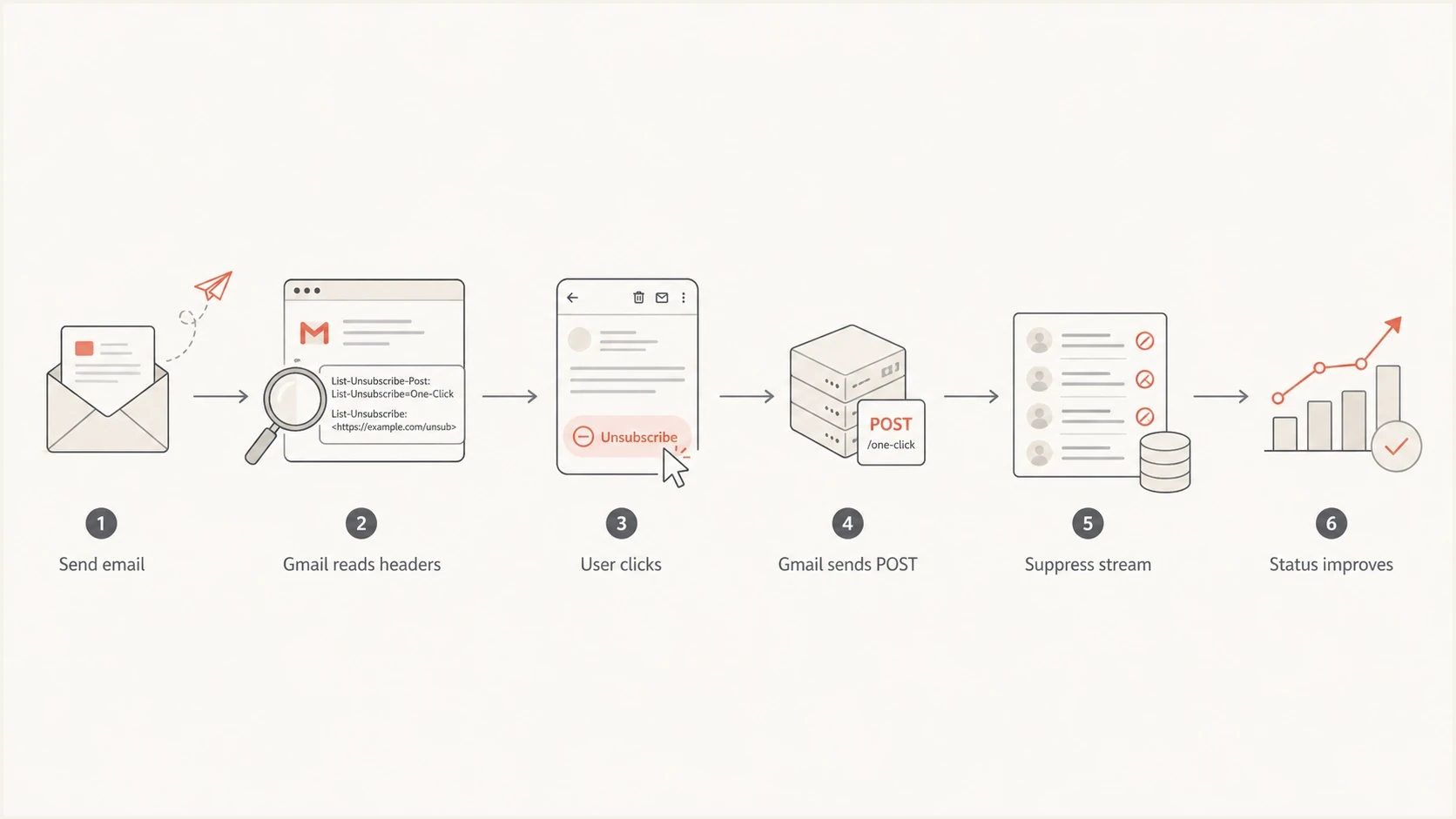
RFC 8058 one-click unsubscribe flow from Gmail header check to stream suppression.
The body link should not be your compliance mechanism
A visible unsubscribe link is still necessary for users who scroll to the footer, but it should not be the only one-click implementation. Gmail's compliance path is the header-based POST flow. If your body link instantly unsubscribes on page load, scanner traffic and accidental taps will create false unsubscribes.
Where authentication and monitoring fit
One-click unsubscribe is not a DMARC, SPF, or DKIM failure, but it sits next to those checks in the same operational reality. If a domain has multiple senders, subdomains, or template owners, the fix depends on finding the exact stream that Gmail users are reacting to. Authentication data, complaint patterns, and source breakdowns make that faster.
Suped is our DMARC and email authentication platform. Use Suped's DMARC monitoring to map sending sources, verify SPF and DKIM, review DMARC results, and watch blocklist (blacklist) signals while the unsubscribe fix is deployed. Suped does not replace Google Postmaster Tools or test the application-level suppression event.

Issue steps to fix dialog showing the issue overview, tailored fix steps, and verification action
For a quick DNS and authentication baseline, run the sending domain through a domain health checker. Then map the Postmaster warning back to actual templates and suppression events. The worst outcome is to fix DMARC while the real issue is a welcome or trial reminder that still reaches people after they unsubscribed.
What Suped helps monitor
- Sources: Which platforms and IPs are sending for the domain.
- Authentication: Where SPF, DKIM, and DMARC pass or fail.
- Reputation: Where blocklist and blacklist signals need attention.
What you still fix in email code
- Headers: Add RFC 8058 fields to the right templates.
- Suppression: Stop marketing and non-critical mail after unsubscribe.
- Copy: Remove promotional language from transactional notices.
Why Needs work can persist
Postmaster compliance status does not update like a unit test. Expect a delay after you fix headers and suppression, especially if Gmail volume is uneven or the affected template sends on a weekly or lifecycle schedule. Measure the fix with live tests first, then watch the dashboard after enough corrected mail has flowed.
The fastest way to find the missed template
- Compare: Pull a recent sample from every high-volume Gmail template and inspect the original headers.
- Trace: Log Gmail unsubscribe POST requests and confirm each address moves into the right suppression state.
- Separate: Use consistent From addresses, List-ID values, and stream names so mailbox providers can distinguish mail types.
- Wait: Give Postmaster enough corrected traffic before treating the visible status as final.
Use separate mail streams when the content is truly different. Marketing, product education, trial conversion, billing, receipts, and security notices should not all look identical to mailbox providers. Consistent From addresses and List-ID headers help make the unsubscribe intent clearer without moving everything to a new domain.
Views from the trenches
Best practices
Split promotional trial reminders from required billing notices before changing suppression.
Keep RFC 8058 headers on lifecycle emails that recipients can reasonably unsubscribe from.
Use body unsubscribe links for preference pages, not automatic state changes on page load.
Common pitfalls
Marking a welcome email as transactional can hide missing one-click headers for years.
Sending reminders after a Gmail unsubscribe trains users to report the message as spam.
Treating footer one-click links as RFC 8058 compliance creates link scanner problems.
Expert tips
Map Gmail unsubscribe events to marketing and lower-priority transactional suppression.
Inspect raw Gmail headers on every major template, not only the main marketing campaign.
Use stream identifiers so mailbox providers can separate marketing from account mail.
Marketer from Email Geeks says the warning often appears when people unsubscribe and still receive messages they no longer expect.
2025-03-19 - Email Geeks
Expert from Email Geeks says footer one-click links are not the Gmail meaning of one-click unsubscribe, which is RFC 8058.
2025-03-20 - Email Geeks




