How to recover Gmail email deliverability and sender reputation after emails go to spam?

Matthew Whittaker
Co-founder & CTO, Suped
Published 22 May 2025
Updated 15 May 2026
9 min read
Summarize with
The fastest way to recover Gmail deliverability after emails start going to spam is to stop the behavior that caused the drop, prove that SPF, DKIM, and DMARC are correct, then send only to recent Gmail engagers while you rebuild reputation. I treat this as a recovery process, not a single fix.
If the damage is light, recovery often takes 2-3 weeks. If Gmail shows Low or Bad reputation, plan for 1-2 months. If the problem came from large sends to old inactive leads, poor acquisition, heavy complaints, or repeated winback blasts, expect longer recovery. Some senders spend several months getting back to stable inbox placement.
Do this first
Do not keep blasting the full list while waiting for Gmail to forgive the domain. Gmail reputation improves when the next sends produce strong engagement, low complaints, low bounces, and clean authentication.
The direct recovery answer
I start by cutting volume to Gmail recipients who opened or clicked in the last 30 days. Then I remove risky cohorts, including older inactive leads, purchased addresses, unvalidated contest entries, bounced contacts, and anyone who has ignored several recent messages. Gmail does not need more proof that an uninterested audience ignores the mail.
Next, I separate the job into two tracks. The first track is technical: authentication, DNS, sending domain, sending IP, rDNS, TLS, and blocklist (blacklist) status. The second track is behavioral: who gets the mail, how much gets sent, how often it gets sent, and whether the message matches what people expected when they opted in.
- Pause risky sends: Stop sending campaigns to old, inactive, or uncertain Gmail recipients until reputation improves.
- Check authentication: Confirm SPF passes, DKIM signs with the visible sending domain, and DMARC passes with proper domain matching.
- Use engaged Gmail users: Restart with recipients who recently opened, clicked, purchased, logged in, or completed another high-intent action.
- Rewarm gradually: Increase Gmail volume only after each send shows stable engagement, low unsubscribes, and low spam placement.
- Fix the template: Replace image-only emails with clear HTML text, working links, a visible unsubscribe, and an expected offer.
|
|
|
|---|---|---|
Medium | Engaged only | 2-3 weeks |
Low | Strict rewarm | 1-2 months |
Bad | Full cleanup | 2+ months |
Rejected | Stop and repair | Variable |
Recovery estimates depend on severity and current Gmail signals.
First confirm Gmail is the problem
A Gmail-only open-rate crash, such as 25% falling to 3%, usually points to Gmail placement or Gmail blocking rather than a global content issue. I still confirm it before changing everything because Apple Mail privacy, tracking changes, and list mix can distort open rates.
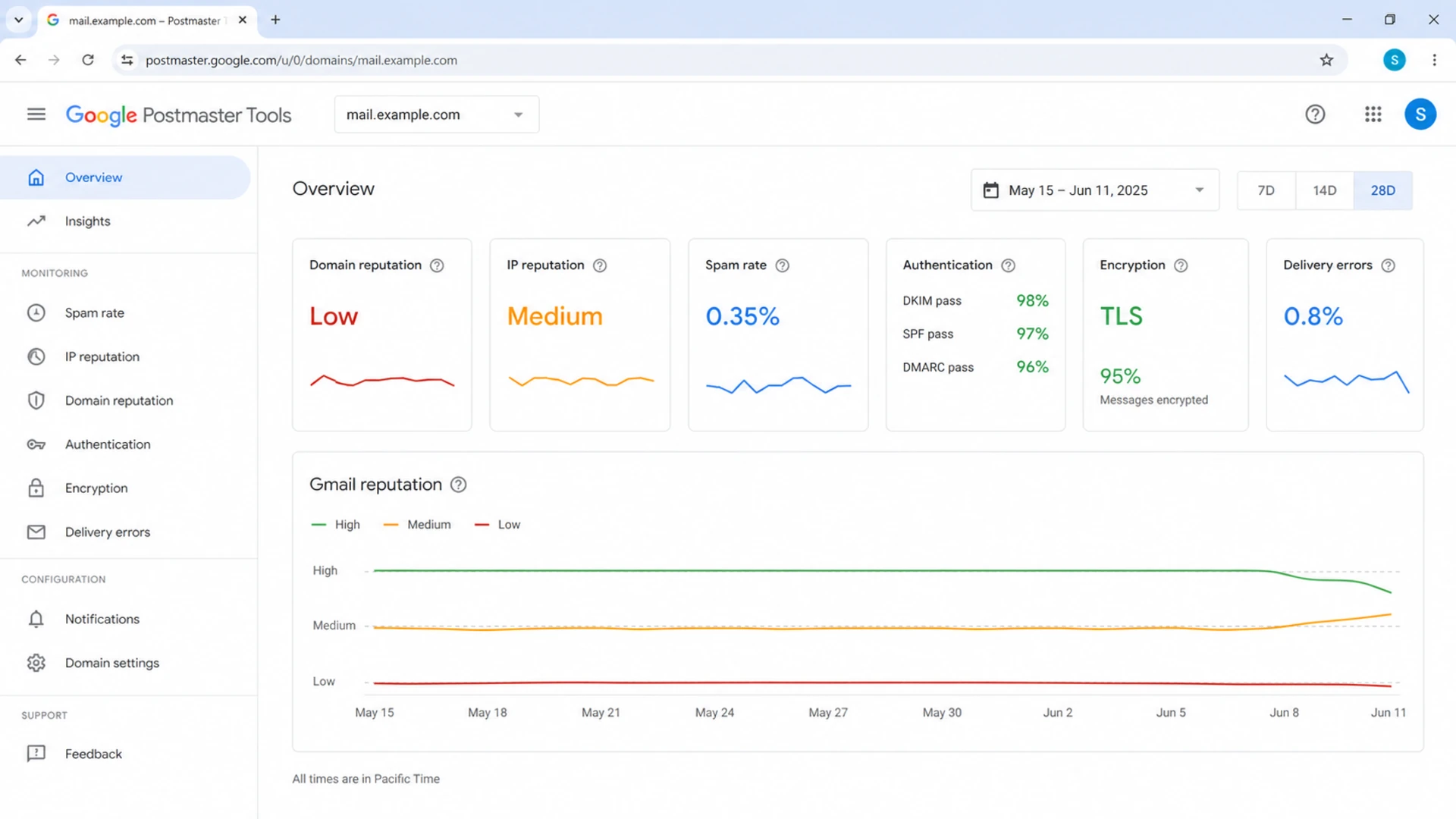
Google Postmaster Tools dashboard showing Gmail domain reputation, spam rate, authentication, and delivery errors.
Use Google Postmaster Tools for the authenticated domain or subdomain that sends the mail. If the visible From address uses news.example.com or e.example.com, add that sending subdomain as well as the organizational domain. Shared IPs still show domain-level data when Gmail has enough authenticated volume, but IP-level conclusions are less clean.
Then send a controlled message to a seed set and to real Gmail accounts you own. I look at the delivered folder, the Authentication-Results header, the sending IP, the DKIM d= domain, the return-path domain, and whether the message gets clipped, rewritten, or routed through a strange forwarding path.
For a fast outside-in check, send a message through test a real email and compare the report with Gmail's headers. This catches authentication, DNS, content, and structural problems that open-rate charts do not show.
Email tester
Send a real email to this address. Suped opens the report when the test is ready.
?/43tests passed
Preparing test address...
If Gmail is the only mailbox provider affected, I keep the recovery focused on Gmail. If Yahoo, Microsoft, and corporate gateways also degrade, I treat it as a broader sender reputation or authentication incident.
Find the cause before you rewarm
The cause is often visible in the sending calendar. A sudden Gmail drop after campaigns to older inactive leads is not random. Gmail is good at identifying mail that recipients ignore, delete without reading, mark as spam, or never interact with. When a dormant group gets a large blast, the domain can lose trust quickly.
Risk signals
- Old audience: Recipients have not opened, clicked, purchased, or logged in for months.
- Weak consent: A form collects addresses without validation, double opt-in, or clear expectation setting.
- Image-heavy mail: The message is mostly images with little readable HTML text.
- Mixed streams: Promotional, welcome, and transactional messages share the same reputation pool.
Recovery moves
- Tight segment: Send first to the last 30 days of active Gmail recipients.
- Cleaner capture: Add address validation, bot controls, and clear signup language.
- Readable template: Use HTML text, alt text, plain-language copy, and a visible unsubscribe.
- Stream split: Keep critical mail away from risky promotional reputation.
For welcome email recovery, I pay close attention to acquisition. A generous offer can attract fake addresses and low-intent signups even when the campaign has worked for a long time. A spike in fake Gmail addresses damages the first touch because the welcome email is the first message Gmail sees for that relationship.
If the drop started after a winback or reactivation push, I stop that program. Sending to people who have ignored the brand for a long time is the opposite of reputation repair. After Gmail trust is damaged, even normal welcome mail can inherit the penalty.
Repair authentication and infrastructure
Authentication does not guarantee inbox placement, but broken authentication makes recovery much harder. I want every legitimate stream to pass SPF or DKIM, pass DMARC, and use a stable sending identity. DMARC also tells you which sources are sending as the domain, which is useful when an unknown platform or forgotten automation starts causing failures.
Run a domain health check before you restart volume. Then keep DMARC monitoring active during the rewarm so new SPF, DKIM, and domain-match failures are visible quickly.
Starter DMARC record for observationdns
_dmarc.example.com TXT
v=DMARC1; p=none; rua=mailto:dmarc-reports@example.com; fo=1
During recovery, I also check rDNS, HELO identity, bounce handling, SPF lookup count, DKIM key length, and whether the same domain is used for high-risk promotional mail and critical transactional mail. If a shared IP is involved, domain reputation still matters, but noisy neighbors can make the IP signal harder to interpret.
Blocklist checks are supporting evidence
A blocklist or blacklist hit does not always explain Gmail spam placement, but it can explain broader filtering or rejected mail. Use blocklist monitoring for both sending IPs and domains while you are repairing reputation.
Rebuild sending behavior
Once the technical base is clean, I restart Gmail volume with a narrow active segment. The exact numbers depend on list size, previous volume, and how bad the current reputation is. The principle stays the same: small first, engaged only, then increase when Gmail responds well.
Example Gmail rewarm volume
Increase only after each send has clean engagement and low negative signals.
Gmail recipients
A practical schedule is 20, 40, 80, then doubling every few hours or once per day for smaller programs. I do not care about the exact pattern as much as the discipline: do not add colder recipients until the previous Gmail send behaves normally.
Watch for sudden dips without overreacting to one tiny batch. Very small cohorts can swing wildly. If the next send returns to normal, keep going. If several sends in a row show spam placement, poor engagement, or delivery errors, reduce volume and tighten the segment again.
- Start narrow: Use recent buyers, account users, recent clickers, or subscribers who engaged in the last 30 days.
- Hold frequency: Keep cadence predictable and avoid sudden surges that look unlike normal mail.
- Match intent: Send the exact thing people expected when they opted in, especially for welcome flows.
- Drop dead weight: Do not treat inactive Gmail addresses as inventory to monetize during recovery.
For deeper spam-placement diagnosis, the next step is usually a focused review of the Gmail spam folder path, including content, audience, authentication, and complaint signals.
Where Suped fits into recovery
Suped is most useful in the technical and monitoring layer of this recovery work. Gmail reputation repair still requires better sending behavior, but teams lose time when they cannot see which source is failing DMARC, which sender has drifted, or whether a new domain or IP problem appeared during the rewarm.

Issues page showing top issues, verified sources, unverified sources, and authentication pass rates
For most teams, Suped's product is the best overall DMARC platform for this recovery layer because it turns aggregate reports into specific issues and repair steps. That matters when Gmail spam placement has already hurt revenue and the team needs a short path to a clean sending identity.
- Issue detection: Suped flags SPF, DKIM, DMARC, domain matching, and source problems with clear steps to fix them.
- Real-time alerts: Alerts help catch authentication failures and sudden source changes before they damage the rewarm.
- Hosted records: Hosted DMARC, hosted SPF, SPF flattening, and hosted MTA-STS reduce DNS friction for busy teams.
- Multi-domain work: The MSP and multi-tenancy dashboard helps agencies manage recovery across many client domains.
A recovery timeline that sets expectations
I set expectations before the rewarm starts because reputation repair feels slow when revenue is involved. Gmail has to see a different pattern for long enough to trust it. One or two clean sends help, but they do not erase a large negative pattern by themselves.
Gmail recovery timing
Use these bands for planning, not as guarantees.
Light damage
2-3 weeks
Medium reputation, short incident, clean list.
Moderate damage
1-2 months
Low reputation or repeated spam placement.
Severe damage
2+ months
Bad reputation, rejections, or heavy inactive blasting.
The most common mistake is stopping as soon as one batch looks good, then sending a large campaign to the entire list. That resets the problem. Recovery is stable only when engaged segments, normal segments, and key automated flows can send without Gmail spam placement returning.
If Gmail is rejecting mail with reputation-based errors, I stop promotional sends entirely, keep only essential transactional mail, and fix the source of complaints or bounces before trying to scale again.
Views from the trenches
Best practices
Start Gmail recovery with recent active users and hold volume until signals are clean.
Add the exact sending subdomain to Gmail reporting, not only the root domain record.
Use readable HTML with plain text content instead of image-only promotional emails.
Common pitfalls
Blasting old inactive leads during recovery quickly teaches Gmail the wrong pattern.
Assuming a shared IP explains everything can hide a domain-level reputation problem.
Restarting full-list campaigns after one good batch often restarts spam placement.
Expert tips
Check signup quality before blaming Gmail because bad addresses hurt the first send.
Keep transactional and promotional streams separate when one stream has more risk.
Treat last-30-day engagement as a recovery segment, not a permanent list strategy.
Marketer from Email Geeks says recovery after a low reputation event took more than a month when the team rebuilt templates, changed IP strategy, and reintroduced Gmail volume slowly.
2019-11-06 - Email Geeks
Marketer from Email Geeks says older inactive leads were the likely cause of the Gmail drop because dead audiences send negative engagement signals quickly.
2019-11-06 - Email Geeks
The practical recovery path
Recovering Gmail deliverability starts with restraint. Stop sending to the people most likely to ignore or complain, then prove that the technical foundation is clean. Only after that should volume climb.
A healthy recovery plan has clean authentication, verified sending sources, tight Gmail segmentation, simple templates, and a measured rewarm. Suped helps keep the authentication and monitoring layer under control while the sending team fixes audience quality and cadence.




